n8n-workflow-agent
Health Uyari
- License — License: MIT
- Description — Repository has a description
- Active repo — Last push 0 days ago
- Low visibility — Only 7 GitHub stars
Code Uyari
- network request — Outbound network request in ai/adapters/anthropic.js
- network request — Outbound network request in ai/adapters/deepseek.js
- network request — Outbound network request in ai/adapters/gemini.js
- network request — Outbound network request in ai/adapters/groq.js
- network request — Outbound network request in ai/adapters/huggingface.js
- network request — Outbound network request in ai/adapters/openai.js
- network request — Outbound network request in ai/adapters/openrouter.js
Permissions Gecti
- Permissions — No dangerous permissions requested
Bu listing icin henuz AI raporu yok.
An intelligent Chrome extension that brings Cursor-style agentic workflow editing to n8n. Create, modify, analyze, and debug workflows using natural language with multi-step autonomous execution.




An intelligent Chrome extension that brings Cursor-style agentic workflow editing to n8n. Create, modify, analyze, and debug workflows using natural language with multi-step autonomous execution.
Features
Agentic Multi-Step Execution
- Autonomous workflow creation: AI automatically executes ALL required steps until completion
- Multi-step planning: AI breaks down complex requests into actionable steps
- Continuous execution: Never stops mid-task - completes the entire workflow automatically
- Smart continuation: Context-aware guidance after each function execution
Multi-Agent Workflow Builder
- 5-agent orchestration system with deterministic routing
- Supervisor Agent: Routes user requests to appropriate specialist agents
- Discovery Agent: Searches n8n node catalog and identifies relevant nodes
- Builder Agent: Creates workflow nodes and connections, validates graph structure
- Configurator Agent: Sets node parameters, validates credentials, provides setup instructions
- Responder Agent: Synthesizes internal agent decisions into user-facing responses
- Per-stage LLM adapters: Support different AI models for different phases
- Persistent state: Chrome storage for workflow session recovery
- Streaming events: Real-time phase progress updates (phase_start, phase_complete, phase_error, complete)
Modern Chat Interface
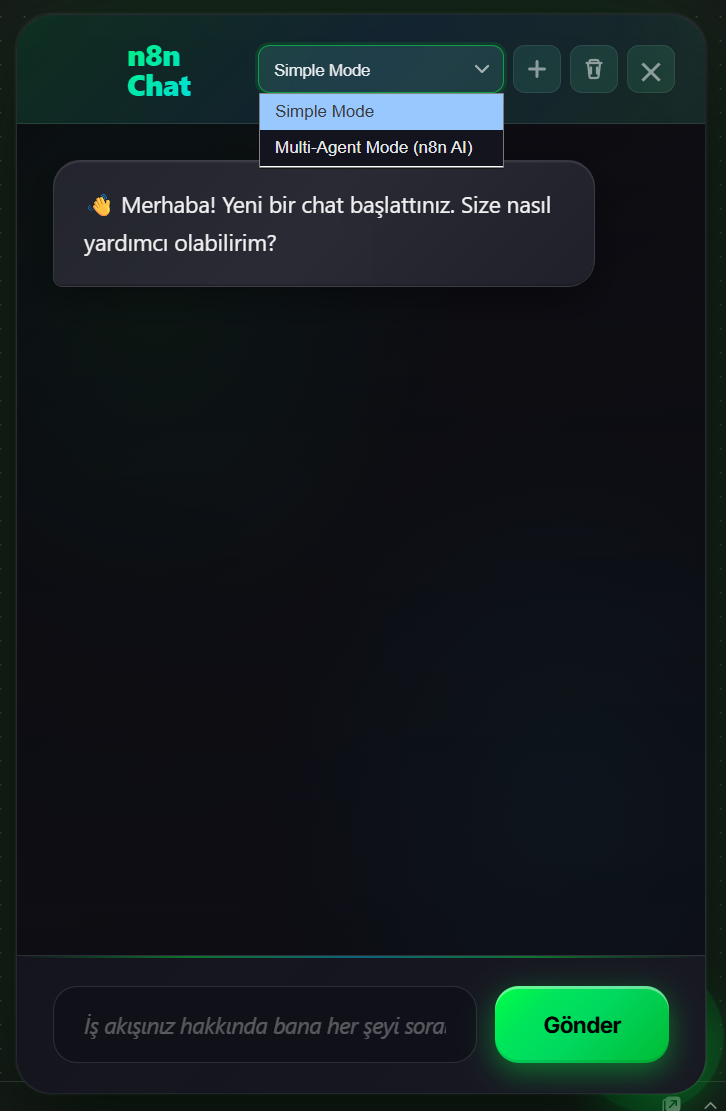
- Glassmorphism design with animated gradients and smooth transitions
- Real-time streaming responses with typing effect
- Function execution badges with status icons and animations
- Smart timestamps with automatic message grouping
- Drag-and-drop positioning with persistent layout (Save UI Position)
- Enhanced markdown support (code blocks, links, formatting)
- Message fade delay: Configurable auto-fade timing for messages
- Custom system instructions: Add your own system prompt to guide AI behavior
Intelligent Workflow Management
- Create workflows from natural language descriptions
- Modify existing nodes with context-aware updates
- Analyze workflows for architecture, performance, and security issues
- Debug workflows with integrated real-time logging
- Auto-fix issues detected during analysis
- Smart node selection: Prefers dedicated service nodes over generic HTTP requests
LangChain & AI Agent Support
- Create LangChain agents with tools, memory, and configuration
- Add tools to agents (HTTP Request, Workflow, Code nodes)
- Configure agent memory (Window Buffer, Conversation Summary, Vector Store)
- Multi-agent workflows (Single Agent, Gatekeeper, Multi-Agent Teams)
- Chained AI workflows with multiple AI models in sequence
Vector Store & RAG Support
- Vector store connections (Qdrant, Pinecone, Weaviate, Chroma)
- Embedding nodes for text-to-vector conversion
- Vector search nodes for semantic search
- Complete RAG workflows (Data Source -> Embeddings -> Vector Store -> LLM)
Workflow Execution Control
- Execute workflows with input data and wait for completion
- Stop running executions
- Get execution status in real-time
- Retry failed executions from specific nodes
Credential Management
- Check node credentials configuration
- Suggest credential types based on node type
- Validate credential connections
- Get credential details with usage examples (
={{$credentials.apiKey}}) - Automatic credential assignment when creating nodes
- 411 credential types with full documentation
Sub-workflow Management
- Create Execute Workflow nodes for sub-workflows
- Import workflows as sub-workflows
- Get sub-workflow information
Advanced Node Configuration
- Configure webhook settings (path, method, authentication)
- Configure schedule/cron triggers
- Configure error handling (retry, continue on fail)
Batch Processing & Looping
- Create batch processors with Split in Batches
- Create loop nodes (for each, while, until)
- Configure split in batches settings
Advanced UI Features
- Workflow visualization (Mermaid diagrams)
- Group nodes visually
- Set custom node colors for organization
Advanced Connection Handling
- Automatic connection of newly created nodes
- Ghost connection cleanup prevents workflow corruption
- Vue reactivity sync eliminates race conditions
- Connection verification ensures workflow integrity
Multi-Provider AI Support
- OpenAI (GPT-5.2, GPT-4o, GPT-4o Mini, o3, o4-mini, GPT-4 Turbo, GPT-3.5 Turbo)
- Anthropic (Claude 4.5 Sonnet/Opus/Haiku, Claude 4.1 Opus, Claude 4 Opus/Sonnet, Claude 3.5 Legacy)
- Google Gemini (Gemini 2.5 Pro/Flash/Flash Lite, Gemini 1.5 Pro/Flash)
- DeepSeek (DeepSeek Chat V3.2, DeepSeek Reasoner V3.2)
- OpenRouter (GLM-4.7, Gemini 3 Flash/Pro, DeepSeek V3.2, Llama 4 Maverick/Scout, Devstral, and 100+ more)
- Groq (Llama 3.3/3.1, Llama 3 Groq Tool-Use, Mistral Small 3, Mixtral)
- Hugging Face (FunctionGemma, Qwen 3, Llama, NovaSky, and more function-calling models)
Note: Cohere and Local LLM were supported in earlier versions but are now deprecated. Existing configurations are automatically migrated to Google Gemini.
Model Auto-Optimization
- Automatic temperature/topP/maxTokens settings per model
- Model-specific optimal configurations for 90+ models
- Custom model input: Enter any model name manually via toggle button
- Thinking mode support for reasoning models (o3, o4-mini, DeepSeek Reasoner)
- Google Search toggle for Gemini models with grounding
Real-Time Debugging
- Integrated debug server with WebSocket support
- Function call logging with full argument tracking
- Error tracking with stack traces and context
- Session summaries with operation metrics
- Toggle on/off directly from extension popup
- Debug Server URL: Configurable server endpoint (default:
http://localhost:3333) - Auto-connect on startup: Automatically connect to debug server
- Console logging: Toggle browser console output
- PII masking: Automatically mask sensitive data in logs
- Quick actions: Open dashboard, clear logs, test connection
Language Consistency
- Automatic language detection: Responds in the same language as user's input
- Supports Turkish, English, Spanish, and more
- Never switches languages mid-conversation
- Full i18n support with English and Turkish locales
Installation
Prerequisites
- Google Chrome or Chromium-based browser (Edge, Brave, etc.)
- n8n instance (cloud or self-hosted)
- API key from one of the supported AI providers
Install from Chrome Web Store
- Visit the Chrome Web Store (coming soon)
- Click "Add to Chrome"
- Pin the extension to your toolbar
Install from Source
Clone the repository:
git clone https://github.com/ForgeLLC/n8n-workflow-agent.git
cd n8n-workflow-agent
Load the extension in Chrome:
- Open Chrome and navigate to
chrome://extensions/ - Enable "Developer mode" (top right)
- Click "Load unpacked"
- Select the project root folder (
n8n-workflow-agent)
- Open Chrome and navigate to
Configure your API keys:
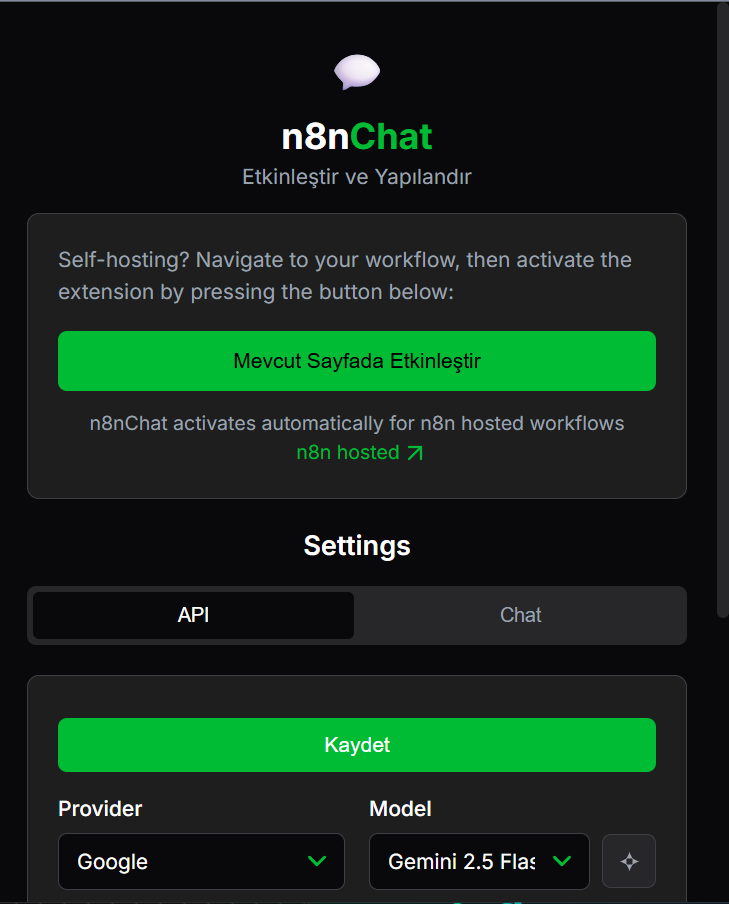
- Click the extension icon in your toolbar
- Go to Settings -> API tab
- Select your preferred AI provider
- Enter your API key
- Click "Save"
Usage
Getting Started
Navigate to n8n:
- Open your n8n workflow editor (e.g.,
https://app.n8n.cloud/workflow/...)
- Open your n8n workflow editor (e.g.,
Activate the extension:
- Click the extension icon
- Click "Activate on Current Page"
- A floating chat button will appear in the bottom right
Start chatting:
- Click the floating chat button
- Type your request in natural language
- Press Enter or click "Send"
Example Prompts
Create Workflows
Create a workflow that:
- Gets data from Supabase
- Summarizes content with AI
- Sends result to Telegram
Modify Workflows
Replace all Google Sheets nodes with Supabase nodes
Analyze Workflows
Analyze this workflow for performance and security issues
Debug Workflows
Why isn't my webhook trigger working?
Get Information
Show me the workflow structure and connections
Create AI Agent Workflows
Create an AI agent that can search the web and send results to Telegram
Create RAG Workflows
Create a RAG workflow that answers questions from company PDFs using Qdrant
Configure Workflows
Configure the webhook node to accept POST requests at /webhook/my-endpoint
Key Concepts
Agentic Execution Model
The extension operates in agentic mode, meaning it autonomously executes multiple steps to complete complex tasks:
- User Request: "Replace Google Sheets with Supabase"
- AI Planning: Breaks down into steps:
- Get workflow info
- Remove Google Sheets nodes
- Create Supabase nodes
- Connect new nodes
- Clean layout
- Validate workflow
- Autonomous Execution: AI executes ALL steps sequentially without stopping
- Verification: AI confirms completion and reports results
No manual intervention required - the AI handles the entire workflow lifecycle.
Multi-Agent Workflow Builder
The extension includes a sophisticated 5-agent orchestration system based on n8n's AI Workflow Builder architecture:
User Message
    |
[SUPERVISOR] --> Routes to appropriate specialist
    |
    +-> [DISCOVERY]     Search node catalog, identify nodes
    |       |
    +-> [BUILDER]       Create nodes, connect them, validate structure
    |       |
    +-> [CONFIGURATOR]  Set parameters, validate credentials
    |       |
    +-> [RESPONDER]     Synthesize results into user response
Each agent has specialized prompts, tools, and can use different LLM models for optimal cost/performance.
Smart Node Selection
The AI automatically prefers dedicated service nodes over generic HTTP requests:
| User Intent | Selected Node Type |
|---|---|
| "Use OpenAI" | @n8n/n8n-nodes-langchain.openAi |
| "Connect to Supabase" | n8n-nodes-base.supabase |
| "Send to Telegram" | n8n-nodes-base.telegram |
| "Google Sheets" | n8n-nodes-base.googleSheets |
| "PostgreSQL database" | n8n-nodes-base.postgres |
HTTP Request node is used ONLY when no dedicated node exists.
Semantic search supports 1000+ nodes (788 official + 212 community) in any language.
Connection Management
Every created node is automatically connected to the workflow:
Trigger -> Processing -> AI/Logic -> Storage/Output
Rules enforced:
- No floating/orphan nodes
- Logical flow maintained
- All connections verified
- Ghost connections cleaned up
Configuration
AI Provider Settings
Navigate to Settings -> API in the extension popup:
| Provider | Required | Get API Key |
|---|---|---|
| Google Gemini | API Key | aistudio.google.com |
| OpenAI | API Key | platform.openai.com |
| Anthropic | API Key | console.anthropic.com |
| DeepSeek | API Key | platform.deepseek.com |
| OpenRouter | API Key | openrouter.ai |
| Groq | API Key | console.groq.com |
| Hugging Face | API Key | huggingface.co |
Chat Settings
Navigate to Settings -> Chat:
General Settings
- Custom System Instructions: Add your own system prompt to customize AI behavior
- Include Workflow Context: Send current workflow data with each request
- Save UI Position: Remember chat window position between sessions
- Message Fade Delay: Set auto-fade delay for messages (0-60 seconds, 0 = disabled)
Tools (Toggle On/Off)
- Workflow Access: Allow AI to read workflow information
- Node Library Access: Allow AI to browse available node types
- Node Creation: Allow AI to create new nodes
- Node Editing: Allow AI to modify node parameters
- Node Removal: Allow AI to delete nodes
- Affiliate Recommendations: Enable affiliate-based service recommendations
- Node Cloning: Allow AI to duplicate nodes with settings
- Advanced Connection Management: Allow AI to remove/update node connections
- Bulk Operations: Allow AI to update/disable multiple nodes at once
- Auto Layout: Allow AI to auto-arrange nodes on canvas
- Workflow Validation: Allow AI to validate workflow structure
- Workflow Execution: Allow AI to test-execute workflows
- Advanced Import/Export: Allow AI to import/export/merge workflows
- Execution History & Analytics: Allow AI to view execution history and performance
- Workflow Templates: Allow AI to use and create workflow templates
- Workflow Optimization: Allow AI to analyze and suggest optimizations
- Workflow Versioning: Allow AI to create/restore workflow snapshots
- Advanced Debugging: Allow AI to debug workflows with trace/profile modes
- Testing Framework: Allow AI to generate and run test suites
- CI/CD Integration: Allow AI to generate CI/CD configurations
- Custom Node Development: Allow AI to generate custom node templates
- Documentation Generation: Allow AI to generate workflow documentation
Advanced Settings
- Temperature (0.0 - 1.0): Controls response creativity (auto-managed per model)
- Max Tokens: Maximum tokens for AI response (auto-managed per model)
- Top P (0.0 - 1.0): Controls response diversity (auto-managed per model)
- Thinking Mode: Extended thinking for reasoning models (o3, o4-mini, DeepSeek Reasoner)
- Google Search: Enable Google Search grounding for Gemini models
Available Functions (60+)
Phase 1: Core Operations
| Function | Description |
|---|---|
create_node |
Create a new node in the workflow |
update_node |
Update an existing node's parameters |
remove_node |
Remove a node from the workflow |
add_connection |
Add a connection between two nodes |
remove_connection |
Remove a connection between nodes |
clone_node |
Clone a node with all settings |
search_nodes |
Search available node types |
get_workflow_info |
Get workflow structure info |
get_node_info |
Get detailed node information |
get_node_schema |
Get parameter schema for a node type |
find_node_by_intent |
Find nodes from natural language intent |
get_node_credentials |
Get required credential types for a node |
get_credential_details |
Get credential fields and usage examples |
get_credential_usage_examples |
Get ={{$credentials.xxx}} examples |
bulk_update_nodes |
Update multiple nodes at once |
bulk_disable_nodes |
Disable/enable multiple nodes |
auto_arrange_nodes |
Auto-arrange nodes in clean layout |
validate_workflow |
Validate workflow and find issues |
test_workflow |
Test workflow execution |
get_workflow_variables |
Get workflow variables (PII-safe) |
export_workflow |
Export workflow as JSON |
Phase 2: Advanced Features
| Function | Description |
|---|---|
import_workflow |
Import a workflow from JSON |
merge_workflows |
Merge two workflows together |
get_execution_history |
Get execution history and results |
analyze_performance |
Analyze performance and bottlenecks |
get_workflow_templates |
Get available workflow templates |
create_from_template |
Create workflow from template |
get_node_execution_data |
Get execution data for a node |
compare_workflows |
Compare two workflows |
optimize_workflow |
Analyze and suggest optimizations |
Phase 3: Enterprise Features
| Function | Description |
|---|---|
create_workflow_snapshot |
Create a version snapshot |
list_workflow_snapshots |
List saved snapshots |
restore_workflow_snapshot |
Restore to a previous snapshot |
debug_workflow |
Advanced debugging (analyze/trace/profile) |
generate_test_cases |
Generate test cases for validation |
run_test_suite |
Execute test suite and report results |
generate_cicd_config |
Generate CI/CD configuration (GitHub Actions, GitLab CI, Jenkins) |
generate_custom_node |
Generate custom node template |
generate_workflow_docs |
Generate workflow documentation (Markdown/HTML/JSON) |
Phase 4: AI & Integrations
| Function | Description |
|---|---|
create_langchain_agent |
Create a LangChain AI agent |
add_tool_to_agent |
Add tool to an agent |
configure_agent_memory |
Configure agent memory |
connect_agent_to_tool |
Connect agent to tool node |
create_vector_store_connection |
Connect to vector store (Qdrant, Pinecone, Weaviate, Chroma) |
create_embedding_node |
Create embedding node |
create_vector_search_node |
Create vector search node |
create_rag_workflow |
Create complete RAG workflow |
execute_workflow |
Execute workflow with input data |
stop_workflow_execution |
Stop running execution |
get_execution_status |
Get execution status |
retry_failed_execution |
Retry failed execution |
check_node_credentials |
Check node credentials |
suggest_credential_type |
Suggest credential type for node |
validate_credential_connection |
Validate credential connection |
create_subworkflow_node |
Create Execute Workflow node |
import_subworkflow |
Import as sub-workflow |
get_subworkflow_info |
Get sub-workflow info |
configure_node_webhook |
Configure webhook settings |
configure_node_schedule |
Configure schedule/cron settings |
configure_node_error_handling |
Configure error handling |
create_batch_processor |
Create batch processing setup |
create_loop_node |
Create loop node (for each/while/until) |
configure_split_in_batches |
Configure batch settings |
create_workflow_visualization |
Generate Mermaid diagram |
group_nodes |
Group nodes visually |
set_node_color |
Set custom node color |
create_chained_ai_workflow |
Create chained AI workflow |
create_single_agent_workflow |
Create single agent workflow |
create_gatekeeper_workflow |
Create gatekeeper multi-agent workflow |
create_multi_agent_team |
Create multi-agent team workflow |
Debugging
Enable Debug Mode
- Open extension popup
- Navigate to "Chat" tab -> Debug Mode section
- Toggle "Enable Real-Time Debug API"
- Configure debug options:
- Server URL: Debug server endpoint (default:
http://localhost:3333) - Auto-connect: Automatically connect when extension starts
- Console Logging: Enable/disable browser console output
- PII Masking: Mask sensitive data in debug logs
- Server URL: Debug server endpoint (default:
- Use Quick Actions: Open Dashboard, Clear Logs, Test Connection
Debug Server (Optional)
For advanced debugging with WebSocket support:
cd debug-server
npm install
node server.js
The debug server provides:
- Real-time function call logging
- Error tracking with stack traces
- Session summaries
- WebSocket streaming
Architecture
+---------------------------------------------------+
|              Chrome Extension (MV3)                |
+---------------------------------------------------+
|  content.js   | Chat UI, Stream Handler, Security  |
|  injected.js  | n8n Canvas Manipulation (Vue/Pinia) |
|  popup.js     | Settings, Provider Config, Debug    |
|  background/  | API Handlers, Workflow Builder      |
+---------------------------------------------------+
                    | (Function Calls)
+---------------------------------------------------+
|              n8n Workflow Editor                    |
+---------------------------------------------------+
|  Vue.js App  |  Pinia Store  |  Canvas Operations  |
+---------------------------------------------------+
Key Components
content/content.js: Chat UI, message streaming, conversation history, SecurityUtils (rate limiting, input validation, XSS sanitization)content/injected.js: Direct n8n canvas manipulation, node CRUD, connection management via Vue/Pinia storecontent/functions/index.js: 60+ function definitions for AI tool calling (4 phases)content/functions/executor.js: Function execution enginepopup/popup.js: Extension settings, API configuration, model auto-optimization, debug controlsbackground/background.js: Service worker with port-based message routing and security whitelistbackground/api-handlers.js: Multi-provider AI streaming handlers (OpenAI-compatible shared handler, Anthropic, Gemini, HuggingFace, LocalLLM)background/workflow-builder-handler.js: Multi-agent workflow builder orchestrationai/adapters/: Provider-specific AI adapters (Anthropic, OpenAI, Gemini, OpenRouter, HuggingFace, BaseAdapter)ai/client.js: AI client withanalyzeWorkflow()andgenerateBlueprint()functionsai/schemas/: JSON schemas for structured AI responseslib/workflow-builder/: Multi-agent workflow builder systemindex.js: WorkflowBuilder class with async generator chat interfaceagents/: Supervisor, Discovery, Builder, Configurator, Responder agentsprompts/: Per-agent system promptsstate/: Persistent workflow builder state (Chrome Storage)tools/: Tool adapter mapping agent tools to extension functionsconfig/llm-config.js: LLM model configurations (Anthropic, OpenAI, OpenRouter)utils/: Node types loader, coordination log, session manager
lib/storage.js: Secure Chrome storage for settings and API keys
Supported Nodes & Credentials
Node Support
Total: 1000+ Nodes
Official Nodes (788 nodes)
- IO / Triggers / API & Data: 300+ nodes (Webhooks, HTTP Request, Schedule Trigger, Telegram Trigger, Database nodes, API integrations)
- Logic / Conditional: 50+ nodes (If, Switch, Merge, Wait)
- Flow Control: 30+ nodes (Split, Merge, Loop)
- Data Transform: 100+ nodes (Set, Edit Fields, Transform)
- Code / Script: 20+ nodes (Code, Function)
- AI / LLM: 50+ nodes (OpenAI, Anthropic, Gemini, LangChain agents)
- Communication: 100+ nodes (Telegram, Slack, Discord, Email, SMS)
- File / Storage: 80+ nodes (AWS S3, Google Drive, Dropbox)
- Commerce / Payment: 50+ nodes (Stripe, PayPal, Razorpay)
Community Nodes (212 nodes)
- Community-developed integrations
- Custom service connectors
- Specialized workflow tools
Credential Support
Total: 411 Credential Types
- API Credentials: 200+ types (API keys, OAuth2, Basic Auth)
- Database Credentials: 30+ types (PostgreSQL, MySQL, MongoDB, Redis)
- Cloud Service Credentials: 100+ types (AWS, Google Cloud, Azure)
- Communication Credentials: 50+ types (Telegram, Slack, Discord, Email)
- Payment Credentials: 30+ types (Stripe, PayPal, Razorpay)
For each credential:
- Field definitions (apiKey, accessToken, etc.)
- Usage examples (
={{$credentials.apiKey}}format) - Authentication configuration
- Test configuration
Security & Privacy
Data Handling
- API keys are stored securely in Chrome's encrypted storage
- No telemetry or usage tracking
- No server-side processing - all AI requests go directly to your chosen provider
- Local-first: Chat history stored locally in your browser
- PII masking in debug logs (configurable)
Security Features
- Rate limiting: Built-in request throttling
- Input validation: Schema-based validation for all function parameters
- XSS sanitization: Automatic sanitization of user inputs
- Port whitelist: Only allowed communication ports accepted
- Origin verification: Messages verified from extension context only
- CSP headers: Strict Content Security Policy for extension pages
Permissions Explained
storage: Save settings and API keys locallyscripting: Inject content scripts into n8n pagestabs: Detect n8n workflow pagesactiveTab: Access current tab for activationhost_permissions: Connect to AI provider APIsoptional_host_permissions: Local debug server (localhost)
What is Sent to AI Providers?
- Your workflow structure (nodes, connections, parameters) - only when "Include Workflow Context" is enabled
- Your chat messages
- Function call results
What is NOT sent:
- Credentials or API keys stored in your workflows
- Sensitive data (masked automatically)
- Your IP address or personal information (beyond what the AI provider collects)
What's New
v1.6.1 (Latest)
- Removed deprecated o7 API provider
- Bug fixes and stability improvements
- Hugging Face function calling support fix
v1.6.0 (2026-01-22)
Comprehensive Node & Credential Intelligence:
- Semantic node selection from user intent (
find_node_by_intent()) - Complete credential database (411 credential types)
- Credential usage examples (
={{$credentials.apiKey}}format) - 1000+ node support (788 official + 212 community nodes)
- Automatic credential assignment when creating nodes
- Enhanced node discovery functions
- Credential details with authentication configuration
- Multi-agent workflow builder system
- Hugging Face provider support
- Model auto-optimization for 90+ models
- Custom model input support
- Thinking mode for reasoning models
- Google Search grounding for Gemini
New Functions:
find_node_by_intent()- Find nodes from natural languageget_node_credentials()- Get credential requirements for a nodeget_credential_details()- Get full credential informationget_credential_usage_examples()- Get credential usage examples
v1.5.0
Phase 4 Features:
LangChain & AI Agent Support:
- Create LangChain agent nodes with tools and memory
- Connect tools to agents automatically
- Configure agent memory (Window Buffer, Conversation Summary, Vector Store)
- Support for all n8n AI agentic workflow patterns
Vector Store & RAG:
- Vector store connections (Qdrant, Pinecone, Weaviate, Chroma)
- Embedding node creation
- Vector search nodes
- Complete RAG workflow generation
Workflow Execution:
- Execute workflows programmatically
- Stop and monitor executions
- Retry failed executions
Credential Management:
- Check node credentials
- Suggest credential types
- Validate credential connections
Advanced Features:
- Sub-workflow management
- Advanced node configuration (webhooks, schedules, error handling)
- Batch processing and looping
- Workflow visualization (Mermaid diagrams)
- Node grouping and custom colors
Known Issues & Limitations
- Vue Store Access: The extension relies on n8n's internal Vue/Pinia store structure. Future n8n updates may break compatibility temporarily.
- Race Conditions: Fixed with
waitForVueUpdate(), but edge cases may exist. - Token Limits: Large workflows may exceed model context windows. Use "Lazy Loading" context strategy or disable "Node Library Access".
- Language Switching: AI may occasionally switch languages mid-conversation (rare, fixed in v1.4.2).
- Vector Store Credentials: Vector store connections require manual credential configuration in n8n settings (security best practice).
See Issues for full list.
Contributing
Contributions are welcome! Please read CONTRIBUTING.md for details on our code of conduct and the process for submitting pull requests.
Development Setup
Clone the repo:
git clone https://github.com/ForgeLLC/n8n-workflow-agent.git
cd n8n-workflow-agent
Install debug server dependencies (optional):
cd debug-server
npm install
Load extension in Chrome:
- Enable Developer mode in
chrome://extensions/ - Click "Load unpacked" and select the project root folder
- Enable Developer mode in
Make your changes
Test thoroughly on n8n workflows
Submit a pull request
License
This project is licensed under the MIT License - see the LICENSE file for details.
Acknowledgments
- n8n for building an amazing workflow automation platform
- OpenAI, Anthropic, Google, DeepSeek, Groq, Hugging Face for providing powerful AI models
- Cursor for inspiring the agentic execution model
- The n8n Community for feedback and feature requests
Support
- GitHub: ForgeLLC
- Issues: GitHub Issues
Star History
If you find this project useful, please consider giving it a star!
Screenshots
Chat Interface
Settings
process exited with code 0 · built by ForgeLLC
Yorumlar (0)
Yorum birakmak icin giris yap.
Yorum birakSonuc bulunamadi