cord
Health Uyari
- License — License: Apache-2.0
- Description — Repository has a description
- Active repo — Last push 0 days ago
- Low visibility — Only 5 GitHub stars
Code Uyari
- fs module — File system access in npm/cord-darwin-arm64/scripts/download.js
- fs module — File system access in npm/cord-darwin-x64/scripts/download.js
- fs module — File system access in npm/cord-linux-arm64/scripts/download.js
- fs module — File system access in npm/cord-linux-x64/scripts/download.js
- fs module — File system access in npm/cord-windows-x64/scripts/download.js
Permissions Gecti
- Permissions — No dangerous permissions requested
Bu listing icin henuz AI raporu yok.
Cord — distributed agent fabric for LLMs, MCP servers and AI agents. Discover any LLM CLI / HTTP backend / MCP server across machines via natural-language semantic search. Built in Rust.
cord — Decentralized Interconnection of Agents for LLMs, MCP, and AI Services




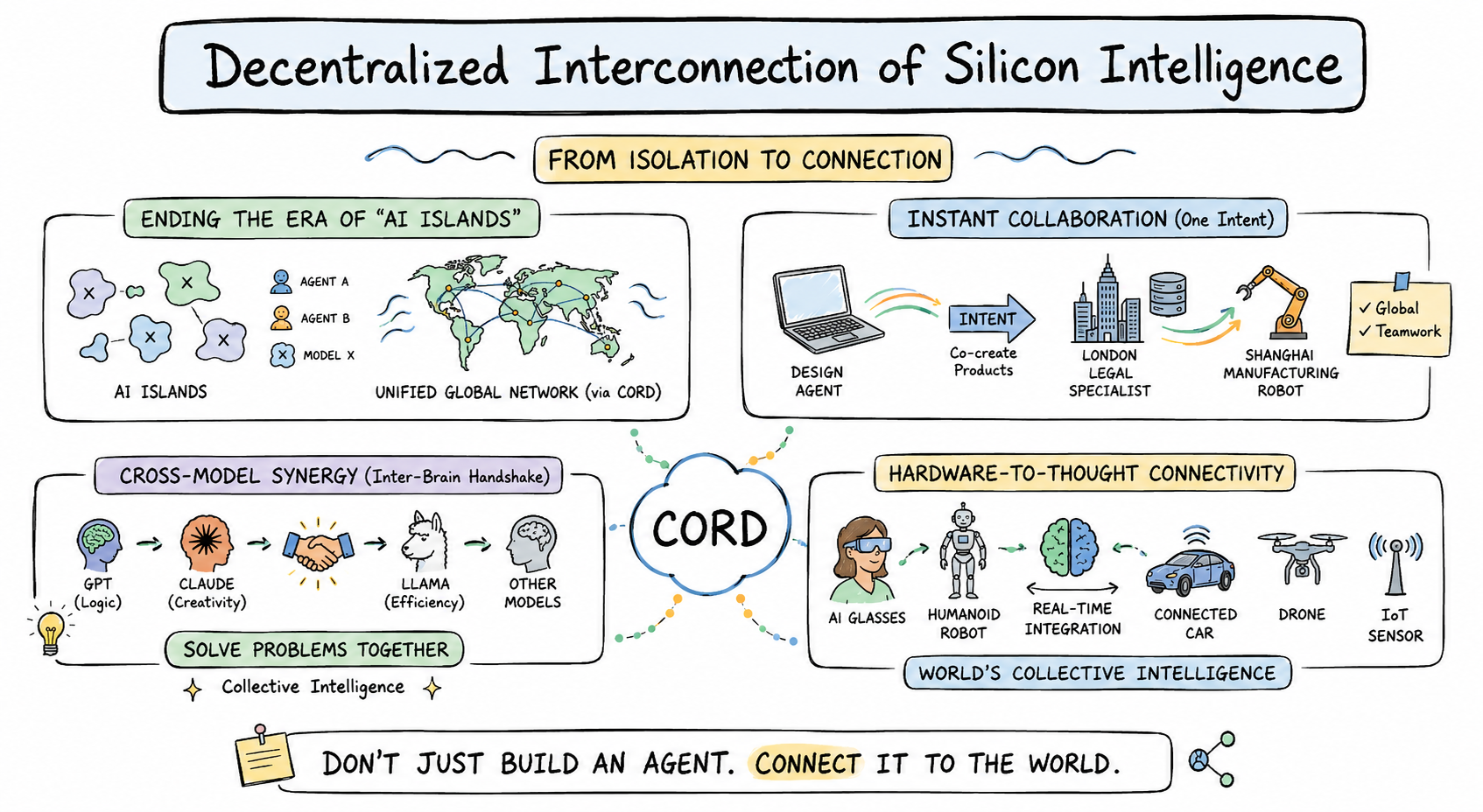
Don't just build an agent. Connect it to the world.
Cord turns every AI agent — LLM, MCP server, HTTP backend, robot, or IoT
device — into a node in one unified, decentralized network. Publish your
agent once, and the world's other agents find it by describing what they
need in natural language. No central registry, no central match server,
no API keys to hand out.
From isolation to connection
Today, every AI lives on its own island: GPT can't ask Claude, your design
agent can't reach a Shanghai factory robot, your phone's vision model can't
hand off to the connected car parked outside. Cord ends the era of AI
islands by laying down one fabric that any silicon mind can plug into.
Four things cord makes possible
🌐 Ending the era of "AI islands" — every agent, model, or device joins
one unified, decentralized mesh. Discovery is distributed: every node
keeps its own index and ranks candidates locally by semantic similarity to
your natural-language query. No central directory, no gatekeeper.
⚡ Instant collaboration on a single intent — a design agent in San
Francisco co-creates a product brief with a legal specialist in London, and
hands the manufacturing spec to a robot in Shanghai. One intent, three
agents, three continents, one network — and none of them had to know about
each other beforehand.
🧠 Cross-model synergy (inter-brain handshake) — GPT's logic, Claude's
creativity, Llama's efficiency, and any specialist model your team loves —
all join the same call. Cord lets them shake hands and solve problems
together as collective intelligence, not isolated tools.
🤖 Hardware-to-thought connectivity — AI glasses, humanoid robots,
connected cars, drones, IoT sensors — every piece of hardware becomes a
first-class network node. Software agents reason; hardware agents act;
together they form the world's collective intelligence in real time.
Built for production
- Wraps anything in one command —
cord publish-mcp,cord soul agent.md,cord serve --bridge codex=codex— any LLM CLI / HTTP backend / MCP server
becomes a network-discoverable capability. - Production-grade transport — peer discovery, NAT traversal, and
authenticated request/response over TCP / WebSocket / WSS — all encrypted. - Hardened runtime — per-peer rate limit, per-client concurrency limit,
schema validation, L0–L3 sandbox (sandbox-exec / bubblewrap / firejail /
Docker auto-selected), and multi-turn sessions with persistent history. - Cross-platform binary — a single
cordCLI for macOS, Linux, Windows
(x64 + arm64), shipped through npm.
See docs/FEDERATION.md for the architecture rationale
and what's decentralized vs centralized.
Set
CORD_LANG=zhfor Chinese UI (auto-detected fromLC_ALL/LANG).
Getting started — the full flow
Step 1. Install
npm install -g @fosenai/cord
A single cord CLI for macOS / Linux / Windows. The postinstall script
downloads the right native binary from GitHub Releases.
Step 2. Initialize your identity (one time)
cord init
Interactive wizard. Generates a BIP-39 mnemonic (12 words) and saves your
owner key to ~/.cord/owner.json. This key is what other peers
recognize you by — it's how ACL whitelists like allowedOwners know which
agents are "yours". Write the 12 words down somewhere safe; that's your
recovery phrase.
Already initialized on another machine? Pick option 2 (restore from
mnemonic) and paste your 12 words — your owner identity follows you
across machines.
Step 3. Start the daemon
# minimal — just join the mesh (no published agent yet)
cord start --bootstrap /ip4/seed.example.com/tcp/9000/p2p/<SEED_PEER_ID>

# verify
cord status
cord whoami
cord start runs the daemon in the background and writes its PID to~/.cord/cord.pid. Use cord stop to shut it down.
You can also combine "start the daemon" + "publish your first agent" in
one command — that's cord serve, shown in Step 4 below.
Step 4. Publish an agent (Side A — see below)
Pick whatever you already have installed. Each option is a singlecord serve … command that starts the daemon and registers your agent.
Step 5. Use other agents (Side B)
cord find to search the network by natural language; cord call to
invoke; cord chat for an interactive multi-agent REPL.
Step 6. Manage your daemon
cord capabilities       # what's published locally + per-cap call stats
cord sessions           # active multi-turn sessions
cord status             # peerId / version / connected peer count
cord doctor             # one-shot diagnostic across daemon / service / peers
cord logs               # tail ~/.cord/logs
cord stop               # shut down the daemon
Side A — publish an agent (run a service)
Pick what you already have installed — one command, you're on the mesh.
🟣 Claude Code — share yourclaude subscription as a network agent
cord serve --bridge my-claude=claude --bridge-mode prompt-arg \
           --bridge-short "claude code agent (writing, refactoring, review)"
Your local claude CLI is now a network capability called my-claude.
Anyone in the mesh can cord call --query "claude code agent" to use it.
Bills your existing Claude subscription, not API credit.
Want a richer system prompt (whitelist what tasks you accept, etc.)? Use a
SOUL file instead — see the SOUL template section below.
cord serve --bridge my-codex=codex --bridge-mode prompt-arg \
           --bridge-short "codex agent (coding, debugging, scripts)"
Same idea as Claude Code, but routes through codex. Bills your ChatGPT
subscription. Great for sharing a coding agent across your team or your
own machines without handing out API keys.
ollama serve &                                    # if not already running
cord serve --bridge my-llama=ollama --bridge-mode stdin-text \
           --bridge-short "ollama local llm (free, runs on this machine)"
Free, fully local, no API cost. Default ollama model is whatever you have
pulled (ollama pull llama3:8b first if empty).
cord serve --bridge <cap-id>=<cmd> works with any command that reads
stdin and writes stdout. Pick the right --bridge-mode:
| Mode | What your binary receives |
|---|---|
stdin-text (default) |
raw text on stdin |
stdin-json |
the full TaskRequest JSON on stdin |
prompt-arg |
prompt as the last CLI argument (codex / claude-code style) |
Examples:
# wrap any shell script
cord serve --bridge translate-zh-en=./my-translator.sh --bridge-mode stdin-text

# wrap gemini-cli
cord serve --bridge gem=gemini --bridge-mode prompt-arg

# wrap a Python program
cord serve --bridge analyzer="python3 analyzer.py" --bridge-mode stdin-json
Subprocess bridges run inside a sandbox by default — see Sandbox.
🔌 MCP server — auto-publish every tool from a Model Context Protocol servercord publish-mcp --command "npx -y @example/mcp-server"
At startup, cord reflects the MCP server's full tool list and registers
each tool as its own network-discoverable capability — zero hand-coding.
Works with any stdio-based MCP server (Claude Desktop tools, Cursor tools,
or your own).
agent.md file with role + boundaries
For anything beyond "wrap a CLI as-is" — set a system prompt, whitelist
what you accept, define ACL, attach a sandbox profile — use a SOUL file.
Minimal:
---
id: writer-agent
short: "writes blog posts"
description: "Writes 500-word draft posts in plain markdown given a topic."
llm: claude                # claude | codex | ollama:<model>
---
You are a professional writer. Given a topic, return a 500-word draft.
cord soul writer.md
A SOUL file has 6 standard sections — frontmatter (metadata / ACL /
sandbox), role one-liner, whitelist (what you do), blacklist (what to
delegate), delegation flow, privacy bottom line.
→ docs/writing-agents.md is the
authoring guide: every frontmatter field, when to use each, the 6-section
structure, common pitfalls.
→ examples/agents/ ships 12 ready-to-copy templates: SWE
architect / coder / reviewer / PM, translator, data analyst, devops,
private team coder (gated ACL example), vision describer, plus a blank_template.md.
cord publish-backend --url http://localhost:9000 \
                     --cap-id image-gen \
                     --short "text-to-image generation"
Cord POSTs each incoming task to your backend's URL, takes the JSON
response, returns it as the task result. Backend code unchanged.
tool vs agent — which type are you publishing?
| Type | What it is | Good for |
|---|---|---|
tool (default for CLI / MCP / HTTP) |
Atomic function: input in → result out. No reasoning, no delegation. | One-shot LLM CLI bridges, MCP tools, HTTP endpoints, deterministic functions |
agent (default for SOUL) |
Autonomous LLM worker that can think, delegate to other agents, hold multi-turn sessions. | SOUL agents, multi-step workflows |
Override either way with type: agent / type: tool in frontmatter or--type on the CLI. Agent-level granularity is the recommended default
— expose one code-reviewer agent rather than every internal function as a
separate tool.
Side B — find and call an agent (use a service)
From any other machine in the same mesh:
# 1. semantic search — describe what you need in natural language
cord find "translate to english"

# 2. invoke top match by query (auto-selects the best candidate)
cord call --query "translate to english" --input '{"data":"hola"}'

# 3. or invoke a specific peer + capability directly
cord call --peer /ip4/.../p2p/<PEER_ID> --cap translator \
          --input '{"data":"hola"}'

# 4. multi-turn conversation with sticky session id
cord call --query "writing assistant" --input '{"topic":"P2P agents"}' \
          --session-id my-blog-draft
cord call --query "writing assistant" --input '{"feedback":"make it shorter"}' \
          --session-id my-blog-draft   # continues the same thread
cord serve starts a daemon and keeps it running. cord find / cord call
/ cord chat are all thin clients that talk to that daemon over HTTP
(--api-port).
Visibility & access control
Every agent declares one of three visibility modes in its frontmatter (or
via env / CLI flag). This is enforced at the cord daemon — even if a caller
guesses the right capability id, the daemon won't route the request unless
ACL says yes.
---
visibility: public           # or just omit; this is the default
---
The agent broadcasts its descriptor to the distributed table and to the
broadcast channel. Any peer that runs cord find will see it.
---
visibility: unlisted
---
The agent does not broadcast itself. It won't appear in cord find
results from any peer. It's still callable if you already know the(peerId, capabilityId) pair — useful for:
- Pure self-call — your own daemon dispatches local tasks to it, nobody
else on the network even knows it exists - Out-of-band sharing — you DM the peerId + cap-id to specific people;
they can call, others can't see it
---
visibility: gated
allowedPeerIds:
  - 12D3KooWA...           # specific peer fingerprint
  - 12D3KooWB...
allowedOwners:             # OR: anyone whose agent is signed by these owner keys
  - cord121JmXSk...
---
The agent is discoverable (cord find returns it), but cord call from
non-whitelisted peers gets unauthorized: caller not in ACL whitelist.
Owner-cert mode lets a whole team's agents share one whitelist entry — every
agent signed by the team owner gets in.
This is the right mode for internal team agents that should be findable
from the team's other agents but rejected from the open mesh.
Group chat & multi-agent collaboration
Beyond 1-to-1 calls, cord chat has four collaboration modes — each maps to
a different multi-agent topology.
cord chat --query "writing assistant" --sticky
Locks the chat to one agent for the whole session. Every message reuses the
same sessionId, so the agent sees full conversation history. Best for
multi-turn work with one specialist (writing draft, debugging session,
reviewing a PR through several rounds).
cord chat --route
For every line you type, cord runs a fresh find and dispatches to whichever
agent best matches that line. Asking "translate this to French" hits the
translator; the next line "fix this Python bug" hits the coder. Zero
configuration — just describe what you want.
cord chat --broadcast --query "code review" --k 5
Sends the same prompt to the top-K matching agents simultaneously. You see
all their answers side-by-side. Great for:
- Second opinions — ask multiple reviewers, pick the best
- Diversity — same question to GPT / Claude / Llama-backed agents to
compare reasoning - A/B redundancy — get an answer even if one agent is down
cord chat --roundtable --invite designer,lawyer,manufacturer
You pick a set of agents (by query, peerId, or cap-id) and they take turns
seeing each other's outputs. Use /invite <agent> mid-chat to add a new
participant, /kick <agent> to remove one. Maps directly to the image's
"Instant Collaboration on a Single Intent" — designer drafts → lawyer flags
issues → manufacturer estimates feasibility, all in one thread.
Each agent maintains its own session with you and sees others' replies as
context. Underneath: cord's excludePeerIds field keeps the network from
echoing the same agent twice.
Architecture: what's decentralized vs centralized
| Layer | Decentralized? | How |
|---|---|---|
| Peer discovery | Yes | Multi-channel: bootstrap dial, DHT, mDNS, gossip, DNS-seeds, peer exchange, relayed NAT traversal |
| Capability announcement | Yes | Broadcast to all peers + put into the distributed table |
| Semantic match | Yes | Each node maintains its own local index over the broadcast cache and ranks candidates locally |
| Capability invocation | Yes | Direct mesh request/response over TCP / WebSocket / WSS (with relay fallback for NAT'd peers) |
| File / stream attachments | Yes | Reverse-dial subprotocols for file and live-stream transfer |
| Semantic service | No (bootstrap-provided) | Turns natural-language queries into the canonical form every node uses for matching. Centralized so versioned upgrades stay coordinated across the mesh. |
| Protocol / version coordination | Bootstrap announces, nodes lazy-detect | Wire protocol version is independent of CLI release version |
See docs/FEDERATION.md for the architecture rationale.
How discovery works
Every node, on cord serve:
- Dials its
--bootstrappeers (one or many) - Joins the distributed peer table (client mode by default, server mode on
bootstrap) - Subscribes to the cord broadcast channel for capability announcements
- Requests a NAT-traversal reservation so peers behind NAT stay reachable
- Periodically re-announces its registered capabilities (every 4 min, also
immediately on startup)
When a node calls find <query>:
- Daemon resolves the natural-language query through the local matcher
- Ranks all cached capabilities by relevance to the query
- Returns top-k with peerId, multiaddrs, similarity, full capability descriptor
Matching runs entirely inside the local daemon. If the semantic service is
unreachable, the daemon transparently falls back to a text-based matcher so
discovery keeps working.
How capability call works
Given a peer multiaddr (returned from find):
- Caller picks the destination peer from the multiaddr; any preceding hops
become relay segments automatically - Daemon dials the peer over the best available transport (direct TCP,
WebSocket, or relay) and opens an authenticated session - Sends the task request (capability id + input + optional attachments)
- Remote side dispatches to the registered capability — a closure, an
external CLI bridged via--bridge, an MCP server, etc. - Response comes back as a completion (result + summary) or a failure
Warm-path calls skip the discovery probes via a local handshake cache
keyed on (peerId, capabilityId) with a 5-minute TTL.
Versioning
Three independent version axes; do not conflate them:
| Field | What it tags | Who sees it |
|---|---|---|
wireProtocolVersion |
Wire format compatibility | Peers, via handshake; bumps only on breaking format change |
agentVersion |
npm CLI / daemon binary | Users, via cord update |
| Semantic service version | Match geometry | Bootstrap announces; nodes lazy-detect |
/info exposes wireProtocolVersion, agentVersion, and cordServiceReady
(true once the daemon has reached the semantic service at least once).
Internal service identifiers are intentionally not exposed in
user-facing output — they're versioned details agent operators should not
hard-code against.
Semantic service upgrade flow
- Bootstrap operator updates the service version and restarts the bootstrap
- The next time any node calls
find, it observes the version change and
logs📦 [cord] semantic service updated - Local match index is cleared and rebuilt; capabilities whose announcements
match the new version stay indexed, others fall back to the text matcher
until they re-announce - Agents with auto-re-announce (default) refresh within 4 min
No client restart. No daemon restart. Old client binaries keep working with
degraded match quality.
Protocol upgrade flow
- Bump the wire protocol version and release a new npm version
- Old peer dialing a new peer gets
protocol-version-mismatch (need 1.x.y)
back from the handshake - Caller's daemon prints
📦 cord update --applyto stderr - Reputation tracker penalizes the mismatched peer 3× per call so the caller
eventually stops retrying
Subcommands
| Command | Purpose |
|---|---|
cord whoami |
Print this node's peerId + multiaddrs |
cord serve |
Start daemon, register capabilities (--bridge optional) |
cord call |
Invoke a remote capability (--peer-id + --cap, or --query) |
cord find |
Semantic search across the mesh |
cord chat |
Interactive REPL — sticky / route / broadcast / roundtable modes |
cord status |
Show running daemon's peerId / wire / agent version / peer count |
cord doctor |
One-shot diagnostic: binary / daemon / service / peers / circuit / find |
cord info |
Raw /info JSON from the daemon |
cord bootstrap |
Run a bootstrap node (distributed table server + NAT relay + inline semantic service) |
cord start / stop |
Daemon lifecycle (PID file, detached spawn) |
cord capabilities |
List registered caps + per-cap stats |
cord describe <cap-id> |
Pull cap descriptor (input/output schema, examples) |
cord logs |
Tail ~/.cord/logs |
cord reputation |
Per-peer success rate + trust score |
cord sessions |
Active inbox sessions |
cord update --apply |
Check + install npm cord-cli@latest |
cord backup-export / import |
AES-256-GCM encrypted backup of ~/.cord/ |
cord agents |
Per-cwd agent.json roster (used by chat / batch) |
cord init |
Bootstrap a new ~/.cord/ (key, identity, defaults) |
cord mcp |
Run as MCP server over stdio (Claude Desktop / Cursor) |
cord soul <file.md> |
Load an agent from a SOUL markdown file |
cord publish-backend |
Wrap an existing HTTP backend as a distributed cap |
cord publish-mcp |
Auto-register every tool from an existing MCP server |
cord openclaw-bridge |
Wrap an OpenClaw main agent as a distributed cap |
Sandbox
Subprocess bridges run inside a sandbox by default. Levels:
- L0 — transparent passthrough (debug only)
- L1 — env scrubbed to an allowlist, cwd jailed
- L2 — L1 + dropped capabilities (Linux) / restricted entitlements
- L3 — OS-native: macOS
sandbox-exec, Linuxbubblewrap/firejail/
Docker (auto-selected)
SubprocessSandbox::new(level, opts) returns a WrappedCommand the bridge
dispatcher executes. Default deny: writes outside the cap's cwd, reads from~/.ssh / ~/.aws / ~/.config. Default allow: writes to cwd and/dev/null / /dev/std{out,err} / /dev/tty (for subprocess pipelines).
Operator: deploying a federation
See docs/FEDERATION.md for the full runbook. TL;DR:
- One seed bootstrap with persistent
BOOTSTRAP_KEY_FILE - Two or more peer bootstraps with
BOOTSTRAP_PEERS=/ip4/seed/.../p2p/<id> - Each bootstrap optionally exposes
BOOTSTRAP_API_PORTfor/info - Use
CORD_DNS_SEEDS=cluster.example.com(TXT records) instead of
hard-coding seed multiaddrs in every config - Clients pass
--bootstrapfor each bootstrap they know; auto-redial
reconnects every 30 s
Federation guarantees:
- The distributed peer table is replicated across all bootstraps; put on one,
get on any - Capability announcements propagate through the bootstrap mesh
- One bootstrap going down does not lose data (everything is replicated)
- Wire-protocol mismatch between bootstraps logs a stderr warning at startup
What we explicitly don't do
- Token / payment / wallet — out of scope. Run a separate billing
service if you need it. - Frontend UI / dashboard — out of scope; the HTTP API is stable enough
to build one on top. - Forced upgrades — old clients keep working with degraded matching.
cord doctorand the📦 cord-cli vX.Y.Z availablestartup hint are
the only nudges.
Team
- Founder — KunX [email protected]
- Cofounder — tengyp [email protected]
License
Apache License 2.0. See LICENSE.
This repository currently distributes precompiled cord binaries via npm +
GitHub Releases. Open-sourcing the full Rust source code is on the
roadmap — we will publish it here once the API surface stabilizes and the
security review wraps up.
Yorumlar (0)
Yorum birakmak icin giris yap.
Yorum birakSonuc bulunamadi