agent-manager-skill
Health Gecti
- License — License: MIT
- Description — Repository has a description
- Active repo — Last push 0 days ago
- Community trust — 23 GitHub stars
Code Gecti
- Code scan — Scanned 12 files during light audit, no dangerous patterns found
Permissions Gecti
- Permissions — No dangerous permissions requested
This tool provides lightweight lifecycle management for multiple AI agents using Python and tmux sessions. It allows you to start, stop, monitor, and schedule agents locally without needing a dedicated server or heavy dependencies.
Security Assessment
Overall risk: Low. The tool relies on tmux to handle long-running processes, which inherently requires executing shell commands. However, the automated code scan of 12 files found no dangerous patterns, no hardcoded secrets, and no dangerous permission requests. Because it is a local execution manager, it does not appear to make unauthorized external network requests or expose sensitive data to the internet.
Quality Assessment
The project is actively maintained, with its last push occurring today. It is properly licensed under the highly permissive MIT license, making it safe for both personal and commercial use. While the community is relatively small (23 GitHub stars), the architecture is deliberately minimal ("zero dependencies" beyond Python and tmux). This simplicity significantly reduces the attack surface and limits the likelihood of supply-chain vulnerabilities often found in projects with heavy dependency trees.
Verdict
Safe to use.
tmux + Python agent lifecycle manager (start/stop/monitor/assign) with cron-friendly scheduling; no server required
Agent Manager (agent-manager)
Simple, installation-agnostic agent lifecycle management using tmux + Python.
Manage multiple AI agents without running a server, wiring HTTP APIs, or pulling in heavy dependencies.
Why agent-manager?
Managing multiple AI agents is deceptively complex:
- Each agent needs its own long-running process
- You need a reliable way to start/stop/monitor them
- Scheduling (cron) should keep working even if you move the skill around
agent-manager solves this with a tiny architecture: tmux sessions + a single Python CLI.
Advantages:
- Zero dependencies beyond
tmux+python3 - Cross-platform (where tmux runs)
- Cron-friendly:
schedule syncwrites crontab entries calling the installedmain.pyby absolute path
Highlights
- 🚀 Simple agent lifecycle management
- 📅 Scheduled task execution via cron
- 🔧 Installation-agnostic design
- 🎯 Zero dependencies beyond tmux + Python
Installation
via openskills (recommended)
# Project installation (works even when `openskills` is not globally installed)
npx --yes openskills install fractalmind-ai/agent-manager-skill

# Global installation
npx --yes openskills install fractalmind-ai/agent-manager-skill --global

# If you already have a global openskills binary, this also works:
# openskills install fractalmind-ai/agent-manager-skill
Manual installation
git clone https://github.com/fractalmind-ai/agent-manager-skill.git
cd agent-manager-skill
cp -r agent-manager ~/.claude/skills/agent-manager
Usage
After installation, read the skill documentation:
# Preferred (portable)
npx --yes openskills read agent-manager

# Optional when openskills is globally installed:
# openskills read agent-manager
Or view directly:
cat ~/.claude/skills/agent-manager/SKILL.md
Quick Start
# From your repository root (where `agents/` lives)
cd your-project

# If installed (project-local; path varies by tool):
python3 .agent/skills/agent-manager/scripts/main.py list
# (or, if you use `.claude/skills/` instead of `.agent/skills/`)
python3 .claude/skills/agent-manager/scripts/main.py list

# If installed (global):
python3 ~/.claude/skills/agent-manager/scripts/main.py list
# (or, if you use `~/.agent/skills/` instead of `~/.claude/skills/`)
python3 ~/.agent/skills/agent-manager/scripts/main.py list

# Sanity check your setup
# (use the same install path as above; replace `.agent/skills/` with `.claude/skills/` if needed)
python3 .agent/skills/agent-manager/scripts/main.py doctor

# Start / monitor / stop
# (same note: replace `.agent/skills/` with `.claude/skills/` if needed)
python3 .agent/skills/agent-manager/scripts/main.py start EMP_0001
python3 .agent/skills/agent-manager/scripts/main.py status EMP_0001
python3 .agent/skills/agent-manager/scripts/main.py monitor EMP_0001 --follow
python3 .agent/skills/agent-manager/scripts/main.py stop EMP_0001

# Optional: keep all agents in one shared tmux session (tabs/windows)
python3 .agent/skills/agent-manager/scripts/main.py start EMP_0001 --tmux-layout windows
tmux attach -t agent-manager
# (Optional) Customize the shared session name via: $AGENT_MANAGER_TMUX_GROUP_SESSION

# If you want to run the CLI from a cloned copy of this repo:
REPO_ROOT="$PWD/your-project" python3 agent-manager/scripts/main.py doctor
Command Path Parity (Docs Baseline)
To avoid path drift across docs and runbooks, define one CLI alias and reuse it:
# Installed skill path (pick one that exists in your environment)
CLI="python3 .agent/skills/agent-manager/scripts/main.py"
# CLI="python3 .claude/skills/agent-manager/scripts/main.py"

# If running from a cloned repo (not installed):
# CLI="python3 agent-manager/scripts/main.py"

$CLI doctor
$CLI list
$CLI status EMP_0001
Getting Started
See examples/getting-started.md for a 2-minute end-to-end walkthrough.
Scenario Config Examples
See examples/agent-configs/README.md for six ready-to-adapt agent YAML templates:
- Code review agent
- Documentation generator agent
- Test runner agent
- Deployment assistant agent
- Monitoring and alert agent
- Data analysis agent
Demo
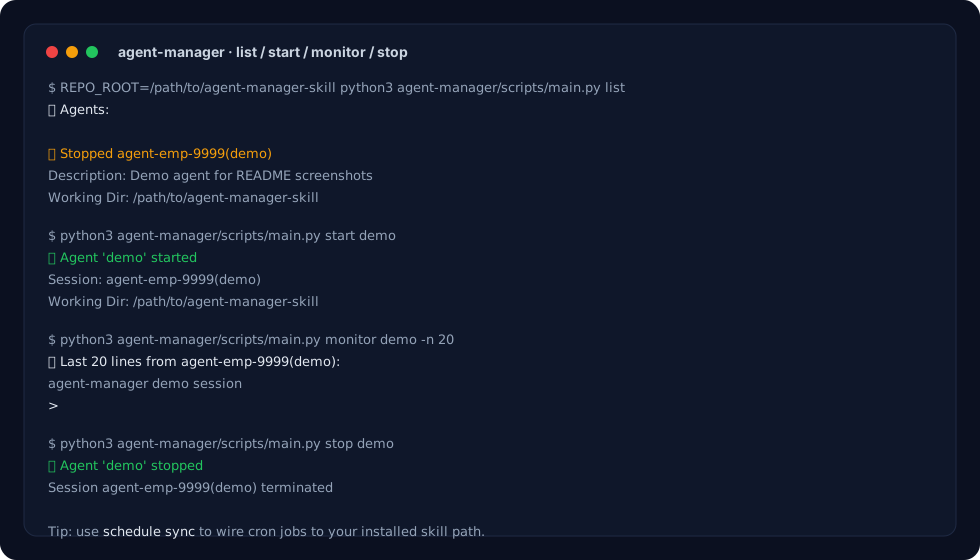
The screenshot above shows a real run of:
list(see configured agents + status)start(launches an agent intotmux)status(quick runtime + heartbeat snapshot)monitor(captures output from the tmux pane)stop(kills the agent's tmux session)
Want an animated GIF instead? You can record it with tools like termttogif (or any terminal recorder) and replace assets/demo.svg.
Path & Repo Root Resolution
- Repo root is resolved in this priority order:
$REPO_ROOT→ git superproject (submodule-safe) → git toplevel → parent-walk fallback. schedule syncwrites crontab entries that call the installedmain.pyabsolute path (so cron keeps working regardless of where the skill is installed).
Skills Resolution
When injecting agent skills into the system prompt, agent-manager searches for SKILL.md in the following locations (first match wins):
<repo>/.agent/skills/<skill>/SKILL.md~/.agent/skills/<skill>/SKILL.md<repo>/.claude/skills/<skill>/SKILL.md~/.claude/skills/<skill>/SKILL.md
Documentation
See agent-manager/SKILL.md for complete documentation.
For CLI refactor progress and migration notes, see agent-manager/docs/cli-modularization-plan.md.
For heartbeat serviceization notes, see agent-manager/docs/heartbeat-serviceization.md.
For operational SOPs and failure handling checklists, see agent-manager/docs/runbook-checklist.md.
For heartbeat observability and SLO metrics, see agent-manager/docs/heartbeat-observability.md.
For local team-chat skill mounting and team rollout steps, see docs/team-chat-skill-install.md.
Testing
# Full suite
python3 -m unittest discover -s agent-manager/scripts/tests -p 'test_*.py' -v

# Integration matrix suite (with flaky-control retries + artifacts)
python3 agent-manager/scripts/tests/run_integration_suite.py \
  --attempts 2 \
  --pattern 'test_integration_*.py' \
  --artifact-dir .artifacts/integration
Requirements
- Python 3.x
- tmux
- Agents defined under
agents/(supportsagents/EMP_0001.mdandagents/EMP_0001/AGENTS.md)
Codex Launcher Notes
When using launcher: codex with cron schedules, agent-manager will best-effort auto-dismiss Codex's first-run/upgrade model selection prompt to keep scheduled jobs non-interactive.
For provider-specific startup overrides, use a flat launcher_config mapping in the agent file. Providers adapt the same field differently; for Codex, each entry becomes a -c key=value override.
Reserved main agents default to the bundled skill prompt at agent-manager/.codex/main-codex-model.md when launcher: codex is used and no explicit launcher_config.model_instructions_file override is provided in the workspace agent config.
Features
- 🚀 Simple agent lifecycle management (start/stop/monitor)
- 📅 Scheduled task execution via cron (
schedule list,schedule sync,schedule run) - 💓 Heartbeat observability (
heartbeat trace --since/--until,heartbeat slo) - 🔧 Installation-agnostic (works from any location)
- 🎯 Zero dependencies beyond tmux + Python
- 💡 Dynamic path resolution (submodule-safe repo root detection)
License
MIT
Yorumlar (0)
Yorum birakmak icin giris yap.
Yorum birakSonuc bulunamadi