CutVoke
Health Gecti
- License — License: MIT
- Description — Repository has a description
- Active repo — Last push 0 days ago
- Community trust — 10 GitHub stars
Code Uyari
- process.env — Environment variable access in apps/desktop/build-dependencies.test.cjs
Permissions Gecti
- Permissions — No dangerous permissions requested
Bu listing icin henuz AI raporu yok.
A local-first video editor where humans and AI agents share an editable timeline. Built for MCP workflows and community effects.
Your footage. Your AI. Your editable timeline.
Start a cut with your preferred AI. Refine it by hand. Keep every edit in a local, editable project.



Download · Watch demos · Connect your AI · Docs · Contribute
English · 简体中文
| See every edit Tracks · Captions · Effects |
Your agent, your choice MCP · HTTP · CLI |
Keep creating MP4 + editable projects |
Watch the product introduction

Watch two complete edits
Original footage first. The complete edit next. Both examples include English and Chinese videos, source media and editable projects. The images below are full-resolution film stills. Download the MP4s for the complete English videos with sound.
01 · CHASE THE LIGHT
Motorcycle film · 31.6 seconds · Landscape

Download the English comparison with sound · Open the repository video page
Look for: moving masks, fragment reconstruction, tracked light anchors, layered lighting and animated type. Four MiniMax shots lead into the complete 22.3-second film.
Download the English film · English editable project · Source media and both languages
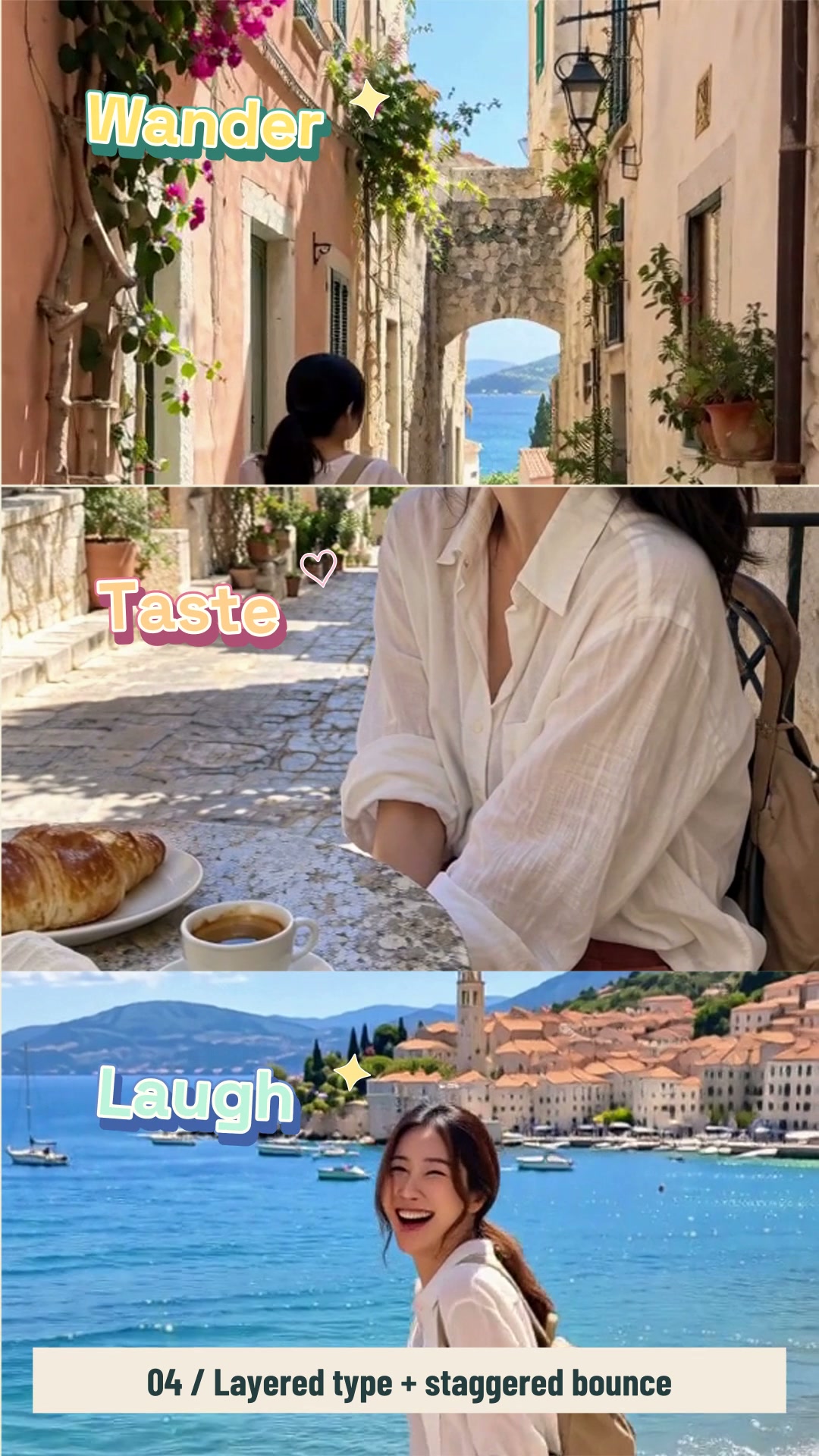
02 · Coastal Joy
Handheld travel vlog · 42.5 seconds · 9:16 portrait
Download the English comparison with sound · Open the repository video page
A splash ruins a pose. The camera operator laughs. A shared memory takes shape. Look for: split screens, layered lettering, speed ramps, masks, color and sound bridges. Original sound stays audible under the music.
Download the English film · English editable project · Source media and both languages
The video downloads use this repository's GitCode LFS storage. All timeline editing, compositing, mixing and MP4 exports were done in CutVoke. Install Git LFS and run git lfs pull to retrieve the videos, original media and project packages. Open a .cutvokepack through Unpack and open in CutVoke.
Inside the editor
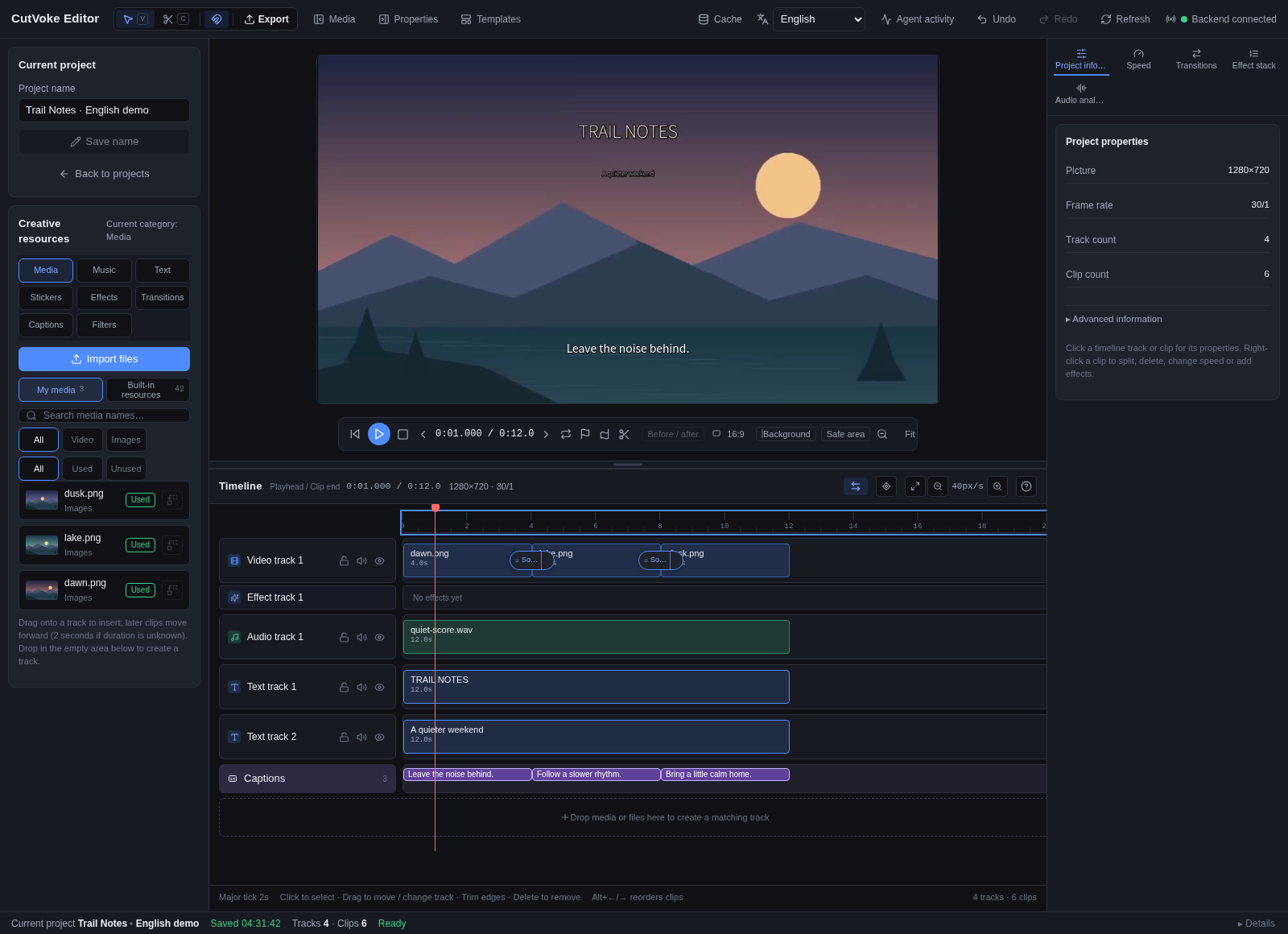
Trail Notes in the actual local editor: three original illustrations, music, titles, captions, scale keyframes and transitions. The repository example creates it through real interfaces, with no video generation service. Captured with the interface set to English, with English demo titles and captions.
Why try it?
After the first cut, a caption fix, a music change or a shorter shot is a focused edit to a project object.
| The friction | How CutVoke helps |
|---|---|
| One subtitle fix restarts a whole generation workflow | Locate a caption by its text and change its words, timing or style; captions remain editable in preview |
| An AI-produced result is difficult to refine by hand | The editor, MCP, HTTP API and CLI use the same persistent project; continue on the same timeline when the agent releases its editing lease |
| Batch edits are hard to inspect or recover from | Preview supported commands before committing, inspect real frames and activity history, and group related changes into one undo operation |
| Media and project files are scattered during a handoff | Import into a persistent media library, export an MP4, or package the editable project with its media |
CutVoke edits and renders media you supply. Your external AI provides understanding, planning and review; the editor contains no large-model or video generation service. This is an early-stage project, so keep original media and independent backups.
Four practical starting points| Scenario | A reproducible starting point |
|---|---|
| Build an editable short | Run the 12-second example below, open its project, play it, then select a clip or caption to refine |
| Correct one subtitle | Have the agent locate the original sentence with project_lookup, then preview and apply caption.update or caption.patch |
| Make another version with new media | Use project_clone, import the replacement and apply asset.swap, preserving the original project |
| Deliver a video and an editable handoff | Run project.preflight, export asynchronously, and use project_package when further editing is needed |
flowchart LR
    A[Local video / images / audio] --> B[Media review and edit plan]
    B --> C[Editable timeline]
    H[Human editor] <--> C
    G[External AI · MCP / HTTP] <--> C
    C --> P[Review real pictures and sound]
    P --> C
    P --> E[MP4 + editable project package]
The timeline supports multiple media tracks, text and captions, clip adjustments, volume and fades, keyframes, and existing transitions/effects. Edits can be previewed and undone/redone; an editing lease keeps grouped agent changes from colliding with manual writes. Continuous preview prepares time windows and reuses cached work. Exports use the project version captured when queued.
For the latest source build, see the production workflow: standalone titles, reusable attached layers, on-demand previews and production archives.
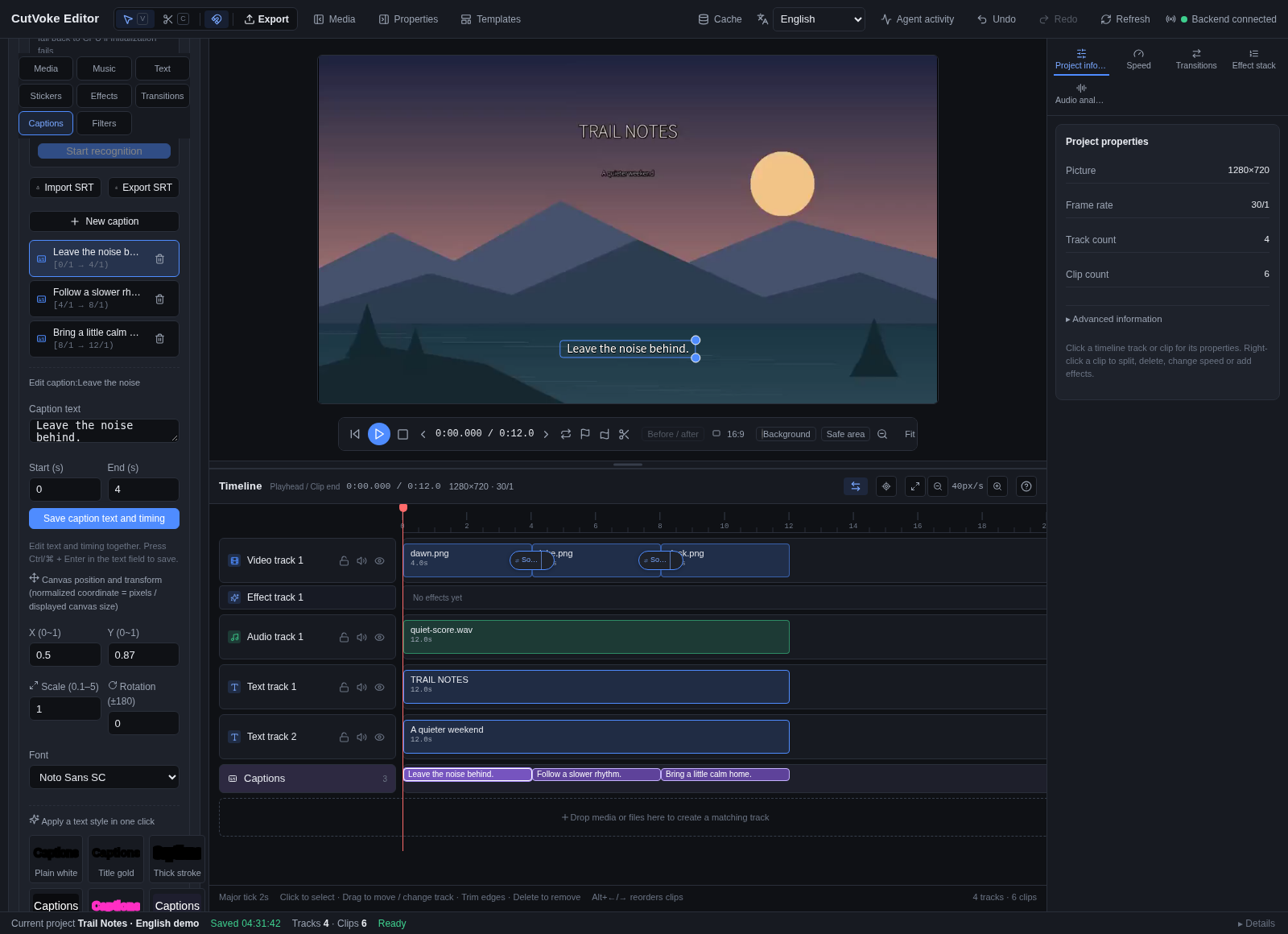
English caption editing: the selected line, its 0–4 second interval and its editable preview overlay. Captions remain individual project objects you can refine.
Get started
Download, extract and start editing. Basic local import, editing, preview and MP4 export need no AI account or separate Python, Node.js or FFmpeg installation.
| Your device | v0.3.4 prerelease |
|---|---|
| Windows x64 | Portable ZIP |
| Mac · Apple Silicon | arm64 ZIP |
| Mac · Intel | x64 ZIP |
| Linux x64 | tar.gz |
Verify SHA-256 · Installation / troubleshooting · All release assets
Windows portable (x64 prerelease)[!NOTE]
The video showcases were made with the source build. Reproduction project packages and source instructions are linked below.
Download Windows portable 0.3.4, from the v0.3.4 prerelease.
- Download the ZIP and SHA256SUMS; verify the ZIP with
Get-FileHash -Algorithm SHA256. - Fully extract
CutVoke-0.3.4-windows-x64-portable.zipinto a writable folder. - Double-click
CutVoke.exe. Keep all neighboring files.
No installer, administrator permission, Python, Node.js or system FFmpeg is needed. Basic local import, editing, preview and MP4 export work without an AI account. Optional AI clients, cloud services and speech/person models have separate requirements.
Projects, imported media, settings and caches use CutVoke Data beside the executable. Preserve it when updating; use project packaging/relink when moving media. The package is unsigned and may trigger SmartScreen. It passed automated Windows Server 2022 x64 frozen-package GUI, MCP, import → preview → export/decode and lifecycle checks. Manual Windows 10/11, audio/GPU and SmartScreen acceptance remain separate. See exact hashes, storage and limits.
The v0.3.4 prerelease rebuilds all four archives from its tagged source commit. BUILD-INFO.json records the exact source, successful CI/native acceptance runs and archive hashes. Earlier releases remain available.
These are the actual archives, ready to extract; no outer Actions ZIP is involved. Verify against SHA256SUMS. The built editor, frozen backend, FFmpeg/ffprobe, resources, fonts and licenses are included; basic editing needs no separate Python, Node.js or FFmpeg. Installation and requirements and the release build evidence describe the exact scope.
- macOS 13+: choose the matching architecture, unzip and move
CutVoke.appto/Applicationsor~/Applications. It has an ad-hoc integrity signature, no Developer ID or notarization. Gatekeeper's automatic trust checks rejected both builds. After verifying the source and SHA256, users who trust the unmodified app may follow Apple's app-specific approval instructions in System Settings → Privacy & Security → Open Anyway after trying to open it. Keep global security protections enabled; no developer account purchase is needed. Actual automation ran on macOS 15 arm64 and Intel, not every user device or macOS 13/14. - Linux x64 / Ubuntu 22.04 baseline: preserve executable permissions/symlinks while extracting the tar.gz, then run
./cutvokein its directory. A graphical desktop, glibc 2.35+, Electron system libraries and working unprivileged user-namespace sandbox are required. No FUSE is needed. Root,noexecand policies blocking the sandbox are outside this directory package's supported scope; do not use--no-sandbox. Other distributions, Wayland-only sessions and Ubuntu 24.04 AppArmor need separate acceptance.
Mac data lives in ~/Library/Application Support/CutVoke/; Linux data lives in ${XDG_DATA_HOME:-~/.local/share}/CutVoke/. Preserve it when replacing the app. Automated frozen-package import, preview, export/full decode and lifecycle checks do not establish manual audio/GPU, quarantined Finder launch or all-device acceptance.
You need Python 3.10+, Node.js 20+, FFmpeg and ffprobe. The FFmpeg build must support H.264/AAC, overlays, text and subtitle rendering; doctor checks the required dependencies.
git clone https://github.com/frankShan001/CutVoke.git
cd CutVoke
python -m venv .venv
Activate the environment before installing. Windows PowerShell:
.\.venv\Scripts\Activate.ps1
macOS / Linux shell:
source .venv/bin/activate
Then install and build the editor:
python -m pip install -e .
cd apps/editor
npm ci
npm run build
cd ../..
cutvoke doctor --json
Make your first result without downloading sample media:
python skills/cutvoke-editor/scripts/demo.py --output .artifacts/first-edit
cutvoke serve --data .artifacts/first-edit/data
Open http://127.0.0.1:8787 and select Trail Notes · editable demo. Success looks like a playable 12-second project with three shots, music, titles and captions, plus trail-notes.mp4, trail-notes.cvkpkg and its editable database in the output directory. Use a new output directory for each run. Stop the server with Ctrl+C. If the port is occupied, use serve --port 8798 and open that address.
The example imports, edits and exports over real stdio MCP, then verifies that those same assets are available through the human editor API. New imports share the Web upload layout, and exact legacy MCP imports remain accessible. See the demonstration and verification boundaries.
The source workflow has been checked in the Linux cloud environment, including FFmpeg 7.1.5, and earlier on Windows. See installation, tested versions and troubleshooting for exact scope; the legacy Windows installer and human device acceptance still require their respective machines. On Windows, start-cutvoke.cmd --web also starts the browser editor using the default personal project library. For the desktop client and building an installer, see local setup and the build entry point.
The service binds to local loopback by default. Source/CLI installs put default project data and media under the user's .cutvoke directory. The example above uses its own .artifacts/first-edit/data and does not open the default personal project library. The Windows portable edition uses its sibling CutVoke Data folder; native Mac/Linux desktop packages use the platform directories above.
Use the language selector on the home screen or editor toolbar. The interface supports Simplified Chinese, Traditional Chinese, English, Japanese, Korean, Spanish, French, German, Portuguese (Brazil), Russian and Arabic. The first visit follows your preferred system/browser languages. An explicit choice stays in the browser after reload; the desktop app also saves it across restarts and uses it for its loading page and native dialog titles, summaries and action buttons. Arabic uses a right-to-left interface while the timeline keeps time moving from left to right.
Language changes affect interface labels, owned progress messages and operation prompts, not project names, captions, media filenames or saved editing data. Technical diagnostics retain their original text beneath localized summaries; resource metadata uses the author's language entries and registry fallback. Operating-system file-dialog controls follow the OS language. Translations include machine-assisted drafts and have not been reviewed by native speakers; corrections are welcome through the translation guide.
Give your AI an editing workflow
Desktop packages: after first launch, use the generated profile/mcp-config.json under the data root in your agent client (CutVoke Data for Windows). It points to the bundled engine and the same project database; a system Python is not required.
Configure the client using the MCP connection guide, and point MCP and the editor at the same --data directory:
cutvoke mcp --data .artifacts/first-edit/data
MCP includes editor_help for current commands, units, recipes and recovery, plus topic="creative" for on-demand principles, work-type guidance and a project plan. The optional cutvoke-editor skill routes the same references for MV/art visual, documentary/travel, narrative, explanation/interview and promotion/showcase. Style follows the brief; review actual moving pictures and sound rather than effect counts. It keeps Agent-created files in the project folder and collects worthwhile verified, content-free new effects locally; publication requires explicit authorization. See the research and adoption record.
The standard MCP launcher automatically activates healthy engine updates while keeping the connection and existing render jobs. See automatic update behavior and limits; previously running launchers need one initial reconnect.
Source MCP-only installs can use python -m cutvoke doctor --mcp-only --json without building the browser editor. Start discovery with editor_help, then commands_list/effects_list for the needed items; capabilities returns a large complete snapshot. See installation diagnostics.
Use it: copy the complete skills/cutvoke-editor/ folder into your AI tool's skill directory, or let a tool that accepts Markdown instructions read SKILL.md. The installation and usage guide includes concrete Codex copy commands and the verified scope. Keep references/ and scripts/ with the entry point.
After connecting, try a request such as:
Use cutvoke-editor to make a 12-second weekend edit for friends from my selected local media. Keep one short title, readable captions, gentle motion and restrained transitions. Use only authorized files, keep intermediate files and the new MP4 in this project's folder, review actual pictures and sound, leave an editable project, and collect useful reusable effects locally when finished.
The skill is creative guidance. It does not install a model or guarantee a polished film from installation alone. Media permissions, the agent's ability to see/listen, and editorial judgment still matter. User media must not be uploaded without authorization.
Build effects together
Create reusable effects during ordinary AI-assisted editing: the agent can save a local module, apply it with undo/redo, and export a settings-only contribution ZIP. No development setup or category-directory configuration is needed for this route. The package excludes user videos, images, audio, text/captions, projects, paths and editing history. The agent must show the explicit privacy notice whenever suggesting sharing; preparing a ZIP uploads nothing, and public submission requires your consent. See the workflow and exact privacy boundary.
Contribution guide · Runnable transition example
See the real transition example and contribution scope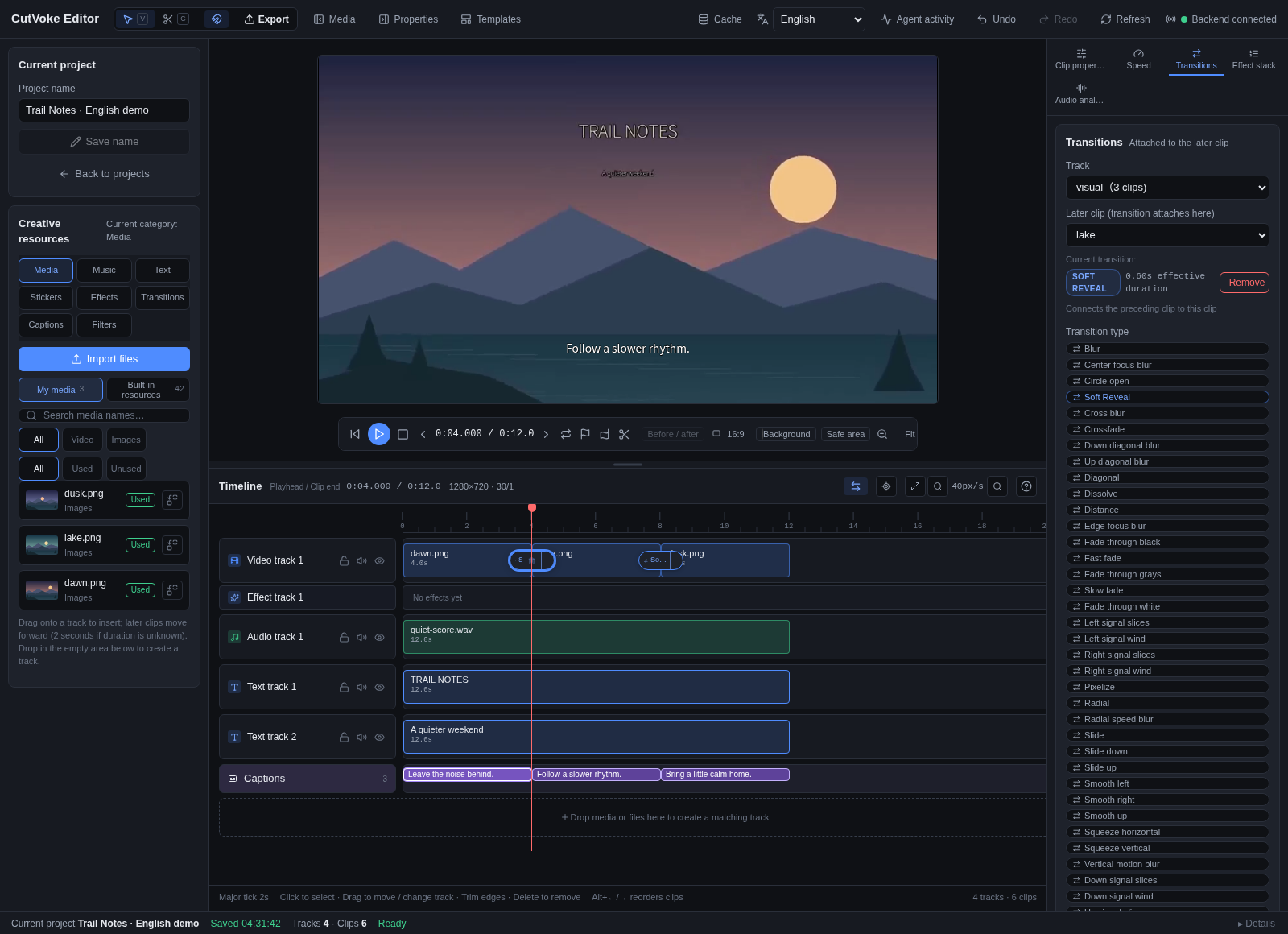
Soft Reveal in the English interface: a contribution manifest loaded by the existing registry, previewed and exported through the existing FFmpeg dissolve algorithm.
Start with the contribution guide and the runnable sample. Store new contributions under effects/<family>/<effect-id>/ with a manifest, description, license and actual preview. Existing assets retain their paths.
Declarative transitions can reuse supported FFmpeg mappings. Other families depend on implemented rendering semantics; a new algorithm still needs an implementation and test PR. A manifest cannot add arbitrary behavior. This contribution path offers no general dynamic-code plugin loading, automatic publication or hot reload.
Learn more and contribute
| What you need | Documentation |
|---|---|
| Independent project folders, moving, backups and legacy migration | Project directories |
| Local startup, desktop, shared database and MCP configuration | Local setup |
| Agent queries, previews, leases, retries and export | External agent editing |
| Skill installation, task inputs and runnable example | Skill usage |
| Optional local transcription and model preparation | Local speech recognition |
| Effect contributions and existing resource packs | Contribution guide · Resource packs |
| Source conventions, layout and checks | English · 中文 · Community tasks · Project layout |
| Installation and candidate packages | Install / troubleshoot · Candidate packaging |
| Security reports | Security policy |
| Screenshot provenance and demonstration limits | Capture and demo notes |
| Official CV icon, platform assets and regeneration | CutVoke brand assets |
Treat CutVoke as an early-stage project: project formats and interfaces can change, complex first previews wait for FFmpeg, and optional speech/person processing needs additional dependencies/models. The sample does not establish large-project performance, every effect or every AI client's compatibility. Try a small copy before using it for important work.
Source code uses the MIT License. FFmpeg is a separate dependency with build-specific licensing and distribution requirements. Preserve the licenses and attribution of external media.
Help shape the next cut. Report an issue · Pick a task · Contribute an effect
If CutVoke helps you create, a Star helps other creators find it.
Yorumlar (0)
Yorum birakmak icin giris yap.
Yorum birakSonuc bulunamadi