LeanKG
Health Gecti
- License — License: MIT
- Description — Repository has a description
- Active repo — Last push 0 days ago
- Community trust — 23 GitHub stars
Code Gecti
- Code scan — Scanned 12 files during light audit, no dangerous patterns found
Permissions Gecti
- Permissions — No dangerous permissions requested
Bu listing icin henuz AI raporu yok.
LeanKG: Stop Burning Tokens. Start Coding Lean.

LeanKG


Lightweight Knowledge Graph for AI-Assisted Development
LeanKG is a local-first knowledge graph that gives AI coding tools accurate codebase context. It indexes your code, builds dependency graphs, generates documentation, and exposes an MCP server so tools like Cursor, OpenCode, and Claude Code can query the knowledge graph directly. No cloud services, no external databases -- everything runs on your machine with minimal resources.
How LeanKG Helps
graph LR
    subgraph "Without LeanKG"
        A1[AI Tool] -->|Scans entire codebase| B1[10000+ tokens]
        B1 --> A1
    end

    subgraph "With LeanKG"
        A2[AI Tool] -->|13-42 tokens| C[LeanKG Graph]
        C -->|Targeted subgraph| A2
    end
Without LeanKG: AI scans entire codebase, wasting tokens on irrelevant context.
With LeanKG: AI queries the knowledge graph for targeted context only.
Installation
One-Line Install (Recommended)
Install the LeanKG binary, configure MCP, and add agent instructions for your AI coding tool:
curl -fsSL https://raw.githubusercontent.com/FreePeak/LeanKG/main/scripts/install.sh | bash -s -- <target>
This installs:
- LeanKG binary to
~/.local/bin - MCP configuration for your AI tool
- Agent instructions (LeanKG tool usage guidance) to the tool's config directory
Supported targets:
| Target | AI Tool | MCP Config | Agent Instructions |
|---|---|---|---|
opencode |
OpenCode AI | ~/.config/opencode/opencode.json |
~/.config/opencode/AGENTS.md |
cursor |
Cursor AI | ~/.cursor/mcp.json |
~/.cursor/AGENTS.md |
claude |
Claude Code/Desktop | ~/.config/claude/settings.json |
~/.config/claude/CLAUDE.md |
gemini |
Gemini CLI / Google Antigravity | ~/.config/gemini-cli/mcp.json / ~/.gemini/antigravity/mcp_config.json |
~/.gemini/GEMINI.md |
kilo |
Kilo Code | ~/.config/kilo/kilo.json |
~/.config/kilo/AGENTS.md |
Examples:
# Install for OpenCode
curl -fsSL https://raw.githubusercontent.com/FreePeak/LeanKG/main/scripts/install.sh | bash -s -- opencode

# Install for Cursor
curl -fsSL https://raw.githubusercontent.com/FreePeak/LeanKG/main/scripts/install.sh | bash -s -- cursor

# Install for Claude Code
curl -fsSL https://raw.githubusercontent.com/FreePeak/LeanKG/main/scripts/install.sh | bash -s -- claude

# Install for Gemini CLI
curl -fsSL https://raw.githubusercontent.com/FreePeak/LeanKG/main/scripts/install.sh | bash -s -- gemini

# Install for Kilo Code
curl -fsSL https://raw.githubusercontent.com/FreePeak/LeanKG/main/scripts/install.sh | bash -s -- kilo

# Install for Google Antigravity
curl -fsSL https://raw.githubusercontent.com/FreePeak/LeanKG/main/scripts/install.sh | bash -s -- antigravity
Install via Cargo
cargo install leankg
leankg --version
Build from Source
git clone https://github.com/your-org/LeanKG.git
cd LeanKG
cargo build --release
Try Without Install
Use GitHub Codespaces to try LeanKG in your browser - no installation required!
- Go to github.com/FreePeak/LeanKG
- Click "Code" → "Create Codespace"
- LeanKG auto-installs when the codespace starts
- In the terminal:
leankg index ./src leankg web - Click "Open in Browser" on port 8080
Free tier: 60 hours/month (3 months), then 15 hours/month
Live Demo
Try LeanKG without installing - visit the live demo at https://leankg.fly.dev/
Update
To update LeanKG to the latest version, run the same install command:
curl -fsSL https://raw.githubusercontent.com/FreePeak/LeanKG/main/scripts/install.sh | bash -s -- update
This will replace the existing binary with the latest release while preserving your configuration.
Quick Start
# 1. Initialize LeanKG in your project
leankg init

# 2. Index your codebase
leankg index ./src

# 3. Start the MCP server (for AI tools)
leankg serve

# 4. Start the Web UI (for visualization)
# Open http://localhost:8080 in your browser
leankg web

# 5. Compute impact radius for a file
leankg impact src/main.rs --depth 3

# 6. Check index status
leankg status
How It Works
C4 Model - Level 2: Component Diagram
graph TB
    subgraph "Developer Machine"
        subgraph "LeanKG System"
            direction TB
            CLI["CLI<br/>init, index, serve, watch"]

            subgraph "Indexer"
                Parser["Parser<br/>(tree-sitter)"]
                Extractor["Extractor<br/>functions, classes, imports, calls"]
            end

            DB[("CozoDB<br/>SQLite")]

            subgraph "MCP Server"
                Tools["MCP Tools<br/>search, query, impact, context"]
            end

            subgraph "Web UI"
                Graph["Graph Viewer<br/>sigma.js"]
                API["REST API<br/>/api/graph/data"]
            end
        end

        AI["AI Tool<br/>(Claude, Cursor, OpenCode)"]
    end

    CLI -->|init| DB
    CLI -->|index| Parser
    Parser -->|parse| Extractor
    Extractor -->|store| DB
    CLI -->|serve| MCP
    DB -->|query| Tools
    Tools -->|MCP| AI
    CLI -->|web| API
    API -->|fetch| Graph
    Extractor -->|watch| CLI
Data Flow
graph LR
    subgraph "1. Index Phase"
        A["Source Code<br/>*.rs, *.ts, *.py"] --> B["tree-sitter Parser"]
        B --> C["Code Elements<br/>functions, classes"]
        B --> D["Relationships<br/>imports, calls"]
        C --> E[("CozoDB")]
        D --> E
    end

    subgraph "2. Query Phase"
        E --> F["MCP Tools"]
        F --> G["AI Tool Context<br/>13-42 tokens"]
    end
Node Types in the Graph
| Element Type | Description | Example |
|---|---|---|
function |
Code functions | src/auth.rs::validate_token |
class |
Classes and structs | src/db/models.rs::User |
module |
Files/modules | src/db/models.rs |
document |
Documentation files | docs/architecture.md |
doc_section |
Doc headings | docs/api.md::Usage |
Relationship Types
| Type | Direction | Description |
|---|---|---|
calls |
A → B | Function A calls function B |
imports |
A → B | Module A imports module B |
contains |
doc → section | Document contains section |
tested_by |
A → B | Code A is tested by test B |
documented_by |
A → B | Code A is documented by doc B |
Key Insight: The graph stores the FULL dependency graph at indexing time. When you query, LeanKG traverses N hops from your target to find all affected elements - no file scanning needed.
MCP Server Setup
See MCP Setup for detailed setup instructions for all supported AI tools.
Agentic Instructions for AI Tools
LeanKG instructs AI coding agents to use LeanKG first for codebase queries.
Quick Rule to Add Manually
Add this to your AI tool's instruction file:
## MANDATORY: Use LeanKG First
Before ANY codebase search/navigation, use LeanKG tools:
1. `mcp_status` - check if ready
2. Use tool: `search_code`, `find_function`, `query_file`, `get_impact_radius`, `get_dependencies`, `get_dependents`, `get_tested_by`, `get_context`
3. Only fallback to grep/read if LeanKG fails

| Task | Use |
|------|-----|
| Where is X? | `search_code` or `find_function` |
| What breaks if I change Y? | `get_impact_radius` |
| What tests cover Y? | `get_tested_by` |
| How does X work? | `get_context` |
Instruction Files (Auto-installed)
| Tool | File | Auto-install |
|---|---|---|
| Claude Code | ~/.config/claude/CLAUDE.md |
Yes |
| OpenCode | ~/.config/opencode/AGENTS.md |
Yes |
| Cursor | ~/.cursor/AGENTS.md |
Yes |
| KiloCode | ~/.config/kilo/AGENTS.md |
Yes |
| Codex | ~/.config/codex/AGENTS.md |
Yes |
| Gemini CLI | ~/.gemini/GEMINI.md |
Yes |
| Google Antigravity | ~/.gemini/GEMINI.md |
Yes |
See Agentic Instructions for detailed setup.
OpenCode Plugin (Auto-Trigger)
LeanKG includes an OpenCode plugin that automatically injects LeanKG context into every prompt. Add to your opencode.json:
{
  "plugins": ["leankg@git+https://github.com/FreePeak/LeanKG.git"]
}
This makes LeanKG tools always available without manual activation. See .opencode/INSTALL.md for details.
Claude Code Plugin (Auto-Trigger)
LeanKG is available via the official Claude plugin marketplace:
/plugin install leankg@claude-plugins-official
Or register the marketplace:
/plugin marketplace add FreePeak/leankg-marketplace
/plugin install leankg@leankg-marketplace
See .claude-plugin/INSTALL.md for details.
Cursor Plugin (Auto-Trigger)
LeanKG is available via the Cursor plugin marketplace:
/add-plugin leankg
See .cursor-plugin/INSTALL.md for details.
Gemini CLI / Google Antigravity (Auto-Trigger)
Install via gemini extensions:
gemini extensions install https://github.com/FreePeak/LeanKG
See GEMINI.md for context file details.
Codex (Fetch Instructions)
Tell Codex:
Fetch and follow instructions from https://raw.githubusercontent.com/FreePeak/LeanKG/refs/heads/main/.codex/INSTALL.md
See .codex/INSTALL.md for details.
Kilo Code (Fetch Instructions)
Tell Kilo Code:
Fetch and follow instructions from https://raw.githubusercontent.com/FreePeak/LeanKG/refs/heads/main/.kilo/INSTALL.md
See .kilo/INSTALL.md for details.
Highlights
- Code Indexing -- Parse and index Go, TypeScript, Python, and Rust codebases with tree-sitter.
- Dependency Graph -- Build call graphs with
IMPORTS,CALLS, andTESTED_BYedges. - Impact Radius -- Compute blast radius for any file to see downstream impact.
- Auto Documentation -- Generate markdown docs from code structure automatically.
- MCP Server -- Expose the graph via MCP protocol for AI tool integration.
- File Watching -- Watch for changes and incrementally update the index.
- CLI -- Single binary with init, index, serve, impact, and status commands.
- Business Logic Mapping -- Annotate code elements with business logic descriptions and link to features.
- Traceability -- Show feature-to-code and requirement-to-code traceability chains.
- Documentation Mapping -- Index docs/ directory, map doc references to code elements.
- Graph Viewer -- Visualize knowledge graph using standalone web UI.
Benchmark Results
LeanKG achieves 25.6% token savings (verified via Kilo CLI MCP testing):
| Metric | Baseline | LeanKG |
|---|---|---|
| Tokens per query | 29,903 | 22,261 |
| Savings | - | 7,642 (25.6%) |
See ab_benchmark/README.md for full methodology, test queries, and detailed results.
Web UI
Start the web UI with leankg web or leankg serve and open http://localhost:8080.
Graph Viewer
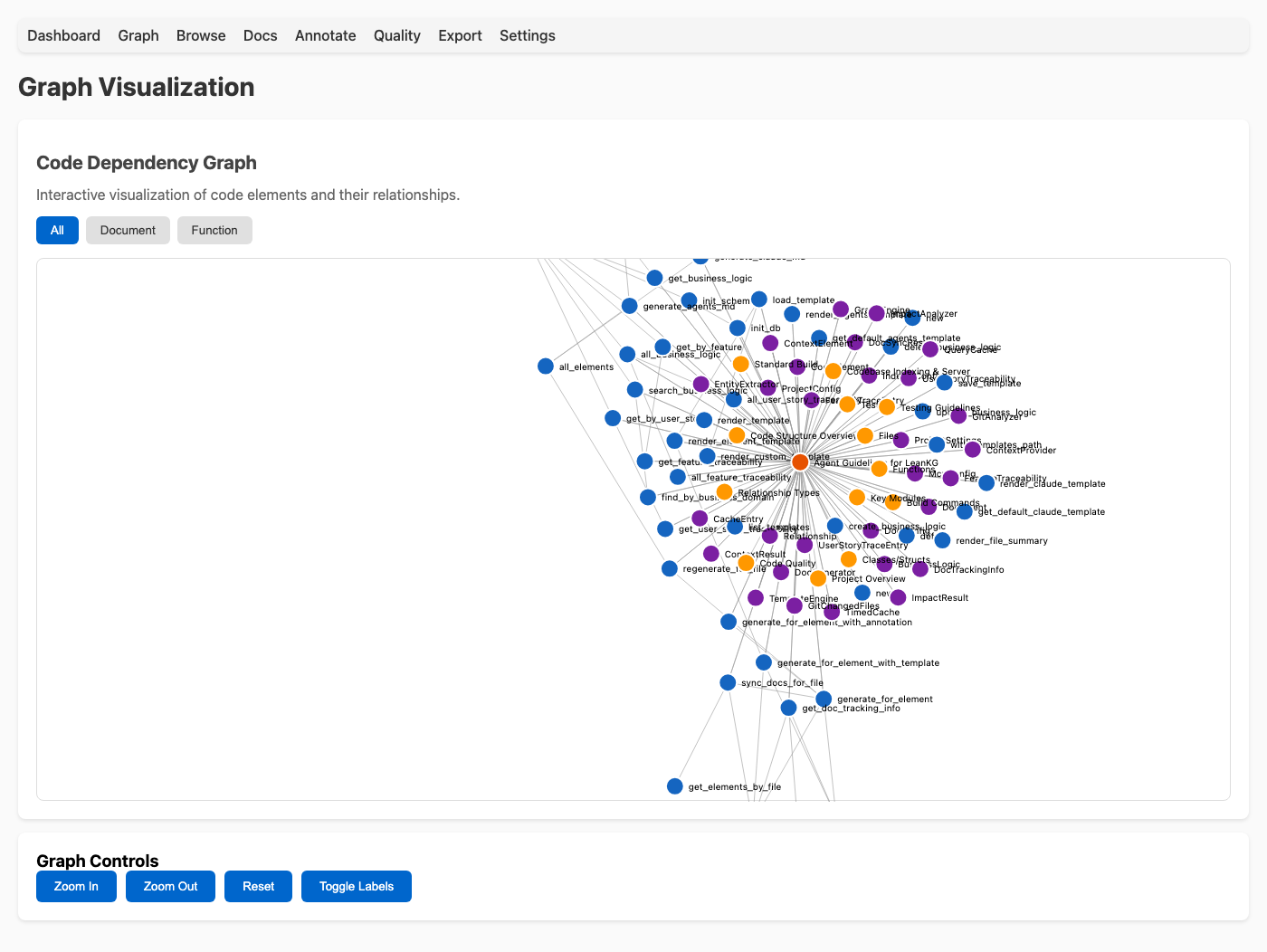
The graph viewer provides an interactive visualization of your codebase's dependency graph. Filter by element type, zoom, pan, and click nodes for details.
See Web UI for detailed documentation.
Auto-Indexing
LeanKG watches your codebase and automatically keeps the knowledge graph up-to-date. See CLI Reference for detailed commands.
CLI Commands
For the complete CLI reference, see CLI Reference.
MCP Tools
See MCP Tools for the complete list of available tools.
Supported AI Tools
| Tool | Integration | Agent Instructions |
|---|---|---|
| Claude Code | MCP | Yes (CLAUDE.md) |
| OpenCode | MCP | Yes (AGENTS.md) |
| Cursor | MCP | Yes (AGENTS.md) |
| KiloCode | MCP | Yes (AGENTS.md) |
| Codex | MCP | Yes (AGENTS.md) |
| Google Antigravity | MCP | Yes (AGENTS.md) |
| Windsurf | MCP | Not yet |
| Gemini CLI | MCP | Yes (AGENTS.md) |
Roadmap
See Roadmap for detailed feature planning and implementation status.
Requirements
- Rust 1.70+
- macOS or Linux
Tech Stack & Project Structure
See Tech Stack for architecture, tech stack details, supported languages, and project structure.
License
MIT
Yorumlar (0)
Yorum birakmak icin giris yap.
Yorum birakSonuc bulunamadi