wesight
Health Warn
- License — License: MIT
- Description — Repository has a description
- Active repo — Last push 0 days ago
- Low visibility — Only 7 GitHub stars
Code Warn
- fs module — File system access in SKILLs/content-planner/scripts/wechat_search.js
- network request — Outbound network request in SKILLs/content-planner/scripts/wechat_search.js
Permissions Pass
- Permissions — No dangerous permissions requested
No AI report is available for this listing yet.
Open-source desktop AI agent workspace with one-click Claude Code, Codex, OpenClaw, Hermes Agent setup and custom LLM model routing.
WeSight
Desktop AI Agent Workspace for Local Coding Agents



English | 简体中文
WeSight is an open-source desktop control console for local AI agents. It helps you install or reuse Claude Code, Codex, OpenClaw, Hermes Agent, OpenCode, Qwen Code, DeepSeek-TUI, and the built-in agent runtime, then gives them a visual workspace for chat, tools, files, IM channels, skills, model providers, runtime metrics, and desktop companion workflows.
Early public releases ship macOS Apple Silicon first. If WeSight helps your agent workflow, a Star makes the project easier for more builders to discover.
Quick Links
- Website: wesight.ai
- Latest release: github.com/freestylefly/wesight/releases/latest
- Screenshots: Screenshots
- Core features: Core Features
- Agent engines: Agent Engines
- Development: Quick Start
Why WeSight
Terminal-native coding agents are powerful, while their setup, model routing, permissions, IM entry points, file changes, and runtime metrics often live in separate places. WeSight turns those moving pieces into one desktop workspace:
- Install, detect, and reuse local agent CLIs from a beginner-friendly UI.
- Run coding agents through a visual chat with tool panels, slash commands, file diffs, and permission prompts.
- Connect agent tasks to IM channels such as Feishu, with per-engine configuration.
- Track every task with engine, model, token usage, TTFT, TPS, tool latency, steps, status, and duration.
- Extend workflows through SkillHub skills, built-in skills, scheduled tasks, memory, and a desktop pet that follows active work.
Screenshots
|
|
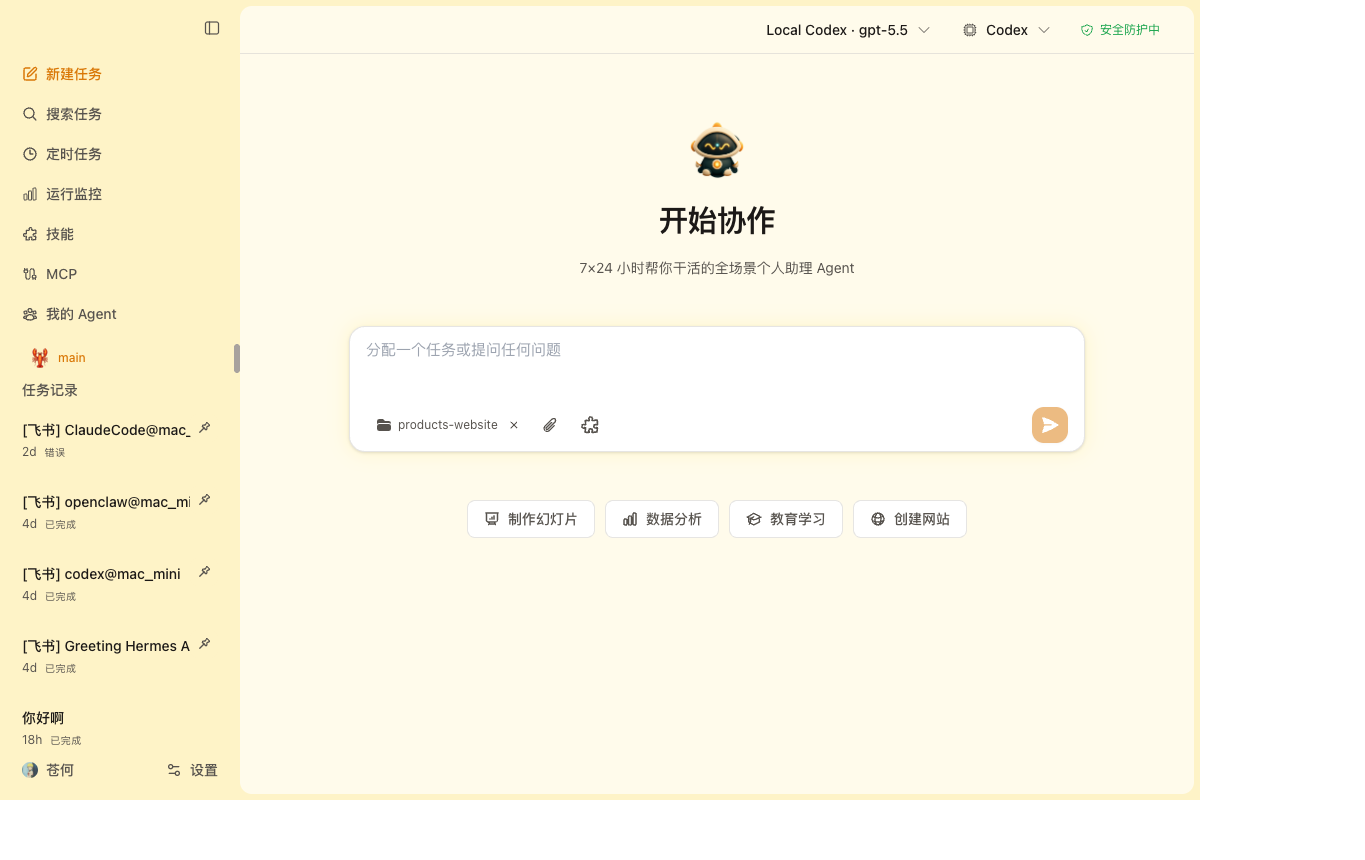
| Cowork Chat Run local coding agents as a desktop chat with engine and model controls. |
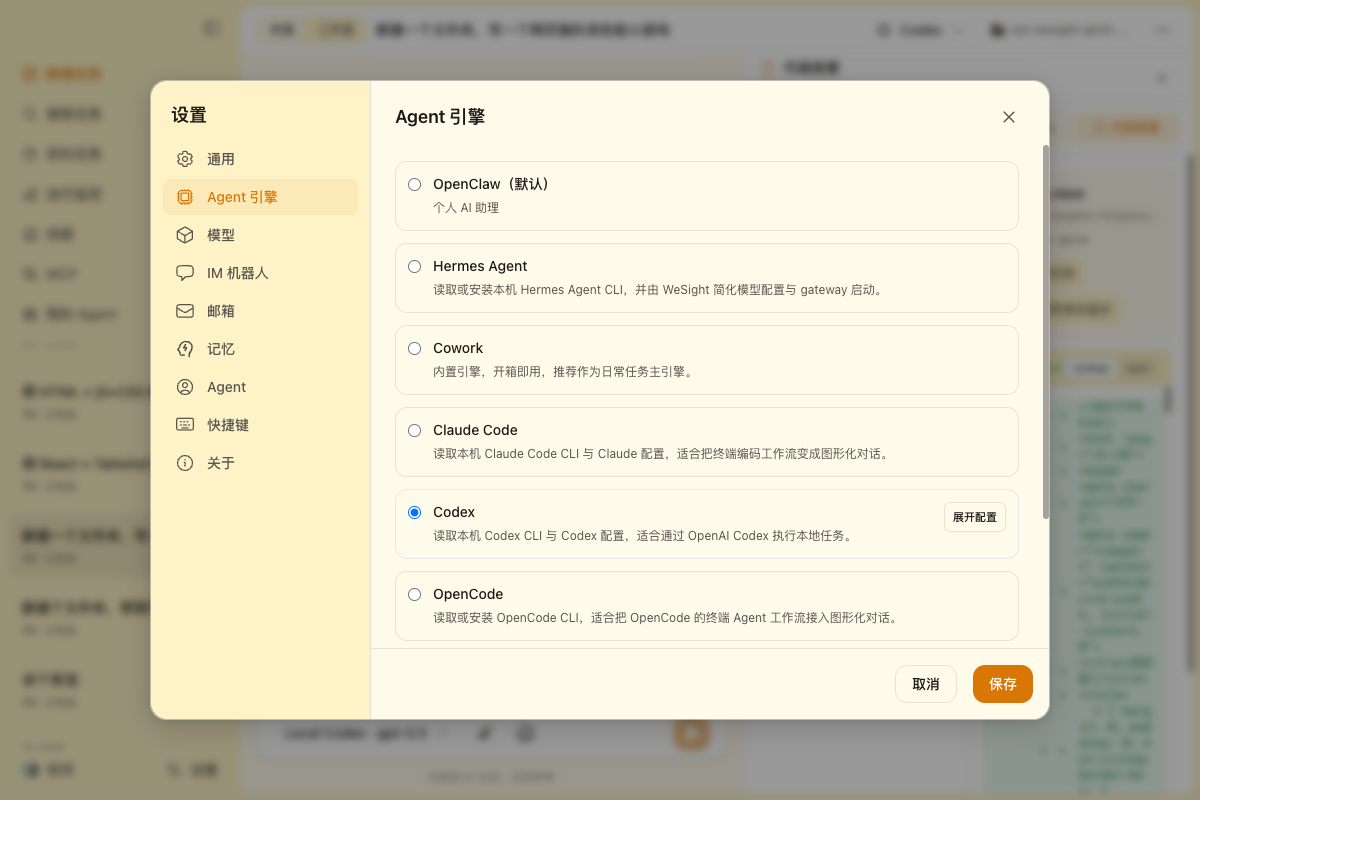
Agent Engines Configure Claude Code, Codex, OpenClaw, Hermes Agent, OpenCode, Qwen Code, DeepSeek-TUI, and the built-in runtime. |
|
|
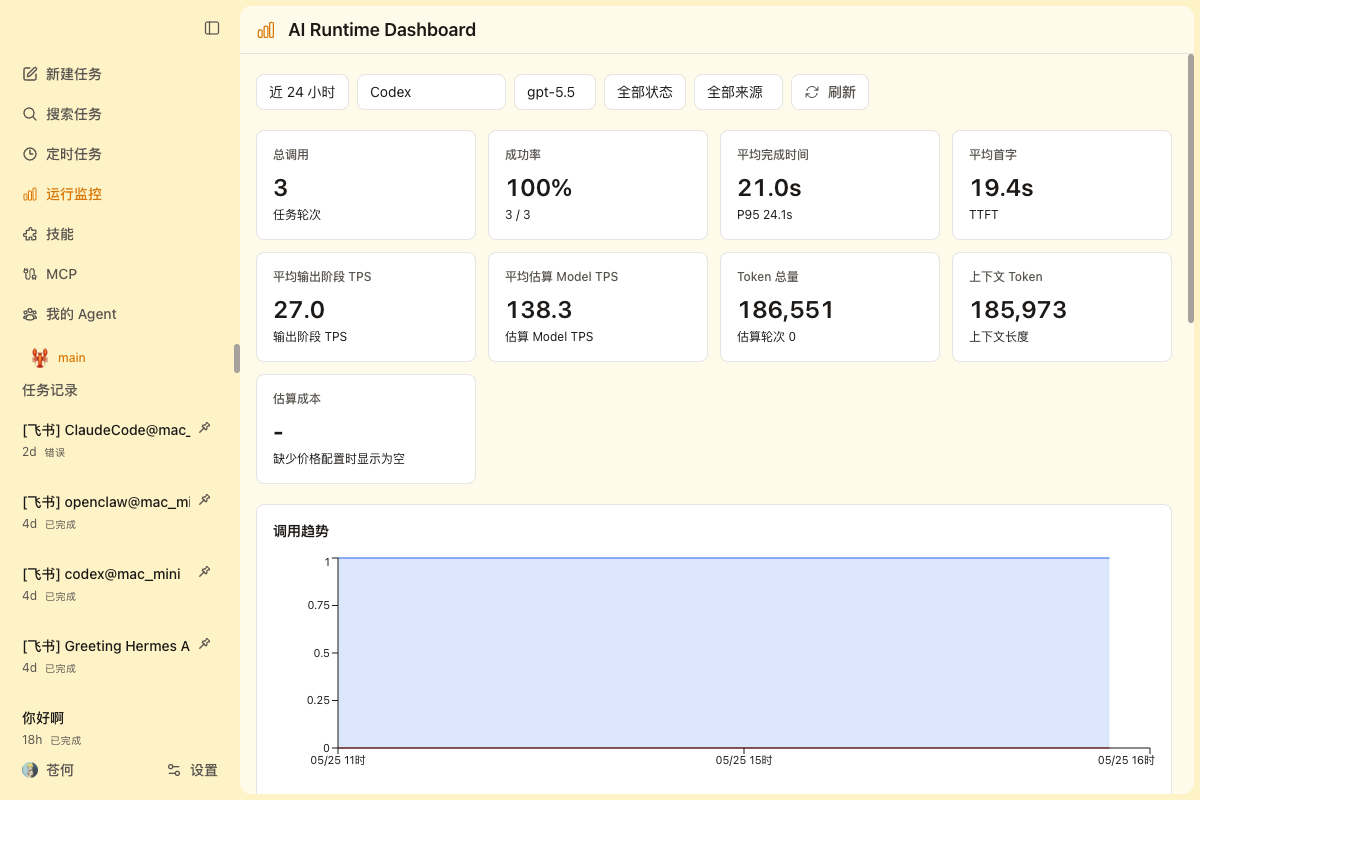
| AI Runtime Dashboard Inspect engine, model, tokens, TTFT, output-phase TPS, estimated model TPS, cost, and status. |
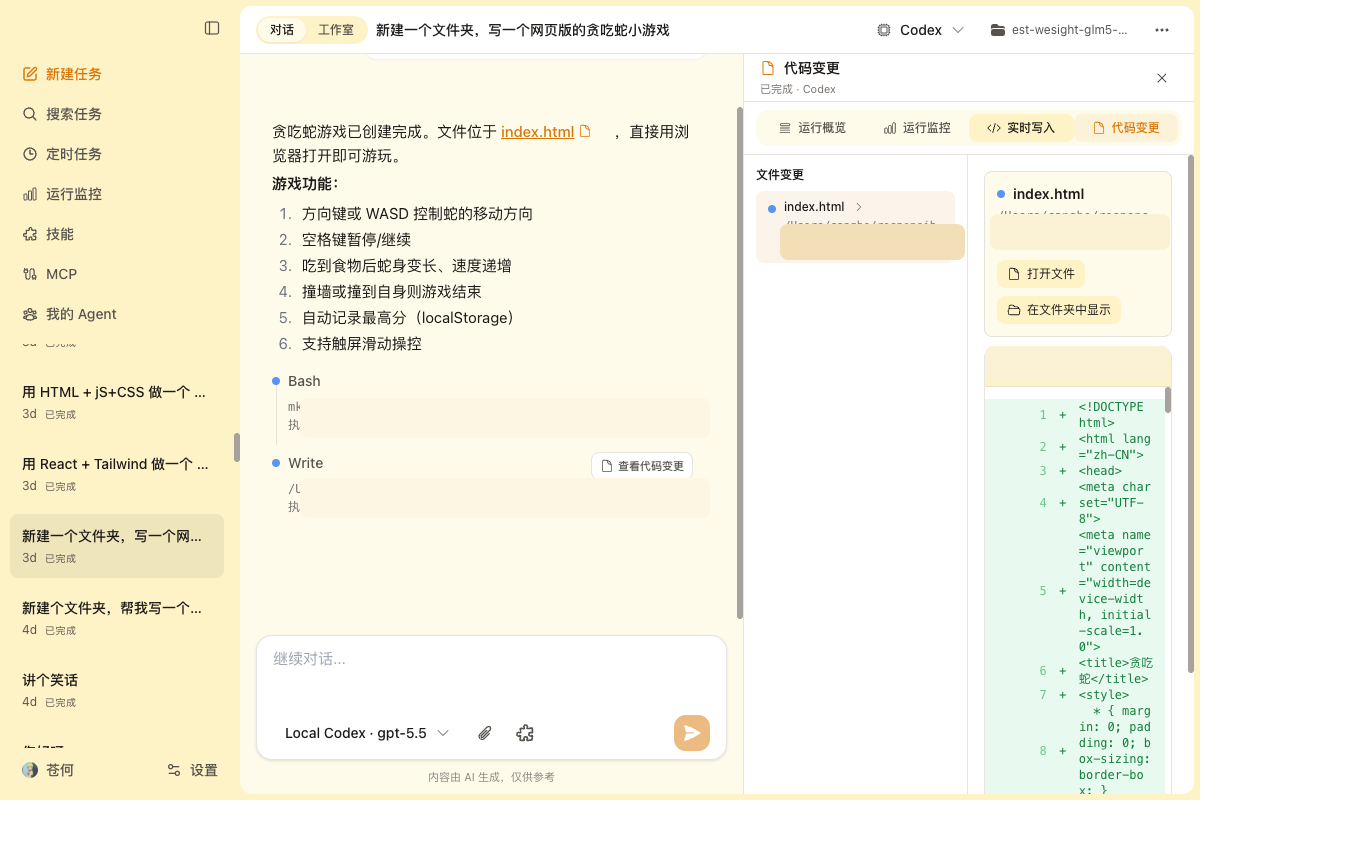
Live Workspace Watch file writes, code changes, tool activity, and generated artifacts while the agent works. |
|
|
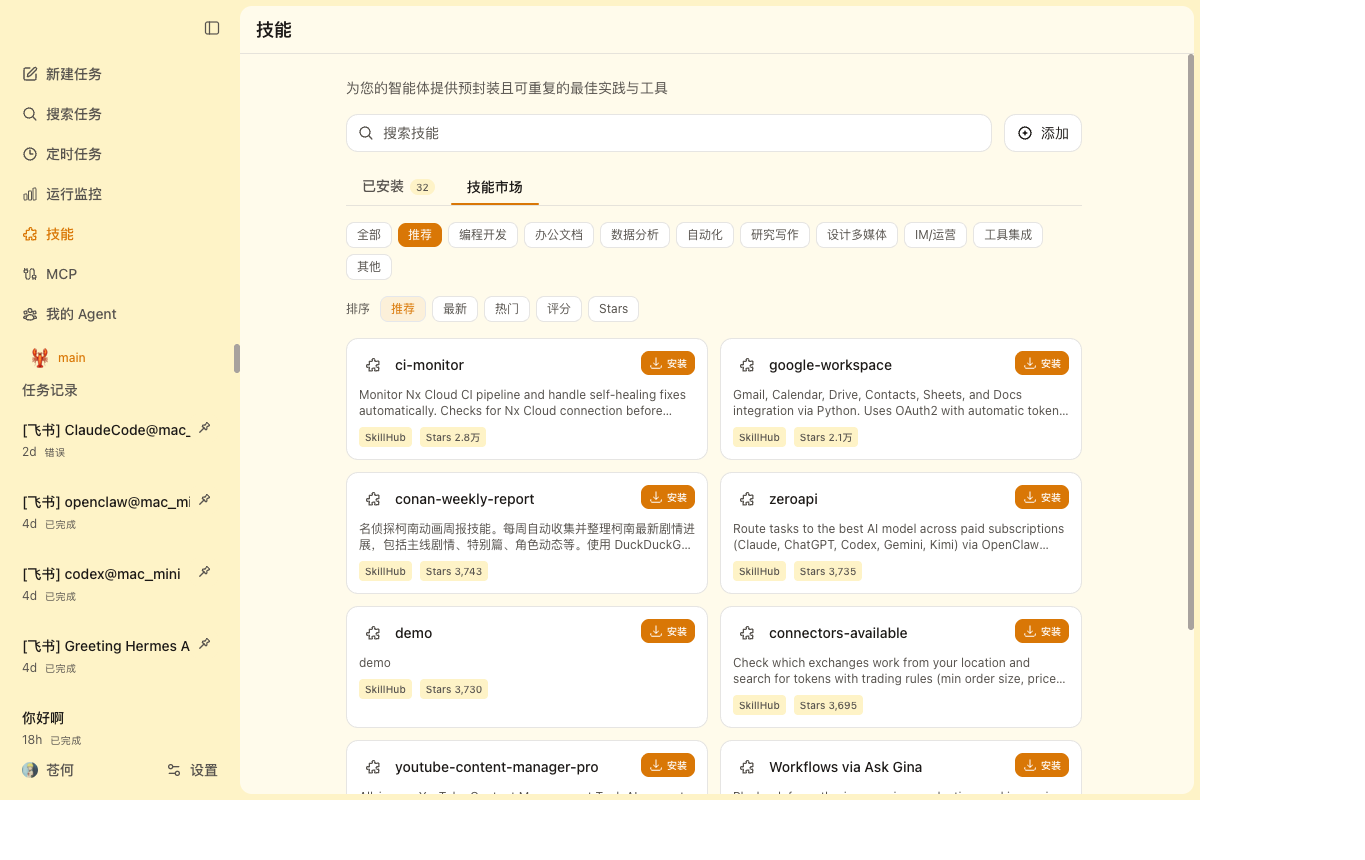
| Skills Marketplace Browse SkillHub categories, install skills locally, and manage installed skills from WeSight. |
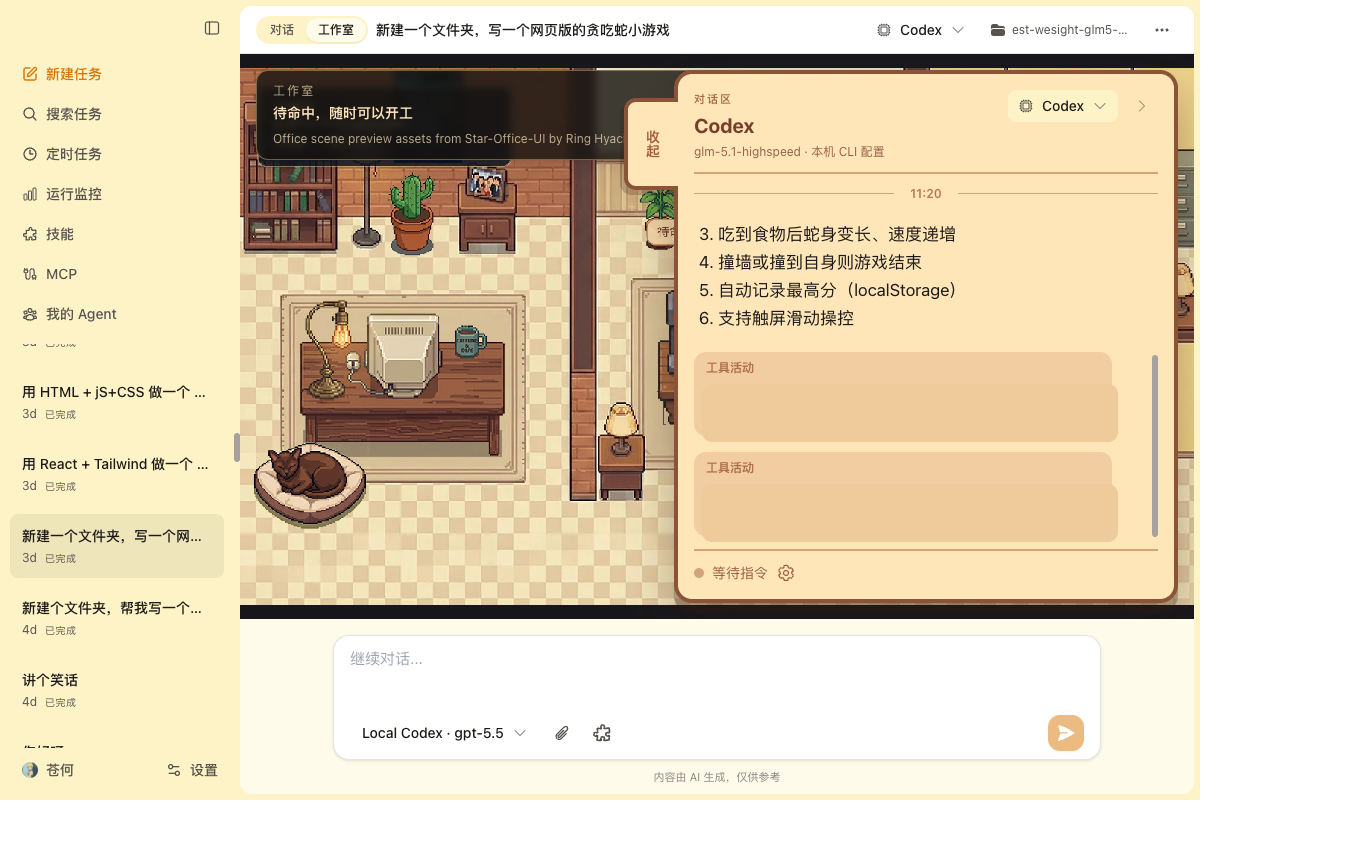
Studio & Pet Use a visual office-style workspace and desktop companion to follow active agent tasks. |
Core Features
- Agent Engines - Run Claude Code, Codex, OpenClaw, Hermes Agent, OpenCode, Qwen Code, DeepSeek-TUI, or the built-in runtime from the same workspace.
- One-click setup - On macOS, WeSight can install supported local CLIs or detect the ones already present on the machine.
- Unified model providers - Configure official OpenAI, Anthropic Claude, Google Gemini, DeepSeek, Qwen, Moonshot, Ollama, OpenRouter, GitHub Copilot, and custom OpenAI-compatible endpoints.
- Local CLI configuration - Use existing Claude Code, Codex, OpenClaw, Hermes Agent, OpenCode, Qwen Code, or DeepSeek-TUI accounts and config when you already have a working terminal setup.
- Graphical tool execution - View commands, files, permissions, slash commands, outputs, generated images, and tool results inside the chat flow.
- IM Agent Hub - Route Feishu messages into OpenClaw, Hermes Agent, Claude Code, or Codex, with per-engine bot profiles.
- AI Runtime Dashboard - Measure calls by engine, model, source, status, tokens, completion time, TTFT, output-phase TPS, estimated model TPS, tool latency, and agent steps.
- Live Workspace - Open a right-side workspace for live code writing, static diffs, runtime monitoring, task todos, skills, and artifacts.
- SkillHub Marketplace - Discover, categorize, install, enable, disable, update, and remove local WeSight skills.
- Scheduled Tasks - Create recurring agent jobs for research, reports, monitoring, inbox cleanup, and reminders.
- Memory and personalization - Extract useful preferences from conversations and reuse them across future sessions.
- Desktop pet and studio - Keep a lightweight desktop companion and a pixel-style studio view for active tasks.
Agent Engines
| Engine | Best For | Setup Path |
|---|---|---|
| Built-in runtime | General desktop cowork sessions and skills | Included in WeSight |
| Claude Code | Claude Code workflows with a graphical chat surface | One-click install or existing local CLI config |
| Codex | Codex CLI workflows, local task execution, and IM control | One-click install or existing local CLI config |
| OpenClaw | Runtime gateway, IM channels, sandbox-style agent work | Local runtime/CLI reuse or WeSight setup flow |
| Hermes Agent | Local Hermes Agent gateway and IM-style runtime experiments | Official installer or existing local CLI config |
| OpenCode | OpenCode terminal agent workflows | One-click install or existing local CLI config |
| Qwen Code | Qwen-friendly coding workflows and DashScope setups | One-click install or existing local CLI config |
| DeepSeek-TUI | DeepSeek-TUI HTTP/SSE runtime and tool streaming | One-click install or existing local CLI config |
Model Providers
WeSight keeps model setup in one place, then maps it into the selected engine when that engine follows WeSight settings.
- Add multiple providers and models.
- Use official OpenAI, Anthropic Claude, and Google Gemini providers.
- Add OpenAI-compatible providers for DeepSeek, Qwen, Moonshot, Ollama, OpenRouter, GitHub Copilot, local gateways, or private endpoints.
- Switch between WeSight-managed model settings and existing local CLI configuration.
- Import or sync local engine configuration when you want WeSight to manage it.
Download
Public desktop builds are published through GitHub Releases:
- Website: wesight.ai
- Latest release: github.com/freestylefly/wesight/releases/latest
Early public releases currently ship macOS Apple Silicon builds first. Release assets are intended for end users. CI artifacts are short-lived build outputs for maintainers to test before a release is published.
Download And Install
1. Download the DMG
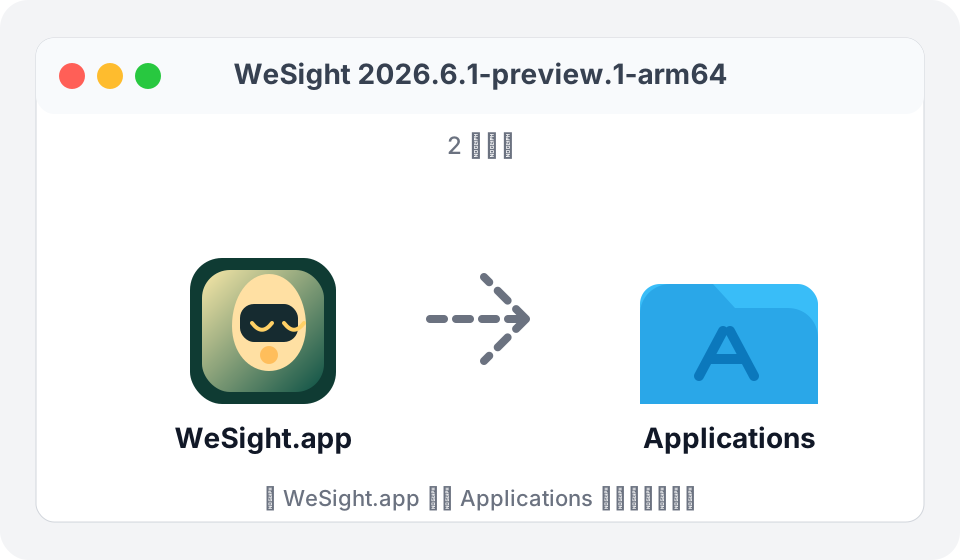
Download WeSight-*-arm64.dmg from the latest release, open it, and drag WeSight.app into the Applications folder.
2. If macOS says the app is damaged
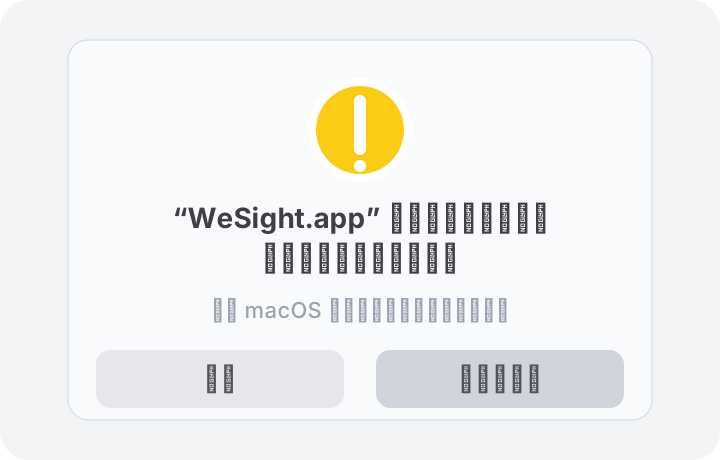
Preview builds are not signed and notarized yet. macOS may show a message like:
“WeSight.app” is damaged and cannot be opened. You should move it to the Trash.
This is usually a Gatekeeper quarantine warning for an unsigned app. It does not mean the downloaded package is corrupted. Click Cancel first.
3. Remove the quarantine attribute
Open the built-in macOS Terminal app and run:
xattr -cr /Applications/WeSight.app
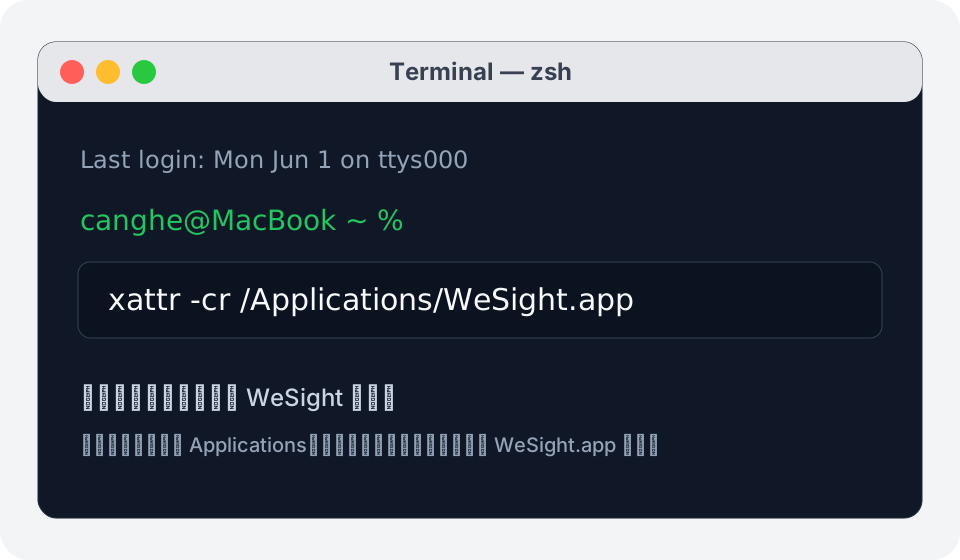
After the command finishes, open WeSight again. If you installed WeSight somewhere else, replace /Applications/WeSight.app with the actual path to your WeSight.app.
Quick Start
Requirements
- Node.js
>=24 <25 - npm
Development
git clone https://github.com/freestylefly/wesight.git
cd wesight
npm install
npm run electron:dev
The Vite dev server runs at http://localhost:5175.
Development With Agent Runtimes
# Start WeSight and detect supported local agent CLIs from Settings
npm run electron:dev

# Convenience aliases currently point to the same development entry
npm run electron:dev:openclaw
npm run electron:dev:hermes
Useful OpenClaw development variables:
# Override OpenClaw source location
OPENCLAW_SRC=/path/to/openclaw npm run electron:dev:openclaw

# Force OpenClaw runtime rebuild
OPENCLAW_FORCE_BUILD=1 npm run electron:dev:openclaw

# Skip OpenClaw version checkout for local OpenClaw development
OPENCLAW_SKIP_ENSURE=1 npm run electron:dev:openclaw
Build
# TypeScript + Vite
npm run build

# Electron main process
npm run compile:electron

# ESLint
npm run lint
Packaging
# macOS
npm run dist:mac
npm run dist:mac:x64
npm run dist:mac:arm64
npm run dist:mac:universal

# Windows
npm run dist:win

# Linux
npm run dist:linux
Managed runtime metadata is declared in package.json. Generated runtime folders, build artifacts, local secrets, and packaged release output are ignored by Git.
Architecture
WeSight uses Electron process isolation. The renderer never directly accesses Node.js APIs; privileged operations go through a typed preload bridge and IPC handlers in the main process.
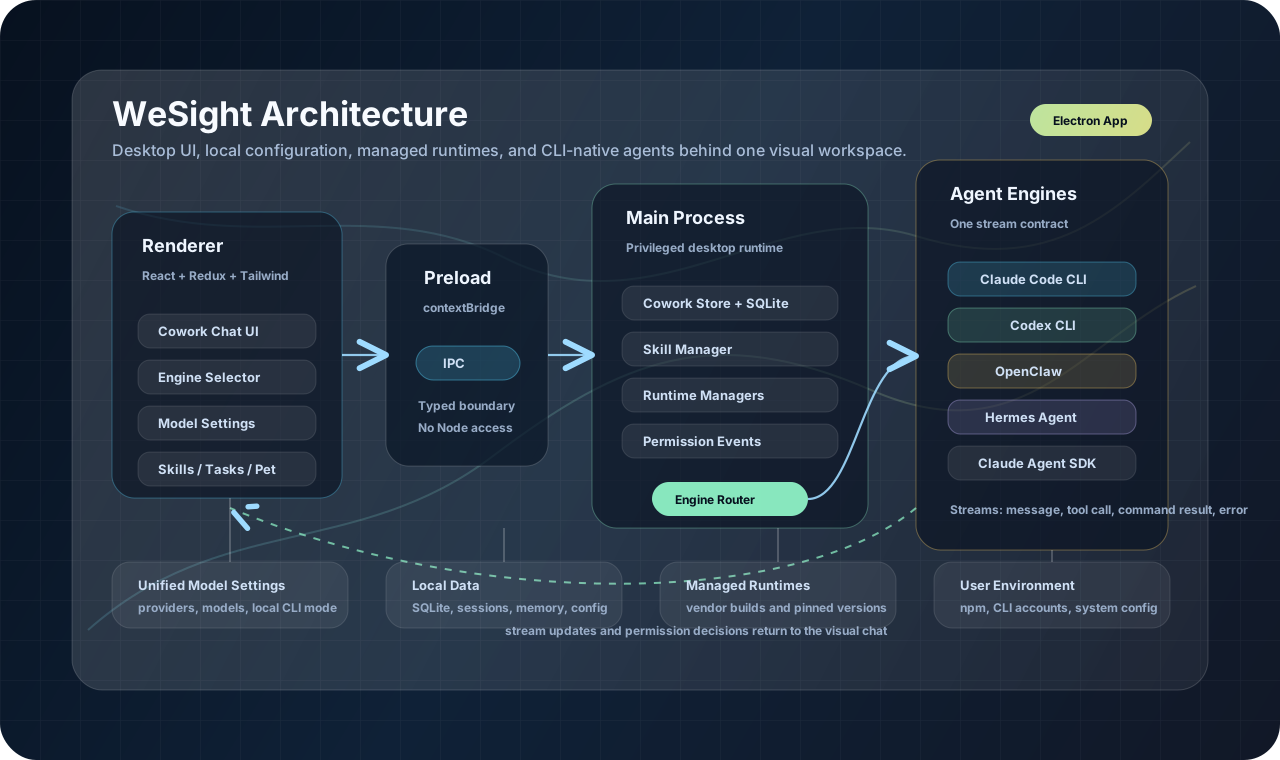
Main Process
- Window lifecycle, tray behavior, desktop pet windows, and deep links
- SQLite persistence for settings, sessions, messages, runtime calls, skills, and auth tokens
- Agent engine routing and external CLI adapters
- OpenClaw and Hermes gateway lifecycle helpers
- IM gateway integrations and native Feishu routing
- Skill management, scheduled tasks, file activity tracking, and runtime telemetry
Renderer
- React + Redux Toolkit + Tailwind CSS
- Cowork chat UI, studio view, live workspace, runtime dashboard, and artifacts
- Engine selector, model selector, settings, skills, MCP, agents, IM, memory, and appearance UI
- Stream rendering for messages, tool calls, command output, slash command panels, files, images, and permission prompts
Key Directories
src/main/
  main.ts                         Electron entry and IPC handlers
  preload.ts                      Safe renderer bridge
  sqliteStore.ts                  Local persistence
  coworkStore.ts                  Session and message storage
  libs/agentEngine/               Engine adapters and router
  libs/externalAgent*.ts          External CLI setup and config helpers
  im/                             IM gateway integrations

src/renderer/
  App.tsx                         App shell
  components/cowork/              Chat, studio, activity workspace, engine UI
  components/Settings.tsx         Model, engine, IM, skills, memory, and app settings
  components/pet/                 Desktop companion UI
  services/                       IPC wrappers and app services
  store/slices/                   Redux state

SKILLs/                           Built-in skills
scripts/                          Runtime, packaging, and setup scripts
src/shared/                       Shared constants and types
Built-in Skills
WeSight includes a broad skills library for day-to-day agent work and connects to SkillHub for marketplace installation.
| Area | Examples |
|---|---|
| Research | web search, tech news, stock research, film/music search |
| Documents | DOCX, XLSX, PPTX, PDF processing |
| Automation | Playwright, local tools, scheduled tasks |
| Creative | Remotion video, frontend design, canvas design, image and video workflows |
| Communication | IMAP/SMTP email and IM channels |
| Agent building | skill creator, skill vetting, custom planning |
Skills can be installed, enabled, disabled, deleted, and routed from the desktop UI.
Security Model
- Context isolation is enabled.
- Node integration is disabled in the renderer.
- Sensitive operations run through main-process IPC.
- Tool execution can surface permission requests before running.
- Local data is stored in SQLite under the app data directory.
- Runtime folders, build artifacts, generated assets, and local secrets are ignored by Git.
Roadmap Ideas
- More engine adapters and runtime profiles
- Better local configuration import and provider sync flows
- Richer IM agent profiles and message formats
- Shareable task templates
- More visual inspection tools for long-running agent tasks
- Skill marketplace updates, reviews, and version management
Community WeChat Group
Scan the QR code below to join the WeSight WeChat group and talk with other builders. The QR code is valid until June 8, 2026; if it expires, follow the official account below to get the latest invite.
Star History
WeChat Official Account
Search 苍何 on WeChat or scan the QR code below to follow Canghe's original WeChat official account. Reply with AI to get more AI prompt and agent workflow resources.
Acknowledgements
WeSight is shaped by many excellent open-source projects and agent community practices. Special thanks to:
- LobsterAI for inspiration around desktop personal assistant agents, README structure, and open-source launch practice.
- OpenClaw for exploring local agent runtimes, gateways, and IM agent capabilities.
- Hermes Agent for local agent runtime, gateway, and model configuration ideas.
- Star-Office-UI for the pixel-style AI studio inspiration.
- SkillHub for ideas around skill discovery, installation, and marketplace flows.
- The terminal-agent ecosystem around Claude Code, Codex, OpenCode, Qwen Code, DeepSeek-TUI, and the builders pushing local AI agent workflows forward.
License
MIT. See LICENSE.
Reviews (0)
Sign in to leave a review.
Leave a reviewNo results found