Archon
Health Gecti
- License — License: Apache-2.0
- Description — Repository has a description
- Active repo — Last push 0 days ago
- Community trust — 130 GitHub stars
Code Basarisiz
- rm -rf — Recursive force deletion command in install.sh
Permissions Gecti
- Permissions — No dangerous permissions requested
Bu listing icin henuz AI raporu yok.
AI-assisted Lean project automation with DAG blueprints, proof orchestration, and multi-agent coding/proving workflows.
Archon
Frenzymath · PKU @ AI4Math
Autonomous formalization of research-level mathematics in Lean 4





✨✨✨ Archon v0.3.0. Adds more harnesses (currently Codex and Claude Code) and workarounds for Anthropic's new rate limits on
claude -p(Codex, a headless Claude TUI, and more). Archon grounds its work in a DAG via LeanDag, a custom API for querying the Lean blueprint graph. The dashboard is richer — blueprints are rendered, the DAG is navigable. Provers can run in different modes (fine-grained, mathlib-build, …), and subprojects can be extracted from the DAG witharchon extractto work on separately, then merged back witharchon merge. Addspeers.yamlto allow archon to read other projects' dags and reuse their proofs.
✨ Archon v0.2.0. Adds multi-lane parallel proving (Anthropic + Moonshot + DeepSeek side by side), inner-git versioning of agent work, a frozen-signature surface (
archon-protected.yaml), an opt-in subagent system (blueprint review, strategy critique, Mathlib design advice, and more), etc.
🔄 Upgrading from v0.1.0 or v0.2.0? Just run
archon updateonce and thenarchon initin existing projects. Please, first backup your work!⌛️ Upgrading from even before? See MIGRATION.md.
📝 Full release notes: CHANGELOG.md.
Archon is an agentic system that autonomously formalizes research-level mathematics in Lean 4. A plan agent provides strategic guidance while prover agents write and verify proofs — separating analysis from execution to avoid context explosion. The system handles repository-scale formalization through three phases: scaffolding, proving, and polish. By default, built on Claude Code and Claude Opus 4.8, with a modified fork of lean-lsp-mcp and lean4-skills. Archon originated from orchestrating Claude Code with OpenClaw. See also our blog and announcement.
Archon is designed and optimized for project-level formalization — multi-file repositories with interdependent theorems, not isolated competition problems. Single-problem benchmarks are therefore not a specific optimization target. For model choice, Opus 4.8 is strongly recommended ; Fable 5 seems very promising on our experiments ; Sonnet also works well but is less capable. Other models are untested — weaker ones may struggle with Archon's complex skills and prompt structures, in which case the system design could hurt performance rather than help it. Since v0.3.0, Codex is also available, and gpt-5.5 can be a good alternative to Opus 4.8. Further models can run through the Claude Code harness — e.g. DeepSeek and Kimi via their Anthropic-compatible APIs, or any OpenRouter model (OpenRouter handles the API translation).
Table of Contents
- 📦 Install
- 🚀 Usage
- 📚 Supplying informal material
Install
Security note:
archon loopruns Claude Code with--dangerously-skip-permissions, meaning the model can execute arbitrary shell commands, read/write any file the process can access, and make network requests, which Claude Code refuses when running as root on Linux. In our experiment, Opus or Sonnet never caused harm, but since there is still a risk, we recommend one of the following workarounds:
- Use a dedicated non-root user (RECOMMENDED) — e.g. create one with
adduser— so you are not running with excessive root privileges.- Set
export IS_SANDBOX=1so Claude Code is allowed to start with this high-risk option.- Run inside a Docker container or VM with no access to sensitive data or credentials
Note: It is recommended to run inside a Python virtual environment (e.g.,
python3.11 -m venv ~/archon-env).
To install the CLI tools and system dependencies, run the following command in your terminal:
curl -sSL https://raw.githubusercontent.com/frenzymath/Archon/refs/heads/main/install.sh | bash
You can also install manually if you prefer. install.sh fetches the repository, runs pip install ., and executes archon setup to install system-level dependencies (uv, Claude Code, ...) and verify your Lean toolchain. The installation process might be slow the first time.
You should now be able to verify the installation and be guided on its usage with:
archon -h
To update an existing install later:
archon update
archon setup also checks for API keys used by the informal agent (OPENAI_API_KEY or GEMINI_API_KEY) — at least one is recommended but not required. Provider keys for Kimi, DeepSeek, and OpenRouter live in .archon/.env for Claude-compatible lanes and model aliases.
The bundled informal agent is a simplified demonstration: a single API call
to an external model for proof sketches. Our internal implementation is more
involved but not yet ready for open-sourcing. In practice the one-shot
approach does not show an obvious performance drop, likely because Claude
Code performs its own verification and refinement on the returned sketches.
CLI overview
| Command | Description |
|---|---|
archon init |
Initialize a new Archon project. |
archon dag |
Elaborate a full informal blueprint (dependency graph) for the project. |
archon blueprint-doctor |
Lint blueprint structure, references, macros, axioms, and coverage annotations. |
archon extract |
Extract a dependency-cone subproject from an Archon project. |
archon merge |
Merge two Archon projects via the DAG, keeping the best shared proofs. |
archon loop |
Run the automated plan → prove → review loop. |
archon doctor |
Verify the full Archon setup. |
archon dashboard |
Start the web monitoring interface. |
archon prove |
Launch a proof loop for a given statement. |
archon setup |
Install system-level dependencies. |
archon update |
Update Archon to the latest version. |
archon discuss |
Start an interactive discussion about the project. |
archon branch |
Switch to an existing inner-git branch, or fork a new one. |
archon log |
Show the inner-git commit graph. |
archon version |
Show the Archon CLI version and, inside a project, the project version. |
archon refactor |
Draft or run a refactor directive. |
archon migrate |
Run one-off migrations for legacy Archon projects. |
Run archon -h or archon <command> -h for details.
Usage
1. Initialize a project
To initialize:
archon init /path/to/your-lean-project
Here /path/to/your-lean-project can either:
- Be empty, in which case Archon creates a new project directory and will ask you what you want to formalize.
- Contain an existing Lean project, in which case Archon will use it as the basis for formalization.
- Contain informal material (e.g. description of the problem, papers, blueprints, ...) in which case Archon will create the Lean project structure inside it and use the informal material to write the first objectives.
archon init does the following inside your project:
- Creates
.archon/with runtime state files and a copy of Archon's prompts, copies the python scripts that agents can use - Installs Archon's lean4 skills as the
lean4@archon-localplugin at project scope - Installs Archon's lean-lsp MCP server as
archon-lean-lspat project scope. Detects and disables any conflicting globallean4-skills/lean-lspMCP - Configures
leanblueprint,git, andlake, and installs the latest mathlib if none is present yet - Launches Claude Code interactively to detect project state and write initial objectives
Re-run init after updating Archon to pull in the latest bundled prompts and skills. It preserves your local edits and config, and lets you keep, merge, or overwrite prompts with the new versions.
2. Configure your preferences
2.1 .archon/config.json and .archon/.env
Since v0.2.0, .archon/config.json lets you store project preferences so you do not have to repeat the same CLI options every time 🤗. It is the recommended place to configure harnesses and models, Claude launch backends, enabled subagents, multi-lane proving, and loop defaults.
See CONFIGURATION.md for the full reference. As a quick overview, a typical .archon/config.json looks like this:
{
  "loop": {
    "max_iterations": 2,
    "parallel": true,
    "max_parallel": 4,

    // How Claude Code is launched — see "Backends" below for why this matters
    // now that `claude -p` is rate-limited ("default" | "claude-p" | "vscode" | "desktop" | "interactive").
    "claude_backend": "claude-p",

    // Default engine for every role and subagent (Claude Code is the default).
    "harness": "codex",
    "model": "opus",

    // Override a specific role (plan / prover / review).
    "roles": { "plan": "claude-code", "prover": "codex" }
  },

  // Opt into focused helper agents. List names, or use "*" to enable every
  // installed subagent (recommended for best results).
  "subagents": {
    "enabled": ["strategy-critic", "blueprint-reviewer", "lean-auditor"]
    // "enabled": "*"   // ← shortcut: turn them all on
  }
}
2.2 Backends and the new Claude rate limits
Anthropic now rate-limits headless claude -p on subscription plans — the engine Archon used by default. Since v0.3.0 there are two ways around this.
Please, note that these solutions are experimental, using the default backend
claude -pis highly recommended, but it is costly.claude-pwrapper (simulatingclaude -pthrough the Claude Agent SDK) works well in the current setup, but it might be fragile, the logs of subagents might not be displayed. Theinteractivebackend is less convenient, because it requires manual interaction, but is a good fallback if theclaude-pwrapper breaks and you are out of credits.vscode/desktopare based on reverse engineering and may not work, but if they work, it would work exactly asclaude -pexcept for the billing. UsingCodexharness instead ofClaude Codeis also a viable option, probably the most stable, since OpenAI hasn't imposed similar limits on their API. Of course, if you useclaude -pwith you api key, there is no reason to change the backend.
Switch the launch backend. loop.claude_backend (or --claude-backend) changes how Claude Code is started, without changing the model:
| Backend | What it does |
|---|---|
default |
Plain claude -p headless subprocess — subject to the new limits. |
claude-p |
Drives the interactive Claude Code TUI headlessly via the claude-p wrapper. Recommended workaround on a rate-limited subscription. |
vscode / desktop |
Based on reverse engineering, if it works, it would attribute the session to the VS Code / Desktop entrypoint. |
interactive |
Runs claude in the foreground for you to drive by hand (serial, no multilane). |
Switch harness to Codex. Set loop.harness: "codex" to route every role and subagent through Codex instead of Claude, or mix the two per role with loop.roles. The built-in Codex harness lets the Codex CLI choose its configured/default model unless you add a model field to the harness descriptor.
See CONFIGURATION.md for precedence rules and the claude-p login directory (claude_p_config_dir).
2.3 ./archon-protected.yaml
Depending on the project, you might want to avoid Archon overwriting some of your contributions. Therefore archon-protected.yaml lets you declare files or declarations that Archon should not modify (e.g. not touch the body, not touch the signature, ...) whether in the blueprints or in the Lean files.
Since v0.3.0 the file supports three kinds of rule, all optional — you mix and match what your project needs. Patterns are fnmatch globs (*, ?, [...]), so a single rule can cover many files or declarations at once:
# 1. Protect Lean declarations, per file.
lean:
  MyProject/Core.lean:
    - some_lemma                 # freeze the SIGNATURE
    - name: key_definition
      protect: all               # freeze the WHOLE declaration
    - name: MyProject.Internal.*

# 2. Protect blueprint (.tex) content.
blueprint:
  - file: blueprint/src/chapters/Intro_*.tex  # whole chapter(s) read-only
  - label: thm:main              # freeze the STATEMENT, the proof may still change
  - label: lem:key*
    protect: all                 # freeze STATEMENT and proof

# 3. Protect arbitrary files by path glob (notes, scripts, data, ...).
files:
  - references/*
  - notes/*.md
2.4 Configure peer projects in .archon/peers.yaml
Please note that the next version of Archon may push this functionality further, or choose a different approach. The implementation is currently very basic, if it doesn't work as expected, keeping this file empty disables this feature.
peers.yaml is a file where you can list other Archon projects whose DAGs Archon can read and reuse proofs from. For instance, if you are working on projects which require the same infrastructure to be built, or if you have divided your project into smaller subprojects, this can prevent work to be done multiple times. Besides, instead of launching several local dashboard, the dashboard gives you the possibility to switch between the dashboards of each project, display the merged DAG, etc.
3. Write blueprints to constitute a consistent DAG
Since v0.3.0, archon dag launches a blueprint-writing loop, which you can run before the main loop or partway through. It uses LeanDag so Archon does not rely solely on the LLM's internal picture of the dependencies.
archon dag /path/to/your-lean-project
This step is optional but recommended. Run it at least once before the main loop, so the blueprint is in place before the agents start writing Lean code.
4. Start the automated loop
This is where Archon does its main work. archon loop alternates plan, prover, and review agents over many iterations — with optional subagents (see Subagents) — to formalize the project in Lean.
archon loop /path/to/your-lean-project
The high-level flow is autoformalize → prover → polish → COMPLETE; prover is the longest phase:
| Stage | What happens |
|---|---|
autoformalize |
Scaffolding — translate informal math into Lean declarations with sorry |
prover |
Proving — fill sorry placeholders with verified proofs |
polish |
Verification and polish — golf, refactor, extract reusable lemmas |
Every phase commits its output to an inner git at .archon/git-dir/ as archon[NNN/phase]: …, so the dashboard's git tree shows the per-phase history independently of your project's outer git. Use archon branch to fork from any historical agent commit if a run goes sideways. Because this history lives in .archon/git-dir/, your own .git is never touched by Archon's versioning.
By default, archon loop also launches the web dashboard (see Web Dashboard) in the background on a free port in the range 8080–8099 and prints the URL.
4.1 Subagents (optional but highly recommended)
Subagents are disabled by default for backward compatibility — everything works without them — but our experiments show they significantly improve Archon's performance and reliability.
The planner and reviewer dispatch subagents in parallel. Each one has a focused scope and a fresh context, rather than carrying the full project context and hundreds of lines of instructions like the plan and review agents do. Subagents whose work is mechanical can run on Sonnet instead of Opus (set in config.json) with no drop in quality.
You can also add your own, specific to your project: write a .md file with YAML frontmatter in the subagents/ directory, then list its name under subagents.enabled in config.json.
Enable every shipped subagent with "*", or list the ones you want — and optionally pin a cheaper model per subagent:
{
  "subagents": {
    "enabled": "*",                 // or an explicit list, e.g.
    // "enabled": ["blueprint-reviewer", "strategy-critic", "lean-auditor"],

    "strategy-critic": "opus",      // per-subagent model overrides
    "refactor": "sonnet"
  }
}
4.2 Multi-lane proving (optional)
By default archon loop runs a single Anthropic lane. Since v0.2.0, multi-lane proving runs parallel prover lanes on different LLM providers (Anthropic, Moonshot/Kimi, DeepSeek) over the same Lean files, in isolated worktrees under .archon/lanes/<lane>/. The first lane to finish a file cleanly wins; the others get a 10-minute grace period, are then cancelled, and a per-file merge agent keeps the best proof per declaration across whichever lanes finished. To enable it, set multilane.enabled: true with a lanes list in .archon/config.json and put provider keys in .archon/.env. See MULTILANE.md for the full setup.
The human's role
Archon is designed to run fully autonomously: it finds alternative proof strategies when it gets stuck, and it is good at self-critique and catching its own mistakes. Still, guiding it with your expertise speeds it up, aligns it with your preferred proof style, and helps it past hard mathematical and Lean challenges.
First, there are several ways to follow Archon's work:
archon discussopens an interactive terminal session where you can talk to Archon directly. At the end, it offers to record guidance for the next iteration inUSER_HINTS.md.- The dashboard lets you monitor the agents, with summaries at the end of each step. Archon can also flag information through
TO_USER.md, shown in a red banner in the dashboard (e.g. an environment-setup issue, a bug in the code, a reference it cannot retrieve, or a critical change in strategy).
There are three ways to influence Archon's behavior. Each serves a different purpose:
| Mechanism | When to use | Lifetime | Who reads it |
|---|---|---|---|
| USER_HINTS.md | This is the easiest way to provide guidance | You can choose between short-lived and permanent hints | Plan agent |
| /- USER: ... -/ comments | File-specific proof guidance | Persistent — stays in the .lean file |
Prover agent |
| Prompts, skills, custom subagents | Change how agents think and operate | Permanent — applies every iteration | All agents |
Customizing skills
Archon ships with a modified fork of lean4-skills, installed as lean4@archon-local (providing /archon-lean4:prove, /archon-lean4:doctor, etc.). Skills are sourced from the installed archon package and registered with Claude Code as a local plugin marketplace.
Modifying global skills: Edit files under the installed package's.archon-src/skills/lean4/ directory inside the installed package (the path might look like /site-packages/archon/.archon-src/skills/lean4/). archon init re-registers the marketplace at the correct path on each run, so your edits take effect after re-init.
Adding new global skills: Create a new directory under the bundled.archon-src/skills/<your-skill-name>/ with a SKILL.md or .claude-plugin/plugin.json inside, and add it to .archon-src/skills/.claude-plugin/marketplace.json. Run archon init again on your project to pick up the new skill.
We encourage you to customize. If you notice the prover repeatedly making the same mistakes, or a proof strategy that consistently works for your project, codify it — add a skill or adjust a prompt. Archon improves as its skills and prompts accumulate lessons from your specific formalization work.
Adding local skills: Place them in <project>/.claude/skills/<your-skill-name>/SKILL.md. They are discovered by Claude Code automatically and won't conflict with Archon's /archon-lean4:* commands. No re-init needed.
Monitoring progress
To check how the formalization is going, the easiest starting point is the dashboard (auto-launched by archon loop — visit the URL printed in the terminal, e.g. http://localhost:8080). It shows iteration progress, parallel prover status, a file-centric Diffs view backed by recorded code snapshots, agent logs with live streaming, a DAG view, blueprints reader, and proof journal milestones.
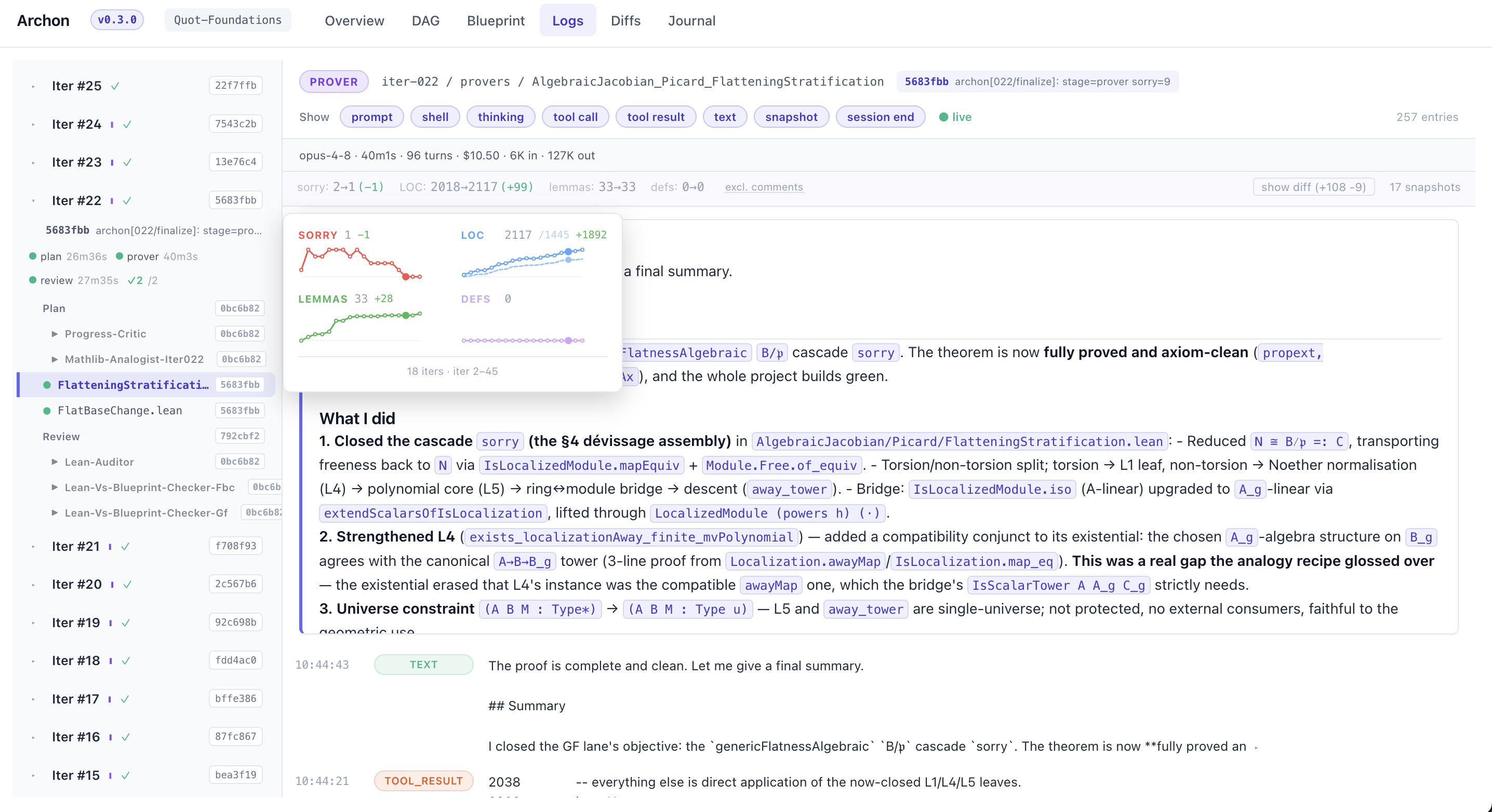
The Logs view groups logs by iteration with phase timing (plan → prover → review) and per-prover completion status. The subagents' logs can also be consulted. All of the logs are live-streamed.
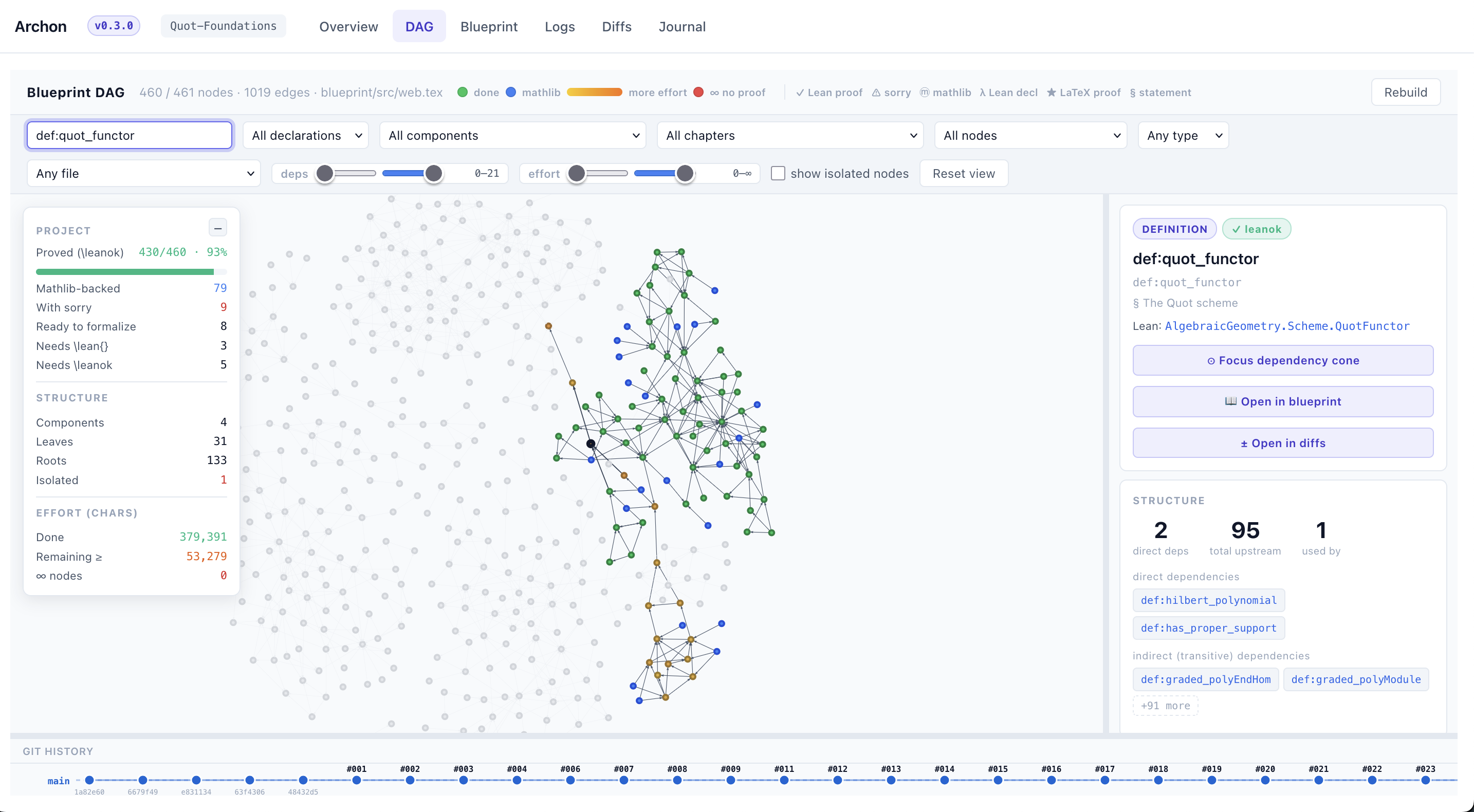
The DAG view renders the blueprint dependency graph interactively — nodes are colour-coded by status (proved / Mathlib-backed / ∞-effort), and clicking one shows its Lean name, status, and shortcuts to focus its cone or open it in the Blueprint / Diffs views. A git-history scrubber along the bottom replays the graph at any past iteration.
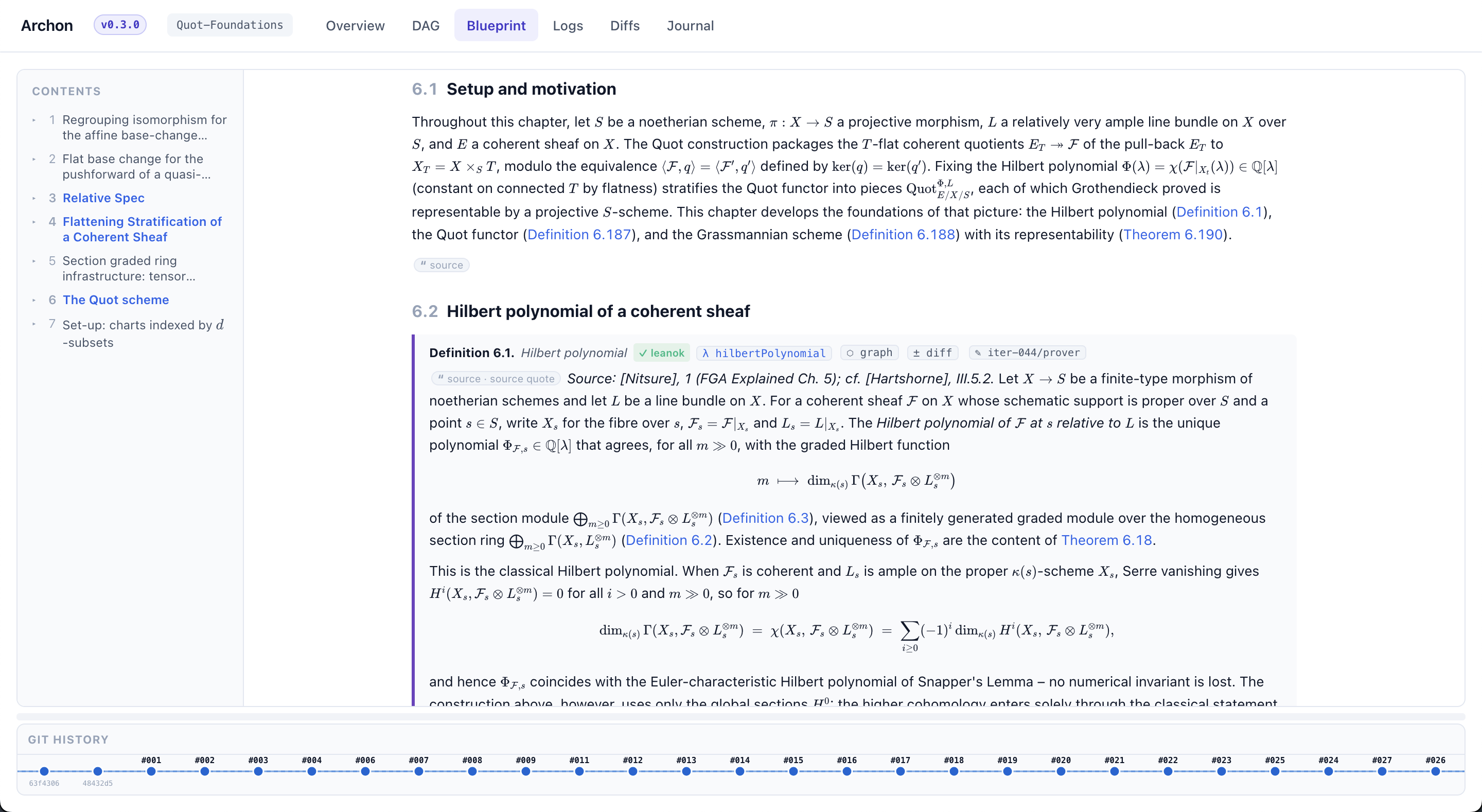
The Blueprint view renders the informal blueprint as a typeset document — chapters, definitions/theorems tagged with their \leanok / \mathlibok status, source citations, and per-declaration links into the graph and diffs.
The Journal view tracks proof milestones across sessions (which theorems were solved, blocked, or retried, with condensed reasoning traces), and the Diffs view replays per-iteration code snapshots — including a live fallback that reads the working tree when an iteration is mid-flight. When multi-lane is enabled, lane-specific logs and the per-file merge agent's output show up alongside the single-lane view.
You can also inspect state files directly:
.archon/logs/iter-<N>/**/*.jsonl— running log of agent activity. The latest iteration's files tell you whether agents are still working..archon/PROJECT_STATUS.md— overall progress: total sorries, what's solved, what's blocked, and reusable proof patterns..archon/proof-journal/sessions/session_N/summary.md— detailed record of a specific iteration: what was attempted, what succeeded, what failed, and why.
These are updated automatically by the review agent after each iteration.
Starting the dashboard manually
If you disabled the auto-launched dashboard, or want to look at a project after the loop has finished and the terminal is gone:
archon dashboard /path/to/your-lean-project -p <port>
Lean blueprint
The planner maintains blueprints with leanblueprint, which archon setup and archon init install and configure. Terence Tao's blog post explains how blueprints work and why they help.
In practice, Archon writes the informal .tex files before the corresponding .lean files, to guide its formalization. Run leanblueprint serve in the project directory to render the blueprints as HTML.
LeanDag
We built LeanDag as a separate repository, since it may be useful outside Archon. It is a small API for querying the DAG structure of a Lean project.
Why add it? LLMs tend to oversimplify dependencies in their internal representation of a project; a deterministic structure to query grounds Archon's work in the real DAG. It also gives a clear picture of each component's difficulty: it estimates effort from the character count of the informal proofs, recursively summing the effort of dependencies that are not yet proven. The estimate is rough, but it is only used to order the proving queue and to decide when to break a high-effort theorem into smaller lemmas.
Existing lean4-skills and lean-lsp MCP installations
If you already have lean4-skills or lean-lsp MCP installed globally, archon init detects them and disables them for this project only — so only Archon's modified versions are active. Your global installations are untouched and continue working in all other projects.
To restore the originals in an Archon project:
cd /path/to/your-project
claude plugin enable lean4-skills --scope project     # re-enable standard skills
claude mcp add lean-lsp -s project -- uvx lean-lsp-mcp  # re-enable standard MCP
Supplying informal material
Formalization quality improves materially when the agents have access to the original informal mathematics. Archon increasingly grounds its work in reference material: v0.2.0 introduced the retriever agent, and v0.3.0 added the blueprint-writing DAG loop, which makes Archon specify and quote its sources in the blueprints.
Archon can already retrieve references on its own; if it doesn't, add a permanent hint in USER_HINTS.md telling it to do so and to rely on them. One limitation: it cannot retrieve papers behind paywalls or textbooks that are not freely accessible.
There are several ways to supply such material:
- Papers and manuscripts — drop PDF or LaTeX files in
/references. - Blueprints — Archon works with blueprints natively; edit them or add your own chapters and Archon will use them (freeze the parts you don't want changed with
archon-protected.yaml). - Informal notes — provide notes in any format (e.g. markdown), in a
/notesdirectory or in/references. Freeze them if Archon should not edit them, and add a hint inUSER_HINTS.mdso Archon knows to use them.
Star History
Yorumlar (0)
Yorum birakmak icin giris yap.
Yorum birakSonuc bulunamadi