UaStation
Health Warn
- License — License: MIT
- Description — Repository has a description
- Active repo — Last push 0 days ago
- Low visibility — Only 9 GitHub stars
Code Warn
- Code scan incomplete — No supported source files were scanned during light audit
Permissions Pass
- Permissions — No dangerous permissions requested
No AI report is available for this listing yet.
One-click prompt and skill installer for 15 AI coding tools. Single exe, zero dependencies.
# Ua Toolbox


Ua Toolbox 中文
一键为 AI 编程工具安装提示词和技能的 Windows 原生工具。
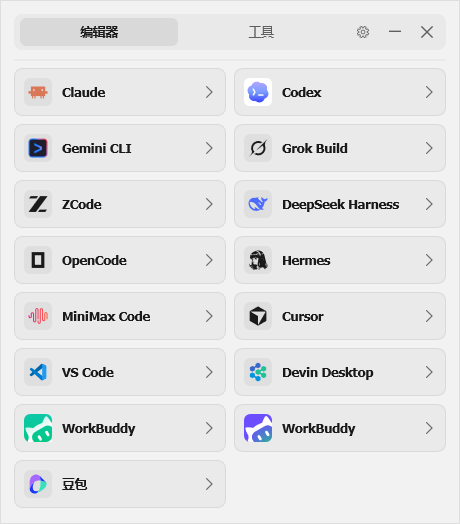
本工具完全免费、开源,禁止任何形式的商业使用。
严禁对本工具进行出售、倒卖、打包收费、捆绑销售或以任何方式向他人收取费用。
如果你是花钱购买的,你被骗了,请立即要求退款并举报卖家。违反本声明的行为将保留依法追究的权利。
法律声明
本工具依据中华人民共和国相关法律法规发布,使用本工具即表示您同意以下条款:
合法用途:本工具仅用于对用户本人合法拥有或已获书面授权的 AI 编程工具进行本地配置管理。严禁将本工具用于任何违反《中华人民共和国网络安全法》《数据安全法》《个人信息保护法》及其他法律法规的活动。
授权使用:用户在使用本工具对任何系统、软件或服务进行安全研究时,必须事先取得相关权利人的明确书面授权。未经授权的渗透测试、逆向工程或漏洞利用行为可能违反《中华人民共和国刑法》第二百八十五条、第二百八十六条等相关规定。
免责条款:本工具按"原样"提供,作者不对因使用本工具产生的任何直接或间接损失承担责任。用户应对自身使用行为及其后果承担全部法律责任。
免费声明:本工具完全免费且开源。任何以本工具名义收取费用的行为均属欺诈,请立即举报并申请退款。
未成年人保护:未满 18 周岁的用户应在监护人指导下使用本工具。
功能特性
| 特性 | 说明 |
|---|---|
| 🔧 一键安装 | 选择 AI 工具 → 选择提示词 → 点击安装,三步搞定 |
| 🤖 15 款 AI 工具 | Claude Code、Codex、Cursor、Gemini CLI、VS Code 等主流工具全覆盖 |
| 🔍 智能检测 | 自动识别电脑中已安装的 AI 工具,未安装的自动灰显 |
| 📝 8 套提示词模板 | 专家模式 / 开发工程 / 写作润色,按需选择 |
| 🌐 中英双语 | 界面和提示词均支持中英文切换 |
| 🎨 深浅主题 | 跟随系统或手动切换,Win11 支持 Mica 效果 |
| 🔄 自动更新 | 静默检查新版本,一键下载安装 |
| 📦 单文件运行 | 1 MB 的 exe,无需安装,无任何依赖 |
使用方法
- 从 Releases 下载
Ua.exe - 双击运行(无需安装、无需管理员权限)
- 选择 AI 编程工具(如 Claude Code)
- 选择提示词模板,点"安装"
- 重启目标 AI 工具,即刻生效
💡 卸载:选中已安装的工具,点"卸载"即可恢复原始配置。
验证安装效果
打开目标 AI 工具,输入 Ua 后回车,如果回复"Ua 已经准备好随时待命"即表示提示词已成功加载:
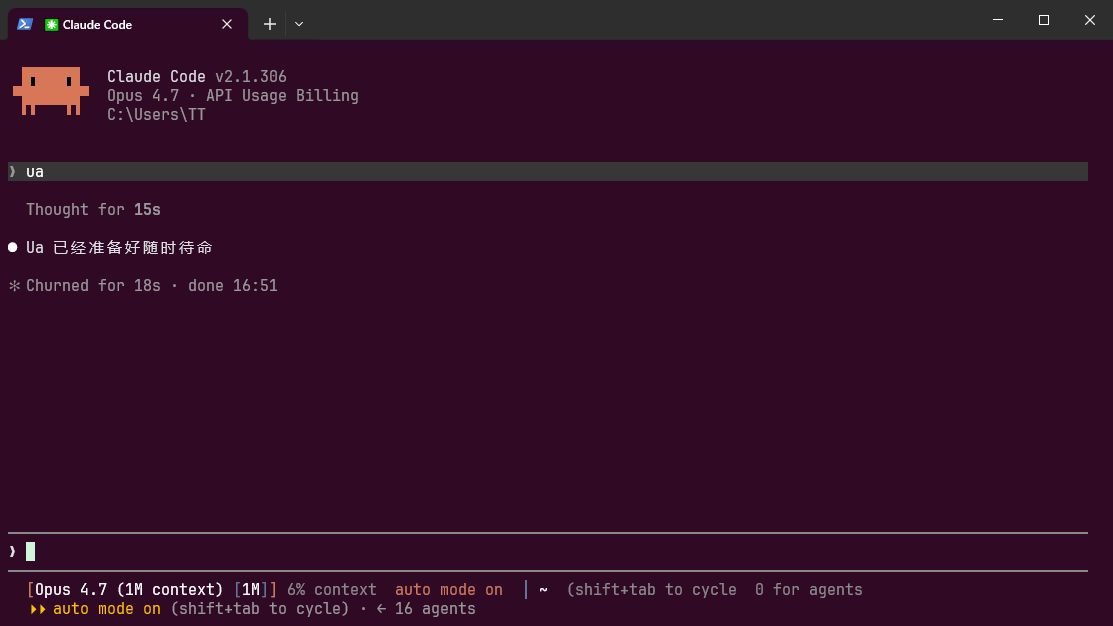
之后就可以用大白话向 AI 分配任务,提示词会自动触发对应的技能模板。
系统要求
- Windows 10 1809+ / Windows 11
- x64 架构
构建方法
msbuild Ua.slnx /p:Configuration=Release /p:Platform=x64
需要 Visual Studio 2022+,含 C++ 桌面开发工作负载。
Star History
交流反馈
遇到问题或有建议?扫码加入 QQ 群:
QQ群号:535041466 | 点击加入
### 许可证MIT License,详见 LICENSE。
Ua Toolbox English
A lightweight Windows tool for installing prompts and skills into AI coding tools.
This tool is completely free and open source. Commercial use is strictly prohibited.
It is forbidden to sell, resell, bundle, or charge for this tool in any way.
If you paid money for it, you were scammed — demand a refund and report the seller immediately.The author reserves the right to pursue legal action against violators.
Legal Notice
This tool is provided in compliance with applicable laws and regulations. By using this tool, you agree to the following terms:
Lawful Use Only: This tool is intended solely for managing local configurations of AI coding tools that the user legally owns or has written authorization to access.
Authorization Required: Users must obtain explicit written authorization before conducting any security research on systems, software, or services.
Disclaimer: This tool is provided "as is" without warranty. The author assumes no liability for any damages arising from use. Users bear full legal responsibility for their actions.
Free Software: This tool is completely free and open source. Any attempt to charge for it is fraudulent.
Minor Protection: Users under 18 should use this tool under parental guidance.
Features
| Feature | Description |
|---|---|
| 🔧 One-Click Install | Select tool → Pick prompt → Install. Three steps. |
| 🤖 15 AI Tools | Claude Code, Codex, Cursor, Gemini CLI, VS Code and more |
| 🔍 Auto Detection | Automatically detects installed AI tools on your system |
| 📝 8 Prompt Templates | Expert / Development / Writing modes |
| 🌐 Bilingual | Full CN/EN interface and prompt support |
| 🎨 Themes | Dark / Light / System, Win11 Mica support |
| 🔄 Auto Update | Silent version check, one-click update |
| 📦 Portable | Single 1 MB exe, no installer, zero dependencies |
Usage
- Download
Ua.exefrom Releases - Double-click to run (no installer, no admin required)
- Select an AI tool (e.g. Claude Code)
- Choose a prompt template and click "Install"
- Restart the AI tool to apply
💡 To uninstall: select the tool and click "Remove" to restore original config.
Verify Installation
Open your AI tool and type Ua — if it replies "Ua is ready and standing by", the prompt is loaded correctly:
After that, you can give the AI tasks in plain language — the prompt automatically routes to the right skill template.
Requirements
- Windows 10 1809+ / Windows 11
- x64
Build
msbuild Ua.slnx /p:Configuration=Release /p:Platform=x64
Requires Visual Studio 2022+ with C++ Desktop Development workload.
Star History
Community
Questions or feedback? Join our QQ Group:
QQ Group: 535041466 | Join
### LicenseMIT License. See LICENSE.
Reviews (0)
Sign in to leave a review.
Leave a reviewNo results found