funnest-charts
Health Gecti
- License — License: Apache-2.0
- Description — Repository has a description
- Active repo — Last push 0 days ago
- Community trust — 13 GitHub stars
Code Uyari
- process.env — Environment variable access in .github/workflows/release.yml
- fs module — File system access in .github/workflows/release.yml
- network request — Outbound network request in apps/playground/src/datafeeds/http.ts
Permissions Gecti
- Permissions — No dangerous permissions requested
Bu listing icin henuz AI raporu yok.
Open-source financial charts for investment apps: a TradingView-style trading chart, SVG chart components, CLI and MCP.

Funnest Charts
Open-source financial charts for investment apps.
A pro-grade trading chart and lightweight dashboard charts, with your data and your design.


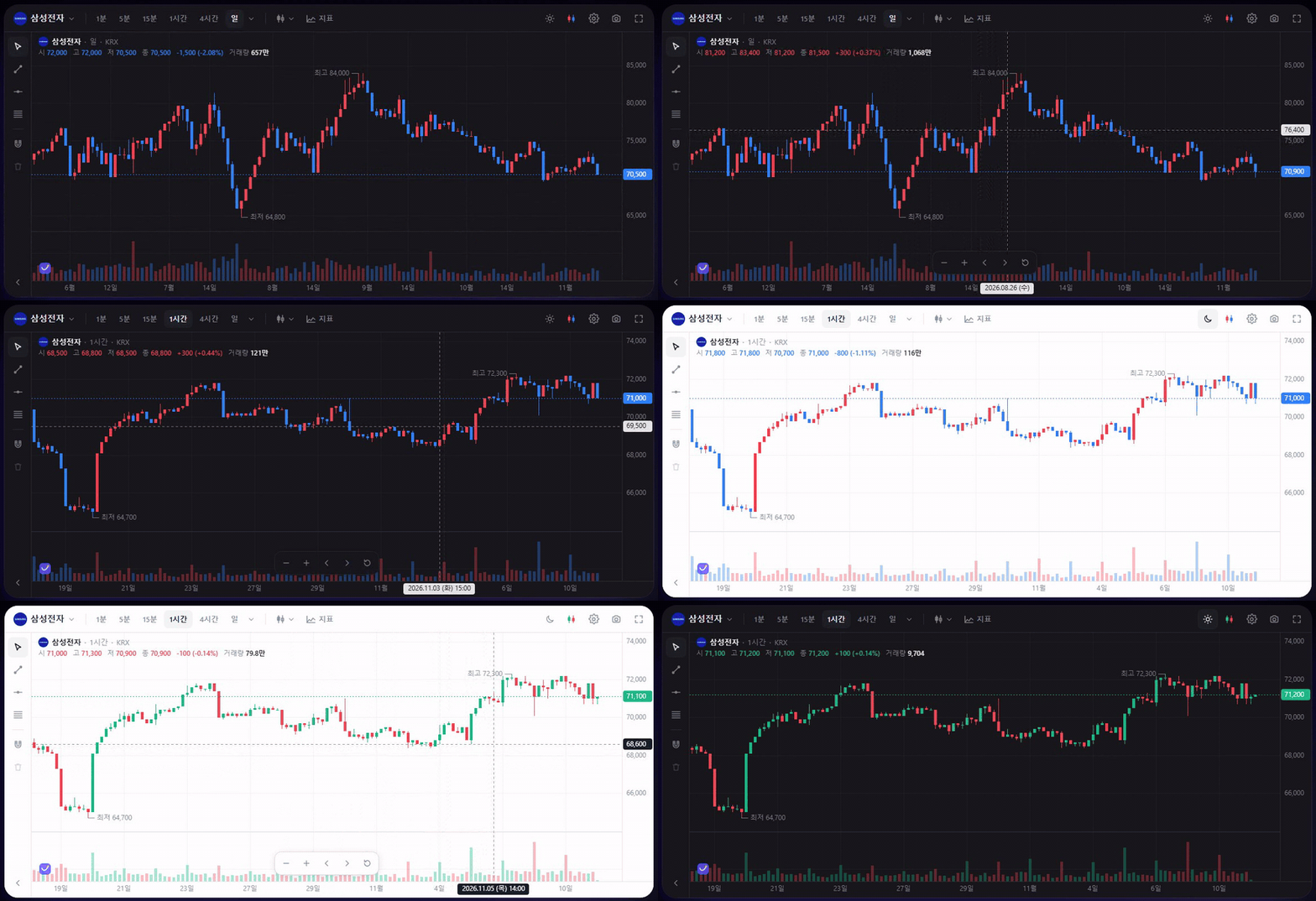
Why
- Runs in your page, not an iframe.
Background, fonts and up/down colors follow your design tokens. - Positions, open orders and fills on the chart, with drag-to-modify orders.
- Mouse and touch: pinch zoom, long-press crosshair, inertial scrolling.
- Korean market defaults: KST, KRX sessions and tick sizes, red-up / blue-down.
- No exchange code inside.
Connect any exchange or broker through oneDatafeedinterface.
Quick start
npm i @funnest/charts-react
import { FnChart } from '@funnest/charts-react';

<div style={{ height: 600 }}>
  <FnChart datafeed={myDatafeed} symbol="005930" resolution="1D" />
</div>
One package is enough for React.
It brings in the engine, the trading UI and the chart math automatically.
Dashboard charts
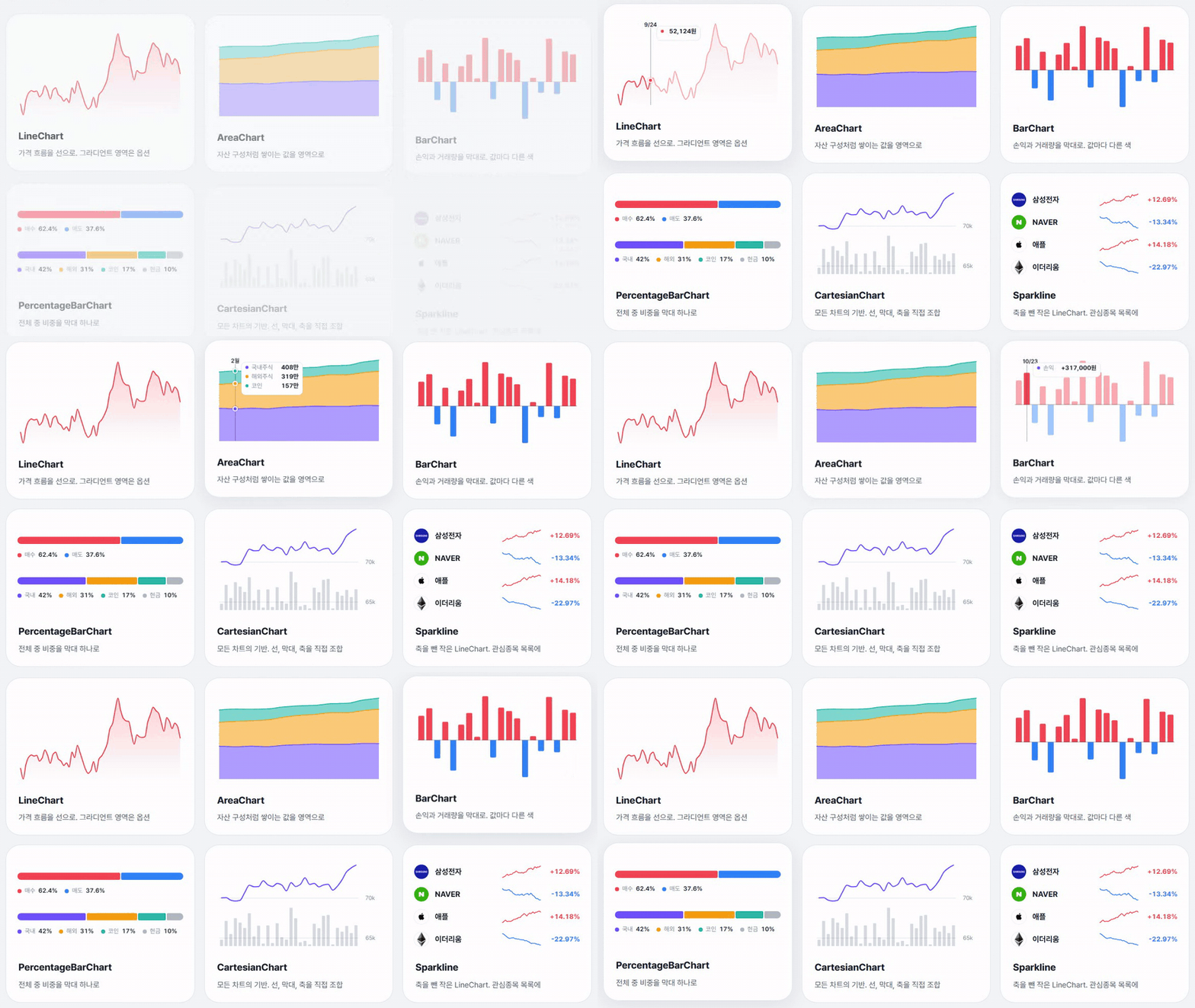
For return cards, watchlists and portfolios that don't need a full trading screen.
They are SVG and safe for server rendering.
import { LineChart, ReferenceLine, Point } from '@funnest/charts-react';

<LineChart series={[{ id: 'price', data: prices }]} area="gradient" scrubber={{ showValues: true }}>
  <ReferenceLine dataY={avgPrice} label="Avg. price" />
  <Point seriesId="price" dataX={prices.length - 1} pulse />
</LineChart>
| Component | Use |
|---|---|
LineChart · AreaChart · BarChart |
Price history, composition (stacked), P&L and volume, horizontal rankings (layout="horizontal") |
CandlestickChart |
A small candlestick chart with volume for cards and dashboards |
DonutChart |
Portfolio shares as a ring (or a pie), total in the middle |
TreemapChart |
Market maps: tiles sized by market cap, colored by change |
PercentageBarChart |
Portfolio weights, buy/sell pressure, several rows or vertical columns |
CartesianChart |
Compose your own from Line, Area, BarPlot, axes and annotations; several y axes (yAxisId) and [low, high] ranges for bands and floating bars |
XAxis · YAxis · Scrubber · PeriodSelector |
Axes, pointer tracking with value tooltips, period tabs |
ReferenceLine · Point · Legend |
Average/target price lines, trade markers, legends |
Packages
| Package | What it is |
|---|---|
@funnest/charts-react |
React: the <FnChart /> trading chart and the SVG chart components |
@funnest/charts-ui |
Trading chart widget for any framework (createTradingChart) |
@funnest/charts |
Canvas engine, indicators and realtime helpers |
@funnest/charts-viz |
Platform-neutral chart math shared by web and React Native |
@funnest/charts-cli |
funnest-charts command: validate specs, render SVG/PNG/HTML, generate React code |
@funnest/charts-mcp |
MCP server for AI tools such as Claude Code and Cursor |
AI · CLI · MCP
npx @funnest/charts-cli render spec.json --out chart.png      # spec → PNG / SVG / HTML / React code
claude mcp add funnest-charts -- npx -y @funnest/charts-mcp   # add the MCP server to Claude Code
The agent skill is in skills/funnest-charts.
A summary for LLMs is at /llms.txt.
Theme
The trading chart follows the OS light/dark setting by default and switches live (colorScheme: 'system').
Pin it with 'light' or 'dark', or override colors with theme.
The SVG components follow the page's color-scheme and the --fnv-* CSS variables.
Logo badge
The trading chart shows a small Funnest logo in its bottom-left corner.
Turn it off with attribution: false.
If you use Funnest Charts for free, keeping it on is the best way to support the project.
Development
pnpm install
pnpm dev          # playground (http://localhost:5173)
pnpm site         # website and docs (http://localhost:3100)
pnpm test         # unit tests
pnpm test:site    # build the website and run browser checks
pnpm typecheck
pnpm build
Releases are published from GitHub Actions with npm Trusted Publishing.
Bump the versions in packages/*/package.json, commit, then push a tag such as git tag v0.1.1 && git push origin v0.1.1.
License
Code is Apache-2.0.
The Funnest name and logos are trademarks and are not covered by the license (NOTICE).
Yorumlar (0)
Yorum birakmak icin giris yap.
Yorum birakSonuc bulunamadi