EchoIsland
Health Uyari
- License — License: MIT
- Description — Repository has a description
- Active repo — Last push 0 days ago
- Low visibility — Only 7 GitHub stars
Code Basarisiz
- os.homedir — User home directory access in apps/desktop/scripts/run-tauri.mjs
- process.env — Environment variable access in apps/desktop/scripts/run-tauri.mjs
Permissions Gecti
- Permissions — No dangerous permissions requested
Bu listing icin henuz AI raporu yok.
Free, open-source Dynamic Island-style desktop hub for AI coding sessions. Unify Codex, Claude Code & Cursor in one lightweight Tauri + Rust interface. Under 50MB.
EchoIsland — Dynamic Island for AI Coding Workflows

EchoIsland is a free, open-source Dynamic Island-style desktop hub that unifies AI coding sessions from Codex, Claude Code, OpenClaw, and future coding agents into one lightweight floating interface. It is Windows-first, actively gaining native macOS support, and built with Tauri + Rust for a small local-first footprint.




The Problem
The rise of AI coding tools has introduced a new productivity bottleneck: multi-tool fragmentation.
According to the JetBrains 2023 Developer Ecosystem Survey, over 50% of developers have adopted AI coding assistants. As tools like Codex, Claude Code, and Cursor mature, many developers now run two or three simultaneously — each in its own terminal window, each with its own approval flow, each with its own conversation context.
Research by Gloria Mark at UC Irvine found that it takes an average of 23 minutes and 15 seconds to return to a task after an interruption (Mark, Gudith & Klocke, "The Cost of Interrupted Work: More Speed and Stress," CHI 2008). Every time you switch between AI tool windows, you pay this cost.
The result:
- Approval notifications missed because you're focused on a different tool's output
- Conversation context lost across scattered terminals
- Repeated re-orientation when jumping between sessions
The Solution
EchoIsland is a lightweight desktop aggregation layer — not another editor, not another chat window. It sits on top of your existing tools as a Dynamic Island-style floating bar and unifies their states:
| What You Get | How It Works |
|---|---|
| Unified Session View | See all active AI sessions from one floating bar |
| Centralized Actions | Handle approvals, questions, and reminders in one place |
| Instant Context | Read latest prompt / reply without switching windows |
| Terminal Jump-back | One click to return to the related terminal window |
| Session Persistence | Auto-snapshot and recovery for interrupted sessions |
Preview
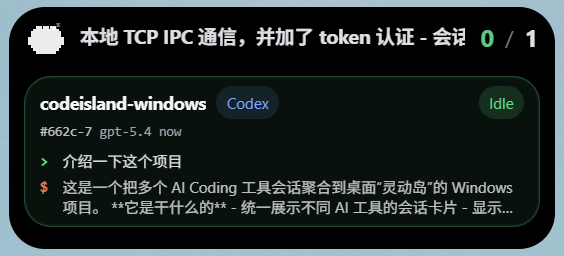
| Floating Bar | Approval / Question | Session Overview |
|---|---|---|
 |
 |
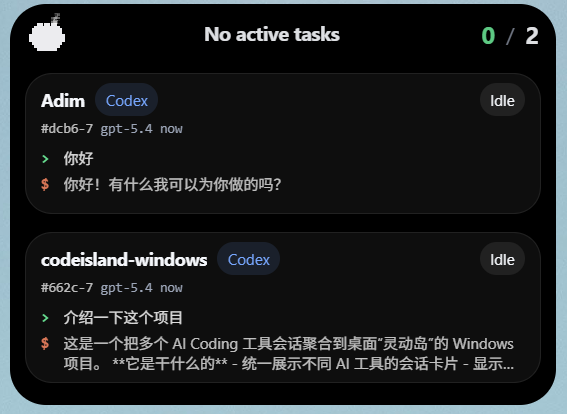 |
| Compact top-level entry for current task awareness | Unified handling for approvals and questions | Aggregated sessions with source and status context |
Development Status
| Area | Status | Notes |
|---|---|---|
| Windows desktop | ✅ Primary target | Tauri/Web UI, shaped floating island, installer packaging |
| macOS native island | 🧪 Active migration | Native panel, notch-aware layout, terminal jump-back, shared runtime |
| Linux desktop | 🧭 Not packaged yet | Rust core is portable; desktop shell work is not prioritized yet |
| Local-first runtime | ✅ Available | TCP IPC, HTTP receiver, persistence, blocking request cleanup |
How EchoIsland Compares
| Feature | EchoIsland | Nimbalyst | Vibe Island |
|---|---|---|---|
| Architecture | Tauri + Rust | Electron | Swift |
| Memory | < 50MB ¹ | ~200MB | < 50MB |
| Open Source | ✅ MIT | ❌ | ❌ |
| Interaction | Dynamic Island floating bar | Kanban board + rich editor | Notch panel |
| Platform | Windows / macOS experimental | macOS / Windows / Linux | macOS only |
| Session Persistence | ✅ Auto-snapshot + recovery | ✅ | ❌ |
| Visual Editing | ❌ (aggregation layer) | ✅ Markdown / mockup / code | ❌ |
| Mobile App | ❌ | ✅ iOS | ❌ |
| Price | Free | Free | One-time purchase |
¹ Tauri apps use the OS-native webview instead of bundling Chromium, resulting in 50–80% lower memory usage compared to Electron-based apps (Tauri Architecture Overview).
Best for: Developers who want a lightweight, always-on session awareness layer — not a full workspace — with Dynamic Island-style quick access, Rust-level performance, and zero cloud dependencies. It remains Windows-first while native macOS support is being actively migrated.
How It Works
AI tools / hooks / local session files
                │
                ▼
           adapters         ← Tool-specific adapters (Codex, Claude Code, ...)
                │
                ▼
              ipc            ← Local TCP with token-based auth (< 2ms latency)
                │
                ▼
            runtime          ← Session state machine + event aggregation
                │
        ┌───────┴────────┐
        ▼                ▼
      core         persistence  ← Snapshot + auto-recovery
        │
        ▼
   desktop UI        ← Tauri floating island interface
Two ingestion paths:
- Realtime event path — tool events enter through
hook-bridge→ipc→runtime - Fallback scanning path — when realtime hooks are unavailable, local session scanning extracts recent dialogue and state from tool history files automatically
Current Capabilities
- Unified event protocol and session state machine
- Local TCP IPC and HTTP receiver with token-based authentication
- Blocking approval / question request cleanup when a bridge or peer disconnects
- Session snapshotting and persistence recovery
- Automatic cleanup for sessions inactive > 30 minutes
- Codex and Claude Code session scanning with adaptive polling
- Approval cards, question cards, completion reminders, and message queues
- Terminal jump-back on Windows and experimental macOS terminal focus
- Native macOS island panel with notch-aware compact layout (experimental)
desktop-hostdebug CLI andhook-bridgebridge program- NSIS and MSI installer packaging for Windows
Supported Integrations
| Source | Status | Notes |
|---|---|---|
| Codex local sessions | ✅ Available | Scans Codex history and session files for recent state |
| Codex hooks | ⚠️ Partially available | Hook install/status supported; Windows live hooks remain limited by upstream Codex runtime behavior |
| Claude Code local sessions | ✅ Available | Scans ~/.claude/projects transcripts with adaptive polling |
| Claude Code hooks | ✅ Available | Installs global hooks through ~/.claude/settings.json and forwards through hook-bridge |
| OpenClaw hooks | ✅ Available | Installs a hook pack and forwards events through the local HTTP receiver |
| Cursor | 🧭 Reserved | Protocol-level space reserved for future integration |
Quick Start
Requirements
- Windows 10/11, or macOS for the experimental native island path
- Rust toolchain
- Node.js + npm
Run Desktop App
npm run desktop:dev
On Windows PowerShell, npm.cmd run desktop:dev is also fine.
Start Local Debug Host
cargo run -p desktop-host
Scan Local Sessions
cargo run -p desktop-host -- codex-scan
cargo run -p desktop-host -- claude-scan
Install Hook Adapters
Build the bridge first, then install the adapters you need:
cargo build -p echoisland-hook-bridge
cargo run -p desktop-host -- install-codex
cargo run -p desktop-host -- install-claude
cargo run -p desktop-host -- install-openclaw
Build Installer
npm run desktop:build
Produces:
EchoIsland Windows_0.1.0_x64-setup.exe(NSIS)EchoIsland Windows_0.1.0_x64_en-US.msi(MSI)
Repository Layout
apps/
  desktop/         → Tauri desktop app
  desktop-host/    → Local debug host / CLI
  hook-bridge/     → Hook forwarding bridge

crates/
  adapters/        → Tool adapters and scanning logic
  core/            → Protocol, state machine, derived state
  ipc/             → Local TCP IPC
  persistence/     → Session persistence
  runtime/         → Runtime orchestration and aggregation

samples/           → Sample events for testing
Who Is EchoIsland For?
- Multi-tool developers — using Codex + Claude Code + Cursor simultaneously
- Terminal-heavy users — want less window switching, more keyboard-driven flow
- Windows developers — a native AI coding hub for a category that has often been macOS-first
- macOS testers — help validate the experimental native island and terminal jump-back flow
- Engineering teams — exploring AI coding workflow aggregation patterns
- Open-source builders — reference architecture for local desktop host + Rust runtime
FAQ
What is EchoIsland?
EchoIsland is a free, open-source desktop hub that aggregates AI coding sessions from multiple tools into one unified floating-island interface. It is Windows-first, has active experimental macOS support, and is built with Tauri + Rust for a lightweight local-first runtime.
How is EchoIsland different from Nimbalyst?
Nimbalyst is an Electron-based visual workspace with a kanban session board, rich file editors (markdown, mockups, code), and an iOS mobile app. EchoIsland takes a different approach: it's a Tauri + Rust lightweight aggregation layer (under 50MB vs Nimbalyst's ~200MB) with a Dynamic Island-style floating bar. EchoIsland focuses on real-time session state awareness and quick terminal jump-back rather than visual editing. It's also fully open-source under MIT — Nimbalyst is not.
How is EchoIsland different from Vibe Island?
Vibe Island is a macOS-only native Swift app that monitors AI agents from the MacBook notch. EchoIsland brings a similar Dynamic Island interaction model to Windows, and is fully open-source under the MIT license. If you're on Windows, EchoIsland is one of only two native options in this category (alongside Nimbalyst).
Is EchoIsland free?
Yes. EchoIsland is completely free and open-source under the MIT license. No cloud account required, no subscription, no usage limits.
Does EchoIsland send data to the cloud?
No. EchoIsland is entirely local-first. All session data stays on your machine. There are zero cloud dependencies — it communicates with AI tools through local TCP IPC only.
What AI coding tools does EchoIsland currently support?
Codex, Claude Code, and OpenClaw have working integration paths today. Codex and Claude Code support local session scanning; Claude Code and OpenClaw support hook forwarding; Codex hooks on Windows remain limited by upstream runtime behavior. Cursor is reserved at the protocol layer for future expansion.
Can I use EchoIsland on macOS or Linux?
EchoIsland is Windows-first, but macOS support is actively being migrated with a native island panel and terminal jump-back work. Linux is not packaged yet, although the Rust core is designed to be platform-portable.
Why Tauri instead of Electron?
Tauri uses the OS-native webview instead of bundling a full Chromium instance. For a tool that runs alongside multiple AI coding agents already consuming significant resources, this difference matters: EchoIsland stays under 50MB while a comparable Electron app would typically use 200–500MB.
Built By
EchoIsland is built by FunplayAI, a team building AI-powered game development tools. We use multiple AI coding agents daily across our game AI projects — EchoIsland was born from our own need to manage the resulting session fragmentation.
Other projects by FunplayAI:
- funplay-unity-mcp — MCP Server for Unity Editor
- funplay-cocos-mcp — MCP Server for Cocos Creator
- funplay-godot-mcp — MCP Server for Godot Engine
Contributing
We welcome contributions. EchoIsland is MIT-licensed and open to PRs, issues, and feature requests.
References
- Mark, G., Gudith, D., & Klocke, U. (2008). "The Cost of Interrupted Work: More Speed and Stress." Proceedings of CHI 2008. ACM. — Context switching costs for knowledge workers.
- JetBrains (2023). "Developer Ecosystem Survey 2023." — AI coding assistant adoption rates among developers.
- Aggarwal, P., Murahari, V., et al. (2023). "GEO: Generative Engine Optimization." arXiv:2311.09735. Princeton University. — Research on optimizing content visibility in AI search engines.
- Tauri Contributors. "Architecture Overview." tauri.app — Tauri vs Electron resource comparison.
License
MIT — free to use, modify, and distribute.
Yorumlar (0)
Yorum birakmak icin giris yap.
Yorum birakSonuc bulunamadi