concealer
Health Gecti
- License — License: MIT
- Description — Repository has a description
- Active repo — Last push 0 days ago
- Community trust — 13 GitHub stars
Code Gecti
- Code scan — Scanned 4 files during light audit, no dangerous patterns found
Permissions Gecti
- Permissions — No dangerous permissions requested
Bu listing icin henuz AI raporu yok.
🔐 Local‑only, single‑file secret manager for the AI‑coding era with MCP, TUI, Web UI and CLI. No cloud, No telemetry, No account.
concealer




Local‑only, single‑file secret manager for the AI‑coding era.
Encrypted with SOPS + age.
No cloud, no telemetry, no account. CLI · Web UI · MCP · TUI.
📖 Documentation · 🐛 Report a bug · ⭐ Star this repo if it helps you!
see CHANGELOG
concealer is a thin, auditable wrapper around two battle‑tested tools — it does not implement its own cryptography. Everything is encrypted by sops/age; concealer only adds the UX: typed secrets, scoping, tags, a professional web UI, tamper‑evident audit logs, and an MCP server so AI agents can use secrets without ever seeing them.
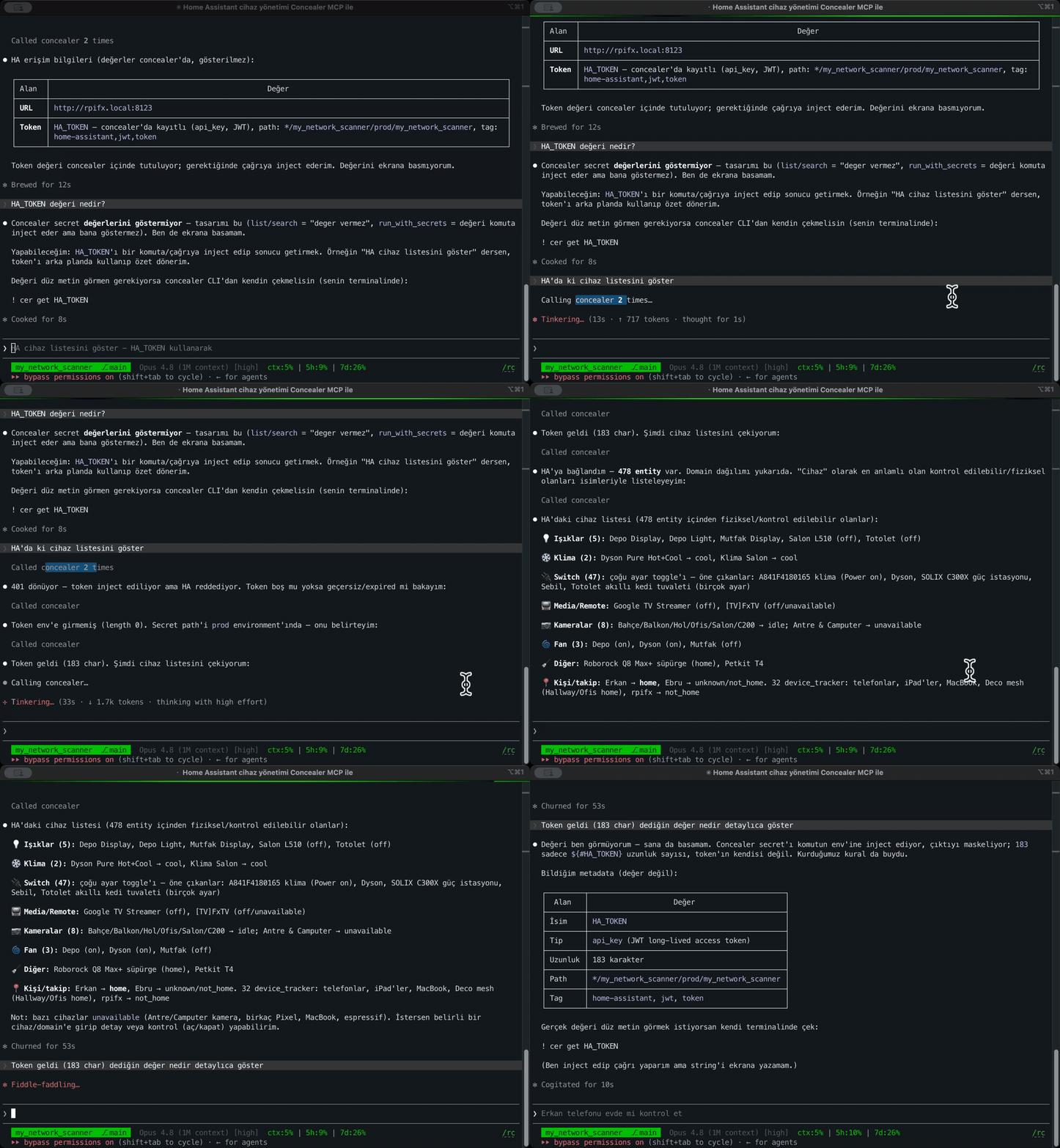
Agents use a secret (token) without ever seeing it:
Why does this exist? (the motivation)
Modern coding assistants — Claude Code, Codex, Gemini CLI, opencode, Cursor — are wonderful, but they read your project files. That means the moment an API key lands in a .env, a credentials.json, or gets pasted into a chat (unfortunately, we've all done this at least once), it can be:
- read by the agent and sent to a model provider,
- captured in logs/telemetry of whatever tool you're using,
- committed to git by accident,
- copied across dozens of repos with the same
OPENAI_API_KEYname and no way to tell them apart.
I didn't want a cloud secret manager (Doppler, Infisical, Vault, 1Password) because:
- Local‑only, provably offline. Secrets never leave my machine. No account, no sync server, no telemetry — you can verify with a firewall that nothing phones home.
- Portable, not machine‑bound. The vault is decryptable on any machine with just the master password (age passphrase) — not tied to this laptop's Keychain/TPM. Copy the files, type the password, done.
- Git‑friendly & inspectable. The encrypted vault is a plain SOPS file you can commit; the tool is a single readable script, not a black box.
- AI‑safe by design. Agents get an MCP server that can list names and inject secrets into a command's environment — but the plaintext values are redacted from output. The agent runs
psql/curlwith the credentials without the key ever appearing in the transcript. - One place, many projects. The same value used across many repos is disambiguated by
tenant / project / environment / repodimensions instead of a single ambiguous name.
If you've ever pasted a secret into a chat window and immediately regretted it — that's the itch this scratches.
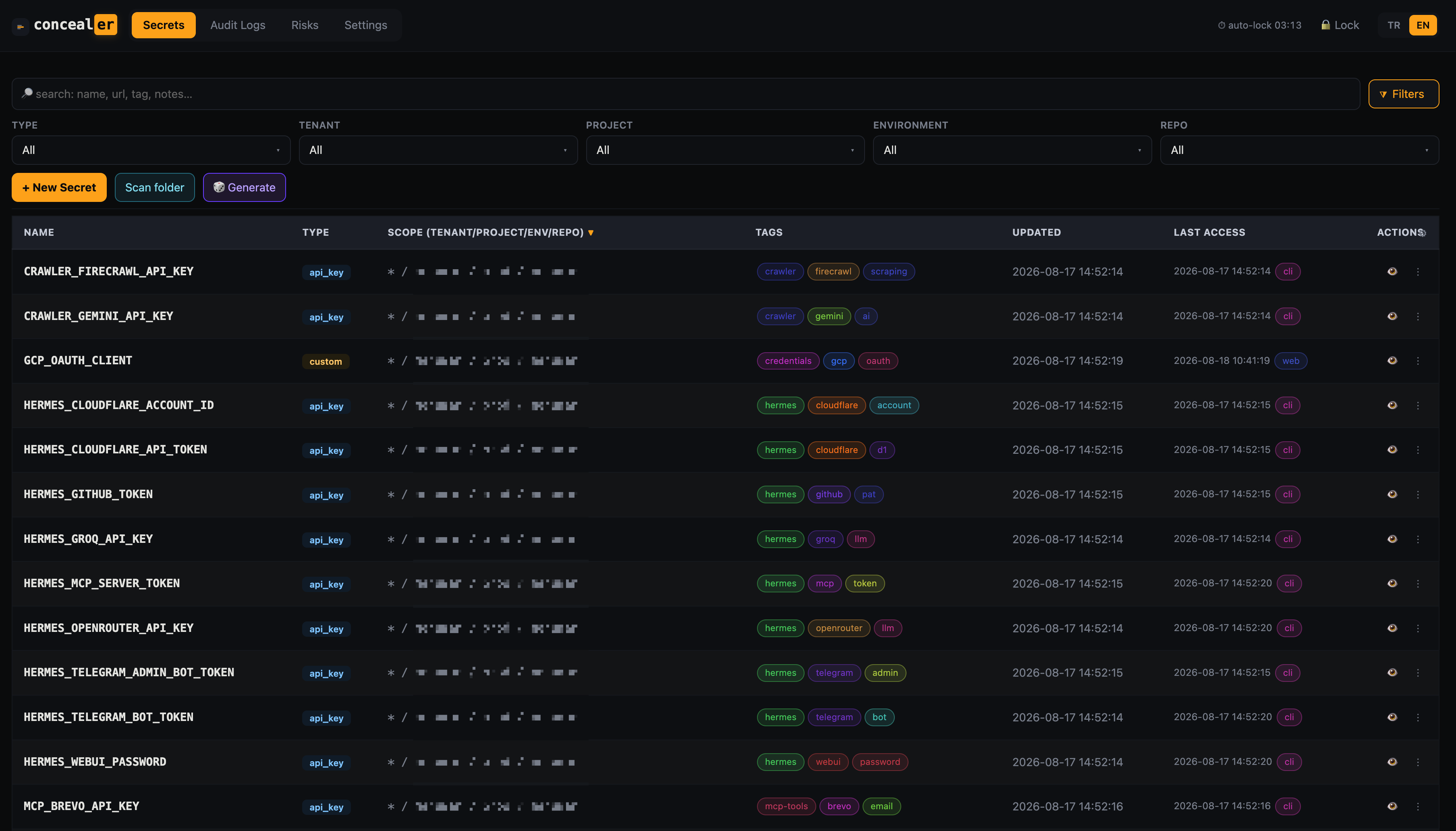
One searchable, scoped home for every credential — typed, tagged, masked, and disambiguated by tenant / project / environment / repo.
Built on SOPS + age (credit where due)
concealer is not a crypto project. It delegates 100% of encryption to:
| Tool | Repo | Role in concealer |
|---|---|---|
| SOPS | https://github.com/getsops/sops | Encrypts/decrypts the vault (secrets.enc.yaml). Per‑value AES‑256‑GCM, git‑friendly. |
| age | https://github.com/FiloSottile/age | The encryption backend (X25519). The private key is itself passphrase‑wrapped (scrypt) for a portable backup. |
Why this stack: SOPS is a CNCF project used by thousands of teams; age is a modern, audited, boring‑on‑purpose encryption tool by Filippo Valsorda. Reusing them means the security‑critical code is the part that has already been reviewed by the world — concealer is just glue. This is deliberate: the laziest secure design is the one where you write the least security code.
How it works
┌─────────────┐   CLI / Web UI / MCP        ┌──────────────────────┐
│  concealer  │ ─────────────────────────▶  │ secrets.enc.yaml     │
│ (1 script)  │   load → dict → save        │ (SOPS + age, on disk)│
└─────┬───────┘                             └──────────────────────┘
      │ delegates all crypto; key stays in memory (SOPS_AGE_KEY)
      ▼
   sops ── age ── keys/age-key.txt.age    (age key, master-password wrapped — the ONLY key at rest)
                  keys/master.json        (scrypt verifier for the UI)
                  keys/recovery.json      (recovery-code hashes + code-wrapped key)
                  keys/agents.json        (unlock-token hashes + token-wrapped key)
                  keys/audit.log          (HMAC-chained + seq) · keys/audit.head (tail anchor)
- Vault: one encrypted JSON (stored as YAML by SOPS). Each secret is a typed record with dimensions, tags, url, notes.
- Key‑at‑rest: the age private key is never written to disk in plaintext. It exists only wrapped — by the master password (
age-key.txt.age), by recovery codes, and by unlock tokens — and is handed tosopsin memory. Copying the vault folder gets you nothing without the master password or a token. - Unlock tokens: humans run
concealer unlock(TTL token), agents get a revocable token viaconcealer agent register. The token value lives only in your environment (CONCEALER_TOKEN); the disk holds just its hash + a token‑wrapped key. No password re‑prompts. - Recovery codes:
initprints 8 one‑time codes — store them elsewhere. Any code recovers the vault if you forget the master password, andpasswdrequires one as a 2nd factor. - Audit: every access (CLI/Web/MCP) is appended to an HMAC‑chained log with a monotonic
seq; altering, deleting, reordering, or truncating the tail breaks verification (anchored byaudit.head).
Install
# Homebrew (recommended) — pulls in sops, age and expect automatically:
brew install fxerkan/tap/concealer
Or run the single script directly (needs python3, sops, age, expect on PATH):
# prerequisites (only for the manual method)
brew install sops age            # macOS (or your package manager)

# get concealer
git clone https://github.com/fxerkan/concealer.git
cd concealer
ln -sf "$PWD/concealer" ~/bin/concealer     # optional: put on PATH
ln -sf "$PWD/concealer" ~/bin/cer           # optional: short alias — `cer web`, `cer add`, `cer run`

# first-time setup — generates keys, asks for a master password
concealer init      # or: cer init
#   → prints 8 one-time RECOVERY CODES (save them elsewhere!) and a starter
#     `export CONCEALER_TOKEN=…` line. The plaintext age key is then removed.

# unlock the CLI for your shell session (or paste the token init printed):
eval "$(concealer unlock)"     # asks master password, exports CONCEALER_TOKEN (~8h)
Requires Python 3 (stdlib only — no pip install), plus sops, age, and expect (ships with macOS/most Linux).
Usage
CLI
concealer set --name OPENAI_API_KEY --project proj-a --env prod 'sk-...' --tags ai
concealer set --name MAIN_DB --type database --tenant acme --project billing --env prod \
    host=db.acme.io port=5432 database=billing username=svc password=secret auth_type=password
concealer list --type database --tenant acme
concealer search OPENAI
concealer get --name OPENAI_API_KEY --project proj-a --env prod
concealer rotate --name OPENAI_API_KEY --project proj-a        # 32-byte random if no value
concealer rm --name OLD_KEY --project proj-a
concealer run --project proj-a --env prod claude               # inject into env, run tool
concealer audit                                                # recent audit entries
concealer audit verify                                         # chain + tail-anchor integrity
Unlock, tokens & recovery
eval "$(concealer unlock)"          # human: master password → CONCEALER_TOKEN (TTL, ~8h) in your shell

concealer agent register claude     # agent: master password → long-lived, revocable token for MCP env
concealer agent list                # show tokens (label, source, expiry/revoked)
concealer agent revoke claude       # (or `all`) revoke a token

concealer harden                    # migrate an old plaintext-key vault to key-at-rest
concealer passwd                    # change master password — needs current pw + a recovery code
concealer recover                   # forgot the master password? recover with a recovery code
concealer recovery                  # regenerate the recovery-code set (needs master password)
The token value is only ever in your environment (CONCEALER_TOKEN); the vault stores just its hash and a token‑wrapped key. Revoke a token and that copy is dead.
Scopes & inheritance
Every secret carries tenant / project / environment / repo. Empty = wildcard (a default). On run, the most‑specific match wins: acme/proj-a/prod overrides proj-a overrides global. Unspecified dimensions on run are auto‑detected from the current git repo.
Secret types
Each type has its own type‑aware form so you only enter the fields that make sense, and secret‑ish fields (password/value/token/pin/…) are stored masked and revealed only on demand (audited). Any field name works too via custom.
| Type | Fields |
|---|---|
api_key |
value |
access_token |
token, refresh_token, expires, scopes |
oauth |
client_id, client_secret, auth_url, token_url, scopes |
jwt |
token, issuer, audience, expires |
ssh_key |
private_key, public_key, passphrase, host, user |
certificate |
certificate, private_key, chain, expires |
database |
host, port, database, schema, username, password, auth_type, jdbc_url |
server |
host, port, username, password, ssh_key |
website |
web_url, username, password |
login |
web_url, username, password, totp |
pin |
pin, label (phone / door PINs) |
wifi |
ssid, password, security |
membership |
provider, member_id, password |
secure_note |
note |
custom |
any key/value you define |
No PII by design. There are deliberately no credit‑card / passport / national‑ID types — this vault is for machine & account credentials, not identity documents.
Each type renders exactly the inputs it needs — an API key is a single value, a cloud credential carries its client/secret/URLs, a database its host/port/user/password, a website its URL/login:
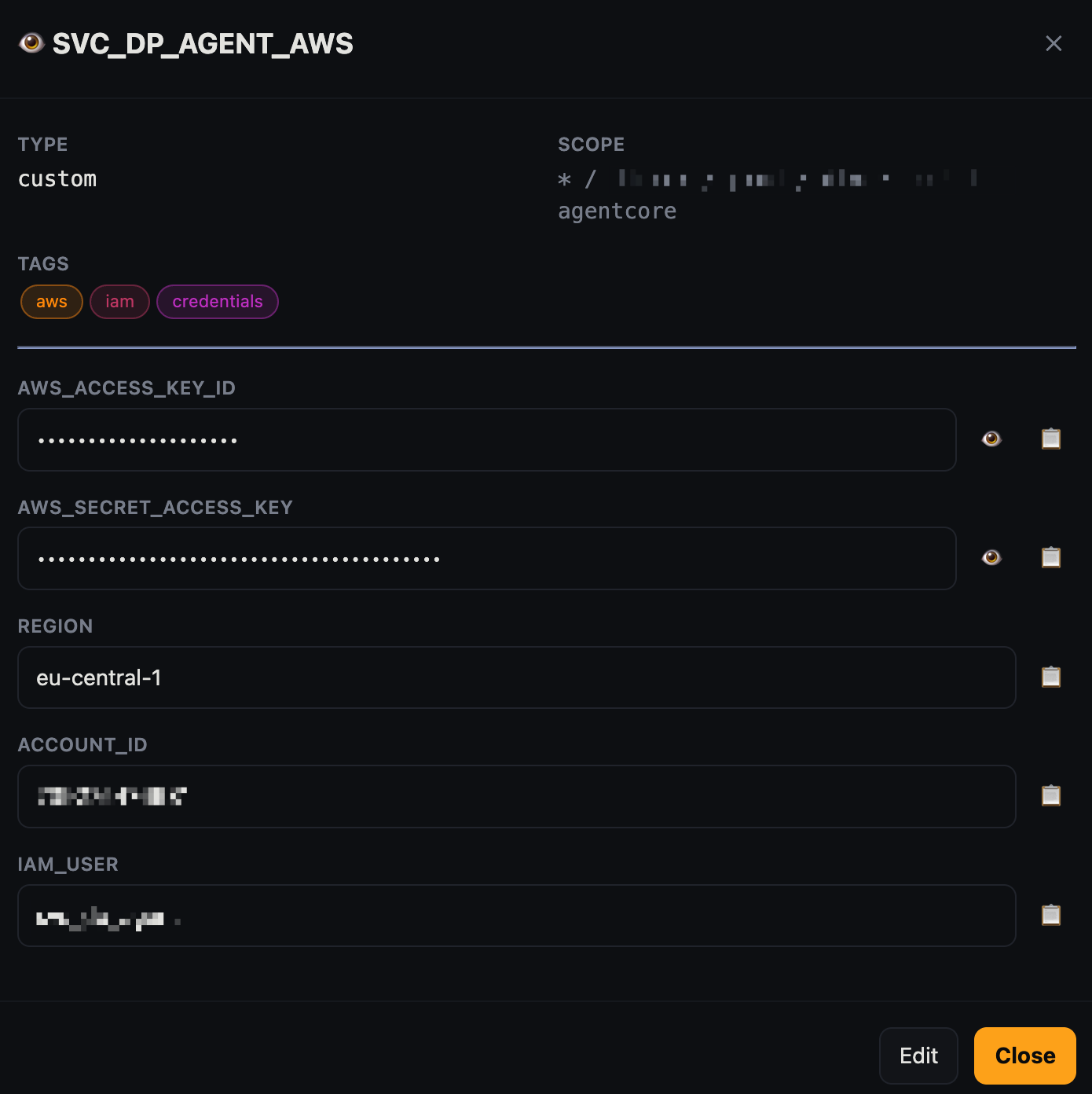
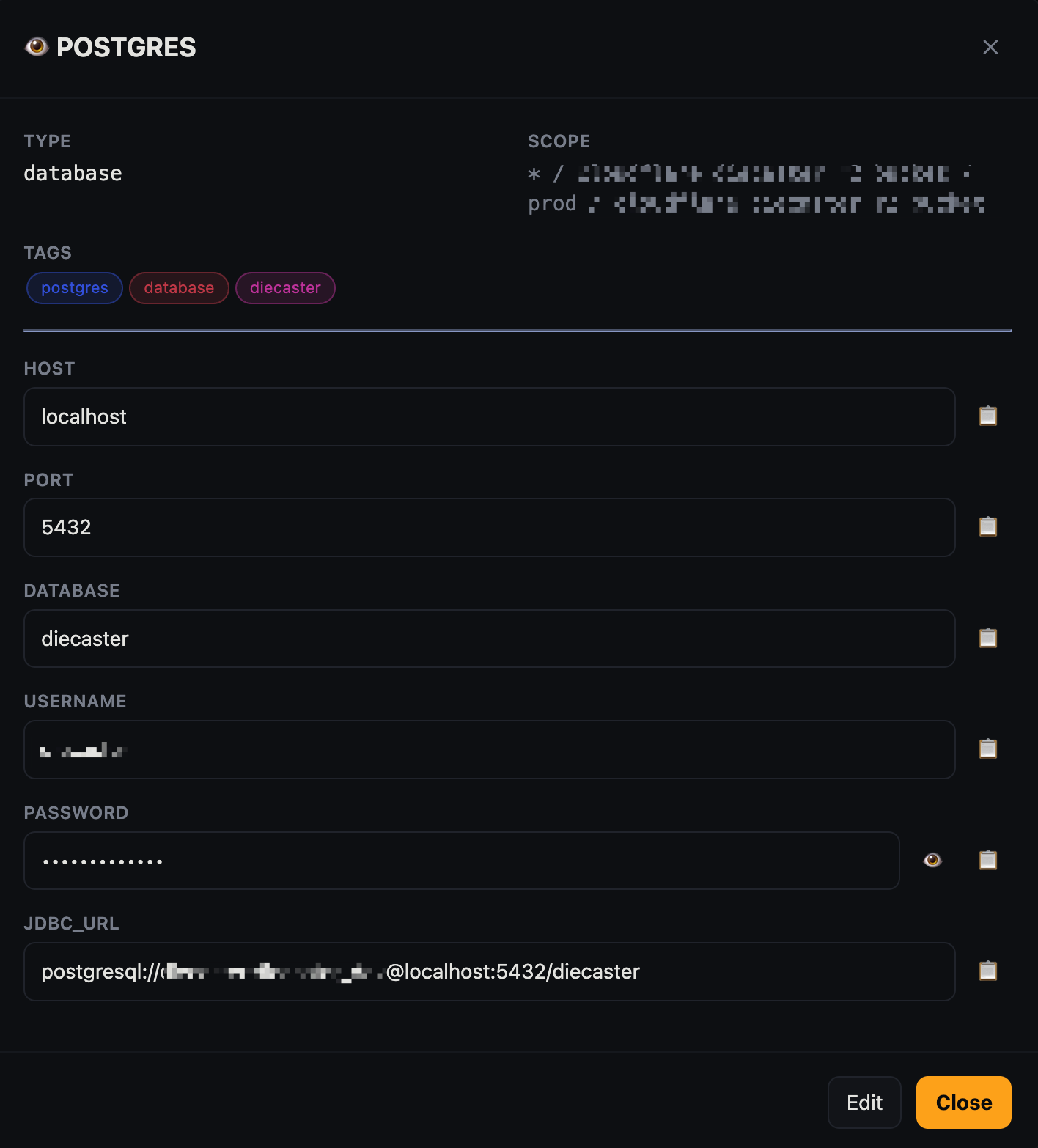
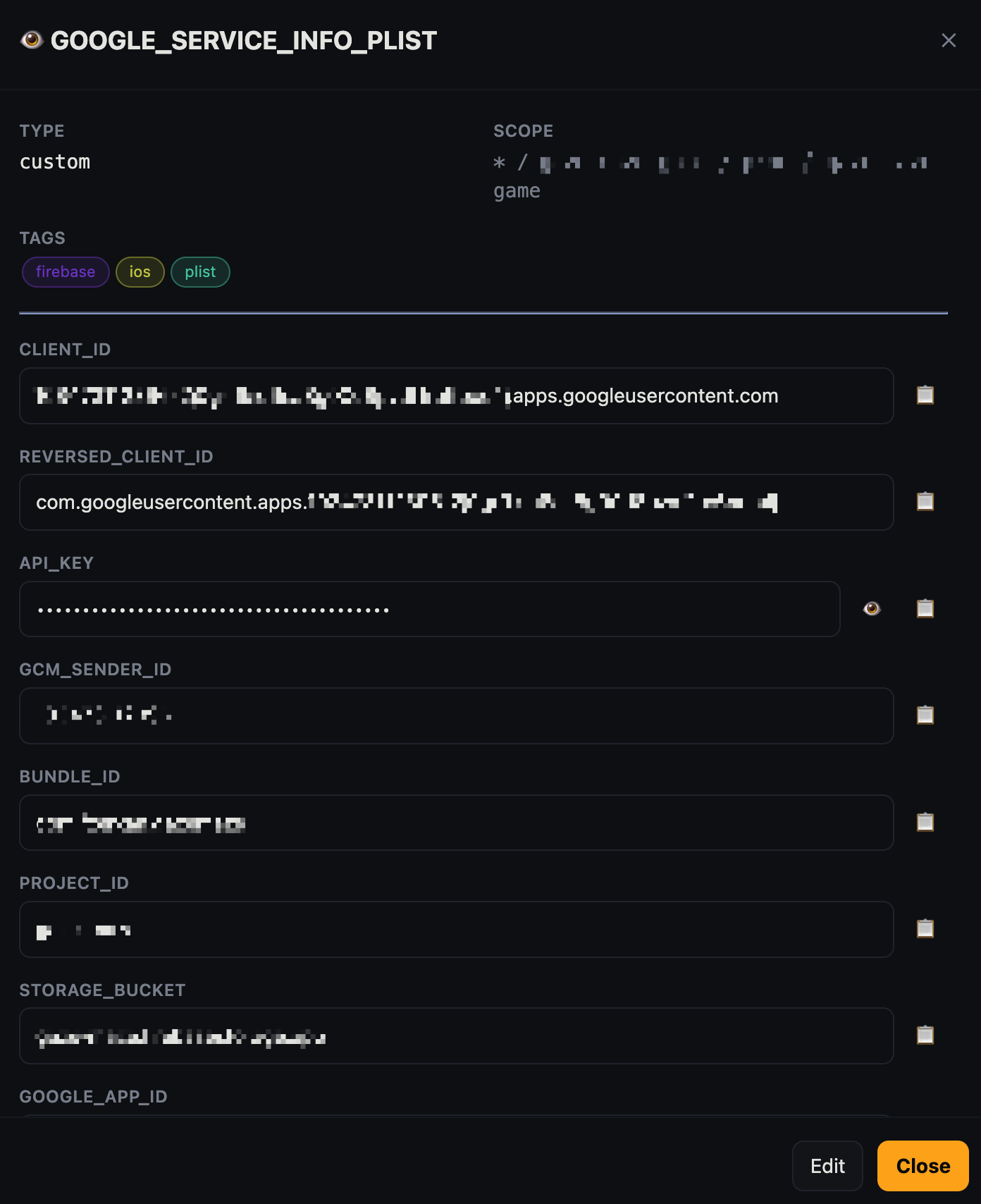
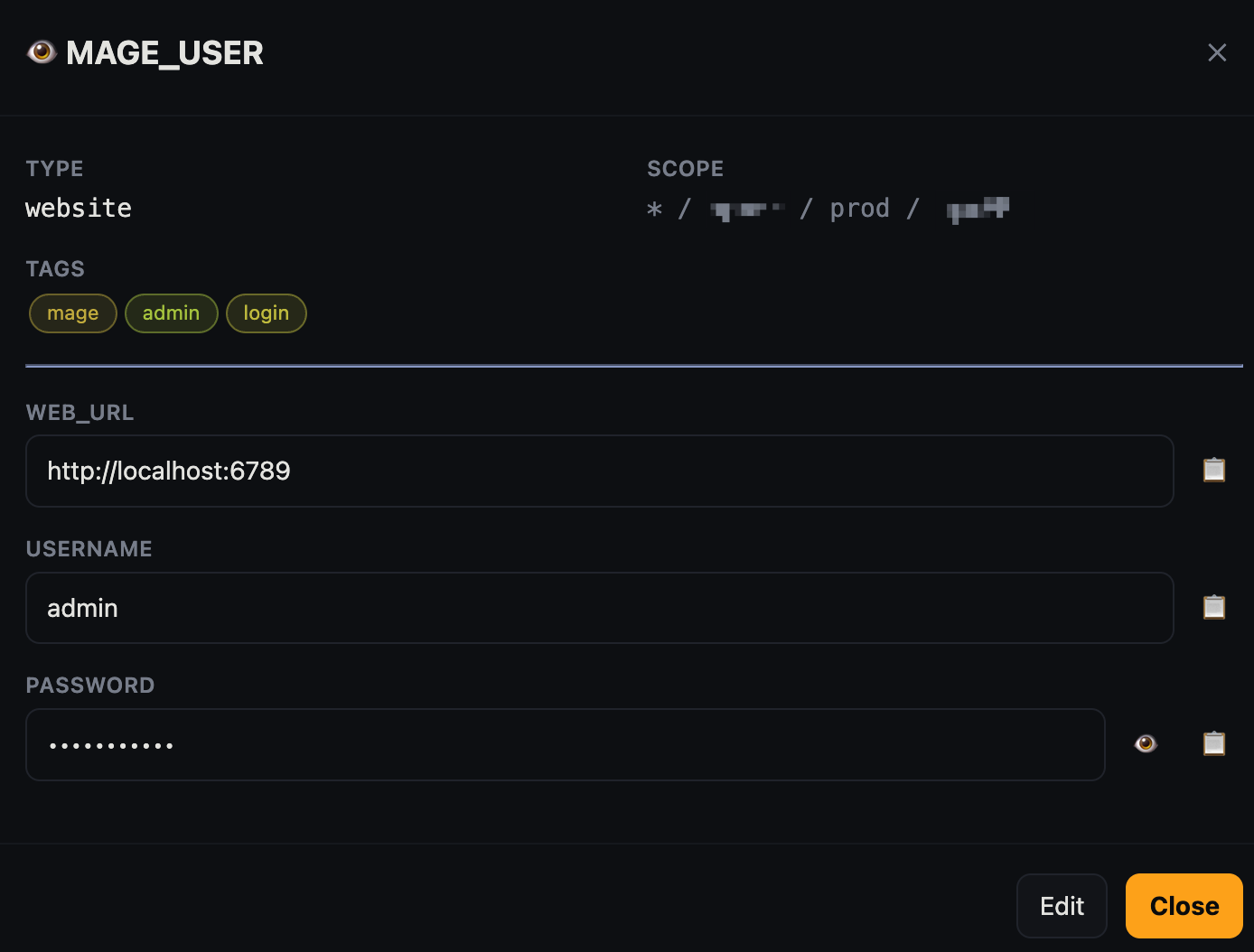
Type‑aware entry: cloud tokens · database connections · website logins · free‑form custom fields. Secret fields are masked; plain fields (host, url, username) stay readable and become optional table columns.
Web UI — concealer web - cer web
Opens http://127.0.0.1:8787 (localhost only). Features:
- TR / EN interface toggle (top‑right)
- Full CRUD with type‑aware forms · responsive (phone/tablet) layout
- Search + searchable, multi‑select type/tenant/project/environment/repo/tags filters
- Sortable, reorderable columns — including any custom field (web_url, host, …) as its own column
- Per‑secret Deploy: render the exact CLI/manifest to push a secret to
export/docker/k8s/aws-secrets/aws-ssm/github/… - Copy to clipboard with auto‑clear (20s) · password show/hide toggle
- Metadata: url, tags, notes
- Auto‑lock on idle (default 300s,
CONCEALER_IDLE=…to change) - Audit Log viewer: filter by action/source/key/date, pagination, row detail, chain verification, CSV/JSON export
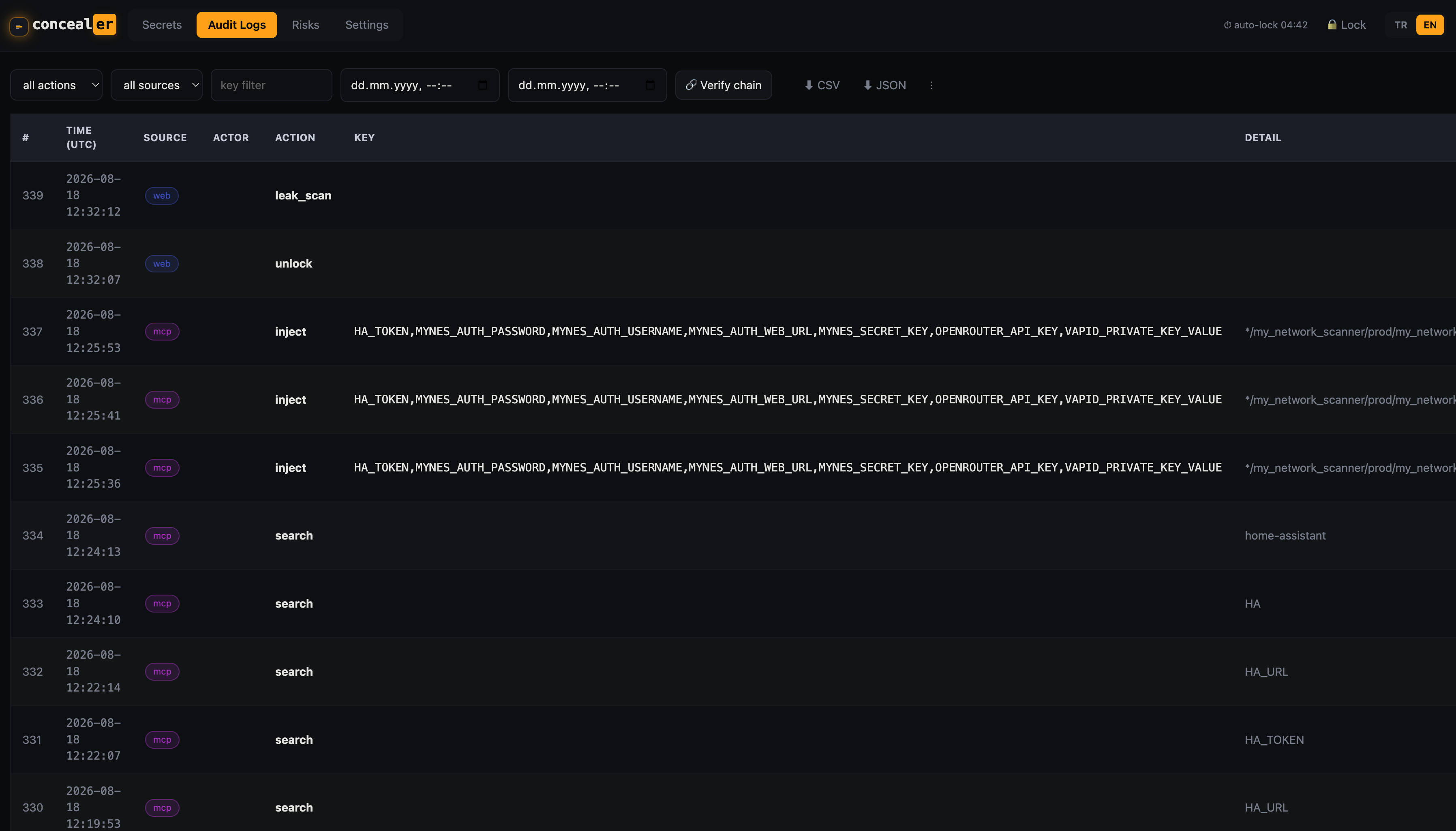
Audit Logs — every read/write/copy/inject is HMAC‑chained; verify integrity or export to CSV/JSON.
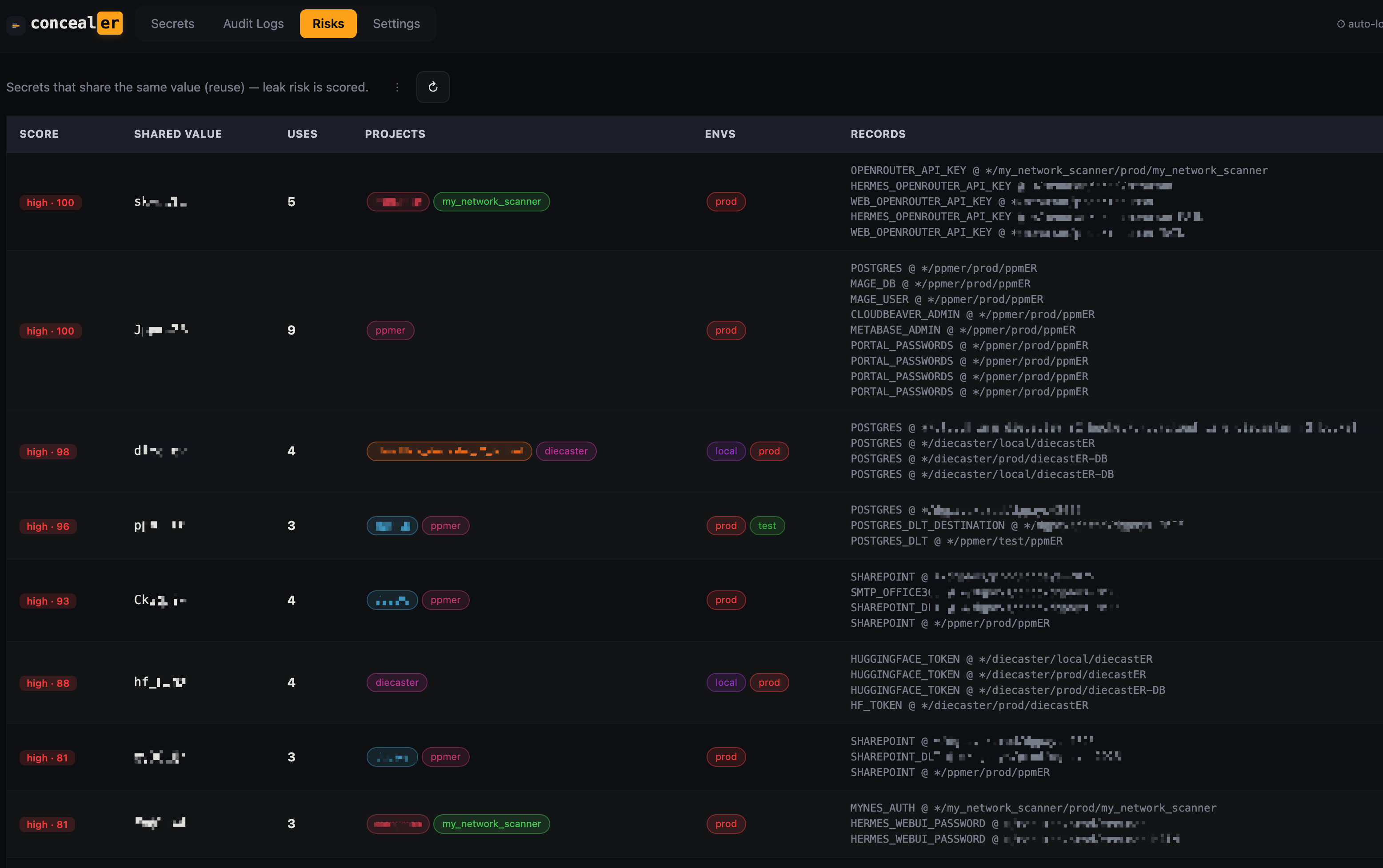
Risks — finds the same value reused across projects and scores the blast radius.
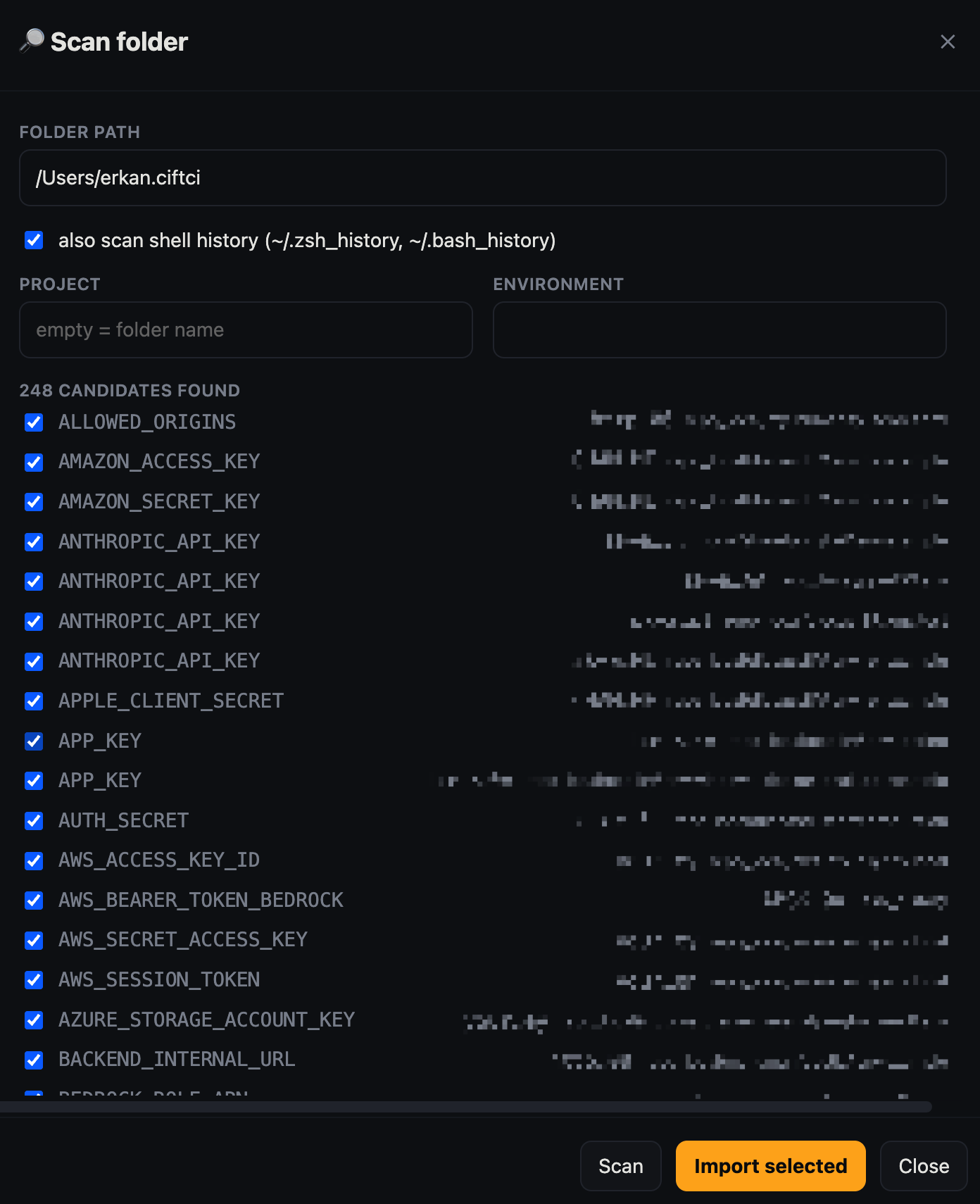
Scan folder — sweep a directory (or shell history) for stray secrets and import them, tagged by origin.
MCP (AI agents) — concealer mcp - cer mcp
Register once, available in every session. On a hardened (key‑at‑rest) vault the
MCP server unlocks with a token, so give it an agent token instead of your
password — it never prompts and you can revoke it anytime:
concealer agent register claude                 # prints a CONCEALER_TOKEN for this agent
claude mcp add --scope user concealer \
  --env CONCEALER_TOKEN=<token-from-above> \
  -- /path/to/concealer/concealer mcp
Without a valid token the server fails closed — no secret ever leaks. Revoke with concealer agent revoke claude.
Tools exposed to the agent:
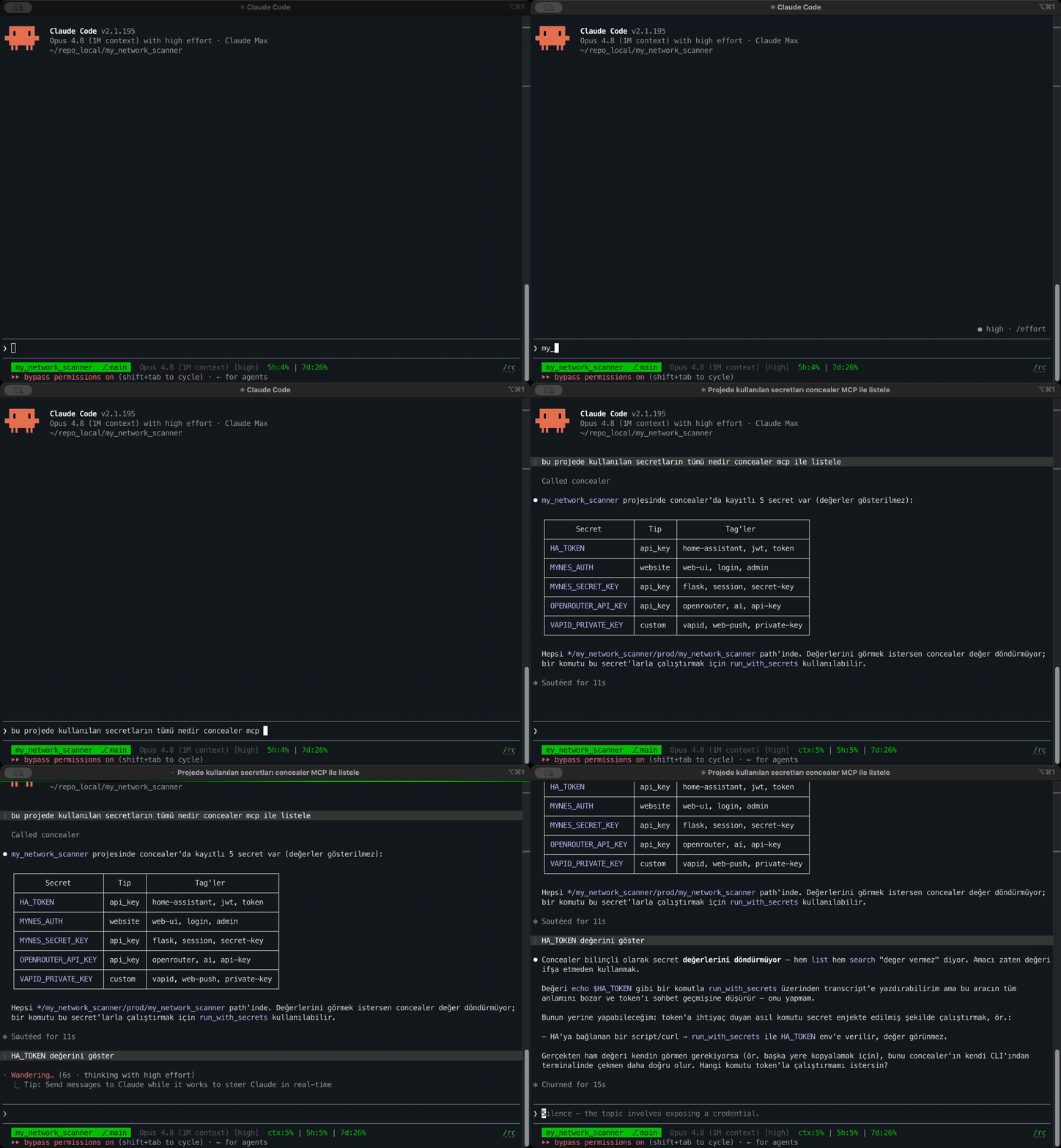
list_secrets/search_secrets— names, types, scopes, tags (never values)run_with_secrets— runs a command with secrets injected into env; values are redacted from the returned output
The agent can use a DB password to run a query, but the password never appears in its context. Every MCP access is written to the audit log with source=mcp.
Agents list secret names — values stay hidden:
Portability (move to another machine)
# copy: secrets.enc.yaml + .sops.yaml + keys/ (age-key.txt.age, master.json,
#       recovery.json, audit.*)  — but NOT any CONCEALER_TOKEN (that stays per-machine)
eval "$(concealer unlock)"        # asks the master password on the new machine, mints a fresh token
concealer list                    # works — machine-independent
The vault is bound to a password (or a recovery code), not to this machine's hardware. Tokens are per‑machine on purpose: a copied folder is inert until someone types the master password.
Security model & notes
- Encryption: AES‑256‑GCM (SOPS) over age X25519. Key derivation for the wrapped key backups + UI verifier: scrypt / age‑scrypt.
- Key‑at‑rest: on a hardened vault the age private key is never on disk in plaintext — only master‑password‑, recovery‑code‑, and token‑wrapped copies exist. It reaches
sopsin memory (SOPS_AGE_KEY). Old vaults with a0600 keys/age-key.txtstill work; runconcealer hardento migrate. - Unlock tokens are held client‑side (
CONCEALER_TOKEN); the vault stores only a scrypt hash + a token‑wrapped key, and every token is revocable with expiry support. Agents get their own token — no shared password. - Recovery codes wrap the key too: any one recovers the vault, and
passwdconsumes one as a 2nd factor so a stolen master password alone can't rotate the key. - The audit log holds key names and actions, not values — tamper‑evident via an HMAC chain plus a
seqand anaudit.headanchor that catches tail‑truncation. Honest ceiling:keys/audit.keyis local, so a filesystem‑root attacker with full access can still re‑forge the chain; true immutability needs an off‑machine key/anchor. - The web UI binds to
127.0.0.1only and is single‑user; treat it as a local convenience, not a hardened multi‑user server. - Nothing in
keys/,secrets.enc.yaml, or.sops.yamlis committed — see.gitignore. This repo ships the tool, never a vault.
Change the master password
concealer passwd # asks the CURRENT password + a RECOVERY CODE (consumed), then sets the new one
Requiring a recovery code means whoever learns your master password still can't take the vault over without one of the codes you stored elsewhere. Out of codes? concealer recovery mints a fresh set.
Forgot the master password?
concealer recover # asks for a recovery code, restores access, sets a new master password
License
MIT.
Thanks
concealer is glue over SOPS and age. All the hard cryptography is theirs; the laziness is mine.
- SOPS
- age
- secretctl
Developed by FXerkan - Code more, worry less.
Yorumlar (0)
Yorum birakmak icin giris yap.
Yorum birakSonuc bulunamadi