OpenProgram
Health Warn
- License — License: AGPL-3.0
- Description — Repository has a description
- Active repo — Last push 0 days ago
- Low visibility — Only 5 GitHub stars
Code Fail
- spawnSync — Synchronous process spawning in cli/src/commands/handler.ts
- process.env — Environment variable access in cli/src/commands/handler.ts
- network request — Outbound network request in cli/src/commands/handler.ts
Permissions Pass
- Permissions — No dangerous permissions requested
No AI report is available for this listing yet.
The Open Source Agent Harness Framework. Any LLM. Any platform. Agentic Programming Paradigm. ♾️

Open-Source, General-Purpose Agent Harness — Build Your Workflows in Python.
Any LLM · Any Platform







Getting Started · Docs · API Reference · Philosophy · 中文
"The more constraints one imposes, the more one frees oneself."
— Igor Stravinsky, Poetics of Music
We propose Agentic Programming. An LLM is flexible; code is deterministic. Let the model run everything and you get chaos — unpredictable execution, context explosion, no output guarantees; hard-code everything and you lose the intelligence. A harness balances the two, interleaved moment to moment — Python for the flow you want fixed, the LLM for the judgement you can't script. (the full rationale →)
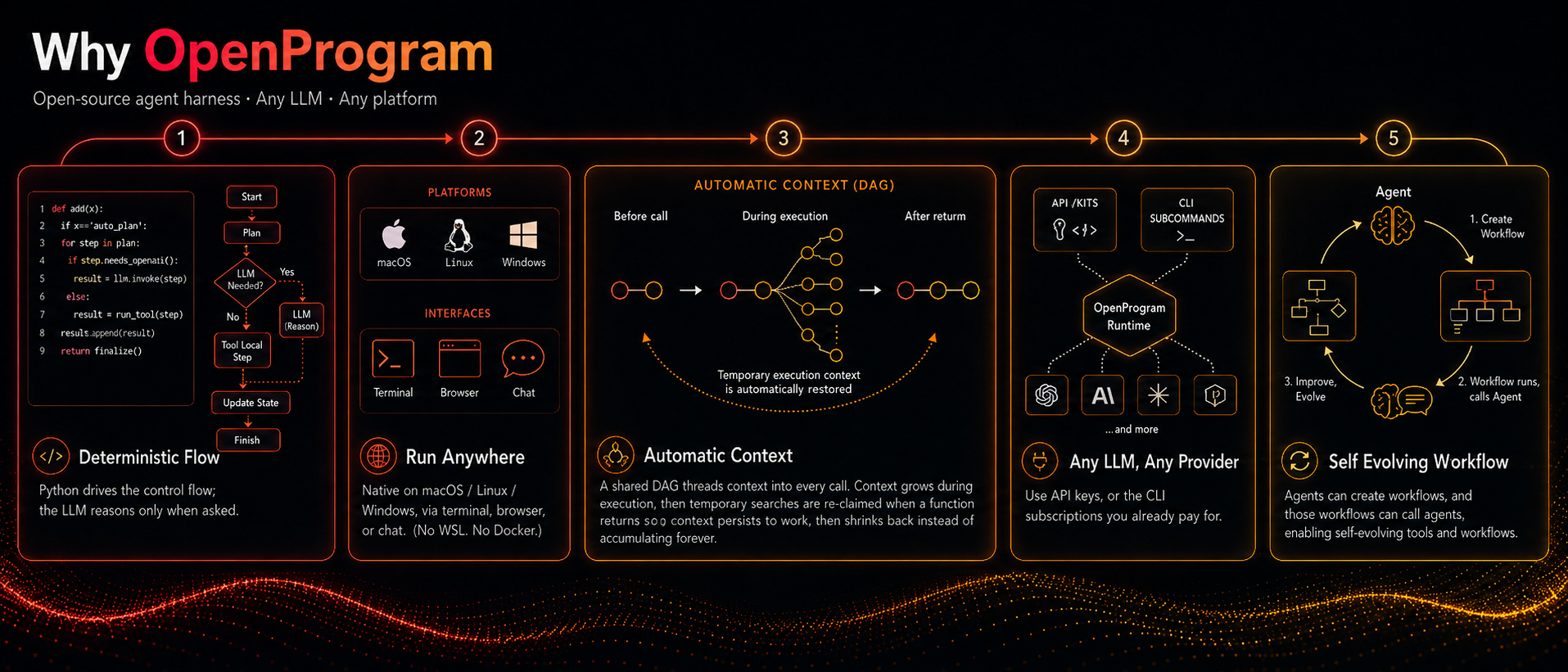
- Deterministic flow, flexible reasoning — Python drives the control flow; the LLM reasons only when asked.
- Run it anywhere — native on macOS / Linux / Windows, via terminal, browser, or chat (no WSL, no Docker).
- Automatic context — a shared DAG threads context into every call; multi-agent ready.
- Any LLM, any provider — API key, or the CLI subscription you already pay for.
- Self-evolving workflows — the agent builds, runs, and improves its own workflows and tools.
Quick Start
1. Install
pip install openprogram                             # TUI + web UI in one wheel
openprogram setup                                   # interactive provider wizard
setup adopts any CLI you're already logged into (Claude Code / Codex / Gemini) and prompts for API keys otherwise. On exit the worker is live — web UI on :18100, API on :18109.
Set a key instead — or log into a CLI provider (claude / codex / gemini) and openprogram setup adopts it:
export ANTHROPIC_API_KEY=sk-ant-...    # Claude
export OPENAI_API_KEY=sk-...           # GPT
export GOOGLE_API_KEY=...              # Gemini
Check with openprogram providers. Priority: Claude Code → Codex → Gemini CLI → Anthropic → OpenAI → Gemini.
2. Chat — pick a surface
openprogram                                         # terminal UI (default)
openprogram web                                     # browser UI
openprogram --print "summarise this file"           # one-shot, no UI
One backend (~/.openprogram/) behind both — a terminal session shows up in the browser and vice versa. The web UI adds the mini-DAG, branch / merge, multi-agent, and attachments; the terminal UI auto-picks Ink (macOS/Linux) or Rich (Windows).
3. Write your own functions
Just ask the agent in chat — "create an @agentic_function that summarises a PDF" — and the bundled agentic-programming skill handles location, decorator, smoke test, and validation.
4. Add the harness suite (optional)
Three sibling harnesses run as OpenProgram programs (inside this install). Add one by name:
openprogram programs install research # or: gui / wiki
It clones into functions/agentics/, pip-installs that harness's own deps, and auto-registers on the next worker restart (or hit Refresh on the Functions page). No symlinks — identical on Windows. Any third-party harness works the same: docs/installing-harnesses.md.
| Harness | What it does | Track record |
|---|---|---|
| GUI Agent Harness | Observe → plan → click → verify by vision; drives desktop apps & OSWorld VMs. Runs on macOS / Windows / Linux (perception macOS-tuned). | OSWorld Multi-Apps 79.8% (72.6 / 91) |
| Research Agent Harness | Literature survey → idea → experiments → paper draft → cross-model review. | Topic → submission-ready draft |
| Wiki Agent Harness | Ingests notes / docs / chats into an Obsidian-compatible vault with [[wikilinks]]. |
Obsidian vault output |
Optional extras
| Extra | Adds |
|---|---|
[anthropic] / [openai] / [gemini] |
Provider SDKs |
[browser] |
Playwright (~150 MB) |
[browser-stealth] |
Cloudflare-bypassing browsers |
[channels] |
Discord / Slack / WeChat bots |
[all] |
Everything except [browser-stealth] |
Post-install steps and per-extra notes: docs/install.md. The harness suite (GUI / Research / Wiki) is not an extra — install those via openprogram programs install <name> (step 4).
Troubleshooting
Two diagnostic commands cover most "it broke and I don't know why" situations:
openprogram rescue          # 11 platform-agnostic probes, each with a fix command
openprogram doctor          # quick "is the install healthy?" check
openprogram logs tail       # follow the worker log live
openprogram providers doctor # OAuth tokens — expiring? refresh wired?
rescue is the one to reach for first when something doesn't work — it doesn't depend on an LLM being reachable, walks through provider config, ports, dependencies, build artefacts, and prints the exact command to fix each finding. Case-by-case docs live in docs/troubleshooting.md.
For platform-builder topics (Runtime retry semantics, the full @agentic_function decorator API, the flat-DAG context model) see docs/API.md and the per-topic notes under docs/api/.
Power-user commands
openprogram logs list                # all log files with size + age
openprogram logs tail worker -f      # follow worker.log
openprogram completion bash          # autocomplete: bash | zsh | powershell
openprogram secrets list             # same as `providers list` (openclaw-style alias)
openprogram worker status            # is the backend up? on what port?
openprogram --resume <session-id>    # pick up a previous chat
How to use
Two ways to interact day-to-day — same backend, same sessions, switch freely.
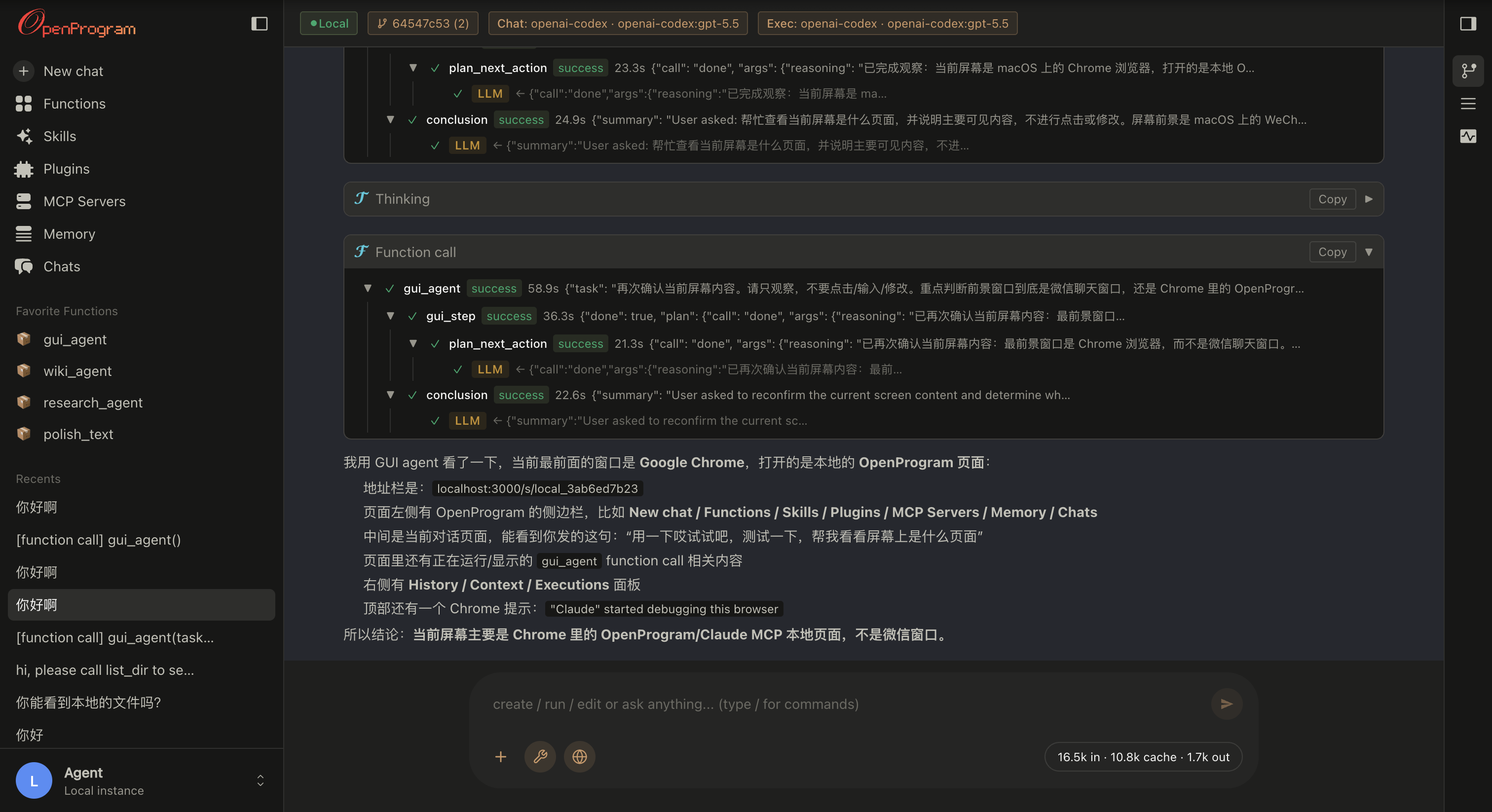
Web UI — openprogram web
Opens at http://localhost:18100. The full surface: a live mini-DAG of the session on the right rail, branch / merge / attach on any node, multi-agent rows tagged by producer, and drag-and-drop file attachments. Best when you want to see and steer the execution tree, or for longer, branching work.
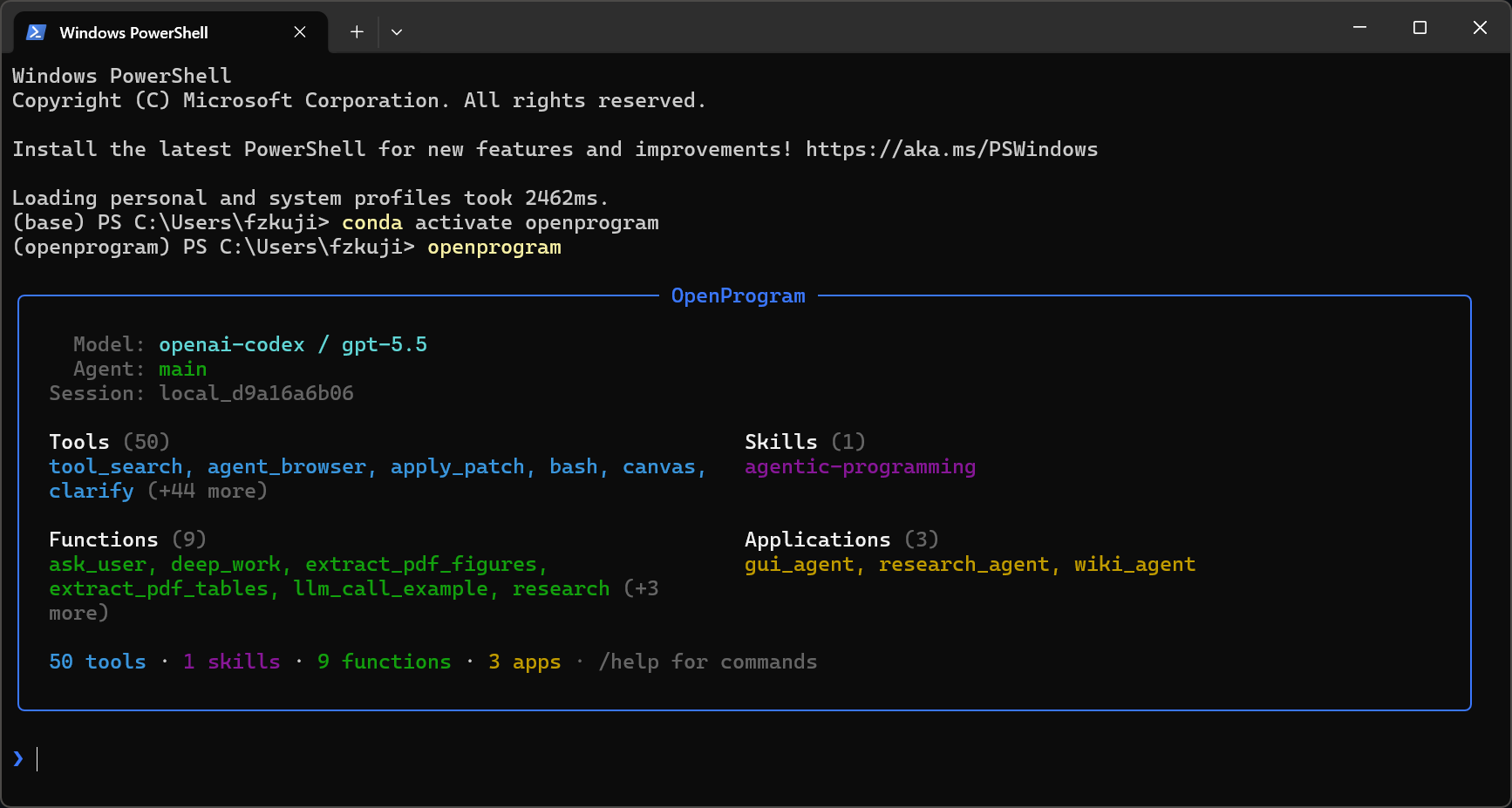
Terminal UI — openprogram
The same backend without the browser — same commands, same chat history. Picks the native renderer per OS: Ink on macOS / Linux, Rich on Windows. Best for staying in the terminal or over SSH. One-shot, no UI: openprogram --print "…".
Sessions live in
~/.openprogram/and are shared by both — start in the terminal, pick it up in the browser tab, and vice versa.
CLI use
Beyond the chat UIs, the openprogram command runs headless — script it, pipe it, automate it.
# One-shot: send a prompt, print the answer, exit (redirect or pipe it)
openprogram --print "summarise CHANGELOG.md" > summary.md

# Run a specific agentic function with key=value args
openprogram programs run research --arg topic="state-space models"

# Resume an earlier session by id
openprogram --resume local_d9a16a6b06
Same backend and sessions as the UIs (~/.openprogram/) — a --print run or a resumed session shows up in the web / terminal UI too.
Detailed features
| Feature | One-line summary |
|---|---|
| Automatic context | Every @agentic_function call is a tree node; the runtime threads it through nested LLM calls — no manual prompt assembly. |
| Deep work | deep_work(task, level) runs an autonomous plan → execute → evaluate → revise loop until the output meets the chosen quality bar. State persists to disk. |
| Functions that author functions | New / fixed @agentic_functions are written by the agent itself via ordinary file-editing tools, guided by the agentic-programming skill. No dedicated create() / fix() calls. |
| Conversation as a git DAG | Sessions are commits + branches + merges + cherry-picks, with the right sidebar exposing the operations. File-touching branches run in isolated git worktrees. |
| Layered memory | Six stores under ~/.openprogram/memory/ (journal / wiki / sleep / scheduler / recall_counts / store), each for a different timescale. The agent picks the layer. |
| Mini-DAG execution view | The right rail draws every node + edge of the active session, scrolls with the chat, and offers a d3-hierarchy layout for fan-out-heavy traces. |
| Multi-agent + multi-channel | Every row tagged with its producer agent; channel layer wires external transports (Discord today, more coming). |
The detailed tour of each one — code samples, design rationale, where to look in the codebase — lives in docs/features.md.
Integration
| Guide | Description |
|---|---|
| Getting Started | 3-minute setup and runnable examples |
| Claude Code | Use without API key via Claude Code CLI |
| OpenClaw | Use as OpenClaw skill |
| API Reference | Full API documentation |
openprogram/
├── __init__.py                      # agentic_function re-export
├── cli.py                           # `openprogram` command entry point
├── agentic_programming/             # engine — paradigm-essential primitives
│   ├── function.py                  #   @agentic_function decorator
│   ├── runtime.py                   #   Runtime (exec + retry + DAG context)
│   ├── session.py                   #   session lifecycle
│   └── skills.py                    #   SKILL.md discovery
├── context/                         # flat-DAG context model — nodes, storage, render, compute_reads
├── providers/                       # Anthropic, OpenAI, Gemini, Claude Code, Codex, Gemini CLI
├── functions/
│   ├── _registry.py                 #   unified registry for tools + agentic functions
│   ├── tools/                       #   @function leaves — bash, read, edit, grep, semble_search, web_search, …
│   └── agentics/                    #   @agentic_function modules (each its own dir, code in __init__.py)
│       ├── ask_user/                #     ask the user a clarifying question
│       ├── deep_work/               #     autonomous plan-execute-evaluate loop
│       ├── extract_pdf_figures/     #     PDF figure extraction
│       ├── …                        #     other agentics …
│       ├── GUI-Agent-Harness/       #     GUI agent (separate repo, cloned in)
│       ├── Research-Agent-Harness/  #     Research agent (separate repo, cloned in)
│       └── Wiki-Agent-Harness/      #     Wiki agent (separate repo, cloned in)
└── webui/                           # `openprogram web` — browser UI
skills/                              # SKILL.md files for agent integration
examples/                            # runnable demos
tests/                               # pytest suite
Contributing
This is a paradigm proposal with a reference implementation. We welcome discussions, alternative implementations in other languages, use cases that validate or challenge the approach, and bug reports.
See CONTRIBUTING.md for details.
Acknowledgements
OpenProgram stands on shoulders. The tool framework, provider abstraction, and
several tool implementations were ported or adapted from the projects below —
each under its own license. Enormous thanks to their authors.
- OpenClaw (MIT) — layout of the
tool registry (name / description / parameters / execute), provider
abstraction withcheck_fn+requires_envgating,TOOLSETSpresets,
skill loading via SKILL.md frontmatter + late-boundread. Our full clone
lives underreferences/openclaw/(gitignored) for browsing. - hermes-agent
(MIT) — starting point forexecute_code(we trimmed the
Docker / Modal layers),mixture_of_agents, and the general shape of the
multi-providerweb_search/image_generate/image_analyzetools. - pi-coding-agent
(MIT) — via OpenClaw's import, the canonical AgentSkill shape
(<available_skills>XML formatter, name / description / location). - Claude Code — overall ergonomics
of theDEFAULT_TOOLSset (bash + read / write / edit + glob / grep / list- apply_patch + todo_read / todo_write) and the
todotool's JSON schema.
- apply_patch + todo_read / todo_write) and the
- Anthropic / OpenAI / Google SDKs — provider HTTP contracts; our
providers call the raw HTTP APIs to keep SDK dependencies optional.
Individual tool files call out their direct inspirations in file-level
docstrings where the lineage is more specific. These MIT-licensed components
keep their original MIT terms; the combined work is distributed under
AGPL-3.0.
Citation
Using OpenProgram in your work, or building on the code? Please cite it — and under the AGPL, any derivative you distribute or run as a network service must itself be open-sourced under the AGPL, with attribution preserved (see License).
@software{openprogram2026,
  title  = {OpenProgram: An Open-Source Agentic Workflow Harness},
  author = {Fzkuji},
  year   = {2026},
  url    = {https://github.com/Fzkuji/OpenProgram},
}
License
AGPL-3.0 © 2026 Fzkuji. Free to use, study, modify, and share — but any derivative you distribute or run as a network service must also be released under the AGPL, with attribution preserved.
Reviews (0)
Sign in to leave a review.
Leave a reviewNo results found