velo
Health Warn
- License — License: Apache-2.0
- Description — Repository has a description
- Active repo — Last push 0 days ago
- Low visibility — Only 5 GitHub stars
Code Fail
- eval() — Dynamic code execution via eval() in crates/velo-audio/models/training/drumtrain.py
Permissions Pass
- Permissions — No dangerous permissions requested
No AI report is available for this listing yet.
Sound shapes light. Live visuals played by the music, for VJs, DJs and anyone with a projector.
Velo
Sound shapes light.
Live visuals played by the music, for VJs, DJs and anyone with a projector.
Download · Five minutes · Features · Connect an AI · Website · Docs
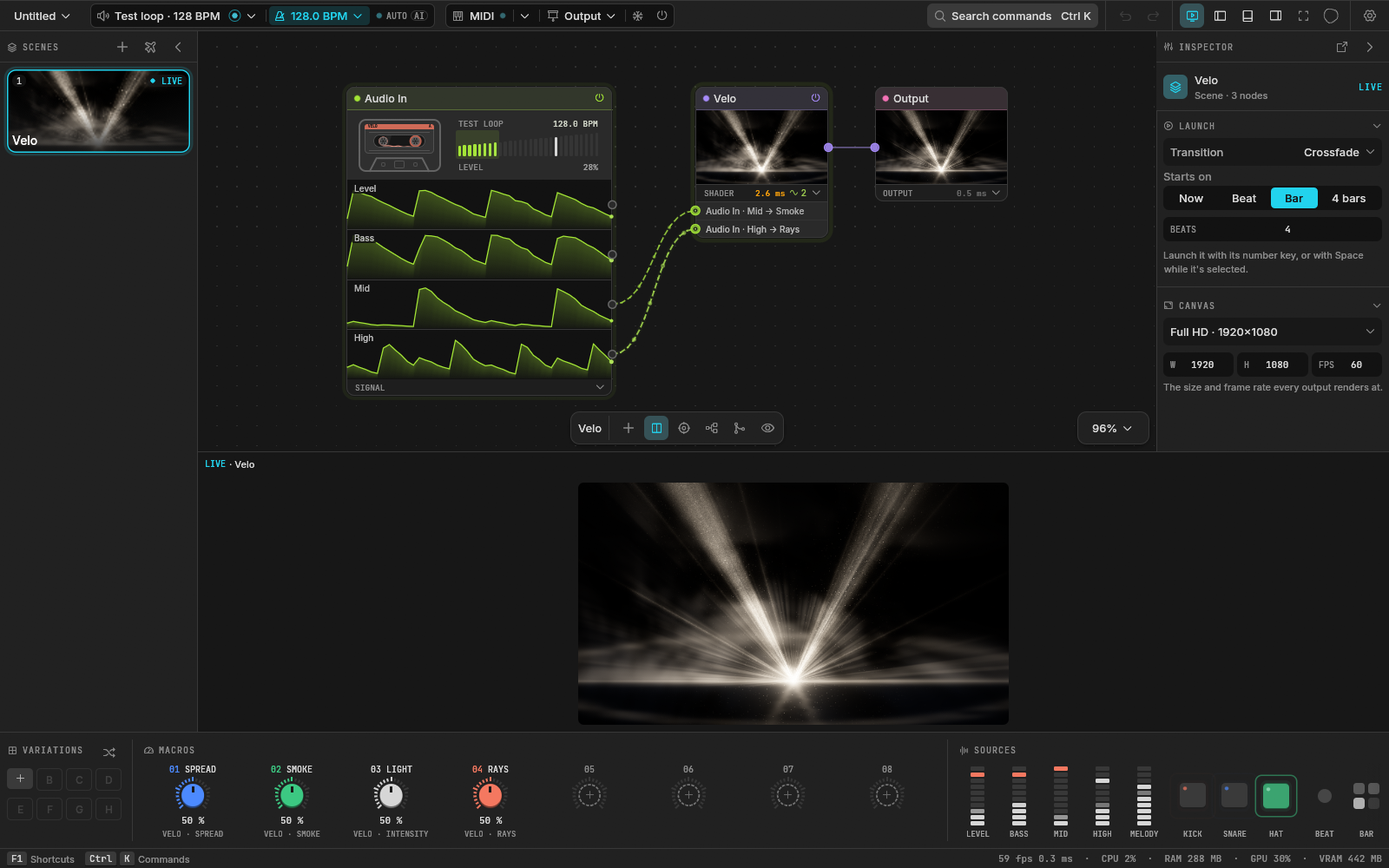
Beta · Windows and macOS · free and open source · written in Rust
What it is
Velo listens to the music and turns it into pictures, live. Each scene is a graph of GPU nodes, from noise and shapes to your own shaders, and any sound feature (the kick, the bass, the melody) can move any value. You play it with macros, scenes and a MIDI controller, send it fullscreen to a projector or to other apps, and if you'd rather describe a visual than patch it, an AI builds it from Velo's own nodes.
It opens on a demo that already moves with whatever the computer is playing.
Download
- Windows: run the installer. It installs for you alone, no admin needed. It isn't signed yet: if SmartScreen stops it, click More info, then Run anyway.
- macOS (Apple silicon, macOS 14 Sonoma or later): open the
.dmgand drag Velo to Applications. The app isn't notarized yet, so the first time macOS refuses to open it: go to System Settings → Privacy & Security and click Open Anyway. - Linux: build from source (below).
Once installed, Velo can check for a newer release and update itself in place.
Five minutes
- Play some music. Velo hears what the computer plays, no cables.
- Press
Tabon the canvas and pick a visual: type a few letters or browse a group, then Enter. - Drag Kick from the sources onto any slider: now the kick moves it.
- Output → a display: it goes fullscreen there.
Bblacks it out,Ffreezes it.
Everything deeper (the patch, your own shaders, the AI) is there when you want it.
Features
Hears the music
- The computer's own sound or any input, split into level, bass, mid, high, kick, snare, hat and melody.
- Kick, snare, hat and melody come from a small neural network that runs live (how it was trained). Each hit's threshold is a line you drag on its graph.
- Tempo heard from the music, tapped, typed, or followed from Ableton Link or a MIDI clock.
- Any source onto any value, with its amount, attack, release and invert. Every generator and effect also has an Automagic knob that plays along by itself.
Makes pictures
- 62 nodes: generators (Noise, Gradient, Shapes, Waveform, Particles, Mesh, Text, Image, Video, Live, Media List, up to 256 files streamed from disk or held in memory), effects (Transform, Kaleido, Color, Blur, Feedback, Displace, Levels, Edges, UV Map, Lookup, Freeze, Time Machine, Key and more), compositing and switching (Blend, Mask, Merge, Switch, Grid, Layer Stack) and signals and logic (Beat Kick, LFO, Envelope, Sequencer, Sample & Hold, Random, Probe, Speed, Delay, Spring and more).
- 40 shader presets, from Plasma and Fire to Lasers, Fractal, Reaction and V Beams, and 25 effect presets, from Glitch and VHS to LED Wall and God Rays.
- Your own WGSL or ISF shaders become nodes with knobs, rebuilt as you type or save. A broken shader keeps the last one that worked. A WGSL shader can keep buffers from frame to frame, each drawn by a pass of its own, for simulations like reaction diffusion.
- Particles are born wherever a picture is lit (a logo, an edge map, a movie), in a sphere, or on the points of a 3D model (.obj, .ply), and drawn as soft dots or a picture of your own; its Orbit view turns a camera round them.
- A Mesh node draws a 3D model (.obj, .ply) solid, with a depth test and 4x antialiasing, lit by a light with a shine, a studio reflection and a rim, from a camera that turns round it; the surface breathes with the bass and the kick flashes it.
- Stills, GIFs, image sequences, HAP, H.264 and HEVC movies.
- Live pictures with the Live node: NDI sources on the network, and on Windows Spout senders on this computer and cameras or capture cards.
Patches by hand
- One graph per scene, TouchDesigner's way: every node shows its picture and what it costs the GPU.
Tabopens the node menu, every node with its icon and a line on what it does. With a node selected, the new one is wired after it.- A signal plugs into a jack on the card it moves. Its cable comes out like a wire: drop it on another card to move one of its values, or on nothing to remove it.
Alt+drag across cables (or the toolbar's tie tool) ties them into a bundle. The arrange button lays the whole graph out left to right.
Plays live
- Scenes launched on the beat, the bar or four bars, with Cut, Crossfade, Wipe, Zoom, Glitch or Flash.
- Eight macros and eight variations per scene on the deck, and an autopilot that moves to the next scene every few bars, seconds, or on a drop, among the scenes you leave in it.
- Layer scenes: always on top of, or underneath, whatever is out (words, a logo, a background), over, added, screened or multiplied; launching one switches it on or off.
- MIDI learn on everything, with soft takeover; OSC in.
- Blackout, Freeze, and a test pattern for lining up the projector.
Goes out
- Fullscreen on any display, the picture's shape kept.
- Spout to Resolume, TouchDesigner, OBS or MadMapper; NDI to any computer on the network.
- The Output grades everything that leaves: exposure, contrast, saturation, hue, colorize, invert, vignette and fade to black.
Builds with AI
- Describe a visual, with pictures as references if you like, and Claude Code, Codex or a model behind an API builds it in a new scene. Ollama and LM Studio are found while they run; OpenAI, Anthropic, Gemini, OpenRouter and Groq take a key.
- Every reply is one undo step, and the AI leaves the live scene alone unless you allow it.
- Velo is also an MCP server (
velo-mcp), so Claude Code, Claude Desktop, Cursor and other MCP clients can drive it from outside.
Holds up for a whole set
- A scene too heavy for the GPU slows down; it never piles up memory. Scenes kept ready to launch take at most half the video memory the system gives Velo: the rest stays the computer's.
- What nobody sees doesn't render: the inputs a Switch isn't showing (up to sixteen), a Blend's layers at no opacity, anything that doesn't reach the Output. A scene that picks among many looks costs the one on screen.
- The status bar shows what Velo takes, each with its last half minute: the engine's frames a second, CPU, memory, and on Windows the GPU and video memory. A chip turns amber when it runs high and red near the top.
- A driver reset, an unplugged projector or a lost audio input: Velo recovers and tells you.
- Autosave every minute, and crash recovery on the next start.
- A project is one
.velofile. Export it with its media, or one scene of it as a project of its own, to hand to someone; import the scenes of another project into yours.
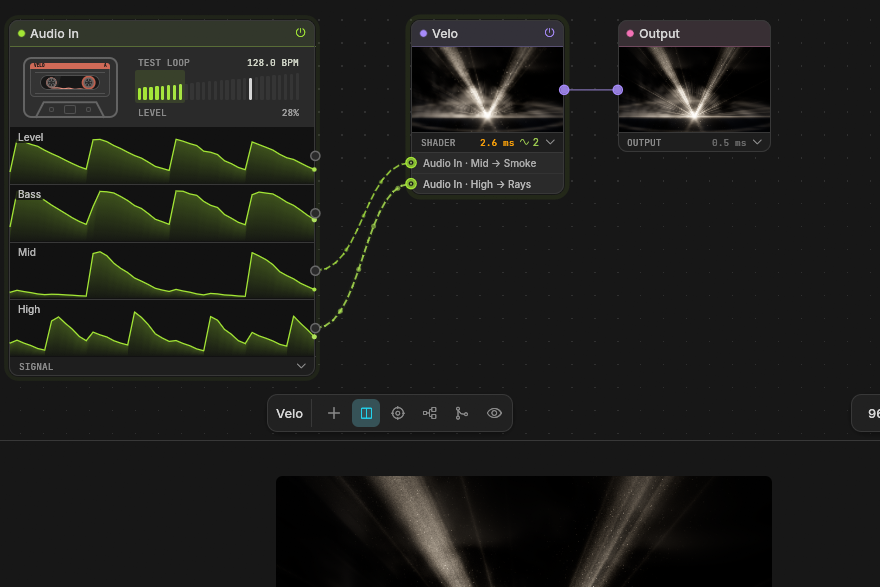 The patch. Audio In's mid and high plug into the shader's jacks. |
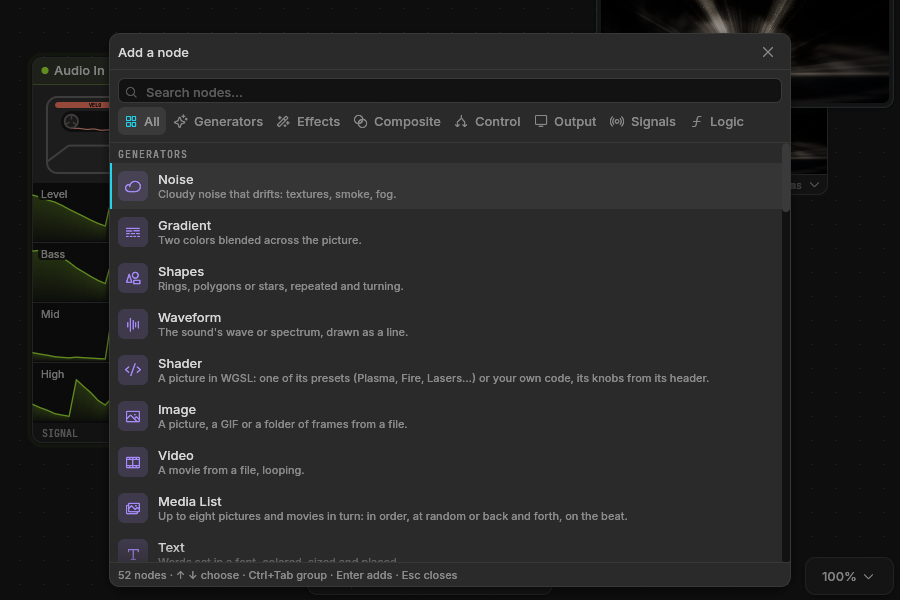 The node menu. 62 nodes, one key away. |
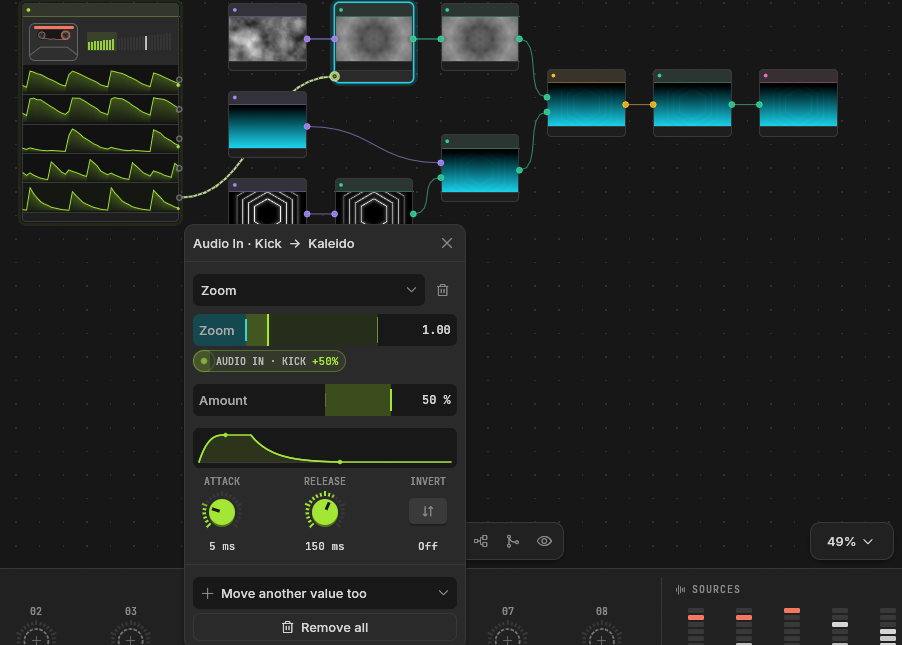 A mapping. The kick moves Kaleido's zoom, with its own envelope. |
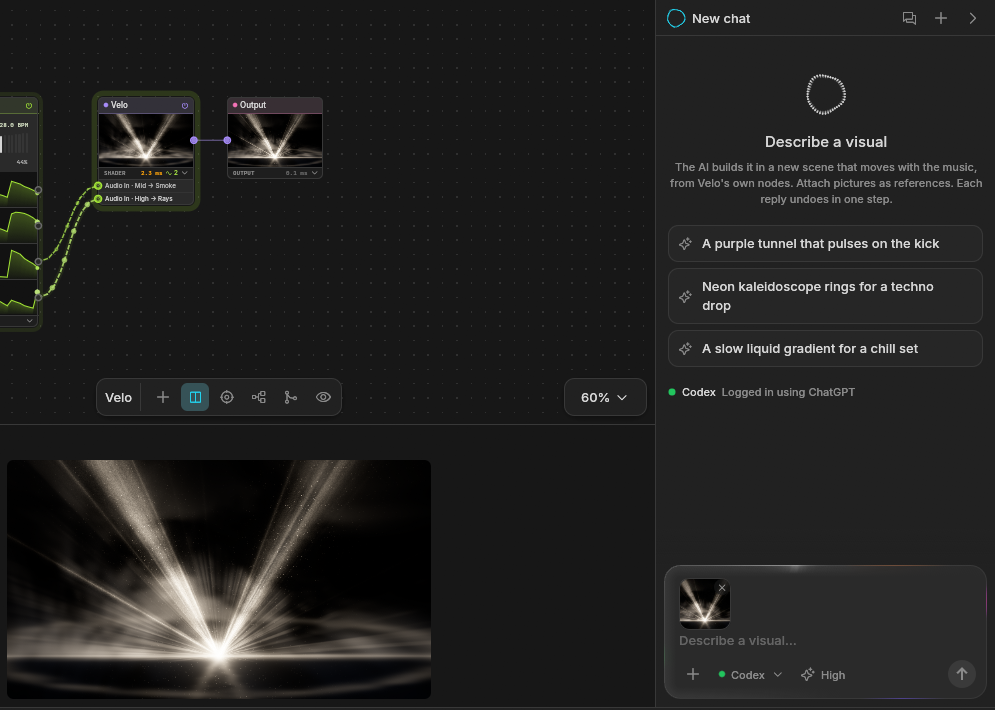 The AI panel. Describe a visual, attach a picture, pick who answers. |
 The deck. Variations, eight macros and every source, live. |
Not a 3D engine (a Mesh draws one model solid and lit and Particles fly a camera round points, with no scene graph, shadows, textures or animation), a mapping suite or a timeline editor: see what Velo is not.
Making the beats too? Ravune, from the same maker, is a modular DAW for deep sound design.
How to connect an AI
There are two ways, independent of each other. In the AI panel, How to connect an AI… shows both with the paths of your own install, ready to copy.
1. An AI inside Velo's panel. Velo runs the claude or codex command, which keeps its own sign-in (being signed in to the Claude app isn't enough).
- Install Claude Code and sign in from a terminal:
claude auth login. For Codex:npm install -g @openai/codex, thencodex login. - In Velo, pick Claude Code or Codex under the AI panel's box. Test the connection says whether it's signed in.
A local model (Ollama, LM Studio) or an API key works from the same menu: Local or API model.
2. Velo driven from outside. Claude Code, Claude Desktop, Cursor and other MCP clients talk to Velo through velo-mcp, the bridge installed next to Velo.
- In Velo: Preferences → AI and agents → Let agents use Velo.
- For Claude Code, run once (the path is where the Windows installer puts Velo):
On macOS the bridge isclaude mcp add --scope user velo -- "C:\Users\<you>\AppData\Local\Programs\Velo\velo-mcp.exe"/Applications/Velo.app/Contents/MacOS/velo-mcp. - Start a new Claude Code session:
/mcplists velo.
Other MCP apps take the same bridge in their list of servers, then a restart:
{
  "mcpServers": {
    "velo": { "command": "C:\\Users\\<you>\\AppData\\Local\\Programs\\Velo\\velo-mcp.exe" }
  }
}
Documentation
The user guide lives on the website: g1lg1l.github.io/velo.
For contributors, the design docs:
| Document | Covers |
|---|---|
| Product | What Velo is, its principles, budgets and interface |
| Architecture | Threads, crates, data flow, failure model, decisions |
| Graph | Nodes, ports, mappings, evaluation |
| Audio | Inputs, analysis, the drum model, tempo |
| Rendering | The frame loop, media, outputs, Spout and NDI |
| Control | MIDI, learn, OSC, clock sync |
| Scenes | Scenes, macros, variations, launches |
| Shaders | The shader node format, ISF |
| Project format | Files, bundles, migrations |
| Roadmap | What comes next |
Build from source
cargo dev
cargo dev runs the app (cargo dev -- show.velo opens a project). It needs a Rust stable toolchain, cmake and a C++ compiler for Ableton Link, and on Windows LLVM (winget install LLVM.LLVM). cargo run -p velo --no-default-features builds without Link. On Linux, install the ALSA headers first (libasound2-dev). cargo build -p velo-mcp builds the MCP bridge.
See CONTRIBUTING.md for the checks a change has to pass.
License
The app (crates/velo) is GPL-3.0-or-later, because it ships with Ableton Link. The libraries (velo-core, velo-engine, velo-audio, velo-mcp) are MIT or Apache-2.0, at your option.
Reviews (0)
Sign in to leave a review.
Leave a reviewNo results found