TowerIsland
Health Uyari
- No license — Repository has no license file
- Description — Repository has a description
- Active repo — Last push 0 days ago
- Low visibility — Only 5 GitHub stars
Code Basarisiz
- rm -rf — Recursive force deletion command in Scripts/build.sh
- rm -rf — Recursive force deletion command in Scripts/test.sh
Permissions Gecti
- Permissions — No dangerous permissions requested
This tool is a macOS utility that provides a floating "Dynamic Island" panel. It serves as a unified dashboard to monitor, manage, and interact with multiple AI coding agents (like Claude Code, Cursor, and Gemini CLI) from a single interface.
Security Assessment
Risk Rating: Medium. The application requires bypassing macOS Gatekeeper (via `xattr -cr`) because it is unsigned, which inherently reduces system security boundaries. In terms of code, the automated scans flagged `rm -rf` commands in the build and test scripts; however, these are standard cleanup operations during compilation and pose no runtime threat. The application does not request explicitly dangerous OS permissions, but its core functionality implies reading local terminal/IDE states and executing window-switching commands. Users should be aware of the inherent risks of running unsigned software that interacts deeply with other active processes. No hardcoded secrets were detected.
Quality Assessment
The project is actively maintained, with its most recent push occurring today. However, it currently suffers from extremely low community visibility, having only 5 stars on GitHub. Most notably, the repository entirely lacks a license file. This means that, strictly from a legal standpoint, default copyright laws apply and others have no explicit permission to use, modify, or distribute the code.
Verdict
Use with caution: The utility is useful and actively maintained, but you assume the legal risks of an unlicensed project and the security risks of installing unsigned macOS software.
A macOS Dynamic Island-style control tower for all your AI coding agents. Monitor Claude Code, Cursor, Codex, OpenCode, Gemini CLI and more — from a single floating panel.
中文 | English
Tower Island
A macOS Dynamic Island-style control tower for all your AI coding agents.
Monitor Claude Code, Cursor, Codex, OpenCode, Gemini CLI and more — from a single floating panel.
Demo
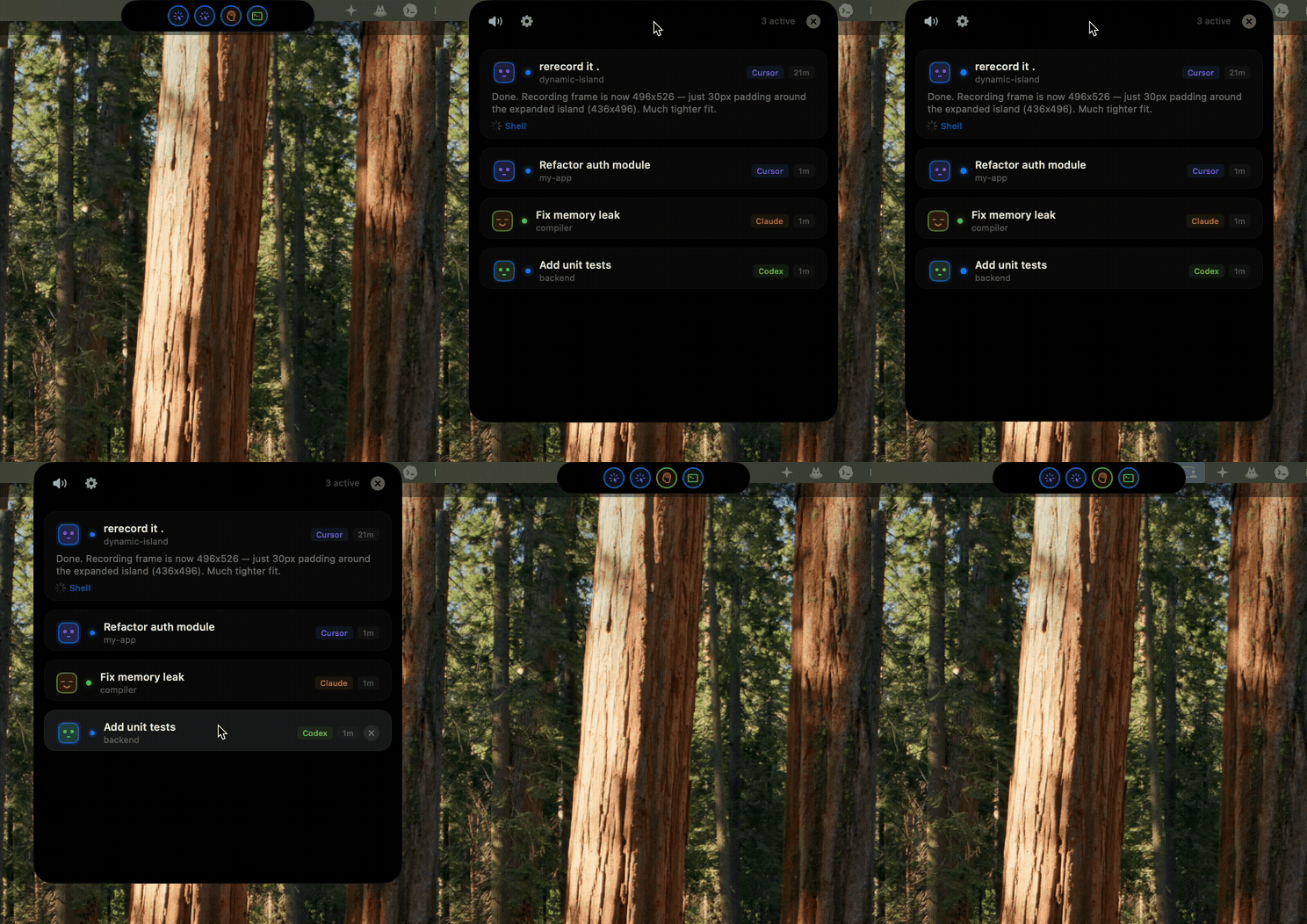
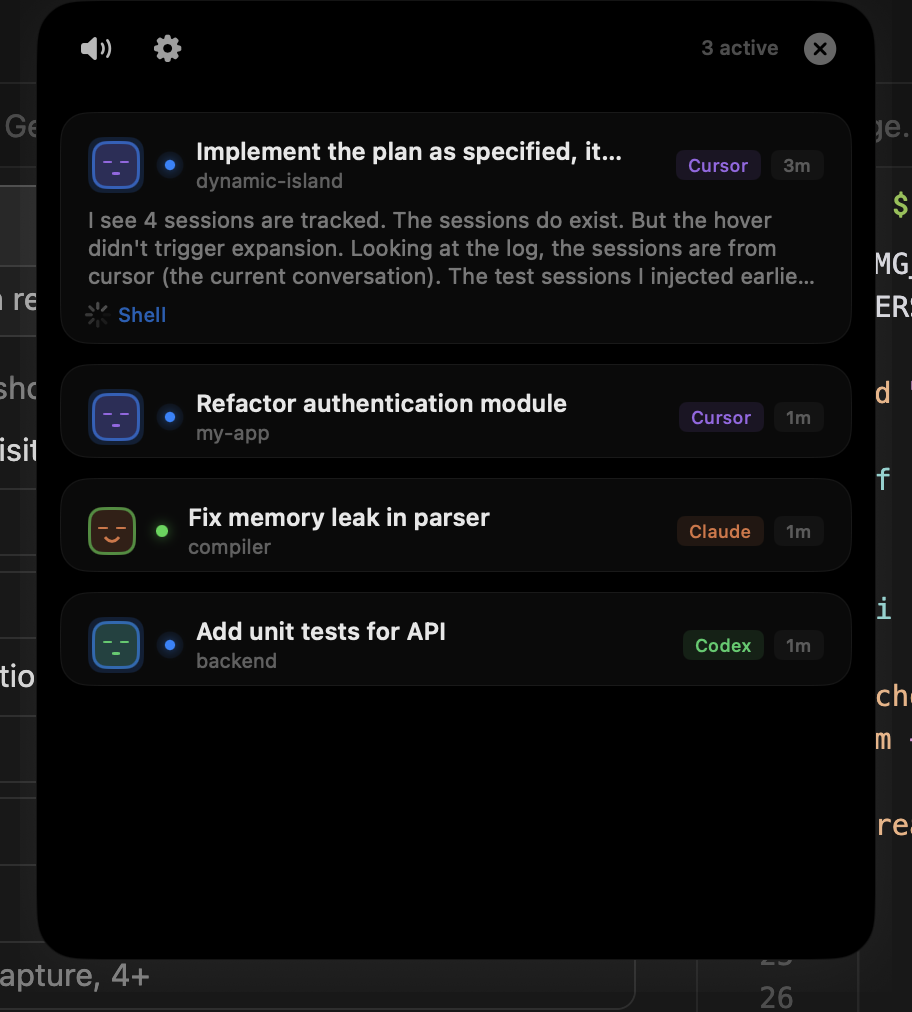
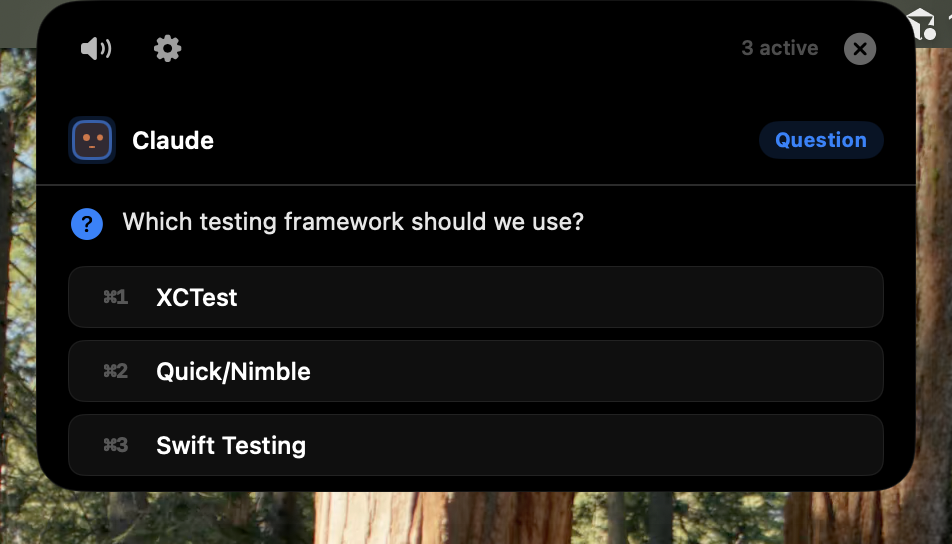
| Collapsed | Expanded | Question |
|---|---|---|
 |
 |
 |
What It Does
Tower Island sits at the top of your screen as a compact pill. When your AI agents are working, it shows their status at a glance. Hover to expand and see all active sessions with full details.
Core features:
- Unified dashboard — See all AI coding agents in one place, regardless of which terminal or IDE they run in
- Real-time status — Live status dots (blue = working, green = done, orange = needs input, red = error)
- Permission approval — Approve or deny file/command permissions directly from the island, no need to switch windows
- Question answering — Answer agent questions from the island UI
- Plan review — Review and approve agent plans inline
- Smart notifications — 8-bit sound effects for session events (configurable per event)
- Multi-session support — Multiple conversations per agent, each tracked independently
- Window jumping — Click a session to jump to the exact terminal tab or IDE window (iTerm2 tab-level precision)
- Horizontal dragging — Drag the island left/right along the top edge
- Session titles — Shows first user prompt as title, workspace folder as subtitle
Supported agents:
| Agent | Hook System | Status |
|---|---|---|
| Claude Code | Native hooks (settings.json) | Full support |
| Cursor | Hooks API (hooks.json) | Full support |
| Codex (OpenAI) | Native hooks | Full support |
| OpenCode | JS plugin | Full support |
| Gemini CLI | Config hook | Basic support |
| Copilot (VS Code) | Config hook | Basic support |
Install
Option 1: Download DMG (Recommended)
- Go to Releases and download the latest
.dmgfile - Open the DMG and drag Tower Island to your Applications folder
- Launch Tower Island
macOS Gatekeeper notice: Since the app is not signed with an Apple Developer certificate, macOS will block it on first launch. To bypass:
xattr -cr /Applications/Tower\ Island.appOr: System Settings → Privacy & Security → scroll down → click "Open Anyway" next to the Tower Island warning.
Option 2: Build from Source
Prerequisites: macOS 14.0+, Swift 5.9+
git clone https://github.com/g535879/TowerIsland.git
cd TowerIsland
bash Scripts/build.sh
open ".build/Tower Island.app"
Agent Configuration
Tower Island auto-configures hooks for all detected agents on first launch. No manual setup needed.
To verify or manually trigger configuration:
- Open Tower Island Settings (gear icon or menu bar)
- Go to the Agents tab
- Toggle agents on/off as needed
Under the hood, it installs a lightweight bridge binary (di-bridge) at ~/.tower-island/bin/ and registers hooks in each agent's config file.
Architecture
┌─────────────────────────────────────────────────┐
│                  Tower Island App                │
│                                                  │
│   NotchWindow (NSPanel)                          │
│   ├── CollapsedPillView (status dots)            │
│   └── Expanded View                              │
│       ├── SessionListView (session cards)        │
│       ├── PermissionApprovalView                 │
│       ├── QuestionAnswerView                     │
│       └── PlanReviewView                         │
│                                                  │
│   SessionManager ← Unix Socket ← di-bridge      │
│   AudioEngine (8-bit sound synthesis)            │
│   ZeroConfigManager (auto-configures agents)     │
└─────────────────────────────────────────────────┘

Agent hooks fire → di-bridge encodes message → socket → SessionManager
Key components:
TowerIsland— Main app. SwiftUI views hosted in anNSPanelfor the floating island UIDIBridge— Lightweight CLI binary invoked by agent hooks. Reads stdin JSON, encodes it as aDIMessage, sends via Unix socketDIShared— Shared protocol definitions (DIMessage, socket config)
Project Structure
Sources/
├── DIShared/          # Shared protocol & socket config
│   └── Protocol.swift
├── DIBridge/          # Bridge CLI binary
│   └── DIBridge.swift
└── DynamicIsland/     # Main app
    ├── TowerIslandApp.swift
    ├── AppDelegate.swift
    ├── NotchWindow.swift
    ├── Models/
    │   ├── AgentSession.swift
    │   └── AgentType.swift
    ├── Managers/
    │   ├── SessionManager.swift
    │   ├── AudioEngine.swift
    │   ├── SocketServer.swift
    │   ├── ZeroConfigManager.swift
    │   └── TerminalJumpManager.swift
    └── Views/
        ├── NotchContentView.swift
        ├── CollapsedPillView.swift
        ├── SessionListView.swift
        ├── ExpandedSessionView.swift
        ├── PermissionApprovalView.swift
        ├── QuestionAnswerView.swift
        ├── PlanReviewView.swift
        └── PreferencesView.swift

Scripts/
├── build.sh           # Release build + .app bundle
└── test.sh            # Integration test suite (100 tests)
Testing
The project includes a comprehensive bash integration test suite:
# Run all tests (requires app to be running)
bash Scripts/test.sh

# Run specific modules
bash Scripts/test.sh M1 M15 M17
Test modules cover: message encoding, session lifecycle, agent identity, permission/question/plan flows, multi-session support, completion sound dedup, configurable linger, and more.
Configuration
All settings are accessible from the Tower Island Settings panel:
| Setting | Default | Description |
|---|---|---|
| Auto-collapse delay | 3s | How long the panel stays open after interaction |
| Completed session display | 2 min | How long completed sessions remain visible (10s–5min or Never) |
| Smart suppression | On | Don't auto-expand when agent terminal is focused |
| Sound effects | Per-event | Toggle individual sound events on/off |
How It Works
- Zero-config setup: On launch, Tower Island scans for installed agents and injects lightweight hooks into their config files
- Hook → Bridge → Socket: When an agent event fires (tool use, permission request, completion), the hook invokes
di-bridgewhich sends a structured message over a Unix socket - Real-time UI: The main app receives messages via
SocketServer, updatesSessionManager, and the SwiftUI views react immediately - Interactive responses: For permissions and questions, the bridge process stays alive waiting for the user's response, then writes it back to stdout for the agent to consume
License
MIT
Yorumlar (0)
Yorum birakmak icin giris yap.
Yorum birakSonuc bulunamadi