mind
Health Gecti
- License — License: MIT
- Description — Repository has a description
- Active repo — Last push 0 days ago
- Community trust — 150 GitHub stars
Code Basarisiz
- fs module — File system access in .github/workflows/opencode-free-smoke.yml
- network request — Outbound network request in .github/workflows/opencode-session-probe.yml
- exec() — Shell command execution in benchmarks/agent-memory/experiments/instrumentation/instrumentation.spec.ts
- process.env — Environment variable access in benchmarks/agent-memory/experiments/instrumentation/instrumentation.spec.ts
Permissions Gecti
- Permissions — No dangerous permissions requested
Bu listing icin henuz AI raporu yok.
Persistent local memory for AI coding agents. Preserve decisions and project context across sessions, compaction, and tools.
🧠 Mind
Your coding agent forgets. Mind remembers.
Local, persistent memory for AI coding agents. Keep decisions, discoveries, fixes,
and working context available across sessions, context compaction, and tools.
Local-first · Open source · MCP


Contents
Why Mind?
Most coding agents lose useful context when sessions end, context is compacted,
or you switch tools. Mind gives them one local memory layer to carry knowledge forward.
- Remember what matters. Preserve decisions, constraints, bug fixes, patterns,
and current references instead of rediscovering them every session. - Continue unfinished work. Checkpoints and session summaries help agents
pick up where they left off, including after compaction. - Connect knowledge. Spaces, tags, directional links, and three memory tiers
keep related information organized and useful as a project evolves. - Share context across tools. The CLI, MCP server, HTTP API, and web app
work with the same SQLite database. - Search without an API key. Full-text retrieval works out of the box;
OpenAI or OpenRouter embeddings are optional for semantic search.
Benchmarks
🏆 86.67% answer accuracy. Top-3 territory. Even without embeddings.
Mind achieved 86.67% answer accuracy on
OmniMemEval LongMemEval-S,
putting it in top-three territory by raw score against
published results
— with semantic RAG disabled.
But remembering the right answer is only one part of memory.
Mind is designed to build, connect, prioritize, and maintain knowledge over time:
promote useful memories, preserve superseded decisions, link related discoveries,
and recover the context needed for the next session.
Benchmark note: Mind's completed run used a stratified subset and GPT-6 Luna
(low) for answering and judging, while the published comparisons use different
sample sizes and configurations. The top-three comparison is indicative, not an
official ranking. RAG was disabled; additional RAG-enabled tests produced similar
results but are not a controlled head-to-head comparison.
Mind's benchmark methodology and results ·
How the memory lifecycle works
See Mind in action
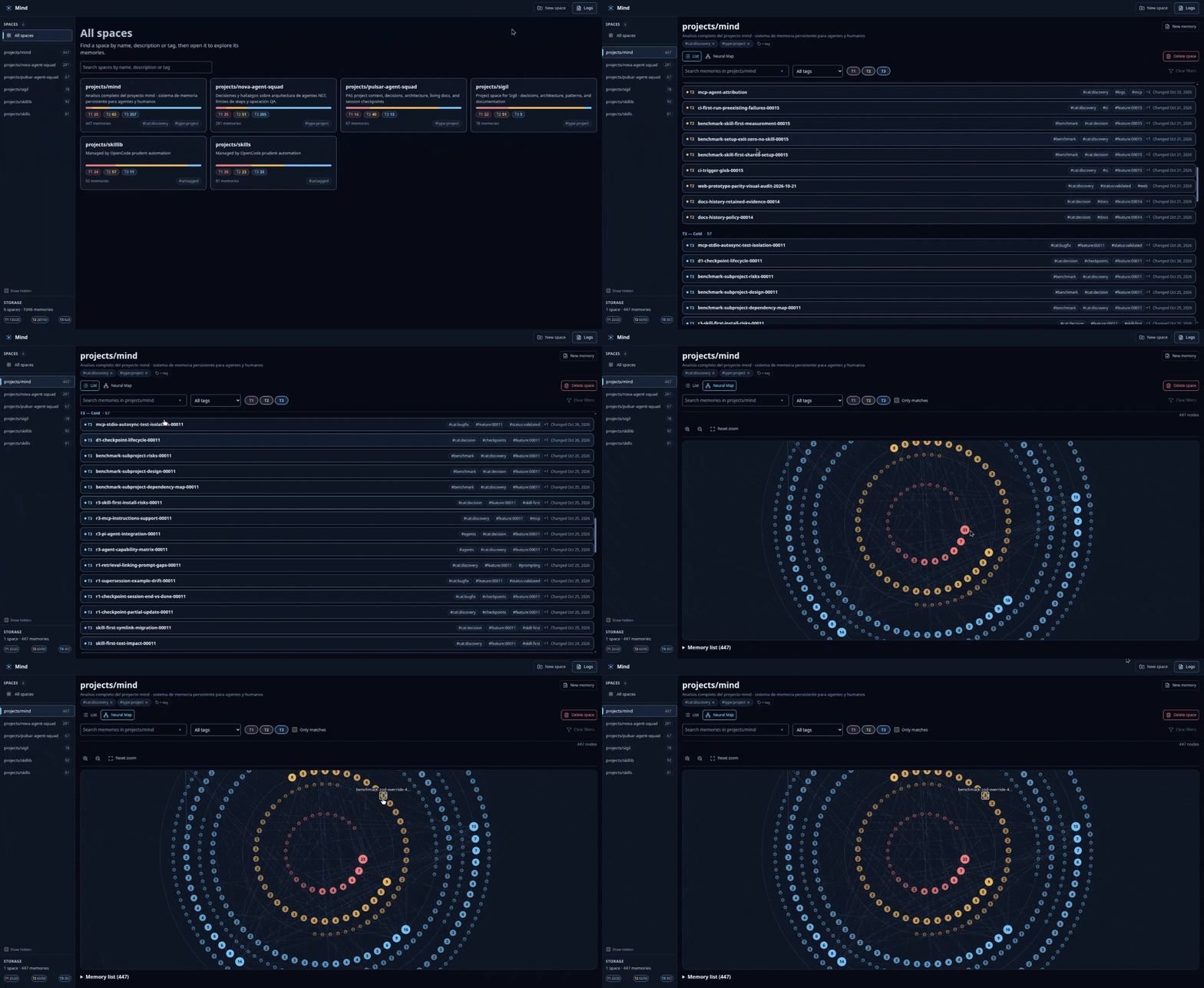
Explore your memories in the web app, edit what matters, and follow
relationships in the per-space Neural Map.
Get started
1. Install Mind
On macOS or Linux, run:
curl -fsSL https://raw.githubusercontent.com/GabrielMartinMoran/mind/main/scripts/install.sh | bash
The installer installs to user-local paths and installs Bun
if needed. It doesn't require sudo. If your shell can't find mind, add~/.local/bin to your PATH as instructed by the installer, then open a
new terminal.
Install from source and advanced configuration
2. Connect your agents
mind setup
This configures all supported agent integrations and the sharedmind-management skill. It does not install the agent applications themselves
and may write configuration for agents that are not installed.
Only want one integration? Use mind setup <agent> (for example,mind setup codex). Run mind setup compatibility to see supported,
partial, and unverified capabilities, or mind setup refresh to update
existing Mind-managed integrations.
Supported agents and capability matrix ·
Agent setup details
3. Try it
mind status
mind create projects/my-project "My project"
mind add projects/my-project architecture "CLI uses command registry + atomic command modules"
mind search architecture
mind serve start
Open http://localhost:30303 to inspect your memories.
Agents use Mind through its installed MCP integration; the commands above are
a quick way to explore the same store yourself.
Using an agent to set up Mind? Give it the installation steps above and ask
it to run mind setup, check mind status, and reportmind setup compatibility results. Your agent should distinguish configured
integrations from those actually validated on your machine.
How Mind works
Mind is a persistent cognitive workspace, not just a collection of notes.
- Remember. Save reusable decisions, fixes, discoveries, and references;
use checkpoints for unfinished work and summaries for completed sessions. - Recall. Retrieve relevant context through Mind's unified full-text search,
with optional embeddings when semantic search is enabled. - Relate and evolve. Link memories, maintain current references, preserve
superseded knowledge, and let useful memories move between active and archive
tiers as their use changes. - Continue. Agents follow the shared
mind-managementskill to recover
context and manage memory across sessions and handoffs, subject to their
integration's capabilities.
Everything lives in one local SQLite store (mind.db). Mind also supports
an experimental opt-in Markdown autosync for versioned
project memories. Optional embedding providers make external API calls only
when semantic search is enabled.
Memory lifecycle ·
Project philosophy
Documentation
Looking for something specific? Start with the
documentation index:
- Agent compatibility and setup
- CLI, web UI, and MCP reference
- Search engine and query syntax
- Autosync (experimental)
- Configuration and optional semantic search
- Skill-first agent protocol
For all available CLI commands, run mind help.
Contributing
Issues and pull requests are welcome. Read CONTRIBUTING.md
for contribution guidelines, tests, and quality gates, and
Mind's philosophy for the project's principles.
License
Star historyYorumlar (0)
Yorum birakmak icin giris yap.
Yorum birakSonuc bulunamadi