job-seeker
Health Warn
- License — License: MIT
- Description — Repository has a description
- Active repo — Last push 0 days ago
- Low visibility — Only 7 GitHub stars
Code Fail
- eval() — Dynamic code execution via eval() in lib/browser-helpers.js
- child_process — Shell command execution capability in lib/browser-helpers.js
- execSync — Synchronous shell command execution in lib/browser-helpers.js
- fs module — File system access in lib/browser-helpers.js
- child_process — Shell command execution capability in scripts/browser.js
- fs.rmSync — Destructive file system operation in scripts/browser.js
- process.env — Environment variable access in scripts/browser.js
- fs module — File system access in scripts/browser.js
- child_process — Shell command execution capability in scripts/dashboard.js
- exec() — Shell command execution in scripts/dashboard.js
- process.env — Environment variable access in scripts/dashboard.js
- fs module — File system access in scripts/dashboard.js
- fs module — File system access in scripts/db.js
- child_process — Shell command execution capability in scripts/generate-cv.js
- execSync — Synchronous shell command execution in scripts/generate-cv.js
- fs.rmSync — Destructive file system operation in scripts/generate-cv.js
- fs module — File system access in scripts/generate-cv.js
- fs module — File system access in scripts/generate-dashboard-demo.js
Permissions Pass
- Permissions — No dangerous permissions requested
No AI report is available for this listing yet.
Automate your job search with your favorite coding agent. Skills, guides, and scripts that any agent (Devin, Claude, Cursor, opencode) consumes to search, apply, and track jobs on your behalf.
Job Seeker
Let your AI coding agent apply to jobs for you.


If this helps you find your next role, give it a star. It helps other devs discover it.
Job Seeker is a set of markdown skills that any coding agent (Devin, Claude, Cursor, opencode) consumes to automate the entire job search:
- Searches LinkedIn with your Must-have filters
- Fills Easy Apply forms from your Postgres DB
- Tracks every application in a kanban pipeline
- Drafts recruiter replies in your writing style
- Runs a daily routine while you review and approve
Your data stays in your own DB. The repo is candidate-agnostic: clone it, run onboarding, and go.
Full documentation: https://galiprandi.github.io/job-seeker/
Demo
https://github.com/galiprandi/job-seeker/releases/download/v0.1.0/demo-terminal.webm
Pipeline kanban (node scripts/pipeline.js):
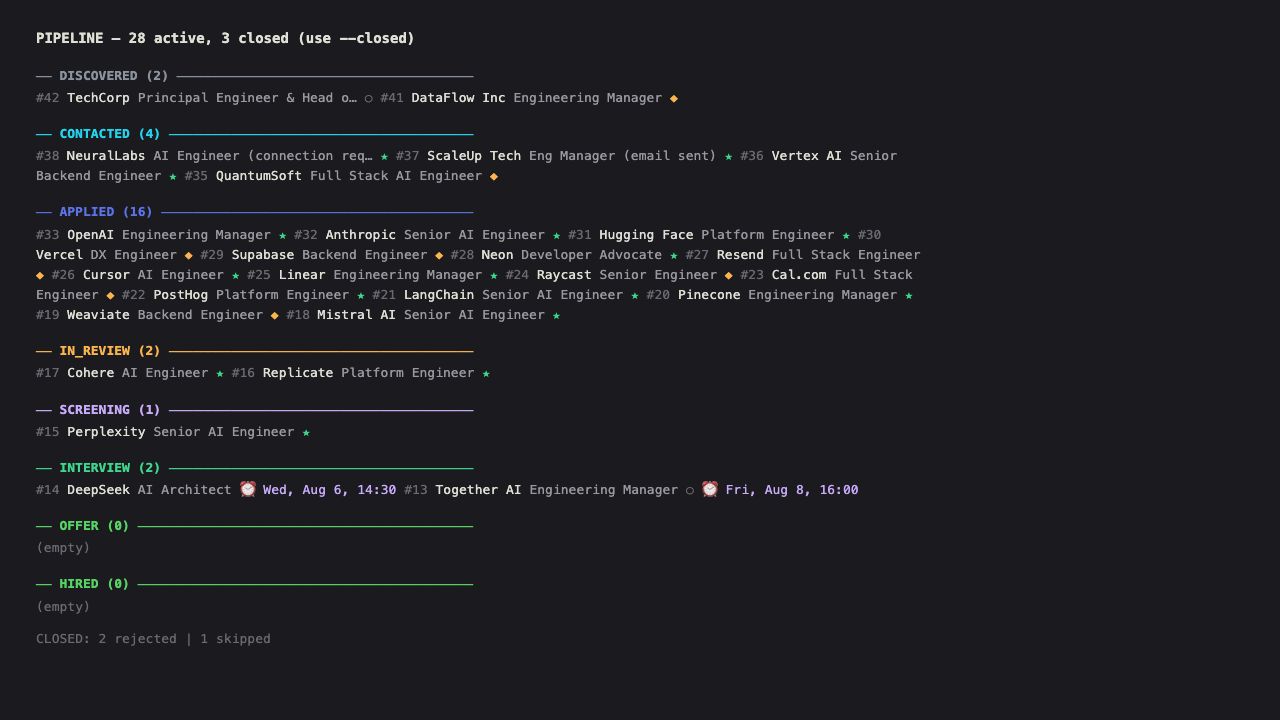
The CLI prints a terminal kanban grouped by pipeline stage (discovered → hired), with match indicators (★ Must, ◆ Strong, ○ Nice), interview dates, and a closed summary. Use --closed to include rejected/withdrawn/skipped columns, --funnel for a bar chart, --move <id> <stage> to move cards, and --card <id> for full card detail with linked messages.
Local dashboard (node scripts/dashboard.js --open):
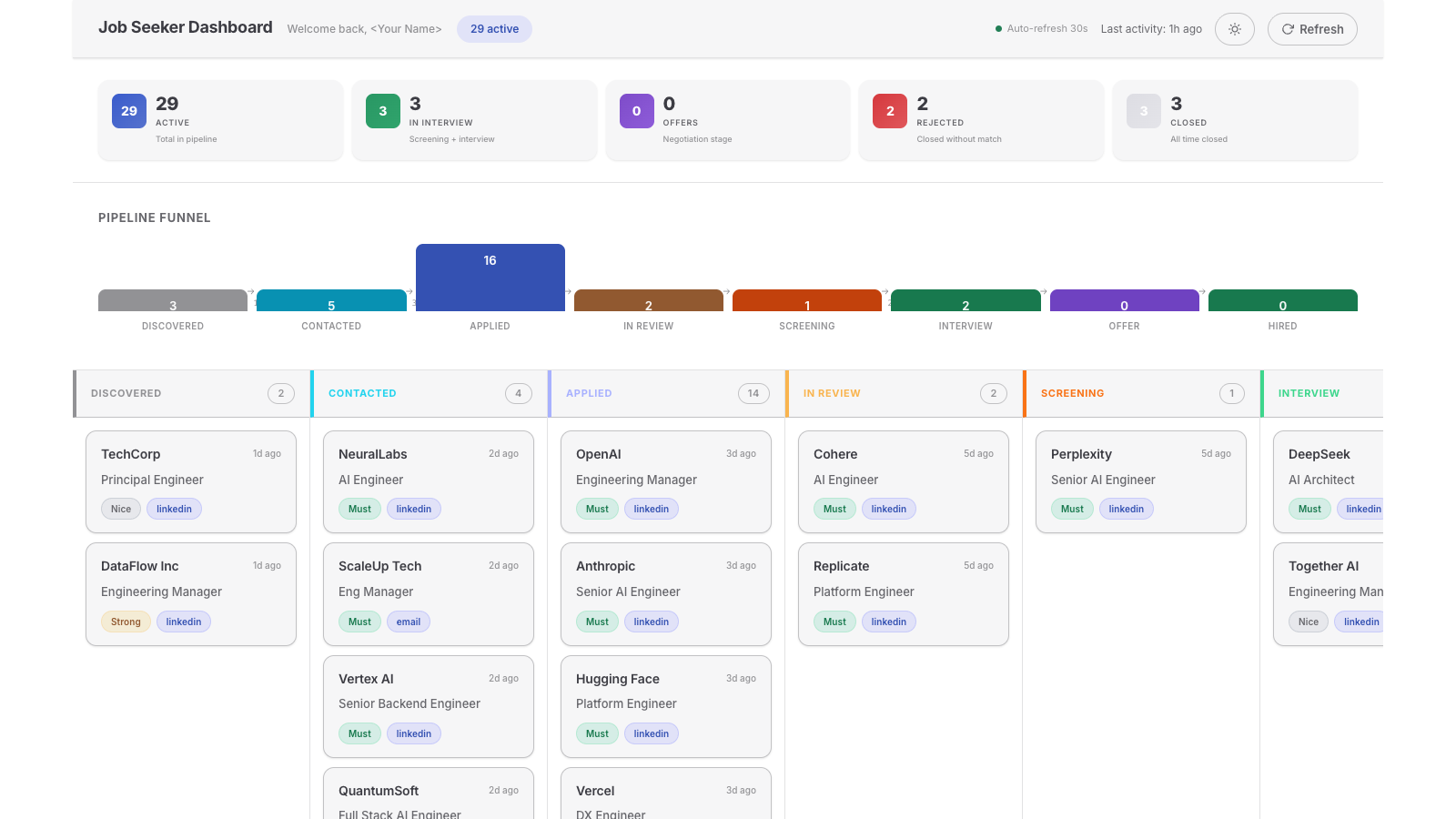
The dashboard visualizes your pipeline with a VitePress-inspired design, including KPI cards, a funnel chart, a kanban board, target-company groups, and recent messages. It also supports light and dark themes. The agent opens it at the end of each round so you can visually review the pipeline. It auto-refreshes every 30 seconds.
Why Job Seeker?
The average job seeker spends 5-8 hours per week scrolling job boards, filling repetitive forms, and tracking applications in spreadsheets. Job Seeker automates the boring part:
- Search your agent reads your profile and searches LinkedIn with your Must-have filters
- Apply Easy Apply forms filled automatically with your data from the DB (no guessing, no inventing)
- Track every application, message, and interview in a Postgres pipeline with a kanban view
- Reply recruiter messages drafted in your style, reviewed by you before sending
- Remember your preferences are detected automatically and stored for future sessions
You stay in control. The agent does the grunt work.
How it works
You: "apply to 5 jobs"
  -> Agent loads your profile from DB
  -> Searches LinkedIn with your Must-have filters
  -> Applies via Easy Apply (form data from DB)
  -> Registers every application
  -> Shows you a summary
- Clone the repo
- Tell your agent: "run the onboarding skill"
- The agent opens a browser, asks you to log into Gmail and LinkedIn, creates your DB, and profiles your CV
- You say: "apply to 5 jobs" and the agent searches, filters, applies and records everything
Your profile, preferences, writing style and history live in Postgres (Neon). Your browser session persists in a dedicated profile. Nothing sensitive is committed to the repo. The repo is candidate-agnostic: clone it, run onboarding, and everything you need is stored in your DB. No file in the repo contains personal data.
Flows
| Flow | Trigger | What it does |
|---|---|---|
onboarding |
onboarding |
Bootstrap: browser with dedicated profile, Gmail + LinkedIn login, Neon DB, user data |
profile |
profile |
Profiling: CV + questionnaire (30 preferences with weights) + voice/style + platform selection |
strategy |
strategy |
Configure job search aggressiveness level. All flows respect it |
radar |
radar |
Passive sourcing: register on job boards, configure alerts, Gmail filter to Job Alerts folder |
targets |
targets |
Active direct sourcing: register and create standout profiles on target companies' career sites, then apply to matching positions |
news |
news |
Review updates in Gmail, LinkedIn and platforms. Prepare drafts, executive summary by priority, hybrid validation and auto-send |
apply |
apply |
Search jobs on LinkedIn, filter by Must-haves, apply via Easy Apply, register in DB |
daily |
daily |
Periodic routine: runs news -> inbox cleanup -> applies if no recent activity |
memory |
(always on) | Autonomous preference detection, storage and injection. Detects preferences from conversation, saves to DB, loads active ones at the start of every flow |
dashboard |
dashboard |
Opens a local web dashboard with kanban, funnel, stats, messages, and target companies. Auto-refreshes every 30s |
Tools (not flows):
| Tool | Location | Usage |
|---|---|---|
playwright-cli |
scripts/browser.js wrapper |
Browser automation: open/close/goto/tabs/sessions via wrapper. Other commands (click, fill, snapshot) via exec or direct call |
db |
scripts/db.js |
Safe Postgres CLI. Reads DATABASE_URL from .env, JSON output, read-only by default (--write for writes) |
pipeline |
scripts/pipeline.js |
Kanban board CLI for application tracking. Print board, move cards, view funnel, card details |
dashboard |
scripts/dashboard.js |
Local web dashboard. Serves at http://localhost:7531. The agent opens it at the end of a round |
Who is this for?
Works best for tech professionals who use LinkedIn as their primary job platform and Gmail for email. The system is designed to be extensible to other platforms.
Requirements
- Node.js 22+
- npx
- A LinkedIn account
- A Gmail account
- A Postgres database (Neon recommended, free tier works)
npm install handles all dependencies, including playwright-cli and pg.
Quick Start
git clone https://github.com/<your-username>/job-seeker.git
cd job-seeker
npm install
Create .env with your connection string:
DATABASE_URL=postgresql://user:[email protected]/dbname?sslmode=require
Open your coding agent in the repo and say: "run the onboarding skill"
After onboarding, try:
- "profile" - set up your professional profile
- "strategy" - configure your search aggressiveness
- "apply to 5 jobs" - search and apply
- "news" - check for updates from recruiters
Platforms
PLATFORMS.md is a catalog of 35 platforms in 5 categories (general, tech, AI, executive, latam), community-maintained. The agent consults it to decide where to search based on your profile. You don't choose platforms, the agent deduces them.
Stack
- Browser:
playwright-cli(installed vianpm install). Persistent profile, headless by default - DB: PostgreSQL via Neon (cloud). Portable across machines
- Node:
pgfor DB access,playwright-clifor browser automation - Skills: Markdown in
.agents/skills/. Universal, not tied to one agent - Tests: Vitest for browser wrapper and script tests
Structure
.agents/skills/              # Skills consumed by any agent
  apply/SKILL.md             # Job search and application
  daily/SKILL.md             # Periodic routine
  db/SKILL.md                # Safe Postgres CLI usage
  memory/SKILL.md            # Autonomous preference detection and injection
  news/SKILL.md              # Updates review and follow-up
  onboarding/SKILL.md        # Onboarding
  profile/SKILL.md           # Profiling
  radar/SKILL.md             # Passive sourcing (alerts)
  strategy/SKILL.md          # Search aggressiveness configuration
  targets/SKILL.md           # Active direct sourcing
scripts/                     # Automation scripts
  browser.js                 # Browser wrapper (open/close/goto/tabs/sessions)
  db.js                      # Safe Postgres CLI
  linkedin-search.js         # Search LinkedIn posts for job openings
  linkedin-invite.js         # Send LinkedIn connection requests
  linkedin-easy-apply.js     # Search + apply to Easy Apply jobs
  gmail-send.js              # Send emails via Gmail web UI with CV attached
  pipeline.js                # Kanban board CLI for application tracking
  dashboard.js               # Local web dashboard (serves at localhost:7531)
  easy-apply-helper.sh       # Helper for Easy Apply form filling
  templates/                 # ATS-specific apply playbooks
    teamtailor-apply.md      # Teamtailor application flow
    humand-apply.md          # Humand.co application flow
tests/browser/               # Vitest tests for browser wrapper
  01-syntax-config.test.mjs  # Config and syntax validation
  02-failfast.test.mjs       # Fail-fast behavior
  03-lifecycle.test.mjs      # Browser lifecycle
  04-tabs.test.mjs           # Tab management
  05-sessions.test.mjs       # Session management
  06-parallel.test.mjs       # Parallel subagent sessions
  07-state-debug.test.mjs    # Auth state and debugging
  helpers.mjs                # Test helpers
assets/                      # Visual assets for README
  social-preview.png         # Social preview image (1280x640)
  pipeline-demo.png          # Pipeline kanban screenshot
  demo-terminal.webm         # Demo video of apply flow
vitest.config.mjs            # Vitest configuration
.playwright/cli.config.json  # playwright-cli config (timeouts, blocked domains)
.env                         # DATABASE_URL (not tracked)
.browser-profile/            # Chrome profile with sessions (not tracked)
.playwright-cli/             # Snapshots and logs (not tracked)
PLATFORMS.md                 # Platform catalog (community)
STRATEGIES.md                # Job search and networking strategies (ordered by effectiveness)
DATA.md                      # Data map: tables, JSONB keys, flow ownership
ADR.md                       # Architecture decisions
AGENTS.md                    # Operational rules + Gold Rules
DESIGN.md                    # Design tokens (placeholder, no UI yet)
CONTRIBUTING.md              # How to contribute
LICENSE                      # MIT
Key decisions
See ADR.md for details. Summary:
- playwright-cli over MCP: native CLI, no JSON config, token-efficient
- Postgres over Mongo: 70% of data is relational. JSONB for semi-structured
- Neon for portability: clone on another machine, same
DATABASE_URL, same profile - npx over global installs: zero friction on clone
- Headless by default: headed only for manual login and 2FA
- Skills in
.agents/skills/: universal format, works with any agent
Disclaimer
Disclaimer: This tool automates browser interactions with job platforms. Review the Terms of Service of each platform before use. The authors are not responsible for account restrictions resulting from automated activity. Use responsibly.
Contributing
Contributions are welcome. See CONTRIBUTING.md for guidelines.
Areas where help is most useful:
PLATFORMS.md: add platforms with the fields from the existing table- Skills: improve existing checklists, rules, and step-by-step detail
- Scripts: add support for new ATS platforms, improve form-filling logic
- Tests: expand browser wrapper coverage, add script tests
- ADR: append-only. To reverse a decision, add a new ADR that supersedes it
License
MIT - use it, fork it, contribute.
Reviews (0)
Sign in to leave a review.
Leave a reviewNo results found