claude-presence
Health Uyari
- License — License: MIT
- Description — Repository has a description
- Active repo — Last push 0 days ago
- Low visibility — Only 5 GitHub stars
Code Basarisiz
- exec() — Shell command execution in src/db/index.ts
- process.env — Environment variable access in src/db/index.ts
Permissions Gecti
- Permissions — No dangerous permissions requested
This tool is a minimal coordination server that allows multiple parallel Claude Code sessions working on the same repository to see each other, claim shared resources (like CI pipelines or ports), and leave messages. It acts as a local bulletin board powered by a SQLite database, requiring zero background daemons to run.
Security Assessment
Overall risk: Medium. The primary concern flagged in the code is shell command execution located in the database setup file (`src/db/index.ts`). While likely used to initialize the local SQLite database, executing shell commands always introduces a potential vector for arbitrary code execution if inputs are not perfectly sanitized. Additionally, the tool accesses environment variables, which is standard for configuring local paths but requires slight caution. On the positive side, it does not request dangerous permissions and appears to operate entirely offline without making external network requests. There are no hardcoded secrets.
Quality Assessment
The project has strong foundational hygiene but very low community adoption. It uses the permissive MIT license and is highly active, with the latest code push occurring today. The codebase is cleanly documented with excellent instructions and clear boundaries for its scope. However, it currently has only 5 GitHub stars, meaning it has not been extensively vetted by the broader developer community.
Verdict
Use with caution — the tool is well-structured and actively maintained, but the low community visibility and the presence of shell execution logic warrant a manual code review before integrating it into your workflow.
Minimal MCP server for inter-session coordination between parallel Claude Code instances. Presence registry + advisory resource locks (CI, deploys, ports) + broadcast inbox. SQLite-backed, zero daemon.
claude-presence


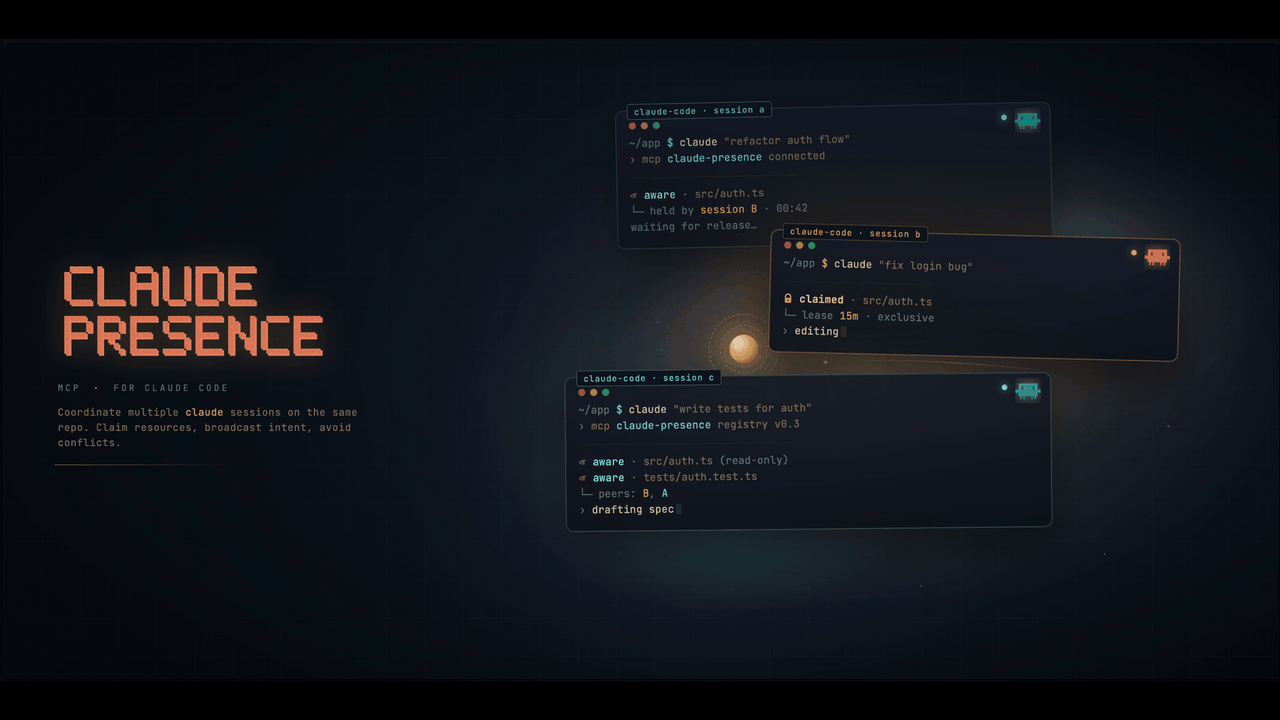
Minimal MCP server for inter-session coordination between parallel Claude Code instances.
When you run multiple Claude Code sessions on the same repo, they don't know about each other. They step on each other's CI runs, push over each other, or duplicate work. claude-presence is a small MCP server that gives each session a view of the others, plus advisory locks on shared resources (CI, staging DB, ports, whatever you name).
Mental model. Sessions don't talk directly — each Claude Code session is an isolated process.
claude-presencegives them a shared bulletin board: each session sees who else is working, what resources are claimed, and can post short messages that others will read when they check in. Think of it as a lightweight coordination layer, not a chat bridge.
Scope is deliberately small. Presence + resource locks + a broadcast inbox. No git integration, no task orchestration, no web UI. If you need more, look at mcp_agent_mail.
Table of contents
- Quick start
- Features
- Install
- Configure
- Verify it works
- Slash commands
- Hooks (optional)
- MCP tools exposed
- CLI
- Troubleshooting
- How it compares
- Security & trust model
- Storage
- Development
- Status
Quick start (60 seconds)
# 1. Install the package globally
git clone https://github.com/garniergeorges/claude-presence
cd claude-presence && npm install && npm run build && npm link

# 2. Install the slash commands for every Claude Code session
cp commands/*.md ~/.claude/commands/

# 3. Add the MCP server to any project you want to coordinate
cd /path/to/your/project
cat > .mcp.json <<'EOF'
{
  "mcpServers": {
    "claude-presence": { "type": "stdio", "command": "claude-presence-mcp" }
  }
}
EOF

# 4. Open Claude Code in that project and type:
#    /register  → you're now visible to other sessions
#    /presence  → see who else is working here
#    /claim ci  → reserve the CI before you push
That's the whole loop. Everything below is detail.
Features
- Presence registry — each session registers itself with a branch and an intent; others see it
- Resource locks — claim a named resource (
"ci","deploy:staging","port:3000") before you touch it; others get a clear "busy" response - Broadcast inbox — drop a short message that other sessions on the same project will see
- Slash commands —
/register,/claim,/release,/presence(no typing ceremony) - CLI —
claude-presence statusshows active sessions outside Claude Code - Zero daemon — SQLite-backed, no port, no background process
- TTL-based cleanup — dead sessions (no heartbeat for 10 min) are removed automatically
Install
From source (current)
git clone https://github.com/garniergeorges/claude-presence
cd claude-presence
npm install
npm run build
npm link       # exposes claude-presence-mcp and claude-presence globally
From npm (when published)
npm install -g claude-presence
Or invoke via npx directly from .mcp.json — no global install needed.
Configure
Add claude-presence to your project's .mcp.json:
{
  "mcpServers": {
    "claude-presence": {
      "type": "stdio",
      "command": "claude-presence-mcp"
    }
  }
}
If you already have other MCP servers, just add this block alongside them — don't replace the whole file. Example with an existing semgrep entry:
{
  "mcpServers": {
    "semgrep": {
      "type": "stdio",
      "command": "semgrep",
      "args": ["mcp"]
    },
    "claude-presence": {
      "type": "stdio",
      "command": "claude-presence-mcp"
    }
  }
}
Install the slash commands (recommended)
cp commands/*.md ~/.claude/commands/
Now in any Claude Code session, you can type /register, /claim <resource>, /release <resource>, /presence.
Verify it works
After configuring .mcp.json, restart Claude Code in the project, then check:
# The CLI and MCP binaries must be on PATH:
which claude-presence           # → /opt/homebrew/bin/claude-presence (or similar)
which claude-presence-mcp       # → same dir

# The CLI runs:
claude-presence status          # → "No active sessions." on first run
Inside Claude Code, type /mcp. You should see claude-presence listed with 9 tools. If it's missing, see Troubleshooting.
Then try /register test — the session should register and the tool reply should list any other active sessions on this project.
Slash commands (recommended)
No ceremony. Just type:
| Command | What it does |
|---|---|
/register [intent] |
Register this session with optional intent (branch + cwd auto-detected). |
/presence |
Show other sessions + active locks on this project. |
/claim <resource> [reason] |
Claim a named resource lock. If busy, shows the holder instead of proceeding. |
/release <resource> |
Release a lock you hold. |
/broadcast <message> |
Post a short message to the project inbox. Other sessions see it on their next /inbox. |
/inbox [all|unread] |
Read messages from other sessions. Default: unread only. |
Example workflow
Session A starts work on feat/login:
/register fixing the login redirect bug
Session A is about to push and trigger CI:
/claim ci pushing feat/login
→ ok: true, held until 10:05
Meanwhile, session B on fix/nav tries the same:
/claim ci pushing fix/nav
→ ok: false — already held by session-a1b2 on feat/login since 09:55
   Want to wait, broadcast, or abort?
Session A finishes CI and releases:
/release ci
Session B can now proceed.
Hooks (optional)
The slash commands cover 99% of daily use. Hooks are optional polish for the last 1%:
hooks/session-start.shruns when you open a new Claude Code session. It prints a short reminder so you remember to/registerand think about resource locks before shared ops. It does not auto-register the session (by design — the slash command keeps it explicit).hooks/user-prompt-submit.shruns on every user prompt. It injects a one-line system message into the context when other sessions or locks are active on this project, so Claude Code stays aware without you asking.
The
UserPromptSubmithook shells out to theclaude-presenceCLI, so it must be on yourPATH(handled bynpm linkornpm install -g). If the CLI is missing, the hook silently exits 0 — no breakage.
Enable them
Back up your settings first:
cp ~/.claude/settings.json ~/.claude/settings.json.backup-$(date +%Y%m%d-%H%M%S)
Then merge the two hook entries into ~/.claude/settings.json. If the hooks section doesn't exist yet:
{
  "hooks": {
    "SessionStart": [
      { "matcher": "", "hooks": [
        { "type": "command", "command": "/absolute/path/to/claude-presence/hooks/session-start.sh" }
      ]}
    ],
    "UserPromptSubmit": [
      { "matcher": "", "hooks": [
        { "type": "command", "command": "/absolute/path/to/claude-presence/hooks/user-prompt-submit.sh" }
      ]}
    ]
  }
}
Merging with existing hooks
If another tool already registers hooks on SessionStart or UserPromptSubmit (GitKraken CLI, custom scripts, etc.), don't overwrite them — add a second entry in the same hooks array. Example coexisting with GitKraken:
{
  "hooks": {
    "SessionStart": [
      { "matcher": "", "hooks": [
        { "type": "command", "command": "\"/Users/you/Library/Application Support/GitKrakenCLI/gk\" ai hook run --host claude-code" },
        { "type": "command", "command": "/absolute/path/to/claude-presence/hooks/session-start.sh" }
      ]}
    ],
    "UserPromptSubmit": [
      { "matcher": "", "hooks": [
        { "type": "command", "command": "\"/Users/you/Library/Application Support/GitKrakenCLI/gk\" ai hook run --host claude-code" },
        { "type": "command", "command": "/absolute/path/to/claude-presence/hooks/user-prompt-submit.sh" }
      ]}
    ]
  }
}
Claude Code runs every command in the array in order. Both tools get their turn.
MCP tools exposed
| Tool | Purpose |
|---|---|
session_register |
Declare this session (project, branch, intent) |
session_heartbeat |
Keep this session alive |
session_unregister |
Clean exit |
session_list |
List active sessions on the same project |
resource_claim |
Acquire advisory lock on a named resource |
resource_release |
Release a lock |
resource_list |
List active locks |
broadcast |
Post a message to the project inbox |
read_inbox |
Read recent messages |
CLI
claude-presence status              # Show all active sessions
claude-presence status --project .  # Filter to current project
claude-presence locks               # Show active resource locks
claude-presence clear               # Prune dead sessions and expired locks
claude-presence path                # Print the SQLite DB path
claude-presence help                # Show help
Add --json to any command for machine-readable output.
Troubleshooting
/mcp doesn't list claude-presence.
Make sure .mcp.json is at the project root (same directory as Claude Code was opened in), the command field matches an executable on PATH, and you fully restarted Claude Code after editing the file (not just reloaded).
command not found: claude-presence-mcp.
Run which claude-presence-mcp. If empty, run npm link again from the claude-presence/ directory. If you installed via npm install -g, check that your npm global bin directory is on PATH (npm config get prefix).
The slash commands don't appear.
Slash commands are loaded at session start. Restart Claude Code after cp commands/*.md ~/.claude/commands/. Type / to see the list.
claude-presence status shows 0 sessions even though Claude Code is open.claude-presence doesn't auto-register — you must call /register once per session. This is deliberate: sessions stay explicit and identifiable.
A lock is stuck because a session crashed.
Dead sessions are pruned after 10 min (no heartbeat). You can force-clean immediately with claude-presence clear, or force-release a specific lock with the resource_release MCP tool passing force: true.
Hooks seem to break my existing GitKraken / custom hook setup.
See Merging with existing hooks. Each event holds an array of hooks; add yours without removing others.
How it compares
| claude-presence | mcp_agent_mail | parallel-cc | |
|---|---|---|---|
| Presence registry | ✅ | ✅ | ✅ |
| File-level locks | ❌ | ✅ | ✅ |
| Named resource locks (CI, ports, DBs) | ✅ | ⚠️ (via file paths) | ❌ |
| Messaging | minimal inbox | full mailbox | ❌ |
| Git integration | ❌ | ✅ | ✅ (worktrees) |
| Slash commands shipped | ✅ | ❌ | ❌ |
| LOC | ~800 | several thousand | ~2000 |
Pick claude-presence if you want something small and focused on "don't let my sessions step on each other". Pick mcp_agent_mail if you want rich agent-to-agent workflows.
Security & trust model
claude-presence is designed for cooperating local sessions on a single developer machine, not for adversarial multi-tenant use. Concretely:
- The SQLite database lives in your home directory and is only reachable by processes running as you.
- Session IDs and
from_sessionfields are self-declared — the server doesn't authenticate them. A buggy or malicious local process could register as any ID or post broadcasts claiming to be another session. - Resource locks are advisory, not enforced. A session can ignore a held lock and push anyway. The value comes from every session agreeing to check first.
This is fine for the intended use case (your own parallel Claude Code sessions cooperating) and explicitly not fine for running untrusted code on the same box. If you need cryptographic identity or server-side enforcement, this isn't the right tool.
See #1 track hardening ideas for future versions (e.g. deriving from_session from the MCP connection context instead of accepting it as an argument).
Storage
Data lives in ~/.claude-presence/state.db (SQLite, WAL mode). Nothing is sent anywhere.
Override the path with CLAUDE_PRESENCE_DB=/custom/path.db.
Retention:
- Sessions: pruned after 10 min without heartbeat.
- Locks: pruned when their TTL expires (default 10 min, configurable per-claim, max 24 h).
- Inbox: pruned after 24 h.
Development
npm run build      # compile TypeScript
npm run dev        # watch mode
node dist/index.js # run the MCP server directly (stdio)
Project layout:
src/
  index.ts         # MCP server entrypoint (stdio)
  db/              # SQLite schema + typed repository
  tools/           # MCP tool implementations (presence, locks, inbox)
  cli/             # claude-presence CLI
hooks/             # SessionStart + UserPromptSubmit scripts
commands/          # /register, /claim, /release, /presence slash commands
examples/          # sample .mcp.json and settings.json hook snippets
Status
🚧 v0.1 — early development. API may change. Feedback and PRs welcome at github.com/garniergeorges/claude-presence.
License
MIT
Yorumlar (0)
Yorum birakmak icin giris yap.
Yorum birakSonuc bulunamadi