Manifold
Health Pass
- License — License: MIT
- Description — Repository has a description
- Active repo — Last push 1 days ago
- Community trust — 95 GitHub stars
Code Pass
- Code scan — Scanned 12 files during light audit, no dangerous patterns found
Permissions Pass
- Permissions — No dangerous permissions requested
No AI report is available for this listing yet.
Operation-first .NET foundation for generating fast CLI and MCP surfaces from a single definition.

Manifold
Manifold is a .NET foundation for defining an operation once and exposing it through both CLI and MCP surfaces.
The model is simple:
- Write one operation by hand
- Let the source generator emit descriptors and invokers
- Wire those generated artifacts into your CLI and/or MCP host
Manifold does not own your transport, hosting model, or product-specific runtime. It focuses on operation definition, binding, metadata, and fast dispatch.
If you want a runnable starting point, the repository includes sample hosts under samples/.
What's Included
| Package | Purpose |
|---|---|
Manifold |
Core contracts, descriptors, attributes, and binding primitives |
Manifold.Cli |
CLI runtime helpers and generated invocation |
Manifold.Generators |
Source generator that emits descriptors and invokers |
Manifold.Mcp |
MCP metadata and invocation helpers |
Core Concepts
An operation is the single source of truth.
From that definition, Manifold.Generators emits:
GeneratedOperationRegistryGeneratedCliInvokerGeneratedMcpCatalogGeneratedMcpInvoker
You compose those generated types into your own application.
Manifold supports two authoring styles:
- Static method operations
- Class-based operations implementing
IOperation<TRequest, TResult>
Install
Most consumers should not install all four packages.
Start with the core package and the generator, then add only the surfaces you actually use.
Typical combinations:
| Scenario | Packages |
|---|---|
| Define operations only | Manifold, Manifold.Generators |
| CLI app | Manifold, Manifold.Generators, Manifold.Cli |
| MCP host | Manifold, Manifold.Generators, Manifold.Mcp |
| Both CLI and MCP | Manifold, Manifold.Generators, Manifold.Cli, Manifold.Mcp |
CLI host:
<ItemGroup>
  <PackageReference Include="Manifold" Version="1.0.0" />
  <PackageReference Include="Manifold.Generators" Version="1.0.0" PrivateAssets="all" />
  <PackageReference Include="Manifold.Cli" Version="1.0.0" />
</ItemGroup>
MCP host:
<ItemGroup>
  <PackageReference Include="Manifold" Version="1.0.0" />
  <PackageReference Include="Manifold.Generators" Version="1.0.0" PrivateAssets="all" />
  <PackageReference Include="Manifold.Mcp" Version="1.0.0" />
</ItemGroup>
If you need both surfaces, combine the two examples.
Authoring Operations
Static Method Example
Static method operations work well when you want the simplest possible definition.
using Manifold;

public static class MathOperations
{
    [Operation("math.add", Summary = "Adds two integers.")]
    [CliCommand("math", "add")]
    [McpTool("math_add")]
    public static int Add(
        [Argument(0, Name = "x")] int x,
        [Argument(1, Name = "y")] int y)
    {
        return x + y;
    }
}
Class-Based Example
Class-based operations are useful when you need a dedicated request type, richer modeling, or DI-managed construction.
using Manifold;

[Operation("math.add", Summary = "Adds two integers.")]
[CliCommand("math", "add")]
[McpTool("math_add")]
public sealed class AddOperation : IOperation<AddOperation.Request, int>
{
    public ValueTask<int> ExecuteAsync(Request request, OperationContext context)
        => ValueTask.FromResult(request.X + request.Y);

    public sealed class Request
    {
        [Argument(0, Name = "x")]
        [McpName("x")]
        public int X { get; init; }

        [Argument(1, Name = "y")]
        [McpName("y")]
        public int Y { get; init; }
    }
}
For class-based operations, register the operation type in DI before using the generated invokers.
using Microsoft.Extensions.DependencyInjection;

ServiceCollection services = new();
services.AddTransient<AddOperation>();
ServiceProvider serviceProvider = services.BuildServiceProvider();
Static method operations do not require DI registration unless they explicitly request services.
Attribute Model
The main attributes are:
| Attribute | Applies To | Purpose |
|---|---|---|
[Operation("operation.id")] |
Method, class | Declares the canonical operation id. Supports Summary, Description, and Hidden. |
[CliCommand("group", "verb")] |
Method, class | Declares the CLI command path, for example math add. |
[McpTool("tool_name")] |
Method, class | Declares the MCP tool name, for example math_add. |
[CliOnly] |
Method, class | Exposes the operation only on the CLI surface. |
[McpOnly] |
Method, class | Exposes the operation only on the MCP surface. |
[ResultFormatter(typeof(...))] |
Method, class | Overrides default CLI text rendering with a custom formatter. |
[Argument(position)] |
Parameter, request property | Binds a positional CLI argument. Supports Name, Description, and Required. |
[Option("name")] |
Parameter, request property | Binds a named CLI option. Supports Description and Required. |
[Alias(...)] |
Method, class, parameter, request property | Adds aliases for commands, options, arguments, or names. |
[CliName("...")] |
Method, class, parameter, request property | Overrides the CLI-facing name only. |
[McpName("...")] |
Method, class, parameter, request property | Overrides the MCP-facing name only. |
[FromServices] |
Parameter | Resolves the value from DI instead of user input. |
Common patterns:
- Use
[Operation]together with at least one surface attribute such as[CliCommand]or[McpTool] - Use
[Argument]for ordered CLI inputs and[Option]for named CLI inputs - Use
[CliName]and[McpName]when the same conceptual field should appear under different names on each surface - Use
[CliOnly]or[McpOnly]when an operation should not be shared across both surfaces - Use
[FromServices]for runtime services such as clocks, repositories, or application state
Examples:
- Rename an option for CLI only with
[CliName("person")] - Rename an MCP argument with
[McpName("targetName")] - Hide an internal operation from generated surfaces with
[Operation("internal.sync", Hidden = true)] - Expose to only one surface with
[CliOnly]or[McpOnly]
CLI Usage
At runtime, compose the generated registry and invoker into a CliApplication.
using Manifold.Cli;
using Manifold.Generated;
using Microsoft.Extensions.DependencyInjection;

ServiceCollection services = new();
services.AddTransient<AddOperation>();
ServiceProvider serviceProvider = services.BuildServiceProvider();

CliApplication cli = new(
    GeneratedOperationRegistry.Operations,
    new GeneratedCliInvoker(),
    serviceProvider);

StringWriter output = new();
StringWriter error = new();

int exitCode = await cli.ExecuteAsync(
    ["math", "add", "2", "3"],
    output,
    error,
    CancellationToken.None);
Notes:
CliApplicationhandles usage text and command dispatchGeneratedCliInvokeris the generated binding layer- Fast sync and async paths are selected automatically when available
MCP Usage
Manifold does not ship an MCP transport host. Instead, it provides:
- Generated tool metadata via
GeneratedMcpCatalog - Generated execution via
GeneratedMcpInvoker - MCP argument parsing and helper APIs in
Manifold.Mcp
A minimal local invocation looks like this:
using System.Text.Json;
using Manifold.Generated;
using Manifold.Mcp;
using Microsoft.Extensions.DependencyInjection;

ServiceCollection services = new();
services.AddTransient<AddOperation>();
ServiceProvider serviceProvider = services.BuildServiceProvider();

JsonElement args = JsonSerializer.Deserialize<JsonElement>(
    "{\"x\":2,\"y\":3}");

GeneratedMcpInvoker invoker = new();

if (invoker.TryInvokeFast(
        "math_add",
        args,
        serviceProvider,
        CancellationToken.None,
        out ValueTask<FastMcpInvocationResult> invocation))
{
    FastMcpInvocationResult result = await invocation;
    Console.WriteLine(result.Number);
}
Metadata discovery:
using Manifold.Generated;

foreach (var tool in GeneratedMcpCatalog.Tools)
{
    Console.WriteLine($"{tool.Name}: {tool.Description}");
}
MCP Transports and Samples
The primary MCP transports are:
stdioStreamable HTTP
Manifold is intentionally transport-agnostic, so the repository includes sample hosts rather than baking transport hosting into the core packages.
Run them like this:
dotnet run --project .\samples\Manifold.Samples.McpStdioHost\Manifold.Samples.McpStdioHost.csproj
dotnet run --project .\samples\Manifold.Samples.McpHttpHost\Manifold.Samples.McpHttpHost.csproj
The HTTP sample listens on http://127.0.0.1:38474/mcp.
Note: the HTTP sample uses ModelContextProtocol.AspNetCore, which is currently a preview package. The stable core MCP package is ModelContextProtocol.
CLI Sample Host
There is also a minimal runnable CLI host:
dotnet run --project .\samples\Manifold.Samples.CliHost\Manifold.Samples.CliHost.csproj -- math add 2 3
dotnet run --project .\samples\Manifold.Samples.CliHost\Manifold.Samples.CliHost.csproj -- weather preview --city Tokyo --days 3
Dependency Injection and Services
There are two service access patterns.
Method-Based Operations
Use [FromServices] on a parameter.
[Operation("clock.now")]
[CliCommand("clock", "now")]
public static DateTimeOffset Now(
    [FromServices] IClock clock)
{
    return clock.UtcNow;
}
Class-Based Operations
Use constructor injection, or request services through OperationContext.
public sealed class GreetingOperation(IGreetingService greetings)
    : IOperation<GreetingOperation.Request, string>
{
    public ValueTask<string> ExecuteAsync(Request request, OperationContext context)
        => ValueTask.FromResult(greetings.Format(request.Name));

    public sealed class Request
    {
        [Option("name")]
        public string Name { get; init; } = string.Empty;
    }
}
Result Formatting
To provide custom CLI text output while keeping structured results for JSON or MCP, implement IResultFormatter<TResult>.
using Manifold;

public sealed class WeatherFormatter : IResultFormatter<WeatherResult>
{
    public string? FormatText(WeatherResult result, OperationContext context)
        => $"{result.City}:{result.TemperatureC}";
}
Then attach it:
[ResultFormatter(typeof(WeatherFormatter))]
Generated Types
The generator emits these public entry points under Manifold.Generated:
GeneratedOperationRegistryGeneratedCliInvokerGeneratedMcpCatalogGeneratedMcpInvoker
These are the standard integration surface for consumers.
Performance
Manifold includes dedicated BenchmarkDotNet suites under benchmarks/.
Benchmark notes and comparison tables are in benchmarks/README.md.
Comparison set:
- CLI
Manifold.CliConsoleAppFrameworkSystem.CommandLine
- MCP
Manifold.Mcp- official
ModelContextProtocol McpToolkitmcpdotnet
Current snapshot:
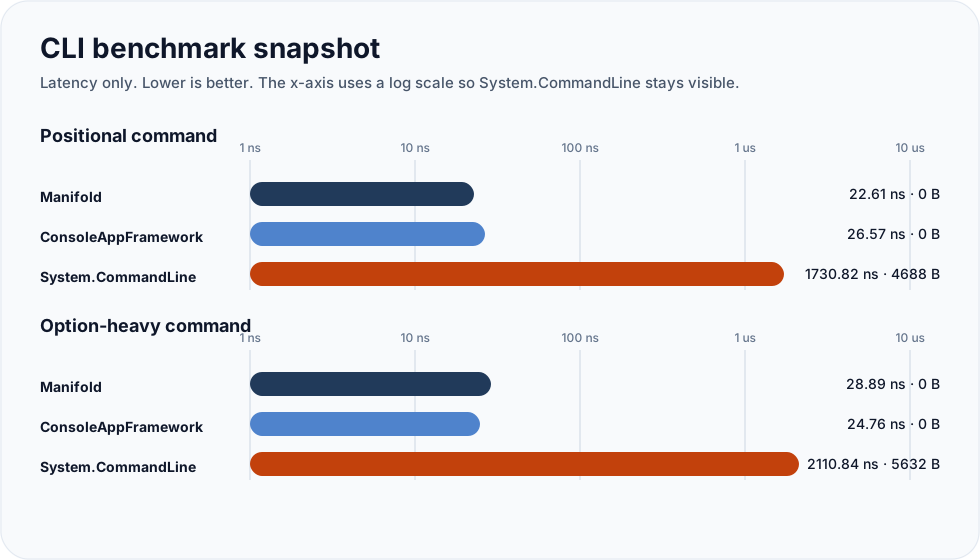
CLI:
| Scenario | Manifold | ConsoleAppFramework | System.CommandLine |
|---|---|---|---|
| Positional command | 22.61 ns / 0 B |
26.57 ns / 0 B |
1730.82 ns / 4688 B |
| Option-heavy command | 28.89 ns / 0 B |
24.76 ns / 0 B |
2110.84 ns / 5632 B |
MCP (roundtrip-shaped):
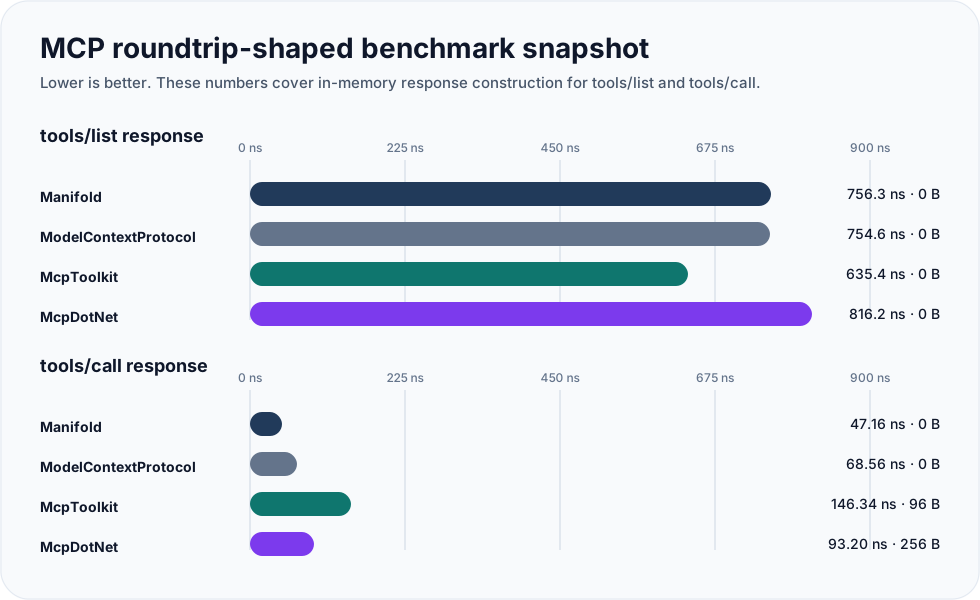
| Scenario | Manifold | ModelContextProtocol | McpToolkit | McpDotNet |
|---|---|---|---|---|
tools/list response |
756.3 ns / 0 B |
754.6 ns / 0 B |
635.4 ns / 0 B |
816.2 ns / 0 B |
tools/call response |
47.16 ns / 0 B |
68.56 ns / 0 B |
146.34 ns / 96 B |
93.20 ns / 256 B |
Notes:
- CLI numbers measure the parser + dispatch hot path
- MCP numbers above reflect in-memory response construction, not transport benchmarks
- The raw
ModelContextProtocolinvocation microbenchmark is nearZeroMeasurement; the roundtrip-shaped table is the more meaningful comparison
For methodology and full reports, see benchmarks/README.md.
Build
From the repository root:
./build/restore.ps1
./build/build.ps1 -NoRestore
./build/test.ps1 -NoBuild
./build/quality.ps1
./build/pack.ps1
./build/pack.ps1 writes .nupkg and .snupkg files to .artifacts/packages/.
Repository Status
- Windows-first scripts and CI
- MIT licensed
- CI verifies build, test, formatting, architecture checks, and package creation
OSS Housekeeping
- License:
LICENSE - Contribution notes:
CONTRIBUTING.md - Third-party notices:
THIRD_PARTY_NOTICES.md
Repository Layout
src/
  Manifold
  Manifold.Cli
  Manifold.Generators
  Manifold.Mcp
tests/
  Manifold.Tests
  Manifold.Cli.Tests
  Manifold.Generators.Tests
  Manifold.Mcp.Tests
benchmarks/
  Manifold.Benchmarks
  Manifold.Mcp.Benchmarks
samples/
  Manifold.Samples.Operations
  Manifold.Samples.CliHost
  Manifold.Samples.McpStdioHost
  Manifold.Samples.McpHttpHost
Reviews (0)
Sign in to leave a review.
Leave a reviewNo results found