track
Health Uyari
- License — License: AGPL-3.0
- Description — Repository has a description
- Active repo — Last push 0 days ago
- Low visibility — Only 5 GitHub stars
Code Gecti
- Code scan — Scanned 12 files during light audit, no dangerous patterns found
Permissions Gecti
- Permissions — No dangerous permissions requested
Bu listing icin henuz AI raporu yok.
Open-source, realtime issue tracking built natively on Cloudflare. Part of Gateweave.

Gateweave Track
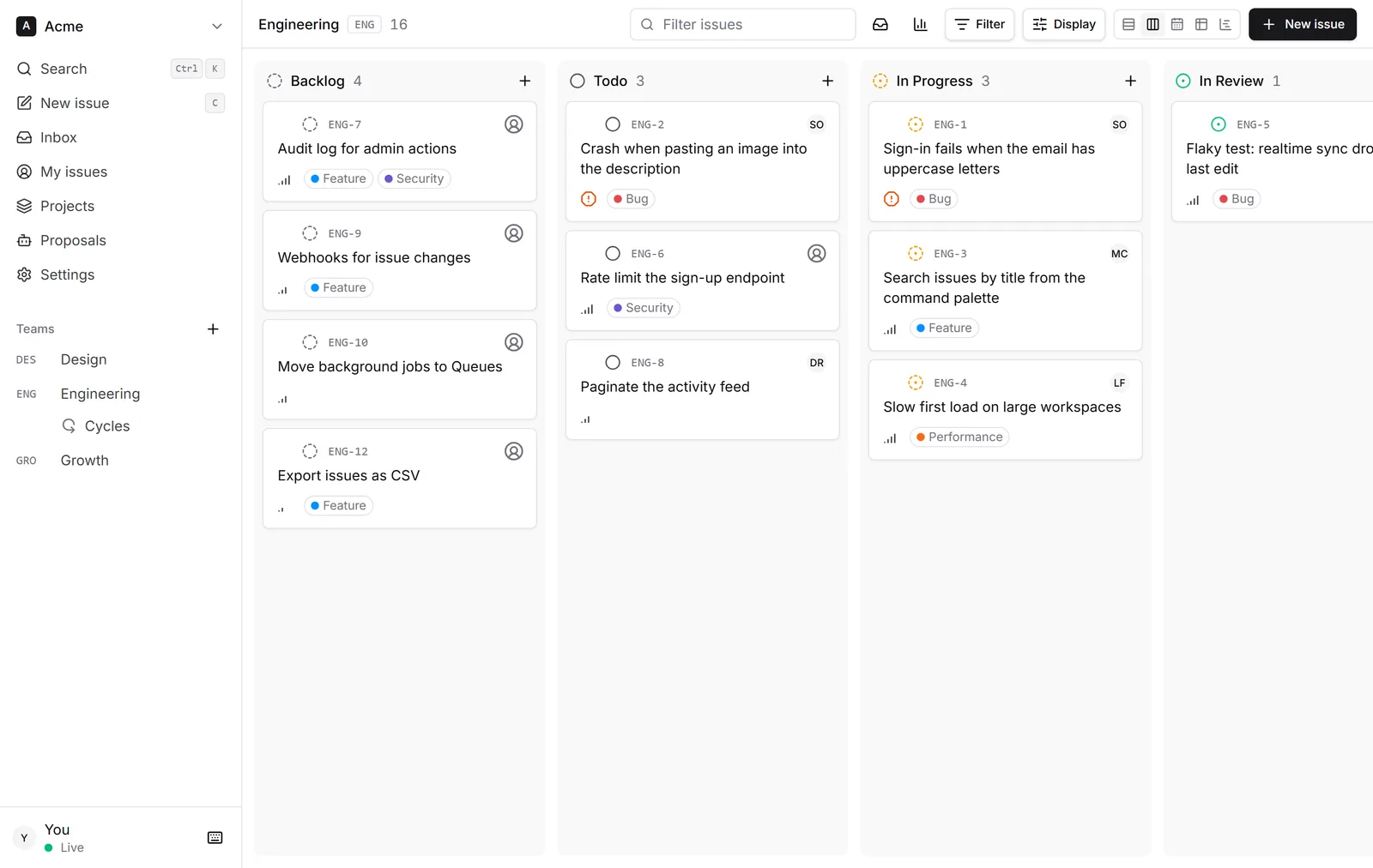
An open-source, realtime issue tracker that runs on one Cloudflare Worker.
No server to patch, no Postgres to back up. It opens at once and keeps working offline.



Try the demo · Deploy your own · What it measures and costs
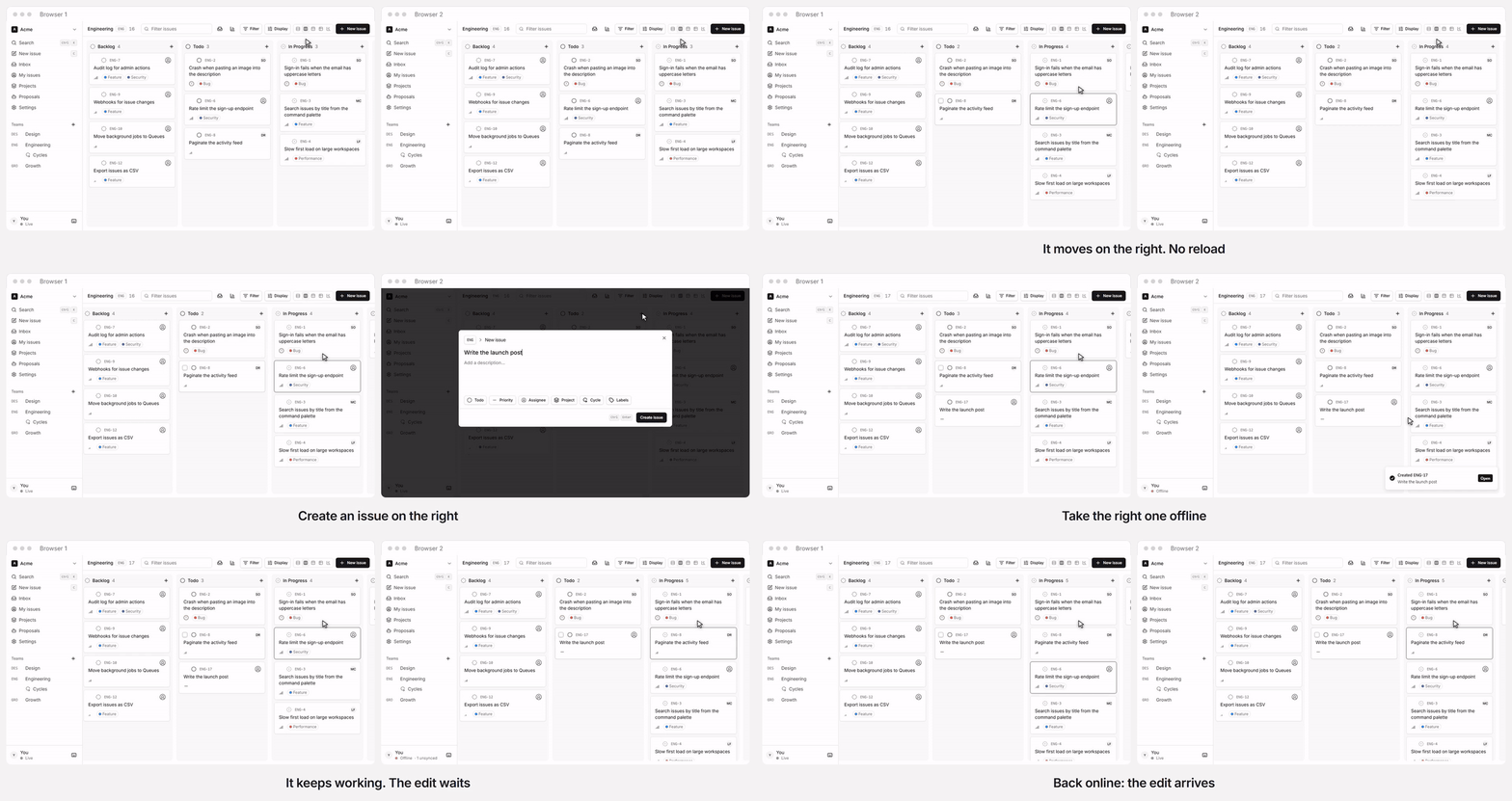
Two browsers on the public demo, in real time. One click opens a private workspace full of sample issues, deleted a day later.
Track keeps every workspace in its own Durable Object, so edits reach everyone instantly, the
app stays fast at any size, and the whole thing deploys as a single Worker you can run on your
own Cloudflare account.
Track is the first product of Gateweave, a family of open-source,
Cloudflare-native business tools. See docs/ecosystem.md.
Status: early development. Sync (server and client), auth, workspaces, invitations, issue
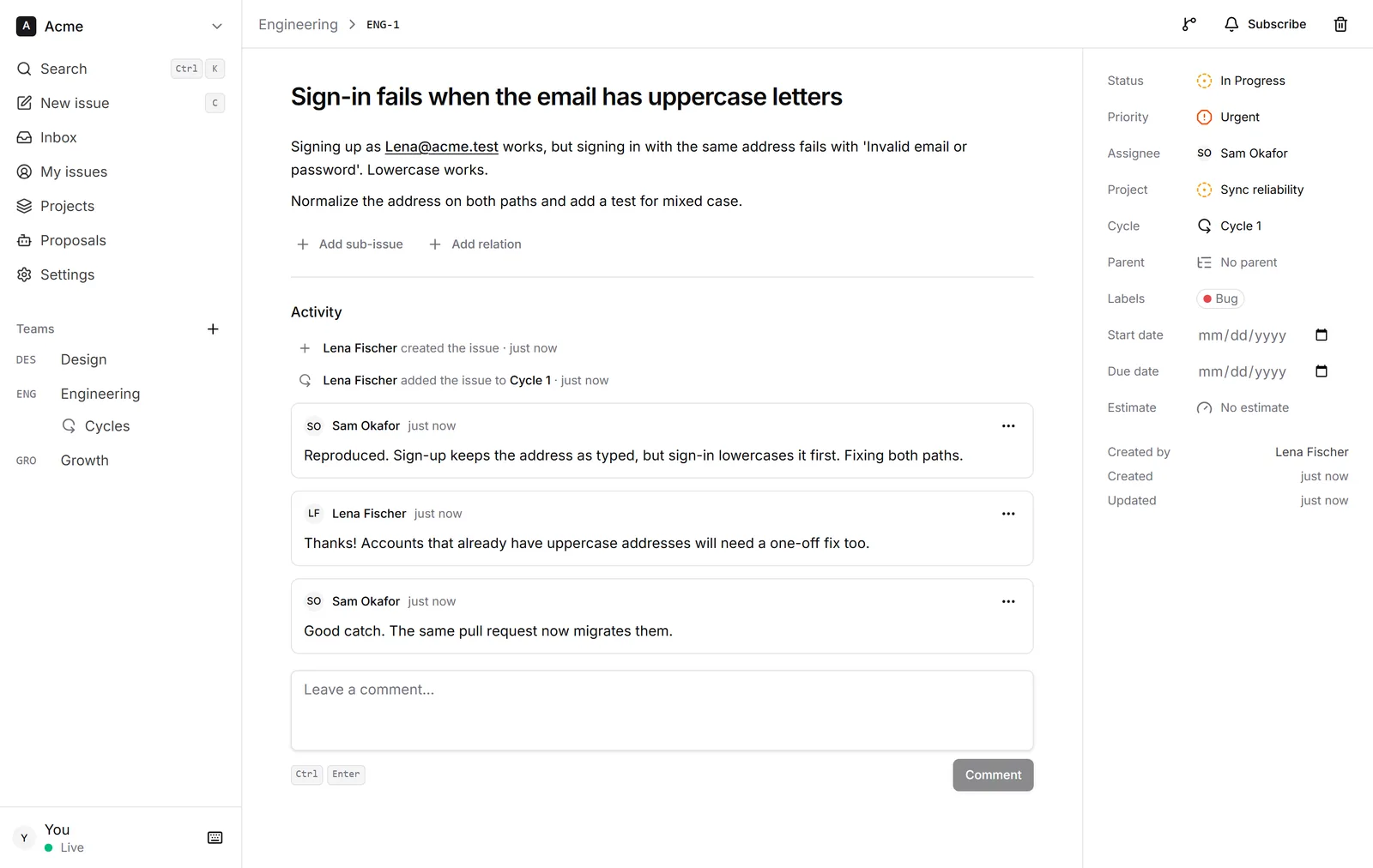
lists, boards, labels, projects, cycles, comments and activity history, the issue page, email, starting offline
and the MCP server for AI agents work end to end. Expect breaking changes until 1.0; see
CHANGELOG.md.
Highlights
- Realtime by default. Changes stream over WebSockets to every open client.
- Local-first and offline-ready. The app opens from a local IndexedDB copy, even with no
connection, and shows edits before the server confirms them. Edits made offline are kept and
sent on reconnect.
Concurrent edits merge per field instead of overwriting each other. - Cloudflare-native. Workers, Durable Objects with SQLite, and D1. No servers, containers or
external databases. - One deploy. UI, API, auth and sync ship together as one Worker.
- Works with AI agents. A built-in MCP server lets Claude, ChatGPT and other agents find, file
and update issues as you, once you approve them in the browser. Agents that work on their own
join as members of their own, with a key. - An inbox of your own. Assignments, @-mentions, comments, status changes and due dates on
the issues you follow arrive live, to read, snooze or archive, and only you see them. What you
leave unread can follow you by email, as you choose. - Webhooks. Each change can be posted to a URL of yours as it happens, signed per
Standard Webhooks and retried while the receiver is down. - GitHub. Pull requests and commits that name an issue link to it. A pull request whose branch
or title names it, or that says "Fixes" it, moves it along: In Progress for a draft, In Review
when opened, Done when merged. - Your data is yours. Export a workspace or one team as CSV or JSON from Settings, Export. It
is built in the browser from its local copy, so it works offline. Settings, Import reads either
file back, into the same workspace or another, and brings issues in from GitHub, Linear and
Jira (its CSV export, with comments).
|
|
Tech stack
TanStack Start · React 19 · Tailwind CSS 4 ·
Better Auth · Drizzle ORM ·
Cloudflare Workers, Durable Objects and D1 · TypeScript 7 · Vitest · Biome
Getting started
Requirements: Node.js 24 (22+ works) and pnpm 12.
pnpm install
pnpm doctor      # checks your toolchain and setup, and explains how to fix anything missing
pnpm dev:setup   # creates .dev.vars with a random secret, migrates the local database
pnpm dev         # http://localhost:4710
pnpm dev:seed    # in a second terminal: a sample workspace with people, teams and issues
The seed prints the sample accounts to sign in with. You can also sign up with any email and
password and create a workspace from scratch. To enable "Sign in with GitHub", uncomment and
fill in GITHUB_CLIENT_ID and GITHUB_CLIENT_SECRET in .dev.vars.
Connect an AI agent
Track is an MCP server. An agent connects to /mcp, sends you
to Track to sign in and approve it, and then works with your permissions: it lists your
workspaces, searches and reads issues, creates and updates them, and creates teams if you are an
admin. Everyone sees its edits live, as they would anyone else's.
With Claude Code and Gateweave Cloud:
claude mcp add --transport http gateweave-track https://track.gateweave.com/mcp
Then run /mcp in Claude Code to sign in. Other MCP clients take the same URL. The endpoint is
on wherever BETTER_AUTH_URL is set (see self-hosting).
Locally, set it to http://localhost:4710 in .dev.vars and connect tohttp://localhost:4710/mcp.
An agent that works on its own, such as a triage bot, should not act as you. An admin creates
an agent member for it under Settings, Agents: it joins the workspace under its own name, can do
what members do, and connects with a key instead of signing in:
claude mcp add --transport http track https://track.gateweave.com/mcp \
  --header "Authorization: Bearer gwt_..."
To have it react to new issues, add a webhook under Settings, Webhooks that points at its
trigger and names it as the agent, so its own changes are not sent back to it.
Scripts
| Command | What it does |
|---|---|
pnpm dev |
Run the app locally with Workers, D1 and Durable Objects |
pnpm dev:seed |
Fill the running app with a sample workspace |
pnpm doctor |
Check the local toolchain and setup |
pnpm check |
Lint and format check (Biome) |
pnpm format |
Apply formatting and safe lint fixes |
pnpm typecheck |
Type-check every package |
pnpm test |
Run the test suites |
pnpm build |
Production build |
pnpm verify |
Everything CI runs: check, typecheck, test and build |
Deploying
The button copies Track to your GitHub or GitLab account, creates the database, and deploys it
to your Cloudflare account; every push to your copy deploys again. From the command line:
pnpm wrangler login
pnpm run deploy    # builds, applies D1 migrations, deploys
Use the Workers Paid plan, because a password sign-in takes more CPU than the Free plan gives a
request. docs/self-hosting.md covers both ways, your own domain, AI agents,
GitHub sign-in, email and updating.
Gateweave Cloud deploys itself from GitHub Actions (.github/workflows/deploy.yml): every green
build of main goes to staging (pnpm deploy:staging, the staging environment inwrangler.jsonc), and publishing a release deploys that tag to production. Forks skip those
jobs.
Project structure
apps/web               The Worker: UI, auth, sync and MCP gateways, D1 schema
packages/protocol      Wire contract shared by client and server
packages/sync-server   WorkspaceDO: storage, mutations, realtime fan-out
packages/sync-client   Browser replica: local cache, optimistic edits, one connection per browser
docs/                  Architecture, roadmap, self-hosting and ecosystem notes
scripts/               Repository tooling
wrangler.jsonc         The Worker's Cloudflare configuration, at the root for the Deploy button
Read docs/architecture.md for how sync, auth and storage fit together,
docs/roadmap.md for what comes next, and CHANGELOG.md for what
each release changed.
Contributing
Contributions are welcome. See CONTRIBUTING.md and our
Code of Conduct. If you work with an AI coding agent, point it at
AGENTS.md. Report security issues privately, as described in
SECURITY.md.
License
Copyright © 2026 Yiğit Tanrıverdi.
Gateweave Track is licensed under the GNU Affero General Public License v3.0. You can
self-host, use and modify Track freely. If you run a modified version as a network service, you must
make your changes available to its users under the same license.
Contributions are accepted under the Contributor License Agreement.
Yorumlar (0)
Yorum birakmak icin giris yap.
Yorum birakSonuc bulunamadi