claude-make-it-rain
Health Warn
- License — License: MIT
- Description — Repository has a description
- Active repo — Last push 0 days ago
- Low visibility — Only 5 GitHub stars
Code Fail
- child_process — Shell command execution capability in bin/make-it-rain.js
- fs module — File system access in lib/config.js
Permissions Pass
- Permissions — No dangerous permissions requested
No AI report is available for this listing yet.
Claude Code spend tracker for your menu bar, makes it rain 💸
Make It Rain 💸


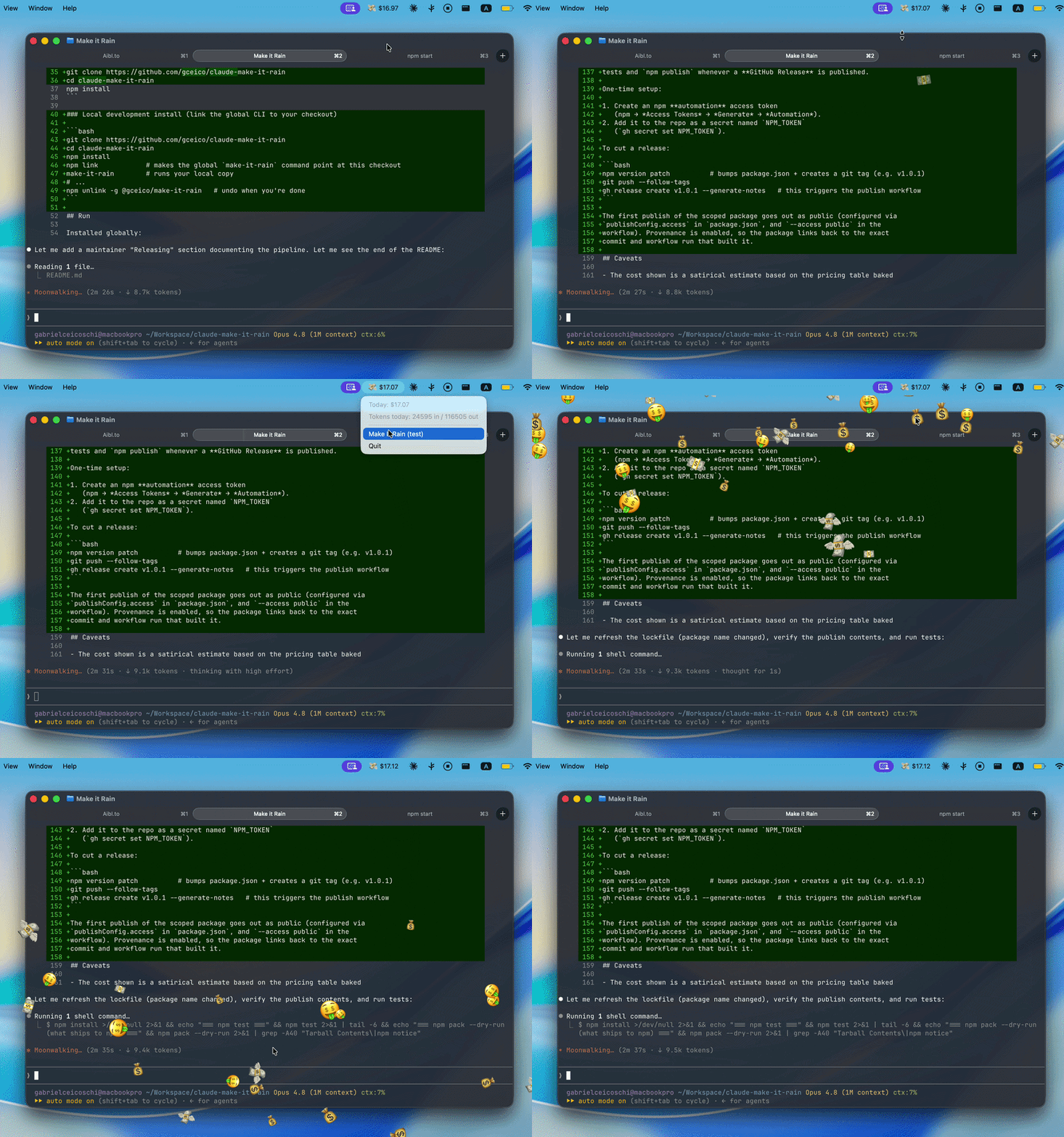
A menu bar app that tracks your Claude Code spend today. Every $1 spent flies
a 💵 off the menu bar — and every $100 makes it rain. 💸
The dollar figure is a rough estimate from per-token pricing.
Requirements
- Node.js 22+ (you have this if you run Claude Code)
- macOS, Windows, or Linux
- Claude Code writing session logs to
~/.claude/projects(the default)
Install
From npm
npm install -g @gceico/claude-make-it-rain
This installs the claude-make-it-rain command.
From a git checkout
git clone https://github.com/gceico/claude-make-it-rain
cd claude-make-it-rain
npm install
Local development install (link the global CLI to your checkout)
git clone https://github.com/gceico/claude-make-it-rain
cd claude-make-it-rain
npm install
npm link                     # makes the global `claude-make-it-rain` command point at this checkout
claude-make-it-rain          # runs your local copy
# ...
npm unlink -g @gceico/claude-make-it-rain   # undo when you're done
Run
Installed globally:
claude-make-it-rain
That's it — the app detaches from the terminal and lives in your tray/menu
bar. You can close the terminal afterwards.
From a checkout:
npm start                        # foreground (logs in the terminal, Ctrl-C to quit)
node bin/make-it-rain.js         # detached, like the installed CLI
node bin/make-it-rain.js --foreground   # same launcher, but stays attached
On launch it scans today's session logs and prints a line like:
MakeItRain: today so far $13.92 (78 entries)
(Only visible when running in the foreground — the detached mode is silent.)
Quit
Click the tray item and choose Quit (or Ctrl-C if running in the
foreground). Only one instance runs at a time — launching a second one exits
immediately.
What you'll see
- A tray item like
💸 $12.34, switching to🤑once today's spend hits
$100. The dollar amount next to the icon is macOS-only; on Windows/Linux
the amount lives in the tooltip and the context menu (a green square is
shown as the icon). - Click the tray item for a menu with today's total, today's input/output
token counts, Make It Rain (test) / Stack of Money — $10 /
Five Stacks — $50 items to preview each animation, the daily-leaderboard
controls (see privacy section below), and Quit. - A 💵 flies off the tray item every time the running total crosses a whole
dollar. Bigger milestones burst thick money stacks from the tray the
first time today's total crosses them — $10 fires one stack of 10 bills,
$50 fires five — and crossing every $100 multiple plays a ~6-second
full-screen shower of 💵💸💰🤑. The overlay is click-through and only exists
while animating.
Staying up to date
Make It Rain checks npm once a day (fail-silently — a missing network never
disturbs the app) to see whether a newer version has been published. When one
is available it shows a one-time desktop notification and adds an
⬆️ Update to vX.Y.Z item to the top of the tray menu; clicking it runsnpm install -g @gceico/claude-make-it-rain@latest for you and then prompts
you to quit and relaunch to apply the update.
How it works
- Polls
~/.claude/projects/*/*.jsonlevery 3 seconds, incrementally reading
only newly appended bytes. The total resets automatically at local midnight. - Every
assistantmessage with ausageblock recorded today (local
time) is priced per-million-token rates keyed off the model id, with
cache-read tokens at 10% of the input rate and cache-write tokens at
1.25x/2x the input rate for 5-minute/1-hour ephemeral cache creation. - Entries are deduplicated by
requestId:messageIdsince the same entry can
appear more than once across files.
Daily leaderboard & privacy (GDPR)
Make It Rain has an optional cloud leaderboard of the day: a friendly ranking
of who made it rain hardest today, by anonymized tag.
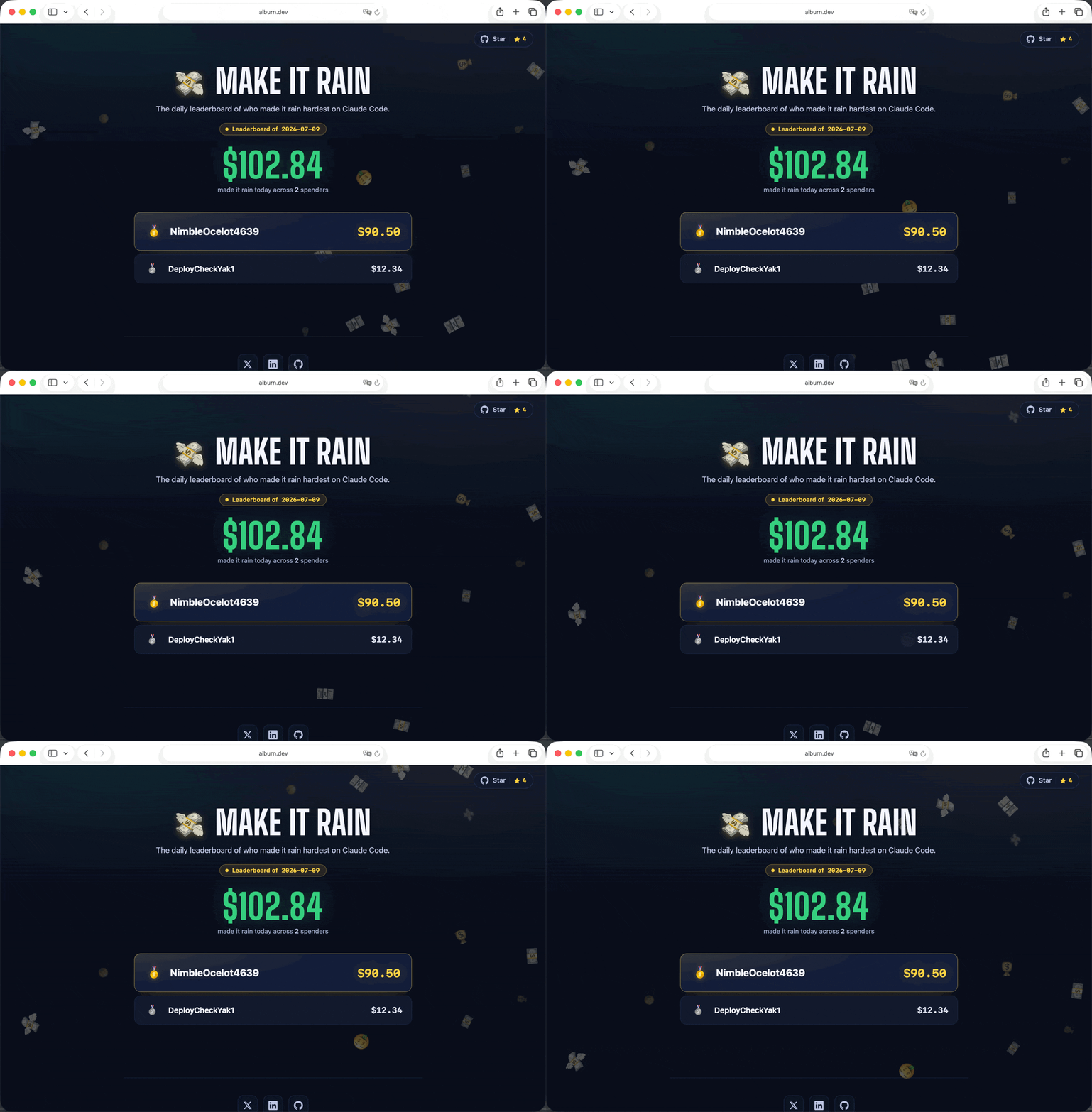
👉 See the live board at aiburn.dev — it resets every
day (UTC) and shows the top anonymized tags along with the repo's GitHub star
count.
What is sent
Exactly two things, once an hour:
- your anonymized gamer tag (e.g.
TurboLlama7392), generated randomly on
first run and stored locally; - today's estimated total in USD.
That's it. No account, email, IP-derived identity, file paths, project
names, model names, prompts, or any other data leaves your machine. The server
does not log IPs or per-user metadata, stores only tag → max daily total, and
resets every day (UTC) — old days are pruned automatically.
It's opt-out, clearly disclosed, and easy to disable
Telemetry is on by default but fully under your control from the tray menu:
- Share on daily leaderboard — a checkbox to turn reporting on/off instantly.
- New random tag — reroll your anonymous tag any time.
- View leaderboard… — opens the landing page in your browser.
- Leaderboard tag: … — shows the exact tag being used.
Your choice is saved in a local config file (config.json under Electron'suserData directory — e.g. ~/Library/Application Support/make-it-rain/ on
macOS, ~/.config/make-it-rain/ on Linux, %APPDATA%\make-it-rain\ on Windows).
You can also edit it by hand: set "telemetryEnabled": false, change"gamerTag", or repoint "apiBaseUrl".
Because no personal data is collected and the tag is anonymous, random, and
user-changeable, there is nothing to identify you by — consistent with GDPR data
minimization. Disabling telemetry stops all network activity. The client points
at the reference server at aiburn.dev by default; if it is
ever unreachable the client fails silently: no errors, no crashes, no retry
storms.
Running the backend yourself
The server is a tiny, zero-dependency Node HTTP app under server/. Point the
client at it via apiBaseUrl in config.json.
node server/index.js # listens on http://localhost:8787
POST /api/report— body{ "tag": "...", "total": 12.34 }GET /api/leaderboard— today's top tags as JSONGET /api/stars— the repo's GitHub star count, fetched server-side and
cached ~10 min (the page can't call GitHub directly under its strict CSP)GET /— the landing page (server/public/index.html)
State lives in a small SQLite database (server/data/leaderboard.db, git-ignored),
backed by the built-in node:sqlite module — still zero npm dependencies. The
server uses node:sqlite (added in Node 22.5), and the desktop app shares the
same Node >= 22 baseline. Set LEADERBOARD_DB to override the file path.
The reference server deploys to Railway with railway up ./server,
built from server/Dockerfile (node:24-alpine, no npm install, sleeps when idle;
persistent volume mounted at /data, LEADERBOARD_DB=/data/leaderboard.db).
Testing & debug hooks
npm test                                  # unit tests (pure Node, no Electron window)
MIR_TEST_RAIN=1 npm start                 # trigger the $100 rain 1.5s after launch
MIR_TEST_STACK=5 npm start                # burst 5 money stacks 3s after launch
MIR_TEST_SHOT=/tmp/overlay.png npm start  # save a PNG of the overlay 4s after launch
Project layout
bin/make-it-rain.js— CLI launcher; spawns Electron detached.main.js— tray item, overlay window management, monitor wiring, IPC,
single-instance lock.lib/usage-monitor.js— incremental JSONL tailing, parsing, dedup, daily
reset (pure Node, no Electron — unit-testable).lib/pricing.js— per-model USD/1M-token pricing table and per-entry cost
calculation (pure Node).lib/milestones.js— first-time-today spend milestones ($10/$50) that burst
money stacks, and the crossing math that fires only the highest one (pure
Node, no Electron — unit-testable).lib/leaderboard-client.js— anonymized-tag generation, config persistence,
telemetry toggle, and hourly fail-silent reporting to the cloud leaderboard
(pure Node, no Electron — unit-testable).server/— tiny zero-dependency Node HTTP backend (index.js+db.js, anode:sqlitestore) and the leaderboard landing page (public/index.html).
Deploys to Railway withrailway up ./server.overlay.html+preload.js— transparent, click-through, always-on-top
fullscreen overlay that renders the dollar-fly and money-rain animations,
hiding itself when idle.test/usage-monitor.test.js— pricing math, dedup, day filtering,
incremental/partial-line reads, crossing math.test/leaderboard-client.test.js— tag generation/sanitization, config
first-run/stability/recovery, telemetry toggle, and fail-silent reporting..github/workflows/— CI (tests on Linux/macOS/Windows × Node 22/24)
and the npm publish pipeline.docs/DECISIONS.md— architecture & decision log for the leaderboard,
deployment, publishing, and security/anti-cheat work.
Releasing (maintainers)
Publishing is automated by .github/workflows/publish.yml, which runs the
tests and npm publish whenever a GitHub Release is published.
One-time setup:
- Create an npm automation access token
(npm → Access Tokens → Generate → Automation). - Add it to the repo as a secret named
NPM_TOKEN
(gh secret set NPM_TOKEN).
To cut a release:
npm version patch          # bumps package.json + creates a git tag (e.g. v1.0.1)
git push --follow-tags
gh release create v1.0.1 --generate-notes   # this triggers the publish workflow
The first publish of the scoped package goes out as public (configured viapublishConfig.access in package.json, and --access public in the
workflow). Provenance is enabled, so the package links back to the exact
commit and workflow run that built it.
Caveats
- The cost shown is a satirical estimate based on the pricing table baked
intolib/pricing.js; it is not pulled from any live pricing API and may
not match actual billing. - If
~/.claude/projectsdoesn't exist or has no session logs for today, the
app simply shows$0.00and keeps polling. - No state is persisted across restarts — it rescans today's logs on launch.
- Animations render on the primary display only.
Who's behind this
I'm Gabriel. I build things like this for fun and for my own work, and ship the
ones that turn out good.
Check One's Skills for my own Claude Skills collection.
I also run AI Workshops and help people turn their expertise into compounded value.
Come say hi at Aibl.to
— Gabriel C.
Reviews (0)
Sign in to leave a review.
Leave a reviewNo results found