vscode-prompt-studio
Health Warn
- License — License: GPL-3.0
- Description — Repository has a description
- Active repo — Last push 0 days ago
- Low visibility — Only 6 GitHub stars
Code Warn
- fs module — File system access in esbuild.js
Permissions Pass
- Permissions — No dangerous permissions requested
No AI report is available for this listing yet.
A markdown-based prompt management system for VSCode including visual exploration views.
VSCode Prompt Studio
An Obsidian-like storage solution for your prompt collection, with live markdown editor and Claude integrations.




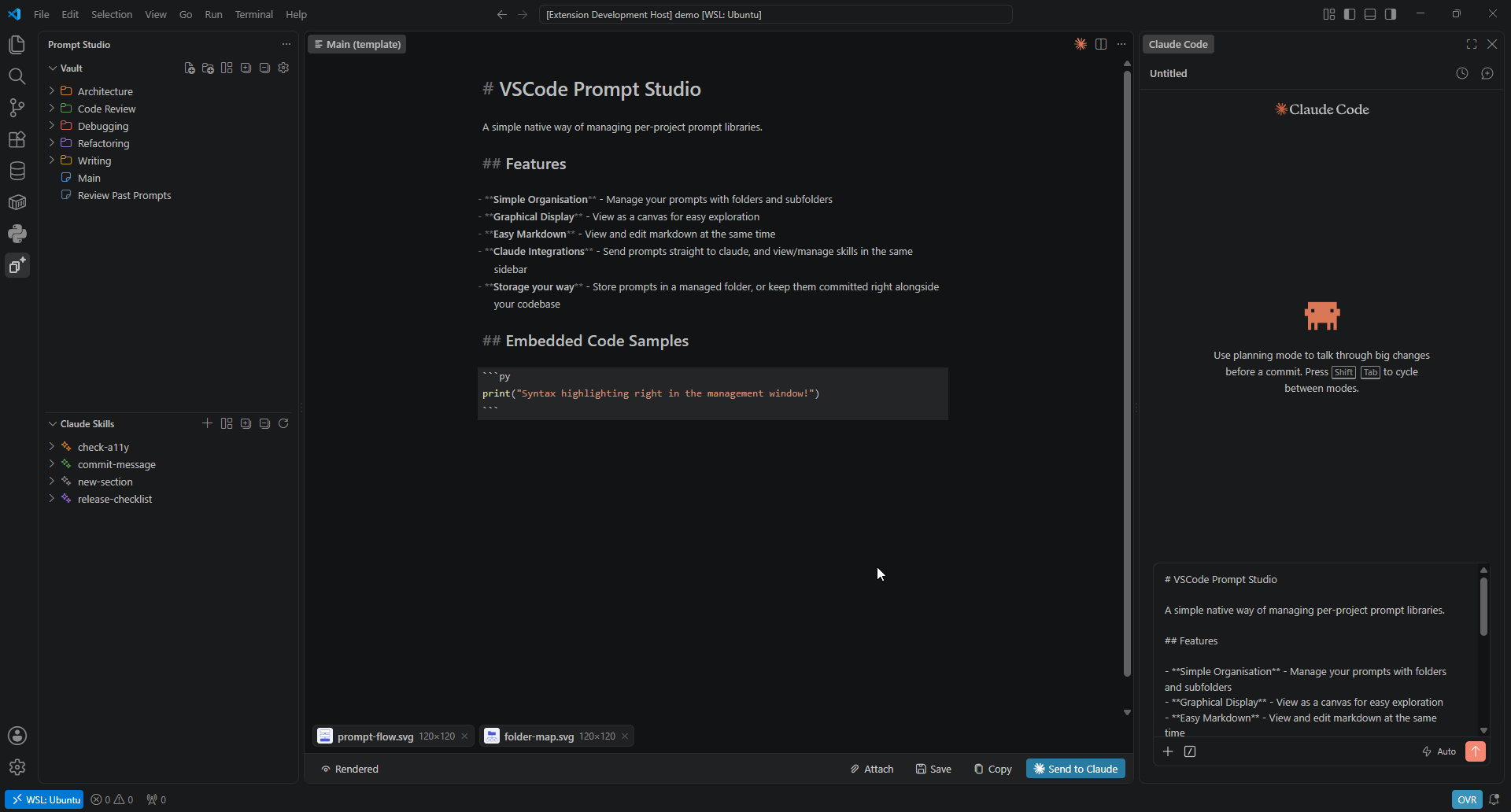
Custom sidebar on the left, live md editor in center, claude on the right.
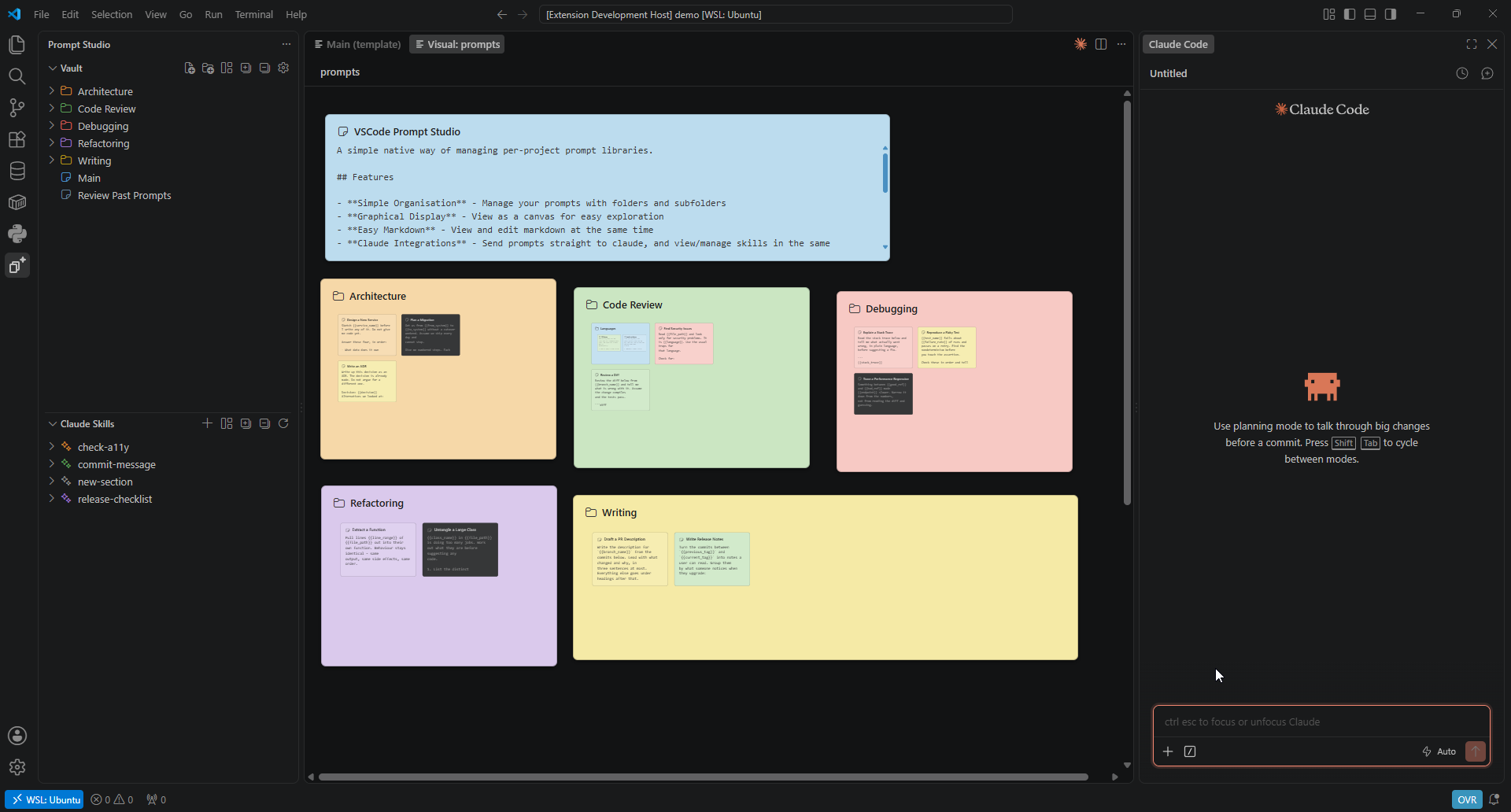
Prompts viewed as separate notes, like having a bunch of notepad.exes open
Store and manage your project prompt collections in one place.
Write your prompts in a live markdown viewer, and store them as plain md files on your disk (stored anywhere, even inside your project folder).
Auto-detect project and sub-project skill files easily view/edit them alongside your prompts.
Features
- Canvas view Explore your prompt collection as an infinite canvas. Zoom into a folder to open it, and type straight into the cards while Edit is on in the bottom bar.
- Live markdown editor or just plain txt.
- Send directly to Claude Send your prompts straight to claude, including media attachments.
- Skills management All
.claude/skillsfolders in the workspace and its sub-projects, browsable and editable in the live editor. - Enhanced
@browsing. A filesystem cache is held meaning that@file links resolve immediately, instead of long loading on Claude. - A vault per project. The project vault location lives wherever you want, so different projects point at different vaults (combine together if you want!).
Install
Search for Prompt Studio in the Extensions view, or install it from the marketplace listing.
Requirements
- VSCode 1.85 or newer.
- Optional | The Claude Code extension, for the Send to Claude actions (you can still copy to clipboard).
- Optional | On Linux,
wl-copyorxclip, so a note's images can be attached to what you send (if uninstalled, the filepath is pasted into the prompt instead).
Settings
Press the gear icon in your studio to open the settings tab (or select Prompt Studio: Settings in the palette.
Current settings:
- Default note view (
promptStudio.defaultNoteView): Wether to use the built-in Markdown template editor, or just use default editor. - Vault location: Where the collection is stored on disk (can be within the project itself). Each defaults to a location in the extension files.
Contributing
Build instructions and the repository layout are in CONTRIBUTING.md.
Third-party notices
This extension uses the following projects, with thanks:
| Component | Copyright | License |
|---|---|---|
| CodeMirror 6 | Marijn Haverbeke and contributors | MIT |
| Lezer | Marijn Haverbeke and contributors | MIT |
| crelt, style-mod, w3c-keyname, find-cluster-break | Marijn Haverbeke | MIT |
| VSCode codicons | Microsoft Corporation | CC-BY-4.0 |
| yaml | Eemeli Aro | ISC |
License
VSCode Prompt Studio is released under the GNU General Public License v3.0. See LICENSE for the full text.
Reviews (0)
Sign in to leave a review.
Leave a reviewNo results found