rfauto
Health Pass
- License — License: GPL-3.0
- Description — Repository has a description
- Active repo — Last push 0 days ago
- Community trust — 31 GitHub stars
Code Pass
- Code scan — Scanned 12 files during light audit, no dangerous patterns found
Permissions Pass
- Permissions — No dangerous permissions requested
No AI report is available for this listing yet.
RF/microwave design automation + LLM orchestration: 16 EM/EDA engines behind one interface, 75 parameterized template families, 340 deterministic calculators, 87 calibration anchors; AI agents drive everything via MCP (157 tools) — physics numbers come only from deterministic kernels, never from the LLM. 28000+ unit tests, GPL-3.0
rfauto




English | 简体中文
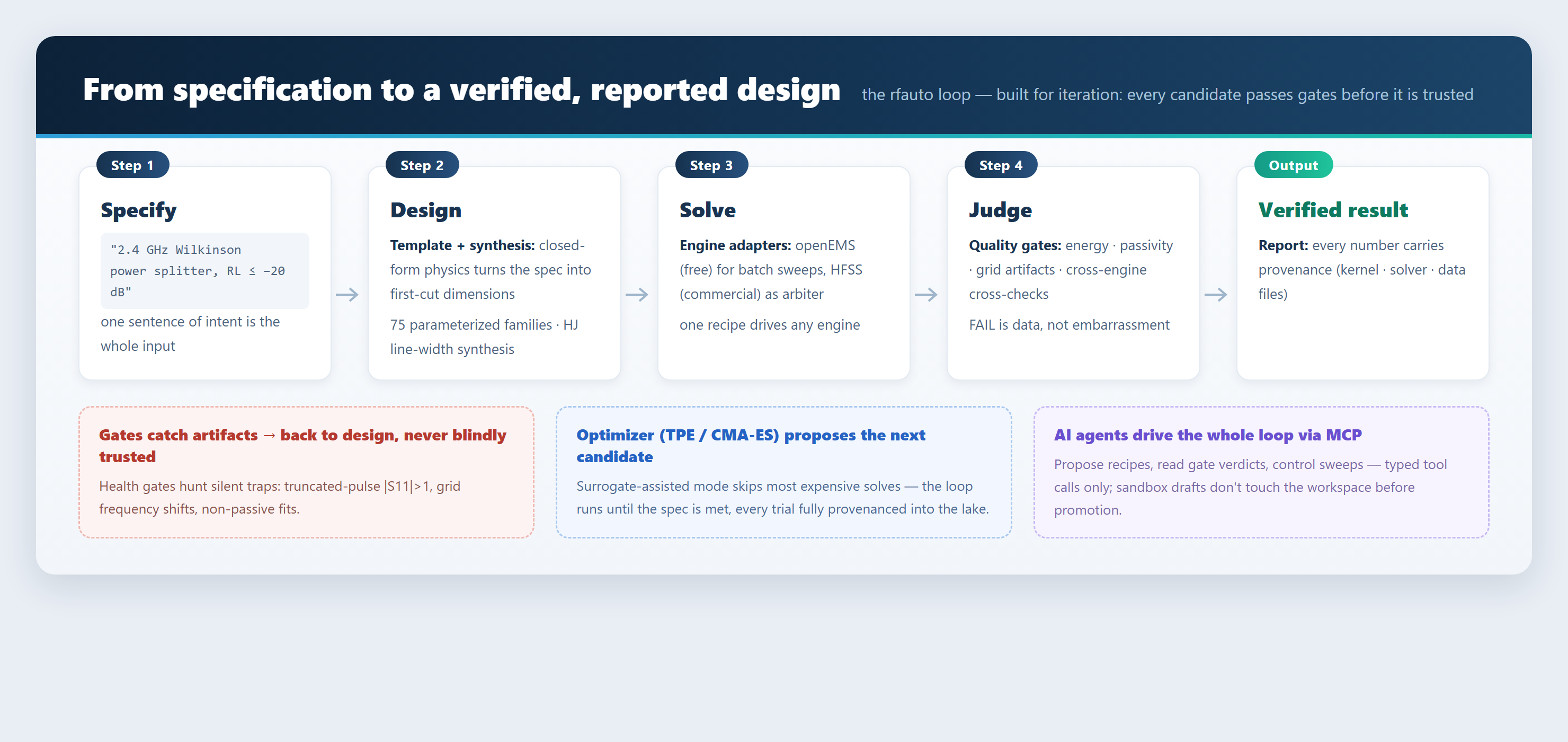
rfauto turns RF/microwave design from "draw, wait for the solver, copy
numbers" into one reproducible automated loop. Describe the device you want; it
derives first-cut dimensions from closed-form physics, drives whichever solver you
have, runs every result through quality gates that catch numerical artifacts, then
optimizes the dimensions — and hands you a report where every number carries its
provenance. AI assistants can drive all of it over MCP, under one iron rule:
Every physical number (frequency, loss, geometry) is produced by the
deterministic kernel or by a solver — never invented by the language model.
Measured counts for this revision (exact; verifiable with scripts/check_numbers.py):
CALCULATOR_REGISTRY 340 (with experimental 341) · TEMPLATE_META 75 ·EXPECTED_TEMPLATES 75 · ANCHORS 87 · CLI commands 297 (leaves) ·
(166 MCP tools + 10 resources)
Scale numbers: MCP tools 166 (+10 resources) | CLI commands 297 (leaves) | CALCULATOR_REGISTRY 340 [with experimental 341] | device templates 75 | anchors 87
Contents · Capability map · Quick start ·
Why trust it · Engine ladder ·
Architecture · Docs map · Roadmap
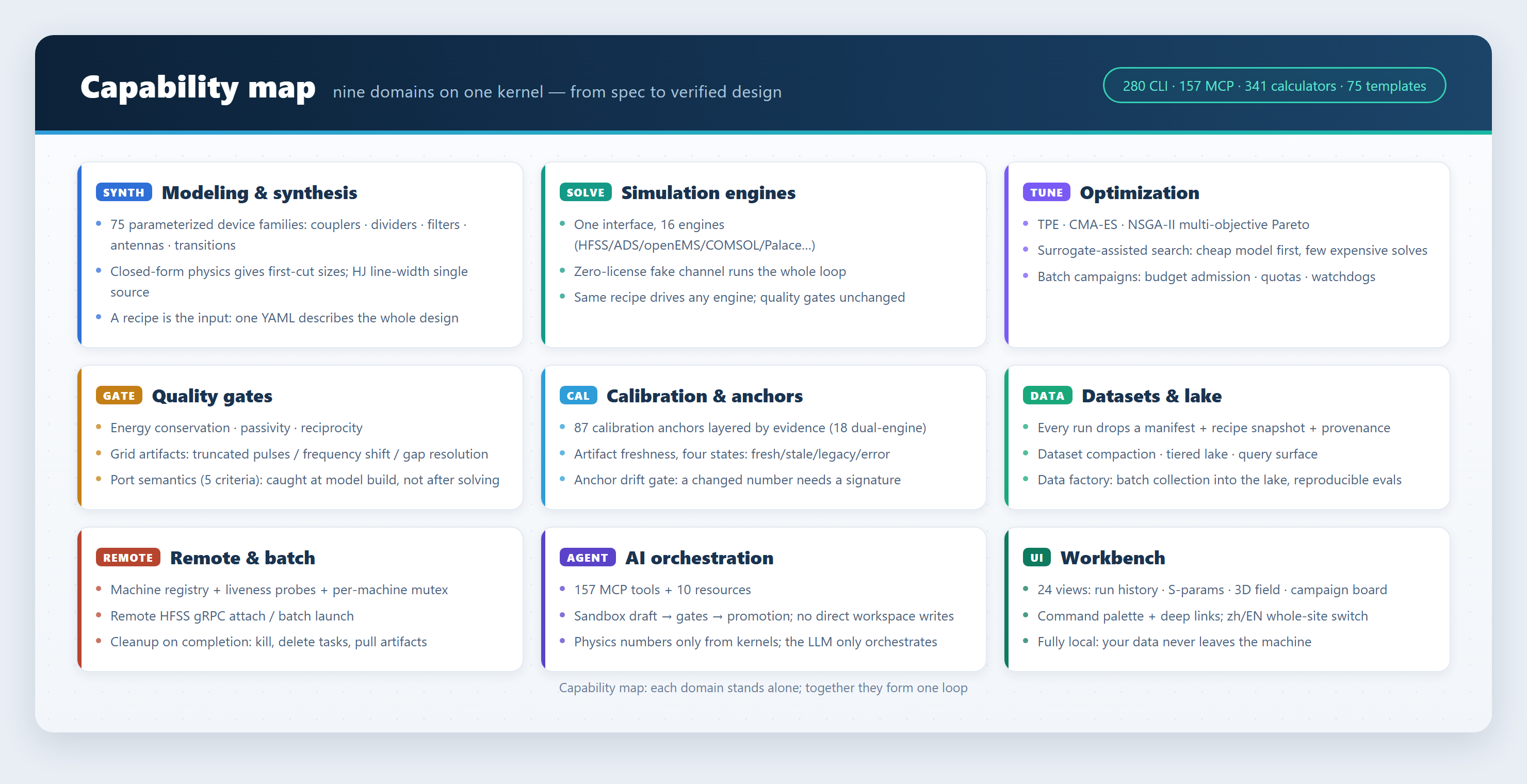
1. Capability map (nine domains)
Each domain works on its own; together they form the loop above. Every command
below is copy-pasteable.
1.1 Device modeling and synthesis
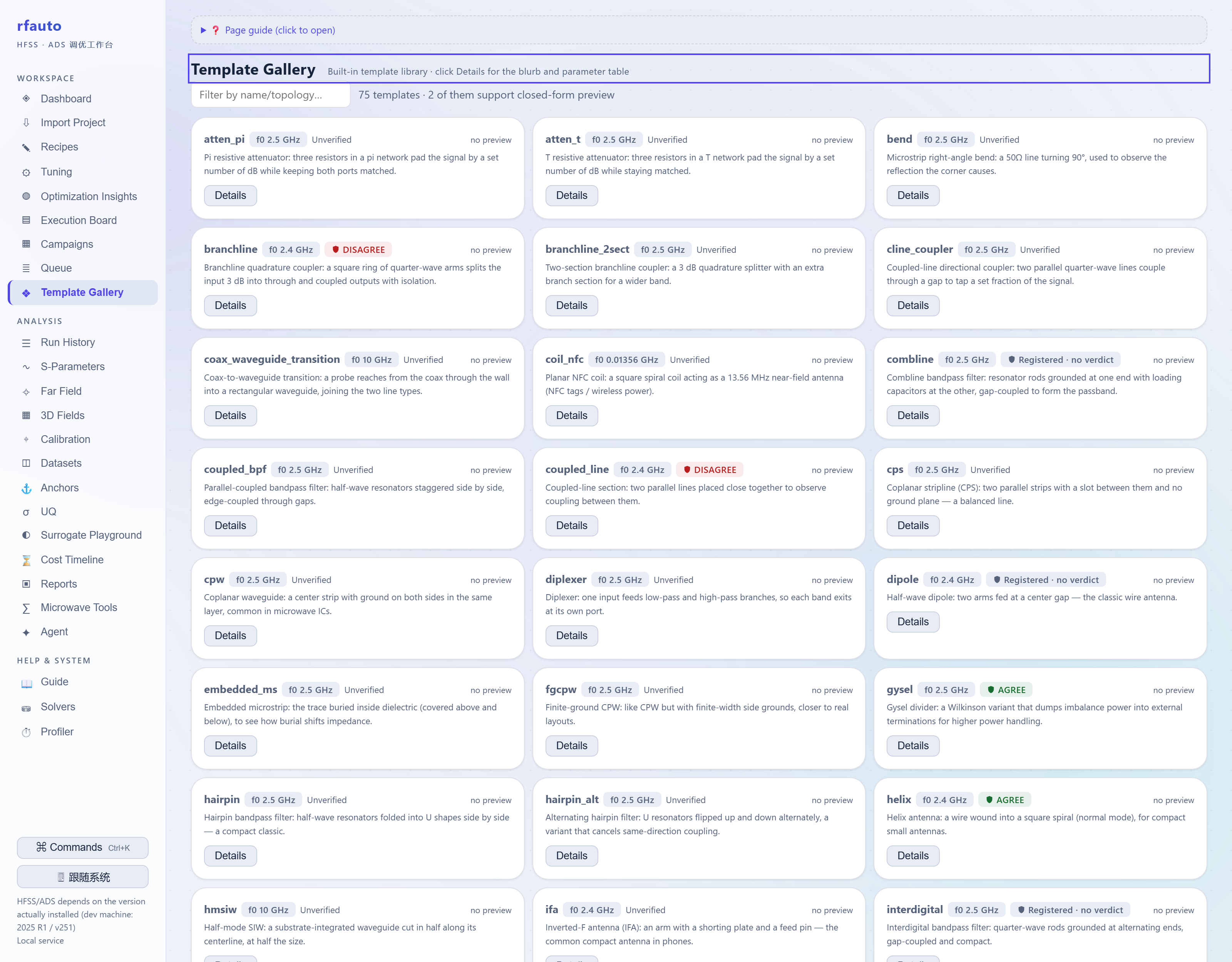
75 parameterized device templates — dividers, couplers, filters, antennas,
transitions, lumped IPD passives. Each template synthesizes first-cut dimensions
from closed-form physics and registers the acceptance criteria for that family, so
you can tell a real result from a grid artifact. Line widths are never copied from
a document: they come from skrf Hammerstad-Jensen synthesis (single source).
rfauto syn mline 50.0 --freq 2.4 --stackup rogers4350b_h0.508
#  width: 1.1133 mm    eps_eff: 2.8530
rfauto templates list                  # the 75 families and their parameters
rfauto templates golden-diff           # geometry golden regression
A recipe is the input: one YAML file describes frequency, substrate, targets and
constraints, and every channel reads the same file.
1.2 Multi-engine simulation
One adapter layer, 16 channels: HFSS, ADS, openEMS, COMSOL, Elmer, NGSolve, Meep,
Icepak, Q3D, Palace, KiCad, ngspice, FDTDX (JAX), MMT (analytical mode-matching),
QucsatorRF, and a VNA measurement channel. Commercial engines are optional extras;
the whole core runs on the built-in fake channel — no license needed to try
everything.
rfauto solvers list                    # registered channels and availability
rfauto run recipes/patch_antenna_v1.yaml --adapter fake
1.3 Optimization and tuning
TPE / CMA-ES / NSGA-II for multi-objective work (Pareto fronts), plus a surrogate
route: fit a cheap model on a batch of results, search on the model, and spend
expensive solves only where they matter. Batch campaigns carry budget admission,
quotas and watchdogs, so they can run unattended overnight.
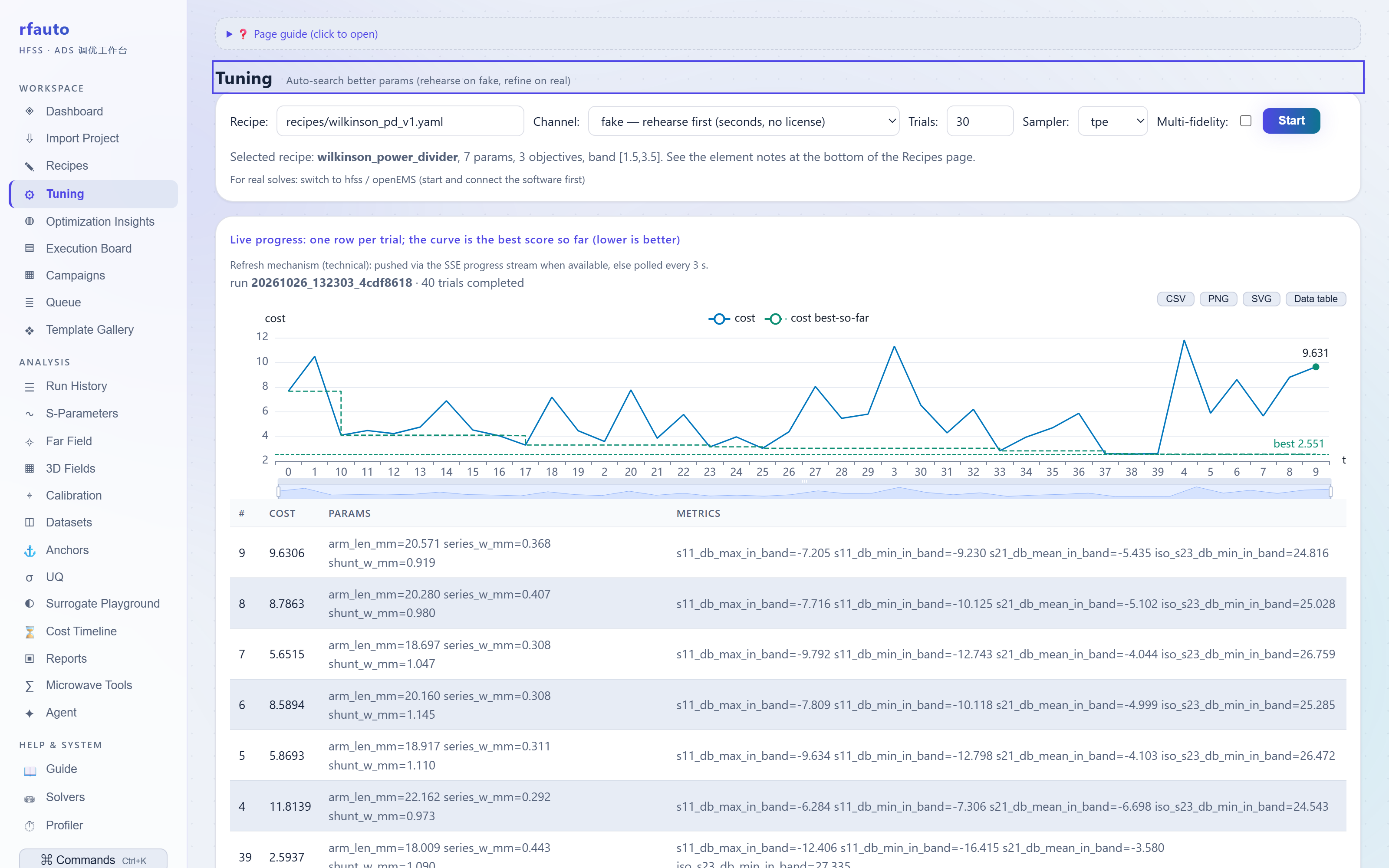
rfauto tune  recipes/wilkinson_pd_v1.yaml --adapter fake --max-trials 40
rfauto sweep recipes/wilkinson_pd_v1.yaml --adapter fake
rfauto campaign plan --config campaign.yaml
1.4 Quality gates
Solvers fail quietly: a coarse mesh shifts the resonance, a wrong port solves to
±0 dB, a truncated pulse pushes |S11| above 1 — and the garbage looks as plausible
as the truth. rfauto makes the judgment an explicit gate.
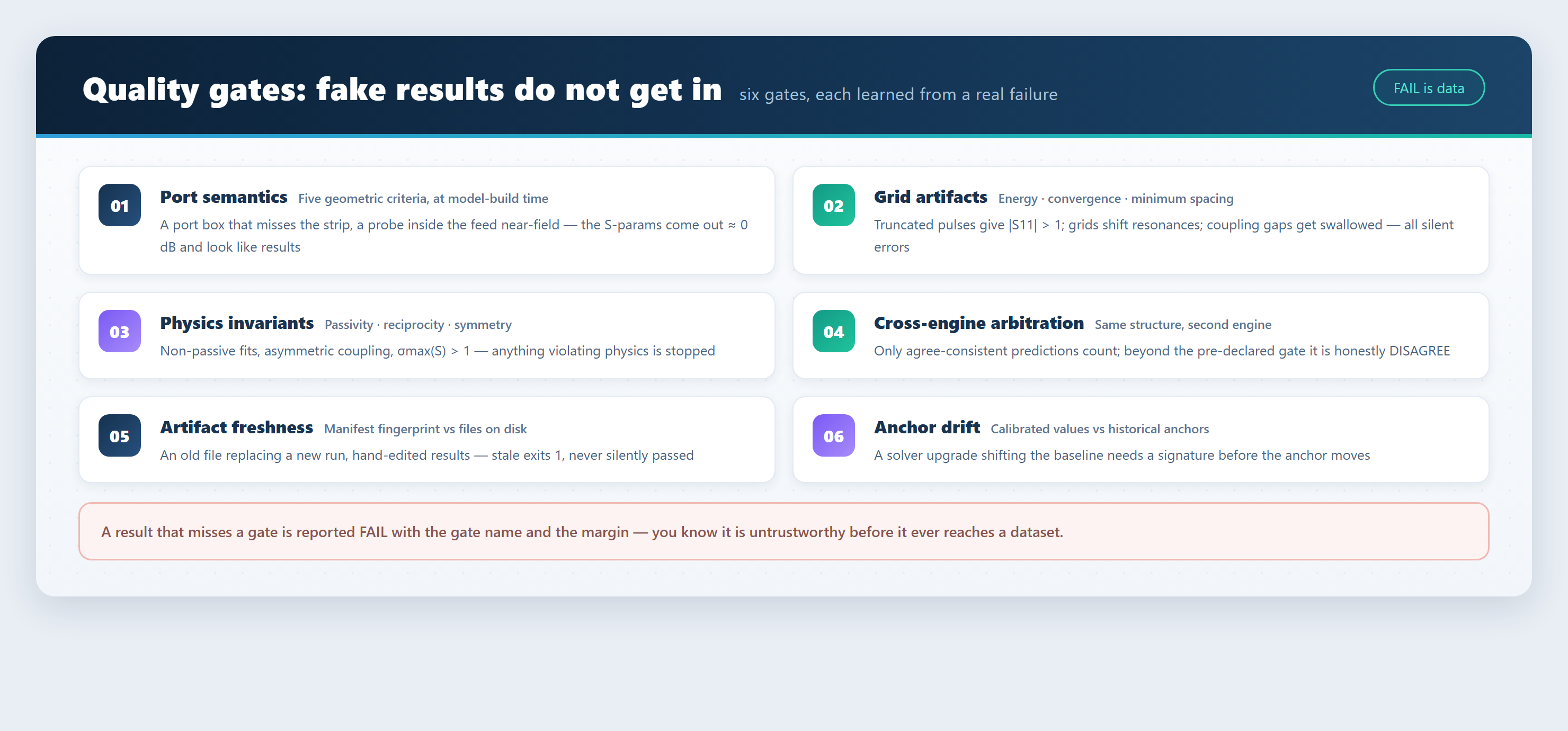
Six gates cover six classes of failure: port semantics (five geometric criteria at
model-build time), grid artifacts (energy / convergence / minimum spacing),
physics invariants (passivity / reciprocity / symmetry), cross-engine arbitration
(a second engine on the same structure), artifact freshness (manifest fingerprint
vs files on disk), and anchor drift. A result that misses a gate is reported
FAIL with the gate name and the margin — never silently passed.
1.5 Calibration and anchors
87 calibration anchors cover 68 device families (75 templates ship; families
without an anchor say so). Layered by evidence strength: 18 are backed by an
HFSS ↔ openEMS dual-engine comparison, 2 by HFSS/MMT arbitration, 1 by HFSS
self-consistency; 62 are closed-form or quasi-static FD reference anchors (59
closed-form + 3 FD, each with formula source and validity domain on file); the
remaining 4 have no engine comparison and say so — a closed-form anchor is never
dressed up as engine-backed.
Artifact freshness has four states (fresh/stale/legacy/error): an old file
replacing a new run is flagged, and rfauto runs verify exits 1.
rfauto anchors list                    # values / status / provenance
rfauto anchors validate                # check provenance records one by one
rfauto runs verify <run_id>            # freshness (stale ⇒ exit code 1)
1.6 Datasets and the lake
Every run drops a self-describing directory: environment fingerprint, recipe
snapshot, metrics, figures, Touchstone files, and a manifest recording hashes of
all artifacts. Datasets assemble runs into a queryable lake with tiered
compaction and batch collection.
runs/20261026_132409_ff7c0bde/
├── meta.json              # environment fingerprint (versions, git sha, deps)
├── recipe.snapshot.yaml   # the recipe snapshot this run used (replay reads it)
├── manifest.json          # SHA256 + size of every artifact (freshness basis)
├── report.md              # human-readable report: metrics, gates, verdict
└── results/
    ├── metrics.json       # machine-readable metrics
    ├── params.s3p         # Touchstone (real-engine channels only)
    └── figs/              # figures
rfauto runs list
rfauto dataset materialize --help
rfauto lake index
1.7 Remote execution and batch
A machine registry with liveness probes and per-machine mutex: send the heavy work
to a compute server and keep only orchestration locally. Remote HFSS runs over
gRPC attach; batch jobs launch short-lived processes. Everything is cleaned up on
completion (processes killed, scheduled tasks removed, artifacts pulled back) so
no orphan holds a license seat.
rfauto remote probe                    # liveness and version check
rfauto remote status
1.8 AI orchestration (MCP)
166 MCP tools and 10 resources: Claude Desktop, Cursor or your own agent can
operate the framework. Agent changes land in a sandbox draft and must pass
validation gates before touching the workspace; the agent emits typed tool calls
only, and the kernel fills in the physics.
pip install -e ".[mcp]"
python -m rfauto.mcp_server            # stdio transport
1.9 Workbench
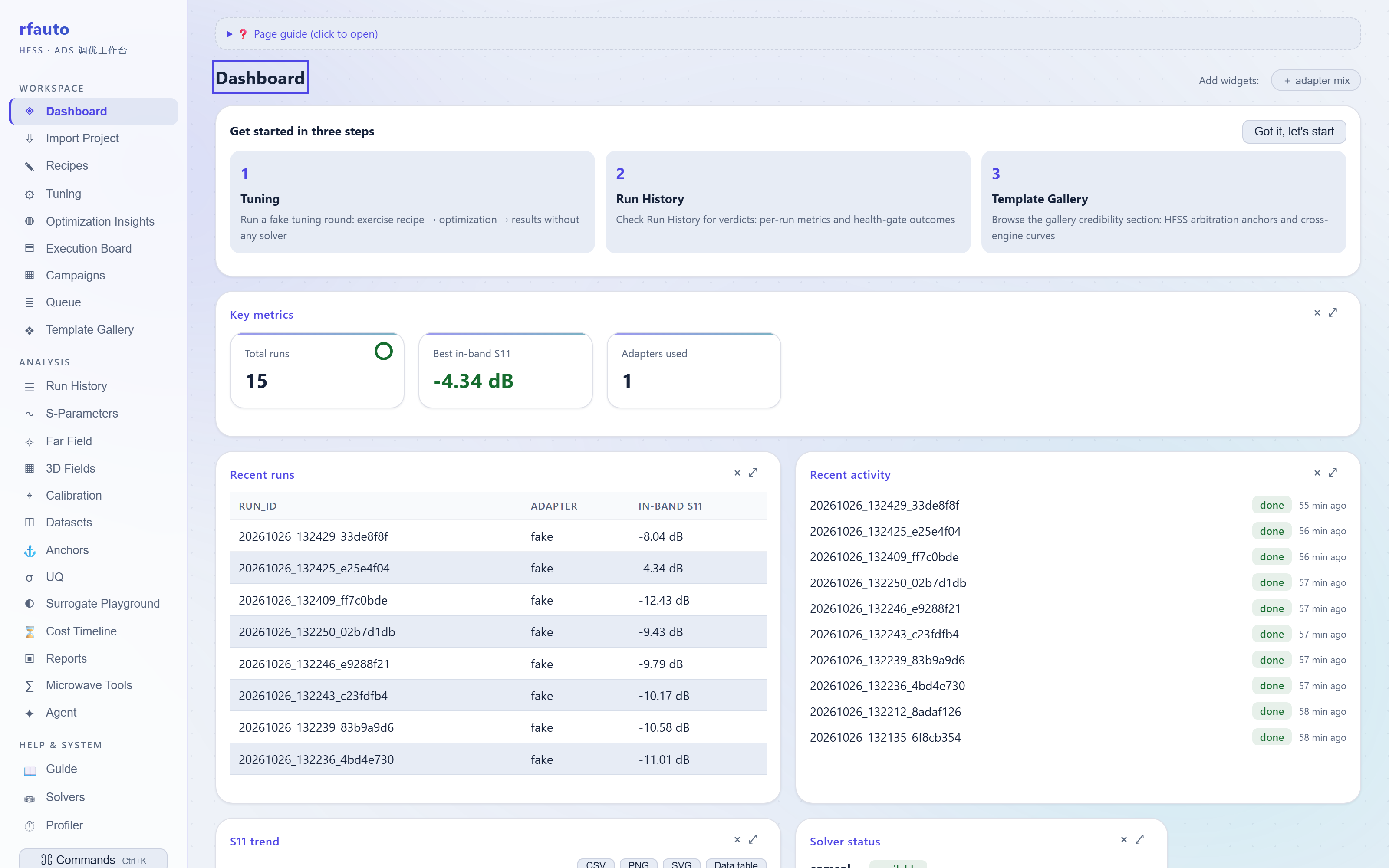
rfauto ui starts a local review workbench (your data never leaves the machine):
24 views over run history, S-parameters, 3D fields, the template gallery, campaign
boards, calibration, datasets, reports and a microwave toolbox. Command palette
(Ctrl+K), deep links, whole-site zh/EN switch.

Quick start
Requirements: Python 3.10–3.12 (python --version). No commercial tool is
needed — steps 0–6 run entirely license-free in about ten minutes.
Step 0 · Get the code
# A. with git (recommended, easy to update)
git clone https://github.com/geer1895/rfauto && cd rfauto

# B. without git: use Code → Download ZIP on GitHub, or grab
#    "Source code (zip)" from the Releases page and unzip it
Step 1 · Install
python -m venv .venv
.venv\Scripts\activate                  # Linux/macOS: source .venv/bin/activate
pip install -e ".[ui]"                  # core + browser workbench
rfauto --help                           # a command table means it works
Steps 2–6 only need the core (pip install -e .); rfauto ui needs the [ui]
extra (starlette/uvicorn); the test suite needs [dev].
Step 2 · Health check
rfauto doctor
Returns a table in a second: Python version, AEDT/ADS detection (marked "not
configured" if absent — the license-free flow is unaffected), cache mode. Add--janitor --min-free-gb 8 to also list orphan solver processes and enforce a
memory floor — worth doing before long real-engine runs.
Step 3 · First simulation (no license)
rfauto run recipes/wilkinson_pd_v1.yaml --adapter fake
Measured output on the development machine (2.4 GHz Wilkinson divider, Rogers
4350B 0.508 mm):
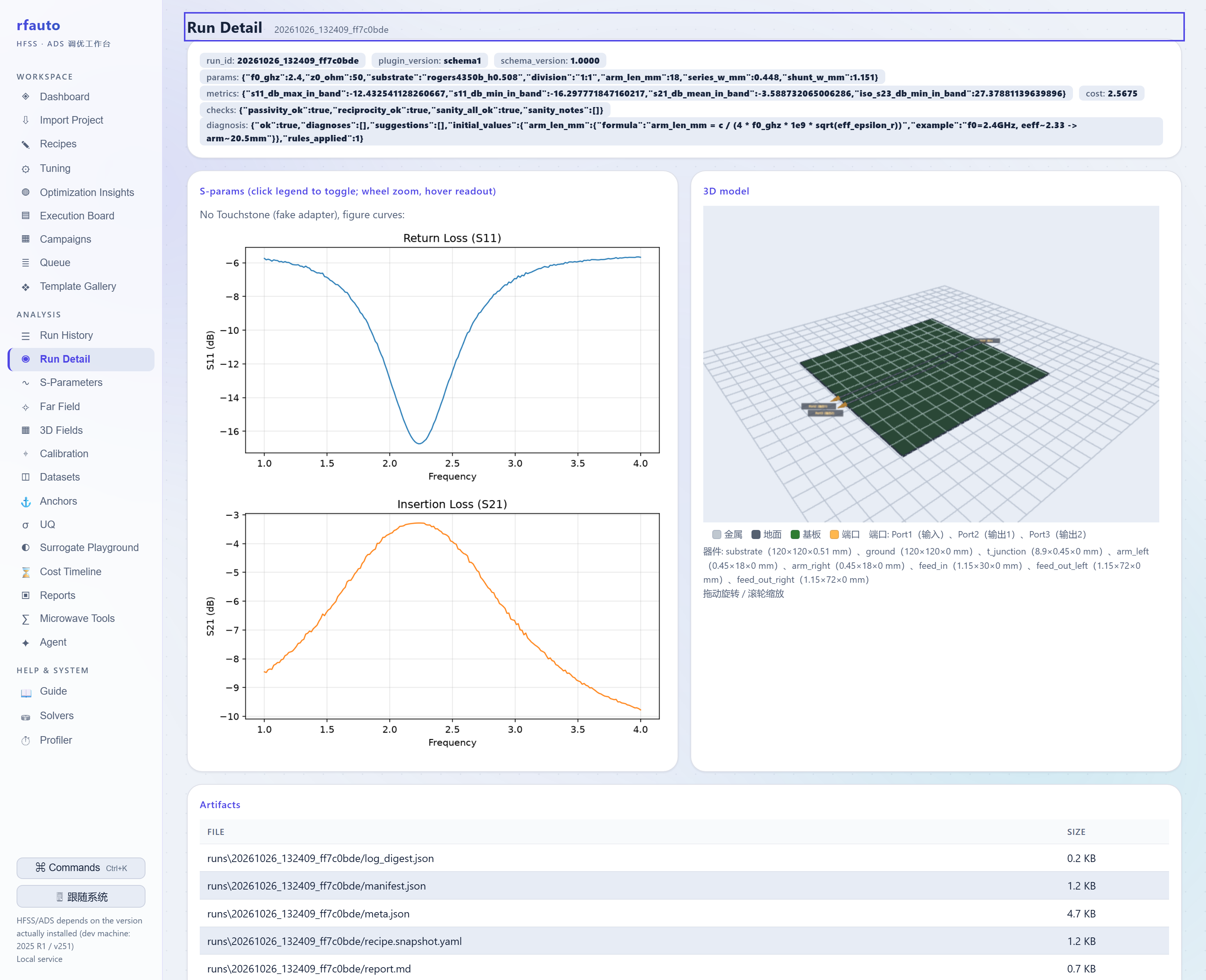
✓ done  run_id: 20261026_132409_ff7c0bde
  metrics:
    s11_db_max_in_band: -12.4325
    s11_db_min_in_band: -16.2978
    s21_db_mean_in_band: -3.5887
    iso_s23_db_min_in_band: 27.3788
The fake channel is a closed-form analytical model, not an EM solve — its job is
to exercise "recipe → run → artifacts → gates" in seconds. Real physics starts at
step 7, with the same recipe and the same gates.
Step 4 · Read the artifacts
Each run lands in runs/<timestamp>_<hash>/ (layout in
1.6). Look at report.md (human) andresults/metrics.json (machine), then verify freshness:
rfauto runs verify 20261026_132409_ff7c0bde
fresh means the files on disk still match the closing fingerprint; stale (an
old file replacing a new one) exits 1 and is never silently passed.
Step 5 · Open the workbench
rfauto ui                 # http://127.0.0.1:8642, loopback only
rfauto ui --port 8643     # use another port if a stale instance holds 8642
The left rail is the workspace: Dashboard, Run History, S-Parameters,
Template Gallery, Microwave Tools (341 calculators), Calibration,
Datasets… The zh/EN switch sits at the top right.
Step 6 · Tune one round
rfauto tune recipes/wilkinson_pd_v1.yaml --adapter fake --max-trials 40
Measured: 40 trials in about 46 s, cost dropping from 3.64 to 2.55, with the
recommended λ/4 arm 18.00 mm, 70.7 Ω arm width 0.448 mm and 50 Ω feed 1.151 mm
(s11_db_max_in_band improves from −11.46 to −12.45 dB). The Tuning view in
the workbench lets you watch it trial by trial.
Step 7 · Switch to a real engine
pip install -e ".[hfss]"        # pyaedt; requires AEDT 2025 R1
# or build openEMS (free) following docs/openems_build_guide.md
Replace --adapter fake with --adapter openems or --adapter hfss — the recipe
and the gates do not change. Before unattended HFSS runs, read
docs/unattended_hfss_automation.md, the
operational discipline distilled from a year of real-machine work. The three that
bite first:
- one
Hfssinstance per Desktop — a second one starts returningNonefrom the
design-variable manager; - one failed assignment poisons the whole session (the gRPC channel breaks and
release_desktopfails silently) — rebuild the session, never continue on a
poisoned one; - project / outdir / log paths must be absolute — a relative
-outdirmakesProject.Renamehang for minutes before failing.
Step 8 · Command cheat sheet
rfauto run <recipe> --adapter fake|openems|hfss   # one run
rfauto tune <recipe> --max-trials 60              # outer optimization loop
rfauto sweep <recipe>                             # parameter sweep
rfauto replay <run_id>                            # reproduce a historical run
rfauto templates list | gallery | golden-diff     # templates and geometric goldens
rfauto anchors list | validate                    # anchor registry
rfauto runs list | verify <run_id>                # runs and freshness
rfauto em doctor | diff | metrics | sweep         # EM semantics layer
rfauto ui                                         # workbench
First-run troubleshooting
| Symptom | Likely cause | Fix |
|---|---|---|
rfauto ui won't open, or pages 404 |
port 8642 held by an old instance (old code) | rfauto ui --port 8643; or check the command line and remove the old instance |
rfauto: command not found |
venv not activated, or install failed | re-activate; verify with rfauto --help after pip install -e . |
| AEDT fails to write files (STEP/export) | non-ASCII characters in the path | use ASCII project/work directories; stage into an ASCII temp dir and copy back |
| HFSS cannot connect / license errors | orphan ansysedt holding a seat |
rfauto doctor --janitor lists them; review, then --janitor-clean |
| solve killed midway, machine sluggish | not enough free memory | rfauto doctor --min-free-gb 8 --enforce before launching |
| fake results differ a lot from hardware | fake is a closed-form model, not an EM solve | fake only validates the pipeline; switch to openEMS/HFSS — same recipe, same gates |
| no Touchstone in the run directory | the fake channel only emits analytical metrics | read results/metrics.json; Touchstone comes from real engines |
| Touchstone on disk disagrees with the run record | an old file replaced the new one | rfauto runs verify <run_id> — stale exits 1 |
3. Why these results can be trusted
Every result carries provenance: which solver ran it, how the geometry was
derived, which gates it passed.
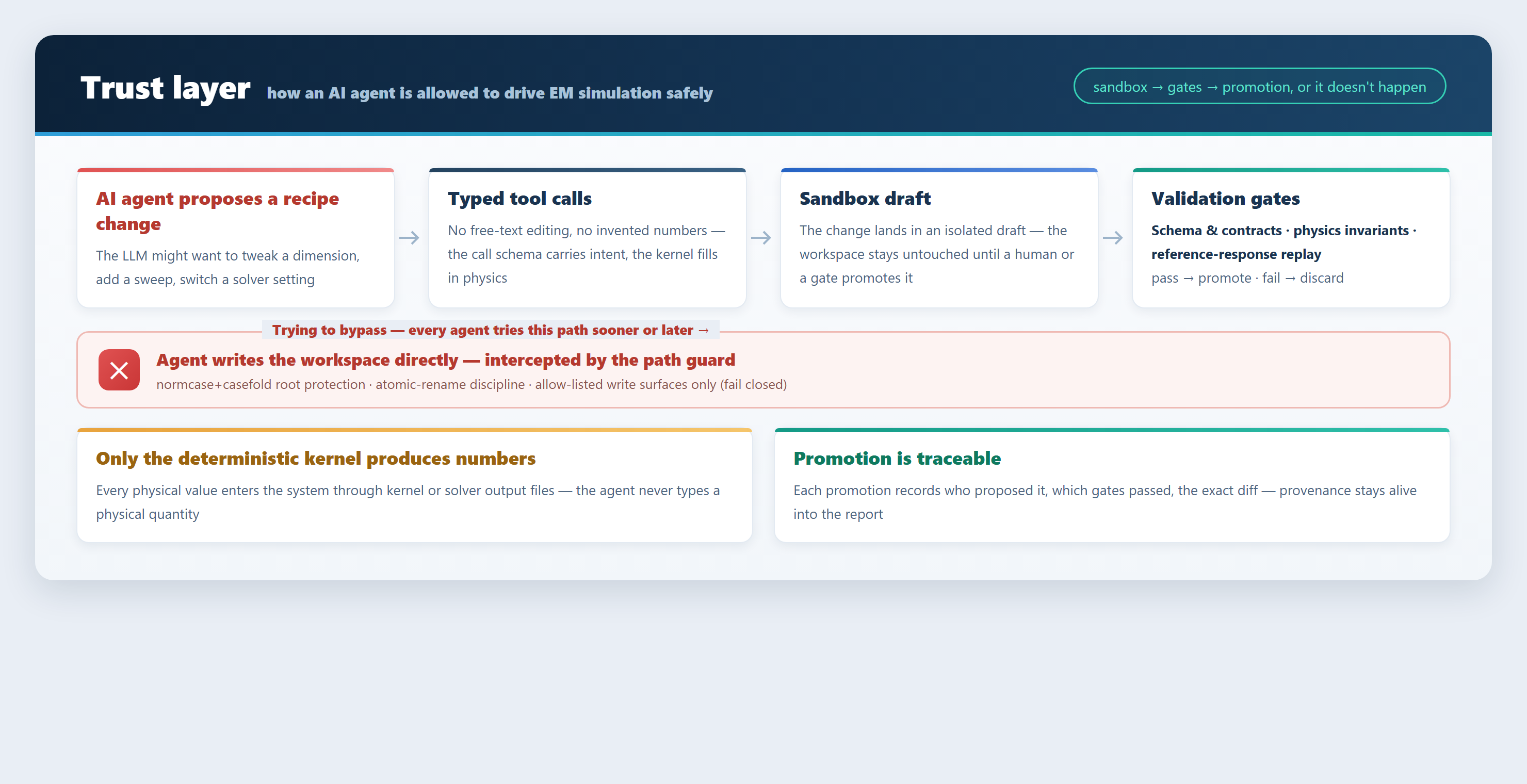
Three layers stack up:
- Numbers come only from the kernel. Frequencies, losses and dimensions are
either closed-form outputs or solver outputs, each with its formula source and
validity domain; the LLM only orchestrates and explains. - Results pass gates before they are trusted. Six gates (see
1.4) cover everything from model-build to post-run; a miss
is an honest FAIL with the margin. - Every change leaves a trace. Agent edits go sandbox draft → validation gates
→ promotion, and the promotion records who proposed it, which gates passed and
the exact diff; anchor changes need a signature.
When two engines agree on the same physical structure, the free one can be trusted
for sweeps; beyond the pre-declared gate (|Δ| ≤ 0.5 dB and the same direction ⇒
AGREE) it is recorded honestly as DISAGREE — never rounded to green.
4. Engine ladder and arbitration
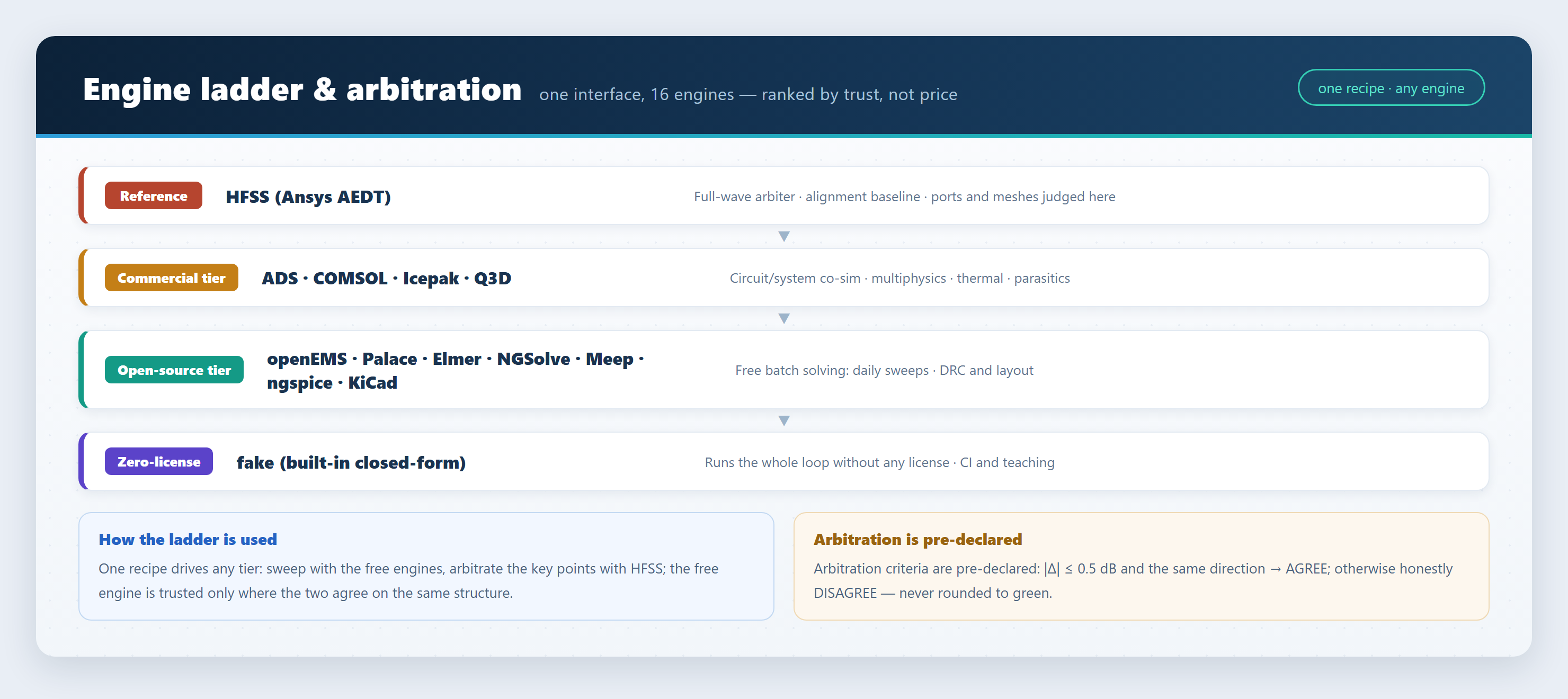
| Engine | License | Typical role |
|---|---|---|
| HFSS (Ansys AEDT) | commercial | full-wave reference / arbiter |
| ADS (Keysight) | commercial | circuit and system co-simulation |
| openEMS | open source (GPL, subprocess) | fast FDTD batch solving |
| COMSOL | commercial | FEM multiphysics |
| Elmer | open source | multiphysics FEM |
| NGSolve | open source | frequency-domain FEM |
| Meep | open source | FDTD |
| Icepak / Q3D (Ansys) | commercial | thermal / parasitic extraction |
| Palace | open source | parallel FEM |
| KiCad | open source | PCB DRC and layout extraction (subprocess) |
| ngspice / Xyce / QucsatorRF | open source | circuit simulation |
| FDTDX (JAX) | open source | differentiable FDTD |
| MMT | open source | analytical mode matching |
| VNA | — | measurement channel (sim-to-measurement correlation) |
| fake (built in) | project-owned | license-free pipeline checks / CI / teaching |
Commercial tools require your own valid license; the framework neither bundles nor
circumvents any license and ships no vendor-proprietary content (see
THIRD_PARTY_NOTICES.md).
5. Architecture
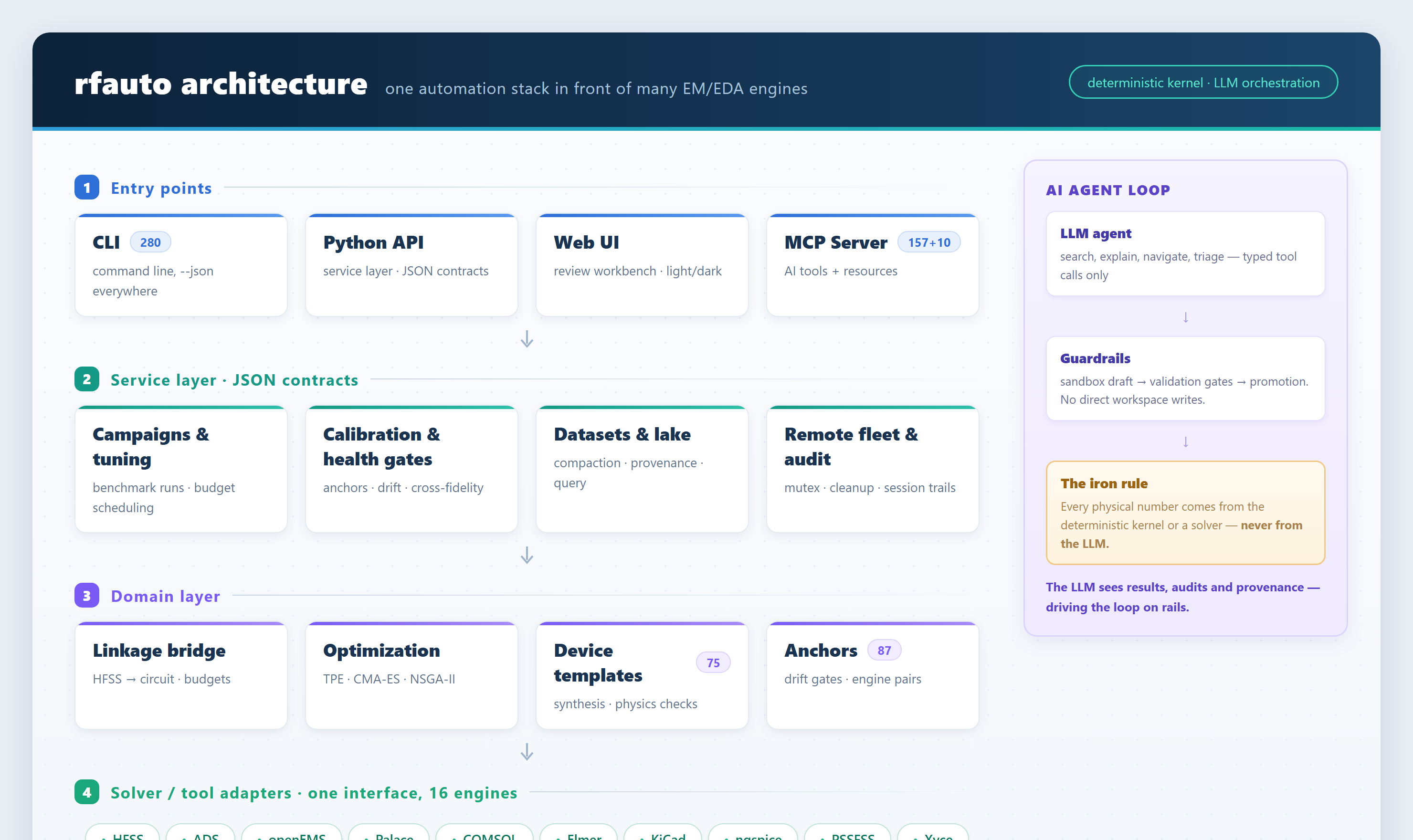
Dependencies only point downward and import-linter enforces it in the test gate (a
reverse import turns the build red):
cli / mcp_server / ui  →  service  →  linkage / optimization / models
                                      →  adapters  →  pipeline  →  infra  →  core
- The service layer speaks JSON: features start as service functions; CLI, MCP
and UI are thin shells; - Numbers live in the deterministic kernel (
core/, pure functions): the LLM
or an agent never produces a physical number; - Replaceable parts are base class + registry:
EMSolverAdapter/EMSolverRegistry,CALCULATOR_REGISTRY, the device-template registry.
Repository layout
src/rfauto/
├── cli/            # command line (297 leaf commands)
├── mcp_server/     # MCP server (166 tools + 10 resources)
├── ui/             # browser workbench (24 views, zero-build native ESM)
├── service/        # business layer: JSON in, JSON out
├── linkage/        # HFSS ↔ circuit linkage
├── optimization/   # TPE / CMA-ES / NSGA-II / surrogates
├── models/         # recipes and device models
├── adapters/       # 16 engine/tool channels + template renderers
├── pipeline/       # run pipeline
├── infra/          # infrastructure (runs paths / cache / logging)
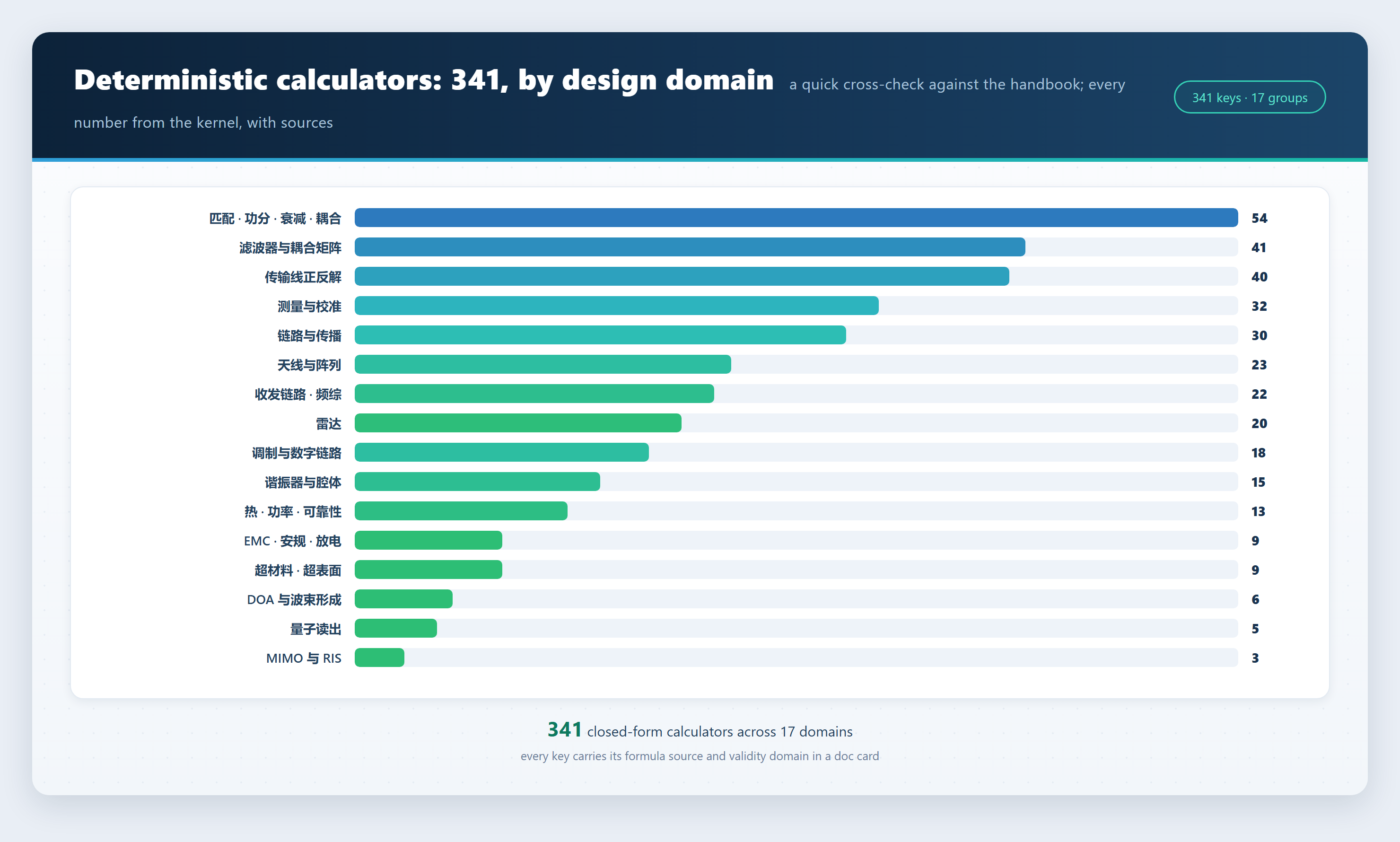
└── core/           # deterministic kernel: 341 calculators + physics criteria
Calculators by domain
6. Docs map
From zero
- Getting started — the first loop in ten minutes
- Real simulation — wiring up openEMS / HFSS
- Workbench tour — what the 24 views are for
- First optimization loop
- Campaign walkthrough
By topic
- Datasets and health gates · Data factory · Data lake
- Measurement alignment — making simulation and measurement agree
- Uncertainty and surrogates
- Verdict semantics — what PASS/FAIL/PARTIAL/UNDECIDABLE mean
- Remote solving · DAG orchestration · Compose and league
- Recast walkthrough · MCP in practice · Extending rfauto
Reference
- Template reference — acceptance values and modeling rules per template
- Calculator usage guide — keys organized by design flow
- Anchor guide · Environment variables · Envelope contract
- Template metadata — one
meta.yamlper family
Explanation and operations
- Layered architecture · Engine ladder and arbitration
- Unattended HFSS discipline · openEMS build guide
- COMSOL notes · Migration guide
- Changelog · Contributing
Container: a Dockerfile ships at the repo root —docker build -t rfauto:local . && docker run --rm rfauto:local smokes it; the
image contains only the open-source core, and mounting your workspace is enough to
run for real (-v "$PWD:/work" -w /work).
7. Status and roadmap
rfauto is a working tool, not a demo: the core loop (template → synthesis → solve
→ gates → optimize → report) has run on real HFSS, ADS, openEMS, COMSOL and KiCad
installations, backed by a test suite of the size above on both Windows (full) and
Linux CI. Development is Windows-first and single-maintainer; Linux support is
improving.
Planned next:
- Datasets and benchmarks — the simulation datasets and agent evaluation sets
accumulated by the data-factory pipeline are not in this repository yet; we plan
to publish them progressively and welcome co-maintainers; - A methodology paper — on quality gates and the deterministic kernel;
co-authors welcome; - More device families, more engines, a smoother first run — all good first
issues.
If any of that interests you, open an issue — the aim is a community project, not
one person's archive.
Contributing
Issues and PRs are welcome — see CONTRIBUTING.md for how to get
started and what the #NNN markers in code comments mean.
Citation
If rfauto helps your research, please cite it — see CITATION.cff.
License
rfauto is GPL-3.0 (see LICENSE). Third-party dependency licenses are
listed in THIRD_PARTY_NOTICES.md. The optional openEMS
adapter drives GPL openEMS in a separate process; this repository does not bundle
the openEMS bindings — build them from the official openEMS sources.
Changelog
v0.13.0 (2026-11-02)
Added:
- Pin-level schematics:
rfauto diagram schematicrenders ADS netlists
as schematics with pins, wires and net names - SVG export:
rfauto diagram to-svgconverts .drawio to SVG so diagrams
can be viewed on servers and in reports without draw.io - 3D stackup preview:
rfauto diagram stackup --previewrenders a 3D
preview PNG alongside the cross-section view - Review annotations: annotations from multiple reviewers merge into one
file, with per-reviewer colors, attribution and counts - Test-setup diagrams: new CISPR 25 conducted-emission scene, with
optional professional electrical component shapes - ADS tuning: active-chain and HB load-pull templates now support
diagram-driven tuning; back-annotation can embed S-parameter curve
plots; the optimizer can call ADS circuit simulation as its objective - Design reports:
rfauto design-reportgains Pareto-front and
two-run parameter/metric comparison sections - Calibration design:
rfauto cal-wizard trlproposes Thru/Reflect/Line
dimensions, bandwidth coverage checks and a test-setup diagram for a
given frequency band - Operations:
rfauto remote boardshows the server and local solve
queues; one-command performance profiling; affected tests pre-run
automatically when source files change (devtest_speculative --watch) - Surrogates: Liquid Neural Network (CfC), complex stamp family
(ngo_stamp_rf), multi-port parametric VF, SVGP, per-parameter SPICE
netlist export, ONNX export - Optimization: TuRBO multi-restart joins the competition leaderboard;
SAAS posterior supports NUTS sampling; multi-objective optimization
supports constraints (c-EHVI) - Architecture credit: event-driven execution, liveness-probe and
channel-separation ideas absorbed from DeepSeek Super-agent (MIT) land
as speculative test pre-runs,rfauto watchdogand unified CLI/JSON
output rules; two design notes indocs/explanation/agent-orchestration.mdanddocs/explanation/cli-json-channel.md
Fixed and improved:
- The serial test gate pins BLAS to a single thread, removing flaky
timeouts in multi-thread environments - A failed comparison gate no longer reports "ADS stage failed"; the two
failure kinds now have distinct messages - 297 CLI commands, 166 MCP tools, 30738 unit tests (same source as the
README badge)
Current version: v0.13.0 (previous: v0.12.1).
Reviews (0)
Sign in to leave a review.
Leave a reviewNo results found