Termexo
Health Pass
- License — License: MIT
- Description — Repository has a description
- Active repo — Last push 0 days ago
- Community trust — 25 GitHub stars
Code Fail
- process.env — Environment variable access in apps/desktop-ui/scripts/capture-demo.mjs
- process.env — Environment variable access in apps/desktop-ui/scripts/capture-readme.mjs
- process.env — Environment variable access in apps/desktop-ui/scripts/desktop-smoke.mjs
- network request — Outbound network request in apps/desktop-ui/scripts/desktop-smoke.mjs
- process.env — Environment variable access in apps/desktop-ui/scripts/desktop-v05-smoke.mjs
- network request — Outbound network request in apps/desktop-ui/scripts/desktop-v05-smoke.mjs
- process.env — Environment variable access in apps/desktop-ui/scripts/lib/desktop-session.mjs
- network request — Outbound network request in apps/desktop-ui/scripts/lib/desktop-session.mjs
- process.env — Environment variable access in apps/desktop-ui/scripts/lib/isolated-app-data.mjs
- process.env — Environment variable access in apps/desktop-ui/scripts/lib/screen-recorder.mjs
- process.env — Environment variable access in apps/desktop-ui/scripts/responsive-smoke.mjs
- spawnSync — Synchronous process spawning in apps/desktop-ui/scripts/run-angular.mjs
Permissions Pass
- Permissions — No dangerous permissions requested
No AI report is available for this listing yet.
AI Workspace Control Plane
Termexo
One window for every coding agent
English · 简体中文




Termexo puts Claude Code, Codex, and the terminals around them into one recoverable Windows
workspace. Keep several agents visible at once, see immediately when one needs input or
approval, reopen yesterday's native session, and switch the Claude CLI between compatible
model providers without rebuilding your setup. Turn on remote access and that same workbench
opens in a browser on your phone or a second computer, driving the very same live terminals —
so the agent waiting on an approval can be answered from wherever you are.
Run the complete Windows app with one command—no Termexo account or server required:
npx termexo@latest
The current version is V0.8.0.
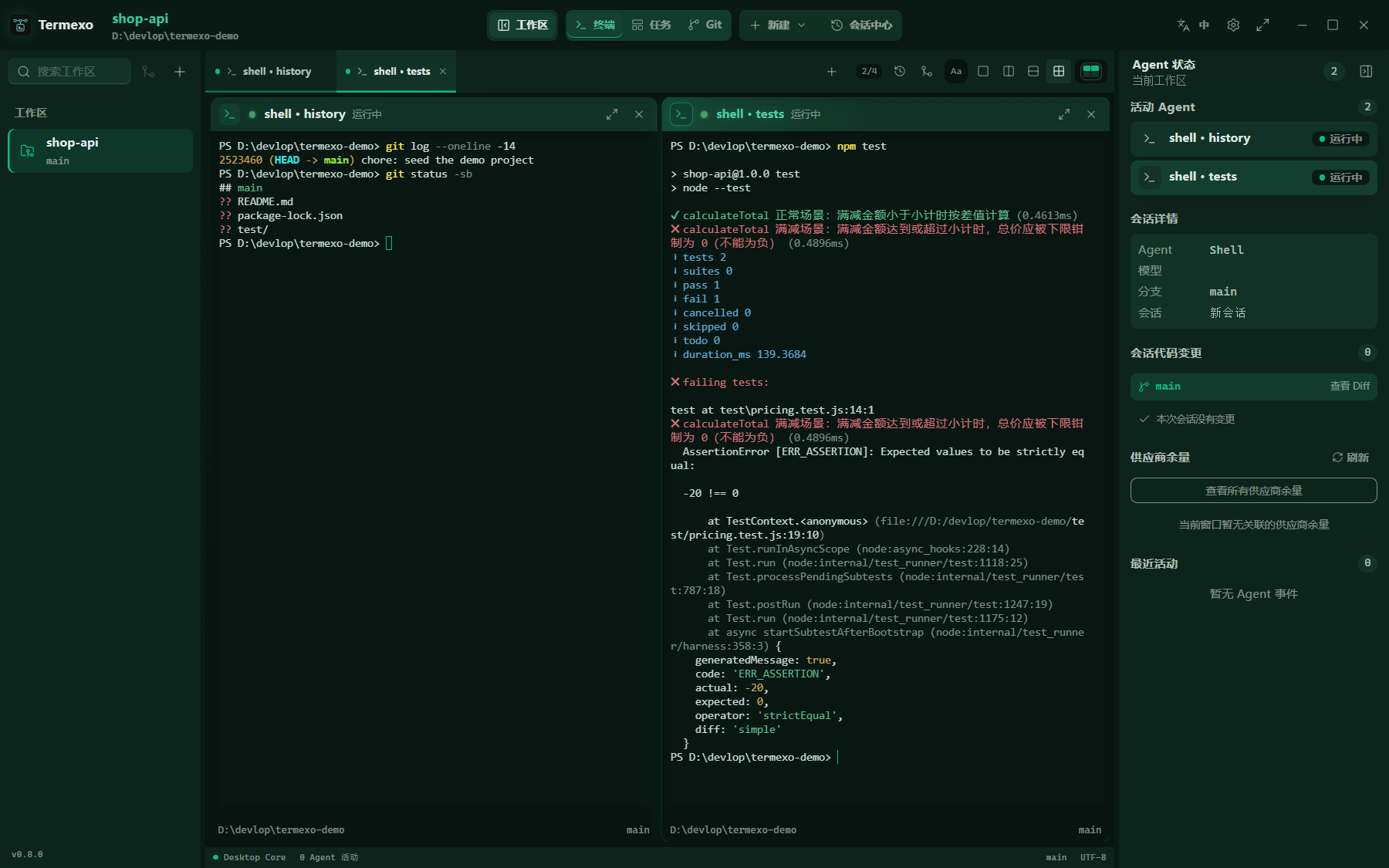
Claude Code and Codex terminals side by side in a workspace that remembers its layout.
What Works Today
|
Four agents. One screen. Run Claude Code, Codex, and OpenCode side by side in as many real PTY terminals as you need, choose which stay visible, and arrange them in a custom 1–6 row/column grid. Reorder tabs by dragging, close one with the middle mouse button, and drive the workbench from the keyboard. Each workspace remembers its folder, tabs, layout, model, and theme. 
|
Know when an agent needs you. Waiting for input, waiting for approval, completed, and failed states are distinct. A persistent banner, native Windows notification, and taskbar flash bring you back to the exact terminal that needs attention. 
|
|
Pick up yesterday's conversation. Search local Claude Code, Codex, and OpenCode sessions across projects, accounts, branches, and models. Termexo restores them through the CLIs' own claude --resume, codex resume, and opencode --session
commands, reclaims a Claude session the CLI still holds open, and keeps native session
files read-only.

|
Same CLI. Different model. Point Claude Code at Anthropic, DeepSeek, MiniMax, GLM, or a custom Anthropic-compatible endpoint. Save providers as profiles, keep API keys in Windows Credential Manager, and switch every Claude terminal in a workspace together. 
|
|
Answer it from your phone. Turn on remote access and any phone, tablet, or second computer on your network or VPN opens the whole workbench in a browser — the same workspaces and the same live terminals, reading and writing the very PTYs the desktop is running. Terminals scroll by finger, the layout folds down to one terminal with panels that float over it, and the link is HTTPS behind an access token you can reveal, turn into a QR code, or rotate. 
|
See what this session changed. The Git view follows the active terminal and measures against the HEAD that terminal started on: the files it touched, the commits it made, and a unified or split diff of any one of them. It keeps reading while you are in it, so the list stays current without a refresh, and it comes back to the file and layout you left it on. 
|
|
Turn a task into a running agent. The task board keeps projects and tasks with priorities and acceptance criteria. Hand one to Claude Code, Codex, or OpenCode and it becomes a real terminal, moving through todo, executing, completed, and verified as that terminal reports its own status. |
Let it run without babysitting. Start any agent with automatic confirmation — --permission-mode auto for
Claude, --approve-for-me for Codex, --auto for OpenCode — so the
AUTO chip on a terminal means the same thing whichever agent drew it.
|
Termexo is local by default: it has no account, cloud service, or required sync. Workspace
state stays in local SQLite storage, credentials stay in Windows Credential Manager, and
Claude/Codex session histories are read-only. The agent CLIs still connect to the providers
you configure under their own terms and privacy policies.
The interface is available in Simplified Chinese, English, Spanish, French, German, Japanese,
and Korean. It follows the Windows language automatically, or you can choose a language from
the main toolbar and keep that choice across restarts.
What's New in V0.8.0
- Remote access. Turn it on in the settings and any phone, tablet, or second computer on the
same network or VPN opens the whole workbench in a browser: the same workspaces and terminals,
reading and writing the same live PTYs. Self-signed HTTPS by default, entered with an access
token the settings panel can reveal, turn into a QR code, or rotate. - Terminals scroll by finger. A drag synthesises a wheel event for xterm to dispatch, which
scrolls the normal buffer and reports the wheel to full-screen agents such as Claude Code and
OpenCode exactly as the desktop wheel does, with inertia after the finger lifts. - Size follows the view in use. Work on the desktop and the terminal uses the desktop's width,
pick up the phone and it becomes the phone's, come back and it returns. Every other client
renders that same grid, panning sideways when its window cannot hold it. - A workbench that fits a phone. Below 640px the split layouts fold to a single terminal, both
side panels float over the workspace instead of taking a column of it, controls grow to a
finger's size, and the tools at the right of the top bar collapse into one menu — which is what
stopped the toolbar from scrolling half its buttons out of reach. - Pick a folder without a native dialog. Starting a terminal from a browser used to open
window.prompt, which some mobile browsers suppress outright. It is an in-app dialog now,
prefilled with the workspace folder, so accepting it is a single tap. - A Git view that stays put. It no longer drops back to the terminals when the active terminal
changes or a read fails, keeps reading the repository while it is open, says why it could not
read one, and returns to the file and layout you left it on.
What's New in V0.7.0
- The window draws its own chrome. No system title bar: the top bar spans the whole window
with the window controls at its right edge, and both side panels start beneath it. Dragging the
bar still moves the window, double-clicking still maximises. - Terminals render on the GPU. A long scrollback scrolls without the stutter the DOM renderer
produced. Machines without a usable GPU fall back to the previous renderer. - A terminal keeps its account. Reconnecting — including after the app restarts — rebuilds the
account directory, proxy settings, and provider key from what the terminal records, instead of
quietly falling back to the CLI's default home. - Switch a terminal's account from its header. The header names the account it runs on, and
picking another restarts that terminal on it with a new session, leaving the model, MCP profile,
and automatic confirmation alone. - Copy configuration between accounts. Settings, instructions, plugins, and skills move across;
credentials, account identity, and session history never do. - Sign-in is noticed on its own. A finished login refreshes the account without waiting for a
CLI that keeps running after the browser flow returns.

A task carries its acceptance criteria from todo through to verified, and runs as a real agent terminal.
Release notes for every earlier version live in CHANGELOG.md.
Why Termexo
AI coding tools usually run in isolated terminals and sessions. As the number of projects
grows, developers have to remember:
- which terminal belongs to which project, branch, and agent;
- which sessions are running, waiting for input, or waiting for approval;
- how to resume a specific Claude session;
- how model, endpoint, API key, and MCP configurations fit together;
- which parts of a workspace can actually be restored after an application restart.
Termexo uses the Workspace as its organizing unit and turns this scattered state into
a local control plane that is observable, recoverable, and extensible.
Implemented Features
| Capability | Current implementation |
|---|---|
| Workspace management | Create, rename, theme, manually reorder, and switch workspaces; persist paths, layouts, and terminal configuration |
| Multi-terminal workbench | Unlimited tabs, explicit pane selection, configurable 1–6 row/column grids, pane/workspace maximize, and real PTYs |
| Agent detection | Detect the Claude Code, Codex, and OpenCode executables, their versions, and health on Windows |
| Start agent sessions | Launch Claude, Codex, or OpenCode with a working directory, isolated login account, Agent-specific model configuration, and optional automatic confirmation |
| Session center | Read-only multi-account Claude/Codex/OpenCode discovery, search, workspace filtering, native resume, and reclaim of a Claude session the CLI still holds open |
| Agent status tracking | Isolated hooks per terminal for thinking, tool use, approval, user input, completion, and failure states |
| Model and MCP profiles | Manage endpoints, keys, and MCP configuration; switch Claude CLI across Anthropic-compatible backends |
| Network and npm profiles | Scope HTTP/HTTPS/SOCKS and npm settings globally or per workspace, test reachability, and inject them at launch |
| Account management | Manage multiple isolated Claude and ChatGPT/Codex logins, defaults, authentication status, and launch-time choice |
| Managed CLI lifecycle | Preview, confirm, install, or upgrade the official Claude Code, Codex, and OpenCode npm packages, then verify the result |
| Task board | Organise projects and tasks with priorities and acceptance criteria, run one as a Claude/Codex/OpenCode terminal, and track it from todo through executing, completed, and verified |
| Prompt assets | Recover live per-terminal drafts; search, favorite, pin, delete, and reuse submitted prompts |
| Session handoff | Build redacted, token-budgeted Git/task packages; import/export documents and continue in another Agent |
| Git graph and diff | Show the active terminal's branch, commit topology, and changes since terminal start with unified or split diff |
| Remote access | Serve the whole workbench over HTTPS to phones and other computers on the network, gated by an access token with QR entry and rotation, with every remote call passing an explicit command allowlist |
| Local data and secrets | Store workspace/session/event data in SQLite and API keys in Windows Credential Manager |
| Browser preview | Preview the complete UI without Rust and exercise layout flows through an interactive simulated terminal |
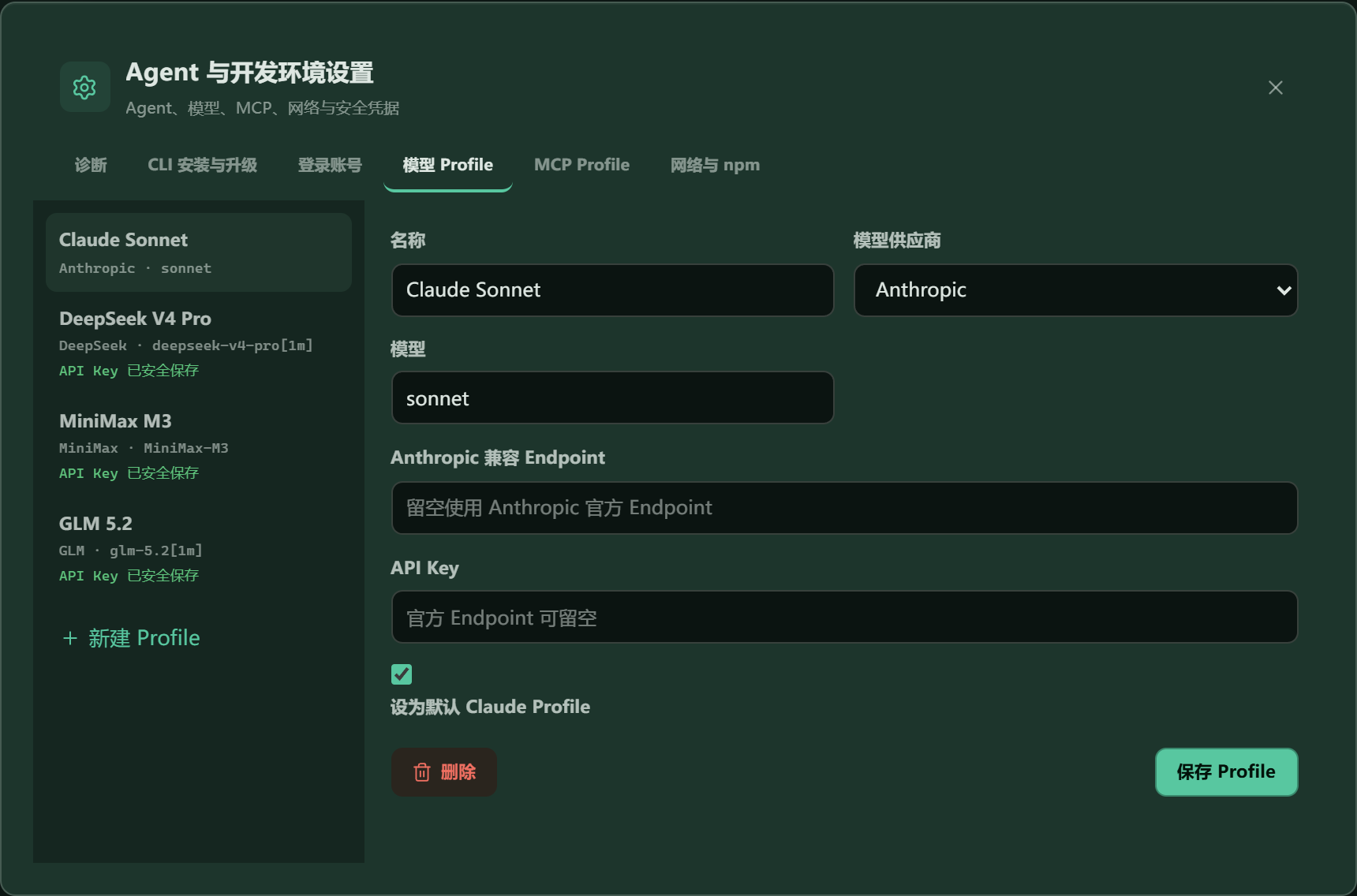
Models, endpoints, and credential entry are managed in one place. Stored secrets are never returned to the frontend.
Design Goals
- Local first — Project paths, terminals, session indexes, and configuration stay on
the local machine by default. Termexo does not require a Termexo cloud service. - Preserve native agent semantics — Prefer native session and configuration
mechanisms instead of pretending that a terminated process is still alive. - Coordinate terminals, do not replace them — Termexo provides the workbench,
state, and orchestration layer. Commands still run inside real PTYs and agents. - Make agent state observable — Map agent-specific events into common running,
thinking, input, approval, completed, and failed states. - Keep security boundaries explicit — Secrets belong in the operating-system
credential store, not in SQLite, snapshots, hook payloads, or logs. - Grow into a multi-agent architecture — Evolve around adapters, PTY, hooks,
snapshots, and routing boundaries so more CLIs can be added without rebuilding the core. - Extend workspaces across trusted devices — Add sharing, remote access, mobile
approvals, and collaboration without weakening local ownership or security boundaries.
Current Boundaries
- Claude Code and Codex both support native detection, account/model-aware launch, local session
discovery, resume, and lifecycle-driven terminal states. Their event vocabularies are not
identical, and compatible-provider model switching currently applies to Claude terminals. - When the app exits, terminated operating-system processes are not “fake restored.”
Termexo restores terminal configuration; historical Claude sessions must be resumed
explicitly from the session center. - Claude and Codex JSONL files are read-only. Termexo never edits, renames, or deletes them.
- Snapshot surfaces remain hidden until their production backend is implemented. Git session
changes are repository deltas observed since terminal start; concurrent editors may contribute. - V0.5 migrates a redacted context package, not a provider's private native transcript. Automatic
permission approval, native transcript rewriting, and cross-agent batch model-switch transactions
remain outside the current release.
See Termexo.md for the complete product plan and
V0.2 architecture for current technical boundaries.
Quick Start
Run directly from npm
The npm package includes the Windows x64 desktop executable:
npx termexo
Or install the command globally:
npm install --global termexo
termexo
This path requires Windows 10/11, WebView2, and Node.js 18.18 or later. Building
from source uses the newer toolchain listed below.
Requirements
- Windows 10/11;
- Node.js
^22.22.3,^24.15.0, or>=26.0.0; - Rust stable, Visual Studio C++ Build Tools, and WebView2 for the desktop runtime;
- a local Claude Code and/or Codex CLI installation (Termexo can also manage installation and upgrades).
1. Clone and install frontend dependencies
git clone https://github.com/gemron/Termexo.git
cd Termexo
npm --prefix apps/desktop-ui install
2. Run the browser preview
npm run dev
Open http://127.0.0.1:4200. Browser mode uses a simulated terminal with help,status, git status, and clear, making it suitable for UI development and review.
3. Run the desktop application
npm run tauri:dev
Desktop mode uses real PTYs. If Claude Code is not available on PATH, specify it:
$env:TERMEXO_CLAUDE_PATH = "C:\path\to\claude.exe"
npm run tauri:dev
How It Works
flowchart LR
    UI["Angular Desktop UI"]
    IPC["Tauri Commands"]
    PTY["PTY Service"]
    Adapters["Agent Adapters"]
    Hooks["Hooks / Event Pipeline"]
    DB[("SQLite")]
    Vault["Windows Credential Manager"]
    Agents["Claude Code / Codex"]

    UI <--> IPC
    IPC --> PTY
    PTY --> Agents
    IPC --> Adapters
    Adapters --> Agents
    Agents --> Hooks
    Hooks --> DB
    IPC <--> DB
    IPC --> Vault
- Angular UI — workspaces, terminal layouts, session center, settings, and Inspector.
- Tauri Commands — a minimal IPC boundary between the frontend and desktop core.
- PTY Service — creates, writes to, resizes, and closes real terminal processes.
- Agent Adapters — Claude/Codex installation detection, read-only session scanning, and native launch/resume.
- Hooks Pipeline — receives agent lifecycle events, deduplicates them, and maps common terminal states.
- SQLite / Credential Manager — stores structured local data and sensitive credentials separately.
Data and Security
| Data | Storage | Policy |
|---|---|---|
| Workspaces and terminal configuration | SQLite | Local persistence |
| Claude/Codex session index | SQLite | Upserted from read-only native session files |
| Agent events | JSONL spool + SQLite | Deduplicated by event_key |
| Model and MCP profiles | SQLite | Plaintext API keys never enter the database |
| Prompt assets and handoff packages | SQLite | Common credentials are redacted before save |
| API keys | Windows Credential Manager | The frontend can read only hasCredential |
| Native agent sessions | Claude/Codex data directories | Read-only; never modified or deleted |
For compatibility with early installations, the database filename and some internal Tauri
identifiers still use a legacy name. This does not affect the Termexo product name or newTERMEXO_* environment variables.
Roadmap
| Version | Goal | Status |
|---|---|---|
| V0.1 | Workspace, multi-terminal, PTY, and SQLite foundation | Complete |
| V0.2 | Claude detection, session resume, hooks, and profiles | Complete |
| V0.3 | Multi-agent foundation, interaction stabilization, and file-link openers | Complete |
| V0.4 | Model switching, live token telemetry, and Plan quota/reset alerts | Complete |
| V0.5 | Prompt assets, handoff documents, session summaries, and cross-agent migration | Complete |
| V0.6 | OpenCode as a third agent, the task board, and automatic confirmation | Current |
| V0.7 | Workspace sharing, remote computers, and mobile access | Planned |
| V1.0 | Stable release, security hardening, and complete recovery UX | Planned |
Next up: notification channels (#5), then the
V0.7 work on workspace sharing and reaching your machine from elsewhere. See
Termexo.md for dependencies and acceptance criteria, and
CHANGELOG.md for what each released version actually shipped.
Repository Layout
Termexo/
├── apps/desktop-ui/       # Angular desktop UI and browser preview
├── src-tauri/             # Rust core, PTY, agents, hooks, database, and commands
├── docs/architecture/     # Architecture notes for implemented versions
├── docs/images/           # README screenshots
└── Termexo.md             # Product design and long-term roadmap
Development and Verification
npm run build
npm test
cargo test --manifest-path src-tauri/Cargo.toml
npm --prefix apps/desktop-ui run e2e:smoke
npm run tauri:build
With the local development server running, regenerate the README screenshots with:
npm run capture:readme
Contributing
Use Issues to report bugs, discuss design
decisions, or propose features. Before submitting code, make sure the change fits the
current release scope and add tests for behavior changes.
License
Released under the MIT License.
Reviews (0)
Sign in to leave a review.
Leave a reviewNo results found