skills-mcp
Health Uyari
- License — License: NOASSERTION
- Description — Repository has a description
- Active repo — Last push 0 days ago
- Low visibility — Only 9 GitHub stars
Code Basarisiz
- fs module — File system access in package.json
- process.env — Environment variable access in scripts/build-catalog.mjs
- network request — Outbound network request in scripts/build-catalog.mjs
- fs.rmSync — Destructive file system operation in scripts/make-demo.mjs
- fs.rmSync — Destructive file system operation in scripts/test-install.mjs
Permissions Gecti
- Permissions — No dangerous permissions requested
Bu listing icin henuz AI raporu yok.
MCP server that lets any AI agent discover, search, and install ~7,000 agent skills from across the GitHub ecosystem (Anthropic, Superpowers, wshobson, antigravity, Composio, and more).
skills-mcp
An MCP server that lets any AI agent discover, search, and install 9,000+ agent skills from across the GitHub ecosystem (Anthropic, Superpowers, wshobson, antigravity, Composio, antfu, TerminalSkills, and more).



skillsmcp.intelliforge.tech — browse the catalog and the install steps in the browser.
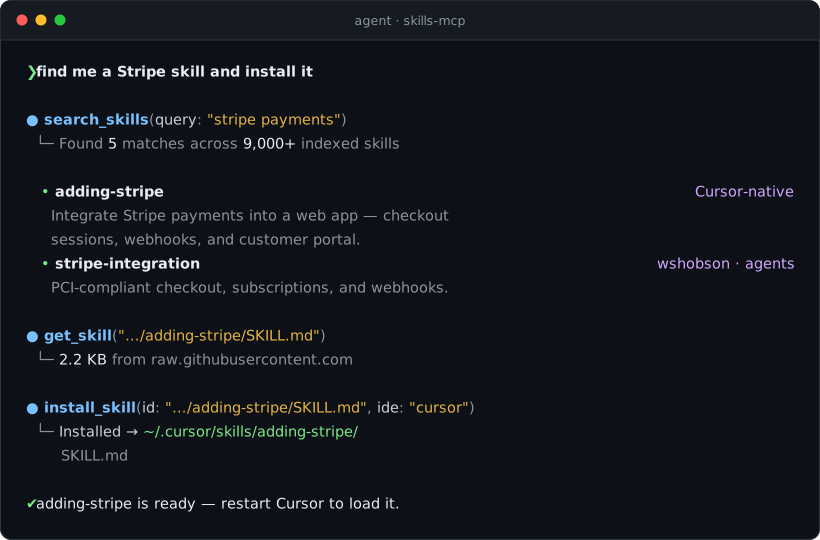
Scripted terminal recreation — every result, count and path in it is real skills-mcp output.
Also available as GIF and MP4.
Why
Agent skills — the SKILL.md packages that teach Cursor, Claude Code and friends how to do one
specific job well — are scattered across a dozen unrelated GitHub repos. Anthropic publishes a
handful. Superpowers, wshobson, antigravity, Composio, TerminalSkills and others publish thousands
more. There is no index, no search, and no install path: you find a skill by already knowing which
repo it lives in, then copy a folder by hand. skills-mcp collapses that into one MCP server —
9,000+ skills from 11 repos, searchable from inside your editor and installable in a single tool
call.
What it does
The Model Context Protocol (MCP) lets editors like Cursor, Claude Desktop, Claude Code, Cline, Continue, Windsurf, and OpenCode plug in external tool providers. This server provides:
| Tool | Purpose |
|---|---|
search_skills |
Free-text + faceted search (domain / repo / tier) |
get_skill |
Fetch the full SKILL.md content from upstream GitHub |
recommend_skills |
"I want to add Stripe to Next.js" → ranked skill suggestions |
list_domains |
All 20 logical domains with skill counts |
list_repos |
All source repositories with counts and links |
install_skill |
Download a skill folder into your IDE's skills directory |
catalog_stats |
Versions, generation time, totals |
Plus a resource (skills://catalog) exposing the full JSON index.
Quick stats
| Skills indexed |  |
| Source repositories | 11 |
| Logical domains | 20 (testing, security, devops, ai-ml, frontend, backend, data, marketing, docs, …) |
| Top domain | AI/ML/LLM (6,991 skills) |
| Top repo | antigravity-awesome-skills (6,308 skills) |
Counts are from the catalog build on 2026-08-03 and grow with the daily refresh — catalog_stats
always reports the live figure.
The catalog is built directly from upstream GitHub repos (no local clones needed) by scripts/build-catalog.mjs and shipped inside the npm package — so search_skills has zero network latency. get_skill and install_skill fetch live from GitHub on demand.
Installation
Install it once, globally. Every config below then points at the skills-mcp binary:
npm i -g @gengirish/skills-mcp
skills-mcp
# [skills-mcp] v1.0.1 ready · 9324 skills · 11 repos
It then waits on stdin for JSON-RPC, which is what your client speaks. Ctrl-C to exit.
Why not
npx -y @gengirish/skills-mcp? It works, butnpxre-resolves the package on
every launch — measured at ~13s to reach the ready banner versus ~0.5s for the
installed binary. Several MCP clients give a server less than that to complete the handshake and
will report the server as failed to connect. Usenpxonly for a one-off try; install globally
for anything you actually use.
Cursor
Edit ~/.cursor/mcp.json (or per-project .cursor/mcp.json):
{
  "mcpServers": {
    "skills": {
      "command": "skills-mcp"
    }
  }
}
Restart Cursor. The agent will auto-discover the tools.
Claude Desktop
Edit ~/Library/Application Support/Claude/claude_desktop_config.json (macOS) or %APPDATA%\Claude\claude_desktop_config.json (Windows):
{
  "mcpServers": {
    "skills": {
      "command": "skills-mcp"
    }
  }
}
Claude Code (CLI)
claude mcp add skills -- skills-mcp          # macOS / Linux
claude mcp add skills -- cmd /c skills-mcp   # Windows
The -- is required. Without it claude mcp add parses the rest as its own flags and fails witherror: unknown option. On Windows the cmd /c wrapper is needed because the global npm binary is
a .cmd shim. Add -s user to register it for every project instead of just the current one.
Check it took:
claude mcp list # skills: ... - ✓ Connected
Cline (VS Code extension)
In Cline's settings → MCP Servers, add:
{
  "skills": {
    "command": "skills-mcp"
  }
}
Continue
In ~/.continue/config.yaml:
mcpServers:
  - name: skills
    command: skills-mcp
Windsurf / OpenCode / others
Any MCP-compatible client: spawn skills-mcp over stdio.
Optional: avoid GitHub rate limits
get_skill and install_skill hit GitHub. Anonymous = 60 req/hr, authenticated = 5,000 req/hr. Set:
{
  "mcpServers": {
    "skills": {
      "command": "skills-mcp",
      "env": { "GITHUB_TOKEN": "ghp_xxxxxxxxxxxx" }
    }
  }
}
A token with no scopes (read-only public access) is sufficient.
Usage examples
Once installed, talk to your agent naturally:
"Use the skills tool to find me skills related to Stripe payments."
"Recommend skills for building a Next.js app with auth and a Postgres database."
"Install the systematic-debugging skill into my Cursor."
"Show me everything tagged 'security' from the wshobson repo."
The agent will call the appropriate tool and act on the results.
Direct tool calls (for power users / scripts)
{
  "tool": "search_skills",
  "arguments": { "query": "kubernetes deploy", "domain": "devops", "limit": 5 }
}
{
  "tool": "install_skill",
  "arguments": {
    "id": "anthropic-skills/skills/skill-creator/SKILL.md",
    "ide": "cursor"
  }
}
ide accepts: cursor (default), claude-code, claude, codex, windsurf, opencode, or custom (with explicit target_dir).
Source repositories indexed
| Repo | Skills | Tier |
|---|---|---|
| zebbern/antigravity-awesome-skills | 6,308 | Mega bundle |
| TerminalSkills/skills | 1,016 | Cross-tool |
| ComposioHQ/awesome-claude-skills | 864 | Curated |
| alirezarezvani/claude-skills | 798 | Production teams |
| wshobson/agents | 180 | Plugin marketplace |
| spencerpauly/awesome-cursor-skills | 65 | Cursor-native |
| obra/superpowers-skills | 31 | Framework |
| antfu/skills | 19 | Curated |
| anthropics/skills | 18 | Official |
| obra/superpowers | 14 | Framework |
| gmh5225/awesome-skills | 8 | Curated |
Domains
Each skill is automatically tagged into one or more of:
testing · debugging · security · devops · data · ai-ml · frontend · mobile · backend · documents · git-collab · performance · design · marketing-content · business-pm · automation · meta-skills · documentation · blockchain · other
Tagging rules live in scripts/classify.mjs (shared by the catalog builder and the Explorer UI's adapter).
Local development
git clone https://github.com/gengirish/skills-mcp
cd skills-mcp
npm install
GITHUB_TOKEN=ghp_xxx npm run build:catalog   # ~5–10 min first time
npm run build                                 # compile TS
npm run inspect                               # MCP Inspector
node scripts/smoke-test.mjs                   # JSON-RPC smoke test
A fine-grained PAT with public-repo read access is enough. Without it, GitHub limits unauthenticated requests to 60 req/hr — the build will still work for tiny subsets via --only=… but won't complete a full refresh.
Project layout:
skills-mcp/
├── src/
│   ├── index.ts        # MCP server (tools + resources)
│   ├── catalog.ts      # JSON catalog loader
│   ├── search.ts       # Fuse.js fuzzy search + filters
│   └── fetcher.ts      # GitHub raw + API download logic
├── scripts/
│   ├── build-catalog.mjs   # GitHub-native catalog builder
│   ├── classify.mjs        # shared domain classification rules
│   ├── smoke-test.mjs      # JSON-RPC stdio smoke test
│   ├── test-install.mjs    # end-to-end install test
│   ├── make-demo.mjs       # README demo (animated SVG + GIF/MP4 frames)
│   └── make-social.mjs     # 1280x640 social preview card
├── sources.json        # declarative list of upstream repos + globs
├── .cache/             # per-repo SHA-keyed cache (gitignored)
├── assets/             # demo.svg / demo.gif / demo.mp4 / social-preview.*
├── data/
│   └── catalog.json    # generated, ~5 MB (committed)
└── dist/               # tsc output (published)
Regenerating the marketing assets
Both generators are dependency-free and emit SVG:
node scripts/make-demo.mjs        # -> assets/demo.svg (animated, 20s loop)
node scripts/make-social.mjs      # -> assets/social-preview.svg
demo.svg degrades gracefully: where CSS animation doesn't run, it renders the finished transcript
instead of an empty window. To refresh the raster copies (needs ffmpeg):
node scripts/make-demo.mjs --frames                                  # assets/.frames/*.svg
npx @resvg/resvg-js-cli assets/social-preview.svg assets/social-preview.png
# rasterise .frames to PNG, then:
ffmpeg -framerate 10 -i png/f%04d.png -i palette.png \
  -lavfi "[0:v]mpdecimate=hi=200:lo=100:frac=0.005[d];[d][1:v]paletteuse=dither=none:diff_mode=rectangle" \
  -vsync vfr -loop 0 -final_delay 450 assets/demo.gif
The mpdecimate + -vsync vfr pass collapses the static holds into single long frames — it takes
the GIF from ~4 MB to ~316 KB with no visible change.
Refreshing the catalog
# Incremental: only fetches repos whose HEAD SHA changed.
GITHUB_TOKEN=ghp_xxx npm run build:catalog

# Full refetch (ignore .cache/):
GITHUB_TOKEN=ghp_xxx npm run build:catalog -- --force --report

# A single repo:
npm run build:catalog -- --only=anthropic-skills

# Include the giant aggregator (~227k entries; very slow):
npm run build:catalog -- --include-registry
Adding a new source: append an entry to sources.json with {key, owner, repo, branch, label, tier, upstream, include}. Re-run npm run build:catalog and the new repo's skills appear automatically.
Automated daily refresh
The included GitHub Actions workflow (.github/workflows/refresh-catalog.yml) runs daily at 06:00 UTC, refreshes the catalog, commits any diff back to main. Manual trigger with --force / --include-registry toggles is available via "Run workflow".
Publishing
Published as @gengirish/skills-mcp.
npm version patch                 # or minor / major
npm publish --access public       # runs prepublishOnly = build:catalog + build
--access public is required: npm defaults scoped packages to restricted.
Two things that are easy to trip over:
The publish hook rebuilds the catalog. prepublishOnly runs build:catalog, which needsGITHUB_TOKEN and takes 5–10 minutes. It also rewrites data/catalog.json, so expect a diff
afterwards — usually just generatedAt/elapsedSec if the upstream repos haven't moved.
To publish without paying for a second rebuild — after a failed publish, say — pack once and push
the tarball. Publishing a tarball skips prepublishOnly entirely:
npm pack                                                    # uses the catalog already on disk
npm publish gengirish-skills-mcp-1.0.0.tgz --access public
npm requires 2FA to publish. Without it you get a 403 that reads as though you failed a 2FA
challenge, when the real state is that there's no second factor configured to challenge you with —
so passing --otp can't help. Check with npm profile get; if it says two-factor auth: disabled,
enable 2FA on npmjs.com first. With auth-and-writes set, every publish needs a fresh --otp, andnpm login (browser flow) is the most reliable way to get a token that accepts one. The documented
alternative is a granular access token with 2FA bypass, scoped @gengirish at the scope level —
package-level won't work for a package that doesn't exist yet.
Verify a release actually boots the way a client will spawn it:
npx -y @gengirish/skills-mcp # should print: [skills-mcp] vX.Y.Z ready · N skills · M repos
To submit to MCP discovery registries:
- mcp.so — open a PR adding an entry
- Smithery —
npx -y @smithery/cli install @gengirish/skills-mcp - claude-plugins.dev — opens an issue/PR to add the server
- Glama AI MCP directory — auto-indexed from npm
How it works under the hood
scripts/build-catalog.mjsreadssources.json, hits the GitHub Trees API once per source, fetches eachSKILL.mdoverraw.githubusercontent.com(with concurrency + per-repo SHA cache), parses YAML frontmatter, applies the shared regex-based domain classifier, and writesdata/catalog.json(~5 MB).- MCP server loads the catalog at startup, runs Fuse.js fuzzy search in-memory, and uses the upstream coordinates (owner/repo/branch/path) to fetch raw
SKILL.mdcontent or recursively download skill folders via the GitHub Contents API on demand.
The catalog is small enough to ship in the npm tarball so search_skills has zero network latency. No local clones of any upstream repo are required at any stage.
License
MIT (this server). Indexed skills retain their upstream licenses — see each source repo. Anthropic's document skills (docx, pdf, pptx, xlsx) are source-available; check before redistribution.
Yorumlar (0)
Yorum birakmak icin giris yap.
Yorum birakSonuc bulunamadi