get-things-done
Health Uyari
- License — License: MIT
- Description — Repository has a description
- Active repo — Last push 0 days ago
- Low visibility — Only 6 GitHub stars
Code Basarisiz
- rm -rf — Recursive force deletion command in package.json
- network request — Outbound network request in scripts/seed-demo.mjs
- fs.rmSync — Destructive file system operation in scripts/smoke-test.mjs
- process.env — Environment variable access in scripts/smoke-test.mjs
- network request — Outbound network request in scripts/smoke-test.mjs
Permissions Gecti
- Permissions — No dangerous permissions requested
Bu listing icin henuz AI raporu yok.
Local GTD workspace for executives: a kanban dashboard over plain Markdown files that Claude Code, Copilot and Codex can work with.
Get Things Done
Your executive workload, as plain Markdown files your AI can actually work with.


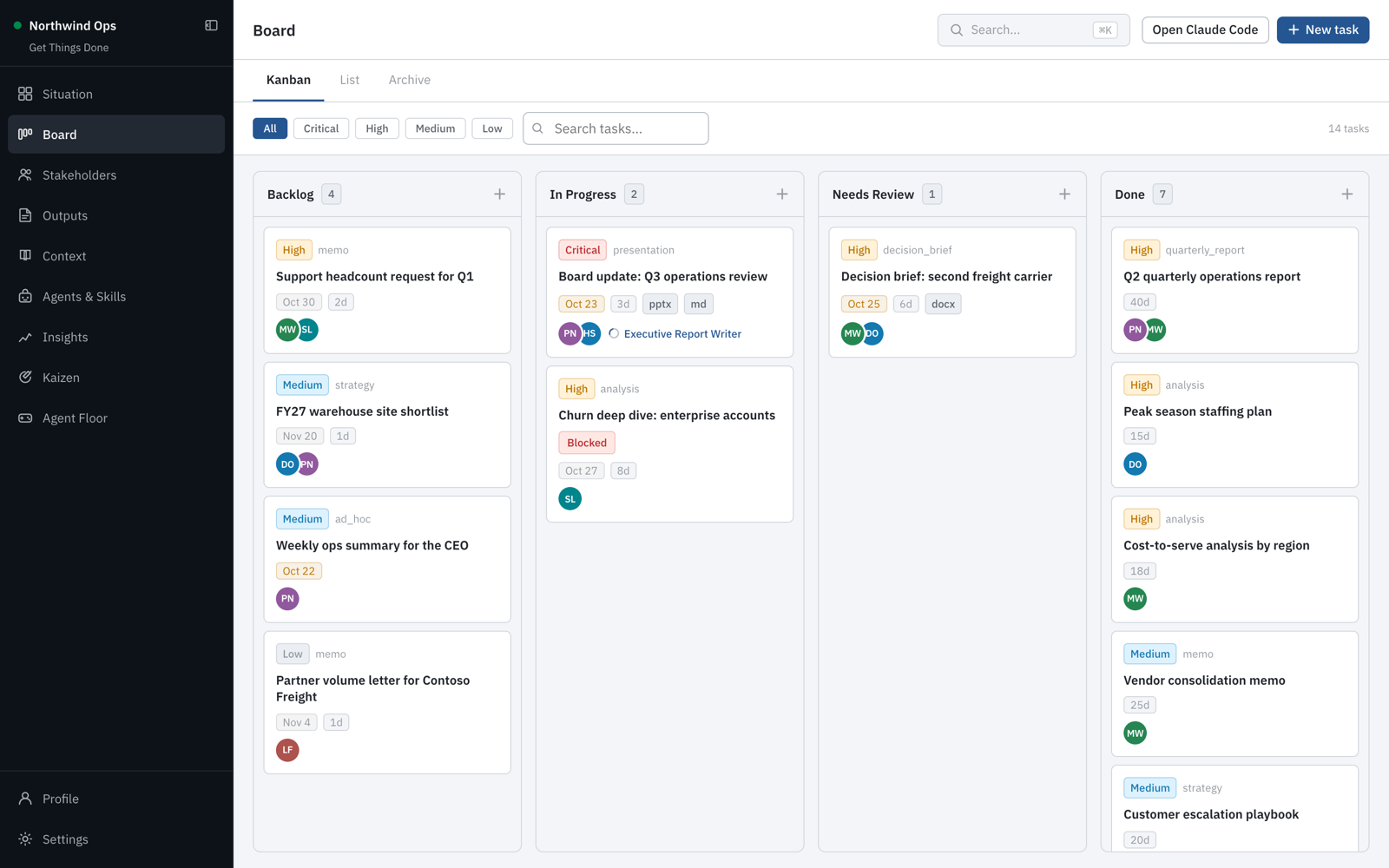
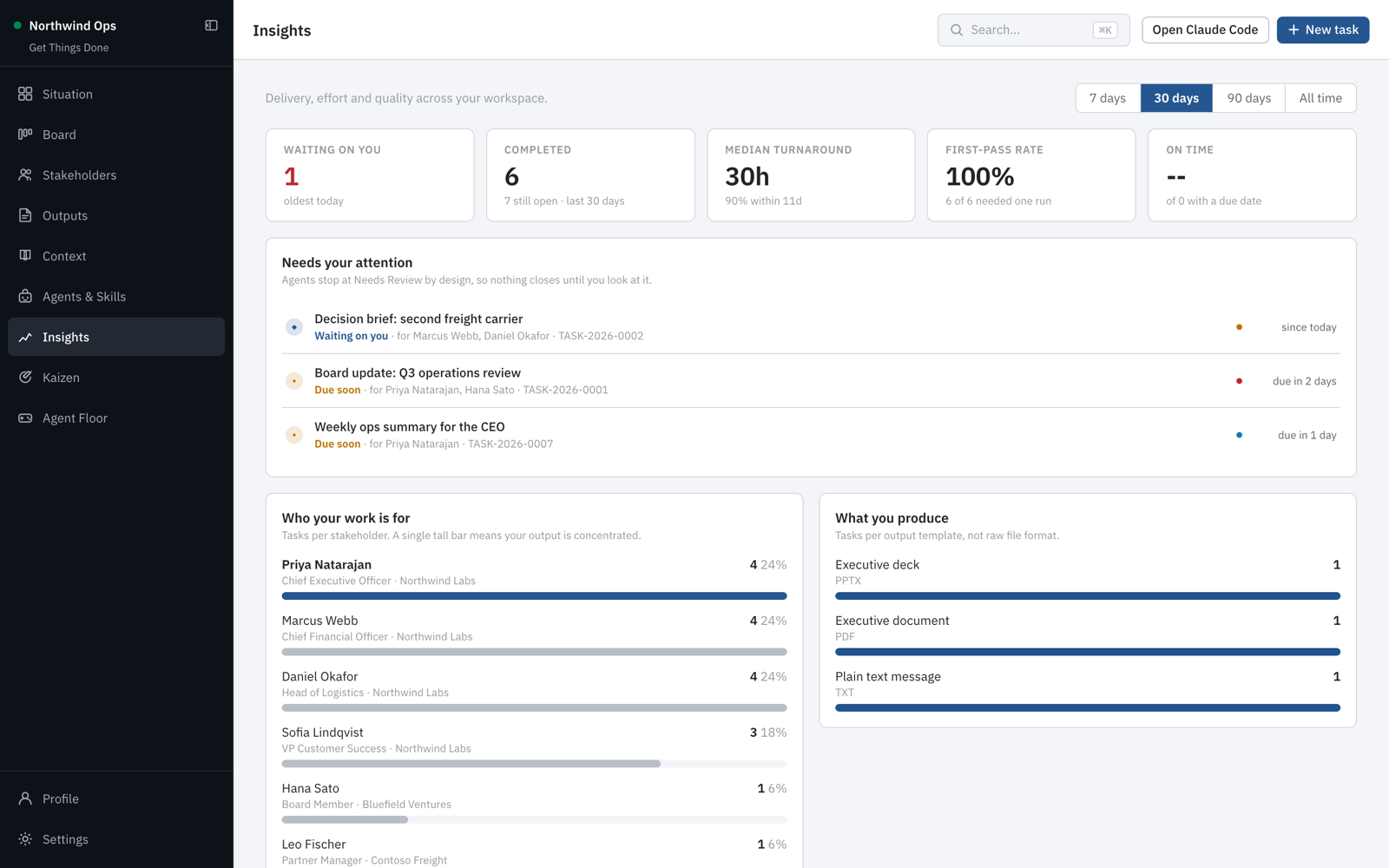
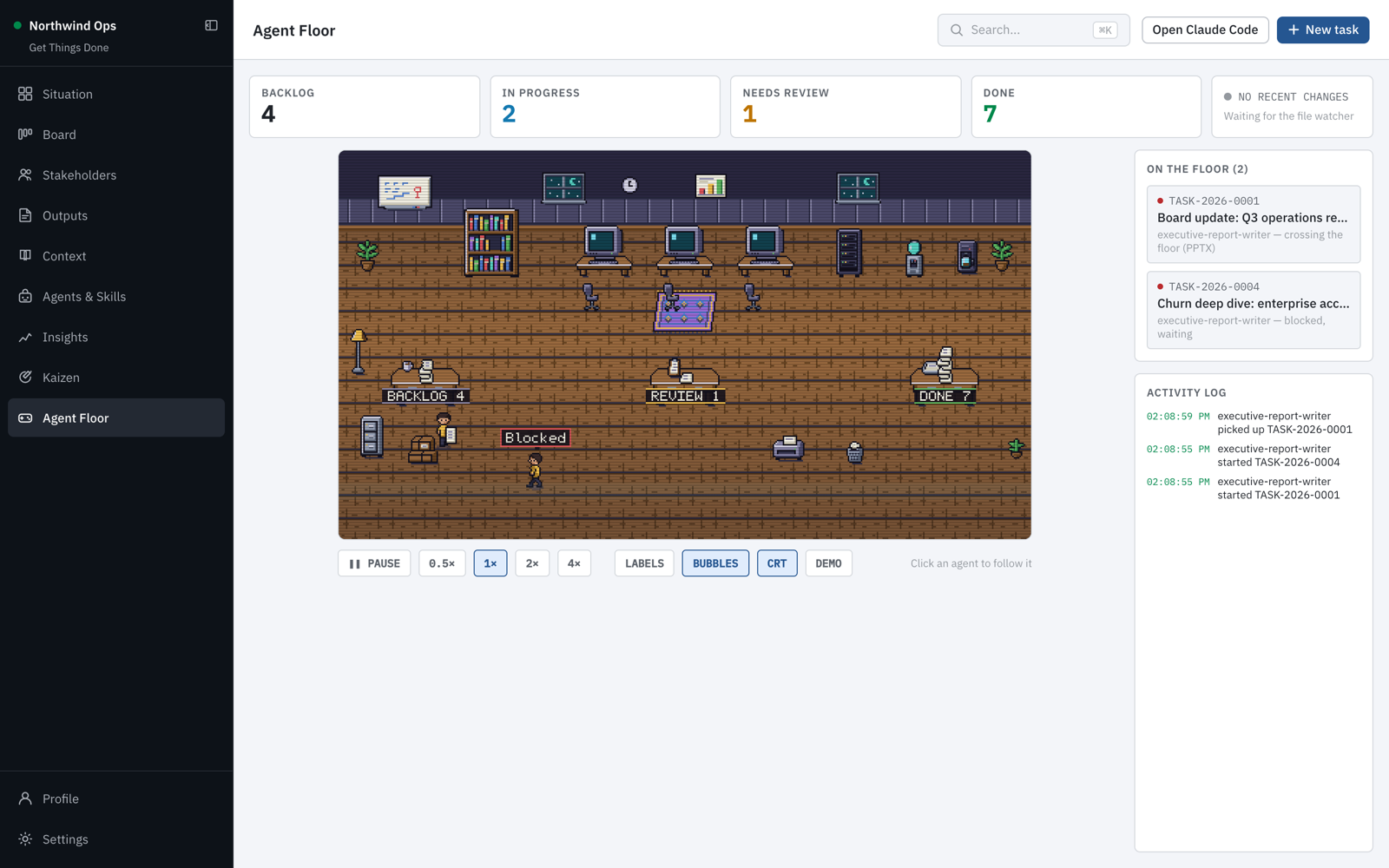
All names, companies and numbers in these screenshots are fictional.
The pitch
You are an executive. Your day is tasks, people, context and deliverables, and all
four live in different places: a task in your head, the political situation in your
memory, the strategy in a deck somewhere, the actual document due tomorrow in a tab
you have not opened yet.
AI assistants should fix this. Mostly they do not, because every conversation starts
from nothing. You re-explain who your CFO is, how your CEO likes to be briefed, what
last quarter's decision was, what your house style looks like. By the time the
context is loaded, you could have written the thing yourself.
Get Things Done gives your AI a memory of your job.
It turns a folder on your machine into a structured executive workspace: your
profile, your stakeholders, your context library, your output templates and your
tasks. A local kanban dashboard lets you run it like a board. And because everything
is plain Markdown in a folder you own, Claude Code, GitHub Copilot and Codex read the
exact same files you do.
Ask for a board memo and the agent already knows who the board is, how you write,
which strategy note applies, and what a finished memo looks like. It writes the
deliverable into the task folder, logs what it did and what it assumed, and marks it
for your review. It never marks its own work done. That stays your call.
Nothing leaves your machine. The server binds to 127.0.0.1. Your content is a
folder of Markdown files you can back up, move, or put in a private git repo. No
account, no cloud, no telemetry.
npm install -g @bertonha/getthingsdone
mkdir my-workspace && cd my-workspace
gtd init
gtd start
Why files, not another app
Every SaaS task tool is a walled garden with an API you have to beg for. This is a
folder.
- Your AI reads it natively. No plugin, no MCP server, no integration. Point
Claude Code at the folder and it works. - It outlives the tool. Markdown and YAML frontmatter will open in thirty years.
- You own the backup story.
git init, Time Machine, Dropbox, whatever you already trust. - You can grep it. Because sometimes that is genuinely the fastest thing.
The dashboard is a convenience over the files, not a prison around them. Delete the
app and you still have everything.
A quick tour
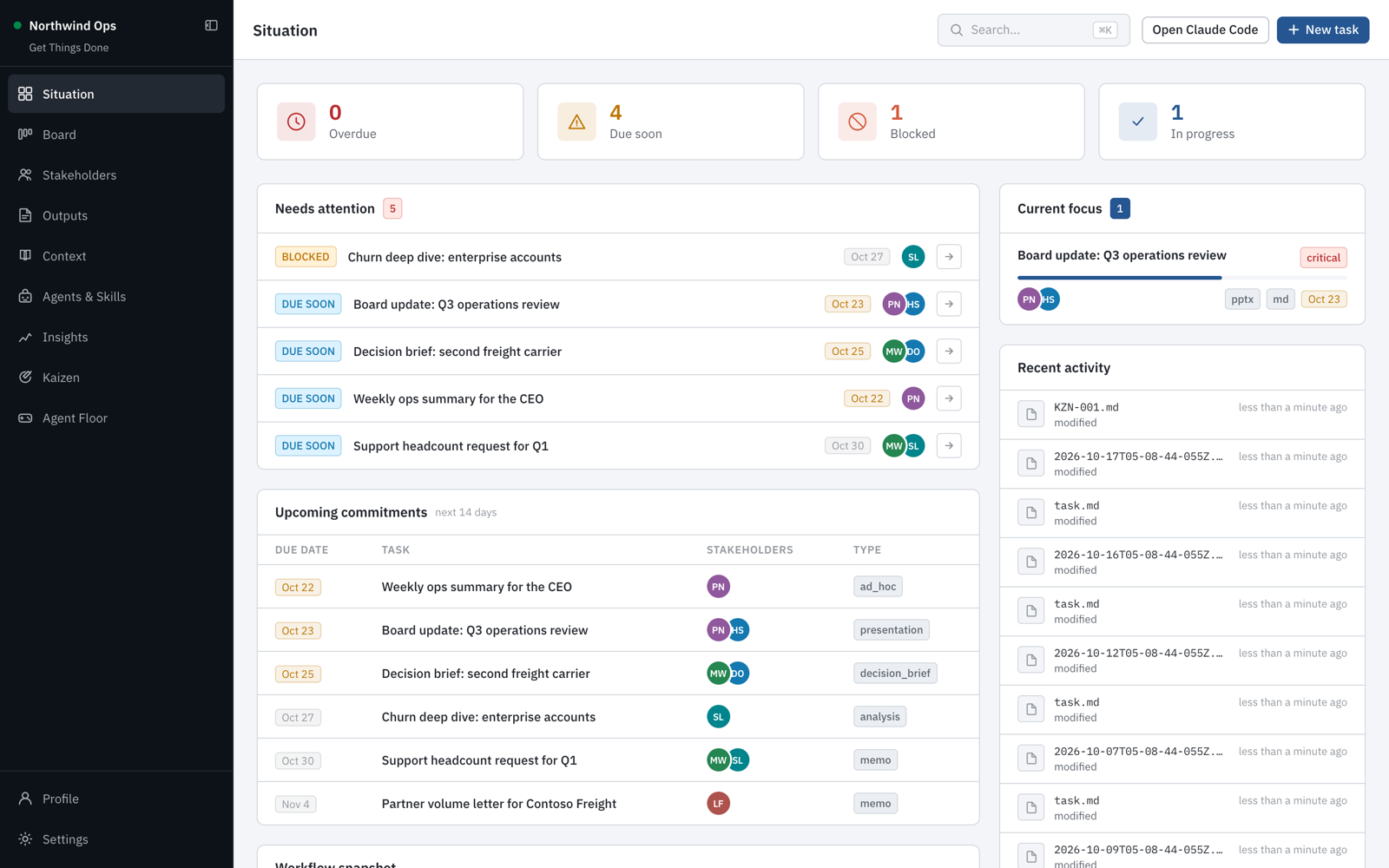
Situation is your morning view: what is overdue, blocked or due soon, what you
are focused on, and what changed in the workspace.
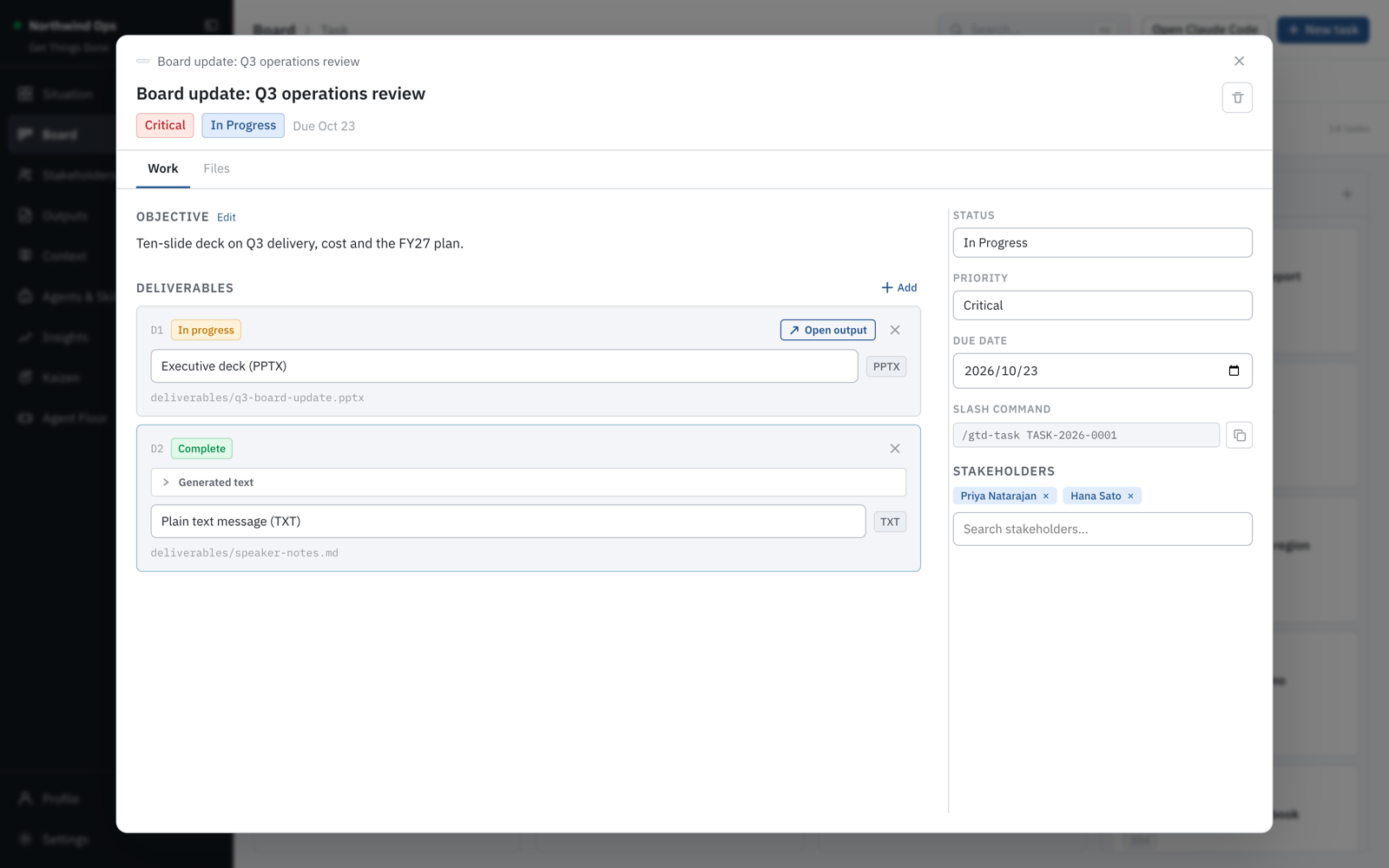
Tasks carry the objective, the stakeholders, the deliverables and the output
template they follow. Copy the /gtd-task command and hand it to your AI agent.
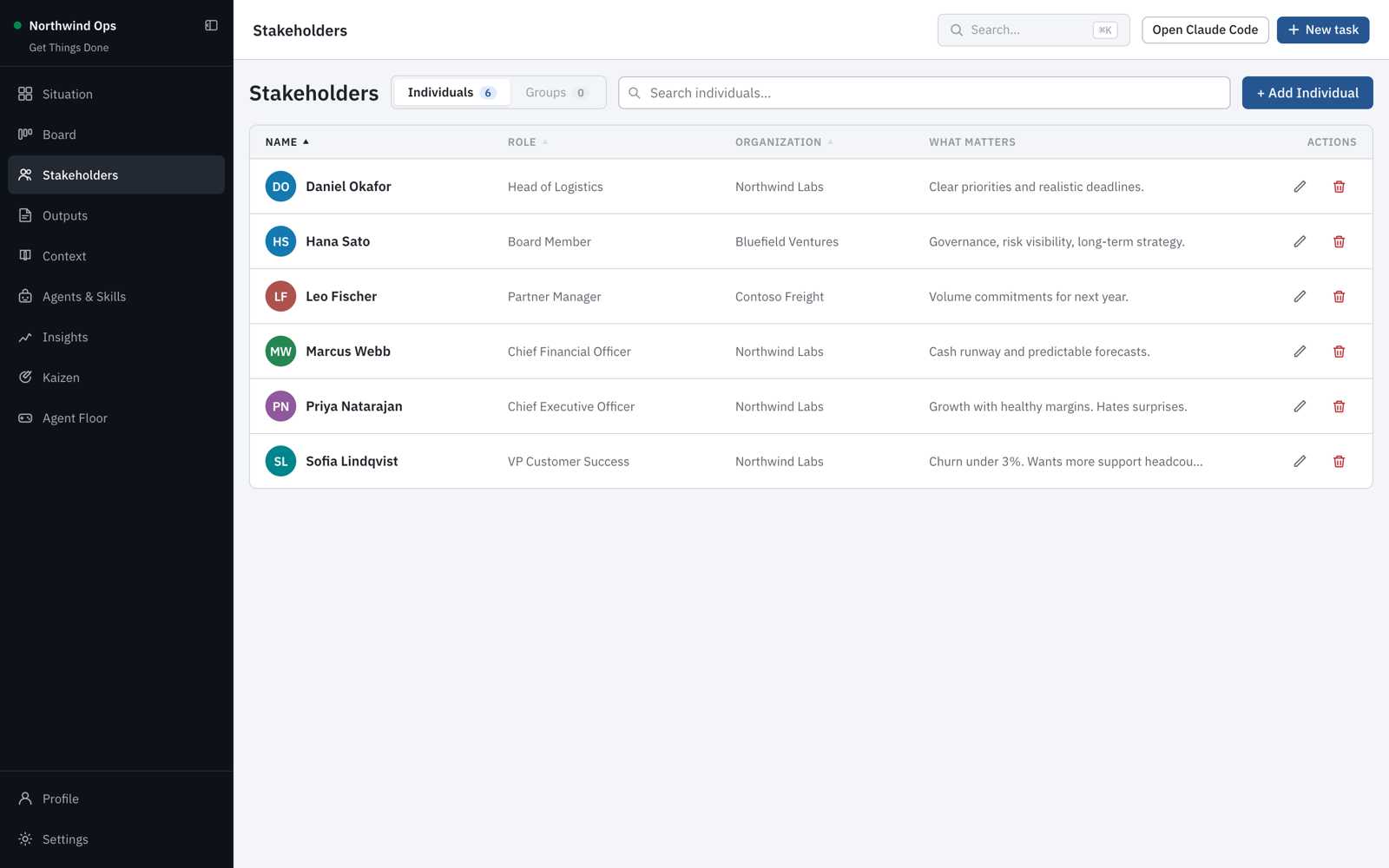
Stakeholders record who people are and what matters to them, so agents write to a
CFO differently than to a partner.
Insights show what is waiting on you, how long work takes, and who your work is
really for.
Agent Floor is an optional pixel-art view of your agents picking up, working on
and handing in tasks. Turn it on under Settings.
Light and dark themes are built in.
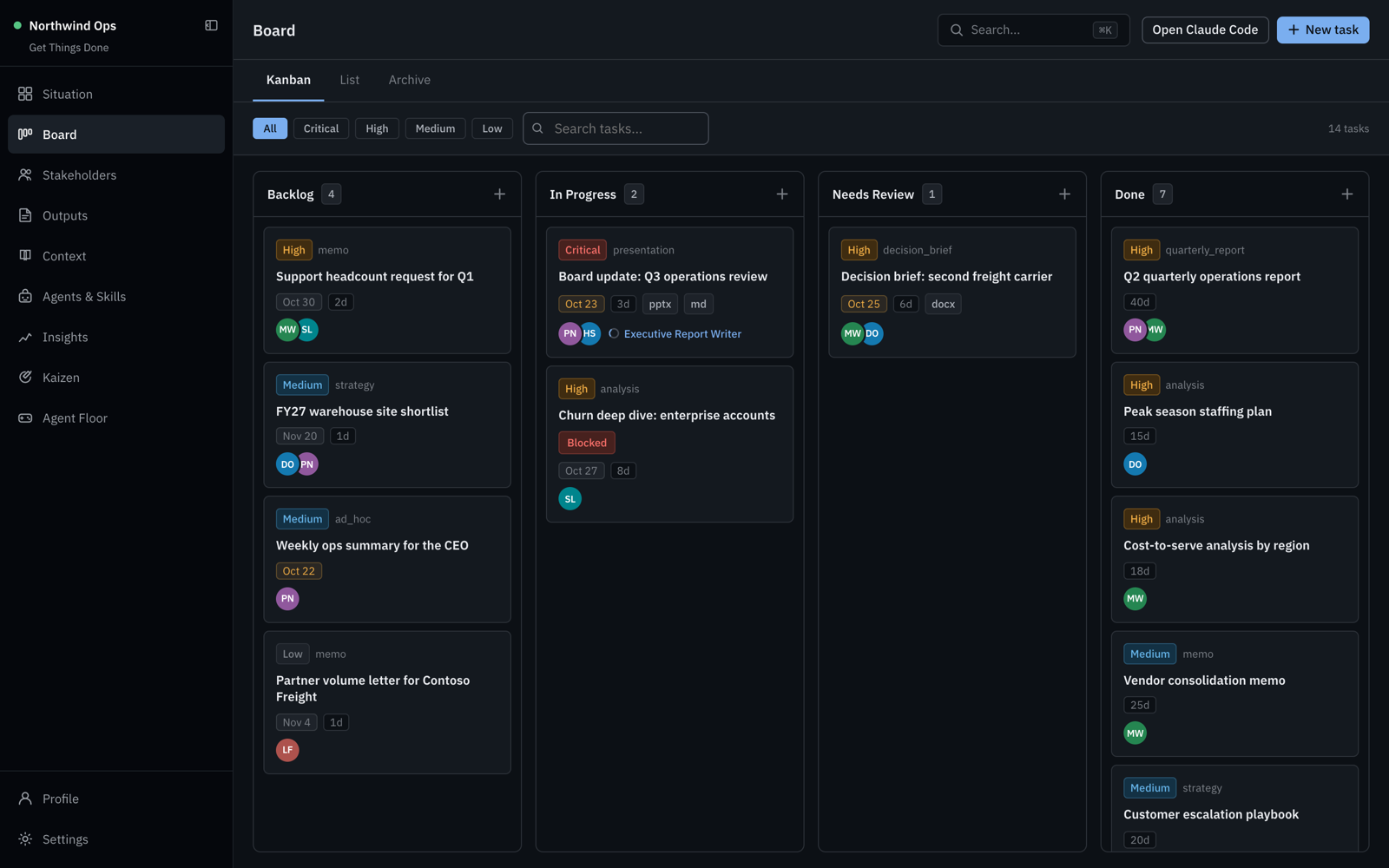
Table of contents
- A quick tour
- Install
- Your first workspace
- Core concepts
- Running a task with an AI agent
- Command reference
- Workspace layout
- What is yours and what is the app's
- Upgrading
- Version control and privacy
- Configuration
- Troubleshooting
- Development
- Contributing
- License
Install
Requires Node.js 20.19 or newer (22 or 24 recommended).
npm install -g @bertonha/getthingsdone
This installs the gtd command globally. The application lives in your globalnode_modules; your workspaces hold only your content.
Verify:
gtd --version
Your first workspace
Create a folder and initialize it:
mkdir ~/executive-workspace
cd ~/executive-workspace
gtd init
gtd init asks five questions:
| Question | What it is used for |
|---|---|
| Workspace name | Shown in the dashboard header |
| Your name | Written into your executive profile |
| Your role/title | Helps agents calibrate tone and altitude |
| Organization | Interpolated into agent instruction files |
| AI tools | Which assistant integrations to install |
Then start the dashboard:
gtd start
It opens http://localhost:3001 in your browser and keeps running in the
background. Close the terminal; it stays up. gtd stop when you are done.
Scripted setup
For dotfiles, containers or CI, skip the prompts entirely:
gtd init --yes \
  --name "Jane Doe" \
  --role "Chief Technology Officer" \
  --org "Acme Corp" \
  --workspace-name "Acme Executive Workspace" \
  --ai claude-code,codex
--yes also engages automatically when stdin is not a TTY.
Core concepts
Five things make up the system. Get these right and the AI output gets dramatically
better.
1. Your profile — profile/executive-profile.md
Who you are and how you communicate. Every agent reads this before writing anything.
Fill in the sections honestly: Responsibilities, Communication Style,
Decision Making, Language Preferences, Recurring Expectations,
Principles.
This is the single highest-leverage file in the workspace. "Direct, no hedging, lead
with the ask, never use em dashes, Japanese business context so use -san" produces
visibly different output than an empty profile.
2. Stakeholders — stakeholders/people/
One file per person: their role, organization, influence level, and what actually
matters to them. Influence level drives how agents write to them:
| Influence | How agents adapt |
|---|---|
decision_maker |
Brief, direct, leads with the ask, one page |
influencer |
Acknowledges their perspective first, invites input |
informed |
Summary only, no unrequested detail |
executor |
Clear action, timeline, owner, no ambiguity |
Org charts (stakeholders/org-charts/) map who reports to whom inside a company or
organization. Build them in Stakeholders → Org charts by dragging people onto their
manager. Agents read the charts for every stakeholder on a task, so a deliverable is
pitched at the most senior person involved and names the right escalation path.
3. Context — context/
Your background knowledge library, filed by category: company/, organization/,strategy/, programs/, decisions/, risks/, glossary/, situation/.
Agents scan the whole library, not just what a task lists. Put the strategy deck
summary, the risk register, the org chart, the acronyms your company invented. This
is the memory you stop having to repeat.
4. Output templates — outputs/templates/
What "finished" looks like. Each template declares a format, required sections and a
style guide. Three ship by default: Plain text message, Executive document,
Executive deck. Create your own for the artifacts you produce over and over —
your weekly update, your steering committee pack, your board memo.
5. Tasks — tasks/active/
The unit of work. A task links the other four together:
tasks/active/TASK-2026-0001/
  task.md            objective, stakeholders, contexts, deliverables
  deliverables/      what the agent produces
  executions/        what it did, what it assumed, what it could not find
  attachments/       source material you provide
  notes/
Tasks move backlog → in_progress → in_review → done. Agents setin_progress when they pick work up and in_review when they finish. Only you setdone, and only after reading the output.
Running a task with an AI agent
Create a task in the dashboard, attach the stakeholders and contexts that matter,
pick an output template. Then from your workspace folder:
claude
Claude Code loads CLAUDE.md automatically. Run the task:
/gtd-task TASK-2026-0001
The agent will, in order:
- Set the task to
in_progress - Read your executive profile
- Read the task definition
- Read every stakeholder listed on it
- Scan the full context library for anything relevant
- Read the output template for each deliverable
- Produce the deliverable into
deliverables/ - Set the task to
in_review - Write an execution log recording decisions, sources and any placeholders
Where data is missing, agents insert explicit placeholders rather than inventing
figures:
[PLACEHOLDER: Q3 revenue from Finance - owner: Sam Rivera - by: 2026-09-05]
A complete structure with marked gaps beats a partial document.
Specialist agents
Four ship with the Claude Code integration and are selected via a task'spreferred_agent field:
| Agent | Use for |
|---|---|
executive-report-writer |
Reports, decks, memos, strategic documents |
stakeholder-advisor |
Sensitive comms, influence mapping, politics |
context-researcher |
Research and context notes (writes context, not deliverables) |
meeting-prep |
Briefs, talking points, likely questions, red lines |
Skills
Five curated skills ship by default: decision-brief, financial-analysis,presentations, risk-analysis, stakeholder-communication. More can be installed
from the Anthropic skills marketplace inside the dashboard's Agents view.
Other assistants
Selecting copilot or codex at init writes .github/copilot-instructions.md orAGENTS.md with equivalent guidance. Same files, same conventions.
Command reference
| Command | Description |
|---|---|
gtd init |
Create a workspace in the current directory |
gtd start |
Start the dashboard in the background |
gtd stop |
Stop the dashboard |
gtd status |
Show whether it is running, on which port, against which workspace |
gtd open |
Open the dashboard in your browser |
gtd upgrade |
Refresh app-provided files after updating the package |
gtd use <path> |
Point the dashboard at a different workspace |
gtd init
| Flag | Description |
|---|---|
-d, --dir <path> |
Target directory (default: current) |
-y, --yes |
Accept defaults, skip all prompts |
--name <name> |
Your name |
--role <role> |
Your role or title |
--org <organization> |
Your organization |
--workspace-name <name> |
Workspace display name |
--ai <tools> |
Comma-separated: claude-code,copilot,codex |
gtd start
| Flag | Description |
|---|---|
-p, --port <number> |
Port to listen on (default 3001) |
--no-open |
Do not open a browser |
-f, --foreground |
Run attached instead of in the background |
If the port is busy, it picks the next free one and tells you. Logs go to.situation-board/logs/server.log in your workspace.
gtd upgrade
| Flag | Description |
|---|---|
-d, --dir <path> |
Workspace to upgrade (default: the configured one) |
Workspace layout
my-workspace/
├── CLAUDE.md                  Instructions your AI agent reads first
├── README.md                  This workspace's own quick reference
├── workspace.yaml             Name, settings, path map
├── .gitignore
│
├── .claude/                   Claude Code integration
│   ├── agents/                4 specialist agents
│   ├── commands/              /gtd-task, /gtd-kaizen
│   ├── skills/                5 curated skills
│   └── settings.json          Tool permissions (read-wide, write-narrow)
│
├── .schemas/                  JSON Schemas for every file type
├── .situation-board/          App state: cache, logs, trash, manifest
│
├── profile/
│   └── executive-profile.md   Your voice and preferences
│
├── stakeholders/
│   ├── people/                STK-NNNN.md
│   └── groups/                GRP-NNNN.md
│
├── tasks/
│   ├── active/                One folder per task
│   └── archive/
│
├── context/                   Your knowledge library
│   ├── company/  organization/  strategy/  programs/
│   └── decisions/  risks/  glossary/  situation/
│
├── outputs/templates/         What "finished" looks like
├── kaizen/                    Improvement proposals
└── workflows/                 Reserved for multi-step workflows
Deletes are soft. Removing a file in the dashboard moves it to.situation-board/trash/ with a timestamp, and every overwrite keeps the previous
version there too.
What is yours and what is the app's
This is worth understanding, because it is what makes upgrades safe.
App-provided — ships with the package, refreshed on gtd upgrade:
CLAUDE.md    README.md    .gitignore    .schemas/
.claude/     (agents, commands, skills, settings)
outputs/templates/plain-text, executive-document, executive-deck
Yours — created through the dashboard or by hand, never touched:
tasks/    stakeholders/    context/    kaizen/    workflows/
profile/executive-profile.md
outputs/templates/<anything you made>
.claude/skills/<anything you installed from the marketplace>
How the app tells them apart
Not by folder — outputs/templates/ and .claude/skills/ legitimately hold both
kinds, and you may well want to edit CLAUDE.md yourself.
Instead the app records a SHA-256 of every file it installs in.situation-board/app-manifest.json. On upgrade, for each app-provided file:
| Situation | What happens |
|---|---|
| File is missing | Installed |
| Hash still matches the manifest | You never touched it — replaced silently |
| Hash differs | You edited it. Yours is kept; the new version is written as <file>.new |
So customize CLAUDE.md freely. You will never lose your changes, and you will never
be stuck on an old version without knowing it. gtd upgrade prints exactly which
files fell into which bucket.
Upgrading
npm update -g @bertonha/getthingsdone
gtd stop
gtd upgrade
gtd start
gtd upgrade operates on the configured workspace. If you keep several, run it in
each with -d:
gtd upgrade -d ~/work-workspace
gtd upgrade -d ~/board-workspace
Version control and privacy
A workspace is a plain folder of Markdown, so git works well:
cd my-workspace
git init
git add .
git commit -m "Initial workspace"
The generated .gitignore already excludes caches, logs and trash.
Use a private repository. Stakeholder files contain real names, influence
assessments and political notes. Context notes contain strategy and risk registers.
Deliverables contain whatever you asked for. This is exactly the material that
should not be public.
The application never transmits your content. The server binds to 127.0.0.1 only.
The single outbound call it can make is when you explicitly install a skill from the
Anthropic marketplace in the Agents view.
Configuration
Global config lives at ~/.gtd/config.json:
{
  "workspace_path": "/Users/you/executive-workspace",
  "port": 3001
}
| Environment variable | Effect |
|---|---|
ESB_WORKSPACE_PATH |
Override the workspace path (takes precedence over config) |
PORT |
Override the port |
Switching between workspaces:
gtd use ~/other-workspace
gtd start
Troubleshooting
gtd start says the port is in use.
It automatically moves to the next free port and prints which one. Pin it with-p 4000 if you prefer.
The dashboard will not start.
Check .situation-board/logs/server.log in your workspace — gtd start prints the
last lines on failure. gtd status shows whether a server is running and where.
Search results look incomplete.
Search uses a native SQLite index. If better-sqlite3 could not build on your
machine, the app falls back to an in-memory scan automatically — everything still
works, ranking is just simpler. The log line starting [search] confirms it.
I edited CLAUDE.md and now there is a CLAUDE.md.new next to it.
Working as intended. A new version shipped, but your edits were kept. Diff the two
and merge whatever you want, then delete the .new file.
I upgraded from the old esb command.gtd is the command now. esb still works as an alias, and your old ~/.esb/config.json
is migrated to ~/.gtd/ automatically the first time you run it.
Development
git clone https://github.com/geovanneb/get-things-done.git
cd get-things-done
npm install
npm run dev          # API on :3001, Vite UI on :5173
| Script | Purpose |
|---|---|
npm run build |
Build CLI, server and UI into dist/ |
npm run dev |
Run server and UI in watch mode |
npm test |
Unit tests plus an end-to-end smoke test (needs npm run build first) |
npm run seed:demo -- <url> |
Fill a running server with the fictional demo workspace |
npm pack |
Produce the exact tarball that would be published |
To get a populated dashboard for development or screenshots, create a throwaway
workspace and seed it. Never seed your real workspace.
node bin/gtd.js init -y -d /tmp/gtd-demo --name "Alex Morgan" --role COO --org "Northwind Labs"
cd /tmp/gtd-demo && node /path/to/get-things-done/bin/gtd.js start --no-open
npm run seed:demo -- http://127.0.0.1:3001
Architecture. src/cli/ is the CLI. server/ is an Express API over the
workspace files, with a chokidar watcher pushing changes over SSE. ui/ is React +
Vite, served statically by the server in production. templates/ holds everything
scaffolded into a new workspace.
server/src/services/scaffold.ts is the single source of truth for creating and
upgrading workspaces. The CLI loads its compiled output at runtime so gtd init and
the server's POST /api/workspace/init can never disagree.
Releases. Maintainers push a vX.Y.Z tag. GitHub Actions builds, tests,
publishes to npm with provenance and creates the GitHub release from
CHANGELOG.md.
Contributing
Contributions are welcome, from typo fixes to new features. Start with
CONTRIBUTING.md. Please read the Code of Conduct,
and report security issues privately as described in SECURITY.md.
License
MIT — see LICENSE.
Yorumlar (0)
Yorum birakmak icin giris yap.
Yorum birakSonuc bulunamadi