unity-biome-mcp
Health Uyari
- License — License: MIT
- Description — Repository has a description
- Active repo — Last push 0 days ago
- Low visibility — Only 6 GitHub stars
Code Gecti
- Code scan — Scanned 12 files during light audit, no dangerous patterns found
Permissions Gecti
- Permissions — No dangerous permissions requested
Bu listing icin henuz AI raporu yok.
MCP server for Unity Editor — 142 tools for scene, assets, animation, VFX, playtest & more
Unity Biome MCP
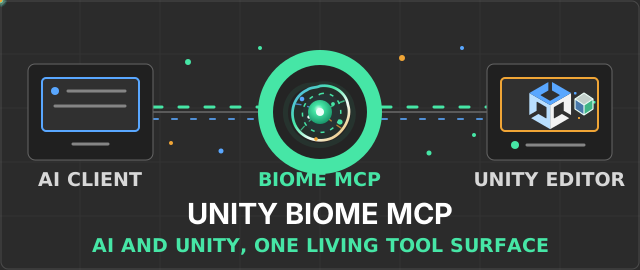
Control the Unity Editor from MCP-compatible AI clients or from chat inside Unity.
Inspect scenes, edit GameObjects, run playtests, and capture results through structured tools.




Quick Start · Documentation · Comparison · Changelog
Quick Start
Requirements: Unity 6 (6000.0 or newer) and uv. You do not need to install Python separately when using uvx.
1. Install uv
macOS and Linux:
curl -LsSf https://astral.sh/uv/install.sh | sh
Windows:
winget install astral-sh.uv
2. Add the Unity package
- In Unity, open Window > Package Manager.
- Select + > Add package from git URL.
- Enter:
https://github.com/german-krasnikov/unity-biome-mcp.git?path=unity-plugin
3. Configure your client
Open MCP > Setup Wizard, choose a client, and follow the result shown by the Wizard.
Configuration depends on the client. The Wizard may write a project configuration, run the configuration helper, copy a client-specific snippet, or defer configuration until In-Unity Chat starts. Restart the selected client when prompted. The Wizard configures the integration; it does not perform an end-to-end connection test.
Manual client setup guidesUse the matching guide:
Claude Code |
Claude Desktop |
Codex |
Cursor |
Junie |
Kimi |
OpenCode |
Rider AI Assistant |
VS Code |
Windsurf
For external OpenCode setup, do not use the Wizard's standard clipboard JSON:
OpenCode has a different configuration shape. Follow the
OpenCode guide.
4. Verify the first connection
For an external MCP client, keep the Unity project open, restart the client if
the Wizard asked you to, and send:
Read the active Unity scene hierarchy at depth 2 and summarize its root objects.
The client should call:
get_hierarchy(depth=2)
A successful response contains the active scene hierarchy. If the call fails, open MCP > Status > Diagnose in Unity. For Chat-only verification, use the
Chat quick check. For command-line diagnostics, run:
uvx --from git+https://github.com/german-krasnikov/unity-biome-mcp.git#subdirectory=server unity-biome-mcp doctor
See Getting Started for recovery steps and platform details.
Local development installationRequirements for a source checkout: Git and Python 3.10 or newer.
git clone https://github.com/german-krasnikov/unity-biome-mcp.git
cd unity-biome-mcp
python install.py setup
python install.py configure --tool claude-code
python install.py doctor
The configuration helper supports claude-code, claude-desktop, cursor,windsurf, vscode, codex, kimi, junie, and opencode.
Documentation
| Goal | Guide |
|---|---|
| Install and connect | Getting Started |
| Choose and configure an MCP client | Client guides |
| Install project-local AI guidance | AI Skills and Agents |
| Find a tool for a task | Tool Guide |
| Use batch safely | Batch Operations |
| Build Play Mode workflows | PlayTest DSL |
| Configure In-Unity Chat | Chat Backends |
| Extend Unity Biome MCP | Plugin Quick Start |
| Diagnose failures | Diagnostics |
What You Can Do
- Scene and object editing: inspect and modify GameObjects, components,
assets, materials, shaders, and UI. - Playtesting and verification: run PlayTest DSL workflows, compile checks,
console checks, runtime diagnostics, and visual comparisons. - Animation and VFX: work with clips, Animator controllers, Timeline,
particles, materials, shaders, and Shader Graph. - Efficient tool use: group compatible operations with
batch, request
deferred schemas, and enable capability categories only when needed. - Extensibility: add project-specific server tools, Unity commands, Chat
context chips, and plugin hooks.
Example prompts:
Create a player object, add a Rigidbody, and place it at the scene origin.
Find enemies without colliders and add a BoxCollider to each.
Run a playtest that moves the player to the door and verifies that the score increases.
Capture the Game View and compare it with the saved baseline.
Summarize scene changes since the last checkpoint.
Batch example
Use batch for two or more compatible operations:
batch(commands="""
create_object name=Enemy
set_property path=Enemy component=Transform prop=position value=0,1,0
manage_component path=Enemy type=Rigidbody action=add
set_property path=Enemy component=Rigidbody prop=mass value=2
""")
Some typed tools are direct-only and cannot be placed in a batch. See the Batch guide for validation, Undo-backed rollback, and error handling.
Ways to Work
External MCP client
An MCP client launches the Python server over stdio. The server discovers the active Unity project and sends framed commands to the editor plugin over localhost TCP.
In-Unity Chat
Open MCP > Chat to work inside the editor. Select a supported CLI backend and use Ask or Agent mode. Authentication is handled by the selected CLI. Context chips can attach scene objects, scripts, and assets to a turn, while each completed AI turn is grouped for Unity undo.
See Chat backends for setup and behavior.
Architecture
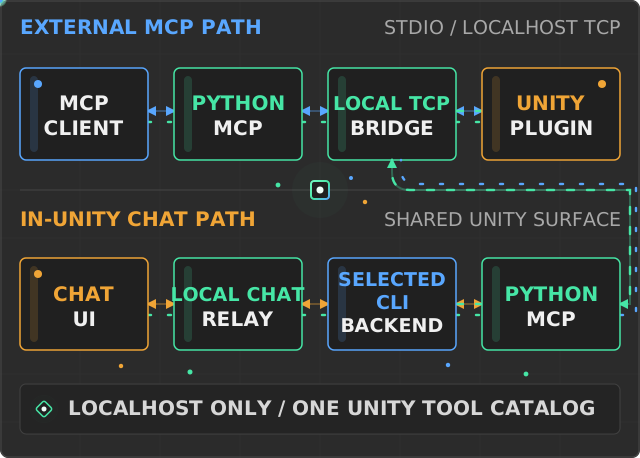
The external path is MCP client -> Python MCP server -> localhost TCP -> Unity Editor plugin. In-Unity Chat invokes the selected CLI through the local chat relay; that CLI connects to the same Python MCP server and rejoins the shared TCP-to-plugin path.
AI Skills
The Unity package includes 11 reusable domain skills and 4 focused agents for
Claude Code and Codex. They cover efficient MCP tool selection, batching,
Unity authoring, playtesting, diagnostics, and evidence-based verification.
Open MCP > Install AI Skills to install them into the current project.
Existing and generated files are ownership-checked before replacement. See
AI Skills and Agents for paths, safe updates, and
Codex synchronization.
Project Inventory
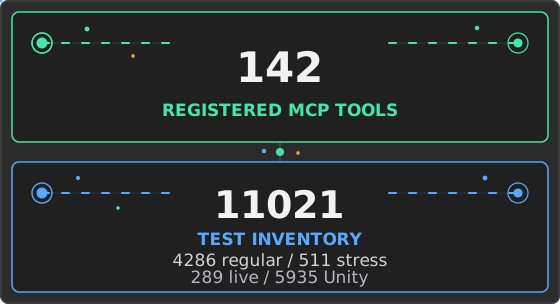
The values below are generated from registrations, pytest collection, Unity test discovery or source scanning, and package metadata. They are discovery counts, not a claim that every test was executed in the current checkout.
Unity MCP Product Comparison
Verified July 29, 2026:
- Unity Biome MCP: deterministic PlayTest DSL and visual baseline/diff workflows.
- Unity MCP Server: first-party local bridge, connection approval, and multi-client support.
- MCP for Unity: Unity 2021.3 compatibility and authenticated remote hosting.
- AI Game Developer: compiled-player runtime support plus local, HTTP, cloud, and Docker deployment.
- MCP Unity: optional Unity Undo rollback for batch operations and an interactive MCP App dashboard.
The detailed matrix cites exact source commits or versioned official documentation
and records constraints as well as strengths.
Open the full source-backed comparison
Recent Changes
Current release: v1.7.0 (2026-07-30). Read the full changelog.
Contributing
Read CONTRIBUTING.md before opening a pull request. New contributors can start with good first issues.
Report security issues through SECURITY.md.
License
Yorumlar (0)
Yorum birakmak icin giris yap.
Yorum birakSonuc bulunamadi