alden
Health Gecti
- License — License: Apache-2.0
- Description — Repository has a description
- Active repo — Last push 0 days ago
- Community trust — 97 GitHub stars
Code Gecti
- Code scan — Scanned 12 files during light audit, no dangerous patterns found
Permissions Gecti
- Permissions — No dangerous permissions requested
Bu listing icin henuz AI raporu yok.
The review companion that knows what you look for: ranks the PRs waiting on you, shows what the diff doesn't, and learns how you review. Runs on your machine.
Alden
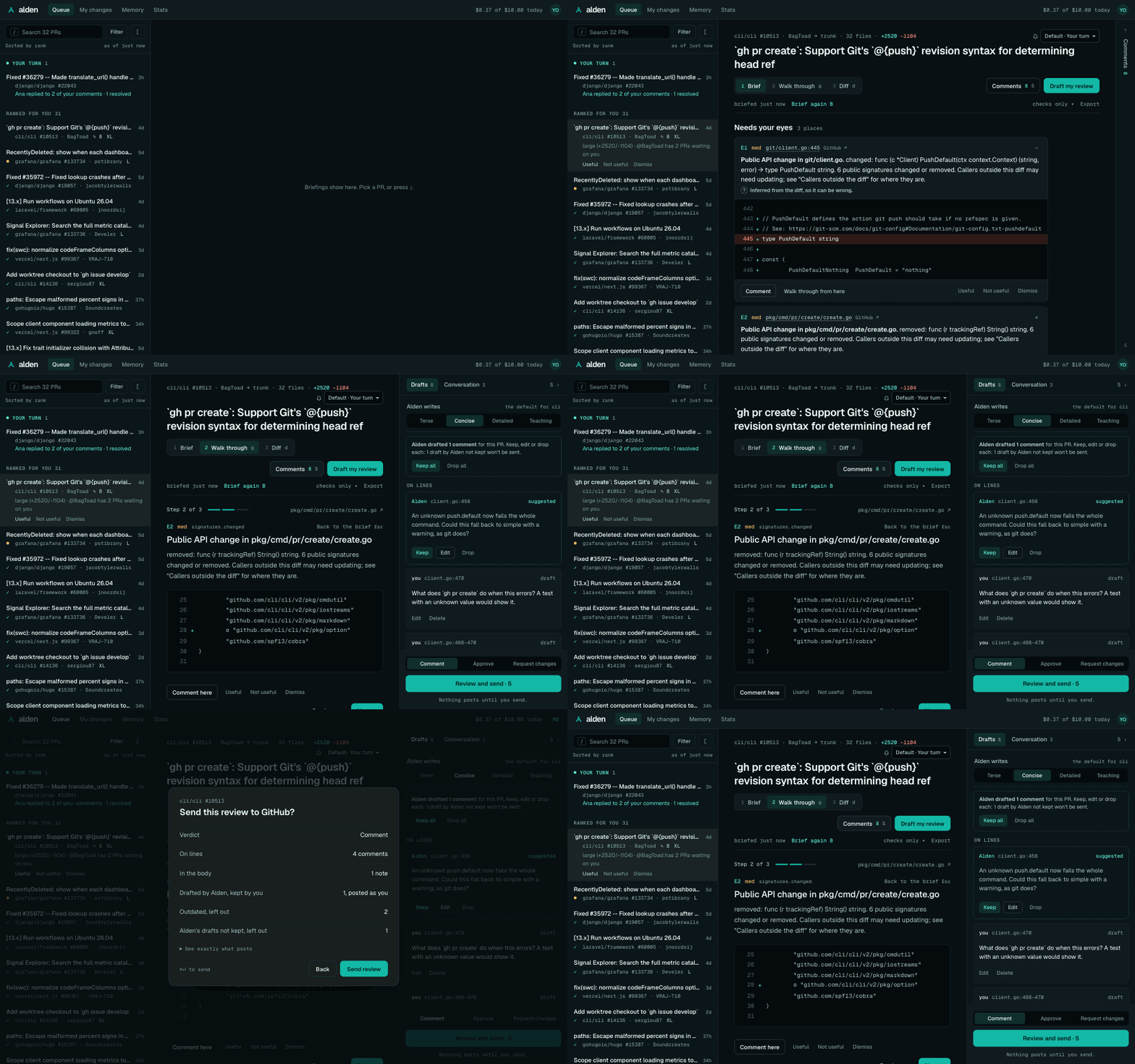
The review companion that knows what you look for. Alden ranks the PRs waiting on you, shows what the diff doesn't (who calls the changed code), and points you at the few places that need your eyes. It learns from your feedback as you go, and it runs on your machine.
Status: open beta. Anyone can install it, and it's free during the beta. Commands and output formats may still
change before 1.0. Questions and ideas: the
Alden Community on Discord.
Install
Pick one (Getting started has the details):
brew install --cask getalden/tap/alden-desktop   # the macOS desktop app, which includes the alden command
brew install getalden/tap/alden                  # the command line tool, on macOS or Linux
npm install -g alden@next                        # with npm, on Node 22.13+ (the beta is under the next tag)
Or download the desktop app's .dmg or a standalone binary for macOS, Linux or Windows from the
releases page. In Claude Code, add the
plugin with /plugin marketplace add getalden/claude-plugin and/plugin install alden@getalden.
Quickstart
alden              # first time: sign in, pick a model, see your queue; then the interactive view
alden auth login   # or sign in on its own (reuses your GitHub CLI sign-in if you have one)
alden queue        # the PRs waiting on your review, ranked
alden open 1       # open the top one in your browser

alden review 1     # brief yourself on #1 from the queue
alden review       # or on your own uncommitted changes, before opening a PR
alden ui           # or do all of it in your browser
Without installing, put npx alden@next in place of alden.
alden review takes a PR URL, owner/repo#123, or a # from your last queue. It prints the few places that need
your eyes, every check Alden ran with its evidence (secrets, migrations, public signatures, dependencies, tests,
config, sensitive paths, CI), and what it did not check. Checks marked ~ infer from the diff alone. Add --json for
the briefing as data.
For TypeScript, JavaScript, Python, Go and PHP, Alden also builds a code graph of the repo and lists the callers
outside the diff of every changed public function, class and method, flagging removed or re-signed code that's still
called. For PHP it follows Laravel's and Symfony's indirect calls too: container bindings, facades, Eloquent scopes and
relationships, Blade templates and service config. Local reviews use your working tree. For PR reviews, Alden uses
a clone of the PR's repo: the one you run it in, one it has seen you use, or one under clones.folders. It fetches the PR into its own worktree under ~/.alden/worktrees
(your checkout is never touched). --no-graph skips it.
With a model (alden setup checks and stores an Anthropic or OpenAI API key, or sets up a local one through Ollama;ANTHROPIC_API_KEY or OPENAI_API_KEY works too), the review also asks a model what the change
does, whether it matches its title, and what else deserves a look. Alden keeps only findings that point at real lines
in the diff, and never lets them displace high-severity checks. Use --model opus for one review, or --no-llm to
skip the model. Every call is checked against your caps before it's sent; alden spend shows what you've spent.alden ask 1 "Is the retry safe?" asks it a question about a briefed PR.
Needs your eyes
  1. Public API change in public/app/features/explore/SignalExplorer/data/metricResourceClient.ts:191
     changed: export function fetchCatalog(…): Promise<MetricInfo[]> → export function fetchCatalog(…): Promise<Catalog>
Then say what you think without leaving Alden: write comments on the places to look or any line of the diff, and send
them to GitHub as one review. Alden posts only what you send, exactly as it shows it to you first; nothing posts in
the background or from a model.
alden comment 1 src/pay.ts:12 "Is fee in cents here?"
alden send 1 --approve -m "Thanks, looks good."
See Comments and sending a review.
alden queue splits the PRs waiting on you into two groups:
- Needs you, highest priority first. Blocking beats waiting beats risk: urgent labels, PRs stacked on this one, and
teammates with several PRs waiting on you come first; then how long you've been asked; then size, sensitive paths
(migrations, auth, payments, CI config, lockfiles), code changed without tests, and files you own in CODEOWNERS. PRs
with failing CI sink to the bottom with "CI failing: ping @author", since the author has to act first. - Fast-track: small, green, conflict-free PRs that only touch docs, only touch tests, or bump a dependency's patch
version. In a repo with no CI, only docs-only PRs qualify. Alden only orders them; it never approves anything.
Every row says why it ranks where it does. Narrow the queue with --repo owner/name or --org name (repeatable), or
get it as JSON with --json (Commands names the schema).
Tune it in your settings, for example:
alden config set queue.fastTrackMaxLines 100
alden config set queue.includeDrafts true
It learns what you look for
Mark a flag Useful or Not useful (or Dismiss it) in alden ui, and open the PRs you care about. After a few
one-sided verdicts on a check, Alden puts its flags first, or leaves them out (never secrets, never high severity).
After you open a kind of PR ahead of its rank a few times, those rank higher. A place you dismissed stays down when you
re-review that PR. Every change says why, in the briefing or the queue row, and nothing is hidden silently.
Add notes the model gets with every review of a repo, and see or forget anything Alden knows:
alden memory add "Money is in cents, never floats"
alden memory
alden memory forget check:tests.missing:down
It all stays in ~/.alden/alden.db on your machine; only your notes go to the model. See
Learning and memory.
Documentation
See the docs: getting started, every command and setting, how the queue and checks
work, the code graph, learning and memory, models and budgets, privacy, and troubleshooting.
Also
alden statsshows your repo's time to first review and review cycle time, before and after Alden, and how long
your own reviews take with Alden (recorded on your machine).- In Claude Code, the Alden plugin adds
/alden:reviewand your queue;alden mcpgives any MCP client the same tools. - On macOS, the desktop app keeps your queue in the menu bar.
Alden is GitHub-only for now and supports TypeScript/JavaScript, Python, PHP (Laravel, Symfony) and Go.
Models and spending
Alden uses your own model account. The default is Claude Sonnet via an Anthropic API key, capped at $0.50 per review and $10 per day. You can switch model, provider (Bedrock, Vertex, Foundry, or any OpenAI-compatible endpoint such as Ollama) and caps:
alden config set model.name opus
alden config set budget.dailyUsd 20
alden config list
Settings live in ~/.alden/config.toml. A repo can override them in .alden.toml. See
Models, providers and budgets and
Configuration.
Open source
Alden is open source under the Apache-2.0 license, and developed in the
open here. Issues, ideas and pull requests are welcome: CONTRIBUTING.md has the setup and the
conventions, and every commit is signed off under the Developer Certificate of Origin.
The single-developer app stays free.
Roadmap
The roadmap is the issue tracker: now,
next and
later. Add a 👍 to what you want most, or open an
idea. Looking for a way in? Try a
good first issue.
Development
Requires Node 22.13+ and pnpm 10.
pnpm install
pnpm test        # Vitest
pnpm typecheck   # tsc across packages
pnpm lint        # Biome
pnpm build       # bundles the CLI into packages/cli/dist
node packages/cli/dist/index.js --help
| Package | What it is |
|---|---|
packages/cli |
The alden command. The only published package; bundles the others. |
packages/core |
The engine: config, GitHub, queue ranking, review. |
packages/schema |
Shared data formats (config, queue items, briefings) that the CLI, UI and desktop app all render. |
packages/ui |
The local web UI (React, Vite), also used by the desktop app. |
packages/desktop |
The macOS app: a Tauri shell around alden ui. |
See CONTRIBUTING.md. Releasing: RELEASING.md. Desktop app:
packages/desktop/README.md. Site and screenshots: site/README.md. Evals,
the gate and the end-to-end test kit: Evals.
License
Apache-2.0; the full text is in LICENSE.
Yorumlar (0)
Yorum birakmak icin giris yap.
Yorum birakSonuc bulunamadi