gantry
Health Uyari
- License — License: MIT
- Description — Repository has a description
- Active repo — Last push 0 days ago
- Low visibility — Only 5 GitHub stars
Code Basarisiz
- rm -rf — Recursive force deletion command in scripts/release.sh
Permissions Gecti
- Permissions — No dangerous permissions requested
Bu listing icin henuz AI raporu yok.
Native macOS app for managing and monitoring Docker — local and over SSH. Agent-ready: built-in MCP server and App Intents. Free and open source.
Gantry
Native Docker management for your Mac. Local and over SSH. Agent-ready with a built-in MCP server. Free, open source, no limits.



Gantry is a fully native macOS app (SwiftUI, Swift 6) for managing and monitoring
Docker — the local daemon and any number of remote hosts over SSH. No Electron,
no subscription, no artificial limits. It is built to be driven by AI agents
too: a bundled MCP server and App Intents expose your Docker
hosts to Claude, Shortcuts, Siri and scripts.
Website: https://getgantry.github.io/
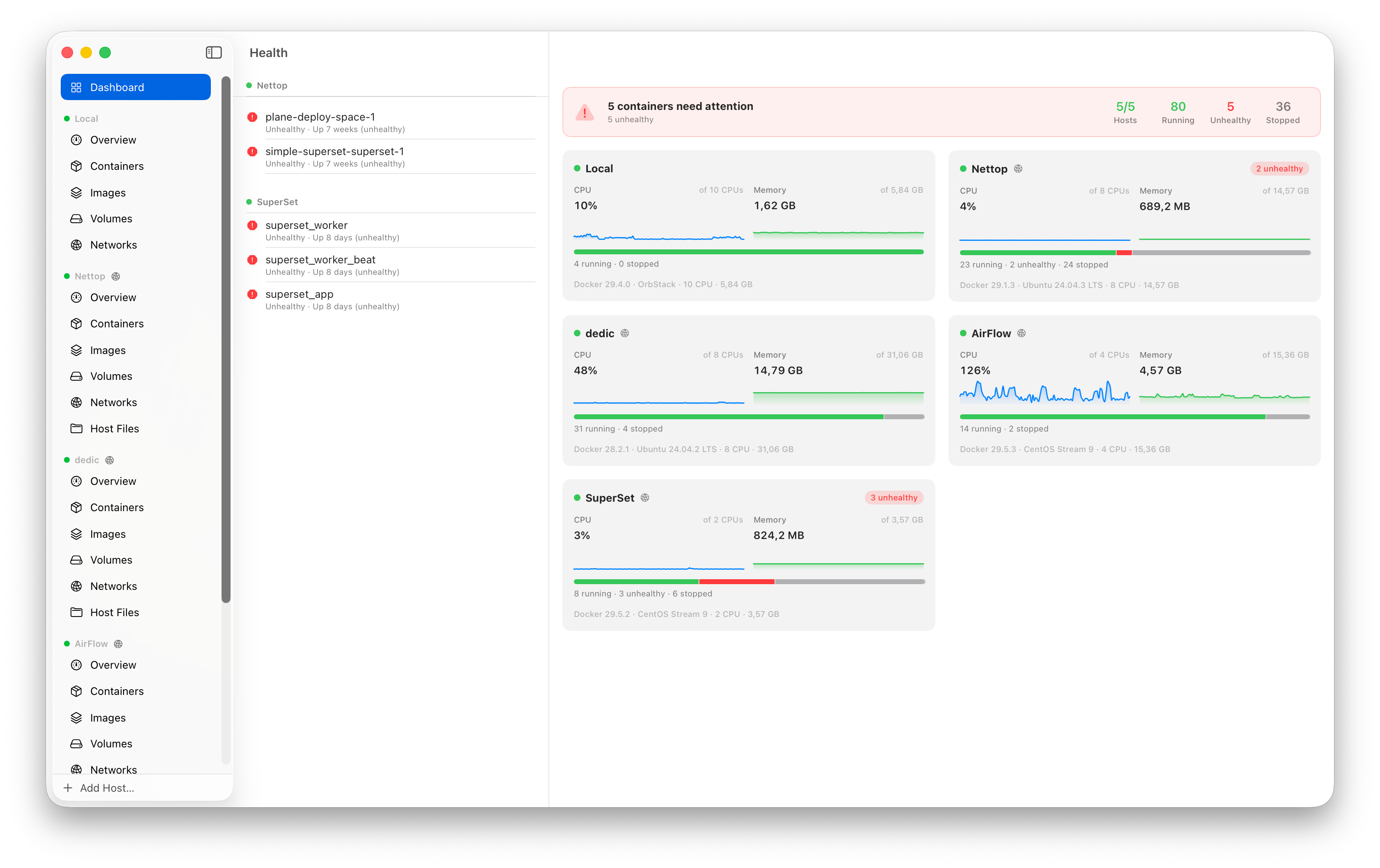
Features
Core
- Containers — list, inspect, start/stop/restart/kill/pause, rename, remove,
create and run with ports/env/volumes/restart-policy, commit to image,
export filesystem, view processes (top), update restart policy - Images — list, history, tag, pull with per-layer progress, remove, prune
- Volumes / Networks — list, inspect, create, remove, prune,
connect/disconnect containers - Docker Compose awareness — containers grouped by compose project with
collapsible sections and group start/stop/restart - System — disk usage (
docker system df), prune build cache
Live
- Logs — streamed in real time with follow mode, Cmd+F search with match
highlighting and next/previous navigation, stderr coloring, filtering - Stats — CPU, memory, network and disk I/O charts (Swift Charts), 1s sampling
- Events-driven UI — lists update live from the Docker events stream,
with polling fallback
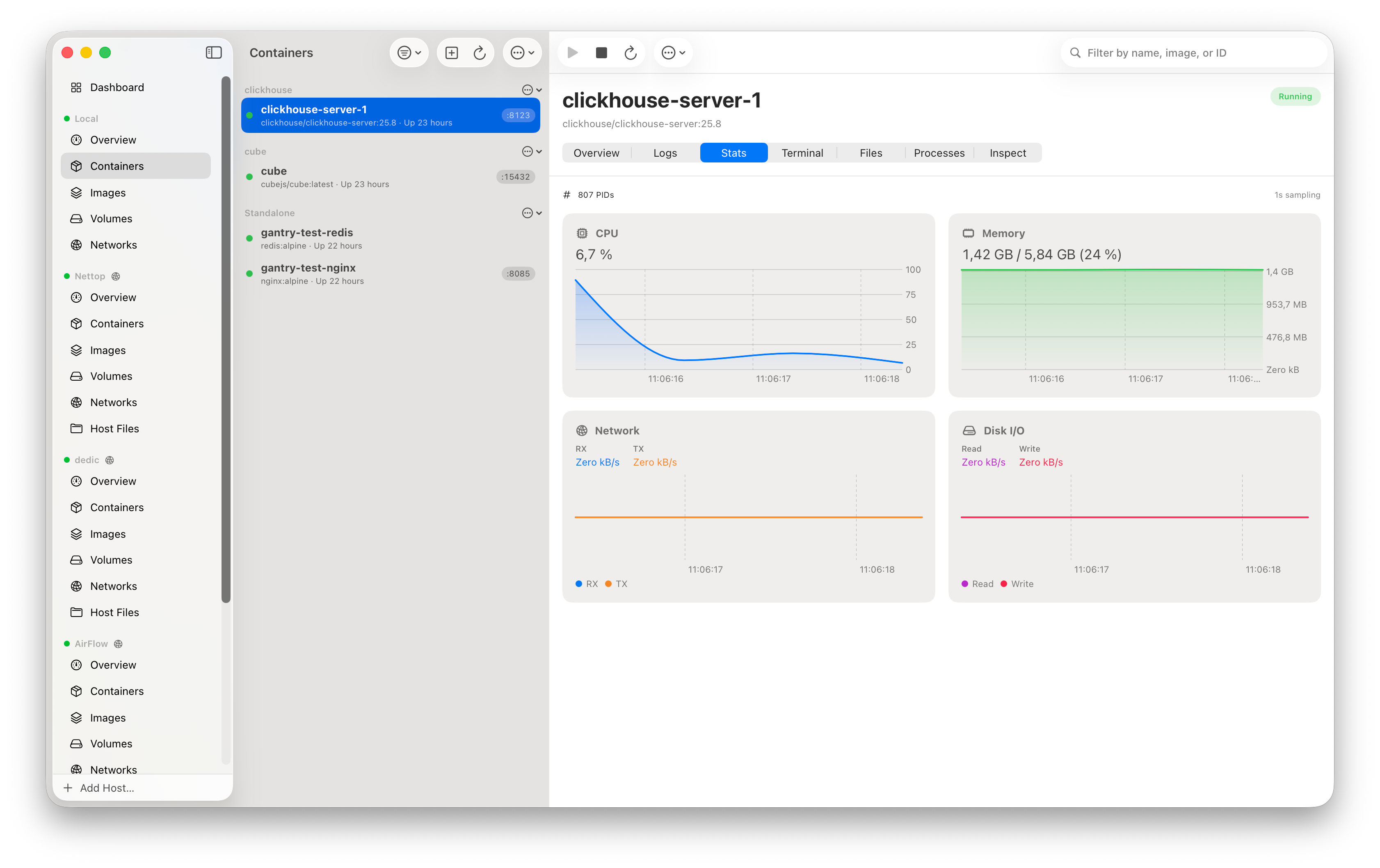
Fleet & hosts
- Fleet dashboard — every connected host on one screen: live CPU/memory
sparklines (10-minute rolling window), container state breakdown, host facts;
opens at launch - Health column — failed connections and unhealthy / restarting / dead
containers across all hosts, each row jumping straight to the culprit - Host overview — CPU/memory gauges, Docker disk usage, daemon facts
- Host terminal & files (SSH hosts) — a shell on the host itself and an
SFTP file browser, alongside the per-container ones - Auto-reconnect — dropped tunnels and transient connect failures retry
with backoff; stale data stays on screen instead of blanking out
Terminal & Files
- Exec terminal — full terminal emulation (SwiftTerm) into any running
container, local or remote - File browser — browse the container filesystem, download and upload files,
drag & drop between Finder and the container (tar-packed transparently)
Remote hosts over SSH
- Connects exactly like
docker -H ssh://user@host: an SSH exec channel runsdocker system dial-stdioand Gantry speaks HTTP/1.1 to the remote daemon
over it — nothing to install on the server beyond Docker itself - Reads
~/.ssh/config(aliases, HostName, User, Port, IdentityFile,
ProxyJump — bastion chains with per-hop auth and host key checks);
the Add Host sheet offers one-click import of your config hosts - ed25519 and RSA keys (openssh-key-v1, optional passphrase), password auth;
RSA signs with rsa-sha2-256 so it works against modern OpenSSH servers - Host key verification with trust-on-first-use prompts (SHA256 fingerprints),
honoring~/.ssh/known_hosts; secrets live in the macOS Keychain
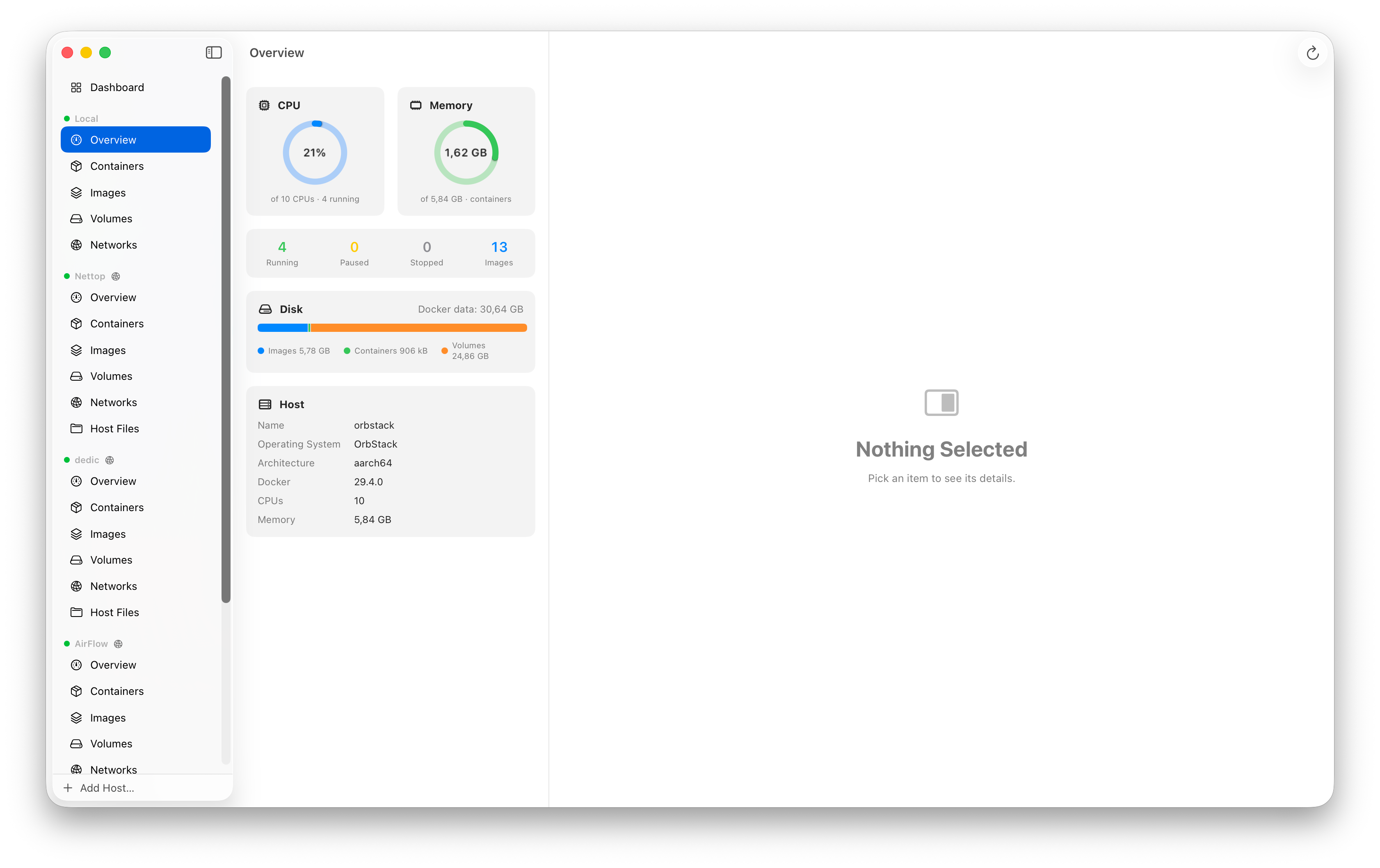
Mac-native
- Three-column split view, Liquid Glass materials, dark/light/system appearance
- Collapsible host sections in the sidebar; reorder hosts via Move Up/Down
- Menu bar extra with running containers and quick actions
- Keyboard shortcuts (Cmd+R refresh, Cmd+N new container, Cmd+F log search)
- Auto-updates via Sparkle (EdDSA-signed appcast)
Agent-friendly
App Intents — list/start/stop/restart containers and fetch logs from
Shortcuts, Siri, Spotlight, or scripts (shortcuts run); works even when
the app is closedMCP server — a bundled
gantry-mcpbinary exposes hosts, containers,
images, volumes, networks, logs, stats, exec and disk usage as
Model Context Protocol tools over stdio,
so AI agents can manage your Docker hosts (including SSH ones):claude mcp add gantry -- /Applications/Gantry.app/Contents/Resources/gantry-mcpHeadless SSH connections only use hosts whose keys you already trusted in the app.
Install
Homebrew
brew install --cask getgantry/tap/gantry
xattr -dr com.apple.quarantine /Applications/Gantry.app
The xattr step clears the quarantine flag — the app is not notarized and
macOS refuses to open it otherwise.
Manual
Download the latest zip from Releases
Unzip and drag Gantry.app to Applications
First launch: right-click the app and choose Open (the app is not
notarized), or clear quarantine:xattr -dr com.apple.quarantine /Applications/Gantry.app
Requires macOS 26 (Tahoe) or later. Works with Docker Desktop, OrbStack,
Colima, or a plain remote dockerd — the socket is auto-discovered
($DOCKER_HOST, ~/.docker/run, ~/.orbstack/run, ~/.colima, /var/run).
Updates arrive automatically via Sparkle once installed.
Building from source
git clone https://github.com/getgantry/gantry.git
cd gantry
open Gantry.xcodeproj   # Xcode 26+, build the "Gantry" scheme
No setup steps. The project is a thin hand-written .xcodeproj whose code
lives in local Swift packages.
Repository layout
App/                  SwiftUI app target (views, intents, app shell)
Packages/
  DockerKit/          Docker Engine API client
    Transport/          unix socket (async-http-client), SSH dial-stdio glue,
                        raw-NIO hijack for exec, hand-rolled HTTP/1.1 codec
    Endpoints/          containers, images, volumes, networks, exec, archive,
                        system, streaming (logs/stats/events)
    Streams/            multiplexed log demuxer, JSON-lines decoder,
                        stats model with the docker CLI CPU/memory formulas,
                        tar reader/writer
  SSHKit/             SSH layer on Citadel: key loading, ssh_config parser,
                      known_hosts + TOFU, SSHDialStdioTransport
  AppCore/            @Observable stores, hosts persistence, Keychain,
                      headless connections for Intents/MCP
  GantryMCP/          stdio MCP server executable (bundled into the app)
scripts/release.sh    release build + Sparkle appcast
Tools/                app icon generator
How the SSH transport works
docker -H ssh:// does not forward the remote unix socket. It runsdocker system dial-stdio on the server, which bridges the SSH channel's
stdin/stdout to the daemon socket. Gantry does the same with
Citadel: one persistent exec channel
carries serialized HTTP/1.1 requests (FIFO, keep-alive), and every streaming
endpoint (logs, stats, events, exec) gets a dedicated channel so nothing blocks.
A 101 Upgraded response switches the parser into raw passthrough — that is
how the interactive terminal rides the same machinery.
About the forks
Gantry currently builds against two small forks, both intended for upstreaming:
- andrewkomkov/swift-nio-ssh
(gantry-fixes) — fixes a process-killingpreconditionFailurewhen a
pending read delivers a window adjust on a locally closed channel, and lets
a key type declare a distinct userauth algorithm name - andrewkomkov/Citadel (
gantry) —
RSA signing with rsa-sha2-256 (RFC 8332) instead of legacy ssh-rsa, which
modern OpenSSH servers reject
Tests
swift test --package-path Packages/DockerKit   # parsers, codecs, tar, exec
swift test --package-path Packages/SSHKit      # ssh_config, known_hosts, keys
Live integration tests are gated: they run automatically only when a local
Docker socket exists (lists, streaming, exec, pull, prune, archive) or when the
SSH test host is reachable (dial-stdio, exec, stream-cancellation stress, RSA
auth). On CI they skip cleanly.
Releasing
scripts/release.sh 0.6.0
gh release create v0.6.0 dist/Gantry-0.6.0.zip --title "Gantry 0.6.0"
git add appcast.xml && git commit -m "Appcast for 0.6.0" && git push
The script builds the app, embeds gantry-mcp, zips, and signs the Sparkle
appcast entry (EdDSA key in the login Keychain).
Known limitations
- Not notarized (no Apple Developer ID) — first launch needs right-click Open
- ECDSA private keys in OpenSSH format are not supported (ed25519/RSA are)
- Remote hosts need
dockeronPATHfordial-stdio(any recent version)
License
Yorumlar (0)
Yorum birakmak icin giris yap.
Yorum birakSonuc bulunamadi