helio
Health Uyari
- License — License: Apache-2.0
- Description — Repository has a description
- Active repo — Last push 0 days ago
- Low visibility — Only 5 GitHub stars
Code Uyari
- process.env — Environment variable access in docker/mcp-echo-server.mjs
Permissions Gecti
- Permissions — No dangerous permissions requested
Bu listing icin henuz AI raporu yok.
Governance proxy for MCP - enforce policies, route approvals, check evidence, track spend, and audit every AI agent tool call. No changes to agent code or MCP servers.
Helio
Open-source governance proxy for AI agents



Getting Started · Docs · Contributing
Helio is an MCP proxy that sits between your AI agents and the tools they use. Every tool call passes through Helio, which enforces policies, checks evidence, routes approvals, tracks spend, and records everything - without changing your agent code or your MCP servers.
npx @gethelio/proxy init
@gethelio/proxy is the only Node package you install. It ships the proxy runtime and bundled dashboard UI assets together.
Why Helio?
Your agent just called an API you didn't expect. It spent money you didn't authorize. It modified a production record you can't easily undo.
Model providers are building governance for their own platforms but your agents run across Claude, ChatGPT, LangChain, CrewAI, and custom frameworks. No single platform governs the full picture. And none of them govern what happens in downstream systems like Stripe, Salesforce, or GitHub.
Helio governs what agents do to the rest of the world across any MCP-compatible agent, any tool, any platform.
How It Works
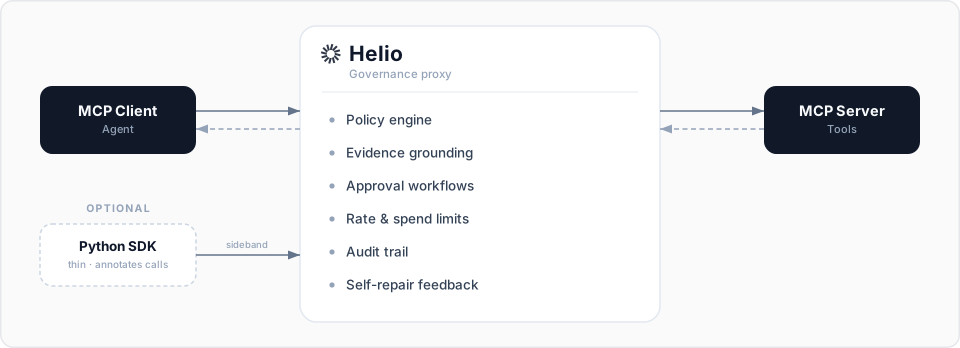
Two integration paths:
- Proxy only: Point your MCP client at Helio instead of your MCP server. Zero code changes. Immediate governance.
- Proxy + SDK: Add the thin Python SDK to annotate tool calls with evidence context and action dependencies. Richer governance, under 500 lines of code.
Quick Start (5 minutes)
1. Install
npx @gethelio/proxy init
This single package includes the built-in dashboard UI bundle.
2. Configure
npx @gethelio/proxy init already created a helio.yaml in your project root. Open it and point upstream.url at your existing MCP server. Helio v0.1 proxies a single upstream MCP server. A fuller example with policies, audit, and a dashboard secret:
version: '1'

upstream:
  url: 'http://localhost:8080/mcp' # Your existing MCP server
  transport: streamable-http # streamable-http (default), sse, or stdio

listen:
  port: 3000 # Helio listens here

policies:
  default: allow

  rules:
    # Block destructive operations
    - match:
        tool: 'delete_*'
      action: deny
      feedback:
        message: 'Destructive operations are disabled'

    # Rate limit expensive API calls
    - match:
        tool: 'search_*'
      action: rate_limit
      limits:
        max_calls: 100
        window: 1h
        key: tool

    # Spend limit on payment tools
    - match:
        tool: 'create_payment'
      action: spend_limit
      limits:
        max_spend:
          field: '$.amount'
          limit: 5000
          currency: 'GBP'
          window: 24h

audit:
  storage: sqlite
  retention: 90d
  include_responses: true

dashboard:
  enabled: true
  port: 3100
  api_secret: '${HELIO_DASHBOARD_SECRET}'
About dashboard.api_secret:
If you ran
npx @gethelio/proxy init, yourhelio.yamlalready contains a generatedapi_secret(a literal 32-byte hex value, also printed when you raninit). It's set — skip this step.If you authored
helio.yamlby hand using the${HELIO_DASHBOARD_SECRET}placeholder shown above, set the variable beforestart:export HELIO_DASHBOARD_SECRET="$(openssl rand -hex 32)"
3. Start Helio
npx @gethelio/proxy start
4. Point your agent at Helio
{
  "mcpServers": {
    "my-tools": {
      "url": "http://localhost:3000/mcp"
    }
  }
}
5. Open the dashboard
http://localhost:3100
That's it. Every tool call now passes through Helio with a full audit trail, rate limits, and spend controls.
Want human-in-the-loop approvals for write operations? See docs/approvals.md for the full Slack and dashboard approval flow, or copy examples/slack-approvals/ as a starting point.
Features
Policy Engine
Declarative YAML rules that match on tool name, annotations, input parameters, environment, and cumulative state. Policies hot-reload without restart.
rules:
  - match:
      tool: 'create_payment'
      input:
        '$.amount': { gt: 1000 }
    action: require_approval
Evidence Grounding
Require proof before high-stakes actions. A refund requires a prior order lookup. A deployment requires a passing test run. The optional SDK marks tool outputs as evidence; the proxy enforces evidence requirements.
rules:
  - match:
      tool: 'process_refund'
    action: deny
    evidence:
      requires: ['orders.lookup']
# Optional SDK enrichment
from helio import HelioContext

# Mark a tool output as evidence
with HelioContext() as ctx:
    result = orders.lookup(order_id)
    ctx.mark_evidence("orders.lookup", "order_data", result)
The SDK talks to the proxy over the sideband API (default 127.0.0.1:3200; bind host is configurable via sdk.host). On every helio start the proxy generates a fresh 32-byte hex token and prints it to stderr:
SDK sideband listening on http://127.0.0.1:3200
SDK token (pass as HELIO_SDK_TOKEN env var to your SDK clients):
  3f9c2b...d8a1
Pass the same value to the SDK process via HELIO_SDK_TOKEN and the SDK automatically attaches Authorization: Bearer <token> to every sideband call. The sideband also rejects any request carrying a non-null Origin header, so a malicious local HTML file cannot talk to it through a browser. Operators who need a stable token across restarts can set HELIO_SDK_TOKEN explicitly in the proxy's environment — the proxy respects a pre-set value instead of regenerating one.
Self-Repair Feedback
When Helio blocks an action, it returns structured feedback explaining what failed and what the agent should do next. The agents can then self-correct and retry.
{
  "blocked": true,
  "reason": "evidence_missing",
  "missing_evidence": ["orders.lookup"],
  "suggestion": "Call orders.lookup with the order ID before retrying"
}
Action Dependency Chains
Declare prerequisite actions in policy. The proxy tracks completed actions per session and blocks anything where prerequisites aren't met.
rules:
  - match:
      tool: 'process_refund'
    requires: ['orders.lookup', 'customer.verify']
Approval Workflows
Route sensitive actions to Slack, webhook, or the Helio dashboard. Configurable timeout and escalation, plus a dashboard-only break-glass override (REST API and dashboard UI; not exposed as a Slack button).
Transaction Controls
Rate limits per tool and per session. Spend limits with cumulative tracking. Irreversible action detection. Dry-run mode that executes the full pipeline without forwarding to the MCP server.
Audit Trail
Every tool call recorded: timestamp, agent identity, tool name, inputs, policy decision, evidence chain, approval status, downstream response, and latency. Searchable dashboard. Export to JSON or CSV.
How Helio Compares
| Helio | Obot | Cerbos | Built-in (Anthropic / OpenAI) | Framework (LangChain / CrewAI) | |
|---|---|---|---|---|---|
| What it governs | Per-call actions with cross-call state | Which tools/MCPs are reachable | App-level authorization decisions | Agent permissions inside one platform | Agent behavior inside one framework |
| Architecture | Out-of-process MCP proxy | Out-of-process MCP gateway | Sidecar / library | In-platform | In-framework |
| Open source | ✅ Apache 2.0 | ✅ Apache 2.0 | ✅ Apache 2.0 | ❌ | Varies |
| Time to value | 5 minutes | Setup-dependent | Hours | Built-in | Built-in |
| No agent code changes | ✅ | ✅ | ❌ | ✅ (within platform) | ❌ |
| Governs agents you didn't build | ✅ Any MCP agent | ✅ Any MCP agent | ✅ (any app) | ❌ One platform only | ❌ One framework only |
| Evidence grounding | ✅ Cumulative across calls | ❌ | ❌ | ❌ | Limited |
| Self-repair feedback | ✅ Structured retry hints | ❌ | ❌ | ❌ | Limited |
| Stateful spend / rate limits | ✅ Per-tool, per-session¹ | Basic | ❌ | ❌ | Limited |
| Approval workflows | ✅ Slack, webhook, dashboard | ✅ | ❌ | Limited | Limited |
| Audit trail (incl. downstream responses) | ✅ Captures upstream MCP responses | Decision logs | Decision logs | Platform telemetry | Framework logs |
* Per-tool and per-session spend limits ship in v0.1. Cross-tool spend aggregation is planned for v0.2.
Works With
Helio works with any MCP-compatible agent or framework:
- Claude (Anthropic)
- ChatGPT (OpenAI)
- LangChain / LangGraph
- CrewAI
- AutoGen
- Custom agents using any MCP client SDK
Documentation
- Getting Started: Install and configure in 5 minutes
- Configuration Reference: Every YAML option explained
- Policy Guide: How to write rules with examples
- Approval Workflows: Slack, webhook, and dashboard approvals
- Audit Trail: What's recorded, how to search, how to export
Examples
Ready-made configurations for common patterns:
- Basic: Deny destructive operations, allow everything else
- Slack Approvals: Route destructive actions to Slack
- Spend Limits: Govern payment tool usage
Contributing
We welcome contributions. See CONTRIBUTING.md for setup instructions, coding standards, and PR process.
Good first issues are labeled good-first-issue.
Community
- GitHub Issues: Bug reports and feature requests
- Twitter/X: Updates and announcements
License
Apache 2.0 - see LICENSE.
Yorumlar (0)
Yorum birakmak icin giris yap.
Yorum birakSonuc bulunamadi