togo
Health Pass
- License — License: NOASSERTION
- Description — Repository has a description
- Active repo — Last push 0 days ago
- Community trust — 25 GitHub stars
Code Pass
- Code scan — Scanned 12 files during light audit, no dangerous patterns found
Permissions Pass
- Permissions — No dangerous permissions requested
No AI report is available for this listing yet.
Your coding agents, in your pocket. Watch, answer and steer agents running on your Mac from iPhone, iPad and Apple Watch.
Togo
Every coding agent. One native app.
Native chat for OpenCode, OMP, Pi and 13 more coding agents.
On iPhone and iPad, with an Apple Watch companion. Your agents run on your own Mac or Linux machine.
100% free and open source. No subscription. No paid tier. No Togo account.
Download on the App Store · Quick start · Supported agents · Docs · Roadmap · Contribute · Website


One app for the agents you already use
Togo maps each supported agent's hooks, session logs or local API into the same native chat. Read the conversation and tool work, answer requests, and change the model or mode where the agent supports it. The agent's real terminal is one tap away.
Your sessions run in tmux on your machine. Start one from your phone or attach from your desk. Keep using your agents, models and provider accounts; Togo connects to the work already running there.
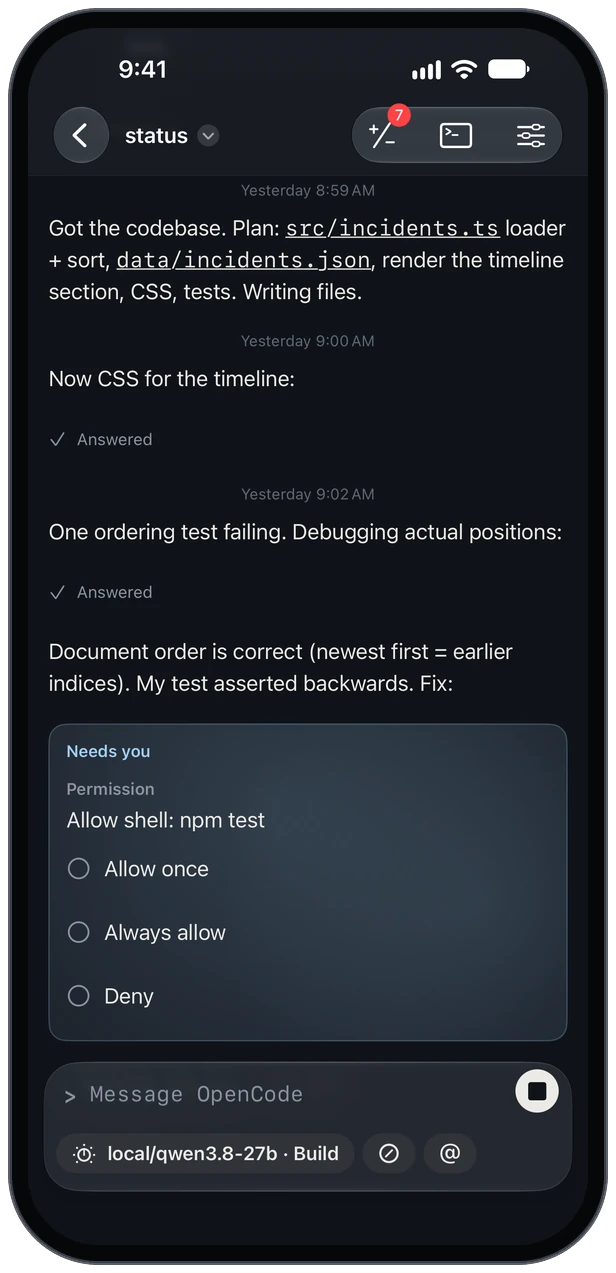 |
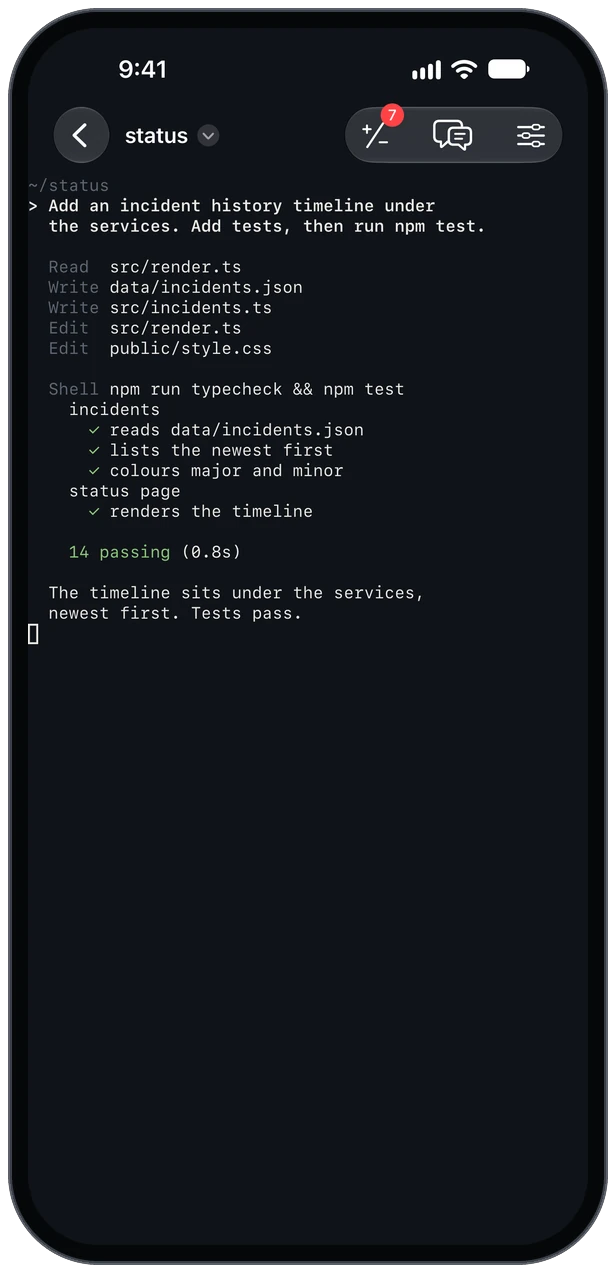 |
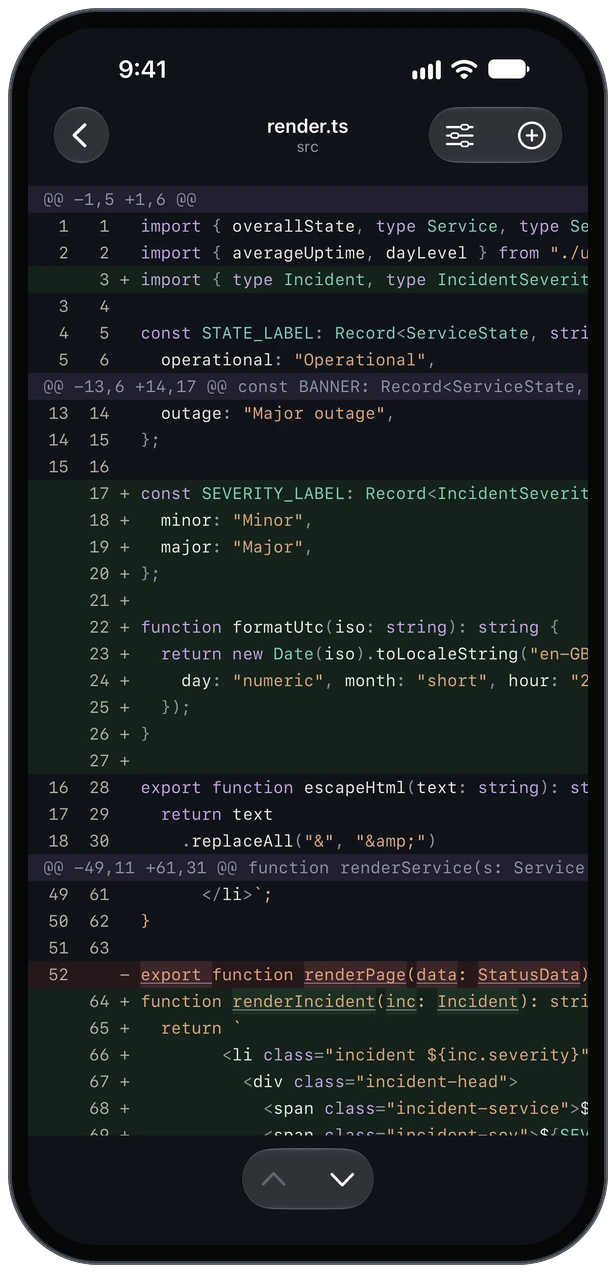 |
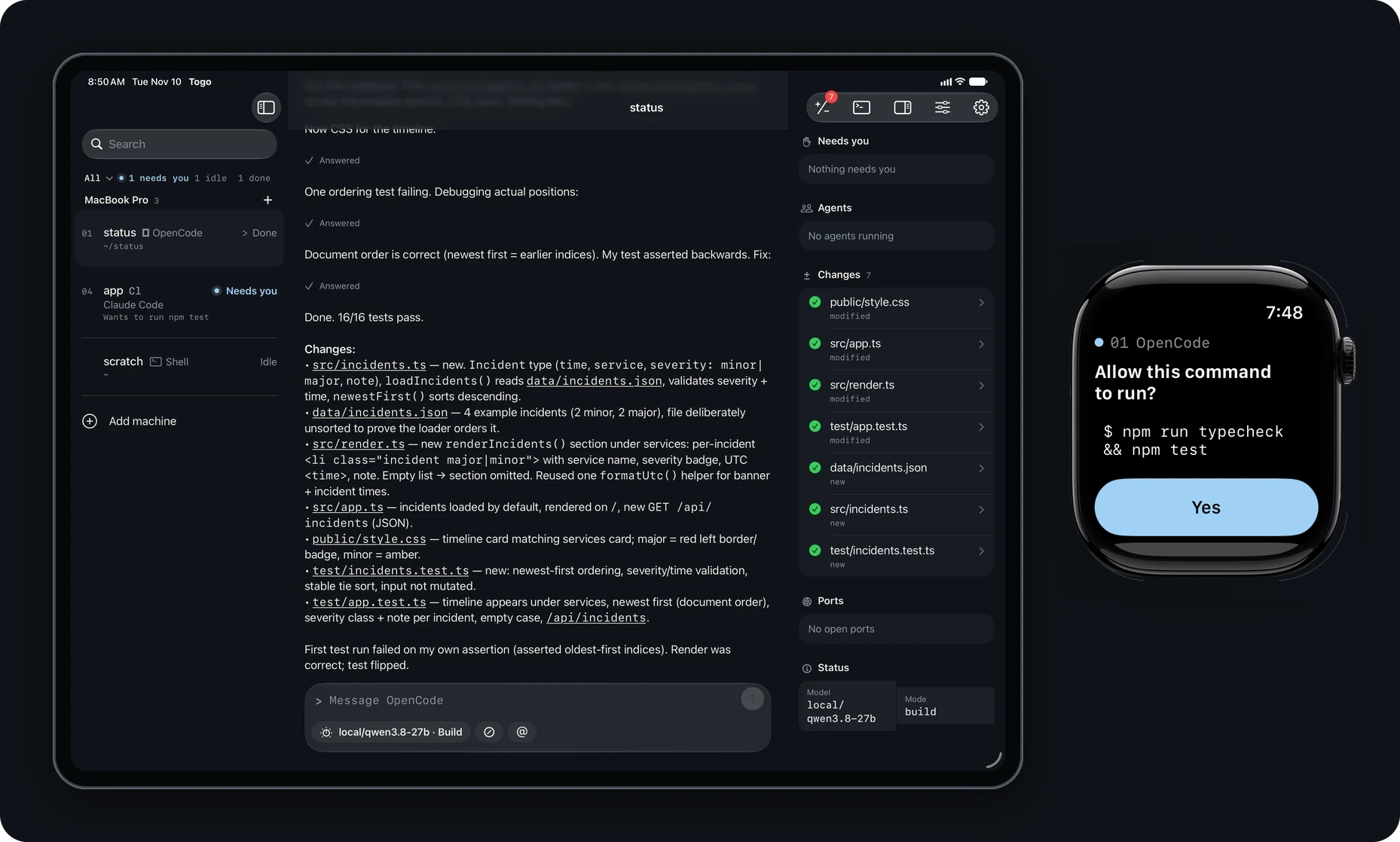
| Chat with your agents. One native interface for 16 harnesses, with messages, tool steps and the controls each agent exposes. |
Open the real terminal. The same session, in the agent's own interface. Switch between chat and terminal. |
Review and commit. Read the diffs, stage files and commit from your phone. |
Step away without losing the thread
You're in line for coffee and an agent stops to ask whether it can run a database migration. Your phone buzzes. Read the command on the Lock Screen and tap Deny. The session stays in tmux, ready for your next instruction.
- Answer where the request finds you. Approvals appear in chat, notifications, Live Activities and on Apple Watch. Answer questions and their choices in the app.
- Start work from your phone. Pick a machine, a folder and an agent. It starts in tmux and appears at your desk too.
- See the rest of the session. Mission control gathers subagents, background shells, plans, changes, ports and status where the agent reports them.
- Use the screen you have. On iPad and an open iPhone Duo, keep the session list beside your work. On Watch, approve or deny a waiting request.
Quick start
Togo has two parts: the app on your phone and a small helper on the machine running your agents.
You need: iOS or iPadOS 26 or later, a Mac or Linux machine with tmux 3.2 or newer, and SSH access to it. The Watch companion needs watchOS 26 or later. Your agents and their model access are separate from Togo.
1. Get the app
Download Togo on the App Store. It's free.
Beta builds come out first on TestFlight.
You can explore with a demo machine before connecting your own: open How it works, then Explore with a demo machine on the first-run screen.
2. Install the helper
Run this on your Mac or Linux machine:
curl -fsSL https://togoapp.dev/install.sh | sh
The installer checks the release's signature and checksum before writing anything, installs to ~/.togo/bin, and starts the background service so alerts can arrive while the app is closed.
With Homebrew:
brew install gettogo/tap/togo
togo service install
Updates come through brew upgrade togo.
From source, with Go 1.26 or newer:
GOBIN="$HOME/.togo/bin" go install github.com/gettogo/togo/helper/cmd/togo@latest
~/.togo/bin/togo service install
Add ~/.togo/bin to your PATH to use plain togo at the desk.
The helper is one binary for macOS and Linux, arm64 and amd64. Release downloads include checksums and a minisign signature. See Verifying a release.
To install without the background service:
curl -fsSL https://togoapp.dev/install.sh | sh -s -- --no-service
3. Connect your machine
On a Mac, enable System Settings > General > Sharing > Remote Login. In Togo, add your machine's hostname and user name, add the app's public key to ~/.ssh/authorized_keys, and verify the host key fingerprint shown on the first connection. Notification pairing happens over that same SSH connection.
For access away from home, connect your phone and machine through Tailscale or use another reachable SSH address. The setup guide walks through the connection; pairing and device revocation covers notification keys.
4. Start a session
Use the plus button in the app, or run this at your desk:
togo doctor
togo hooks install
togo new opencode --dir ~/code/project
togo doctor checks the machine and changes nothing. togo hooks install configures installed agents that accept hooks and backs up the files it changes.
togo ls         # list sessions
togo attach 1   # join a session from your terminal
On a Mac, plugged-in mode keeps the machine awake while sessions work. Closed-lid use on battery needs additional awake setup. Troubleshooting explains the other checks from togo doctor.
Without the helper, a reachable SSH machine still works as a terminal. The helper adds native agent chat, session controls, alerts and remote approvals.
Supported agents
All 16 get a native chat. Model selection, approvals, questions and other controls depend on the agent. The app reads each agent's existing hooks, logs or API; an unrecognised version opens in the terminal rather than guessing.
| Agent | Command | Native controls | Togo reads |
|---|---|---|---|
| OpenCode | opencode |
model, mode, approvals, questions, resume | local HTTP API and event stream |
| OMP | omp |
model, effort, questions | session log |
| Pi | pi |
model, effort, resume | session log |
| Claude Code | claude |
model, mode, effort, approvals, questions, resume | hooks, status line, transcript |
| Codex | codex |
model, mode, effort, approvals, questions, resume | app-server, as a second client |
| Copilot CLI | copilot |
model, approvals, questions, resume | hooks |
| Cursor CLI | cursor-agent |
model, approvals | hooks |
| Aider | aider |
model, mode | chat history file |
| Amp | amp |
approvals | a Togo plugin |
| Cline | cline |
approvals, questions, resume | session file |
| Crush | crush |
mode, questions, resume | client-server API |
| Droid | droid |
approvals, questions, resume | hooks |
| Goose | goose |
mode, approvals, questions, resume | session database, read-only |
| Kilo Code | kilo |
model, mode, approvals, questions, resume | local HTTP API and event stream |
| Kimi Code | kimi |
model, mode, approvals, questions, resume | wire log |
| Mistral Vibe | vibe |
mode, approvals, questions, resume | session journal |
Any other CLI agent works in the terminal view. A screen watcher can surface numbered menus and y/n prompts so you can answer them from your phone. Agent compatibility
Roadmap
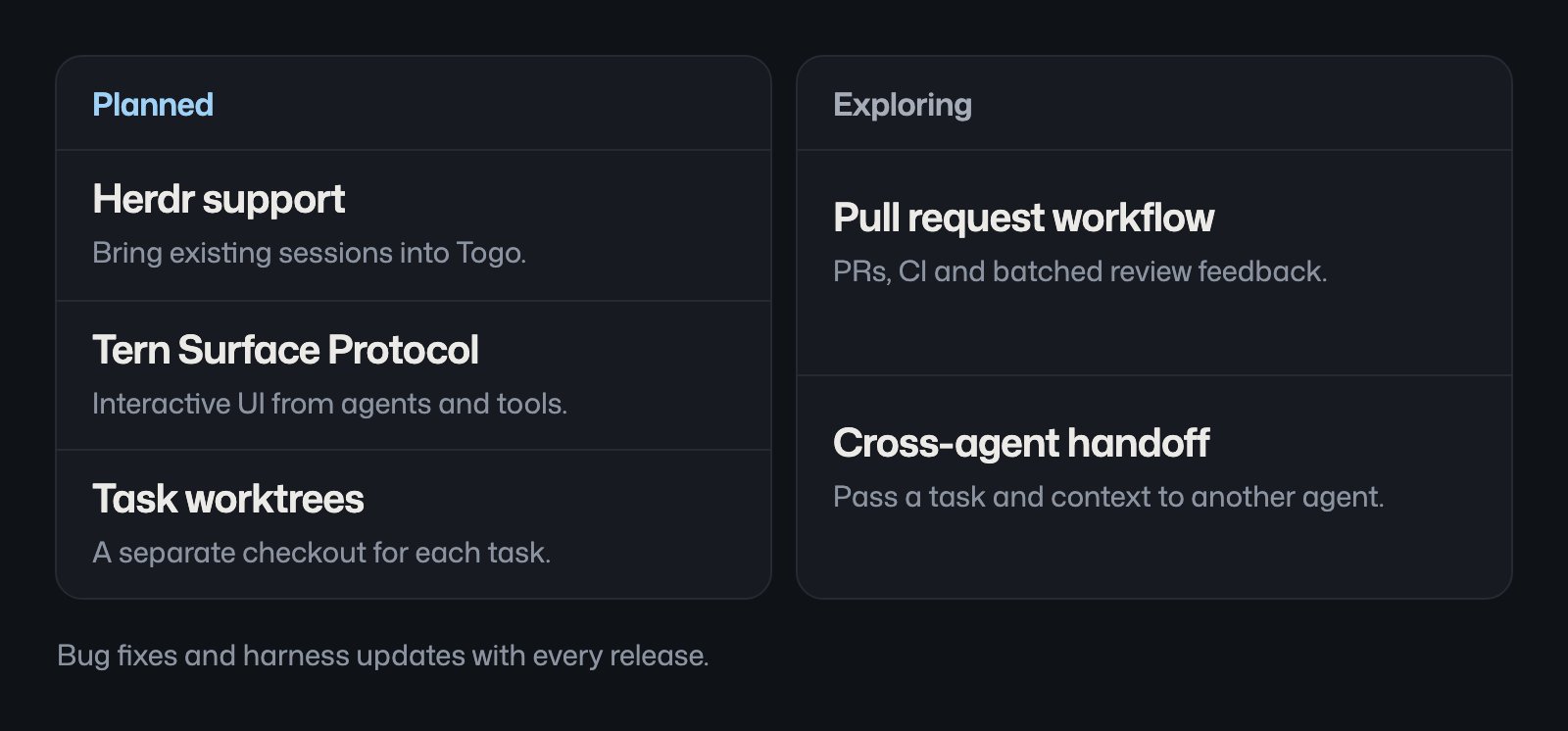
Follow the roadmap discussion for scope and updates. Planned features have no release dates yet.
Contributing
Togo is free and open source across the app, helper and relay. You can work on the helper, adapters, relay and protocol on macOS or Linux without an Apple developer account.
| Help with | Where to start |
|---|---|
| Make a first contribution | Add custom SSH port support to the diagnostics (#3), a Go-only good first issue. |
| Build a planned feature | The Herdr backend prototype (#4) and Tern Surface Protocol prototype (#5) are open for help. Discuss a smaller piece in the issue before starting. |
| Test your agent | Report an agent issue with its version and what Togo missed. |
| Report a bug | Open a bug report with steps to reproduce and the app/helper versions. |
| Improve agent support | Explore the adapters: YAML definitions and Go mappers for messages, tools, status and controls. |
Read CONTRIBUTING.md for setup and review requirements. Sign off commits with git commit -s.
Introduce yourself in the welcome discussion, ask setup questions in Q&A, or suggest a workflow in Ideas. Remove private details from anything you share publicly; vulnerabilities go through SECURITY.md.
If you find Togo useful, a star is a welcome way to support the project.
How it works
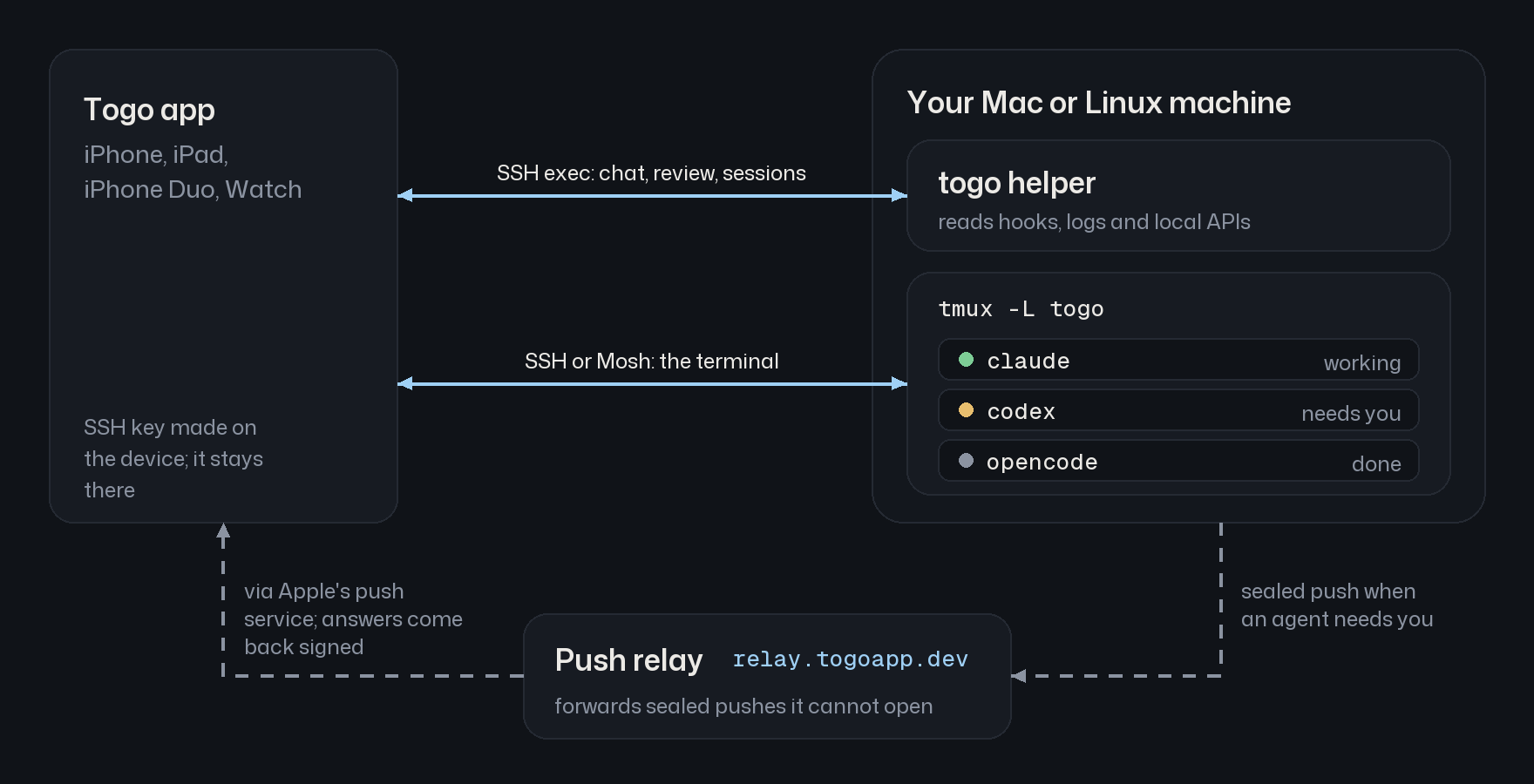
- Sessions live in a separate tmux server,
tmux -L togo. Your own tmux server is left alone. - Native chat and session controls travel over an SSH exec channel:
togo serve --stdio. The helper opens no listening port. - The terminal attaches to the same session over SSH or Mosh.
- The helper seals notifications for each paired device. A small relay forwards them to Apple and carries signed approval answers back through a short-lived mailbox.
The helper is also scriptable: togo ask "Ship it?" --options yes,no waits for an answer on your phone. togo notify, togo job and togo awake cover notifications, long tasks and keeping the machine awake. Architecture
Privacy and security
- Direct connection. Chat, terminal output and reviewed code travel between your phone and your machine over SSH or Mosh. Togo doesn't upload your repository to a Togo server. Your agent's model provider still receives your prompts and code as it does at the desk.
- Device-held keys. SSH keys are made on the device and kept in the Secure Enclave or device-only Keychain. Host keys are pinned.
- Encrypted notification contents. Each payload is sealed for one device with X25519, HKDF-SHA256 and ChaCha20-Poly1305. The relay cannot read commands, questions or output. Live Activity status fields, including the agent name, state and request count, travel in the clear because iOS renders them directly.
- Signed approvals. Lock Screen and Watch answers are signed with the device's Ed25519 key, checked for freshness and accepted once. The relay carries approve and deny only; typed replies and always-allow decisions stay in the app.
- No tracking. The app has no analytics, ads or crash reporter. The helper never reads agent credential files or logs secrets. You can use your own relay.
Read the security model for the full boundaries and SECURITY.md to report a vulnerability privately.
Build from source
| Path | Component |
|---|---|
apps/ios |
iPhone, iPad and Watch app, built with SwiftUI and XcodeGen |
packages |
Swift packages for the session model, terminal, Mosh and push crypto |
helper |
Go helper |
relay |
Cloudflare Worker push relay |
protocol |
JSON-RPC schema and shared fixtures |
make build lint test   # helper
make relay-test        # relay
make ios-bootstrap     # Mac with Xcode: prepare simulators and generate the project
make ios-test
See CONTRIBUTING.md for prerequisites and the checks relevant to each component.
Why Togo?In 1925, Togo led Leonhard Seppala's sled-dog team on the serum run to Nome, covering about 260 miles, including the sea ice on Norton Sound. Balto led the final leg and got the statue in Central Park. Togo did the long haul in the dark, which is the job we had in mind.
Licence
The app and Swift packages are GPLv3 with an app store permission: LICENSE. The helper, relay and protocol are MIT. Product names and logos belong to their respective owners.
Reviews (0)
Sign in to leave a review.
Leave a reviewNo results found