mcp-musescore
Health Gecti
- License — License: MIT
- Description — Repository has a description
- Active repo — Last push 0 days ago
- Community trust — 40 GitHub stars
Code Gecti
- Code scan — Scanned 12 files during light audit, no dangerous patterns found
Permissions Gecti
- Permissions — No dangerous permissions requested
This server provides an AI assistant with programmatic control over MuseScore, enabling it to compose music, navigate scores, and add lyrics via a WebSocket-based plugin system.
Security Assessment
The overall risk is Medium. The code scan of 12 files passed with no dangerous patterns, hardcoded secrets, or dangerous permission requests. However, the architecture inherently requires network communication. It operates by running a local Python server that makes network requests to a WebSocket plugin installed directly inside MuseScore. While this is the expected behavior for controlling a local application, it relies on local network traffic and introduces an external control vector into your digital audio workstation.
Quality Assessment
The project is in excellent health and appears well maintained. It is licensed under the standard MIT license and passed all active repository checks. With 40 GitHub stars, it has established a solid baseline of community trust. The provided documentation is clear, comprehensive, and includes straightforward setup instructions for multiple operating systems.
Verdict
Safe to use, provided you are comfortable running a local WebSocket bridge between your AI client and MuseScore.
A Model Context Protocol (MCP) server that provides programmatic control over MuseScore!
MuseScore MCP Server
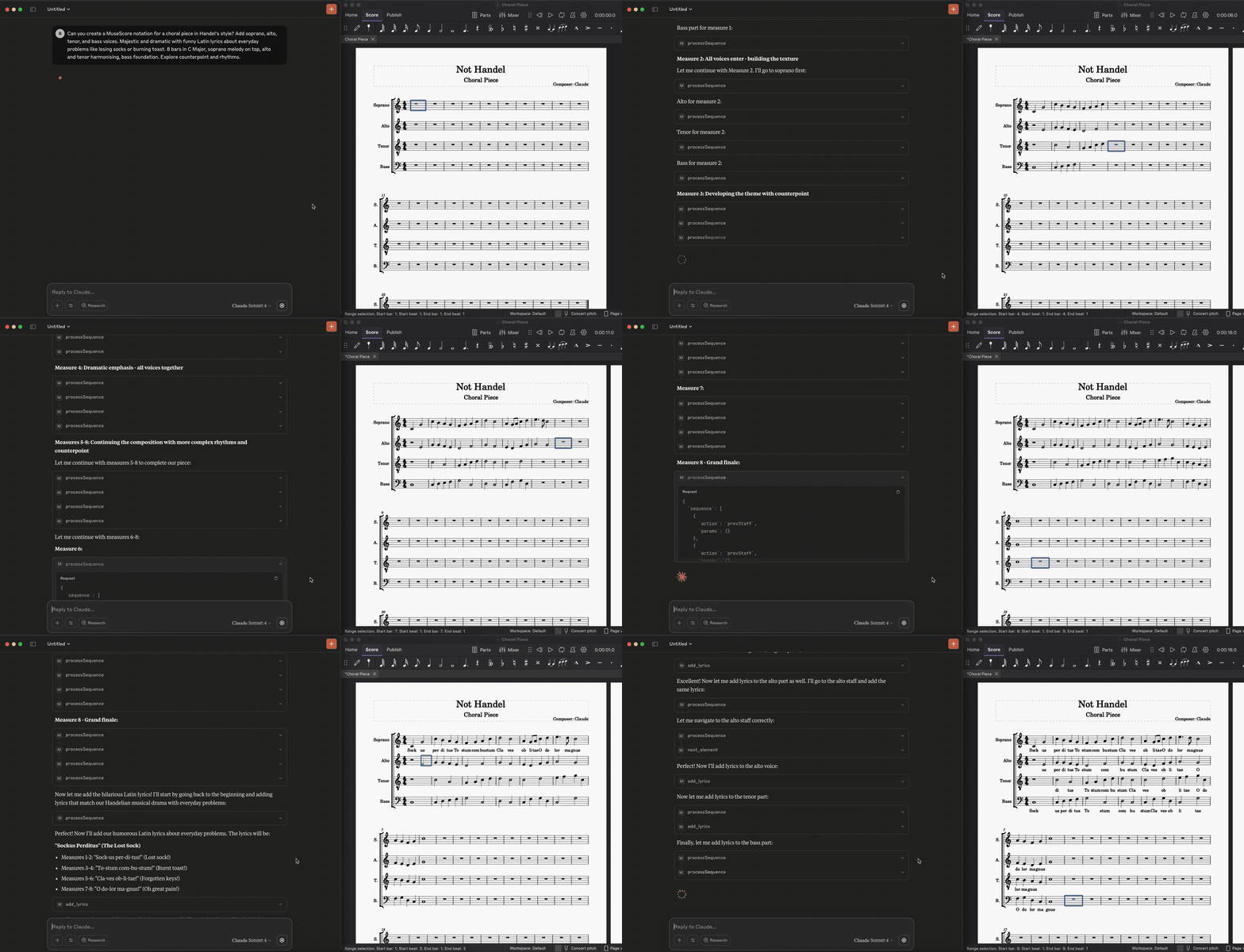
A Model Context Protocol (MCP) server that provides programmatic control over MuseScore, via a WebSocket-based plugin system. This allows AI assistants like Claude to compose music, add lyrics, navigate scores, and control MuseScore directly.
Prerequisites
- MuseScore 3.x or 4.x
- Python 3.8+
- Claude Desktop or compatible MCP client
Setup
1. Install the MuseScore Plugin
First, save the QML plugin code to your MuseScore plugins directory:
macOS: ~/Documents/MuseScore4/Plugins/musescore-mcp-websocket.qml
Windows: %USERPROFILE%\Documents\MuseScore4\Plugins\musescore-mcp-websocket.qml
Linux: ~/Documents/MuseScore4/Plugins/musescore-mcp-websocket.qml
2. Enable the Plugin in MuseScore
- Open MuseScore
- Go to Plugins → Plugin Manager
- Find "MuseScore API Server" and check the box to enable it
- Click OK
3. Setup Python Environment
git clone <your-repo>
cd mcp-agents-demo
python -m venv .venv
source .venv/bin/activate  # On Windows: .venv\Scripts\activate
pip install fastmcp websockets
4. Configure Claude Desktop
Add to your Claude Desktop configuration file:
macOS: ~/Library/Application Support/Claude/claude_desktop_config.json
Windows: %APPDATA%\Claude\claude_desktop_config.json
{
  "mcpServers": {
    "musescore": {
      "command": "/path/to/your/project/.venv/bin/python",
      "args": [
        "/path/to/your/project/server.py"
      ]
    }
  }
}
Note: Update the paths to match your actual project location.
Running the System
Order of Operations
- Start MuseScore first with a score open
- Run the MuseScore plugin: Go to Plugins → MuseScore API Server
- You should see console output:
"Starting MuseScore API Server on port 8765"
- You should see console output:
- Then start the Python MCP server or restart Claude Desktop
[insert screenshot of different functionality, harmonisation, melodywriting, as zoomed in GIFs]
Development and Testing
For development, use the MCP development tools:
# Install MCP dev tools
pip install mcp

# Test your server
mcp dev server.py

# Check connection status
mcp dev server.py --inspect
Viewing Console Output
To see MuseScore plugin console output, run MuseScore from terminal:
macOS:
/Applications/MuseScore\ 4.app/Contents/MacOS/mscore
Windows:
cd "C:\Program Files\MuseScore 4\bin"
MuseScore.exe
Linux:
musescore4
Features
This MCP server provides comprehensive MuseScore control. 🌟 NEW in this fork: Built-in automatic, flawless multi-voice Polyphony & Temporal layout mapping to LilyPond!
Navigation & Cursor Control
get_cursor_info()- Get current cursor position and selection infogo_to_measure(measure)- Navigate to specific measurego_to_beginning_of_score()/go_to_final_measure()- Navigate to start/endnext_element()/prev_element()- Move cursor element by elementnext_staff()/prev_staff()- Move between stavesselect_current_measure()- Select entire current measureselect_custom_range(start_tick, end_tick, start_staff, end_staff)- 🌟 Slicing tool to extract cross-measure, multi-staff phrasing perfectly!
Polyphony & LilyPond Integration
- Temporal Rhythm Padding: Voices with gaps or rests automatically receive LilyPond spacer sequences (
s4.) to hold their mathematical place accurately. - Concurrent Voice Rendering: Full 4-voice (
\voiceOne,\voiceTwo, etc.) arrays correctly structured and sharded per staff for advanced Agent processing.
Note & Rest Creation
add_note(pitch, duration, advance_cursor_after_action)- Add notes with MIDI pitchadd_rest(duration, advance_cursor_after_action)- Add restsadd_tuplet(duration, ratio, advance_cursor_after_action)- Add tuplets (triplets, etc.)
Measure Management
insert_measure()- Insert measure at current positionappend_measure(count)- Add measures to end of scoredelete_selection(measure)- Delete current selection or specific measure
Lyrics & Text
add_lyrics_to_current_note(text)- Add lyrics to current noteadd_lyrics(lyrics_list)- Batch add lyrics to multiple notesset_title(title)- Set score title
Score Information
get_score()- Get complete score analysis and structureping_musescore()- Test connection to MuseScoreconnect_to_musescore()- Establish WebSocket connection
Utilities
undo()- Undo last actionset_time_signature(numerator, denominator)- Change time signatureprocessSequence(sequence)- Execute multiple commands in batch
Sample Music
Check out the /examples folder for sample MuseScore files demonstrating various musical styles:
- Asian Instrumental - Traditional Asian-inspired instrumental piece
- String Quartet - Classical string quartet arrangement
Each example includes:
.mscz- MuseScore file (editable).pdf- Sheet music.mp3- Audio preview
Usage Examples
Creating a Simple Melody
# Set up the score
await set_title("My First Song")
await go_to_beginning_of_score()

# Add notes (MIDI pitch: 60=C, 62=D, 64=E, etc.)
await add_note(60, {"numerator": 1, "denominator": 4}, True)  # Quarter note C
await add_note(64, {"numerator": 1, "denominator": 4}, True)  # Quarter note E
await add_note(67, {"numerator": 1, "denominator": 4}, True)  # Quarter note G
await add_note(72, {"numerator": 1, "denominator": 2}, True)  # Half note C

# Add lyrics
await go_to_beginning_of_score()
await add_lyrics_to_current_note("Do")
await next_element()
await add_lyrics_to_current_note("Mi")
await next_element()
await add_lyrics_to_current_note("Sol")
await next_element()
await add_lyrics_to_current_note("Do")
Batch Operations
# Add multiple lyrics at once
await add_lyrics(["Twin-", "kle", "twin-", "kle", "lit-", "tle", "star"])

# Use sequence processing for complex operations
sequence = [
    {"action": "goToBeginningOfScore", "params": {}},
    {"action": "addNote", "params": {"pitch": 60, "duration": {"numerator": 1, "denominator": 4}, "advanceCursorAfterAction": True}},
    {"action": "addNote", "params": {"pitch": 64, "duration": {"numerator": 1, "denominator": 4}, "advanceCursorAfterAction": True}},
    {"action": "addRest", "params": {"duration": {"numerator": 1, "denominator": 4}, "advanceCursorAfterAction": True}}
]
await processSequence(sequence)
Star History
Troubleshooting
Connection Issues
- "Not connected to MuseScore":
- Ensure MuseScore is running with a score open
- Run the MuseScore plugin (Plugins → MuseScore API Server)
- Check that port 8765 isn't blocked by firewall
Plugin Issues
- Plugin not appearing: Check the
.qmlfile is in the correct plugins directory - Plugin won't enable: Restart MuseScore after placing the plugin file
- No console output: Run MuseScore from terminal to see debug messages
Python Server Issues
- "No server object found": The server object must be named
mcp,server, orappat module level - WebSocket errors: Make sure MuseScore plugin is running before starting Python server
- Connection timeout: The MuseScore plugin must be actively running, not just enabled
API Limitations
- Lyrics: Only first verse supported in MuseScore 3.x plugin API
- Title setting: Uses multiple fallback methods due to frame access limitations
- Selection persistence: Some operations may affect current selection
File Structure
mcp-agents-demo/
├── .venv/
├── server.py                           # Python MCP server entry point
├── musescore-mcp-websocket.qml         # MuseScore plugin
├── requirements.txt
├── README.md
└── src/                                # Source code modules
    ├── __init__.py
    ├── client/                         # WebSocket client functionality
    │   ├── __init__.py
    │   └── websocket_client.py
    ├── tools/                          # MCP tool implementations
    │   ├── __init__.py
    │   ├── connection.py               # Connection management tools
    │   ├── navigation.py               # Score navigation tools
    │   ├── notes_measures.py           # Note and measure manipulation
    │   ├── sequences.py                # Batch operation tools
    │   ├── staff_instruments.py        # Staff and instrument tools
    │   └── time_tempo.py               # Timing and tempo tools
    └── types/                          # Type definitions
        ├── __init__.py
        └── action_types.py             # WebSocket action type definitions
MIDI Pitch Reference
Common MIDI pitch values for reference:
- Middle C: 60
- C Major Scale: 60, 62, 64, 65, 67, 69, 71, 72
- Chromatic: C=60, C#=61, D=62, D#=63, E=64, F=65, F#=66, G=67, G#=68, A=69, A#=70, B=71
Duration Reference
Duration format: {"numerator": int, "denominator": int}
- Whole note:
{"numerator": 1, "denominator": 1} - Half note:
{"numerator": 1, "denominator": 2} - Quarter note:
{"numerator": 1, "denominator": 4} - Eighth note:
{"numerator": 1, "denominator": 8} - Dotted quarter:
{"numerator": 3, "denominator": 8}
Yorumlar (0)
Yorum birakmak icin giris yap.
Yorum birakSonuc bulunamadi