handoffs
Health Warn
- License — License: MIT
- Description — Repository has a description
- Active repo — Last push 0 days ago
- Low visibility — Only 8 GitHub stars
Code Pass
- Code scan — Scanned 8 files during light audit, no dangerous patterns found
Permissions Pass
- Permissions — No dangerous permissions requested
No AI report is available for this listing yet.
A Claude Code mod that turns Claude's requests into checklist cards, with steps to tick, decision buttons, and Open and Copy buttons
Handoffs
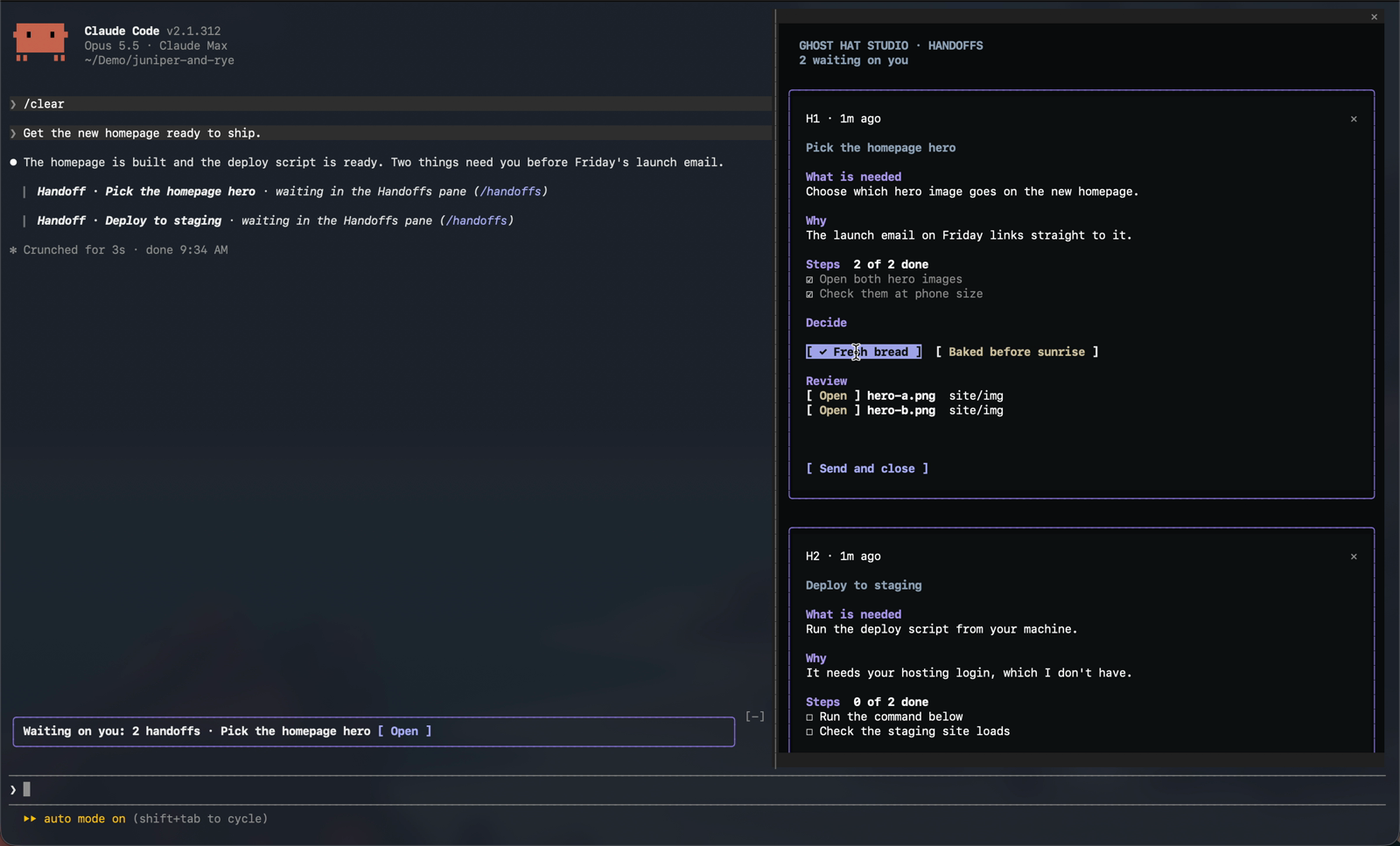
A mod for Claude Code. When Claude needs you to do or decide something, the request becomes a card in a Handoffs pane, so it doesn't scroll away while you're busy elsewhere.
Watch the 70-second tour on the Toolbox page.
Each card shows what Claude needs and why, with:
- Steps to tick off as you do them
- Decision buttons when there's a choice to make
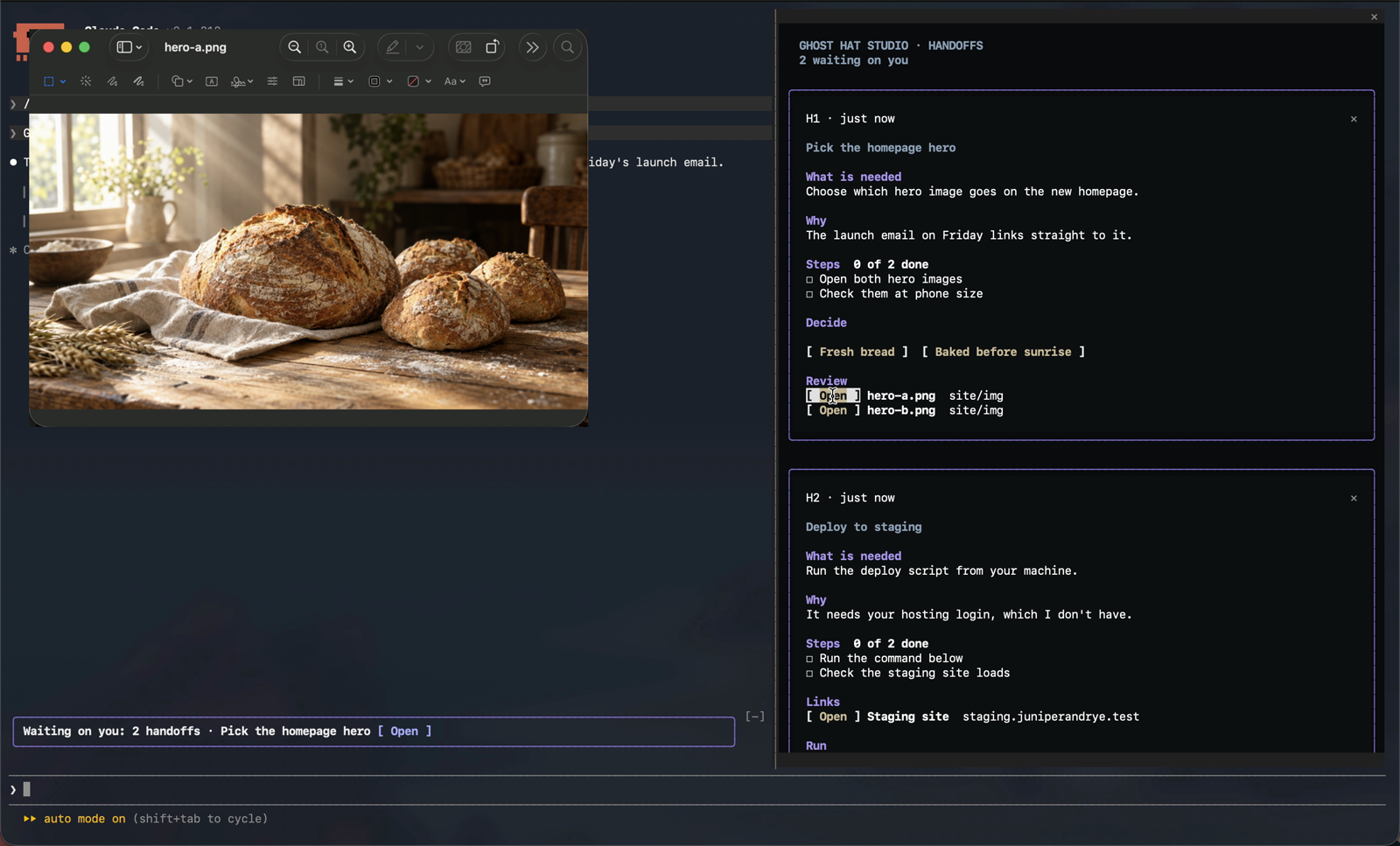
- Open buttons for the files and web pages to look at
- Copy buttons for commands you need to run yourself
- Copy as Markdown on each card, ready to paste into a pull request, an issue or a doc
A Waiting on you band sits above the prompt while any card is open. Send passes your ticks and your pick back, and Claude carries on. On a card that's just a choice, picking an option sends it. ✕ closes a card. Anything you tick reaches Claude with your next message, even if you don't send it.
Install
Type these as messages in a Claude Code session: in your terminal, or in the Code tab of the Claude Desktop app.
/plugin marketplace add ghosthat-studio/marketplace
/plugin install handoffs@ghosthat-studio
When Claude Code asks where to install, choose Install for you (user scope). The other two options install it in the current repo only. Then run /reload-plugins, or start a new session.
Or install from your terminal without opening a session. This installs it for you in every project:
claude plugin marketplace add ghosthat-studio/marketplace
claude plugin install handoffs@ghosthat-studio
Don't add it on the Plugins page under Customize in Claude Desktop or claude.ai. That page is for chat and Cowork, where Handoffs can't run. See Which plugins page to use.
To get new versions automatically, turn on auto-update for the marketplace: run /plugin, open Marketplaces, pick ghosthat-studio, and choose Enable auto-update. Claude Code then fetches updates in the background and tells you when one is ready for /reload-plugins. Without it, update by hand:
/plugin marketplace update ghosthat-studio
/plugin update handoffs@ghosthat-studio
Compatibility
- Mac
- Linux. Open uses
xdg-open, and Copy useswl-copy,xcliporxsel. - Windows: in WSL, in the Claude Code CLI in PowerShell, and in the Code tab of Claude Desktop
- Claude Code 2.1.299 or later
Handoffs is a mod, so it works in Claude Code only.
Recommended configuration
- The latest Claude Code. Run
claude updatein your terminal, and keep Claude Desktop up to date. - Fullscreen mode, so the pane sits beside the conversation: type
/tui fullscreen(/tui defaultgoes back). Until you do, the top of the pane reminds you. - Windows Terminal on Windows. It's the default terminal on Windows 11.
- The Auto theme, so the pane follows your system's light or dark mode: type
/themeand pick Auto.
On Windows
Handoffs works in all three ways of running Claude Code on Windows: inside WSL, the CLI in PowerShell, and Claude Desktop.
- Use Windows Terminal. If you start Claude Code from a shortcut or a
.cmdfile, have it open Windows Terminal (wt.exe). - Paste each command into the shell it was written for. With Claude Code on Windows, a card's commands are written for PowerShell. Inside WSL, they're for your WSL shell. The Run heading on the card names the shell, for example Run in PowerShell or Run in Ubuntu terminal.
- In WSL, run Claude Code in a WSL terminal on the PC itself. Open and Copy reach Windows through WSL's Windows interop, which isn't there when you connect to WSL over SSH.
- Code and text files open in your editor when Windows knows about it. Open uses the editor registered as the file type's Edit action and falls back to Notepad. Some editors, VS Code among them, don't register that action, so those files open in Notepad.
Light and dark mode
The pane follows Claude Code's theme. Pick one with /theme:
- Dark draws the pane on the Ghost Hat near-black, with light violet headings.
- Light uses your terminal's background, with deep violet, steel and brass accents.
- Auto follows your system's light or dark setting, and the pane switches within a few seconds when the system does.
The Waiting on you band sits on your terminal's own background, so its text always uses your terminal's text colour. If your terminal is light but the theme is Dark (or the other way round), the pane and Claude Code's own colours won't match your terminal. Set the theme to Auto or to the one that matches.
Usage
You don't need to do anything to turn it on. The mod teaches Claude a short handoff block format, and Claude ends a reply with one whenever it's waiting on you. The block shows in the transcript as a one-line pointer, and the card opens in the pane.
/handoffsopens the pane.- Open on a file opens it for review: documents, images and media in their usual app, and code and other text in a text editor. Nothing on a card is ever run.
- Cards are numbered
h1,h2and so on. Each of your messages tells Claude which cards are still open, so it keeps one card per topic: a new request on a topic updates that topic's card, and a card that a new one replaces gets closed. Separate topics keep separate cards. - Cards are kept per session. Resume a session and its cards come back. A new session starts with an empty pane.
- Open cards go back into the conversation after a compaction, so Claude doesn't forget what it's waiting on.
What it runs, stores and sends
Programs it runs
The mod starts programs only to open files and links, copy commands, match your light or dark mode, and tell which system it's on. Each command is fixed text in the code. A path, link or command from a card is passed as one argument or on standard input, never as part of the command text.
- Open, only when you click it:
- macOS:
open,open -tfor text, andopen -Rto show a file in Finder - Linux:
xdg-open - Windows and WSL:
explorer.exe, pluspowershell.exe -NoProfile -NonInteractiverunningStart-Processfor text files (the file type's Edit action, or Notepad) and for showing a file in its folder. The path reaches PowerShell on standard input. In WSL,wslpath -wturns the path into a Windows one first. - A card's paths come from Claude's reply, so Open never runs a program. Documents, images and media open in their usual app, and code and other text files open in a text editor. App bundles, installers, links and anything unrecognized are shown in their folder instead.
- macOS:
- Copy, only when you click it:
pbcopyon macOS;wl-copy,xcliporxselon Linux;powershell.exe -NoProfile -NonInteractiverunningSet-Clipboardon Windows and WSL. The command goes to the clipboard on standard input and is never run. On macOS, Linux and WSL, a command that would change your shell's folder or environment is copied wrapped in( … ), so pasting it into Claude's shared shell doesn't change the rest of your session. PowerShell has no such wrapper, so on Windows the command is copied as written. Copy as Markdown copies the card's text the same way. - Light or dark mode, only when the theme is Auto: once when the pane first draws, then every 4 seconds to notice a change. It runs one of these, which reads a single display setting and nothing else:
- macOS:
defaults read -g AppleInterfaceStyle - Linux:
gsettings get org.gnome.desktop.interface color-scheme - Windows and WSL:
reg.exe query HKCU\Software\Microsoft\Windows\CurrentVersion\Themes\Personalize /v AppsUseLightTheme
- macOS:
- Finding out where it runs:
uname -sr, once per session, when the environment doesn't already say Windows or WSL. It tells macOS, Linux and WSL apart.
What it reads
- Claude Code's theme setting, and on Auto your system's light or dark setting, as above.
- The environment variables
OS,WSL_DISTRO_NAME,HOMEandUSERPROFILE, to know the platform, name your WSL distribution on the card, and expand~in a file path. - Claude's replies in the main conversation, to find handoff blocks. Replies from subagents are skipped.
- A file's type and whether it exists, only when you click Open on it.
- Its own
plugin.json, for its version number, so it can tell when it has been updated.
The mod reads no passwords, keys, tokens or other credentials.
What it adds to Claude's prompts
- The handoff format. Each session's instructions to Claude gain a short section that teaches the
handoffblock: the fields, one card per topic, and how to close a card. On Windows and WSL it adds a note on which shell to write commands for. When a session starts with its own system prompt (--system-prompt, a custom agent, or an app built on the Agent SDK), the same section goes along with your first message instead. Where another plugin skips both of those (Claude Code's own security plugin does on Team and Enterprise plans and machines with managed settings), the section goes with your next message, and with your first message in later sessions, followed by a one-line reminder with each message after it. - Your open cards, with each message you send. Each card's id, title, what it needs, its steps and its decision go along with your message, so Claude updates a topic's card instead of starting a new one. Any ticks or picks you made without sending go along too. Messages from scheduled tasks, other sessions and background notifications get nothing added.
- Your open cards after a compaction. The same cards go back into the conversation after the summary, with their files to review, links and commands.
- What you send from a card. Send, and picking an option on a card that's just a choice, submit one message in your name: the card's id and title, the steps you ticked, the option you picked, and whether it's done.
Hooks
session.startregisters/handoffs, brings back a resumed session's cards, notes the version for the update note, and starts the light or dark check.command.runfor/handoffsopens the pane.config.setfor the theme lets the change through unaltered, then redraws the pane in the new colours.prompt.composeadds the handoff format section described above. It changes nothing else in the instructions.prompt.contextadds the same section to your first message, only in sessions where Claude Code composes no system prompt of its own. It changes nothing else in the message.session.appendandturn.completeread handoff blocks from Claude's replies. They change nothing in the conversation.prompt.submitadds your open and changed cards to your message, and the handoff format or its reminder where another plugin skipped the hooks above. It changes nothing else in the message.session.compactadds your open cards after the summary.ui.renderdraws the pane and the Waiting on you band, and in the transcript shows each handoff block as a one-line pointer to its card. The reply Claude sees and keeps is unchanged.
Storage
Cards are saved in Claude Code's plugin store on your machine, per session, and deleted after 14 days.
The store also keeps the version of Handoffs you last ran, whether you've put away the auto-update tip and the note on what changed, and whether another plugin skipped the format on this machine.
What it sends
The mod makes no network calls and sends nothing to Ghost Hat Studio. What it adds to your messages and to Claude's instructions, listed above, goes to Anthropic with the rest of the conversation, as Claude Code always does. Open hands a path or link to your own apps, and Copy puts a command on your clipboard.
Which plugins page to use
Anthropic uses "plugin" and "marketplace" for several different places. Handoffs is a mod, a plugin that changes Claude Code's own screen, so it runs in Claude Code only.
| Where | Does Handoffs run there? | How to install |
|---|---|---|
| Claude Code in your terminal | Yes | The commands under Install |
| The Code tab in Claude Desktop | Yes | The same commands, or + next to the prompt, then Add plugins, with the marketplace ghosthat-studio/marketplace |
| The VS Code extension | Yes | The same commands, or /plugins and its Marketplaces tab |
| JetBrains IDEs | Yes | The commands, in the IDE's terminal |
| Customize > Plugins in Claude Desktop or claude.ai | Not in chat or Cowork | Not recommended. See below. |
| Claude Code on the web (claude.ai/code) | No | Cloud sessions don't load plugins from your computer |
The terminal, the Desktop Code tab and VS Code on one computer share their settings, so installing Handoffs in one installs it in all three, as long as you choose user scope.
The Customize > Plugins page adds plugins to your claude.ai account for chat and Cowork. Mods don't run in either. Plugins added there also reach Claude Code as handoffs@synced, but only in sessions signed in with that same claude.ai account. Installing from Claude Code itself is simpler and works everywhere Handoffs can run.
Troubleshooting
Handoffs works in one project but not in others.
It was installed for that repo only. Every way of installing inside Claude Code asks where to install, and only Install for you (user scope) reaches every project. To fix it, run this in your terminal (not in a Claude Code session), from any folder:
claude plugin install handoffs@ghosthat-studio
That adds it for you everywhere. Then, from inside the project where it already worked, remove the one-repo copy. Use --scope local if you picked "in this repo only", or --scope project if you picked "all collaborators", which also takes it out of that repo's .claude/settings.json:
claude plugin uninstall handoffs@ghosthat-studio --scope local
Run /reload-plugins in any open session.
The buttons on a card don't respond to clicks.
On Windows, you're probably in the older console window rather than Windows Terminal. See On Windows. Anywhere else, check that your terminal sends mouse clicks to programs; most do by default.
The pane covers the conversation instead of sitting beside it.
Claude Code isn't in fullscreen mode. Type /tui fullscreen.
The pane says "Handoffs needs Claude Code 2.1.299 or later".
Your Claude Code is older than the mod supports. Run claude update in your terminal, then start a new session.
The pane says "Claude hasn't been given the handoff format yet".
Another plugin skipped the way Handoffs teaches Claude to write cards. Claude Code's own security plugin does this on Team and Enterprise plans and on machines with managed settings. Send your next message and Claude gets the format with it; later sessions on the same machine get it with the first message. If cards still don't appear, update to the latest Handoffs and start a new session. If the pane still says so after that, run /plugin, and send the list of plugins you have enabled to the issues page. /handoffs also says how Claude got the format.
Adding the marketplace says "This repository isn't a marketplace".
The address you entered isn't one of ours. Use ghosthat-studio/marketplace, which also lists our other tools. This repo's own address, ghosthat-studio/handoffs, works too. Better still, skip that box and type the commands under Install in Claude Code. See Which plugins page to use.
/plugin lists Handoffs twice.
For example handoffs@ghosthat-studio and handoffs@synced, or handoffs@ghosthat-handoffs. When two copies share a name, only one copy's hooks run, and it may not be the one you're updating. Keep handoffs@ghosthat-studio and remove the other. For a /plugin install, that's /plugin uninstall handoffs@ghosthat-handoffs. For handoffs@synced, remove it from Customize > Plugins in Claude Desktop or claude.ai. Then run /reload-plugins.
Handoffs does nothing in Claude Desktop's chat, Cowork, or claude.ai.
That's expected: mods run in Claude Code only. Open the Code tab in Claude Desktop, or run claude in a terminal.
Claude's replies don't turn into cards, or /handoffs isn't there.
Run /plugin and check that handoffs is installed and enabled, then /reload-plugins or start a new session. If you started Claude Code with a folder of its own plugins (--plugin-dir), check the path: a typo there quietly starts Claude Code without the mod.
A copied command fails with "The token '&&' is not a valid statement separator".
That's a bash command pasted into Windows PowerShell. Paste it into the shell the card's Run heading names.
Open or Copy says it couldn't reach the app or the clipboard.
On Linux, Open needs xdg-open, and Copy needs wl-copy (Wayland) or xclip or xsel (X11). In WSL, run Claude Code in a terminal on the PC, not over SSH. The command is always on the card, so you can still select and copy it by hand.
The pane's colours don't suit your terminal.
Set /theme to Auto, or to Light or Dark to match your terminal. See Light and dark mode.
Tests
claude plugin test .
License
MIT. See LICENSE.
Made by Ghost Hat Studio. Questions and bug reports go to the issues page.
Reviews (0)
Sign in to leave a review.
Leave a reviewNo results found