webview-cli
Health Uyari
- License — License: MIT
- Description — Repository has a description
- Active repo — Last push 0 days ago
- Low visibility — Only 5 GitHub stars
Code Basarisiz
- rm -rf — Recursive force deletion command in install.sh
- eval() — Dynamic code execution via eval() in scripts/runtime-smoke.mjs
Permissions Gecti
- Permissions — No dangerous permissions requested
This tool is a native macOS MCP server that provides lightweight, HTML-based user interfaces for AI agents via a declarative JSON structure. It is designed to quickly prompt users for input, review diffs, or approve actions without relying on heavy frameworks like Electron.
Security Assessment
Risk Rating: Medium
The tool does not request explicitly dangerous OS permissions and contains no hardcoded secrets. It primarily leverages the built-in macOS WebKit framework to render UI elements. However, the automated installation method carries notable risks. The install script uses a recursive force deletion command (`rm -rf`), which can be dangerous if the paths are unexpectedly modified or resolve incorrectly. Additionally, a test file contains an `eval()` call, introducing the risk of dynamic code execution. While the core server binary is lightweight, these installation and testing scripts require careful manual review before deployment.
Quality Assessment
The project uses the permissive MIT license and is under active development, with its most recent code push occurring today. The codebase is lightweight and heavily optimized for Apple Silicon and macOS 12+. However, community trust and visibility are currently very low. With only 5 stars on GitHub and a small user base, the project has not yet been widely battle-tested or audited by the broader open-source community.
Verdict
Use with caution — while the core binary is lightweight and well-licensed, the installation script contains potentially dangerous commands and the project currently lacks widespread community validation.
Native macOS UIs for CLI AI agents. 193KB single binary, ~180ms cold start, no Electron. Renders A2UI declarative UI.
webview-cli
Native macOS UIs for CLI AI agents.
~290KB · ~180ms cold start · no Electron · no npm · no runtime




curl -sSL https://raw.githubusercontent.com/giannimassi/webview-cli/main/install.sh | bash
One command. Installs the binary via Homebrew, installs the Claude Code skill if ~/.claude exists, runs a smoke test.
~290KB vs Electron's 50MB+
Your AI agent needs to ask you a question that doesn't fit in a terminal prompt. The choices today:
- Electron app: 50MB+ runtime, 500–800ms cold start, requires a persistent app bundle. Way too heavy for a subprocess the agent spawns 20 times per session.
- Tauri / Wails: 8–15MB, 300–500ms. Still too heavy, still designed as app frameworks.
osascriptAppleScript dialog: built-in, ~300ms, gives you 2 buttons and a text field. Useless for anything structured.- Terminal
[y/N]: the default. Fine for yes/no, terrible for "review this diff" or "pick one of these 12 PRs."
webview-cli: ~290KB single binary, ~180ms cold start, a real native macOS window, structured JSON back to the agent, process dies clean.
| webview-cli | Electron | Tauri / Wails | osascript | |
|---|---|---|---|---|
| Binary size | ~290KB | 50MB+ | 8–15MB | built-in |
| Cold start | ~180ms | 500–800ms | 300–500ms | ~300ms |
| Rich HTML/CSS UI | ✅ | ✅ | ✅ | ❌ |
| Structured JSON out | ✅ | app-specific | app-specific | ❌ (string) |
| Spawnable subprocess | ✅ | ❌ (app lifecycle) | ❌ (app lifecycle) | ✅ |
| Runtime deps | none | Electron bundle | WebView2/WebKit2 + Rust | none |
| Agent-first design | ✅ | ❌ | ❌ | ❌ |
Why it's this small
The numbers aren't optimization magic. They come from not bundling things that were already there.
WKWebView is already on your Mac. The same engine Safari uses. We wrap it instead of shipping Chromium. That's ~50MB saved, no install-time download, and a decade of Apple's work on rendering correctness and memory management comes for free.
The Swift runtime ships with macOS 12+. libswiftCore, libswiftFoundation, and friends live on the OS. We don't bundle them, version-pin them, or worry about ABI skew. Another ~12MB avoided, and none of the dylib-shipping pain that usually comes with cross-platform Swift.
A2UI is declarative, not imperative. Your agent describes what UI it wants in a flat JSONL stream; the renderer decides how to lay it out, handle focus, and collect form data. ~250 lines of vanilla JavaScript covers the entire catalog — no React, no templating engine, no build step.
Each subtraction compounded. Together they produced a binary that starts in ~180ms — faster than Electron finishes parsing its own bootstrap scripts.
Who it's for
Agent developers on macOS.
Claude Code was macOS-first. Cursor is macOS-first. Codex CLI, ChatGPT Desktop, Raycast, Warp, the wave of indie MCP servers being published on GitHub every week — the people building and using agent workflows skew heavily toward macOS. If you've opened Claude Code recently, you're probably holding a Mac.
macOS-only is a choice, not a gap. A Linux port (GTK + WebKit2) and a Windows port (WebView2) are both technically straightforward, and the protocol is platform-independent — but shipping them at v0.1 would mean three build pipelines, three sets of edge cases, and slower iteration on the platform the audience actually uses. Depth over breadth. If you need this on another OS badly enough to maintain a port, open an issue — a clean implementation gets merged.
Use it
With Claude Code
Install the bundled skill once:
ln -s "$(pwd)/skill" ~/.claude/skills/webview # or use the installer flag
Then ask your agent anything that needs structured input from you. The skill handles the rest — generates A2UI, spawns the binary, parses the result, returns typed data. You never write JSONL by hand.
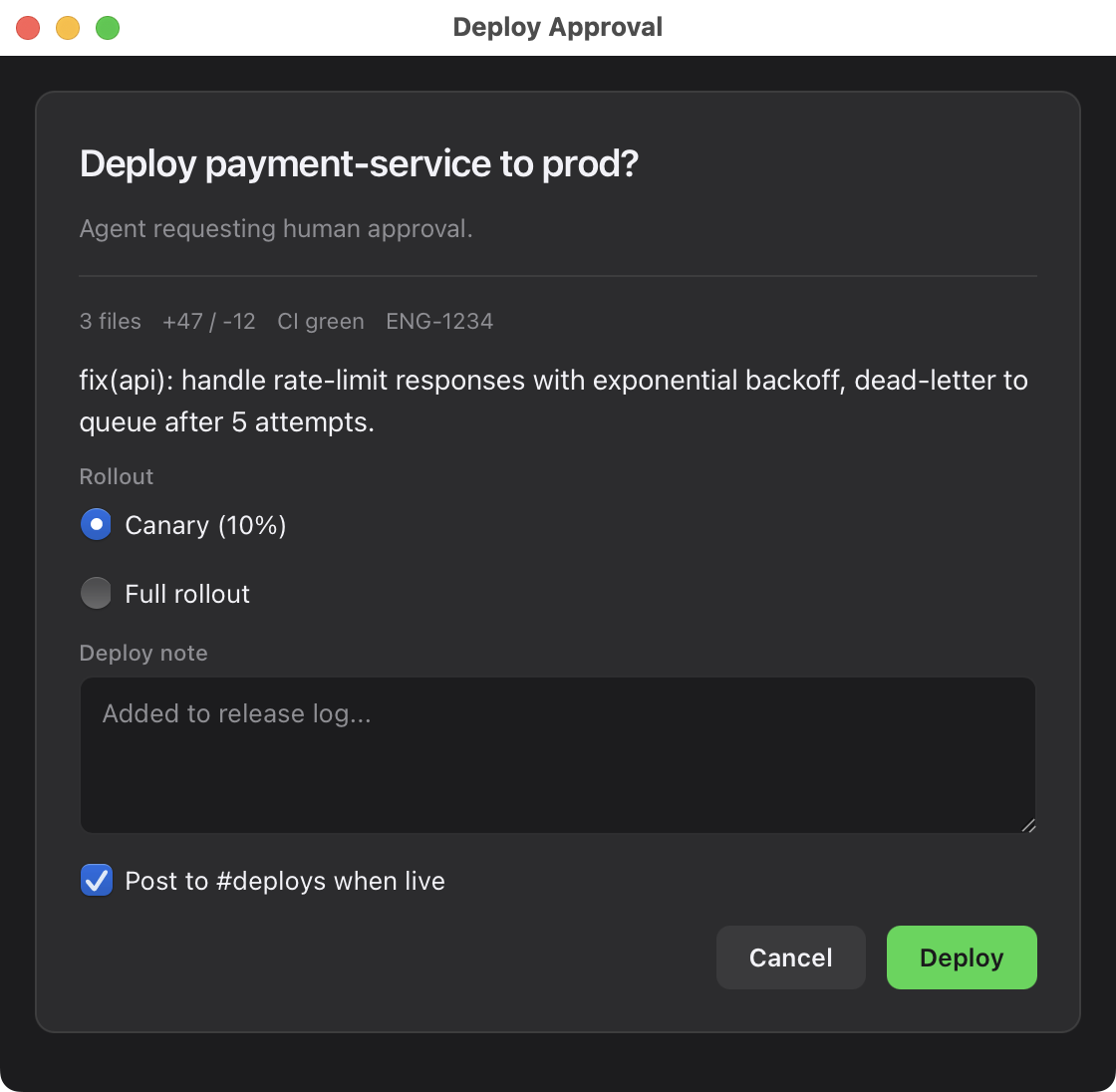
Example: deploy approval. Agent says:
"I'm about to deploy
payment-serviceto production. Should I proceed?"
The skill opens a native window with the change summary, a rollout radio (canary / full), a comment field, and Approve/Cancel. You click. The agent receives:
{"action": "approve", "data": {"rollout": "canary", "note": "Monitoring on standby"}}
and continues. No terminal input. No context loss.
Other patterns the skill handles out of the box: single-select from agent-found options (PRs to review, branches to rebase), multi-field config forms, diff-and-acknowledge flows. Full skill docs: skill/SKILL.md.
With OpenAI Codex CLI, Gemini CLI, or any subprocess-capable agent
The binary is protocol-agnostic. Anything that can spawn_subprocess and read stdout works:
import subprocess, json

result = subprocess.run(
    ["webview-cli", "--a2ui", "--timeout", "120"],
    input=your_a2ui_jsonl,
    capture_output=True, text=True
)
# result.returncode: 0=submitted, 1=cancelled, 2=timeout, 3=error
# json.loads(result.stdout) has {"status", "data": {"action", "data": {...}}}
A complete wrapper plus a Codex tool definition you can paste into your agent config: examples/openai-codex-tool.md.
From a shell script or MCP server
It's a Unix tool. Stdin in, stdout out, exit codes report outcome. Pipes work. Blocking works. Put it wherever a subprocess can run:
# Approval gate in a CI/deploy script
RESULT=$(cat my-form.jsonl | webview-cli --a2ui --title "Deploy?" --timeout 300)
case $? in
  0) ACTION=$(echo "$RESULT" | jq -r '.data.action'); [ "$ACTION" = "approve" ] && deploy ;;
  1) echo "User cancelled." ;;
  2) echo "Timed out — no response in 5 min." ;;
esac
Common patterns
Pick from optionsAgent enumerates candidates (PRs, branches, files). User picks one with radio buttons. Agent proceeds with the choice. 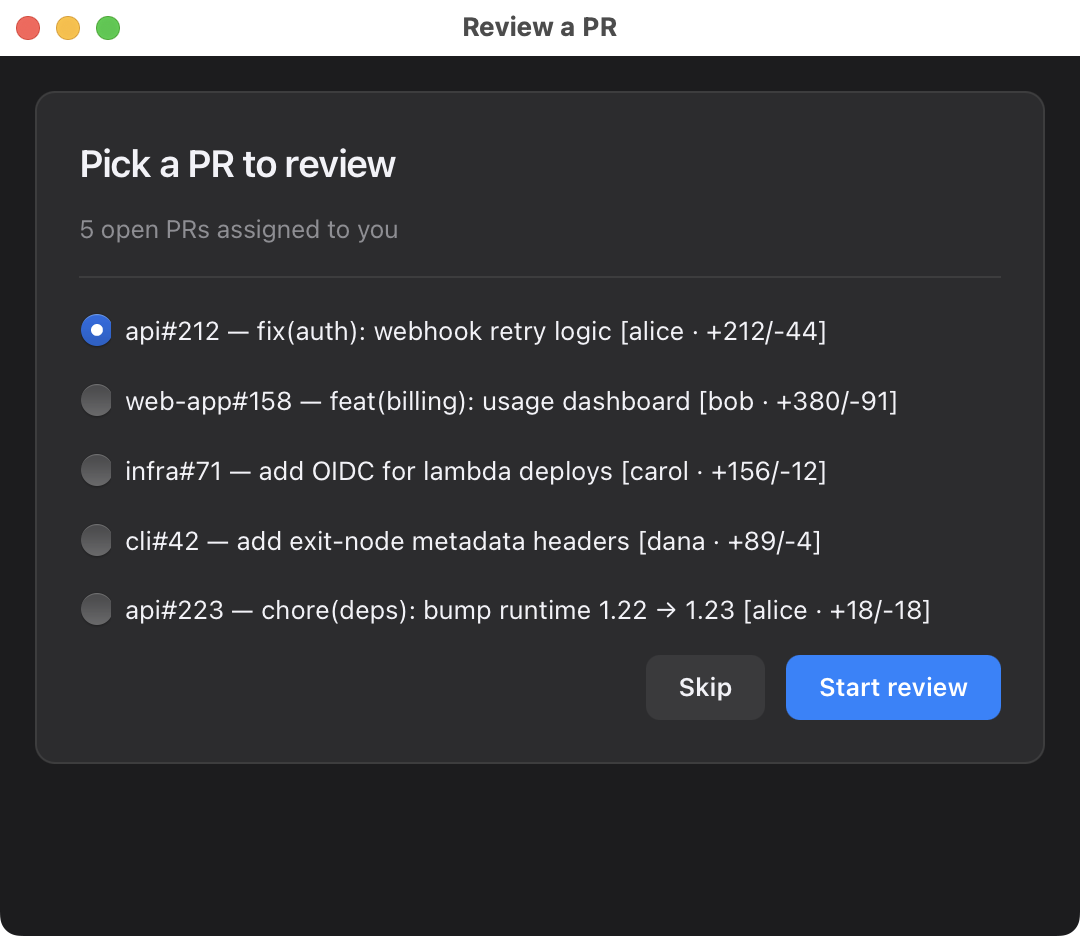
|
Multi-field configText inputs + selects + checkboxes in one native form. Better than six 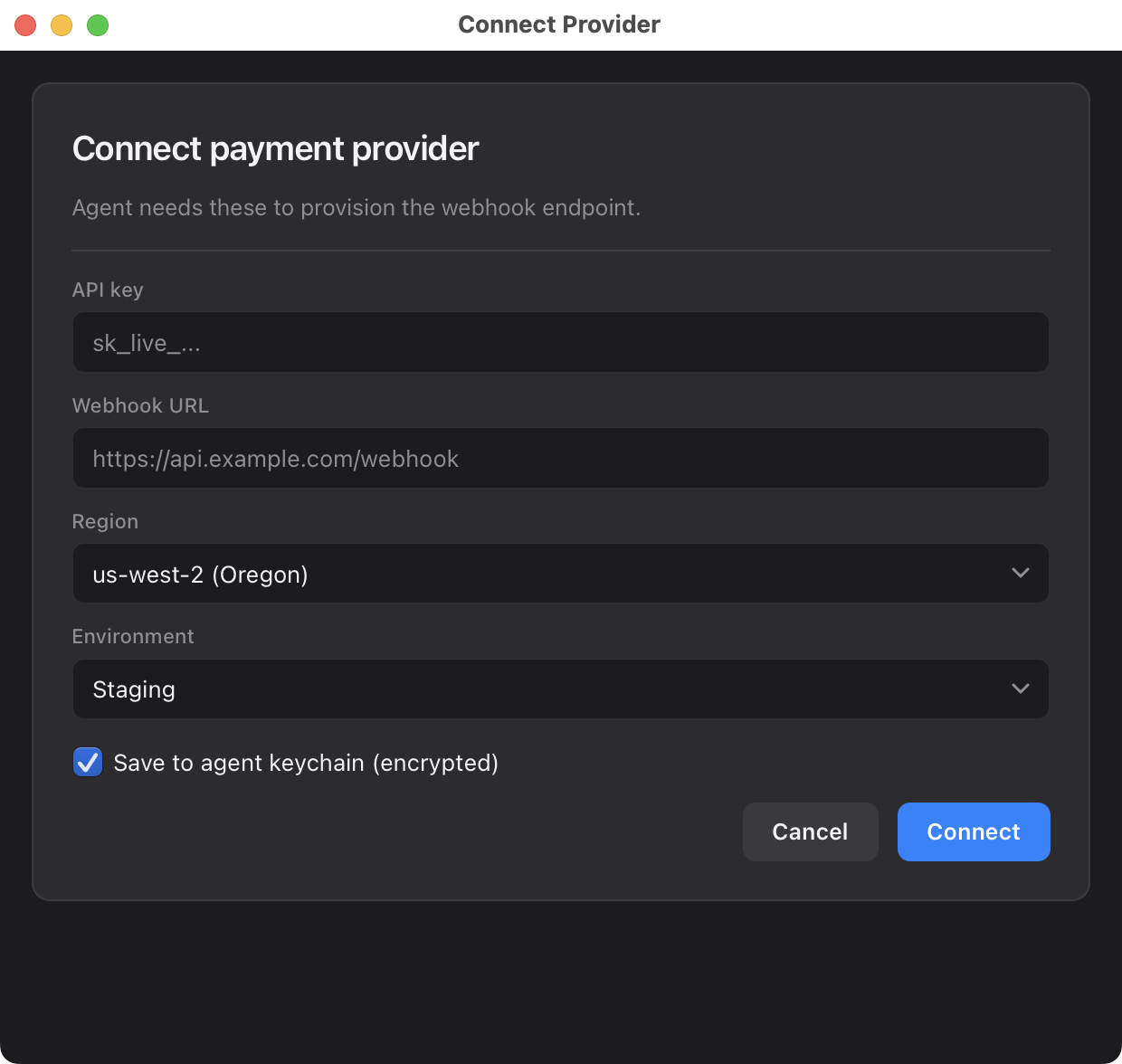
|
Destructive confirmationIrreversible action with context, safety checkbox, and a danger-variant button. Prevents the "yes 40 times in a row" mistake. 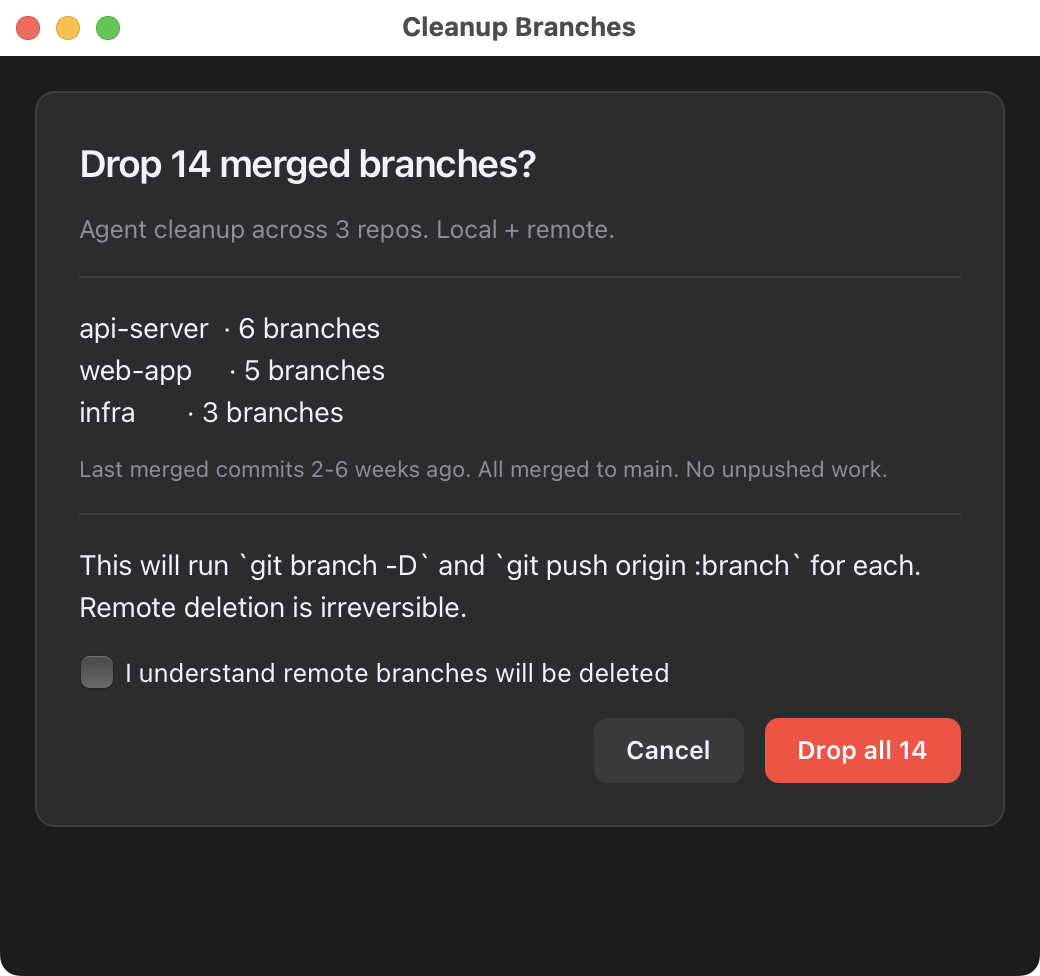
|
Triage / classificationPriority dropdown, complexity radio, and notes in one native form. Agent gets structured metadata back to act on. 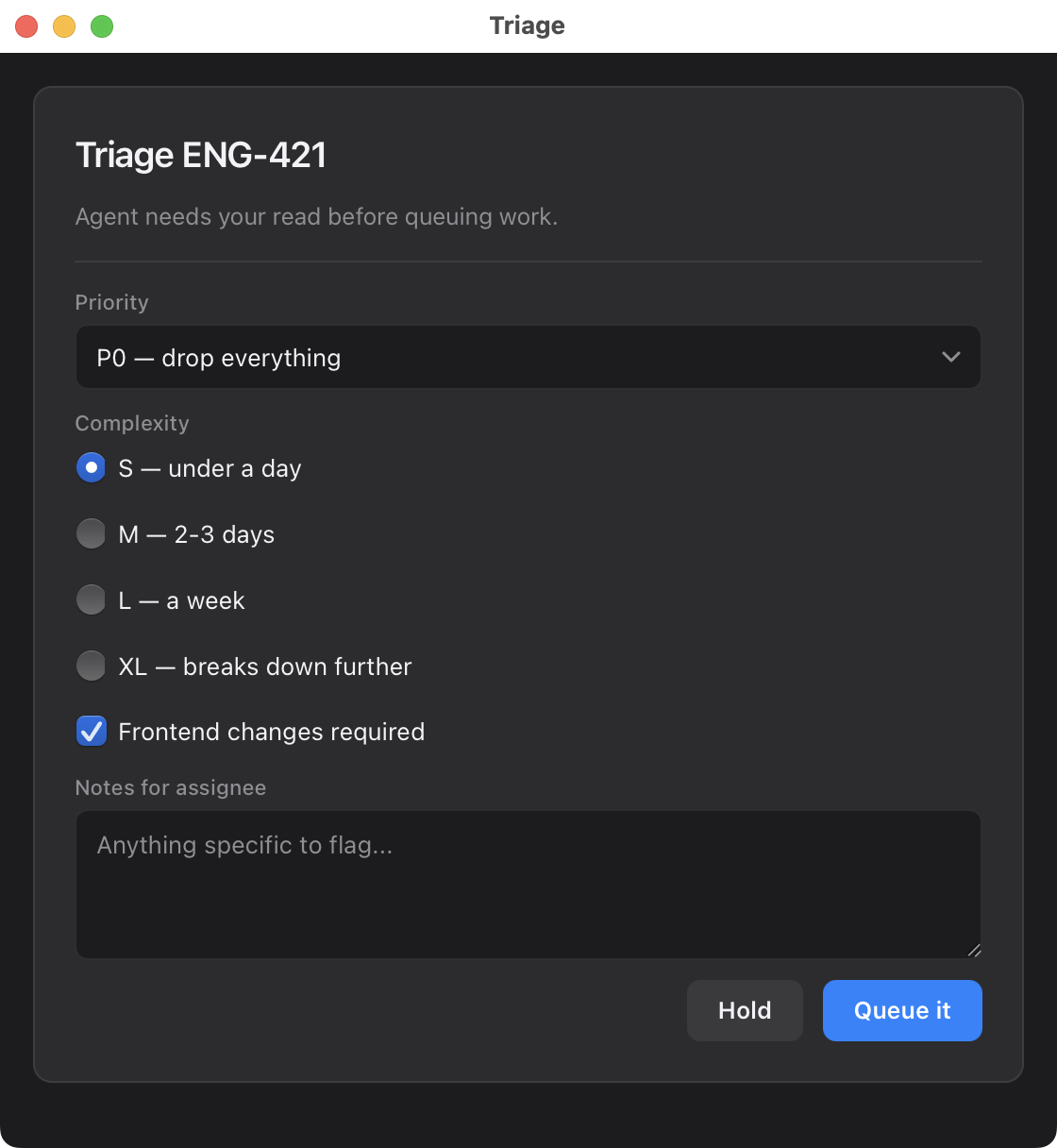
|
Markdown reviewAgent generates a spec or doc. User reviews with paragraph-level comments, optionally edits the source, and submits structured feedback. Agent reads the review and can iterate. |
Combine markdown review with formReview a spec AND pick options in one window. Comments, edits, and form fields together. |
{"surfaceUpdate":{"components":[{"id":"root","component":{"Column":{"children":{"explicitList":["card"]}}}}]}}
{"surfaceUpdate":{"components":[{"id":"card","component":{"Card":{"children":{"explicitList":["title","diff","risk","note","btns"]}}}}]}}
{"surfaceUpdate":{"components":[{"id":"title","component":{"Text":{"usageHint":"h2","text":{"literalString":"Deploy payment-service to prod?"}}}}]}}
{"surfaceUpdate":{"components":[{"id":"diff","component":{"Text":{"usageHint":"body","text":{"literalString":"3 files · +47/-12 · CI green · ENG-1234"}}}}]}}
{"surfaceUpdate":{"components":[{"id":"risk","component":{"RadioGroup":{"label":{"literalString":"Rollout"},"fieldName":"rollout","options":[{"value":"canary","label":"Canary (10%)"},{"value":"full","label":"Full rollout"}]}}}]}}
{"surfaceUpdate":{"components":[{"id":"note","component":{"TextInput":{"label":{"literalString":"Deploy note"},"fieldName":"note","multiline":true}}}]}}
{"surfaceUpdate":{"components":[{"id":"btns","component":{"Row":{"alignment":"end","children":{"explicitList":["c","go"]}}}}]}}
{"surfaceUpdate":{"components":[{"id":"c","component":{"Button":{"label":{"literalString":"Cancel"},"variant":"secondary","action":{"name":"cancel"}}}}]}}
{"surfaceUpdate":{"components":[{"id":"go","component":{"Button":{"label":{"literalString":"Deploy"},"variant":"success","action":{"name":"approve"}}}}]}}
{"beginRendering":{"root":"root"}}
That's the whole approval UI above. One line per component, flat adjacency list, LLM-friendly to generate. The skill produces this from a short natural-language description of the UI.
Install
One command (recommended)
curl -sSL https://raw.githubusercontent.com/giannimassi/webview-cli/main/install.sh | bash
Handles Homebrew tap + formula install + Claude Code skill install + smoke test. Flags:
--with-claude-skill— force skill install even if~/.claudenot detected--no-claude-skill— skip skill install
Homebrew only
brew tap giannimassi/tap
brew install webview-cli
From source
git clone https://github.com/giannimassi/webview-cli.git
cd webview-cli
make install   # copies to ~/bin/webview-cli
Requires macOS 12+ and the Swift toolchain (Xcode Command Line Tools is enough).
Supported A2UI components
Text, TextInput, Button, Column, Row, Card, Select, Checkbox, RadioGroup, Image, Divider. Subset of Google's A2UI v0.8 standard catalog.
Full prop reference: docs/a2ui-subset.md. Protocol reference: docs/protocol.md. Architecture tour: docs/architecture.md.
How it works
One Swift file, ~550 lines. NSApplication with .accessory policy (no Dock icon), one NSWindow with a WKWebView, WKScriptMessageHandler bridging JS events to stdout, WKURLSchemeHandler serving an embedded renderer via agent://. Stdin feeds A2UI JSONL into the renderer.
The renderer itself is ~250 lines of vanilla ES — no React, no framework, no build step. It's embedded as a string literal in the Swift binary. "What CSS framework is that?" is a frequent question. The answer is none — system fonts, -apple-system, CSS custom properties, ~60 lines of hand-written styles.
See docs/architecture.md for the tour.
License
MIT — see LICENSE.
Credits
- A2UI by Google — the declarative UI spec this renders a subset of
- Opus 4.7 — this tool was built in one evening with Claude Code driving the keyboard. It pairs well with its builder.
Built by @giannimassi. If this unblocks one of your agent workflows, a star is appreciated.
Yorumlar (0)
Yorum birakmak icin giris yap.
Yorum birakSonuc bulunamadi