gitmir-local
Health Uyari
- License — License: AGPL-3.0
- Description — Repository has a description
- Active repo — Last push 0 days ago
- Low visibility — Only 6 GitHub stars
Code Basarisiz
- fs.rmSync — Destructive file system operation in bin/gitmir.mjs
- os.homedir — User home directory access in bin/gitmir.mjs
- process.env — Environment variable access in bin/gitmir.mjs
Permissions Gecti
- Permissions — No dangerous permissions requested
Bu listing icin henuz AI raporu yok.
Open-source Object Context for software teams and AI agents. Maps real code into business objects, logic and dependencies, shows change impact, serves relevant context over MCP, and verifies outcomes. Local-first.
GitMir Local
Open-source Object Context for AI software development.






Your repository holds the code. GitMir builds the model of how the product actually
works — objects, relationships, business rules, states, journeys, ownership, evidence —
and keeps it in the repo next to the code.
                 YOUR REPOSITORY
                        │
                        ▼
          ┌───────────────────────────┐
          │      OBJECT CONTEXT       │  objects · relationships · rules
          │      .gitmir/model/       │  states · journeys · ownership
          └───────────────────────────┘  evidence · known deviations
                        │
             ┌──────────┴──────────┐
             ▼                     ▼
            YOU                YOUR AGENT
      What does this do?    The relevant slice,
      What can break?       not the whole repo
      Why is it like this?  The rules it must not break
      What changed?         What to verify when done
Build the context once. Keep it in the repo. Reuse it for every change — instead of making
the agent reconstruct your product from scratch on every task.
Local-first · no GitMir account · no GitMir telemetry · MCP included
60 seconds · Five minutes on your own repository · How the model works
One change, two readings
A ticket says "Allow a partial refund."
What the repository shows you: a refund function, an endpoint, a dialog.
What the product says that change means:
Allow a partial refund
├── refundOrder                    the function named on the ticket
├── Order                          its lifecycle has a refunded state, with effects
├── OrderRefunded                  an event two other functions handle
├── Payment                        money — marked sensitive in the model
├── captureRefund                  runs downstream, in another area
├── notifyRefund                   runs downstream
├── POST /api/orders/:id/refund
├── OrderPage · RefundDialog
└── "Refund an order"              a journey a person walks, 5 steps
Two areas. One journey. One lifecycle. Money in reach.
21 of 29 possible points — 72% of this product.
The ticket tells the agent what to change.
GitMir shows what the product says that change means.
A developer can implement the ticket exactly as written and still implement the wrong
change for the product. So can an agent, faster.
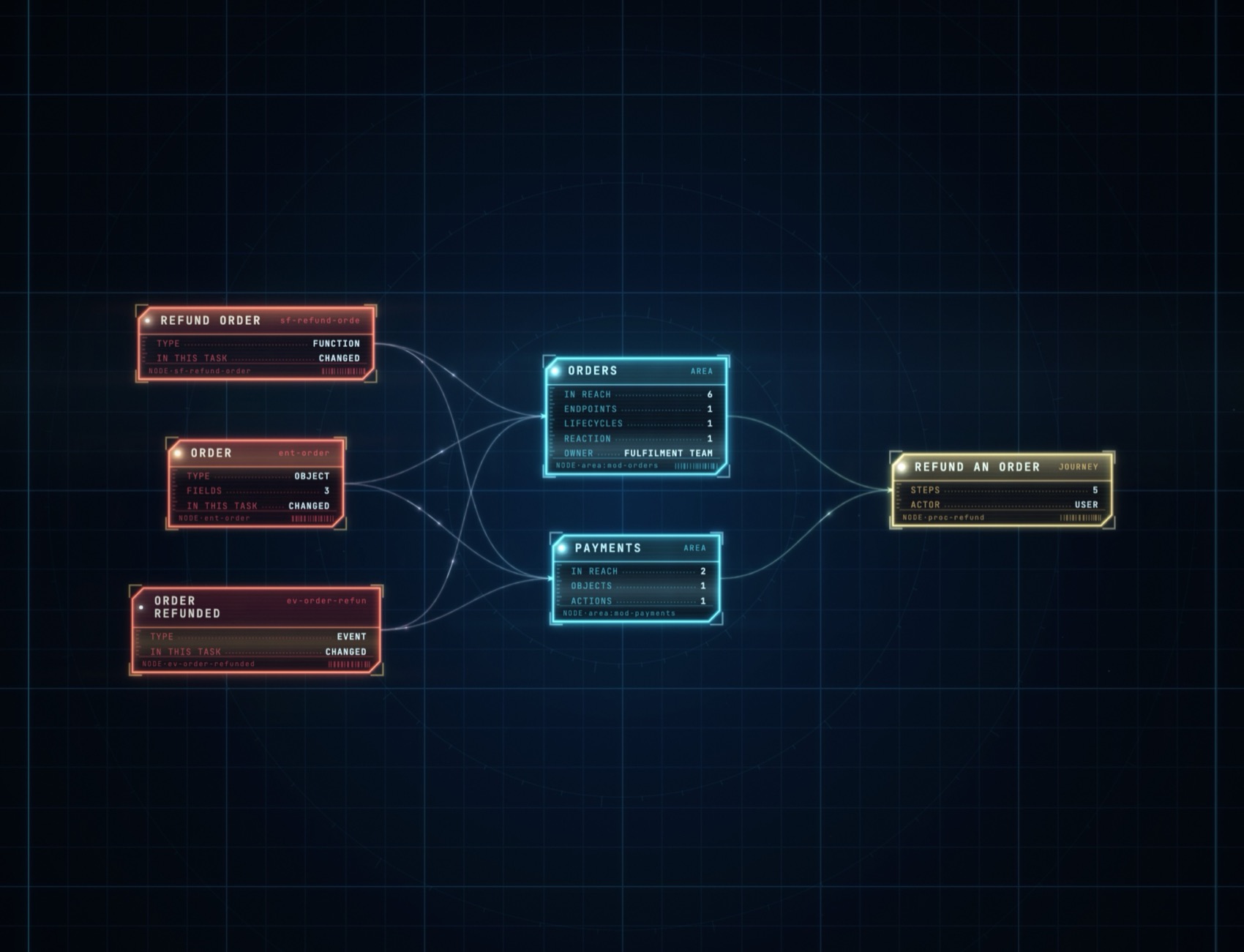
→ How change impact is calculated — every weight, the two-hop
rule, and how to disagree with the number.
What you get
1 · Understand the product. Ask what checkout depends on, where a business rule is
implemented, why an order can enter a state — answered by walking the model rather than
reassembling it from files.
2 · Understand a change. What it reaches, in both directions. Inbound is the direction
that gets forgotten: what the function calls is already in your head, what calls it is
not.
3 · Give the agent the right context. Not more context — the relevant context. The
slice for this change, over MCP, with the rules it must not break and the deviations
already known in the code it is about to touch.
4 · Verify the outcome. The affected context becomes the verification steps. A task is
not done because code was generated; it is done when the expected product behaviour is
proven.
Understand → Execute → Verify, over one model that lives in the repository.
60 seconds
Read it first, then run it:
git clone https://github.com/gitmir-hello/gitmir-local.git
cd gitmir-local
node server.ts
Or install the gitmir command:
curl -fsSL https://ide.gitmir.com/install.sh | sh     # macOS · Linux
irm https://ide.gitmir.com/install.ps1 | iex          # Windows
gitmir
Clones into ~/.gitmir/local, links one command onto your PATH, and pulls nothing from a package registry. Read the installer — it is short on purpose. There is no npm route: npm i -g would put this under node_modules, where Node refuses to strip TypeScript types.
http://localhost:4599 → add a project folder → ▶ Run Claude → paste thegitmir-model skill. Claude reads the repo, writes .gitmir/model/, and every view
has something in it.
| Command | |
|---|---|
gitmir |
start it and open the browser |
gitmir mcp add |
register the MCP server with the Claude Code CLI |
gitmir status |
Node version, port, what is missing |
gitmir update |
pull the latest, and restart if it was running |
Want to look before pointing it at your own code? Addexamples/refund-shop — an invented shop with a model and two
planned tasks. Every number in this README is that project.
Five minutes on your own repository
Build the model, then ask your agent these five questions:
- What are the main business objects in this product?
- Pick one that matters. What depends on it — in both directions?
- Where is its lifecycle implemented, and what fires on each transition?
- If I change that behaviour, which user journeys could be affected?
- Which of the relationships in your answer are inferred rather than confirmed?
If any answer surprises you, GitMir has surfaced context that was living in the repository
or in somebody's head.
What GitMir keeps, instead of another chat history
.gitmir/model/       areas · business objects · functions · endpoints · screens
                     events · journeys · lifecycles · reactions · ownership
.gitmir/findings/    where the code does not do what the product says
tasks/               work, its declared scope, its risk, its approval
The important part is not the nodes. It is the relationships:
Refund ─┬─ modifies ────────→ Payment
        ├─ changes ─────────→ Order.status
        ├─ may_restore ─────→ Inventory
        ├─ requires ────────→ Permission
        ├─ contributes_to ──→ FinanceReport
        └─ follows ─────────→ RefundPolicy
Ids are stable, so a rename stays a rename instead of becoming a delete and a create. Every
view, the MCP server and the task queue read the same files — they cannot answer the same
question two different ways.
This is not "the code is the truth". The code is one input. The model is
code + confirmed rules + decisions + evidence, which is why spec-audit can record the
places where those disagree instead of quietly preferring one.
Use it from the agent you already have
gitmir mcp add
Then ask, in Claude Code, Cursor, or anything else that speaks
MCP:
What depends on Refund?
What breaks if I change Order.status?
Which business rules govern cancellation?
What should be verified for this task?
Where does the code already not do what the spec says?
Same model, same relationships, no separate AI knowledge base. Your editor starts it as a
subprocess over stdin/stdout — no port, no network, and the dashboard does not need to be
running. Every reply states how fresh the model is, because there is no amber banner in
somebody else's editor.
→ The MCP server — thirteen tools, and what each admits about its own
behaviour.
Trust is visible
The first question after "an AI built a model of my product" is what if it got it wrong —
so the answer is on screen rather than in a footnote.
An AI reads and structures the codebase. Once the relationships are written down, GitMir
walks them deterministically — the same model gives the same answer every time, and
changing one link by hand moves the number accordingly. What you are asked to trust is the
map, not the arithmetic. And the map states its own standing:
- Freshness — how far the code has moved since the model was built, on every answer
- Declared or inferred — whether a task named its scope, or the numbers came from what
it merely mentions - Known deviations — where the code does not do what the spec says, marked on the
objects themselves - Gaps — what the model does not know about your product yet, stated as absence rather
than left silent
The How much to trust it view exists to be read before quoting any number from any
other view.
Start with the problem you have
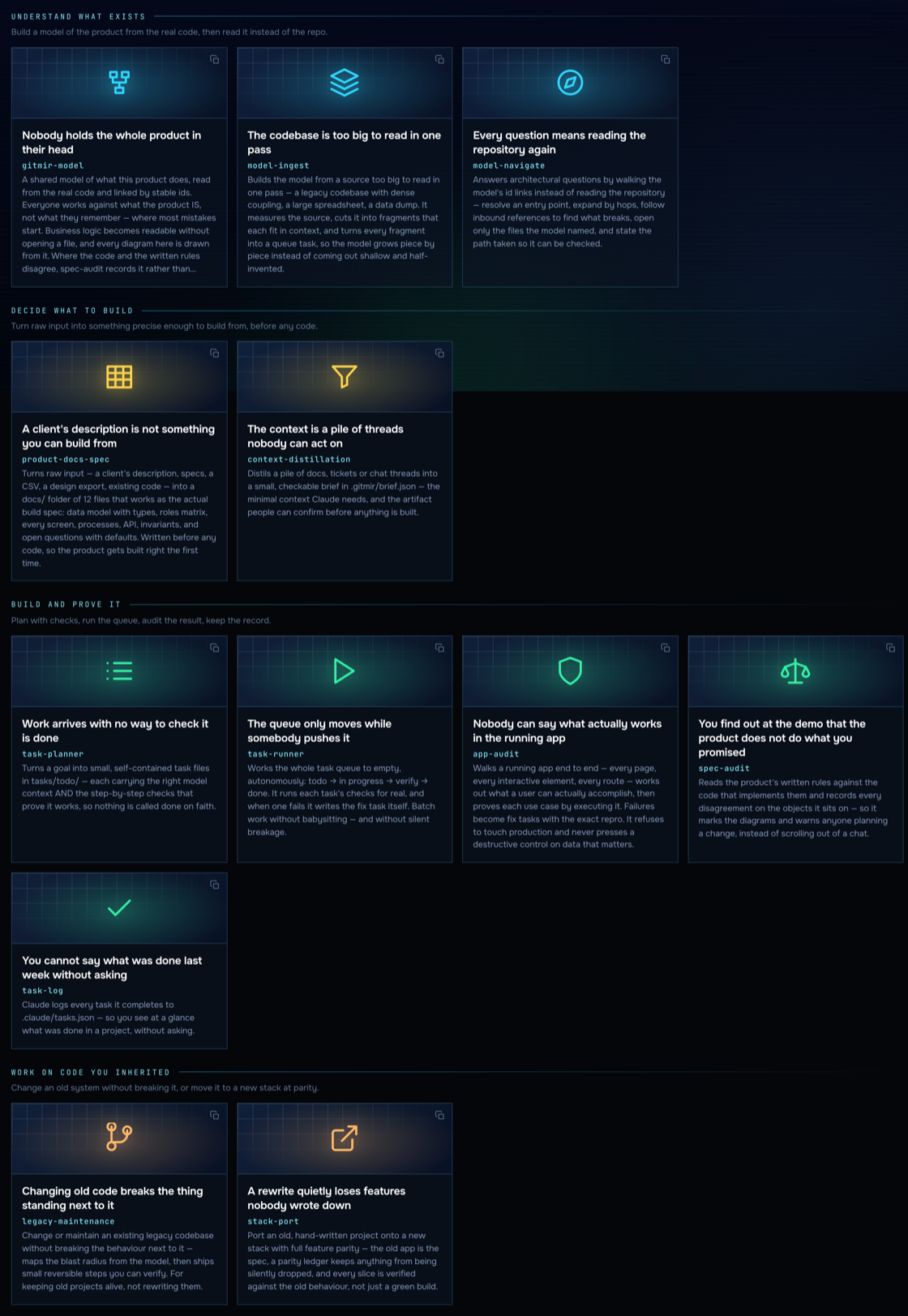
| Your situation | The path |
|---|---|
| I inherited a codebase | gitmir-model → model-navigate |
| The repo is too big to read in one pass | model-ingest |
| I need to make a risky change | model-navigate → task-planner → task-runner |
| The docs and the code may disagree | spec-audit |
| I have to prove the app actually works | app-audit |
| I am moving this to another stack | stack-port |
| I am changing an old system I did not write | legacy-maintenance |
| I have an idea and no spec | product-docs-spec → task-planner |
| I keep re-explaining the same context | context-distillation |
| I cannot say what was done last week | task-log |
Twelve skills, plain markdown in skills/ — read them, change them, keep your
own. They are served as MCP prompts too, so most clients surface them as slash commands.
Where the code disagrees with the product
Your agent reads the spec against the code and finds fifteen places they disagree. It
writes them in a reply, and they are gone when the conversation ends — the agent that edits
one of those functions next week does not know, and neither does whoever approves the
change.
spec-audit records them instead. Each names the rule, what the code does instead, what
that costs, and the objects it sits on:
- the object is drawn as deviating on every diagram — in colour, so the mark survives
at the zoom where labels disappear - the change radius warns before anyone approves work that reaches it
- the context handed to an agent carries it, so it cannot plan against rules the code
does not follow - deciding to live with one records who decided and why — the difference between a
product with known limits and one with surprises
A finding remembers the files it was read from. When one changes, it asks to be re-checked
rather than going on asserting something about code that has moved.
The dashboard
Arranged by the question you arrived with, not by the shape of the data. Every view opens
by saying what it is, what it gives you, and how to use it.
| The question | What answers it |
|---|---|
| What does it do? | the product map, the journeys people walk, the business objects, where data moves between areas, what raises a signal |
| Why does it work this way? | the lifecycle of each object, and every branch with the condition it actually checks |
| What would a change cost? | what a task reaches, how much of the product that is, whether anything sensitive is in it |
| Who answers for it? | the owning team per area — and the areas nobody has claimed, drawn as the gap they are |
| How much should I trust it? | where the model is solid, where it is guessing, what it does not know |
| What actually happened? | where the code disagrees with the spec, what changed between two dates, whether finished work stayed inside its declared scope |
Every diagram opens: an area holds its objects, a transition holds what it fires — so the
top level stays a size you can take in and the detail is one click inside it.
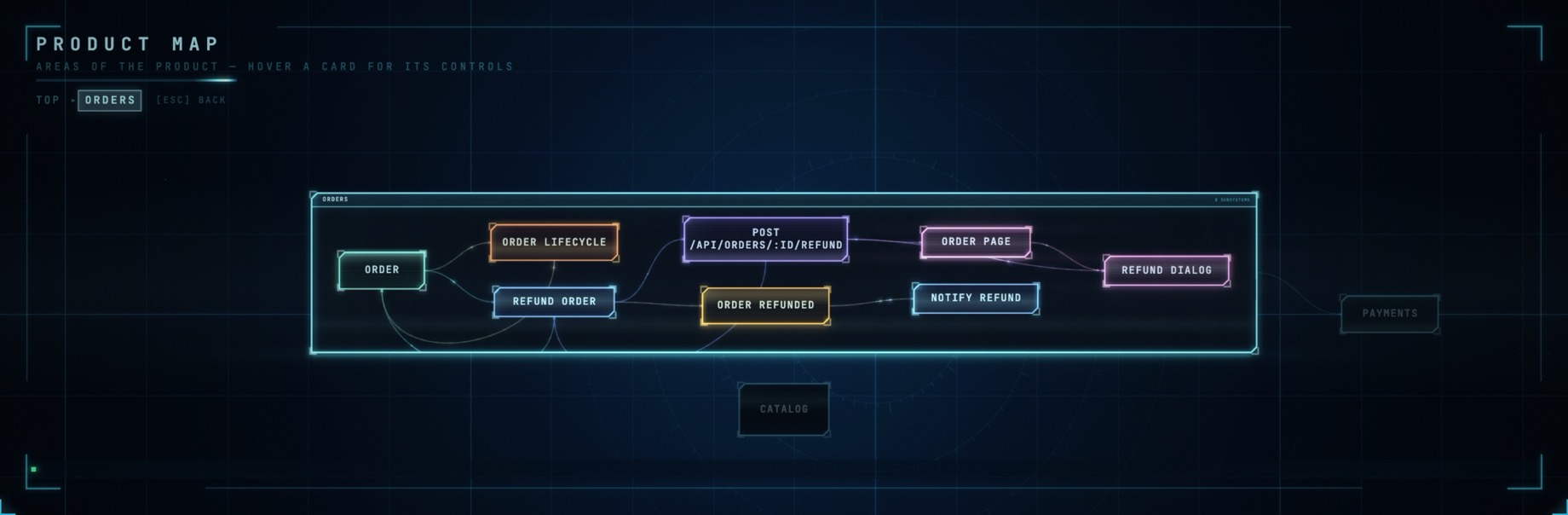
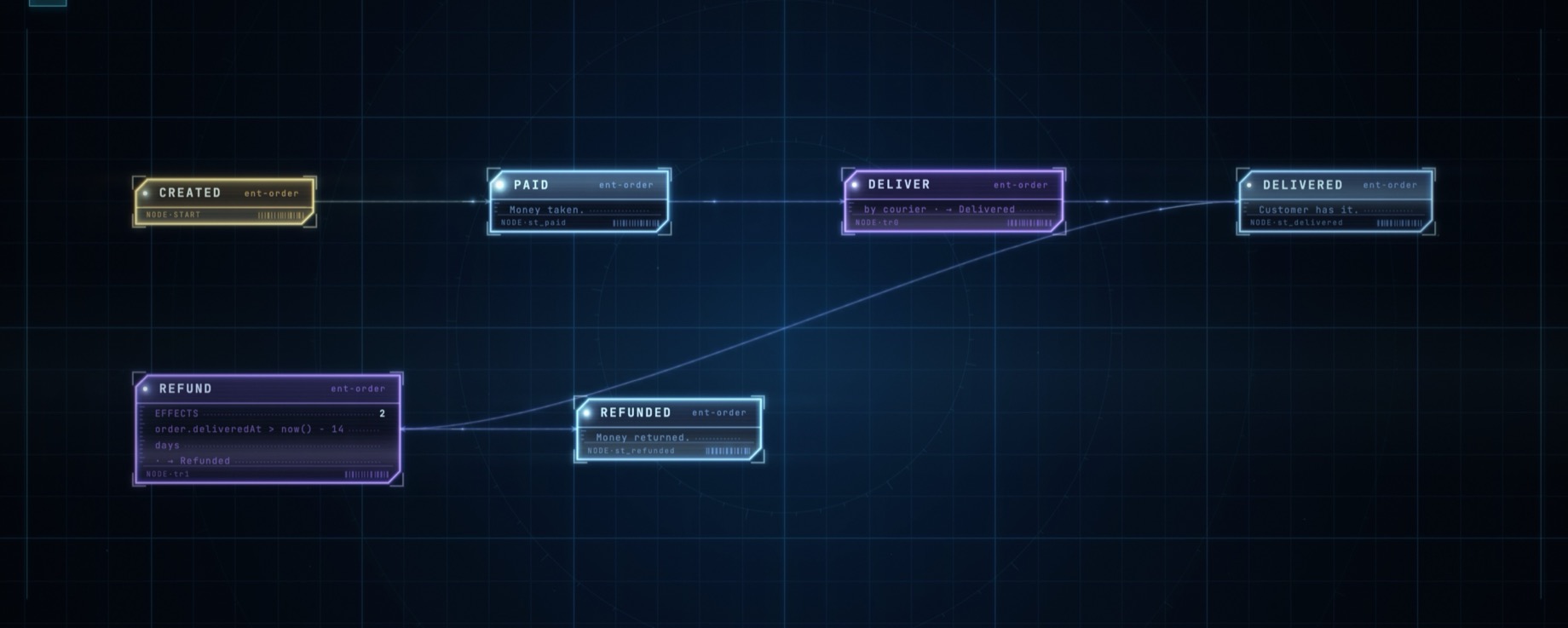
Alongside: Queue (todo → in progress → verify → done, each card carrying its risk and
its approval) and Preview (open any URL, click an element, get a prompt naming it and
the files it probably lives in).
They are drawn on a canvas by a renderer written for this project — which is why vendor/
holds fonts and nothing else, and why a map exported for someone to open is one self-contained
file under a megabyte.
Local, and what that does and does not mean
GitMir uploads nothing. The model, the dashboard, the MCP server and the task queue run
on your machine and are stored in your project. No GitMir account is required for local
use, and there is no GitMir telemetry — not reduced, not anonymised, none.
(SECURITY.md)
Your coding agent is a separate program with its own policy. Claude Code, Cursor or
whatever you run sends code and context to the model provider it is configured against,
under that provider's data terms. GitMir does not change that and will not pretend to. What
it changes is how much has to be sent: the relevant slice of the model, instead of the
repository, over and over.
Requirements. Node.js 22.18+ — it runs the TypeScript directly, sonode server.ts is the whole build system. The claude CLI on your PATH if you want the
dashboard to run Claude for you. macOS · Windows · Linux. dependencies is empty and
staying that way: the renderer is written for this and the fonts are vendored, so it works
offline. Port 4599, or GITMIR_PORT=4600.
Local → Connect → Team → Enterprise
GitMir Local — this repository. Free, open source, and not a trial: the model, every
view, the MCP server, twelve skills, the task queue with risk and approval, and sharing a
read-only map. One person on one machine, for as long as they like.
The paid part begins at the second person — a shared model between machines, tasks that
travel between teammates, their snapshots next to yours — and continues into adapting
GitMir to an organisation's own products, agents and rules.
→ ide.gitmir.com
The model never leaves your machine either way. What travels between teammates is what you
send: ids, counts, area names, decisions and who made them. The server routes messages and
stores no business logic — which is why this engine is open in the first place, and why you
can read exactly what it does.
License. Dual: AGPL-3.0 — fork it, use it for paid work, run it forever
without us; distribute a modified version as a service and your source goes AGPL too. Or a
commercial license for closed-source embedding — [email protected].
We built this for ourselves — we run Claude Code all day across dozens of projects.
Run it on a product you actually know, then tell us:
did the model understand it correctly · what did it miss · what dependency did it find that
you did not expect
Share what the model got right and wrong
There is no telemetry, so that thread is the only way we learn anything.
🌐 gitmir.com · 🚀 ide.gitmir.com · ✉️ [email protected]
© GITMIR · bundled fonts ship under their own licenses (THIRD_PARTY.md) · the GITMIR name and logo are trademarks
Yorumlar (0)
Yorum birakmak icin giris yap.
Yorum birakSonuc bulunamadi