developer-kit
Health Gecti
- License — License: MIT
- Description — Repository has a description
- Active repo — Last push 0 days ago
- Community trust — 205 GitHub stars
Code Gecti
- Code scan — Scanned 12 files during light audit, no dangerous patterns found
Permissions Gecti
- Permissions — No dangerous permissions requested
This tool is a modular plugin marketplace designed for Claude Code and other agentic CLIs. It provides over 150 validated, spec-driven skills and 45 specialized agents to assist with development tasks across multiple programming languages and cloud platforms.
Security Assessment
The overall risk is rated as Low. The automated code scan reviewed 12 files and found no dangerous patterns, hardcoded secrets, or requests for dangerous permissions. Because this is an agent that interacts with development workflows, it inherently executes shell commands and accesses local file systems to perform its tasks. However, it does so strictly within the expected boundaries of a development assistant. Users should still exercise standard caution when granting any CLI tool access to their local environment.
Quality Assessment
The project demonstrates strong health and maintenance signals. It is actively maintained, with the most recent push occurring today. It has garnered 205 GitHub stars, indicating a solid and growing level of community trust. Furthermore, the repository is properly licensed under the highly permissive MIT license, making it fully open source and safe for integration into most projects.
Verdict
Safe to use.
Modular plugin marketplace for Claude Code and agentic CLIs, with validated, spec-driven skills, agents, commands, and workflows for Java, TypeScript, Python, PHP, AWS, and AI.


🌐 Languages: English | Italiano | 中文 | Español
A modular AI plugin system that supercharges your development workflow across languages and frameworks.
Installation • Quick Start • Plugins • Documentation • Changelog
Why Developer Kit?
Developer Kit is a modular plugin marketplace for Claude Code that teaches Claude how to perform development tasks in a repeatable, high-quality way. Instead of generic AI responses, you get domain-specific expertise for your exact tech stack.
- 🧩 Modular by Design — Install only what you need. Java developer? Grab
developer-kit-java. Full-stack TypeScript? Adddeveloper-kit-typescript. - 🎯 Domain Experts — 45+ specialized agents for code review, refactoring, security audits, architecture design, and testing across 7+ languages.
- 📚 150+ Skills — Reusable capabilities from Spring Boot CRUD generation to CloudFormation templates, all with best practices built-in.
- 🔄 Multi-CLI Support — Works with Claude Code, GitHub Copilot CLI, OpenCode CLI, and Codex CLI.
- ⚡ Auto-Activation — Path-scoped rules automatically activate when you open relevant files. No configuration needed.
Installation
Quick Install (Recommended)
Claude Code
# Install from marketplace
/plugin marketplace add giuseppe-trisciuoglio/developer-kit

# Or install from local directory
/plugin install /path/to/developer-kit
Claude Desktop
Enable Skills in Settings → Add giuseppe-trisciuoglio/developer-kit
Manual Installation
# Clone the repository
git clone https://github.com/giuseppe-trisciuoglio/developer-kit.git

# Install via Makefile (auto-detects your CLI)
cd developer-kit
make install

# Or install for specific CLI
make install-claude      # Claude Code
make install-opencode    # OpenCode CLI
make install-copilot     # GitHub Copilot CLI
make install-codex       # Codex CLI
Quick Start
# After installation, start your CLI
claude

# Check available commands
/help

# Use a Developer Kit command
/devkit.refactor

# Or invoke a specs workflow
/specs:brainstorm
Example Prompts
Generate a complete CRUD module for User entity with NestJS and Drizzle ORM
Review this Java Spring Boot service for security issues
Create a CloudFormation template for ECS with auto-scaling
Help me refactor this monolithic class into clean architecture
Generate unit tests for this TypeScript service with 100% coverage
Usage
Developer Kit provides four layers of capabilities:
1. Skills
Reusable capabilities loaded on-demand. Example:
[Skill: spring-boot-crud-patterns activated]
Skills automatically provide patterns, templates, and best practices for specific tasks.
2. Agents
Specialized sub-agents for complex workflows:
# Invoke via natural language
"Review this code as a Spring Boot expert"

# Or use commands
/devkit.java.code-review
/devkit.typescript.code-review
3. Specifications-Driven Development (SDD)
Transform ideas into production-ready code through a structured workflow:
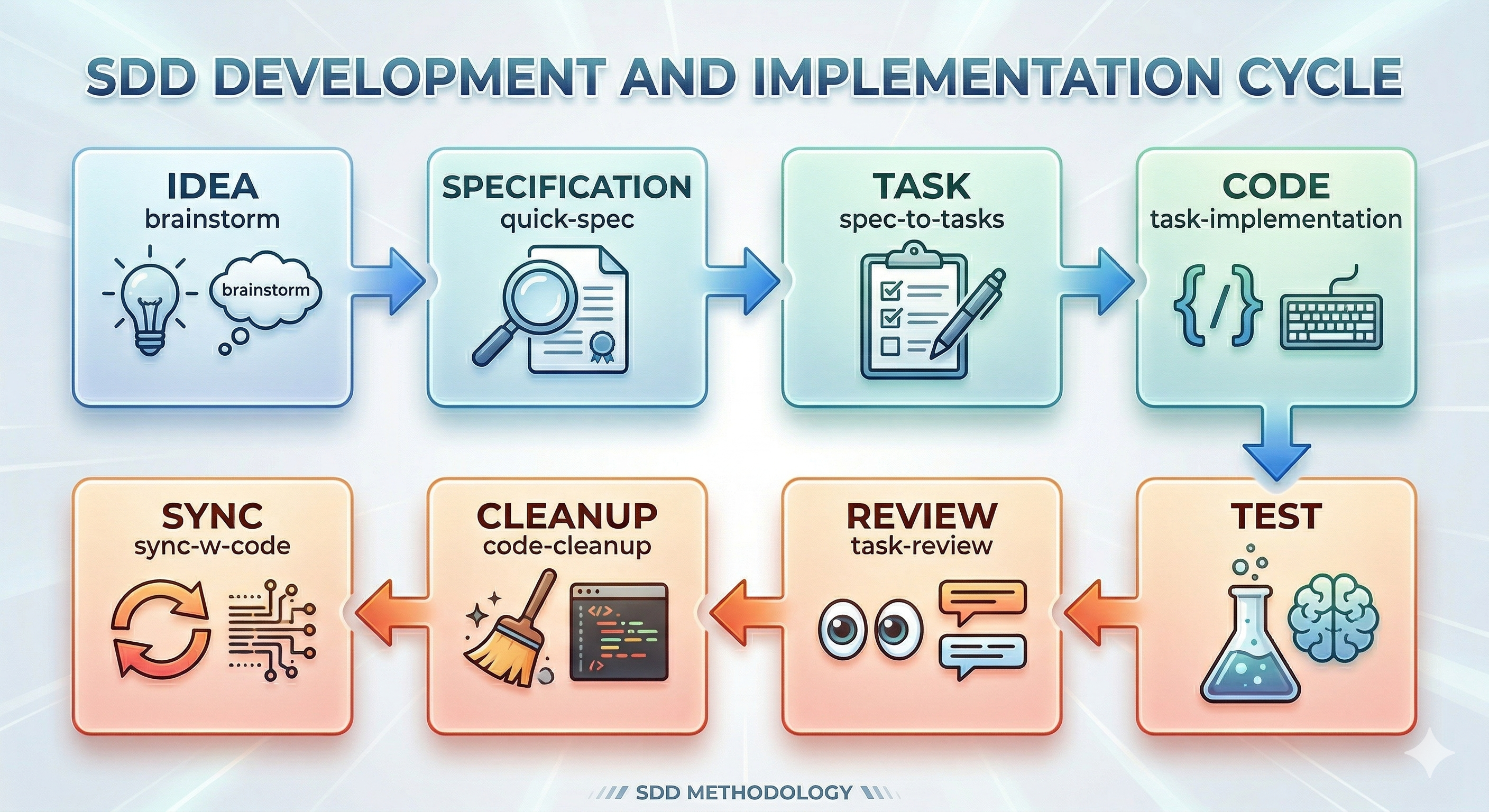
Phase 1: Specification Creation
| Command | When to Use | Output |
|---|---|---|
/specs:brainstorm |
New features, complex requirements | Full specification with 9 phases |
/specs:quick-spec |
Bug fixes, small enhancements | Lightweight 4-phase spec |
The specification lives in docs/specs/[id]/YYYY-MM-DD--feature-name.md
Phase 2: Task Generation
| Command | Description |
|---|---|
/specs:spec-to-tasks |
Convert specification into executable task files |
/specs:task-manage |
Add, split, update, or reorganize tasks |
Tasks are generated in docs/specs/[id]/tasks/ with individual task files.
Phase 3: Implementation
| Command | Description |
|---|---|
/specs:task-implementation |
Guided implementation of a specific task |
/specs:task-tdd |
Test-Driven Development approach for the task |
Each task implementation updates the Knowledge Graph for context preservation.
Phase 4: Quality Assurance
| Command | Description |
|---|---|
/specs:task-review |
Verify task meets specifications and code quality standards |
/specs:code-cleanup |
Professional cleanup: remove debug logs, optimize imports |
/specs:spec-sync-with-code |
Synchronize spec with actual implementation |
Additional Workflow Commands
| Command | Description |
|---|---|
/specs:spec-quality-check |
Interactive quality assessment of specifications |
/specs:spec-sync-context |
Sync Knowledge Graph, Tasks, and Codebase state |
/specs:ralph-loop |
Automated loop for spec-driven development |
/devkit.refactor |
Refactor existing code with architectural analysis |
/devkit.github.create-pr |
Create PR with comprehensive description |
4. Rules
Path-scoped rules auto-activate based on file patterns:
# Auto-activates for *.java files
globs: ["**/*.java"]
---
Always use constructor injection. Never use field injection with @Autowired.
📋 Note on Rules Installation
Plugins do not automatically install rules into your project. To use the rules, you can copy them manually
or use the Makefile command:# Copy rules from a specific plugin make copy-rules PLUGIN=developer-kit-java # Or manually copy .md files from the plugin's rules/ folder mkdir -p .claude/rules cp plugins/developer-kit-[language]/rules/*.md .claude/rules/The rules will be automatically activated based on the
globs:patterns defined in the header of each file.
Available Plugins
| Plugin | Language/Domain | Components | Description |
|---|---|---|---|
developer-kit-core |
Core | 6 Agents, 8 Commands, 4 Skills | Required base plugin with general-purpose capabilities |
developer-kit-specs |
Workflow | 9 Commands, 2 Skills | Specifications-driven development (SDD) workflow |
developer-kit-java |
Java | 9 Agents, 11 Commands, 51 Skills, 4 Rules | Spring Boot, LangChain4J, AWS SDK, GraalVM |
developer-kit-typescript |
TypeScript | 13 Agents, 3 Commands, 25 Skills, 17 Rules | NestJS, React, Next.js, Drizzle ORM, Monorepo |
developer-kit-python |
Python | 4 Agents, 4 Rules | Django, Flask, FastAPI, AWS Lambda |
developer-kit-php |
PHP | 5 Agents, 3 Skills, 4 Rules | WordPress, Sage, AWS Lambda |
developer-kit-aws |
AWS | 3 Agents, 19 Skills | CloudFormation, SAM, CLI, Architecture |
developer-kit-ai |
AI/ML | 1 Agent, 3 Skills, 1 Command | Prompt Engineering, RAG, Chunking |
developer-kit-devops |
DevOps | 2 Agents | Docker, GitHub Actions |
developer-kit-tools |
Tools | 4 Skills | NotebookLM, Copilot CLI, Gemini, Codex |
github-spec-kit |
GitHub | 3 Commands | GitHub spec integration |
Total: 150+ Skills | 45+ Agents | 20+ Commands | 45+ Rules
Plugin Architecture
developer-kit/
├── plugins/
│   ├── developer-kit-core/          # Required base
│   │   ├── agents/                  # Agent definitions (.md)
│   │   ├── commands/                # Slash commands (.md)
│   │   ├── skills/                  # Reusable skills (SKILL.md)
│   │   ├── rules/                   # Auto-activated rules
│   │   └── .claude-plugin/
│   │       └── plugin.json          # Plugin manifest
│   ├── developer-kit-java/          # Java ecosystem
│   ├── developer-kit-typescript/    # TypeScript ecosystem
│   └── ...
├── .skills-validator-check/         # Validation system
└── Makefile                         # Installation commands
Each plugin is self-contained with its own manifest, components, and dependencies.
Configuration
Plugin Selection
Install only the plugins you need:
# Core + Java + AWS
make install-claude
# Then enable: developer-kit-core, developer-kit-java, developer-kit-aws

# Full-stack TypeScript
# Enable: developer-kit-core, developer-kit-typescript, developer-kit-aws
Rules Auto-Activation
Rules automatically activate based on file patterns:
---
globs: ["**/*.java"]
---
# This rule activates for all Java files
- Use constructor injection
- Follow naming conventions
LSP Integration
Language plugins include LSP server configurations (.lsp.json):
| Language | Server |
|---|---|
| Java | jdtls |
| TypeScript | typescript-language-server |
| Python | pyright-langserver |
| PHP | intelephense |
Language Support Matrix
| Language | Skills | Agents | Commands | Rules | LSP |
|---|---|---|---|---|---|
| Java/Spring Boot | 51 | 9 | 11 | 4 | ✅ |
| TypeScript/Node.js | 25 | 13 | 3 | 17 | ✅ |
| Python | 2 | 4 | 0 | 4 | ✅ |
| PHP/WordPress | 3 | 5 | 0 | 4 | ✅ |
| AWS/CloudFormation | 19 | 3 | 0 | 0 | ❌ |
| AI/ML | 3 | 1 | 1 | 0 | ❌ |
Validation & Quality
Developer Kit includes a comprehensive validation system:
# Validate all components
python .skills-validator-check/validators/cli.py --all

# Security scan (MCP compliance)
make security-scan

# Pre-commit hooks
.skills-validator-check/install-hooks.sh
Ecosystem
Listed on:
Related Projects:
- Claude Code — AI-powered terminal from Anthropic
- OpenCode — Open-source AI coding assistant
- GitHub Copilot CLI — AI pair programming
- Codex CLI — OpenAI's coding agent
Contributing
We welcome contributions! See CONTRIBUTING.md for:
- Adding new skills, agents, and commands
- Plugin development guidelines
- Validation requirements
- Branch strategy and versioning
Security
Skills can execute code. Review all custom skills before deploying:
- ✅ Only install from trusted sources
- ✅ Review SKILL.md before enabling
- ✅ Test in non-production environments first
- ✅ Run
make security-scanbefore releases
Security scans run automatically via GitHub Actions on every PR.
License
MIT License — Open source and free to use.
Acknowledgments
- Claude Code by Anthropic — The foundation this plugin system extends
- Qwen Code — README design inspiration
- Contributors — Thank you to everyone who has contributed skills and plugins
Made with ❤️ for Developers using Claude Code
Also compatible with OpenCode, GitHub Copilot CLI, and Codex
Yorumlar (0)
Yorum birakmak icin giris yap.
Yorum birakSonuc bulunamadi