den
Health Uyari
- License — License: MIT
- Description — Repository has a description
- Active repo — Last push 0 days ago
- Low visibility — Only 6 GitHub stars
Code Gecti
- Code scan — Scanned 4 files during light audit, no dangerous patterns found
Permissions Gecti
- Permissions — No dangerous permissions requested
Bu listing icin henuz AI raporu yok.
See, approve and steer all your Claude Code agents from one terminal screen.
Den
See, approve and steer all your Claude Code agents from one terminal screen.
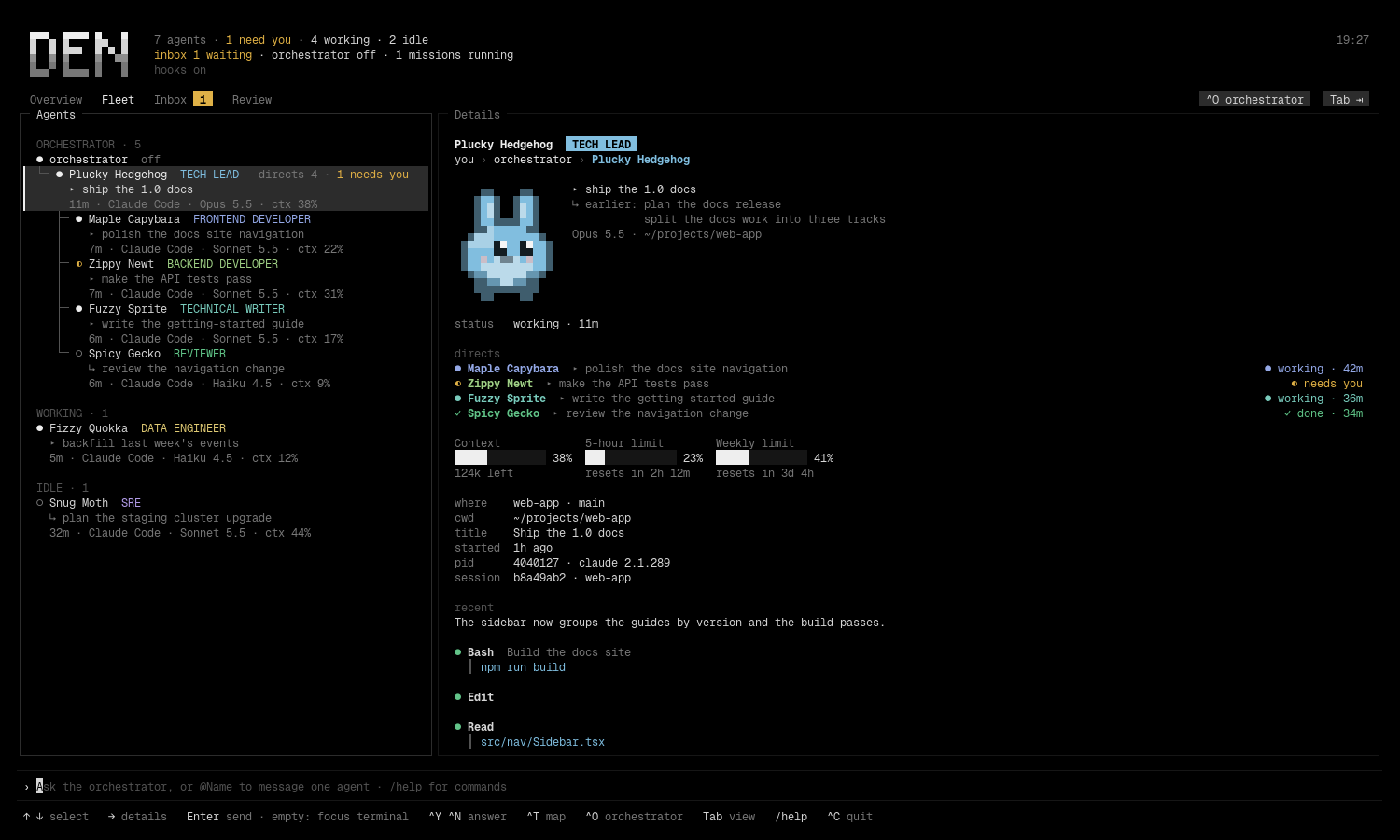
Den is a small terminal UI that finds the Claude Code sessions already running
in your terminals, shows who they are (the agent-badge critter, role and task),
streams everything that needs your answer into one inbox, and lets you talk to
one agent with an @mention or to an orchestrator that speaks to all of them.
It also draws who directs whom, keeps standing goals as missions, and shows what
each agent changed as a diff you can comment on and send back to the agent,
and adds up what the work cost.
Den is Linux software. It reads /proc and ~/.claude/sessions, brings
terminals to the front through Hyprland, and starts new ones throughxdg-terminal-exec. See Requirements for what works without
Hyprland.
Contents
- Install · Requirements · On Omarchy · Quick start
- Views: Overview, Fleet, Inbox, Review, Orchestrator
- Notifications · Events for scripts
- The command line · Keys
- Orchestrator · Dispatch cards
- Who directs whom · Spawning agents and teams · Closing agents · Bringing agents back · Skills for roles
- Overview, projects and missions · Templates
- Cost
- Review · Worktrees in Review · The agent badge
- Configuration · Files Den writes
- Troubleshooting · Den, Herdr and OpenRig · Contributing · License
Install
From source
The repository uses a git submodule (mods/agent-badge, the agent-badge mod
that Den embeds in its binary). Clone with it, or the build has nothing to
embed:
git clone --recurse-submodules https://github.com/GlacierHubAB/den
cd den
# already cloned without it?  git submodule update --init
make build        # ./den, stamped with the version from git describe
make install      # builds into $PREFIX/bin/den, PREFIX defaults to ~/.local
go install …/cmd/den@latest does not work: the badge mod lives in the
submodule, which a Go module download does not include.
make test runs go vet ./... and the test suite against a scratchXDG_STATE_HOME, so it never touches your own Den state.
From a release
Tagged releases carry static Linux binaries, den_linux_amd64 andden_linux_arm64, the THIRD_PARTY_LICENSES notices and a SHA256SUMS file
covering all three. Download the binary for your machine and the checksum file
into one folder, then:
sha256sum -c --ignore-missing SHA256SUMS
chmod +x den_linux_amd64
mkdir -p ~/.local/bin && mv den_linux_amd64 ~/.local/bin/den
den version
make release builds the same files into dist/; pushing a v* tag runs it
on GitHub Actions. Only Linux binaries are built.
Requirements
- Linux, amd64 or arm64. Den reads the process tree from
/proc
(internal/procs), so it does not run on macOS or Windows. - Claude Code 2.1.289 or newer. That is the version that writes
~/.claude/sessions/<pid>.jsonfor every live session, which Den treats as
the source of truth (internal/discover).claudemust be onPATHfor the
orchestrator and for spawned agents. - Go 1.26 (the
goline ingo.mod) to build from source. - A terminal that reports
Shift+Enter(Den asks for it;Ctrl+JandAlt+Enteralso insert a newline). Thumbnails of pasted images need the kitty graphics protocol and
are skipped without it. - Hyprland for focusing an agent's terminal (
Enteron an empty line,den focus) and for putting spawned terminals on your workspace. Withouthyprctlthe Fleet, Inbox, Review, orchestrator and hooks still work; focus
reports that no window was found. herdr panes are
focused too when the agent runs inside one. - git 2.38 or newer for the merge check in Review (
git merge-tree --write-tree); the rest of Den does not need it. - A terminal launcher for spawning:
uwsm-appwithxdg-terminal-exec,
orxdg-terminal-execalone, or$TERMINAL. Without onespawn_agentandopen_terminalreport an error (internal/spawn/spawn.go). notify-send(libnotify) for desktop notifications. Clicking one to
focus the agent works on omarchy-shell (Omarchy 4), mako and swaync, and
through a middle click on dunst. Withoutnotify-sendnothing is shown and
nothing else changes.- Hooks (
den install-hooks) for the inbox, permission answers, history
and the hierarchy. Without them Den still lists and messages agents. - The agent-badge mod (
den install-mods) for roles, tasks and the 5-hour
and weekly gauges. Optional: names and critters match with or without it.
On Omarchy
Den is built on and for Omarchy, and that is where every
part of it works. On Omarchy:
- Spawned agents open the way Omarchy opens a terminal. Den runs
setsid uwsm-app -- xdg-terminal-exec --dir=<dir> -- claude …, the same
launch as Omarchy's terminal keybinding, so the window is your default
terminal and is detached from Den (internal/spawn/spawn.go). - They land on the workspace you are on. Den records the active Hyprland
workspace before it launches and moves the new window there if it opened
elsewhere (internal/hypr). - Enter focuses the agent's window through
hyprctl, matching Ghostty's
one-process-many-windows by title and directory. - Colours follow the current Omarchy theme, read from
~/.local/state/omarchy/current/theme/colors.toml(internal/theme).
Install it the usual way: download a release binary into ~/.local/bin
(already on Omarchy's PATH), or build it with make install (Go 1.26 or
later), then run den install-hooks once. Den ships no keybinding of its own;
to give it a key, bind omarchy-launch-or-focus-tui den in your Hyprland
bindings.
Other Linux desktops work too, without the window placement (see
Requirements). Den does not run on macOS or Windows: it reads/proc.
Quick start
den install-hooks     # once; wires Den into ~/.claude/settings.json (backed up first)
den install-mods      # once; puts the bundled agent-badge mod into ~/.claude/skills
den                   # the TUI
Hooks and the mod apply to Claude Code sessions started after installing them.
Existing sessions show up in the Fleet at once but only report prompts and
turns once restarted.
den install-hooks adds one entry per event for SessionStart, SessionEnd,UserPromptSubmit, Notification, Stop, PostToolUse, PreToolUse
(matcher AskUserQuestion), PermissionRequest, StopFailure andPostToolUseFailure, each running den hook. Installing twice replaces Den's
old entries, so run it again after upgrading Den; den uninstall-hooks removes
them. CLAUDE_CONFIG_DIR moves the settings file Den edits.
Commands
den                     the TUI
den list [-json]        what Den sees, for scripts and debugging
den focus mossy         focus an agent's terminal by name, session id or pid
den explain mossy       how Den arrived at that agent's name, status, window…
den send mossy "rebase on main first"   message an agent from a script; --wait for its turn to end
den wait mossy --until done             block until an agent is idle, needs you, or done
den ask "who is blocked on what?"       one orchestrator turn from a script
den events -json        follow the event stream, one JSON object per line
den events              headless: print hook events as they arrive
den install-hooks       wire Den into Claude Code's hooks
den uninstall-hooks     undo
den skills              the skills Den installed, for which project or agent, from where
den skills catalogue    the vetted skills catalogue: repo, pinned commit, license, why
den skills match "ui designer"          what the catalogue offers a role
den skills remove frontend-design ~/code/site   remove what Den installed
den install-mods        put the bundled agent-badge mod into ~/.claude/skills
den mods                what ships in this binary and where it is loaded from
den uninstall-mods      undo
den config              the config file path and the settings in effect
den config init         write a documented ~/.config/den/config.toml
den version
den mcp and den hook are run by Claude Code, not by you.
Views
The tab row reads Overview Fleet Inbox Review. Tab and Shift+Tab cycle
through them. The orchestrator has no tab: Ctrl+O opens it and brings you
back, and sending plain text opens it too. Its state sits beside the keycap on
the tab row.
- Overview: one project at a time, its agents on the left and its missions
on the right. See Overview, projects and missions. - Fleet: agents grouped by state (needs you, working, idle, gone) or by the
tree that directs them, each with critter, role, task, repo, branch and
context usage. A details pane shows the selected agent's animated critter,
context and usage gauges, the chain of command and recent activity.Enter
on an empty line brings that agent's terminal to the front. - Inbox: every permission request, plan review, question and finished turn
from every session. See below. - Review: what each agent changed, as a diff. See Review.
- Orchestrator: the chat with the agent that knows the fleet.
Inbox
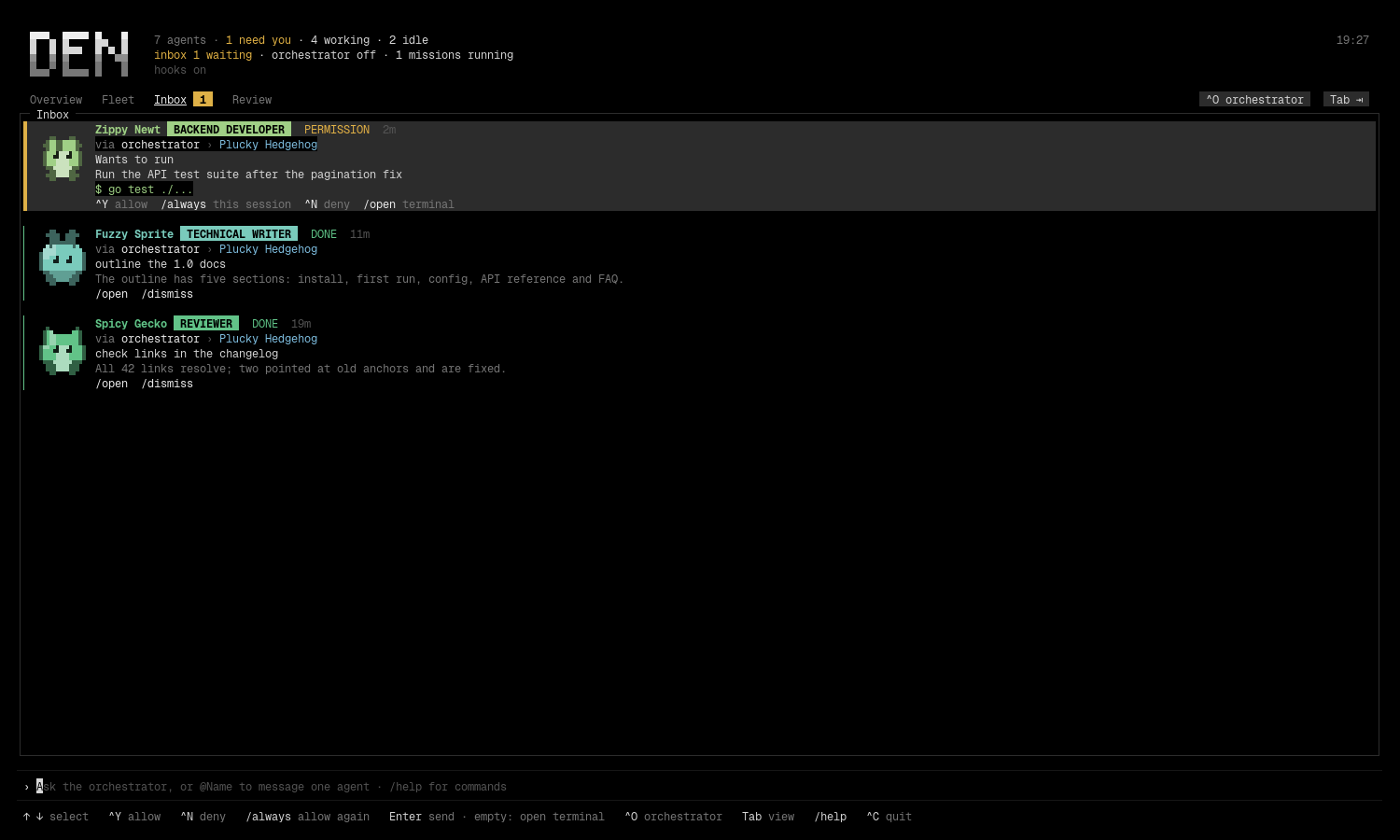
With the hooks installed, each item is a permission, a plan review, a question
or a finished turn; Den adds its own questions, to close agents, to install
skills or to reopen agents after a restart. Waiting permissions and plans can
be answered from Den: Ctrl+Y allows and Ctrl+N denies the waiting one,/always allows it and the same tool again this session, /open focuses the
terminal, /dismiss clears an item, and /unread keeps the selected item
counted as new until you open or dismiss it (/unread again marks it read).
Finished turns are appended to ~/.local/state/den/history.jsonl (the newestinbox.history, 100 by default, come back on restart). The request shows the
whole command or edit the permission is about.
Den holds a permission request only while you are not at that terminal. If the
agent's window is focused, or you switch to it, the normal Claude Code dialog
appears instead, and so it does when hooks.permission_wait (580 s) runs out
or Den is not running.
Answering an agent's questions
Off by default. With answer_questions = true under [hooks] in the config
(restart Den after changing it), a question an agent asks with Claude Code'sAskUserQuestion tool waits in the inbox as well as in its terminal: the
question, its header, its numbered options with their descriptions, and
"Question 2 of 3" when it asks several. On the Inbox view, select it and type
an option's number then Enter; for a question that takes several answers,
type several numbers (1 3). Anything else you type is your own answer, as
the dialog's "Type something" row takes it; put a number meant as text in
quotes ("3"). /answer <text> does the same from any view. A call with
several questions takes them one at a time, the answers so far listed above
the next one, and the agent hears back only once all are answered. Ctrl+Y
does not answer a question; Ctrl+N leaves it to the terminal.
The terminal dialog stays usable the whole time, and whichever you answer
first counts: answered or dismissed (Esc) in the terminal, the inbox item
clears. Den lets go after hooks.permission_wait (580 s, inside the hook's
600 s timeout), when you are at that terminal, or at once when Den is not
running; the question is then the terminal's alone. Den never answers on its
own.
This relies on undocumented Claude Code behaviour (a PermissionRequest
hook that allows the call with the answers added to its input), checked
against Claude Code 2.1.289. A later version may ignore such an answer; the
terminal dialog then stays and works as usual. No new hook is needed: it uses
the PermissionRequest hook den install-hooks already sets up.
Two kinds of item say an agent may be stuck. Neither ever counts as "needs
you":
- failed: a turn ended on an API error (
StopFailure: rate limit,
overload, login, billing), orstuck.tool_failurestool calls (3) failed in
a row (PostToolUseFailure; a tool you interrupt withEscdoes not
count). The item names the error type or the tool, never the command or its
output. A new prompt, or a tool call that works, resolves it. - stalled: an agent has been working for
stuck.stalledminutes (20) with
no hook event. A long build looks the same, so this is a hint to look, not a
verdict. Any hook event from that agent resolves it.
Notifications
Den sends a desktop notification (through notify-send) when a permission,
plan or question starts waiting on you, and one reminder if it is still
waiting after notify.remind minutes (10). A notification reads like "Mossy
Lemur needs your permission": the agent's name and the kind of request, never
the command, a path, a prompt or file text. Clicking it brings that agent's
terminal to the front, as den focus does. That uses the notification's
default action: omarchy-shell (Omarchy 4), mako and swaync run it on a click,
dunst on a middle click; on a server without actions the click does nothing.
There is no notification for an agent whose terminal is the focused window, or
while Den's own window is focused (when Den can tell: Ghostty runs all its
windows in one process, so there it cannot), and none for the orchestrator's
own traffic.
The rest are off by default, each with its own switch under [notify]:
done: an agent finished. Only the top of a branch notifies, an agent
nobody in the fleet directs, or one the orchestrator does, and only once
nobody under it is still working. Workers finishing for a lead stay quiet.failedandstalled: the stuck items above.without_den: Den only notifies while it runs. With this on,den hook
turns Claude Code's own permission and input notices into a desktop
notification when no Den is listening. There is nothing to click then.
DEN_NOTIFY=off turns every notification off.
Events for scripts
den hook appends every event to ~/.local/state/den/events.jsonl, one JSON
object per line with a version field and metadata only (kind, session, agent
name, time; never a command, prompt or file text). den events -json follows
it, den wait <agent> --until idle|needs-you|done blocks on it, and the [on]
config section runs a command per event kind, for example to push to your
phone. The stream and den wait work without Den running; the stalled andstill_waiting events and [on] commands come from a running Den. The
schema, exit codes and the environment [on] commands get are in
docs/EVENTS.md.
Messages you send to an agent arrive in its session the way messages from other
Claude Code sessions do, with a first line saying they come from you via Den.
While you are at that agent's terminal Den holds the message and delivers it
when you leave, so it never lands under something you are typing.
The command line
The line at the bottom is always open. Type to ask the orchestrator, @Name …
to message one agent (Tab completes the name), /help for commands. It grows
with what you type, one row for a short message and more as text wraps (by
display width, so wide characters count double) or you add line breaks, up to
a third of the screen; past that it scrolls inside itself and keeps the cursor
line in view. Nothing you type or paste is cut off. The panes above shrink to
make room.
Images travel with a message. Paste or drag an image file (a path, a file://
URL or several lines of them) and it becomes a chip, [Image #1], in the text;Ctrl+V takes an image straight from the clipboard (saved under~/.local/state/den/attachments/). When the message goes out the chip reads[Image #1: /full/path.png], so the receiving session can open the file. If
the terminal answers Den's kitty-graphics query, a thumbnail is drawn next to
each chip. Delete a chip from the text and its image is left out.
Slash commands
| Command | Does |
|---|---|
/allow /y, /deny /n, /always /a |
answer the waiting prompt |
/open /o /focus |
focus the selected agent's terminal |
/answer <text> |
answer the agent's question waiting in Den: an option's number, several for a multi-select, or your own words (with hooks.answer_questions) |
/dismiss /x |
clear the selected inbox item |
/unread /u |
keep the selected inbox item counted as new until opened or dismissed; again to mark it read |
/copy |
copy the last command block in view (Orchestrator and Overview) |
/close /kill |
close the selected agent; /close idle every idle one; /close idle 1h those idle at least that long (30m, 2h, 1d); /close <name>, <name>; --force includes working agents and kills what does not stop |
/reopen <name>, /reopen --fork <name> |
reopen an agent Den has seen in the last two weeks with claude --resume; --fork opens a copy of its conversation under a new session id |
/protect <Name>, /unprotect <Name> |
keep an agent out of every close; /protect alone lists what is protected |
/flag <Name>: <note>, /unflag <Name> |
mark an agent as holding context: a bulk close lists it without selecting it |
/rescan /r |
refresh now (in Review, reload the diffs) |
/overview /missions, /fleet, /inbox, /review |
switch view |
/map |
toggle the Fleet map |
/orchestrator /orch |
open the orchestrator; /orch new starts a fresh session, /orch restart restarts it |
/project <name>, /project add <dir>, /project drop |
pick, list or unlist a project |
/mission <goal>, /pause, /resume, /stop |
missions |
/budget 2M, /budget $5, /budget off |
set, show (/budget alone) or remove the budget on the open or selected mission |
/template, /template <name> <target or goal>, /template save <name> |
list the mission templates, start a proposal from one, save the open mission as one |
/delete /del |
remove the review comment under the cursor |
/send, /send <Name>, /send orchestrator |
send review drafts to their agents, to one agent, or those no live session can take to the orchestrator |
/merge [<Name>], /cleanup [<Name>] |
in Review, ask to merge the selected agent's worktree branch, and to remove its worktree |
/help /?, /quit /q /exit |
Keys
| Key | Does |
|---|---|
Tab / Shift+Tab |
next / previous view (with @ typed, Tab completes the name) |
Ctrl+O |
open the orchestrator, press again to go back |
← → |
move between panes; on Overview switch project; in Fleet fold and unfold a branch |
↑ ↓ |
select, or scroll in the focused pane |
PgUp PgDn |
scroll the chat; half a screen in Review; five rows elsewhere |
Enter |
send; with an empty line, focus the selected agent's terminal (Overview: open the mission; chat: expand the card; Review: edit the comment under the cursor) |
Shift+Enter, Alt+Enter, Ctrl+J |
newline |
Ctrl+Y / Ctrl+N |
allow / deny the waiting prompt (Overview: start / drop the proposed mission) |
Ctrl+T |
toggle the Fleet map |
Ctrl+X |
close the selected agent (Fleet, map, Inbox): a question in the inbox lists what would close, Ctrl+Y does it |
Ctrl+V |
paste an image from the clipboard |
Esc |
clear the line; closes a proposal or an open mission; drops a review edit or range |
Ctrl+C |
quit |
Review adds Shift+↑ ↓ to extend a selection and mouse support: click a work,
file or line, drag or shift-click for a range, wheel to scroll.
On the Orchestrator and Overview views Den owns the mouse too, because the
terminal's own selection runs across the whole row and would take the agents
pane and the borders along with the chat. Drag inside the chat or the mission
pane to select that pane's text only; letting go copies it. Click a command
block (the lines with a bar down the left) to copy the whole block, or type/copy for the last one in view. The wheel scrolls. Copies go through OSC 52
(the terminal's clipboard escape) and through wl-copy when it is installed.Esc drops the highlight. The terminal's own selection is still there: holdShift while dragging in Ghostty. The Fleet and Inbox views never capture the
mouse.
Orchestrator
The orchestrator is a headless Claude Code session Den starts on your first
plain-text message. It has six tools: ListAgents and SendMessage, plus
four Den gives it through its own MCP server (den mcp): spawn_agent,open_terminal, close_agent and propose_skills; the last two only ever
ask you (see Closing agents and Skills for roles). It gets a fresh roster of
the fleet with every message, so it can answer "who is blocked on what?" or
relay "tell Mossy to rebase first". It cannot approve anything; you do that in
the inbox.
Its turns are billed like any other session. It uses sonnet unless the config
file or DEN_ORCHESTRATOR_MODEL says otherwise ("off" keeps Claude Code's
default). Only Den's MCP server is loaded into it (--strict-mcp-config); your
own MCP servers never are. A watchdog names a silent turn, restarts it once and
resends what it owes.
Each message has its speaker's name on the line above it, so the text uses
the pane's full width.
The chat persists: every entry and card state is appended to~/.local/state/den/orchestrator.jsonl and restored on launch (newest 500).
The orchestrator resumes its previous session; if that fails, Den starts a fresh
one and replays the last exchanges.
Dispatch cards
When the orchestrator hands a brief to an agent, that agent's turn shows up in
the chat as a card the agent owns: its avatar and colour, the role chip, the
brief, and a state chip through queued, working, needs you, done or failed.
While it works the card shows the latest tool call from the hook stream; done,
it collapses to the agent's last message in one sentence with call and file
counts. With two or more cards live, a strip at the top of the pane keeps them
in view. Everything on a card comes from the agent's own hooks and transcript,
never from the orchestrator's retelling.
| Key | On a focused card |
|---|---|
↑ ↓ |
move between cards; past the last one the chat follows its tail again |
Enter (empty line) |
expand to the agent's full turn, with diffs and output |
→ |
open the agent in the Fleet; ← comes back to the card |
Ctrl+Y Ctrl+N |
answer the card's permission, exactly as in the inbox |
/open |
focus the agent's terminal |
Who directs whom
Agents hand work to each other over Claude Code's session messaging, so the
fleet is a tree, not a list. Den learns the edges from traffic it already sees:
a dispatch card is an edge from the orchestrator; a peer message arriving at an
agent (the UserPromptSubmit hook carries the sender) puts the receiver under
the sender, unless the receiver sits above the sender, in which case it is a
report back; an agent the orchestrator spawned is its child from the start.
Edges are appended to ~/.local/state/den/edges.jsonl and come back on
restart; a child keeps its newest parent and drops out of the tree when its
session is gone.
In the Fleet every tree sits in its own section, the orchestrator's first, with
guides between parent and child, directs n on a parent and what the branch
needs rolled up (1 needs you). ← folds the selected branch and → unfolds
it. The details pane shows the chain of command (you › orchestrator › Mossy Lemur) and a directs list with each child's brief and state. Ctrl+T or/map swaps the pane for a map: one column per level from you to the leaves;↑ ↓ walk it, ← goes to the parent and → to the first child.
In the chat, a card whose agent handed work on grows a line per child, and its
state says needs you · via <child> when something deeper down is waiting on
you; Ctrl+Y / Ctrl+N on it answer the child's request. Inbox items from an
agent inside a tree carry a via orchestrator › … line.
Spawning agents and teams
Ask the orchestrator for a new agent ("start an agent in ~/code/site that fixes
the login redirect") and it opens your default terminal in that directory withclaude --name <peer> running and its brief as the first prompt. The brief
arrives introduced as coming from the orchestrator on your behalf and asks the
agent to report back when done or blocked. The agent appears in the Fleet like
any other, and the orchestrator tells you its critter name. "Open a terminal in
~/code/site" gives you a plain shell the same way.
The terminal is launched the way Omarchy's own keybinding does it (setsid uwsm-app -- xdg-terminal-exec --dir=…), so it is detached from Den. Den records
your active workspace first and moves the new window there if it landed
elsewhere. If Claude Code has never worked in the folder, it asks you to trust
it in that terminal first; nothing happens until you answer. Set spawn = false under [orchestrator], or DEN_ORCHESTRATOR_SPAWN=off, to take the two
tools away.
A model per agent. spawn_agent takes a model: haiku for small,
mechanical, well-specified tasks, sonnet for ordinary building, writing and
fixing, opus for work that needs judgment (design, architecture, review,
leading others). The orchestrator picks by the task. Its spawn note says which
(▶ starting an agent in ~/code/site on opus · …), and once the session
registers the note becomes that agent's dispatch card.
A worktree per agent. spawn_agent takes worktree: true, or a name.
The agent is then started with claude --worktree <name>, so Claude Code gives
it a git worktree of its own under <repo>/.claude/worktrees/<name> on a new
branch worktree-<name>, and parallel agents in one repository do not edit
the same files. With true the name is the agent's peer name (with a number
added if that folder already exists). The folder must be in a git repository
that has a commit; otherwise spawn_agent says so and starts nothing. The
agent's brief is extended with its branch and the instruction to commit there
and leave merging to you. A lead can give each of its people a tree the same
way. By default Claude Code branches from the repository's default branch on
the remote; its worktree.baseRef setting changes that. To carry gitignored
files such as .env into every new worktree, use Claude Code's own.worktreeinclude file. Den has no per-repository setup command. When a
session exits with changes or commits in its worktree, Claude Code asks whether
to keep or remove it; an untouched worktree is removed without asking, and a
crashed session's stays. Den never removes one by itself (see Review).
Leads staff their own work. Every agent the orchestrator starts gets Den's
MCP server too, so it has spawn_agent itself, pre-approved. A lead's brief
names the roles under it with their models and parts; it starts them in their
own terminals, they report to the lead, and the lead reports up when the piece
is done. Ask for "a team" and the orchestrator starts one lead on opus and
leaves the rest to it. Den learns each of those spawns from the lead's own hook
stream (PostToolUse on spawn_agent), so the Fleet draws the tree as it
grows, and the lead's card stays working · waiting on 3 agents between turns
until nobody under it is at work.
Closing agents
Ctrl+X on an agent, or /close, asks before anything happens: a question
lands in the inbox listing exactly what would close, one line per agent
with its process id and the terminal window Den matched to it (or "no
window found, only the process ends"), and Ctrl+Y carries it out, Ctrl+N
keeps everything. /close idle clears every idle agent in one question;/close Mossy Lemur, Snug Capybara names them. The question warns when an
agent's checkout has uncommitted changes (which files), and when an agent
directs others, who stay open unless also selected.
The rules, enforced whatever asked: an agent that is working or waiting on
you is refused unless you add --force; the orchestrator, Den itself and
anything Den runs inside are never closed; an agent not in the fleet is
refused by name; the window Den runs in is never closed. Each agent gets a
graceful stop (SIGTERM) and a short wait; only --force sends SIGKILL to one
that does not stop, and nothing is forced from the orchestrator's side. A
terminal Den opened for the agent closes with its process; a window Den
matched by title is closed through Hyprland by address, never any other
window. Closed agents leave Den's state at once: their open inbox items are
resolved, they drop out of the tree, and the roster rescans.
/close idle 1h picks the agents that have been idle for at least that long.
Idle time is measured from the agent's last activity, which Den takes from
Claude Code's own session file: the moment the session last changed between
busy and idle (statusUpdatedAt), that is, when its last turn started or
ended; a session that has not reported a change yet counts from its start.
Den does not use the transcript's last write for this, because Claude Code
appends to the transcript when messages arrive, which is not use. An agent
whose last activity is unknown is never treated as stale. The same time isLastActive in den list -json.
Some agents must survive a bulk close. /protect <Name> keeps an agent out
of every close, even by name, until /unprotect; the list is~/.local/state/den/protected.json, which also takes paths (an agent whose
working directory, edited repositories or task involve one of them is
protected) and flagged agents. /flag <Name>: <note> marks an agent as
holding context you may still need: a bulk close shows it as "Holds context,
not selected" with the note, and only /close <Name> includes it. The
question lists what was skipped and why, so the list is always exact.
The orchestrator has the same door, close_agent: "kill the idle agents we are
not using" or "close what has not been used for an hour" (idle_for: "1h")
becomes the same question in your inbox, marked as its request with its
reason, protected agents skipped and flagged ones unselected, and it only
hears what you decided. It cannot force.
Bringing agents back
Den keeps a snapshot of every live agent in ~/.local/state/den/roster.json:
its session id, working directory, peer name, critter name, role, model,
who directs it, its mission, whether Den started it, its private skills
folder if it has one, and when Den last saw it. The file is rewritten
atomically when the fleet changes, and otherwise at most once a minute to keep
the last-seen times current.
When Den starts and agents that were live when it last stopped are gone (after
a reboot, say), one question lands in the inbox: Restore 3 agents?, one line
per agent with its name, role, model and folder, who directed it, its mission,
when Den last saw it, and how many tokens of conversation it would reload with
an estimated cost at its model's cache-write rate from the price table (see
Cost). Ctrl+Y reopens them, each in a new terminal on your workspace, the
way spawned agents start: claude --resume <id> with the same peer name,
model and skills folder, and Den's tools again for agents Den started.Ctrl+N leaves them closed, and later restarts do not ask about them again.
Nothing reopens without Ctrl+Y.
The question leaves out agents you closed through Den (/close, Ctrl+X or
the orchestrator's close_agent) and agents that ended on their own while Den
was running, unless they ended within two minutes of Den's own last write,
which is how a shutdown looks. Agents whose conversation is no longer on disk
are left out too.
A resumed session keeps its session id, so it takes its old place in the tree
and its mission. Den puts each reopened agent back under the agent that
directed it once both are running again. /reopen <name> asks the same
question for one agent, closed or ended; /reopen --fork <name> works on a
running agent too and opens a copy of its conversation under a new session
id, which Den records so the copy takes the original's place in the tree.
restore.ask = false in the config, or DEN_RESTORE=off, turns the restart
question off; the roster is still kept for /reopen.
Skills for roles
Den ships a small, vetted catalogue of Claude Code skills (SKILL.md folders)
and offers the ones that fit an agent's role. Nothing is installed until you
press Ctrl+Y on a question in the inbox that lists each skill with its
repository, pinned commit, license and why it fits; Ctrl+N declines.
The catalogue is internal/skills/catalogue.json, built into the binary. Every
entry names a GitHub repository, a full commit SHA (never a branch), an
allowed license, its role tags, a one-line reason, what was checked before it
was admitted, and every file with its SHA-256. den skills catalogue prints it.
It holds six skills from four repositories:
| Skill | Roles | Repository @ commit | License |
|---|---|---|---|
| frontend-design | frontend, design | anthropics/skills @ dbd4588f9e10 | Apache-2.0 |
| test-driven-development | testing, coding | obra/superpowers @ bb92a7774141 | MIT |
| verification-before-completion | coding | obra/superpowers @ bb92a7774141 | MIT |
| diagnosing-bugs | coding | mattpocock/skills @ 49dd158d1076 | MIT |
| vulnerability-triage-brocards | security | trailofbits/skills @ 442fc9d6c89b | CC-BY-SA-4.0 |
| property-based-testing | testing | trailofbits/skills @ 442fc9d6c89b | CC-BY-SA-4.0 |
The writing, devops and research tags have no skills yet. Roles are free text
("coding agent", "ui designer", "sysadmin"), so Den matches them word by word
to the tags coding, frontend, design, writing, testing, security, devops and
research, and offers at most three skills; a role with no known word gets
nothing. den skills match "<role>" shows what a role would be offered.
Two ways in. spawn_agent takes a role: Den offers the matching skills
for that agent only and waits for your answer before starting it. On Ctrl+Y
they go into a folder of Den's own, ~/.local/state/den/skills/agents/<peer>-<time>/.claude/skills,
and the agent is started with claude --add-dir on it, so no other session
sees them; on Ctrl+N the agent starts without them. propose_skills offers
a role's skills to a project (an agent already running, or a folder you
name): they go into <project>/.claude/skills, where every Claude Code
session in that project finds them. A session that started before that folder
existed needs /reload-skills. The orchestrator offers skills when it starts
an agent with a role, or when you ask; a lead can pass a role to the agents it
starts.
What Den checks at install. It looks the skills up again in its own
catalogue (a request can only narrow the role's matches), downloads each file
from raw.githubusercontent.com/<repo>/<commit>/…, and refuses the skill if
any file's size or SHA-256 differs from the catalogue, if any markdown file's
frontmatter sets hooks or allowed-tools, if it runs a shell command when
it loads (!`cmd` or a ```! block), or if SKILL.md names a different
skill. It never replaces a folder that is already there, writes no file
executable, and installs nothing into ~/.claude/skills. Skills whose folder
carries no license get their repository's license file copied in beside them.
Den runs nothing a skill ships.
Provenance and removal. Every install is recorded in~/.local/state/den/skills.json: skill, repository, commit, license, scope,
project or agent, path, date, who approved (your user, in Den) and who asked.den skills lists them. den skills remove <skill> [<project | peer | path>]
deletes the files Den installed, keeping any file changed since, removes the
skill's folder once it is empty, and drops the record.
Overview, projects and missions
The Overview tab, first in the row, shows one project at a time. Projects are
the repositories agents work in, found through the files their transcripts say
they edited plus session folders that are checkouts; the strip under the tabs
lists them with a count of agents on each. ← → or /project <name> switch,
the pick is remembered, and the Review tab follows it. A folder nobody works in
yet is listed with /project add <dir> (its repository root when it is inside
one) and stays listed, empty, until /project drop.
A mission is a standing goal: a purpose in one sentence, constraints that ride
on every dispatch, and what done looks like, or "standing" for one that never
ends. Type the goal on the Overview command line (or /mission <goal>) and the
orchestrator answers with a proposal: the mission rewritten, done-when,
constraints it inferred, the agents it means to reuse, the team it means to
start (roles as a tree, each with the model it picked), and the shape it chose
with one line of reasoning. Ctrl+Y starts it, Ctrl+N drops it, typing
refines it, Esc keeps it for later. Nothing runs before Ctrl+Y. When the
run starts, the orchestrator spawns only the roles that report to it; each lead
starts its own people.
| Shape | Runs as |
|---|---|
▶ once |
one dispatch to one agent; done when it reports back |
↻ loop |
one agent iterates; after each pass Den asks the orchestrator whether the goal is met, and it re-dispatches until it is |
⇶ fan-out |
a lead with children in parallel, repeated until the lead says done |
⏲ schedule |
Den fires a run on the cadence (every 30m, daily 08:30, weekly mon 09:00, or a five-field cron line); each run is a once or a fan-out |
Den drives the runs: it asks the orchestrator to dispatch, tags the resulting
cards with the mission, notices when they settle, and asks again when the shape
calls for another pass. Enter on a mission opens it: the fields, a line per
run with its progress or summary, then the mission's conversation, where the
agents the orchestrator dispatched work inline as dispatch cards, in the order
they were sent, just as in the Orchestrator chat. A dispatch made while you
talk about a finished mission shows there too. /pause holds the next run,/resume lets it go, /stop ends the mission and keeps its history. Missions
persist in ~/.local/state/den/missions.jsonl; the project pick and pinned
projects in overview.json beside it.
Templates
A template is a mission's shape and team saved under a name: the purpose with a
blank ({target}) for what it is about, done-when, constraints, the shape, and
the roles as a tree, each with its model. Four ship in the binary:
| Template | Shape | Team |
|---|---|---|
code-review |
fan-out | a review lead on opus, a code reviewer and a security auditor on sonnet; read-only |
bugfix |
loop | a coding agent on sonnet, a code reviewer on opus |
research |
fan-out | a research lead on opus, a web researcher and a codebase researcher on sonnet |
docs-pass |
once | a technical writer on sonnet, an editor on haiku |
/template lists them. /template code-review ~/code/demo-app puts the
template's proposal on the Overview at once and asks the orchestrator to adapt it
to the target; it may change the team or the wording, and says what it changed.
A folder as the first word of the target picks that project. It is the usual
proposal card: Ctrl+Y starts it, Ctrl+N drops it, typing refines it, and
nothing runs before Ctrl+Y. The roles keep their words ("security auditor",
"technical writer"), so the vetted skills that fit a role are offered when the
agent is started, for you to approve, as for any other agent.
/template save <name> keeps the shape and team of the pending proposal or of
the open or selected mission (a name is lower-case letters, digits and
hyphens; a built-in's name is refused). Yours live in~/.config/den/templates.json (beside config.toml, so DEN_CONFIG moves it):
a JSON list with the fields above, name, about and mission as the
minimum, which you can edit by hand. An entry with the name of a built-in
replaces it; an entry that is not valid is skipped; a file that does not parse
is reported on the list and never overwritten. Templates are data, with no
conditions or scripts. The orchestrator is told the template names with every
message, so "start a code review of ~/code/demo-app" can point you to one.
Cost
Den adds up the tokens in each session's transcript, exactly: every assistant
message counts once (Claude Code writes a message once per content block, so
the repeats are skipped), cache reads and writes are kept apart, and a session's
subagents, which Claude Code keeps in files beside the session's own, are shown
as a separate figure. A transcript is read once and then only what was appended.
The format is Claude Code's own and may change; what does not parse is skipped.
Tokens come first. Dollars are an estimate: the same tokens at API list prices
from a small built-in table taken 2026-09-25, written ≈ $1.23, with a + when
a model has no price and its tokens are left out. On a subscription nothing is
billed per token, so read it as what the work would cost at list price. When a
transcript carries Claude Code's own cost record, the details pane shows it asreported, beside the estimate and never added to it. Prices can be overridden
by model-id prefix in config.toml, in dollars per million tokens (input,
output, cache write, cache read; the last two are optional):
[prices]
claude-opus-5-5 = "4, 20, 5, 0.2"
The Fleet details pane shows an agent's tokens, subagents, estimate and, for an
agent that directs others, the figures for its whole team. The Overview strip
shows the fleet total: every session Den sees, plus what the orchestrator
reports for itself. An open mission shows what it used, and each run its own:
the tokens of the agents its dispatches went to, and of everyone they direct,
from the first dispatch until the run ended. A run's figure is kept inmissions.jsonl when it ends. den list -json gains a Cost object on every
agent (tokens, subagent_tokens, estimated_usd, partial,claude_code_reported_usd) and a TeamCost for agents that direct others.
A mission can have a budget, off unless set: /budget 2M (tokens) or/budget $5 (estimated dollars) on the open or selected mission, counting all
its runs. When the mission crosses it Den pauses it, as /pause does, and asks
once in the inbox: Ctrl+Y keeps going past the budget, Ctrl+N stops the
mission. Den never stops agents itself; a pause only holds the next run.
Setting a new budget while the question is open replaces it.
Review
The Review tab shows what each agent changed, as git sees it on disk, with
every changed line coloured by the session that wrote it. It follows the
project picked on Overview.
- Which files. From each agent's transcript (its Edit, Write and Bash file
changes), not from the folder it started in, so an agent started in~that
edits files in several repositories is covered. - Which diff. The working tree against a base: committed, staged and
unstaged changes, and untracked files that are not ignored. On a feature
branch the base is where it left the default branch (origin's HEAD, elsemainormaster); on the default branch itself it is the last commit
before the session started, so work committed straight to main still shows. - Per agent, per line. Each agent gets the files in which it owns at least
one changed line, with its own added and removed counts. A line belongs to
the newest agent edit that added (or removed) exactly that text. Lines no
edit explains stay grey. Two agents in one file are told apart line by line. - Syntax highlighting. Code in the diff is coloured with
chroma, the lexer picked from the
file name. Each hunk is lexed as the new side and the old side so block
comments and strings that span lines colour correctly. Changed lines sit on a
faint green or red tint. Files chroma does not know, and diffs over 256 KB,
are drawn plain. - Comments. Select a line (
Shift+↑ ↓or the mouse for a range), type, andEntersaves a draft comment addressed to the agent that wrote most of those
lines.Enteron an empty line edits the comment under the cursor and/deleteremoves it. Comments are kept in~/.local/state/den/reviews.json
(readable only by you) and survive restarts. - Sending.
/senddelivers each agent's drafts as one message into its
own session, the way@Namemessages go, held while you are at that
terminal. Each comment cites its file and lines and quotes them, so the
agent finds the place even after the lines have moved./send <Name>sends
one agent's drafts. There is no confirmation step: the message is plain
text and cannot approve anything. Drafts for an agent whose session has
ended, and for lines no agent wrote, stay drafts and the right column says
so;/send orchestratorhands them to the orchestrator to pass on. If
delivery fails the comments stay drafts. - Addressed. A sent comment stays under its line, marked "sent · open",
until the lines it quotes change on disk. When it is sent Den counts how
often those lines appear in the file, and whenever the diffs reload it
counts again: fewer means the agent changed them, and the comment reads
"sent · addressed". Edits that only move the lines do not count. A comment
on removed lines counts as addressed once those lines are back. - Refresh. The diffs reload when you enter the tab if they are older than
2 s, every 15 s while it is open, and on/rescan.
Left column: Recent work, one entry per agent, and Files for the
selected work. Centre: the diff. On wide terminals a right column lists the
comments by recipient, with whether that agent is live: drafts first, then
open (→) and addressed (✓). Narrower than 72 columns the diff is shown alone.
Worktrees in Review
An agent that works in a git worktree (one Den started with worktree, one
you started with claude --worktree, or one you made with git worktree add)
is shown under the repository the worktree belongs to, not as a project of its
own, and its row names its branch and how many commits it is ahead of the main
checkout's branch. Its diff is still read inside the worktree, on its branch,
from the commit Claude Code made the worktree from when the session recorded
it (else the usual base). Review offers two things for it, next to /send
(which sends your comments back to the agent):
/merge(or/merge <Name>) puts one question in the inbox and moves you
to it: the branch, the branch it goes into, the commits, the files with their
line counts, and whether it fast-forwards or needs a merge commit. Nothing is
merged by asking. Den checks first, withgit merge-tree, which changes
nothing: the merge goes into the branch checked out in the repository's main
checkout, and only if that checkout is on a branch (not a detached HEAD), has
no staged, unstaged or untracked changes (Claude Code's own.claude/worktrees/folders do not count) and no merge, rebase or
cherry-pick in progress, and the two branches combine without conflicts.
Otherwise it says exactly why and asks nothing; a conflict is listed in the
question andCtrl+Yrefuses it.Ctrl+Ychecks again (same branch, same
commits on both sides, still clean) and then merges, as a fast-forward or with
a merge commit as the question said. If git fails anyway the merge is aborted,
so the checkout is never left half-merged. If either branch moved since the
question, it is dropped and/mergeasks again.Ctrl+Ndrops it. Uncommitted
changes in the worktree are not carried by a merge, and the question says so./cleanup: removing the worktree is a second, separate question, asked
right after a successful merge and any time by/cleanup. It is refused while
an agent is still running in the worktree, and while the worktree has any
uncommitted or untracked file: Den never removes work that is not committed,
and never forces a removal. If git still holds the lock Claude Code took, Den
releases it only when the process named in the lock has ended.Ctrl+Yremoves
the worktree and, only if its branch is merged into the main checkout's branch,
deletes the branch; an unmerged branch stays with its commits.
The agent badge
agent-badge is a Claude Code
mod, MIT licensed, that pins a band above each session's prompt with the
agent's name, critter, role, current and earlier tasks, and gauges for context,
the 5-hour and weekly limits. It is a git submodule at mods/agent-badge and is
embedded in the Den binary; den install-mods copies it to ~/.claude/skills,
which Claude Code loads without further setup. If a development checkout is
already loaded through CLAUDE_CODE_PLUGIN_DIRS the installer says so and
leaves it alone (--force installs anyway). Claude Code 2.1.289+ is needed.
Role and task come from a small Haiku call through your own Claude Code session,
billed like any other usage.
The critter name and face are seeded from the session id, so a resumed session
keeps them. Den computes the same names and sprites itself (a port of the
badge's generator in internal/badge), so they match with or without the badge;
the badge adds roles, tasks and the gauges (1.1.0+).
Colours follow the current Omarchy theme. Only the theme's real hues are used
for agents, topped up from a built-in set of twelve soft colours to at least ten.
Den gives every live session its own colour, oldest session first, and records
the choice in ~/.local/state/den/colors.json; the badge (1.2.0+) reads that
file so the critter in each terminal matches the one in Den. The same colour
marks the agent in the Fleet, inbox, dispatch cards, the map and Review.
Configuration
Everything has a default, so the file is optional. den config init writes
this starting point to ~/.config/den/config.toml ($XDG_CONFIG_HOME/den/ when
set; DEN_CONFIG overrides the path):
[orchestrator]
model = "sonnet"            # any claude --model value, or "off" for Claude Code's default
name = "den-orchestrator"   # how the orchestrator session names itself to peers
spawn = true                # may open terminals and start agents on the workspace you are on

[inbox]
history = 100               # finished turns kept as history

[detail]
recent = 20                 # activity entries shown in the details pane

[hooks]
permission_wait = 580       # seconds Den may hold a permission before the terminal dialog takes over
log = true                  # append every hook run to ~/.local/state/den/hooks.log
answer_questions = false    # answer an agent's questions (AskUserQuestion) from the inbox, see Inbox

[restore]
ask = true                  # after a restart, ask once whether to reopen the agents that were live

[notify]
needs_you = true            # desktop notification when a permission, plan or question waits on you
remind = 10                 # minutes before one more for something still waiting; 0 never
done = false                # when the top agent of a branch finishes; its workers stay quiet
failed = false              # when a turn ends on an API error or tool calls keep failing
stalled = false             # when an agent has gone quiet while working
without_den = false         # let den hook notify needs-you itself while Den is not running

[stuck]
stalled = 20                # minutes working with no hook event before the inbox says stalled; 0 off
tool_failures = 3           # tool calls failing in a row before the inbox says so; 0 off

[events]
log = true                  # den hook appends metadata-only events to ~/.local/state/den/events.jsonl

# A shell command per event kind, run by Den with the event's metadata as
# DEN_* variables and as JSON on stdin. Nothing runs unless you add one.
# Kinds: session_start session_end turn_start done needs_you idle
# turn_failed tool_failed stalled still_waiting. See docs/EVENTS.md.
[on]
# needs_you = "ntfy publish my-den-topic \"$DEN_AGENT needs you\""

# [prices]                  # override the cost estimate's price table, see Cost
# claude-opus-5-5 = "4, 20, 5, 0.2"
Mission templates are in templates.json beside it (see Templates).
DEN_ORCHESTRATOR_MODEL, DEN_ORCHESTRATOR_SPAWN=off, DEN_PERMISSION_WAIT,DEN_HOOK_LOG=off, DEN_RESTORE=off and DEN_NOTIFY=off win over the file.DEN_SOCKET moves the socket the hooks talk to (default$XDG_RUNTIME_DIR/den.sock).
Files Den writes
State lives under $XDG_STATE_HOME/den/ (~/.local/state/den/ by default):
| File | Holds |
|---|---|
hooks.log |
one line per hook run: event, session, delivered or not; failed [on] commands |
events.jsonl |
the event stream for scripts, metadata only (docs/EVENTS.md); moves to events.jsonl.1 past 4 MB |
history.jsonl |
finished turns |
orchestrator.jsonl |
the orchestrator chat and card states |
edges.jsonl |
who directs whom |
missions.jsonl |
missions, their runs, each run's tokens and estimate, and budgets |
roster.json |
the agents Den has seen live in the last two weeks, to reopen them |
protected.json |
agents a close leaves alone, folders that protect their agents, and flagged agents with their notes |
skills.json |
every skill Den installed: where from, where to, when, who approved |
skills/agents/ |
skills installed for one agent only |
overview.json |
the picked and pinned projects |
reviews.json |
Review comments |
colors.json |
the colour of each session |
attachments/ |
images pasted from the clipboard |
Templates you save go to ~/.config/den/templates.json, beside config.toml.
Den also edits ~/.claude/settings.json (hooks, with a backup beside it) and~/.claude/skills (the badge mod), writes <project>/.claude/skills only
for skills you approved for that project, and listens on a Unix socket in$XDG_RUNTIME_DIR. It reads ~/.claude/sessions/ and Claude Code's transcripts
under ~/.claude/projects/; it does not write to those two.
Troubleshooting
- No agents listed. Den needs Claude Code 2.1.289+; older versions do not
write~/.claude/sessions. Press/rescan, or runden listto see what
Den sees andden explain <name>for how it arrived at a name or status. - Nothing reaches the inbox. Hooks apply to sessions started after
den install-hooks. Check~/.local/state/den/hooks.log; a line ending inno den listeningmeans the hook ran but Den was not running. - Enter does not focus a terminal. Focus needs Hyprland (
hyprctl) and
finds the window by title or working directory;den explain <name>says how
it matched, or why not. - Spawn fails. Install
xdg-terminal-execor set$TERMINAL;claude
must be onPATH. - Orchestrator costs. It is a real Claude Code session; lower the cost with
model = "haiku"or turn spawning off.
Den, Herdr and OpenRig
Herdr and
OpenRig are open-source tools for running
many coding agents too. They solve different parts of the problem, and Den can
sit next to Herdr rather than replace it.
| Den | Herdr | OpenRig | |
|---|---|---|---|
| What it is | A dashboard and control room for the Claude Code sessions already running on your machine | A terminal multiplexer for agents: it owns their terminals in a background server | A daemon that runs agent teams defined in YAML, on tmux |
| Agents | Claude Code | Claude Code, Codex, Cursor, OpenCode and others | Claude Code, Codex and Pi |
| Where agents run | In your own terminal windows; Den reads ~/.claude/sessions |
In Herdr's panes; detach and reattach, also over SSH | In tmux sessions OpenRig starts, or Herdr when installed |
| Platforms | Linux (Omarchy/Hyprland for window placement) | Linux, macOS, Windows | macOS, Linux, WSL2 |
| License | MIT | Apache-2.0 | Apache-2.0 |
What Den does that is its own:
- One approval inbox. Permission requests, plan reviews, questions and
finished turns from every session land in one list;^Y/^Nanswer a
waiting permission or plan without switching windows, and withhooks.answer_questionson, an agent's question is answered there too. - An orchestrator you talk to, a Claude Code session that can message,
spawn and staff agents for you. (OpenRig also lets you talk to a lead agent.) - Missions: standing goals run once, in a loop, fanned out or on a schedule.
- Who directs whom, drawn as a tree from the messages agents send each other.
- Review: every agent's changes as a highlighted diff, each line in the
colour of the agent that wrote it, with comments you send back to the agent
and see marked addressed once the lines change. - Cost: tokens rolled up per team and per mission run, an estimate in
dollars at list price, and an optional budget on a mission. (OpenRig also
counts tokens per seat.) - Attention: a desktop notification when something waits on you, with a
click that focuses the agent's terminal, silence for workers that finish for
a lead, and inbox items for failed and stalled agents. (Herdr also sends OS
notifications.) - Events for scripts:
den wait,den send --wait, a versionedden events -jsonand[on]commands per event kind, with metadata only.
(Herdr has a socket API andagent prompt --wait.) - A worktree per agent:
spawn_agentcan start an agent in its own git
worktree, and Review asks before it merges the branch and, separately,
before it removes the worktree. (Herdr also makes worktrees first-class.) - Bringing agents back: after a reboot or a closed Den, one inbox question
reopens the agents that were live withclaude --resume, and puts them back
in their tree and mission;/reopen <name>does it for one agent. (Herdr
and OpenRig also restore agents after a restart.) - Mission templates: four built in (code review, bugfix, research, docs
pass), and your own saved from a mission; the orchestrator proposes and you
confirm. (OpenRig also ships built-in teams and shareable bundles.) - The agent badge: a name, critter, role and task for each session.
Where the others go further: Herdr keeps agents running when you close the
client or lose SSH. Den restores conversations, the tree and missions after a
restart with one question, but it does not keep processes alive. Herdr also
works across several machines, supports many agent CLIs and runs on macOS and
Windows. OpenRig gives agent teams persistent roles,
addresses and a work queue, and runs Claude Code and Codex side by side.
Den works with Herdr: it notices a Claude Code session running inside a Herdr
pane and, on focus, asks Herdr to bring that pane forward
(internal/fleet/fleet.go). Herdr and OpenRig are their authors' projects;
the descriptions above come from their READMEs as of October 2026.
Contributing
See CONTRIBUTING.md and docs/DEVELOPMENT.md.
License
MIT, see LICENSE. The bundled agent-badge mod
(mods/agent-badge) is MIT licensed under its own LICENSE, and Den's name
generator in internal/badge is ported from it.
THIRD_PARTY_LICENSES holds the license of every Go
module built into the binary, and says where the catalogue's skills come from
and under which license: Den embeds only its own catalogue and downloads a
skill, at its pinned commit, when you approve it. Releases ship the file next
to the binaries. go run ./internal/tools/thirdparty regenerates its Go
module section, and a test fails when that section no longer matches the
build.
Yorumlar (0)
Yorum birakmak icin giris yap.
Yorum birakSonuc bulunamadi