dotfiles
Health Gecti
- License — License: MIT
- Description — Repository has a description
- Active repo — Last push 0 days ago
- Community trust — 20 GitHub stars
Code Basarisiz
- rm -rf — Recursive force deletion command in apps/update-installed-apps.sh
- rm -rf — Recursive force deletion command in scripts/harden-repos.sh
- network request — Outbound network request in skills/great-readme/scripts/render_readme.py
- network request — Outbound network request in skills/harvest-reviews/scripts/digest.mjs
Permissions Gecti
- Permissions — No dangerous permissions requested
Bu listing icin henuz AI raporu yok.
My macOS dev setup and the agent skills I use with Claude Code and Cursor, installed with one Makefile.

~/dotfiles
My macOS dev setup and 20 agent skills for Claude Code and Cursor, linked into place by one Makefile.





Agent skills · Quick start · How it works · Architecture · New Mac setup
Why
A new Mac means a day of remembering which apps, fonts, brew packages and editor
settings you had, and a shell that gets slower every time an installer appends a line to.zshrc. This repo keeps all of it in one place: configs are symlinked into $HOME, so
editing a file here changes the live setup, and package lists are regenerated from the
machine instead of maintained by hand.
It is also where my agent skills live. The same skills/ folder is linked into Claude
Code, Cursor and ~/.agents, so every tool reads one copy.
It's for me first, and for developers who want to borrow a fast .zshrc or a skill. It
isn't a one-command bootstrap for someone else's machine: paths, apps and themes are mine,
and several steps are manual on purpose.
Design principles
| Principle | In practice |
|---|---|
| Fast shell startup comes first | Every process spawned at startup costs ~25ms on this machine because endpoint security inspects each exec, so .zshrc runs no eval "$(tool init zsh)" and defers everything the first prompt doesn't need. |
| One copy, symlinked | ~/.zshrc, ~/.zprofile, ~/.vimrc and every skill are links into this repo. |
| Secrets stay out | Machine-specific settings go in ~/.zshrc.local; private skills go in ~/.skills.local/. Neither is tracked. |
| Only config for tools in use | Lines installers append are moved into the right section or removed, never left at the end of the file. |
Quick start
Prerequisites: macOS, git and make (from the Xcode Command Line Tools,xcode-select --install). The Makefile expects the repo at ~/dotfiles.
The smallest useful piece is the agent skills, which need nothing else:
git clone https://github.com/glrodasz/dotfiles.git ~/dotfiles
cd ~/dotfiles
make help          # list every target
make slink-skills  # link skills/* into ~/.claude/skills, ~/.cursor/skills-cursor and ~/.agents/skills
Each linked skill replaces any existing skill with the same name in those folders. Open
Claude Code or Cursor and the skills show up as slash commands, e.g. /branch-test-plan.
To use the shell config too, install its dependencies (see New Mac setup)
and run make slink-zsh, which replaces ~/.zshrc and ~/.zprofile with links.
New Mac setup
The full checklist, in orderInstall fundamental apps
- Install Chrome, 1Password, and Ghostty
- Install Elgato Camera Hub, Elgato Control Center, Elgato Stream Deck, and Game Capture HD from here
- Install Logitech Options+
- Install Logitech G Hub
- Install Purchased Apps from the App Store
- Install Downloaded Apps listed in
apps/installed-apps.json - Install Visual Studio Code and Cursor
Configure Git
(If not available) Install Git through the Xcode Command Line Tools:
xcode-select --install
- Add the SSH keys from 1Password to
~/.sshand update permissions:chmod 400 id_{algorithm} - Add the SSH key to the agent:
ssh-add -K ~/.ssh/id_{algorithm} - Set git name:
git config --global user.name "Guillermo Rodas" - Set git email:
git config --global user.email "<email>@gmail.com" - Clone dotfiles:
git clone [email protected]:glrodasz/dotfiles.git ~/dotfiles
Configure Brew
- Install brew:
/bin/bash -c "$(curl -fsSL https://raw.githubusercontent.com/Homebrew/install/HEAD/install.sh)" - Run the commands it prints to make brew available in the path
- Install brew packages:
make install-brew(includesstarship,zandzsh-syntax-highlighting, which.zshrcloads)
Configure Zsh
Linux: install
sudo apt install zshand make it the default shell:chsh -s $(which zsh)
- Install Oh My Zsh:
sh -c "$(curl -fsSL https://raw.githubusercontent.com/robbyrussell/oh-my-zsh/master/tools/install.sh)" - Clone zsh-defer into a hidden folder:
git clone https://github.com/romkatv/zsh-defer.git ~/.zsh-defer - Link the zsh config:
make slink-zsh
Configure the development environment
- Install nvm following these instructions
- Install Active LTS
nvm install --ltsand Currentnvm install node - Install npm packages:
make install-npm(with both the nvm LTS version and the OS Node version)
Install fonts
- Install Hack Nerd Font and JetBrainsMono Nerd Font from https://www.nerdfonts.com/font-downloads
Configure terminals and Vim
- Set up the terminals from
terminal/: Ghostty, iTerm, Terminal.app and Warp - Clone vim-colors-solarized and link vim, following
vim/README.md
Configure editors
- Configure Visual Studio Code from
editors/vscode - Configure Cursor from
editors/cursor - Configure WebStorm from
editors/webstorm
Configure extra options
- Configure macOS options from
mac/ - Configure extra apps from the
DO NOT FORGET to backupApple Note - Link the agent skills:
make slink-skills
Raspberry Pi OS
Follow Configure Git, Configure Zsh, Configure the development environment and
Configure terminals, then raspberry/README.md.
How it works
Everything runs through make. make help lists the targets from their ## comments.
| Group | Targets | What happens |
|---|---|---|
| Symlinks | slink, slink-skills (-cursor, -claude, -agents), slink-zsh, slink-vim |
Links from $HOME into this repo. Skills are every skills/*/SKILL.md plus every ~/.skills.local/*/SKILL.md, linked into ~/.cursor/skills-cursor, ~/.claude/skills and ~/.agents/skills. make slink runs skills, zsh and vim. |
| Install | install, install-brew, install-npm |
brew install everything in brew/packages; npm install -g public-ip-cli, internal-ip-cli, trash-cli, vercel and serve. |
| Backup | backup, backup-brew, backup-apps, backup-npm |
Interactive whiptail checklists rewrite brew/packages and apps/installed-apps.json from what is installed; backup-npm prints the global npm packages. |
| Package | zip-skills |
Zips each skill into skills/<name>.zip for uploading to Claude. Files are listed through git ls-files, so gitignored data never ships. |
Fast zsh startup
The shell is tuned around one fact: each process spawned at startup costs ~25ms here.
| Technique | Where |
|---|---|
starship init output is cached in ~/.cache/starship/init.zsh and regenerated only when the starship binary or starship.toml changes. PROMPT2 is resolved at cache time too. |
.zshrc |
Oh My Zsh's libs, git plugin and custom configs are sourced directly instead of through oh-my-zsh.sh, whose startup checks spawn ~10 processes. omz commands keep working. |
.zshrc |
The completion dump is rebuilt only when fpath or one of its directories changed; otherwise compinit -C loads it without a rescan. |
.zshrc |
Tool paths (Go, Ruby, Android, Java, Rust…), nvm, the z and poetry plugins, syntax highlighting, Google Cloud SDK and ~/.zshrc.local load after the first prompt with zsh-defer. |
.zshrc |
The Homebrew environment is written out statically instead of running eval "$(brew shellenv zsh)". |
.zprofile |
Architecture
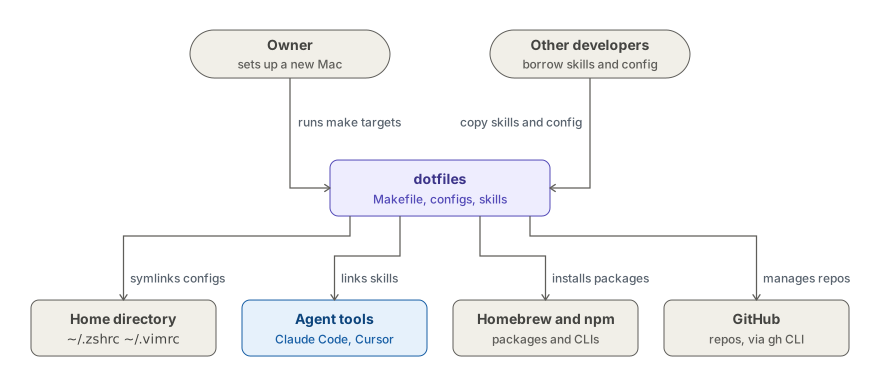
Purple is this repo, blue is the AI coding tools that load the skills, and gray is people
and external systems.
The repo is plain files and a Makefile; nothing runs in the background. The only lasting
effect of make slink* is a set of symlinks, so git pull updates the live shell and
every agent tool at once, and deleting a link undoes it.
The scripts in scripts/ are the only part that talks to a remote service: they call the
GitHub API through gh to inventory repos or apply branch rulesets and security settings.
Tech stack · Shell: zsh, Oh My Zsh, zsh-defer, Starship · Automation: Make, Bash,
whiptail, gh + jq · Agents: Agent Skills (SKILL.md) for Claude Code, Cursor and~/.agents · Packages: Homebrew, npm, nvm, pyenv
Usage
Agent skills
| Skill | What it does | Reach for it |
|---|---|---|
| Git workflow | ||
branch-test-plan |
Turns a branch diff into a manual QA plan with regression checks | before opening a PR |
harvest-reviews |
Distills merged-PR review comments into rules for the team reviewer | after a batch of merged PRs |
reviewable-commits |
Rebuilds a messy branch into a few logical, reviewable commits | before asking for review |
stacked-pr-splitter |
Redesigns an oversized PR as a set of small stacked pull requests | when a PR is too big |
team-reviewer |
Reviews a diff the way your teammates would, from their past comments | before requesting human review |
| Code quality | ||
branch-comment-cleanup |
Strips filler comments and makes the code explain itself instead | tidying a diff before review |
feature-based-architecture |
Organizes a codebase by feature, with atomic UI and design tokens | deciding where a file belongs |
minimal-code-changes |
Keeps every edit surgical: no drive-by refactors or cleanups | any edit to existing code |
quantum-design-tokens |
Moves hardcoded UI values onto a three-tier design token system | replacing hardcoded colors and spacing |
| Web audit | ||
a11y-page-audit |
Audits a page for keyboard and screen-reader gaps, then fixes them | before shipping a page |
light-dark-mode |
Adds light/dark mode with no flash, OS sync and an accessible toggle | when a site needs dark mode |
localization |
Adds languages to a site with locale URLs, a toggle and hreflang | adding a language to a site |
prod-page-audit |
Checks SEO, favicon, OG previews and mobile before you go live | on the way to production |
| Tooling | ||
context7-mcp |
Pulls real library docs from Context7 instead of guessing from memory | any library or framework question |
env-example-sync |
Aligns your .env with .env.example and flags the leftovers |
after pulling |
great-readme |
Rewrites a README as a product page with a quick start and C1 diagram | before publishing an open source repo |
| Meta | ||
shell-aliases-social |
Exports your best shell aliases as a shareable JSON catalog | when sharing your dotfiles |
skill-best-practices-sync |
Refreshes the upstream skill-authoring guides and the local digest | before auditing your skills |
skills-audit |
Reviews every skill against the best practices, then standardizes them | after adding or editing a skill |
skills-social |
Exports your skills as a shareable JSON catalog for a social card | when sharing your skills setup |
Private or machine-specific skills go in ~/.skills.local/<name>/SKILL.md; make slink-skills links them next to these. More in skills/README.md.
Shell aliases and functions
A few from zsh/.zshrc:
| Command | Does |
|---|---|
gwin |
Stage everything and commit with chore: commit changes |
gfresh |
Check out main, fetch and pull |
greb |
Interactive rebase from where the branch left origin/main |
fbr |
Fuzzy-find a local or remote branch with fzf and check it out |
npmd / pnpmd / yarnd / denod |
Run the dev script with any package manager |
rmnpmi |
Delete node_modules, clean the npm cache and reinstall |
findport / killport |
Show or kill whatever listens on one or more ports |
secret |
Print a random 32-byte hex secret |
rm |
Move to the trash instead of deleting (trash-cli) |
Scripts
scripts/github-audit.shinventories every repo of a
GitHub user or org intoscripts/github-audit/(gitignored).scripts/harden-repos.shapplies a default-branch
ruleset, squash-only merging, Dependabot and a read-onlyGITHUB_TOKEN, per visibility,
with a--dry-runpreview.raycast/scripts/has three Raycast commands that open a URL or a
Google search in a specific Chrome profile (work, private, public).
Project layout
dotfiles/
├── Makefile       # every install, link and backup target
├── zsh/           # .zshrc and .zprofile
├── skills/        # agent skills, one folder per skill
├── scripts/       # GitHub audit and hardening scripts
├── brew/          # brew/packages and its backup script
├── apps/          # installed-apps.json and its backup script
├── npm/           # global npm packages
├── terminal/      # Ghostty, iTerm, Terminal.app and Warp setup
├── editors/       # VS Code, Cursor and WebStorm setup
├── vim/           # .vimrc and solarized colors
├── raycast/       # Raycast script commands
├── mac/           # macOS settings
└── raspberry/     # Raspberry Pi OS setup
Documentation
| Doc | What's in it |
|---|---|
skills/README.md |
Installing skills, local skills, keeping them consistent, the shareable catalog |
scripts/README.md |
github-audit.sh and harden-repos.sh: flags, profiles and what each setting does |
AGENTS.md |
Conventions for editing this repo, especially the zsh comment style and startup rules |
brew/README.md, apps/README.md, npm/README.md |
Installing from and regenerating each backup |
terminal/ |
Theme, font and window settings for Ghostty, iTerm, Terminal.app and Warp |
editors/ |
Settings sync and themes for VS Code, Cursor and WebStorm |
vim/README.md |
Cloning solarized and linking .vimrc |
mac/README.md |
Screen saver and lock screen settings |
raspberry/README.md |
Packages, fonts and prompt for Raspberry Pi OS |
Contributing
- Add a skill: create
skills/<name>/SKILL.mdwithnameanddescription
frontmatter, check it withpython3 skills/skills-audit/scripts/lint_skills.py, then runmake slink-skills. Regenerate the catalog with theskills-socialskill. - Change the shell: follow
AGENTS.md, then check the syntax withzsh -n zsh/.zshrcand the startup time withfor i in $(seq 1 10); do /usr/bin/time zsh -i -c exit; done. - Keep backups current: run
make backup, follow the steps in each folder's README,
and commit the changes.
License
MIT © 2026 Guillermo Rodas.
The Snazzy terminal color schemes are from Sindre Sorhus's Snazzy.
vim-colors-solarized by Ethan
Schoonover is cloned separately and keeps its own license.
Yorumlar (0)
Yorum birakmak icin giris yap.
Yorum birakSonuc bulunamadi