tokens-on-track
Health Gecti
- License — License: MIT
- Description — Repository has a description
- Active repo — Last push 0 days ago
- Community trust — 15 GitHub stars
Code Basarisiz
- rm -rf — Recursive force deletion command in build.sh
- rm -rf — Recursive force deletion command in setup-signing.sh
Permissions Gecti
- Permissions — No dangerous permissions requested
Bu listing icin henuz AI raporu yok.
macOS menu bar app that tracks your Claude Code and Codex quota usage and pace, so you use every token without running dry.
Tokens on Track
Use every token. Never run dry.
Tokens on Track is a macOS menu bar app showing how much of your Claude Code and Codex
quota you have burned, and whether you are burning it faster than the window
refills. Refreshes every 15 minutes, and tells you when you are running hot.

⬇ Download for macOS
A signed and notarized .dmg. macOS 14+.
What it reports, in the dropdown and on the desktop card:
TOKENS ON TRACK                   05:07
Claude                             MAX
5h          ▓▓▓─┃──────   18%     07:59
week        ▓▓▓▓┃──────   22%  Sat 21:00
Codex                              PRO
week        ▓───┃──────    3%  Mon 08:34
spark week  ▓───┃──────    1%  Mon 08:36
- Bar — quota consumed in that window.
┃tick — where the bar should be if you spent the window evenly.
Fill left of the tick, you are under budget; right of it, you are ahead.- Colour — position against the target, not absolute usage. Green at or
under the target, orange up to 1.5× it, red beyond that or above 90% consumed. - Percentage — quota used by default, or usage compared with the even-spend
target when Vs target is selected in Settings. At 100% of target, spending
is exactly where it should be now. - Working hours — optionally spread the full quota over selected weekdays
and hours while you are inside that schedule. Outside it, the target returns
to the ordinary wall clock. - Right column — when the window resets, as a wall-clock time.
Install
- Download the latest
.dmg, open it, and drag Tokens on Track
to Applications. - Launch it. Approve the notification prompt, and the Keychain prompt if one appears
(only Claude's token lives in the Keychain — a Codex-only setup never sees it).
The download is signed with a Developer ID certificate and notarized by Apple, so
Gatekeeper does not block it on a Mac that has never seen it. macOS may still ask
you to confirm the first launch of a downloaded app; that is the ordinary prompt,
not the "cannot be opened" refusal. Nothing to compile, no developer tools needed.
Requirements: macOS 14+, and Claude Code and/or Codex already logged in.
Either provider can be missing — you get a per-provider error rather than a
failure.
Prefer to build it yourself? See Building from source.
What you get
Menu bar. The window in the most trouble, as its provider's logo, a ring
filled to its consumption and tinted by its position against the target, and
the selected percentage reading. Any of the three can be switched off, and you
can widen it to as many as four windows, which are simply the busiest ones — two Claude windows if
Claude owns the two busiest. Tick Always keep every provider on screen to hand
each provider a slot first instead, so a quiet Codex stays visible beside a loud
Claude at the cost of bumping a window that really is busier. The window's
initial sits in the hole of the ring (w week, h 5-hour, s spark week),
which is the one place a menu bar has room to spare. Click it for the dropdown.
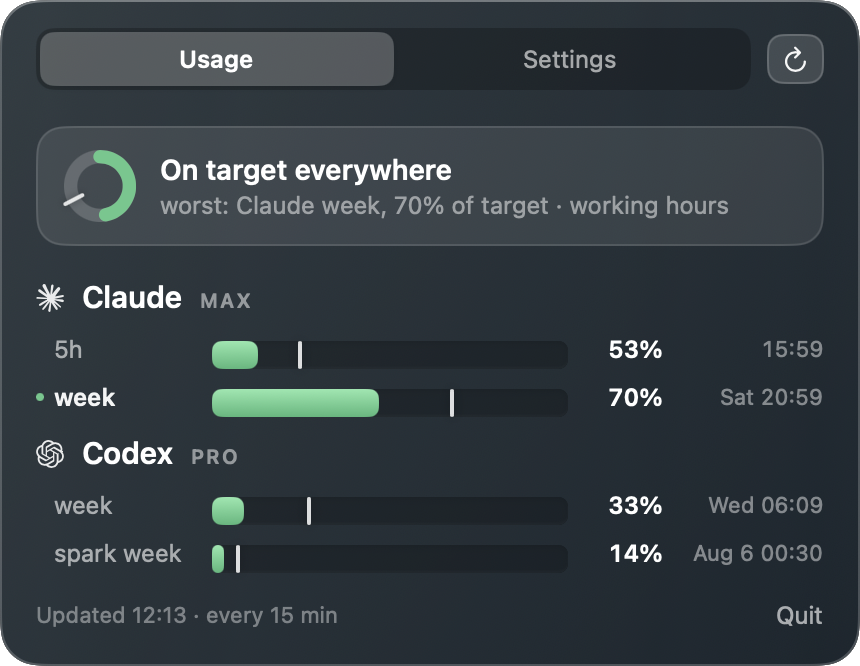
Dropdown. Two tabs on a pane of glass. Usage leads with one line saying
whether you are fine — "On target everywhere", or how far above the target
the worst window is — then a row per window, with a Refresh button beside
the tabs. Settings holds everything else, so opening it can no longer push the
reading off the bottom of the screen.
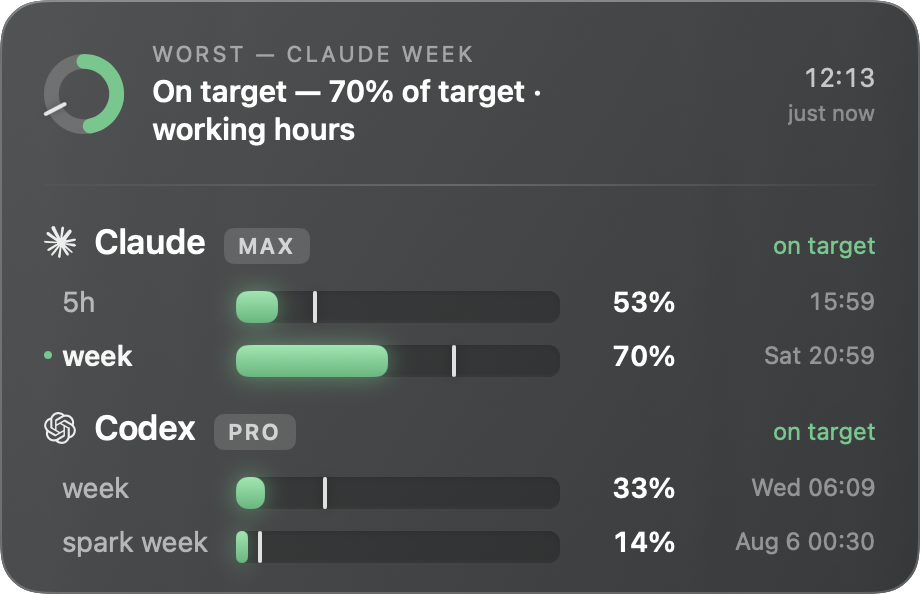
Desktop card. The same reading, free-standing and roomier: a ring for the
worst window, the summary line, and a block per provider with a word for how
that provider on its own is doing. The whole card lights red from the inside
once a window is in trouble, so the state survives peripheral vision. Drag it
anywhere; the position is remembered by its top left corner, so it stays put
when a row appears. It sits just above the desktop icons and behind every window
by default — set Card layer to Floating to keep it in front instead.
Right-click it for refresh, hide and quit.
Notifications. One alert when a window passes your threshold, one when it is
above your target multiple. Each fires at most once per window; the
moment a window resets, the slate is wiped and the next crossing is announced
again.
The Settings tab groups them the way System Settings does: Menu bar (which
parts to draw, how many windows), Display (whether percentages show Used or
Vs target, desktop card on/off, its layer, open at login), Working hours
(selected days and one shared time range), Alerts (both thresholds, on
sliders rather than steppers), and Refresh (5, 15, 30 or 60 minutes).
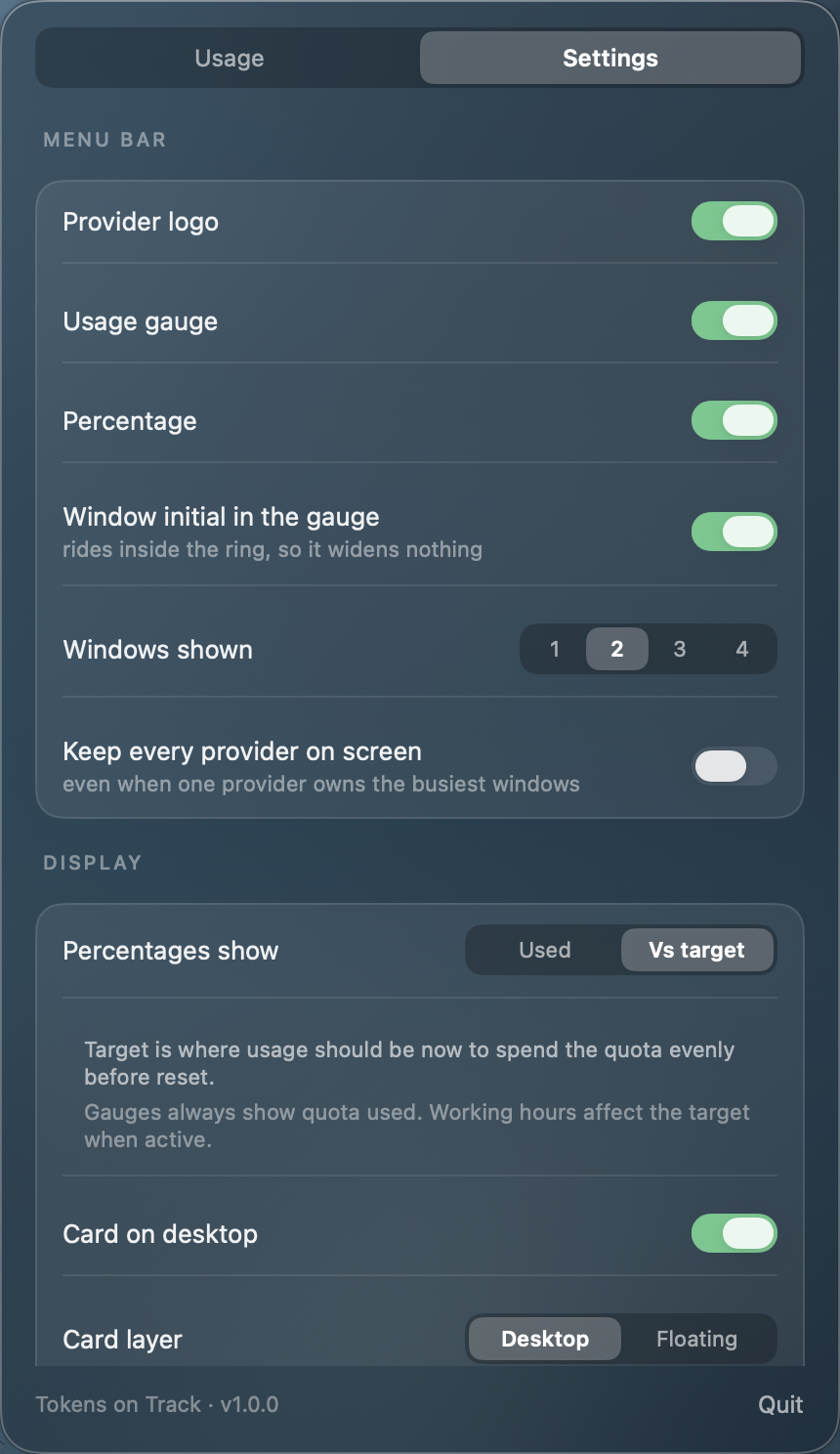
Screenshots are captured by .agents/skills/glass-ui-changes/capture.sh.
Working-hours target
The working-hours target is optional and off by default. While the current
local time is inside the selected schedule, each provider window's full 100%
quota is spread evenly over every selected working hour contained in that
window. That also redistributes the shares that a wall-clock target would have
assigned to evenings and weekends.
When the current time leaves the schedule, every window deliberately switches
back to an ordinary wall-clock target. The white target notch, target
percentage, colour, worst-window ranking and target alerts all use the active
calculation, so they may jump at the boundary. Target alerts are never
suppressed outside working hours. Windows with no scheduled overlap also use a
wall-clock target.
Why not a WidgetKit widget
Because it would be strictly worse here. A widget extension runs sandboxed, so
it could read neither the Keychain nor ~/.codex/auth.json, and it would need
an App Group — which needs a paid developer team — merely to see the cache the
app already writes. It would also need full Xcode to build, and it could only
sit in the widget grid. The desktop card drags anywhere and needs none of that.
How it works
The app fetches on its own timer, on wake, and on demand, then writes~/.local/share/ai-usage/usage.json (override the directory withAI_USAGE_DIR). Everything on screen is drawn from that one file, so the menu
bar ring, the dropdown and the desktop card can never disagree.
| Source file | Job |
|---|---|
Fetcher.swift |
reads both credential stores, calls both usage APIs |
Report.swift |
the JSON written to the cache |
WorkSchedule.swift |
local working intervals, DST and schedule boundaries |
Pace.swift |
target share, active time basis, pace rate, colours, reset labels |
UsageCard.swift |
the reading, shared by the dropdown and the desktop card |
Glass.swift |
the glass surfaces, tracks, ring and controls both are built from |
StatusIcon.swift |
the menu bar item — logo, ring, percentage |
BrandGlyph.swift |
reads Resources/Icons/*.svg into drawable outlines |
Notifier.swift |
threshold and target alerts, one per window instance |
UsageStore.swift |
the single reading, its timer, and the cache |
Where the numbers come from
| Provider | Credential | Endpoint |
|---|---|---|
| Claude | Keychain item Claude Code-credentials (written by Claude Code) |
GET api.anthropic.com/api/oauth/usage |
| Codex | ~/.codex/auth.json (written by the Codex CLI) |
GET chatgpt.com/backend-api/codex/usage |
Both are the same first-party endpoints the CLIs themselves call, and both are
undocumented internal APIs. They can change shape or start rejecting
non-CLI callers without notice. That is the most likely way this breaks.
Which windows appear depends on what each API returns for your plan:
- Claude reports
five_hourandseven_day. - Codex reports a primary window, an optional secondary one, and any
model-specific buckets fromadditional_rate_limits(e.g. GPT-5.3-Codex-Spark)
as their own row. On Pro today only weekly windows come back —secondary_windowisnull. If a 5-hour window reappears it is rendered with
no change.
Security
Worth understanding before running something that touches your API credentials.
- Reads the Claude OAuth token via
/usr/bin/securityand the Codex token from~/.codex/auth.json— the two stores the CLIs already maintain. - Sends each token only to its own provider's host. No third party, no
telemetry, no analytics. - Never prints or logs a token. The cache holds percentages, reset timestamps
and plan names — nothing secret. - Read-only on both credential stores. It never writes or refreshes tokens, so
it cannot invalidate either CLI's login. - No dependencies beyond the system frameworks. The app's own supply chain is
this repo and nothing else. Read it; it is short. - Downloading is a wider trust decision than building. Take the
.dmgand you
are also trusting the release build and the machine that signed it, which you
cannot audit from here.release.pyitself pullsrichandpydanticat
version ranges. Build from source withbuild.shif you would rather trust only
the code you can read — it needs no network and no third-party package.
Signing. The published .dmg is signed with a Developer ID Application
certificate and notarized by Apple; its signature is stable across launches.
A build you make yourself with build.sh is signed with an ad-hoc identity
instead — enough for notifications and the login item, but the signature changes
on every rebuild, so macOS may re-ask for Keychain consent after one. That is
expected for local builds and does not happen with the released app.
Troubleshooting
Menu bar shows a letter instead of a logo
BrandGlyph falls back to the provider's initial when it cannot readResources/Icons. That happens when the app is run straight out of swift build rather than from the bundle build.sh assembles. Point it at the working
copy with AI_USAGE_ICONS=$PWD/Resources/Icons, or just use ./build.sh.
Menu bar item missing
macOS hides status items when the bar runs out of room, and menu bar managers
(Bartender, Ice, Hidden Bar) park them off-screen by default. Check the app is
alive with pgrep -fl "Tokens on Track", then look in your manager's hidden section.
Desktop card missing
By default it sits behind every window, so a maximised window hides it. Show the
desktop, or set Card layer to Floating. If it was dragged to a screen
that is no longer attached, it comes back to the top right on the next launch.
No notifications
The app asks for permission on first launch. If it was refused, re-enable it
under System Settings → Notifications → Tokens on Track. Notifications need the app to
be signed, which build.sh handles — running the raw swift build binary skips
them on purpose.
stored token went stale — run claude once / run codex once
You are still signed in. Each CLI keeps a refresh token and mints a new access
token when it next runs, so the copy this app reads out of their store lapses on
its own — overnight, typically. Start the relevant CLI once and the next fetch
recovers. By design this app never refreshes tokens itself — it will not touch
your logins.
Until it recovers, the rows carry the last reading that did land, dimmed, with
the notice saying when it was taken. They are dropped once they are three hours
old or their window has reset, whichever comes first.
http 403 from Codex
The edge in front of chatgpt.com intermittently rejects a valid request. The
fetch already retries once; a later run generally succeeds.
Reading is stale
The header marks a reading (stale) once the cache is more than 45 minutes old.
Hit Refresh; if that fails the per-provider error says why.
Building from source
git clone https://github.com/gnibu/tokens-on-track.git
cd tokens-on-track
./build.sh --install
That compiles, wraps the binary in Tokens on Track.app, ad-hoc signs it, copies
it to /Applications and launches it. Drop --install to build into .build/
and leave /Applications alone.
Requirements: macOS 14+ and Command Line Tools (xcode-select --install).
Full Xcode is not needed; there is no .xcodeproj, build.sh assembles the
bundle by hand.
Publishing a signed, notarized .dmg is a different loop — see
docs/releasing.md.
Uninstall
osascript -e 'quit app "Tokens on Track"'
rm -rf "/Applications/Tokens on Track.app"
rm -rf ~/.local/share/ai-usage
defaults delete io.github.ai-usage
License
Copyright © 2026 Benoit Pothier. Released under the MIT License — seeLICENSE.
Resources/Icons holds the Claude and OpenAI marks, taken verbatim from
simple-icons, whose packaging is
CC0. The marks themselves remain trademarks of Anthropic and OpenAI, and are
used here only to identify whose quota a row is reporting. They are drawn
monochrome and scaled uniformly, never recoloured, stretched or rotated. Neither
company endorses or is affiliated with this project.
Yorumlar (0)
Yorum birakmak icin giris yap.
Yorum birakSonuc bulunamadi