akili
Health Uyari
- License — License: AGPL-3.0
- Description — Repository has a description
- Active repo — Last push 0 days ago
- Low visibility — Only 5 GitHub stars
Code Gecti
- Code scan — Scanned 12 files during light audit, no dangerous patterns found
Permissions Gecti
- Permissions — No dangerous permissions requested
Bu listing icin henuz AI raporu yok.
Open-source platform for orchestrating, governing, and safely automating AI agents across your infrastructure.
Akili

The security-first platform for orchestrating, governing, and safely automating AI agents.
Default Deny. Explicit Allow. Always Auditable.
Overview · Quick Start · Features · Architecture · Install · Configuration · Screenshots · License





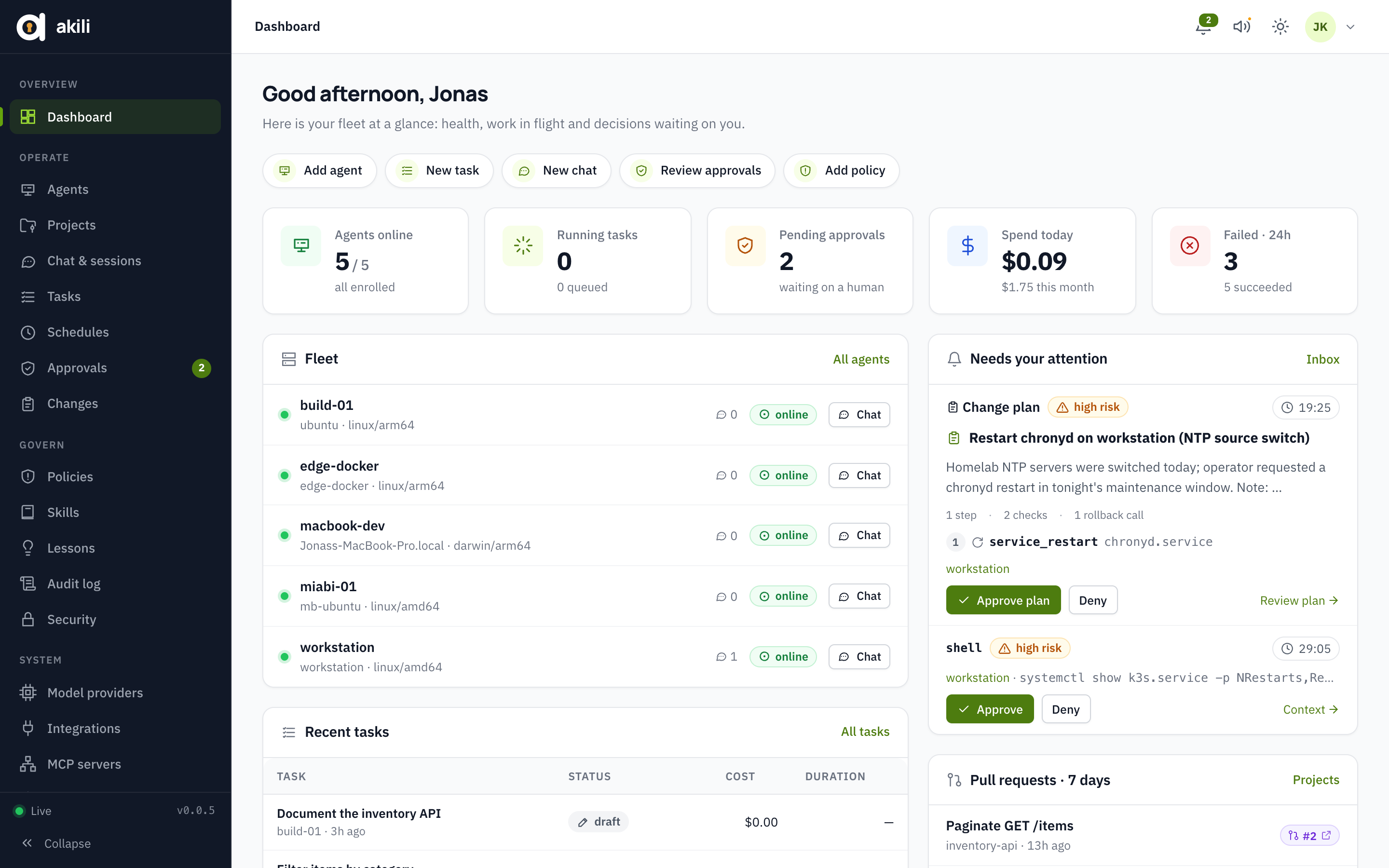
Overview
Akili is a platform for orchestrating, governing, and safely automating AI agents. It lets AI agents write code, operate servers and drive deployments, without handing them the keys.
- Orchestrate: hand work to a fleet of agents from one control plane — coding tasks, alert triage, deployments and chat sessions — and watch them run in real time.
- Govern: every model call goes through the control plane's gateway, and every tool call is checked against a signed policy twice — once on the agent and once on the control plane — before anything runs. Risky actions wait for a human.
- Automate safely: agents run on your servers and dial out to the control plane; approved change plans run step by step and roll back automatically if a check fails, and every decision lands in a hash-chained audit log.
The platform ships as three parts:
server: the control plane, theakilibinary. A web UI, a REST API with OpenAPI docs at/docs, and an LLM gateway that holds the provider keys. State lives in PostgreSQL; Redis carries events, presence, leases and leader election.agent: theakili-agentbinary. It runs on your servers, dials out over an encrypted tunnel (yamux over WebSocket) and runs chat and task sessions within the signed policy it receives. It holds no model or forge credentials, and is installed from GitHub Releases.proto: the wire contract both sides import: envelopes, the tool catalog with risk levels, the policy engine and templates.
Core features
- Policy before every action: allow, deny or approve, decided by the agent and the control plane independently, with risk from a shared catalog. Autonomy levels L0 to L3; critical actions always need a human. How a tool call is decided
- Coding agents: projects on GitHub, GitLab or Gitea, a branch per task, pull requests, sandboxed tests, and a git proxy that keeps forge credentials off the agent. Coding
- Operations: alerts become triage tasks; fixes are change plans approved once, run step by step and rolled back automatically if a check fails. A recorded browser terminal. Operations
- Miabi: deploys, rollbacks, databases and workspaces, scoped by policy, with every deploy verified on real traffic. Miabi
- Chat anywhere: in the web UI (with images), or from Slack, Telegram and Signal with approval buttons. Images in chat · Chat gateways
- MCP servers: tools from MCP servers, run on the control plane so agents never hold their credentials. MCP
- Hardened by default: multiple replicas, encryption at rest with Vault Transit, OIDC SSO, SIEM streaming, agent mTLS and an organization-wide kill switch. High availability and hardening
- Lessons and notifications: agents propose what they learned and an admin approves it; approvals and results reach you by sound and email. Lessons · Notifications
- Community and Enterprise: the complete Community edition is AGPL; Akili Enterprise adds teams, SAML/SCIM, approval governance and compliance features. License
Architecture
flowchart TB
    subgraph clients["Users and integrations"]
        direction LR
        ui["Web UI and REST API"]
        chat["Slack, Telegram, Signal"]
        alerts["Alertmanager and webhooks"]
    end

    subgraph cp["Control plane: akili, one or more replicas"]
        direction LR
        api["API and auth"] --> policy["Policy engine and approvals"] --> audit["Audit log"]
        tunnel["Agent tunnels"] --> policy
        tunnel --> gateways["LLM gateway, git proxy, MCP gateway"]
    end

    subgraph data["State"]
        direction LR
        pg[("Postgres: state, audit")]
        redis[("Redis: events, presence, leader election")]
    end

    subgraph ext["External services, credentials held by the control plane"]
        direction LR
        llm["Model providers"]
        forge["GitHub, GitLab or Gitea"]
        miabi["Miabi"]
        mcpsrv["MCP servers"]
    end

    subgraph host["Your servers"]
        direction LR
        agent["akili-agent"] --> tools["Host and git tools"]
        agent --> sandbox["Sandbox containers"]
    end

    clients --> cp
    cp --> data
    cp --> ext
    host -- "agent dials out: yamux over WebSocket" --> cp
- The agent dials out. No inbound port is opened on your servers. Model calls, git pushes, and Miabi or MCP calls go through the control plane, so the agent never holds provider keys or forge credentials.
- Every tool call is checked twice: by the agent against its signed policy bundle and by the control plane against the current policy, which writes the audit record before anything runs (see How a tool call is decided).
protois the contract between them: envelopes, the tool catalog with risk levels, and the policy engine.- Replicas share Postgres and Redis. An agent's tunnel lives on one replica, and Redis relays commands, events and the terminal to the others.
Quick start
docker compose up -d --build                     # http://localhost:9000
docker compose logs akili | grep password        # first-run owner password (or set AKILI_ADMIN_PASSWORD)
With no ANTHROPIC_API_KEY, the control plane seeds a scripted development provider so you can try everything end to end. It understands run: <cmd>, read: <path>, list: <path>, write: <path> :: <text> and host. To use a real model, set ANTHROPIC_API_KEY before the first start, or add a provider under Settings → Model providers.
Add an agent in the UI (Agents → Add agent). The UI shows a one-time join token and an install command:
# On a server (systemd, runs as the unprivileged "akili" user)
curl -fsSL https://akili.example.com/install-agent.sh | sudo AKILI_URL=https://akili.example.com AKILI_JOIN_TOKEN=akj_... sh

# Or with Docker
AKILI_JOIN_TOKEN=akj_... docker compose --profile agent up -d
Install
Releases are cut from v* tags and publish:
| Channel | What you get |
|---|---|
| Container images | linux/amd64 and linux/arm64, tagged with the version and latest. Control plane: jkaninda/akili (Docker Hub) and ghcr.io/goakili/akili. Agent: jkaninda/akili-agent (Docker Hub) and ghcr.io/goakili/akili-agent |
| Binaries | akili (the web UI is embedded) and akili-agent on GitHub Releases, for Linux and macOS on amd64 and arm64 |
| Homebrew | The agent on macOS and Linux: brew install goakili/tap/akili-agent, then enroll and brew services start akili-agent. See goakili/homebrew-tap |
| VS Code | The extension in vscode/: chat with agents, run tasks, approve and review their changes from the editor (make vscode-package) |
| Miabi marketplace | Templates for Akili (the control plane with its PostgreSQL, Redis and route) and the Akili Agent |
Docker Compose: examples/ runs the published images in production mode: the control plane with PostgreSQL and Redis (compose.yml), and an agent on another host (compose-agent.yml).
cd examples && cp .env.example .env   # set the URL and the secrets
docker compose up -d
Miabi: deploy Akili from the Miabi Marketplace. Miabi provisions PostgreSQL, Redis and the route, and generates the secrets. It is still your own Akili, the same build, on your infrastructure.

The control plane needs PostgreSQL and Redis. In production (AKILI_ENV=production) it refuses to start without an AKILI_JWT_SECRET and an AKILI_ENCRYPTION_KEY of at least 32 characters each. Serve it over HTTPS with AKILI_COOKIE_SECURE=true, and set the proxy timeouts below. See Configuration and Reverse proxy and load balancer.
The install script downloads the agent from the GitHub release matching the control plane's version and verifies it against the release's checksums.txt, so agents always match the control plane. The Docker install command uses the agent image with the same version tag. A control plane that is not a release build installs the latest release and image. Either way, hosts need to reach github.com.
No access to github.com? Mirror the release assets with the same layout and point the install script at the mirror:
curl -fsSL https://akili.example.com/install-agent.sh | sudo AKILI_URL=… AKILI_JOIN_TOKEN=… \
  AKILI_AGENT_RELEASE_URL=https://mirror.example.com/akili/releases AKILI_AGENT_VERSION=1.2.3 sh
Development
One repository, three Go modules and a go.work; run everything from the root:
| Path | What it is |
|---|---|
server |
The control plane (github.com/goakili/akili/server) |
agent |
The agent (github.com/goakili/akili/agent) |
proto |
The wire contract (github.com/goakili/akili/proto), Apache-2.0 |
web |
The Vue UI, built into server/internal/web/dist and embedded in the akili binary |
docker |
Dockerfile (control plane) and Dockerfile.agent, both built from the repository root |
scripts |
The end-to-end suites and the load test |
git clone [email protected]:goakili/akili.git && cd akili
make test        # unit tests of proto, agent and server
make vet
make e2e         # Postgres + Redis in Docker, server + agent, full API walk-through
make e2e-all     # every end-to-end suite (coder, ops, miabi, ha, hardening, chat)
make build-ui    # build the UI into the server's embed directory
make server agent   # bin/akili and bin/akili-agent
make docker-build   # both images (docker/Dockerfile, docker/Dockerfile.agent)
make run         # build UI + server, run the binary (embedded UI on :9000) with compose Postgres/Redis and .env
make run-agent   # build and run a local agent; enrolls on first run with AKILI_JOIN_TOKEN from .env
make dev         # same, via `go run` (pair with `cd web && npm run dev` for hot reload)
cd web && npm run dev   # UI on :5173, proxied to the API on :9000
CI runs the unit tests and the UI checks, then every end-to-end suite in parallel, on each push to main and each pull request. Pushing a v* tag runs the release.
How a tool call is decided
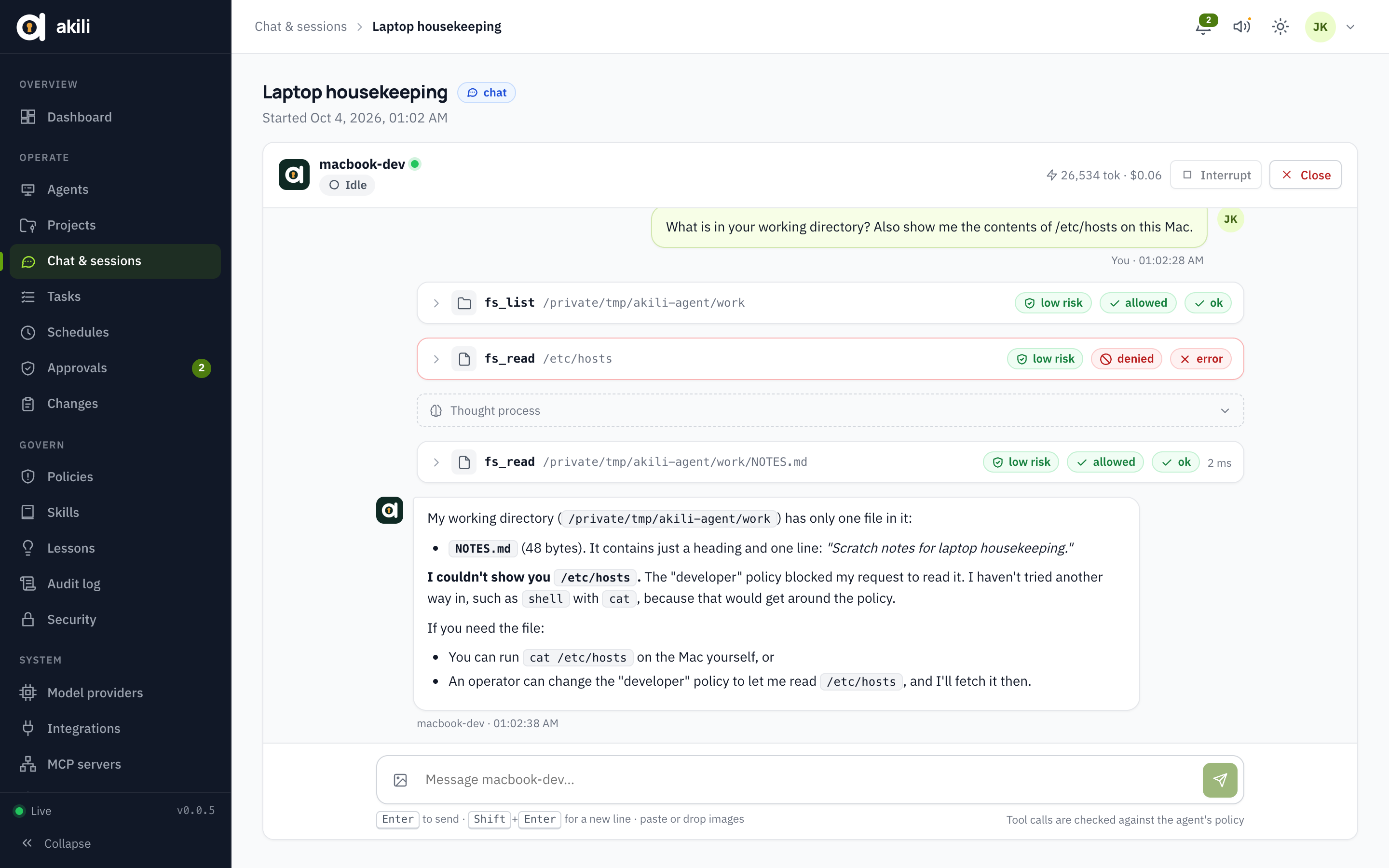
- The model (through the control plane's LLM gateway) asks for a tool call.
- The agent evaluates it against its signed policy bundle, then sends
tool.requestto the control plane. - The control plane re-evaluates it against the current policy, using risk from the shared catalog (never the agent's claim). It writes the audit record before anything runs; if the audit write fails, the call is denied.
- The result is allow, deny, or approve. An approval waits for an operator decision bound to that exact request, and expires after 30 minutes.
- The tool runs only if both the agent and the control plane allow it. The agent then re-checks real paths after resolving symlinks, runs shell commands with a scrubbed environment in their own process group, and refuses private and loopback addresses for
http_fetch.
Autonomy levels are L0 (every call needs approval), L1 (auto-run low risk), L2 (up to medium) and L3 (up to high). Critical actions always need a human.
Coding: projects, branches and pull requests
Connect a forge under Integrations: Gitea with a token, GitHub with a token or a GitHub App, or GitLab (gitlab.com or self-managed) with an access token. Installation tokens from an App are short-lived. Then add a project, either by connecting an existing repository or by creating a new one, optionally from a template such as Go service (Okapi).
For each coding task or chat on a project:
- The agent works in its own git worktree, on the branch
akili/<task-id>. A retry continues on the same branch and the same pull request. giton the agent talks to a local proxy, which forwards over the tunnel to the control plane. The control plane adds the forge credentials, so the agent never holds them. It allows only that project's repository, and refuses every push except to the session's own branch: no pushes tomain, no deletes, no tags. Every push is audited before it reaches the forge.- Git identity: each agent commits under one identity, set by the control plane. By default it is
Akili Agent <[email protected]>, the email of the akili-agent GitHub account. To change the default for every agent, setAKILI_GIT_NAME_TEMPLATEandAKILI_GIT_EMAIL_TEMPLATE, or set a commit name and email per agent. Use a bot account's email (for example its GitHub noreply address) so commits link to that account. An agent can't be given the email of a user in the organization. The proxy reads every pushed commit and refuses the push if any author or committer email differs (for examplegit commit --authorrun in a shell). Each commit made withgit_commitends withAkili-Task: <task-id>(for tasks) andAkili-Agent: <agent name>trailers. Users can opt in under Settings → Account → Credit on agent work. With a co-author email (use the forge's noreply address), commits from sessions they start add aCo-Authored-Byline for them. With a forge username, the pull request footer says "requested by @user". The footer also has a hidden<!-- akili:task=… agent=… -->marker with only IDs. - The agent's tools are
git_status,git_diff,git_commit,git_push, andsandbox_exec.sandbox_execruns tests in a disposable container built from the project's sandbox image: capabilities dropped, running as the agent's user, with only the worktree and a build cache mounted. It needs Docker on the agent host. pr_openandpr_statusrun on the control plane, which holds the credentials. The task records the pull request, and the UI shows its diff.- Triggers: labelling an issue with the project's trigger label (for example
akili) creates a task. This needs a webhook signed with the integration's secret. Maintenance presets schedule dependency updates, vulnerability scans, test-health checks and docs-drift checks. - Plans: a project's Plans tab holds work written as a description and ordered phases. Link one or more active plans to a task (or start one with Create task on the plan): the agent receives them with its goal, as they were when the task was created, works on the open phases and reports progress with
plan_phase_update. It can't edit, activate or delete plans, or touch plans not linked to its task. An agent can propose a plan withplan_propose(also allowed in the read-only policy): it arrives as a draft marked "proposed", with a link to the session, and nothing works on it until a person activates it. Phases it changes are marked "by agent" with the task. A plan's status follows its phases (in progress, done); people set draft, active and archived. Tasks can also be saved as drafts and started later. Each phase can say when it is done ("done when…"), and Task on a phase creates a task focused on it: the agent sees the whole plan but finishes and reports on that phase only.
Sandbox on agent hosts: sandbox_exec needs a Docker daemon the agent's user can reach. Adding the akili user to the docker group makes that user root-equivalent on the host, so prefer rootless Docker or a dedicated build host for coding agents. Without Docker, the tool reports that it is unavailable, and tests can still run through shell (High risk, needs approval below L3).
GitLab. Use a project or group access token with the Developer role and the api scope. GitLab itself then refuses pushes to protected branches, behind Akili's own push guard.
- A project or group token with the Owner role on the repository is refused.
- A project token can't create repositories. To let Akili create them, use a group token with Maintainer.
- Owners can be nested groups (
platform/backend), and merge requests show as!12. - Test reads the token's kind and expiry. Admins get an email and a webhook notification 14 days before it expires, because GitLab disables expired tokens without warning.
- For a self-managed instance on a private CA, paste the CA on the integration. It is trusted for API calls and git.
- Issue webhooks use GitLab's secret token (
X-Gitlab-Token), compared in constant time. GitLab doesn't sign the body, so give it anhttpsURL. - If a project has the "Reject unverified users" push rule, set the agents' commit email to the bot's own noreply address, or turn the rule off for the bot.
make e2e-coder runs the whole flow against a real Gitea in Docker. make e2e-gitlab runs it against GitLab CE. It is opt-in and not part of e2e-all: GitLab needs about 4 GB of memory and a few minutes to boot.
Operations: alerts, change plans and a recorded terminal
- Host tools (read-only, Low risk):
service_status,journal_logs,disk_usage,process_list,docker_ps,docker_logs,cert_check,package_updatesandnet_probe. Mutating tools (High risk):service_restartanddocker_restart. They run fixed programs with validated arguments, never a shell string. Policies restrict which systemd units and containers they may touch. Theoperatortemplate never allows restartingsshdor the agent itself. - Change plans (
change_run): the agent proposes a change as a single plan: steps, read-only checks (expect/rejectoutput), and a rollback. A human approves the plan once. The agent runtime, not the model, then runs the steps in order, runs every check, and rolls back automatically if a step or a check fails. The control plane only allows calls that exactly match the approved plan, and each at most once. Every call's outcome is recorded on the change. - Alerts: create an alert route (Alerts) and point Prometheus Alertmanager, or anything that can POST JSON, at its secret URL. Each firing alert becomes a triage task on the host it names (the
instancelabel is matched against agent names and hostnames), with the route's instructions. Duplicates are skipped while a triage task is open. Alert text is passed to the model as fenced, untrusted data. - Recorded terminal: admins can open a browser terminal on agents whose policy sets
terminal: true. It is relayed through the control plane, so it works across replicas, recorded as an asciinema cast (output and input), audited, and closed after 15 minutes idle or 2 hours. - Runbooks: built-in, read-only skills (disk space, service down, high load, certificate expiry, incident triage, container crash loop, deployment rollback) steer the agent towards the right tools and towards
change_run. - Privileges:
service_restartusessudo -n systemctl restart <unit>, so grant theakiliuser exactly the units it may restart, for exampleakili ALL=(root) NOPASSWD: /usr/bin/systemctl restart nginx.service.
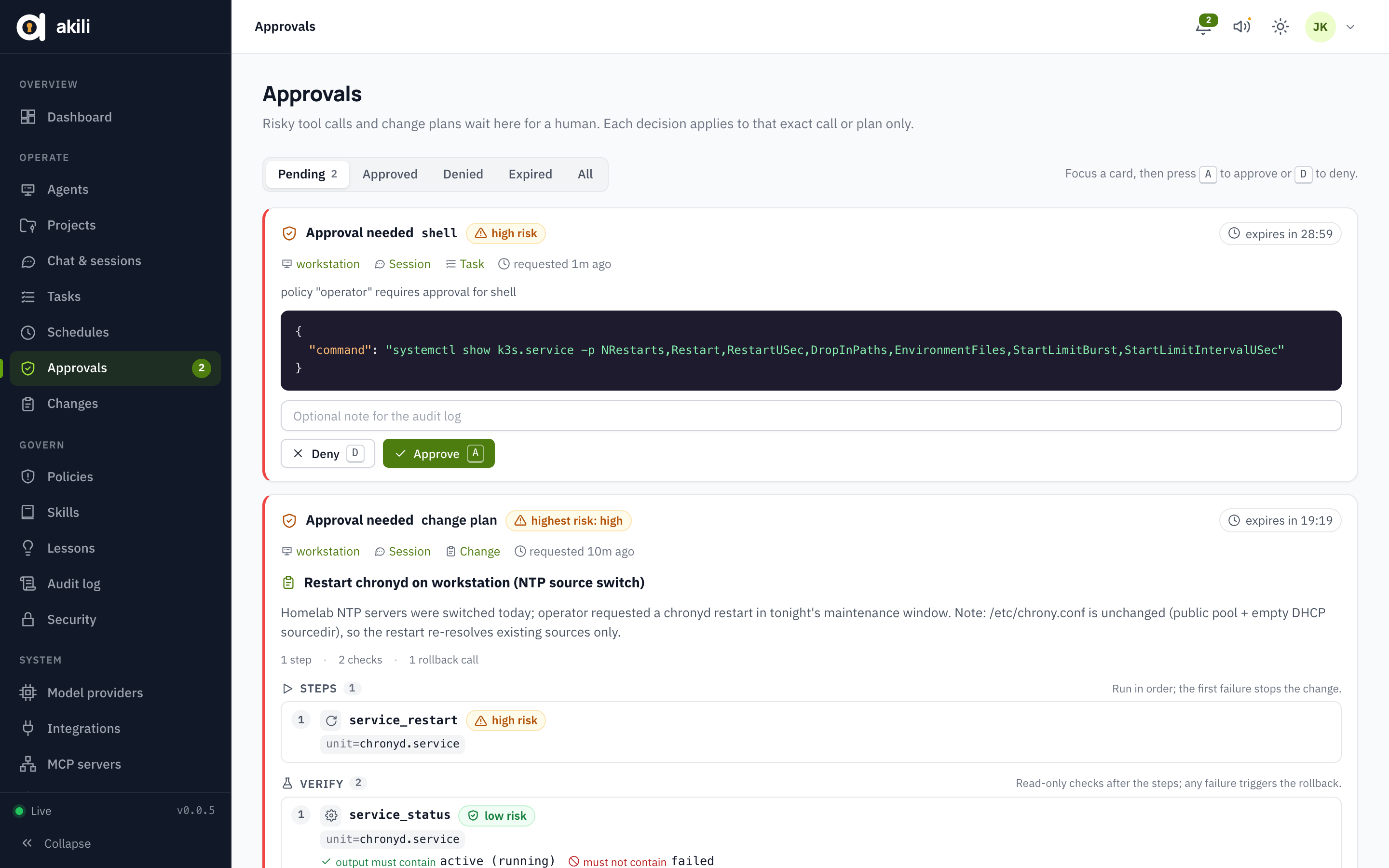
make e2e-ops runs the whole flow: alert, then triage, then an approved plan, then verify and rollback, plus the terminal.
Miabi: workspaces, deploys, databases and more
Integration and workspaces: add a Miabi integration with the Miabi URL and an
mb_key. Use a key from a dedicated bot user that belongs only to the workspaces Akili should manage, with the scopesread,writeanddeploy. Akili lists the workspaces the key reaches, and you enable the ones agents may use. A key bound to one workspace works too. The key stays on the control plane. For a Miabi with a self-signed or private-CA certificate, paste its CA (PEM) in the integration. It is trusted for that integration only: API calls, event streams and themiabi mcppreset (viaMIABI_CA).Addressing and policy: every tool names a
workspaceand resolves apps, databases, stacks, cron jobs and pipelines by name only. The policyappsrule matchesworkspace/app,workspace/db:<name>,workspace/stack:<name>,workspace/cron:<name>,workspace/pipeline:<name>andworkspace/*. For example, allowstaging/*and denyprod/*, andprod/*covers everything in production.Tools:
Risk Tools Low miabi_workspaces,miabi_overview,miabi_apps,miabi_status,miabi_deployments,miabi_releases,miabi_logs,miabi_deploy_logs,miabi_events,miabi_alerts,miabi_databases,miabi_db_backups,miabi_traffic,miabi_env(secrets masked),miabi_cronjobs,miabi_pipelinesMedium miabi_alert(ack/resolve),miabi_db_backup,miabi_cron_runHigh miabi_deploy,miabi_rollback,miabi_restart,miabi_scale,miabi_maintenance,miabi_canary(promote/abort),miabi_env_set(non-secret only),miabi_stack_restart,miabi_pipeline_runCritical miabi_db_restore(always needs a human)miabi_trafficreportstraffic: okortraffic: degradedagainst an error-rate or p95 threshold, so a change plan can verify a deploy on real traffic and roll it back automatically.Watches: watch an app, a pattern, or a whole workspace (
*).- Every successful deploy is verified, and the agent proposes a rollback if it is unhealthy.
- Failed deploys, crashes, out-of-memory kills, drift and an open reconcile breaker open triage tasks, and so do failed backups and restores with Databases on.
- Events arrive over Miabi's live event stream: no webhook or public URL is needed, and nothing is lost across a reconnect. A signed webhook (
/api/v1/webhooks/miabi/<integration>) still works.
Marketplace: Akili itself installs on Miabi from marketplace templates: the control plane (with its PostgreSQL, Redis and route) and the agent.
MCP servers
Agents can use tools from MCP servers through the control plane. The calls run there, so agents never hold the servers' credentials, and every call is audited.
- Miabi preset: add an MCP server from a Miabi integration. Akili runs
miabi mcpwith the integration's URL and key. The server image includes a pinned Miabi CLI (--build-arg MIABI_CLI_VERSION=…to change it). Outside Docker, putmiabion the control plane's PATH. - Other servers: stdio servers, limited to the commands in
AKILI_MCP_COMMANDSand started with a clean environment, or Streamable HTTP servers. Commands are looked up inAKILI_MCP_BIN_DIRfirst, then PATH. Mount that directory read-only, e.g.-v ./mcp-bin:/opt/akili/mcp-bin:ro: the server refuses a binary it could rewrite, because the binary runs with integration keys. Every replica needs the same mount. - Which tools agents get:
- Tools are named
mcp__<server>__<tool>. - Read-only tools start enabled at low risk. Every other tool stays disabled until an admin enables it with a risk, and only read-only tools can be low risk.
- A policy must allow MCP tools by name (e.g.
mcp__miabi__*);developerand thefull-*templates allow all tools.
- Tools are named
- Limits: MCP inputs are opaque to policy, so these tools can't be restricted to particular workspaces or apps. Prefer the native Miabi tools for changes.
make e2e-miabi runs everything against a fake Miabi with two workspaces:
- the event stream, then verification, then an approved rollback;
- webhooks and database triage;
- a prod deploy rolled back by its health check, and one rolled back by its traffic check;
- every workspace operation;
- a restore that needs a critical-risk policy and approval;
- the policy, name-only and enabled-workspace guards;
- the MCP gateway with the real
miabi mcp. SetMIABI_CLIorMIABI_CLI_SRC; without either, that section is skipped.
Images in chat
Attach images to a chat message in the UI with the image button, by pasting, or by dropping them on the composer. PNG, JPEG, GIF and WebP are accepted, up to 5 MB each and 5 per message; the type is checked from the bytes, so an SVG or a renamed file is refused.
- The image is uploaded to the session (
POST /api/v1/sessions/{id}/attachments), and the message carries only its id. The history that is replayed to the agent therefore stays small, and the image bytes never pass through the agent. - The LLM gateway loads the image when it calls the model, and only from the calling session's own attachments, so an agent cannot read another session's images or send bytes of its own.
- Both Anthropic and OpenAI-compatible providers receive images. The model needs vision support.
- Every image is resent with each later turn of the conversation, which costs input tokens; Anthropic's prompt cache absorbs most of it.
Chat: Slack, Telegram and Signal
Talk to agents, start tasks and approve tool calls from chat. The gateways are thin clients of the session API, so policy, approvals and audit work exactly as in the UI.
Channels (Chat):
- Telegram: a bot token from @BotFather. The control plane polls Telegram, so no public URL is needed.
- Slack: an app with a bot token and its signing secret. Point Event Subscriptions (
app_mention,message.im) and Interactivity at the URLs shown for the channel, and give it the scopeschat:write,app_mentions:readandim:history. - Signal: a signal-cli REST API server holding the bot's number.
Linked users only. Each person clicks Link my account in Akili and sends
/link <code>to the bot. Their chat actions then run with their own Akili role and are audited as them. Unlinked users can only/linkand/help.Commands:
/agents,/agent <name>,/new,/status;/task <goal>(the result is posted back);/approvals,/approve <id>,/deny <id>.
Anything else is sent to the conversation's agent. Approval requests come with Approve/Deny buttons on Slack and Telegram, and as text commands on Signal.
Bot tokens and the signing secret are encrypted at rest and covered by
akili keys rotate.
Notifications: dashboard sounds and email
- Dashboard: a chime when an approval is requested and when your tasks finish (speaker button in the top bar).
- Email through Posta: add a Posta integration (URL, a workspace API key, the From address on a verified domain, and a CA for a private certificate). Test runs a dry-run send. The first Posta integration is the default; with several, pick one with Make default.
- Who gets what: operators and above get approval requests, at most one a minute each (the email links to the approvals page). Whoever started a task gets its result. Each person turns either off, or sends themselves a test email, under Settings → Account.
- What is in an email: what happened (agent, tool, risk, task title, status, cost) and a link to Akili. Tool arguments, output and transcripts are never sent, because Posta stores and analyzes what it sends. Each email is audited as
notify.emailwith Posta's message id, so Akili's audit and Posta's delivery log line up. A Posta failure never blocks a task or an approval. AKILI_NOTIFY_WEBHOOK_URLstill posts the same events to a Slack-compatible webhook.
Lessons: what agents remember
Agents can propose a lesson with the lesson_propose tool, such as a host quirk, a procedure that worked, or a pitfall. A lesson is used only after an admin approves it (Lessons), optionally edited. Approved lessons, agent-specific or for all agents, are added to new sessions' system prompts; the 20 newest are used.
Admins can also write lessons directly. Proposals are capped per session and deduplicated, so injected text can't quietly change an agent's behaviour.
make e2e-chat runs both features against fake Telegram, Slack and Signal APIs:
- linking, and refusing unlinked users and viewers;
- a button approval that an unlinked user can't press;
/taskover Signal, approved by text command;- Slack signatures, replays and retries;
- a lesson absent from the prompt until approved, and a rejected one never present.
High availability and security hardening
Several replicas. Run two or more control-plane replicas on the same Postgres and Redis behind any load balancer.
- An agent's tunnel lives on one replica. Commands, events and the terminal are relayed through Redis, and one elected replica runs the dispatcher and the SIEM forwarder.
- If a replica dies mid-task, the agent reconnects through the load balancer. The surviving replica reopens the task's session from its stored history, and the task continues on the same attempt.
- A tool call in flight when the connection dropped is reported to the model as interrupted ("may or may not have run"), so it checks before repeating.
make e2e-hakills the tunnel's replica with SIGKILL in the middle of a step and checks that the task still finishes.
Encryption at rest (KMS). Every secret is sealed with a data key, and data keys are stored wrapped by a key-encryption key.
- With
AKILI_KMS=local(the default),AKILI_ENCRYPTION_KEYwraps them. - With
AKILI_KMS=vault-transit, a Vault (or OpenBao) Transit key does. It never leaves Vault, and the database alone never yields a secret. - Values written before this change (
v1:) stay readable whileAKILI_ENCRYPTION_KEYis set. - Keys are managed with
akili keys, run on a control-plane host:akili keys statuslists the data keys, which provider wraps each, and how many secrets each seals.akili keys rotatemakes a new data key active and re-encrypts every secret in one transaction.akili keys rewrapre-wraps the data keys with the current provider.
- To move to Vault:
- Set the
AKILI_VAULT_*variables andAKILI_KMS=vault-transit, and keepAKILI_ENCRYPTION_KEYfor one run. - Run
akili keys rewrap, thenakili keys rotate. - Remove
AKILI_ENCRYPTION_KEY.
- Set the
Single sign-on (OIDC). Set AKILI_OIDC_ISSUER, AKILI_OIDC_CLIENT_ID and AKILI_OIDC_CLIENT_SECRET, and register <public URL>/api/v1/auth/oidc/callback with the provider.
- The flow is the authorization code flow with PKCE. The state is single-use and bound to the browser, and the nonce is checked.
- Only verified email addresses are accepted, optionally limited to
AKILI_OIDC_ALLOWED_DOMAINS. - The first sign-in pins the provider's subject to the user, so another identity using the same email address is refused.
- Roles follow the groups claim through
AKILI_OIDC_ROLE_MAP, for exampleakili-admins=admin. SSO never grants or removes the owner role. AKILI_OIDC_DISABLE_PASSWORD=trueleaves password sign-in to the owner only, as a break-glass.
Two-factor authentication. Each user can turn on TOTP in Settings → Account with any authenticator app.
- After the password, sign-in asks for a 6-digit code. Each code works once, and failed codes are limited per user and audited.
- Ten single-use recovery codes are shown once at setup; they can be replaced with a current code.
- An admin can reset 2FA for a user who lost their device (Settings → Users).
- SSO sign-ins rely on the identity provider's MFA, and API keys are not affected.
SIEM. The audit trail streams to any combination of three sinks:
- a webhook (
AKILI_SIEM_WEBHOOK_URL), JSON or NDJSON, signed with HMAC, and able to send anAuthorizationheader such as a Splunk HEC token; - syslog (
AKILI_SIEM_SYSLOG, RFC 5424 overudp://,tcp://ortls://); - a JSON-lines file (
AKILI_SIEM_FILE, or-for stdout).
Delivery is at least once and in order. Each sink keeps a cursor in the database, so a sink that was down catches up. Each event carries its hash and prev_hash, so the receiver can verify the chain.
TLS and agent mTLS. AKILI_TLS_CERT_FILE and AKILI_TLS_KEY_FILE make the server terminate TLS itself; the certificate reloads when its file changes.
- With
AKILI_AGENT_MTLS=requiredandAKILI_AGENT_CLIENT_CA_FILE, enrolling and connecting need a client certificate signed by that CA. - Browsers on the same port are unaffected.
- Agents present their certificate with
AKILI_CLIENT_CERT_FILEandAKILI_CLIENT_KEY_FILE, which are re-read on every connection.
Client IPs. Rate limits and audit entries use the connection address.
X-Forwarded-Foris honoured only fromAKILI_TRUSTED_PROXIES. Set it to your ingress's CIDR, or every user shares the ingress's login rate limit.- Agents connecting and enrolling are limited per IP only on failures, and successful connects are limited per agent. A whole fleet behind one NAT can therefore reconnect at once.
Defenses the tests hold in place:
- The agent refuses its own state directory (its private key) outside the workdir, whatever the policy says.
- Tool output is redacted before it reaches the model: pass-through secret variables and common credential formats (cloud keys, forge tokens, private keys, JWTs, URL passwords).
- Untrusted text (issues, alerts, Miabi events) is fenced as JSON, so it cannot close its fence.
- On Linux the control plane and the agent mark themselves non-dumpable at startup. Processes they start as the same user (stdio MCP servers, shell tools) therefore cannot read their environment or memory through
/proc, and neither writes core dumps. - The prompt-injection corpus in
proto/testdata/injectionruns against every built-in policy at every autonomy level.
make e2e-hardening covers the following against a real Vault, a fake OIDC provider and generated certificates:
- mTLS;
- SSO: roles from groups, refusals, and the owner-only password;
- both SIEM sinks, with the chain checked;
- the local → Vault move, then running on Vault alone;
- forged
X-Forwarded-Forheaders.
make loadtest runs 1,000 simulated agents and 200 tasks against one replica. On a laptop, all were online in about 11 seconds, with no errors and no disconnects, and every task succeeded.
Reverse proxy and load balancer
Agent tunnels, the browser terminal and the live event streams are long-lived connections. Most proxies close a connection after 60 seconds without traffic, which makes agents reconnect constantly. Set these timeouts on whatever sits in front of Akili (nginx, Traefik, HAProxy, a cloud load balancer):
| Timeout | Recommended | Minimum | Why |
|---|---|---|---|
| Read | 3600s |
900s |
The browser terminal sends nothing while idle; Akili closes it itself after 15 minutes idle |
| Write (send) | 3600s |
900s |
Same connections, in the other direction |
| Idle | 3600s |
900s |
Keeps idle WebSocket and SSE connections open |
Agent tunnels send a heartbeat every 15 seconds and a yamux keepalive every 20 seconds, and the event streams ping every 20 seconds, so these stay up with any timeout above 30 seconds. The browser terminal is what needs the long timeout.
Also:
- Pass WebSocket upgrades through (
UpgradeandConnectionheaders). - Turn off response buffering, or live updates arrive in bursts.
- Set
AKILI_TRUSTED_PROXIESto the proxy's address range (see Client IPs).
Configuration (control plane)
Settings come from environment variables. On start the server also loads ./.env (or the file named by AKILI_ENV_FILE); variables already set in the real environment take precedence. Start from the template: cp .env.example .env. docker compose reads the same .env for ANTHROPIC_API_KEY, AKILI_ADMIN_PASSWORD and AKILI_JOIN_TOKEN.
| Variable | Default | Notes |
|---|---|---|
AKILI_PORT |
9000 |
the API, UI and agent tunnels; it was 8080 up to 0.0.5 |
AKILI_ENV |
production |
production enforces secret lengths and forbids * CORS; set development for local dev |
AKILI_DATABASE_URL |
local Postgres | |
AKILI_REDIS_ADDR / _PASSWORD / _DB |
localhost:6379 |
|
AKILI_JWT_SECRET |
dev default | ≥ 32 chars in production |
AKILI_ENCRYPTION_KEY |
dev default | ≥ 32 chars; encrypts provider keys and the policy-signing key |
AKILI_PUBLIC_URL |
http://localhost:9000 |
used in install commands and links |
AKILI_COOKIE_SECURE |
false |
set true behind HTTPS |
AKILI_ADMIN_EMAIL / _PASSWORD |
[email protected] / generated |
first owner, created once |
ANTHROPIC_API_KEY |
– | seeds the default provider on first start |
AKILI_DEFAULT_MODEL |
claude-opus-5-5 |
model for the seeded provider |
AKILI_NOTIFY_WEBHOOK_URL |
– | Slack-compatible webhook for approvals and task results |
AKILI_WEB_DIR |
– | serve the UI from disk instead of the embedded build |
AKILI_MCP_COMMANDS |
miabi |
executables admins may run as stdio MCP servers |
AKILI_MCP_BIN_DIR |
– | read-only directory searched before PATH for those executables |
AKILI_GIT_NAME_TEMPLATE |
Akili Agent |
commit name of agents without their own; {agent_id} and {agent_name} expand |
AKILI_GIT_EMAIL_TEMPLATE |
[email protected] |
commit email of agents without their own; {agent_id} and {agent_name} expand |
AKILI_GIT_EMAIL_DOMAINS |
– | comma-separated domains allowed for per-agent commit emails; empty allows any |
AKILI_LICENSE / _FILE |
– | Akili Enterprise license token, installed on start when none is stored |
Upgrading from 0.0.5 or earlier: the default port moved from 8080 to 9000, matching Miabi, Posta and Goma Admin. Agents and forge webhooks keep the URL they were given. If those URLs include :8080 and you don't put the port behind a proxy, set AKILI_PORT=8080 to keep the old port. For Helm, set config.port and service.port to 8080. Otherwise, re-point each agent and webhook to :9000.
Screenshots
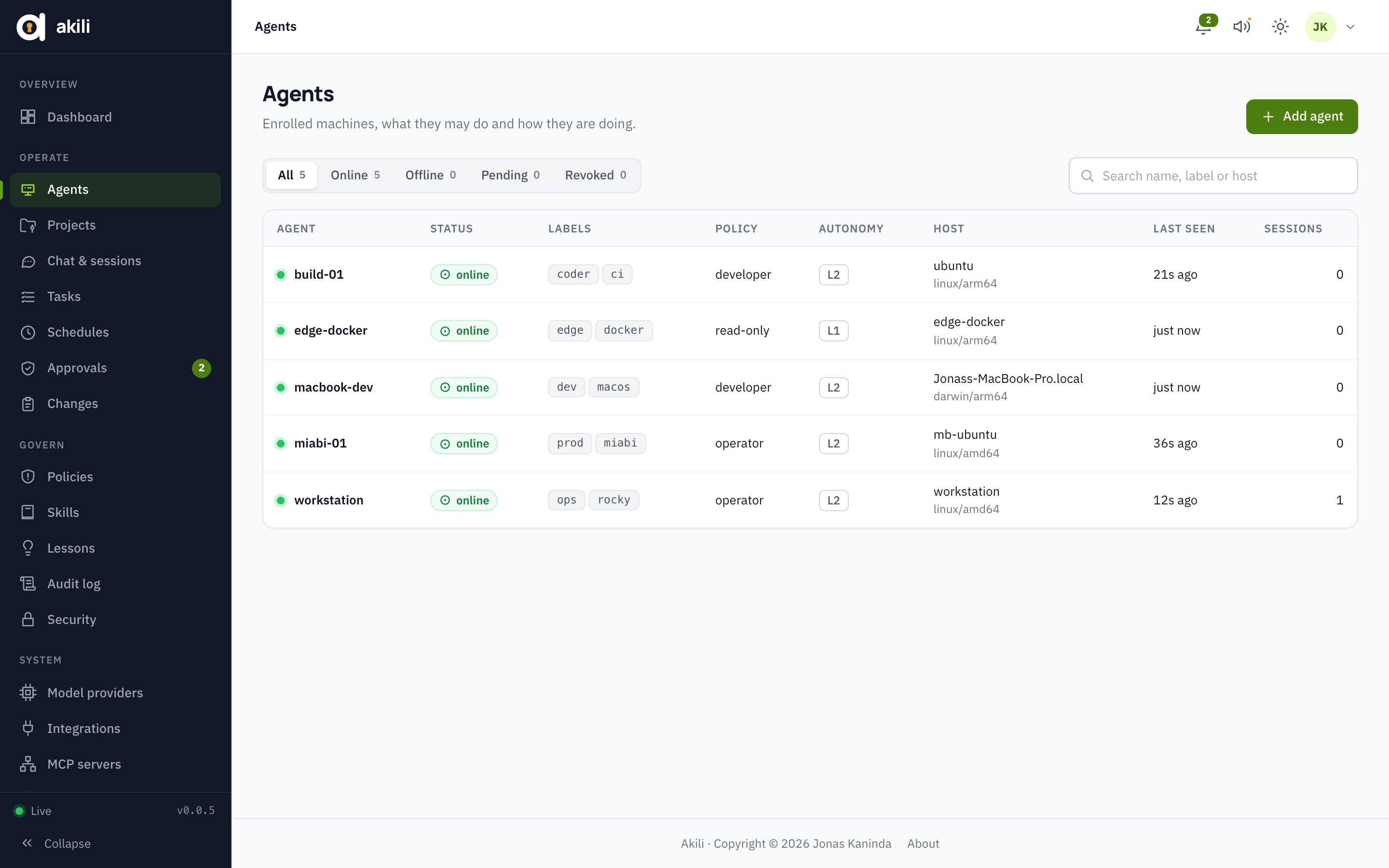 Agents: status, host and policy of every agent Agents: status, host and policy of every agent |
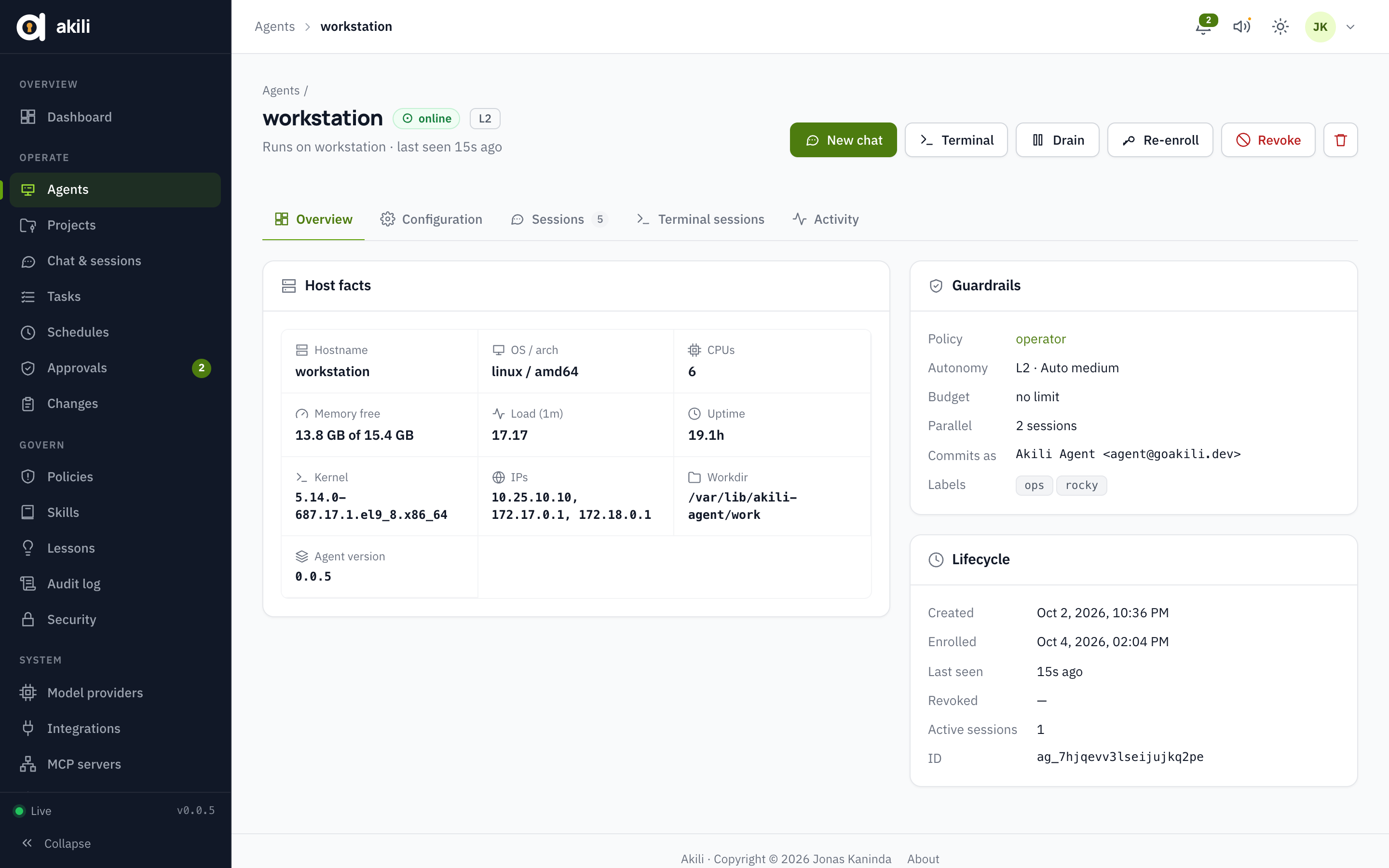 Agent: host facts, guardrails and lifecycle Agent: host facts, guardrails and lifecycle |
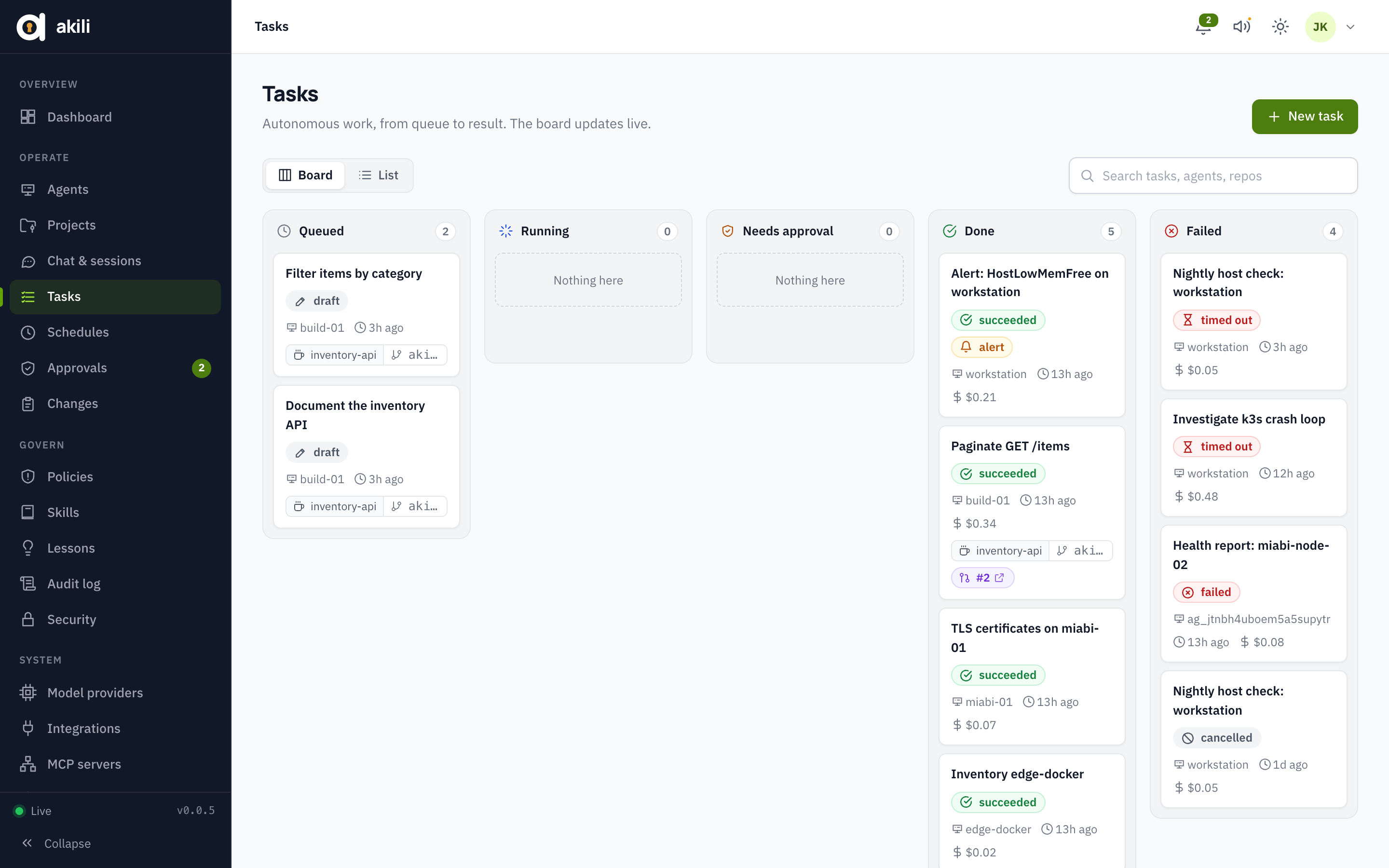 Tasks: work in flight and its outcome Tasks: work in flight and its outcome |
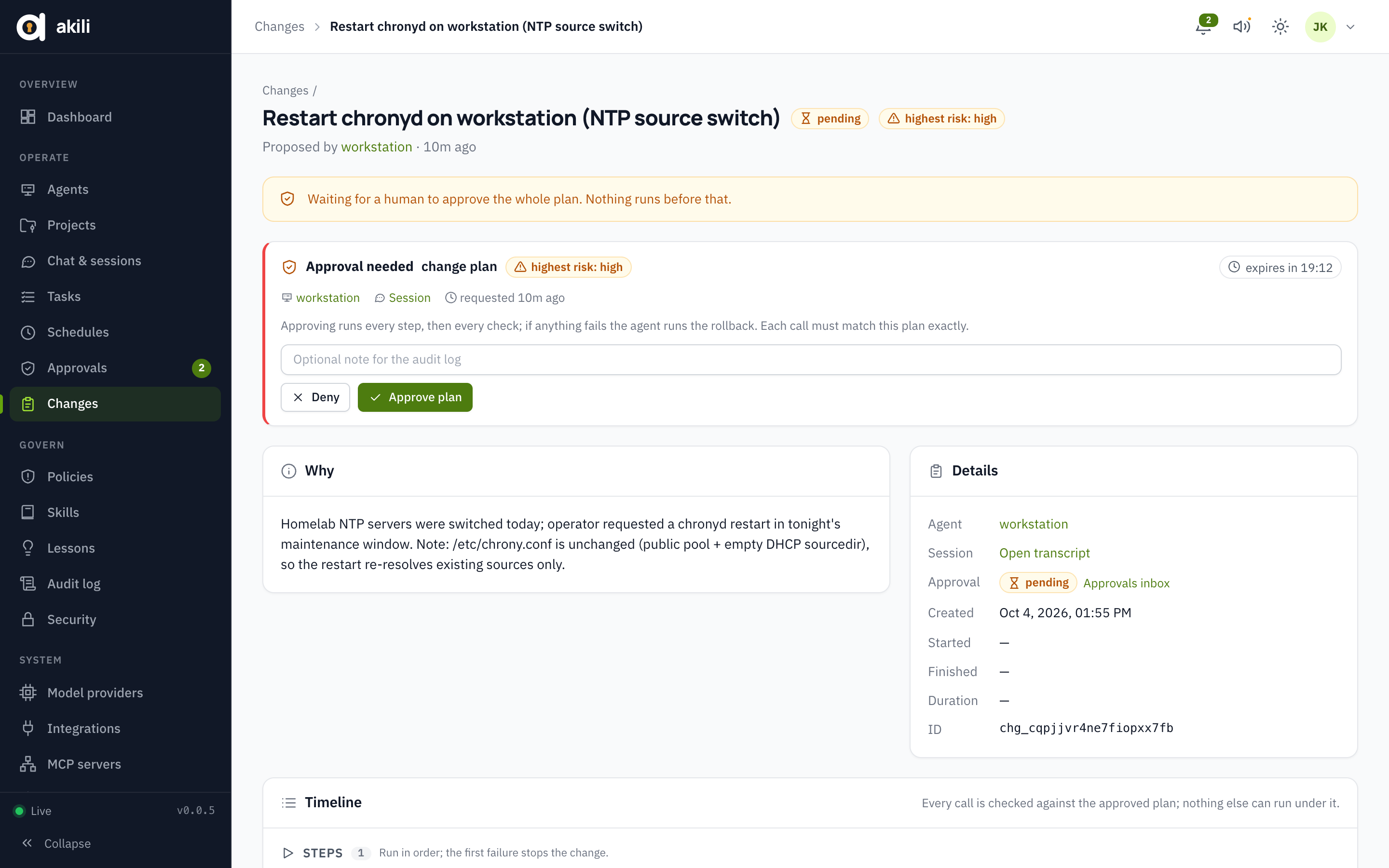 Change plan: why, what runs, and its approval Change plan: why, what runs, and its approval |
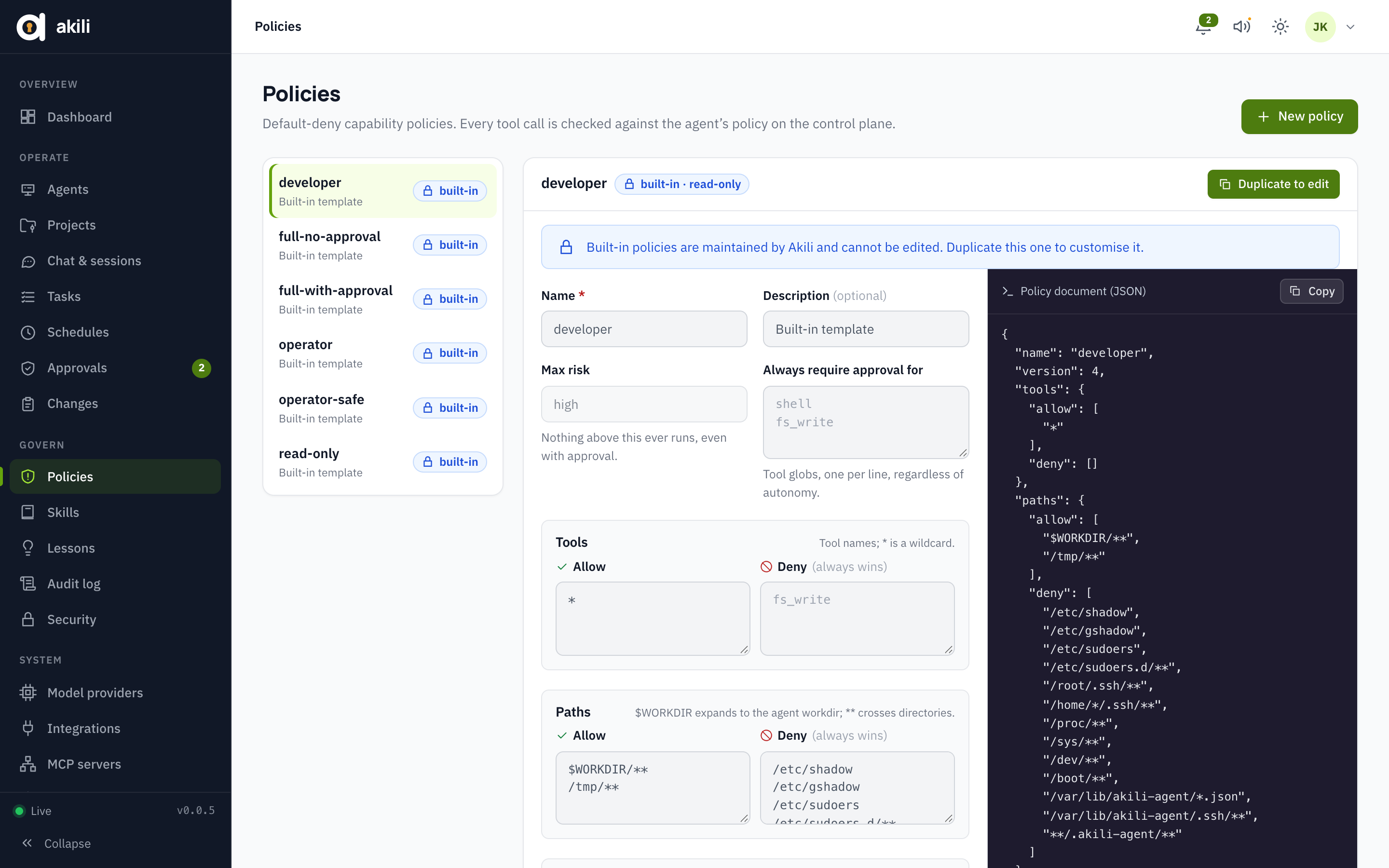 Policies: what each agent may do Policies: what each agent may do |
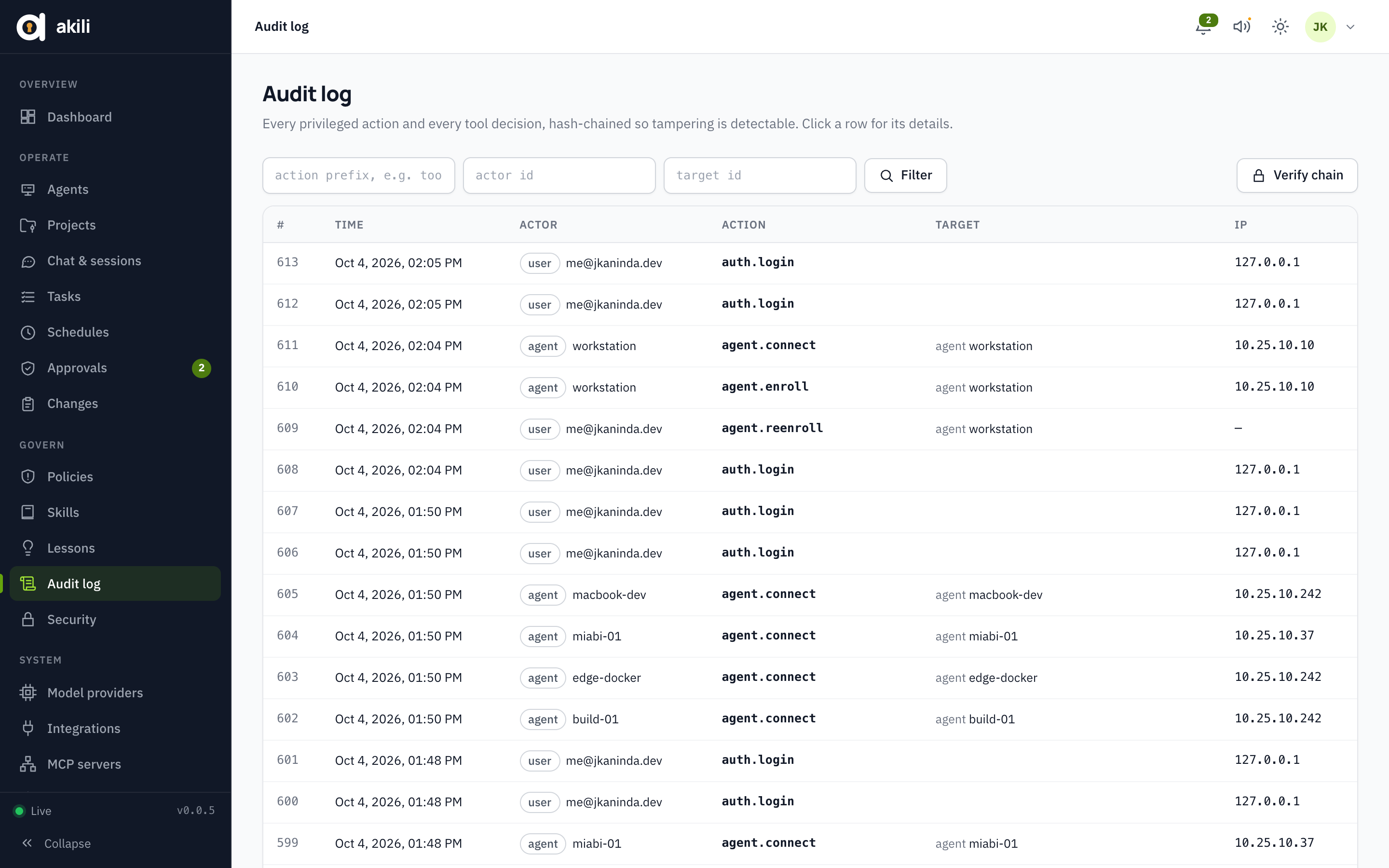 Audit log: hash-chained, every decision recorded Audit log: hash-chained, every decision recorded |
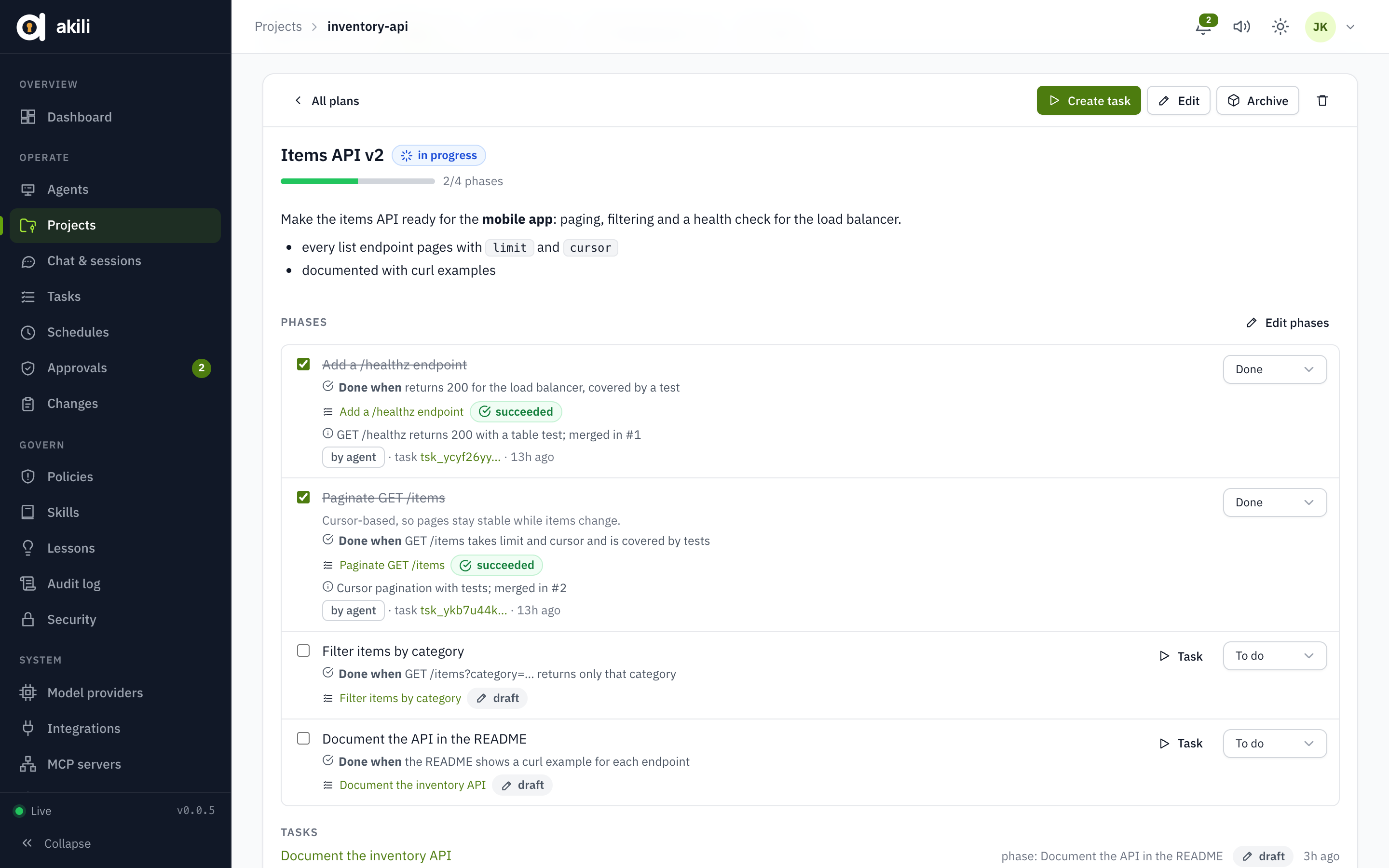 Plan: phases, when each is done, and what agents finished Plan: phases, when each is done, and what agents finished |
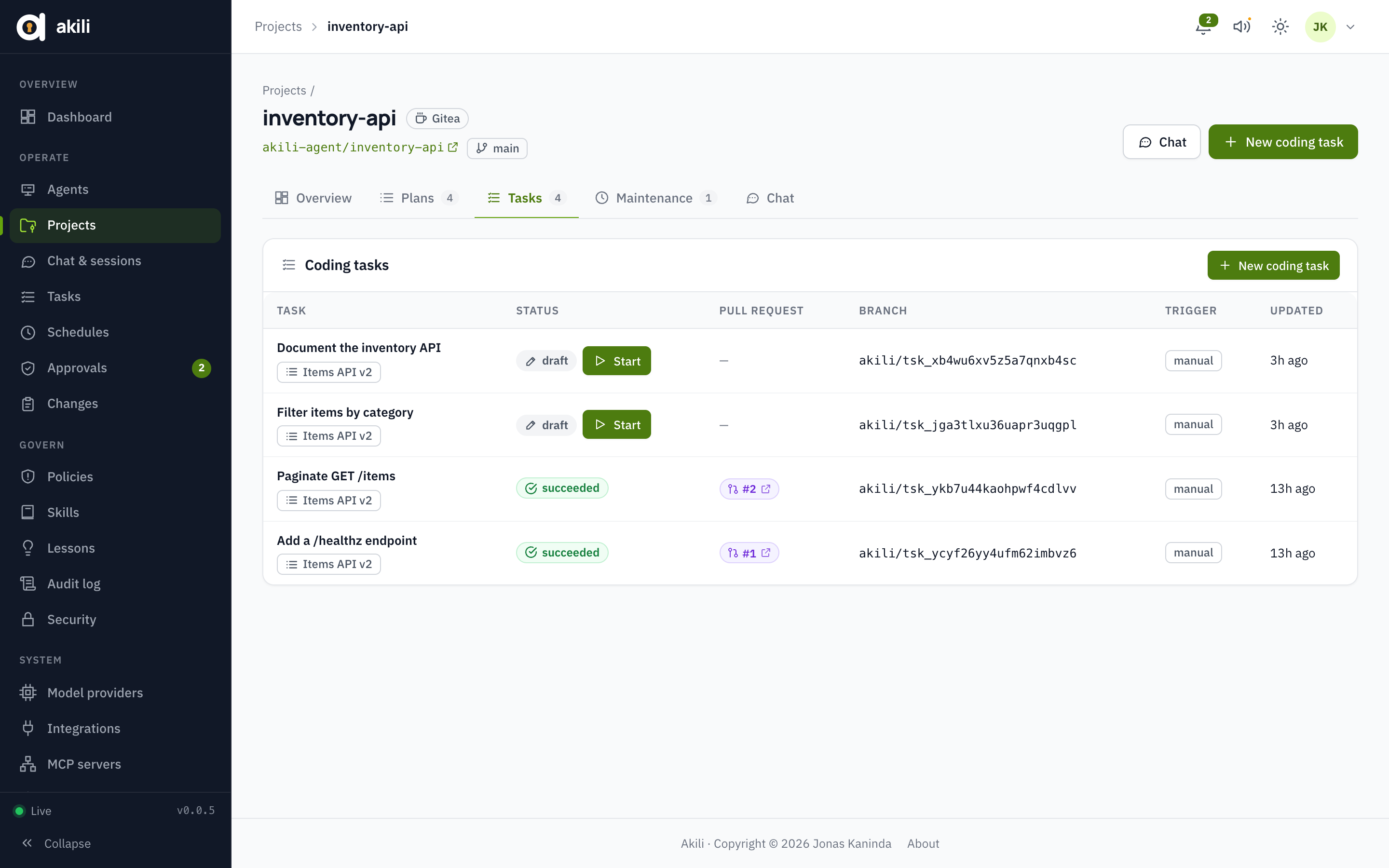 Project tasks: drafts, linked plans and pull requests Project tasks: drafts, linked plans and pull requests |
License
Akili is free software, published under the GNU Affero General Public License v3.0 or later (AGPL-3.0-or-later). The wire contract in proto is under the Apache License 2.0, so other clients can implement it.
Copyright © 2026 Jonas Kaninda
Yorumlar (0)
Yorum birakmak icin giris yap.
Yorum birakSonuc bulunamadi