goat
Health Warn
- License — License: MIT
- Description — Repository has a description
- Active repo — Last push 0 days ago
- Low visibility — Only 5 GitHub stars
Code Warn
- process.env — Environment variable access in .agents/skills/test-goat-mobile/scripts/pair-client.sh
Permissions Pass
- Permissions — No dangerous permissions requested
No AI report is available for this listing yet.
GOAT: one control surface for Claude Code, Codex, Cursor and more, across your machines. Fork of T3 Code.
Install · Downloads · User guides · How it is built
GOAT runs the coding agents you already use, such as Claude Code, Codex and Cursor, on the machines you own: your laptop, a desktop at home, an SSH server or a cloud machine. You steer all of them from one place, whether that is the desktop app, a browser or your phone. Agents can start work on another machine, follow it, and hear back when it finishes, and Fleet shows you what is running and what needs you.
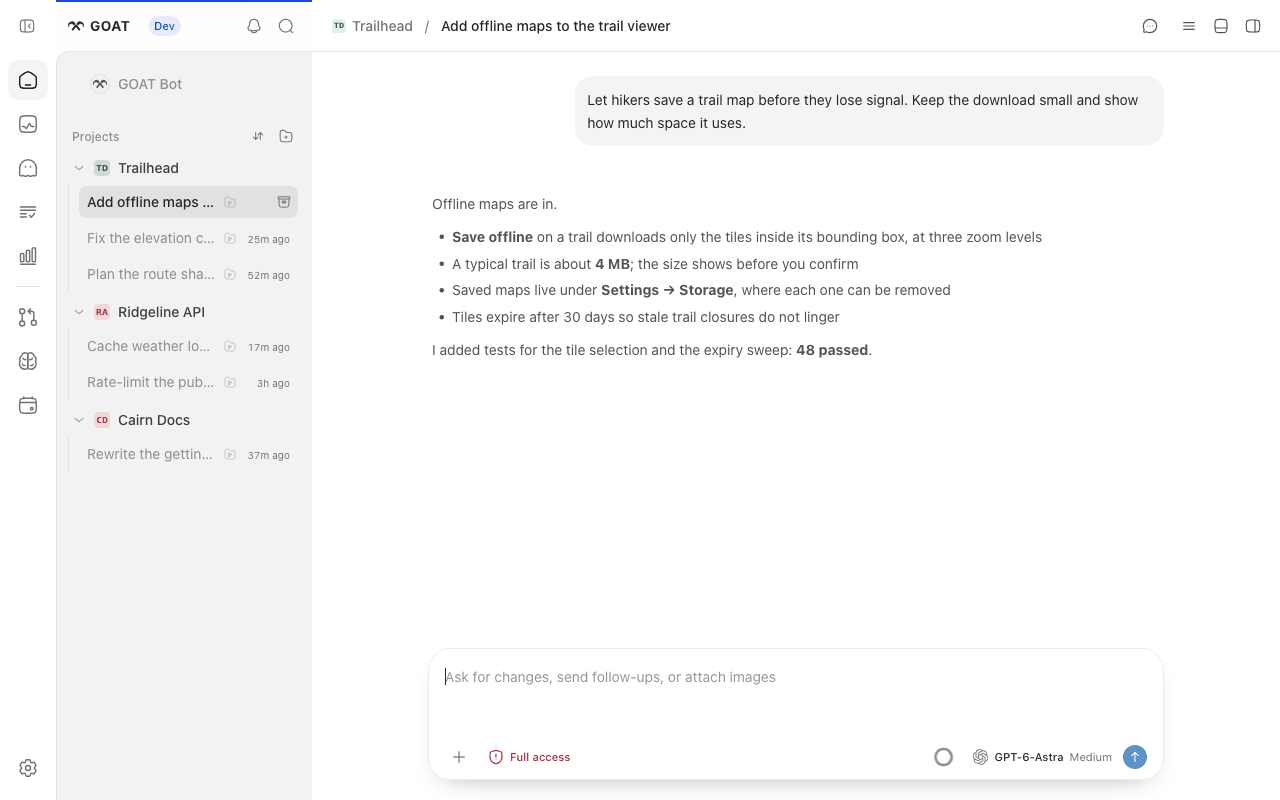
A synthetic demo project and conversation.
Every machine is an environment
Each machine you work on runs a GOAT server. The server and the state it owns (projects, threads, provider sign-ins and memory) form an environment. Clients connect to as many environments as you like, and an environment can reach others: an SSH host gets its GOAT runtime on first use, a GOAT server you already run can be linked for agents with a pairing link, and on Windows a WSL distro runs its own environment.
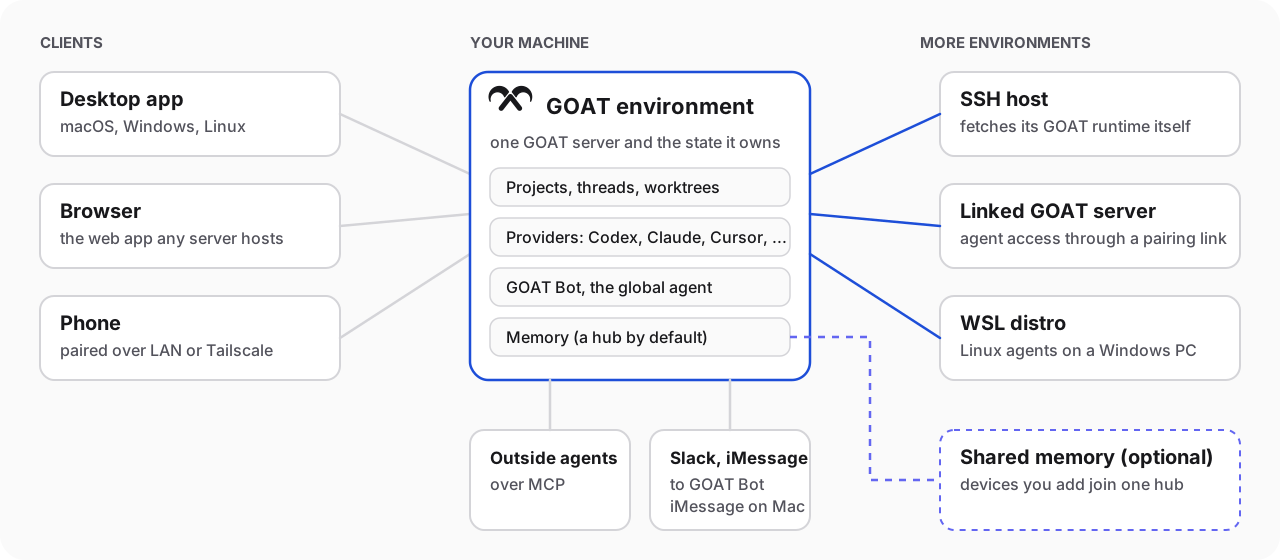
What GOAT adds
GOAT began as a fork of T3 Code and keeps its fast, event-sourced core. On top of it, GOAT adds:
- GOAT Bot. One standing conversation that is not tied to a project. Ask it for work and it starts a coding thread in the right project and machine, then reports the result. The same bot answers in Slack, and over iMessage when the server runs on a Mac.
- Agents that cross machines. An agent can browse folders on an SSH host, start a thread or worktree there, move a thread over with its uncommitted changes, and wait for the result. Hosts download their own GOAT runtime, and Boat cloud machines work like any other SSH host.
- Fleet. One view of every connected machine and the agents working on it, with counts of threads that are running or waiting for you.
- Memory. Finished conversations become memories scoped to all projects, one project or one thread. You can import memories from Codex, Claude and OMO, and share them across devices through a hub.
- Orchestration tools. The GOAT MCP server gives agents
goat_*tools to launch threads, watch them, get notified when they end, and report results to the thread that started them. Outside agents such as Claude Code, Codex and ChatGPT can connect to the same server. - Cloud agents. Claude Cloud, Cursor Cloud and Devin Cloud appear as providers next to the local ones.
- Its own desktop app. The GOAT desktop app has its own app ID, data folder and update feed, so it installs beside the T3 Code app without sharing state. Its command line is
goat.
Quick start
Set up a provider on the machine that will do the work. Claude Code, Codex, Cursor, Grok Build, OpenCode, Antigravity, Pi, Muse Code, ACP agents and the cloud providers are supported. The provider table covers the command-line providers, ACP providers covers ACP agents, and cloud providers sign in from Settings → Providers.
Install GOAT. Download the desktop app for macOS, Windows or Linux from goat-si/goat-releases, or install the
goatcommand:curl -fsSL https://raw.githubusercontent.com/goat-si/goat-releases/main/install.sh | shOn Windows, run
irm https://raw.githubusercontent.com/goat-si/goat-releases/main/install.ps1 | iexin PowerShell. Intel Macs have the desktop app but nogoatexecutable; see Intel Macs.Start GOAT. Open the desktop app, or run
goatif you installed the command; it starts the server and opens the web app. On macOS and Linux,goat service installkeeps the server running in the background.goat --helplists the rest.Add your other screens and machines. Pair a phone or another browser with remote access, and add SSH hosts under Settings → Connections.
GOAT is published to the public goat-si/goat-releases repository, which the install scripts, the desktop updater and goat update all read. It publishes stable releases, starting with v0.1.1, and Nightly builds. The install scripts follow the Nightly train unless you set GOAT_CHANNEL=stable.
Hubs
Every environment starts as its own memory hub. Add another device from the hub's Settings → Memory, and both save to and search the same memories. See Memory.
Documentation
| To | Read |
|---|---|
| Install, update and keep running | Install · Updating · Background service |
| Work in threads | Threads and sidebar · Composer · Permission modes · Keyboard shortcuts |
| Work across machines | Remote access · Move work to another machine · Source control |
| Bring in agents and messages | Outside agents · Slack and iMessage · Memory |
| Set up providers | Codex · Claude · OpenCode · ACP · Pi |
| Understand the code | Architecture overview · System map · Contributing |
Every user guide lives in docs/user.
Development
Install vp
GOAT builds with Vite+. Install the global vp command first:
# macOS / Linux
curl -fsSL https://vite.plus | bash
# Windows
irm https://vite.plus/ps1 | iex
Then run vp i to install dependencies and vp run dev to start the server and web app. Development covers dev state and sharing, and CONTRIBUTING.md comes before your first PR.
Lineage
GOAT is a fork of T3 Code by Ping and shares its git history. We merge upstream every cycle, and devlog/_chase records how far GOAT has followed and where it deliberately differs. Thank you to the T3 Code team for the foundation.
License
MIT. LICENSE keeps the original T3 Code copyright notice. Icons: Solar by 480 Design, CC BY 4.0.
Reviews (0)
Sign in to leave a review.
Leave a reviewNo results found