dreamcoder
Health Gecti
- License — License: NOASSERTION
- Description — Repository has a description
- Active repo — Last push 0 days ago
- Community trust — 498 GitHub stars
Code Gecti
- Code scan — Scanned 12 files during light audit, no dangerous patterns found
Permissions Gecti
- Permissions — No dangerous permissions requested
Bu listing icin henuz AI raporu yok.
A locally run, multi-provider AI coding workspace · 本地运行、支持多家模型服务商的 AI 编程工作台
English | 简体中文
DreamCoder
A locally run, multi-provider AI coding workspace
Manage Claude Code workflows on your desktop and continue sessions from your phone on the same LAN.





Also hosted on AtomGit: atomgit.com/GoDiao/DreamCoder (mirror; please open issues and pull requests on GitHub)
🌱 Contributions welcome! Browse good first issues and help wanted, and read the contributing guide before starting.
✨ Why DreamCoder?
DreamCoder runs its desktop app and session service locally, bringing model configuration, coding sessions, the terminal, and tool activity into one workspace.
- Choose a model provider: Configure Anthropic or OpenAI-compatible endpoints. Presets include DeepSeek, Qwen, Kimi, Zhipu GLM, LM Studio, and Ollama; custom endpoints are also supported. Model availability depends on your provider and configuration.
- Follow the work: Review sessions, file changes, terminal activity, and tool calls on your desktop.
- Continue on your phone: Enable H5 Access to reach desktop sessions from a phone browser on the same LAN. Access across networks requires a reverse proxy you configure yourself.
- Learn how a coding agent works: A seven-part source code walkthrough follows one code change through the execution loop, tools, permissions, sessions, and desktop integration. See the Coding Agent Implementation Guide.
Provider settings and API keys are stored in local files. When you use a cloud model, requests are sent to your chosen provider. See the privacy notice.
🚀 Key Features
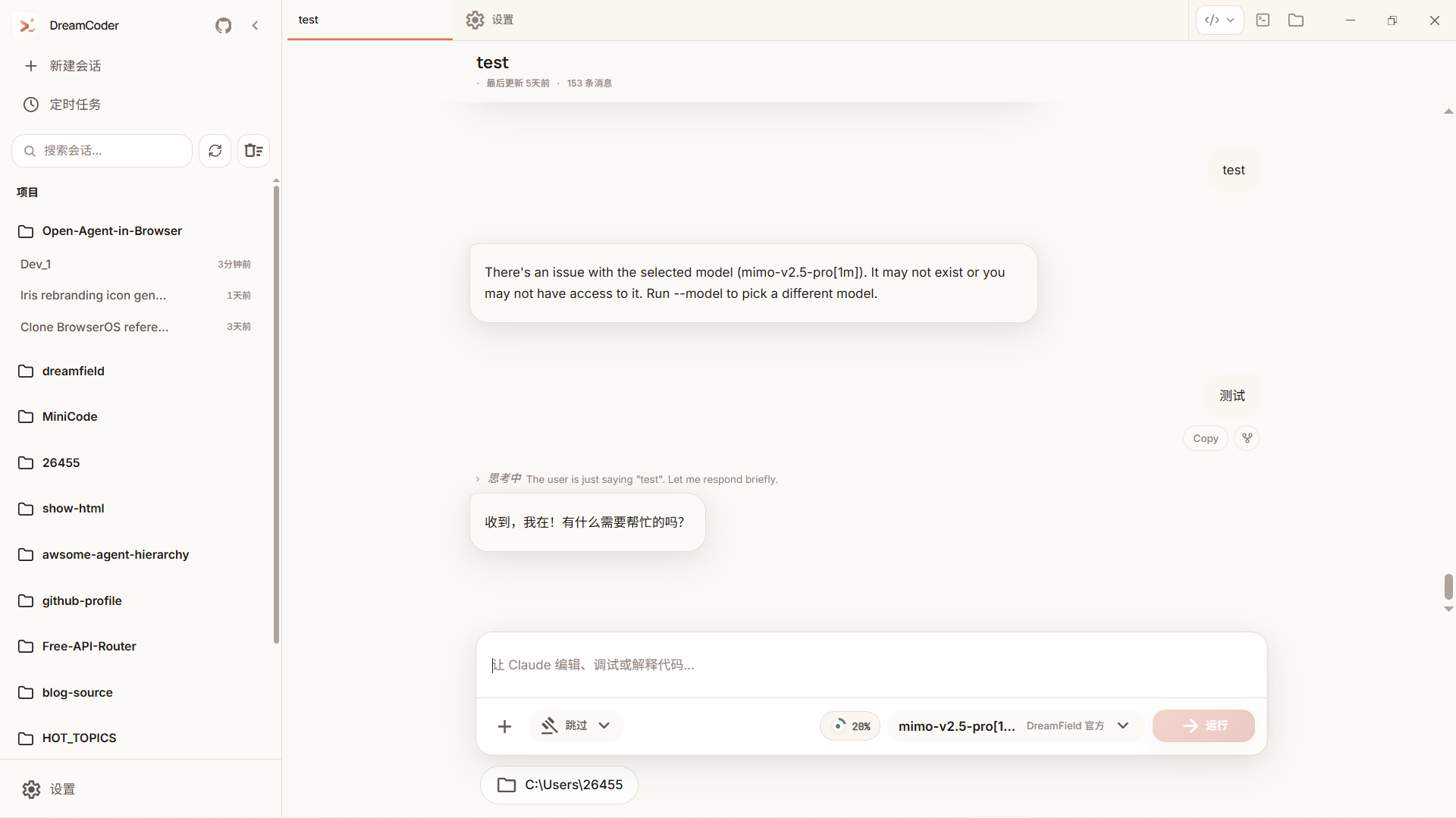
1. Native Desktop Experience
- Smoother session management: Visual history, a sidebar with several ways to organize sessions, and a side panel per session for file changes and terminals.
- Terminal built into the workflow: Built-in PTY (PowerShell/Bash/Zsh) with xterm.js.
- Settings you can manage visually: Configure providers, API keys, and preferences without editing JSON files.
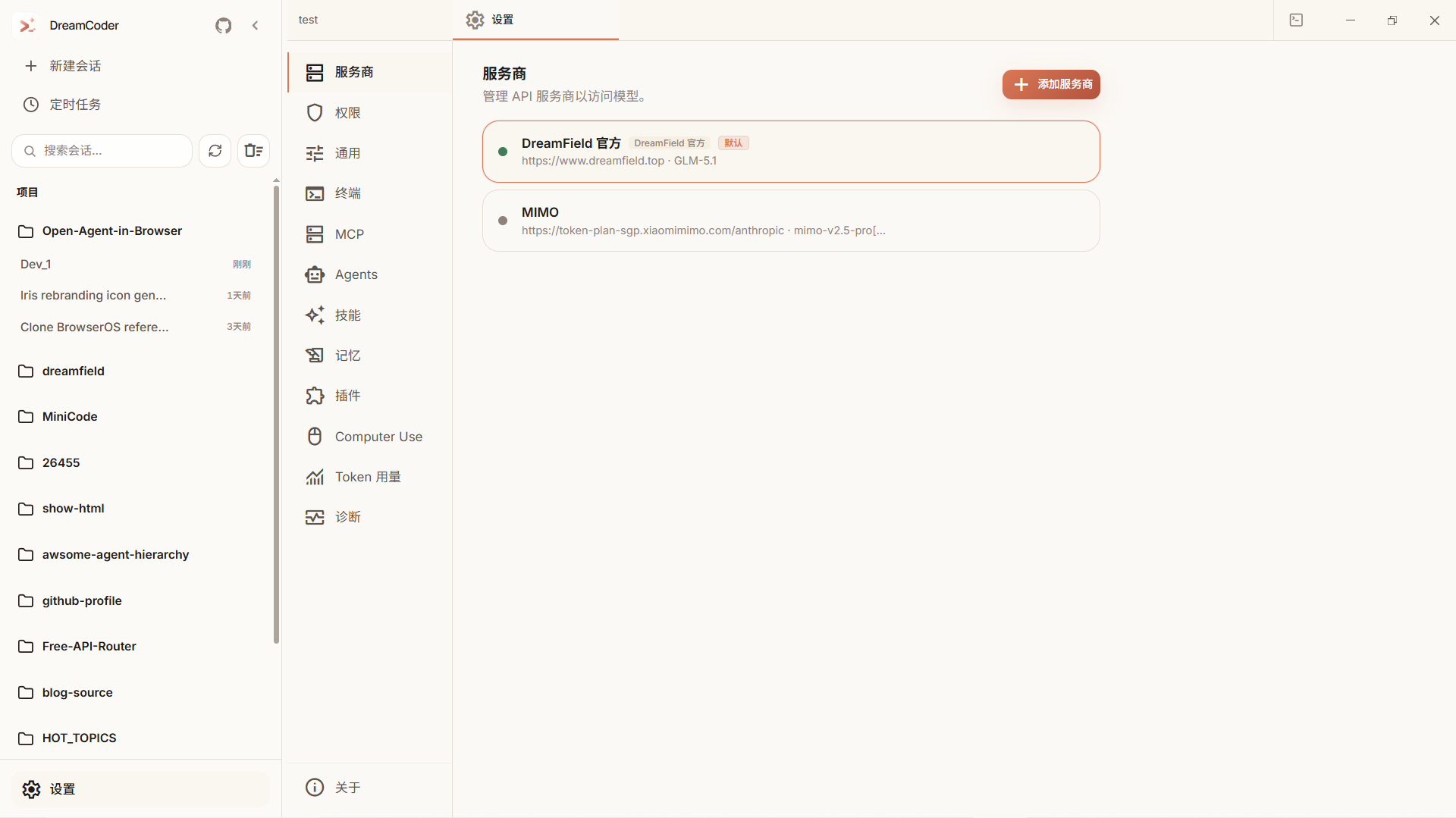
2. Multi-Provider Configuration
- Presets and custom endpoints: Set the API key, endpoint, and model mapping for your chosen provider.
- Connection check: Test the availability and latency of configured endpoints in Settings.
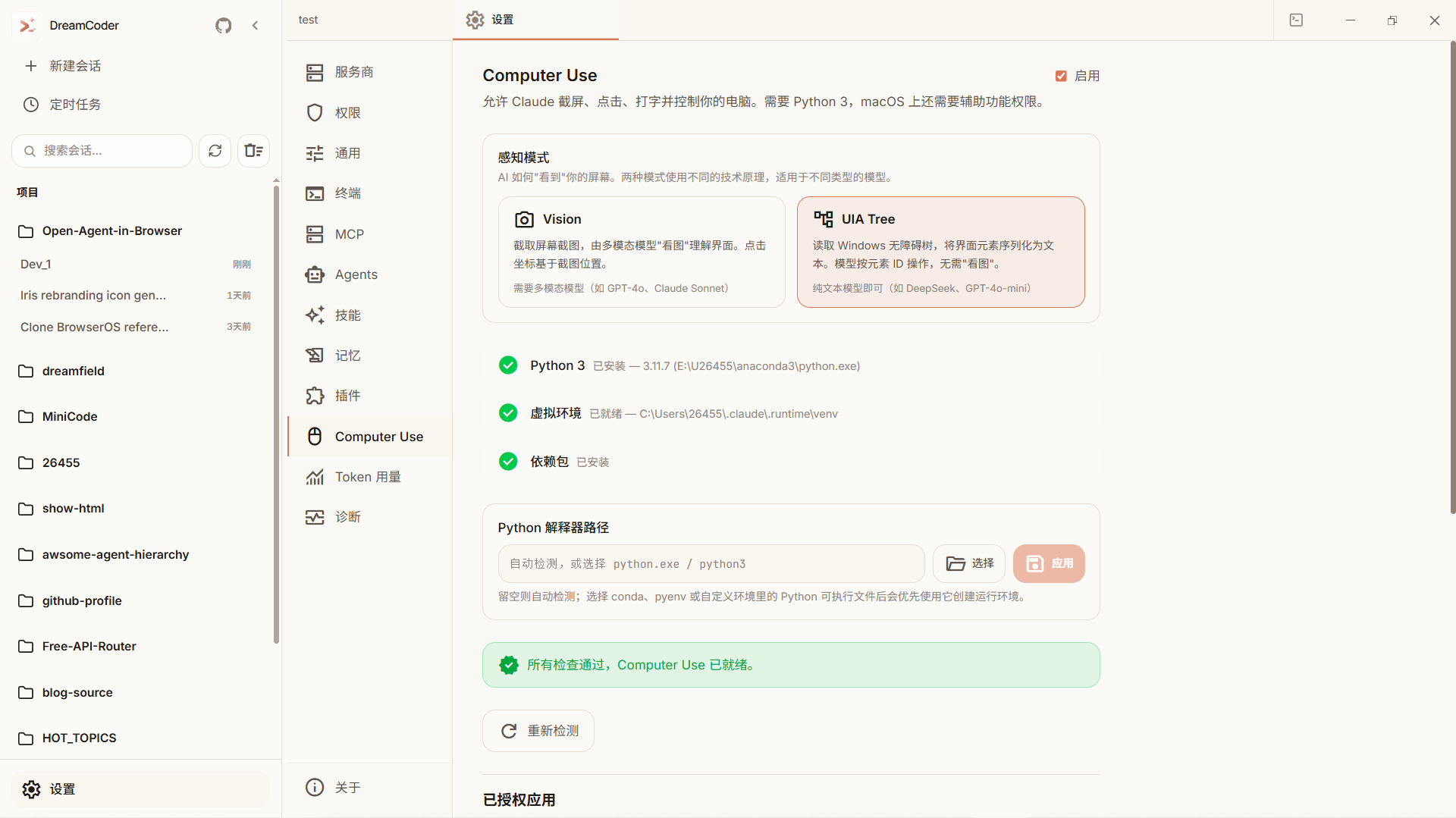
3. Claude Code Workflows
- Dual Computer Use modes: Supports visual screenshot control and UIA Tree mode (text-based accessibility).
- Transparent tool execution: File edits and terminal commands are surfaced clearly, so it's easy to understand and review what the agent is doing.
- MCP extensibility: Expand context and tooling through the Model Context Protocol.
4. Continue on Your Phone over LAN
- H5 Access: Enable access in Settings, manage the token, and use the QR code to connect a phone on the same LAN.
- Access scope: Keep the desktop app running. Cross-network access requires your own reverse proxy; the deployment guide is still in progress.
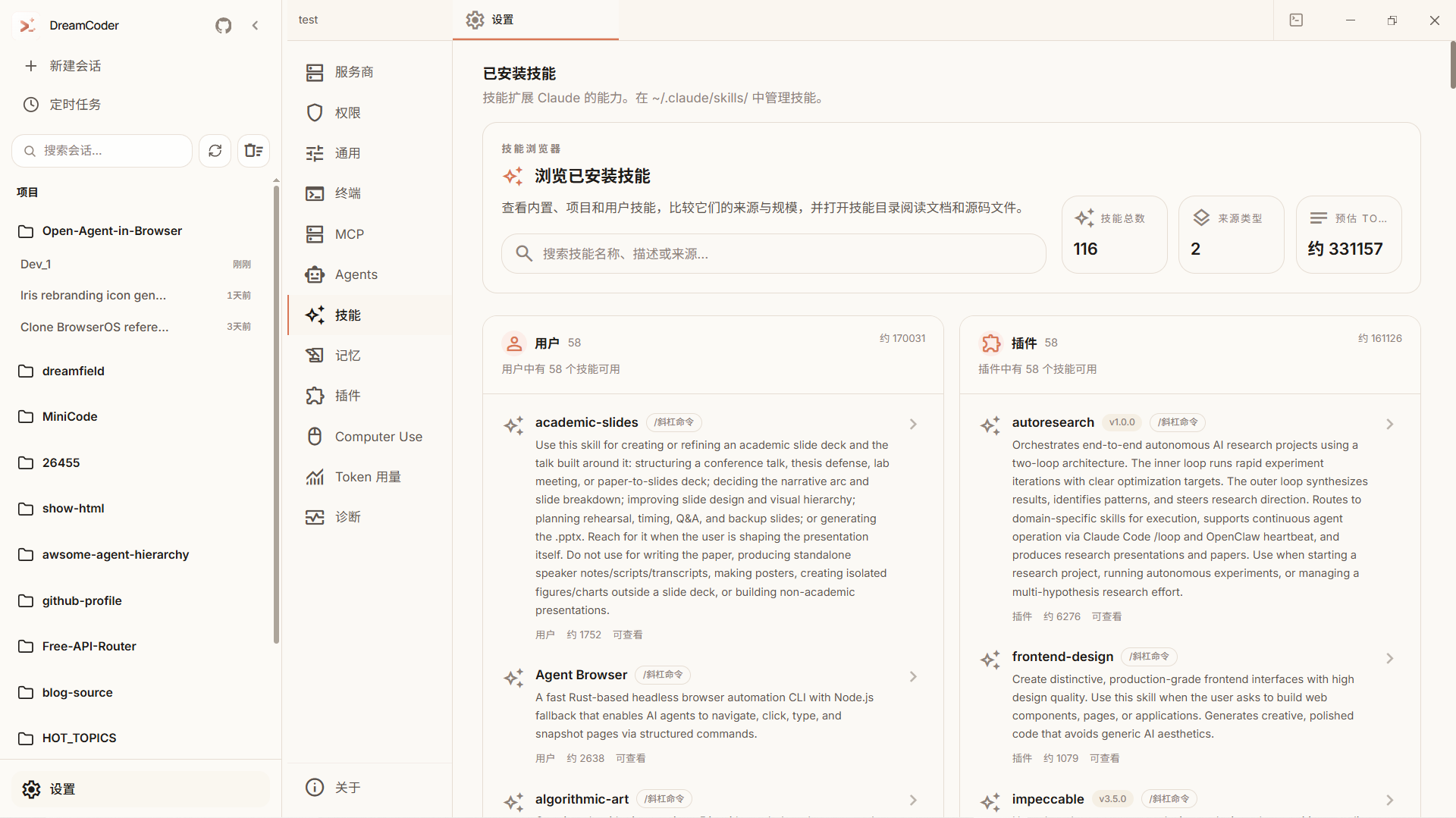
5. MCP Extensions
- Visual configuration: Manage MCP servers in the UI instead of editing JSON by hand.
📖 Source Code Walkthrough
To learn how a coding agent works under the hood, read the Coding Agent Implementation Guide (also available in Chinese). The seven-part series follows one small code change through the execution loop, code tools, permissions, sessions and context, streaming and failure recovery, and desktop integration, with source links for each point.
🛠️ Tech Stack
| Component | Technology |
|---|---|
| Desktop Shell | Tauri 2 (Rust) |
| Frontend UI | React 18 + Vite + TailwindCSS 4 |
| Backend Runtime | Bun (Node.js compatible) |
| Terminal | portable-pty (Rust) + xterm.js |
| State Management | Zustand |
| Protocol | WebSocket, MCP, LSP |
💻 Platform Support
| Platform | Status | Pre-built Installer |
|---|---|---|
| Windows x64 | ✅ Maintainer-tested regularly | ✅ -setup.exe (unsigned) |
| macOS arm64 | ✅ Used daily by the maintainer | ✅ .dmg (unsigned) |
| Linux x64 | ⚠️ Not part of daily validation yet | ❌ Community help welcome |
DreamCoder is developed and validated primarily on Windows x64.
macOS (Apple Silicon) runs from source (bun run tauri dev) and is used by the maintainer during development, and ships as a.dmgfrom v0.5.0.
Linux has#[cfg(target_os = "linux")]branches in the codebase, but it is not part of the maintainer's day-to-day workflow, so Linux support is still best-effort.
If you're running DreamCoder on macOS or Linux, issues and PRs are especially valuable;
for the current Linux memory investigation, see #25.
Check GitHub Releases for the actual assets available with each release.
📅 Roadmap
- Phase 1: Desktop GUI implementation + Multi-Provider System + Project Workspace
- Phase 2: CLI Backend Integration + Computer Use + MCP + Skills + Agent Teams
- Phase 2.5: Performance — bundle splitting, polling throttle, terminal LRU, sessionStore refactor
- Phase 3: H5 LAN Access (access desktop sessions from a phone/browser after enabling it)
- Phase 4: Release Automation + Auto-update
- Phase 5: Remote Agent Backend (run the agent on a remote host over SSH / WebSocket)
See ROADMAP
🏁 Getting Started
Prerequisites
- Bun >= 1.0
- Rust (required to build the desktop app)
- Node.js >= 18 (still needed by parts of the dependency chain)
Installation
Installers for macOS (Apple Silicon) and Windows x64 are on Releases. They are not code-signed yet; the release notes explain how to open them the first time. The steps below run the development version from source. This is a Bun monorepo, with separate dependencies at the repo root and in
desktop/. Run all the steps below to avoid startup failures intauri dev, especially around the sidecar binary, the frontend build output, or missing Tauri CLI pieces.
# 0. Clone the repo
git clone https://github.com/GoDiao/dreamcoder.git
cd dreamcoder

# 1. Install root workspace dependencies (sidecar runtime: Anthropic SDK, AWS SDK, ink, etc.)
bun install

# 2. Install desktop dependencies (Tauri CLI + React frontend)
cd desktop && bun install

# 3. Build the sidecar binary
bun run build:sidecars

# 4. Build the frontend once (creates desktop/dist; without it tauri dev fails with resource path `../dist` doesn't exist)
bun run build

# 5. Launch the desktop app in dev mode
bun run tauri dev
Linux users: you will also need system packages such as WebKitGTK, libappindicator, and librsvg.
See the Tauri prerequisites guide for details.
If you can contribute distro-specific setup commands, a PR would be greatly appreciated.
Configure Your Model
- Open DreamCoder and go to Settings -> Providers.
- Add your API key (for example Anthropic, OpenAI, or DeepSeek).
- Choose a default model and start coding.
UI Language
On first launch, DreamCoder detects your system locale: Chinese systems (zh-*) get the Chinese UI, everything else defaults to English. You can switch languages anytime in Settings, and your manual choice is persisted and always takes precedence afterwards.
🤝 Contributing
Issues and pull requests are welcome. If you'd like to improve DreamCoder, start with the Contributing Guide to get familiar with the workflow and collaboration style.
📝 Changelog
For release history and notable updates, see CHANGELOG.md.
📄 License
MIT © 2024-2026 GoDiao & DreamCoder Contributors
Yorumlar (0)
Yorum birakmak icin giris yap.
Yorum birakSonuc bulunamadi