TintaView
Health Uyari
- License — License: MIT
- Description — Repository has a description
- Active repo — Last push 0 days ago
- Low visibility — Only 5 GitHub stars
Code Basarisiz
- rm -rf — Recursive force deletion command in packaging/install.sh
- network request — Outbound network request in packaging/install.sh
Permissions Gecti
- Permissions — No dangerous permissions requested
Bu listing icin henuz AI raporu yok.
TintaView: your keyboard, mouse and headset lighting mirror what your coding agent is doing. Green when idle, yellow while it works, blinking red when it needs you. Tray usage panel for Claude Code, Codex CLI, Cursor, Copilot CLI and JetBrains AI. Drives Razer Chroma, Logitech G HUB, SteelSeries GameSense and OpenRGB. Windows, WSL, Linux, macOS.
TintaView

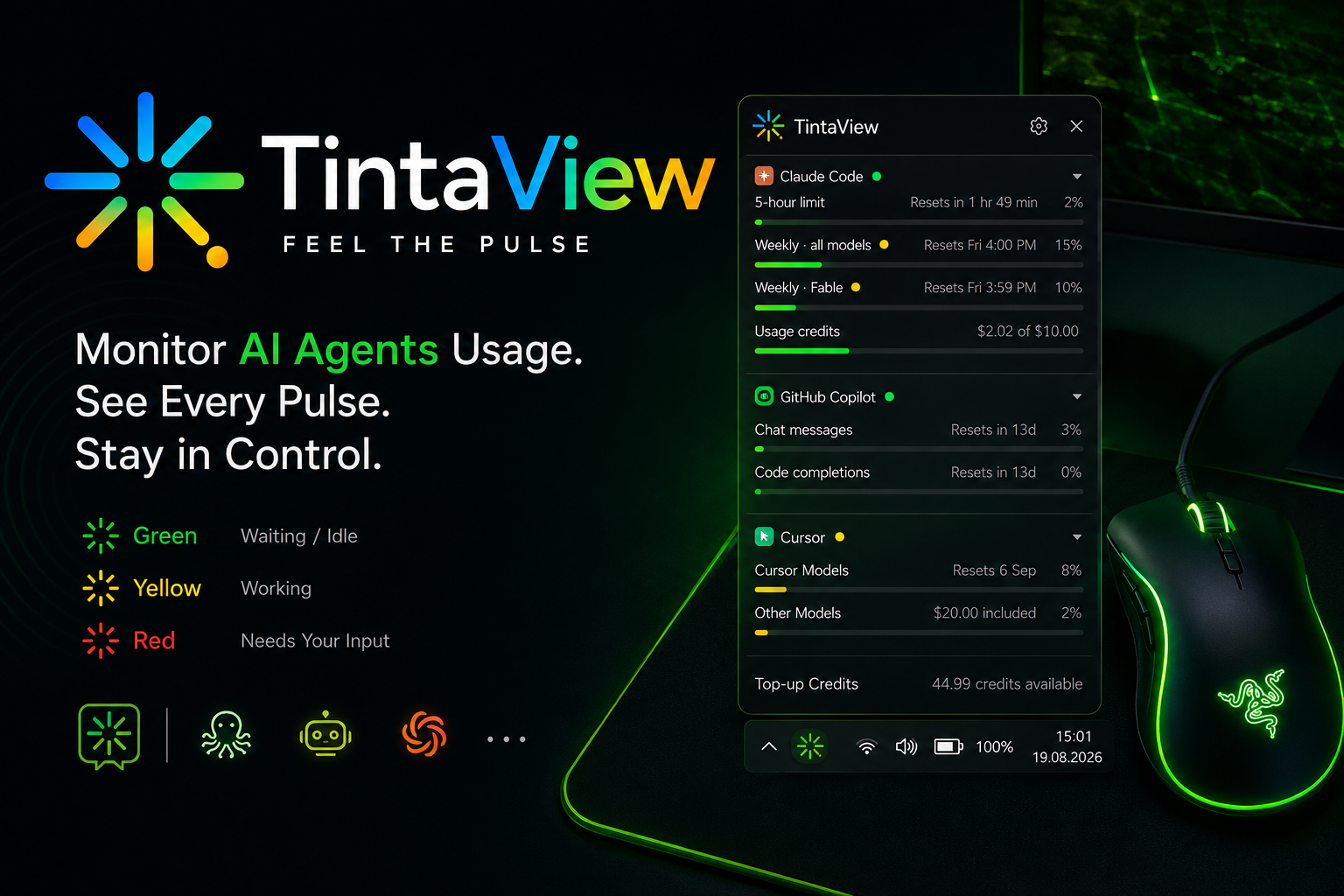
Your keyboard, mouse and headset lighting — plus a tray icon — mirror what your coding
agent is doing, in the TintaView mark's own colours: green when a session is open and
idle, yellow while it's working, and red, blinking when it needs you to act. When
no agent session is running, devices return to their previous lighting and the tray shows
the plain TintaView logo. Click the tray icon for a usage panel (5-hour /
weekly limits, credits, or token totals, depending on the agent). Works with
Claude Code, Codex CLI, Cursor and GitHub Copilot CLI; drives Razer Chroma, Logitech G
HUB or OpenRGB devices; runs on Windows, WSL, Linux and macOS. The usage panel
also has a card for JetBrains AI Assistant — it doesn't light up (see below), but its
usage shows up alongside the others.
What works where
Agents — every agent reports session start/end and "working" the same way; only the
"needs your approval" signal differs:
| Agent | "Needs your approval" | Notes |
|---|---|---|
| Claude Code | Real events (PermissionRequest, plus Notification / permission_prompt on older builds) |
Also covers Claude's multiple-choice questions (AskUserQuestion). After updating from a version without PermissionRequest, re-run tintaview setup to add the hook — the tray says so at startup. |
| Codex CLI | Real event (PermissionRequest) |
Commands only: Codex's Plan-mode multiple-choice questions fire no PermissionRequest, so they don't show as waiting. Hooks are version-gated — see Troubleshooting. Windows-native Codex (not under WSL) falls back to the notify program, which only reports idle. |
| Cursor | Heuristic, not a real event. Cursor has no "waiting for approval" hook, so TintaView guesses: if a tool starts and nothing else happens for stall_seconds (default 8s), it's treated as a stall and turns the light red. This can occasionally be wrong in either direction — see Troubleshooting. |
|
| GitHub Copilot CLI | Real event (Notification for a permission prompt or a question) |
TintaView's hooks go in a file of their own, ~/.copilot/hooks/tintaview.json. Needs a recent Copilot CLI (tested on 1.0.94+). In a WSL-split install the hooks go inside the distro, so it's the Copilot you run in WSL that lights up. |
JetBrains AI Assistant is not in that table — it gets no lighting or session
tracking, only a usage card (see Usage stats): it's an IDE plugin with no
scriptable event API at all.
Lighting engines — Chroma is the default when it's reachable:
| Engine | Windows | Windows + WSL | Linux | macOS |
|---|---|---|---|---|
| Chroma (Razer) | Default | Default (daemon runs on the Windows side) | Not available (Windows-only SDK) | Not available (Synapse was discontinued on macOS) |
| G HUB (Logitech) | Supported — G HUB can keep running | Supported (daemon runs on the Windows side) | Not available (Windows-only SDK) | Not available (Windows-only SDK) |
| GameSense (SteelSeries) | Supported — GG can keep running | Supported (daemon runs on the Windows side) | Not available (no Linux build of GG) | Supported — the only engine that is |
| OpenRGB (Razer, Logitech, Corsair, ASUS, …) | Supported | Supported | Supported — best device coverage | Very limited device support |
| Status-only | Always available | Always available | Always available | Always available |
In practice: on macOS, SteelSeries devices are the only ones that light up. Chroma
and G HUB are both Windows-only SDKs and OpenRGB's macOS device support is too thin to
rely on, but SteelSeries GG runs there and its GameSense API is plain local HTTP. If your
devices are Logitech, prefer G HUB over OpenRGB — like GameSense, it doesn't need you
to quit the vendor app first (see
Troubleshooting).
On Windows the tray itself always starts as pythonw.exe (no console window). Only
the G HUB engine additionally spawns a short-lived python.exe child to talk to
Logitech's LED SDK — that SDK returns success under pythonw but does not actually
change the lights (see Troubleshooting).
Chroma, GameSense and OpenRGB stay in the tray process.
Install
Windows
Open PowerShell and run:
irm https://raw.githubusercontent.com/GomelHawk/TintaView/main/packaging/install.ps1 | iex
That's it — no admin rights (it installs per-user under %LOCALAPPDATA%\TintaView), no
security warnings, and it finishes by launching the setup wizard.
Requires Python 3.12 or newer. If you don't have one, the script tells you and stops;winget install --id Python.Python.3.12 --exact --source winget is the one-liner it
suggests.
To pass options, run it as a script block instead (piping into iex can't forward
arguments):
& ([scriptblock]::Create((irm https://raw.githubusercontent.com/GomelHawk/TintaView/main/packaging/install.ps1))) -NoAutostart
-Prefix DIR— install location (default%LOCALAPPDATA%\TintaView).-Version X.Y.Z— install a specific release instead of the latest.-Python EXE— use a particular interpreter instead of the newest one found.-NoAutostart— skip the "start when I sign in" entry.-NoWizard— don't launch the setup wizard afterwards.-Uninstall— remove the app and its autostart entry. Your config, hooks and logs are
left alone on purpose (on Windows they live in that same folder).
Every option also reads a TINTAVIEW_* environment variable (TINTAVIEW_PREFIX,TINTAVIEW_NO_AUTOSTART, …), so the plain piped one-liner above stays configurable.
Re-running the script is also how you update — it upgrades in place and never touches
your config, hooks or autostart choice. tintaview update just does this for you.
TintaView isn't code-signed, and Windows has two independent defences against unsigned
software. A downloadable installer loses to both:
Mark-of-the-Web. Browsers tag every download with it. That tag is what makes
Edge/Chrome block an unsigned installer on reputation, and what makes SmartScreen show
"Windows protected your PC" when you run it. PowerShell doesn't attach the tag, so
neither check has anything to fire on. Downloading a.zipand extracting it by hand
doesn't help either — Explorer's extractor copies the tag into every file it writes.Smart App Control, on by default on clean Windows 11 installs. Mark-of-the-Web is
irrelevant to it: it refuses to run any executable that is neither signed nor already
known-good to Microsoft's cloud. A compiled bundle can never satisfy it without a
certificate, because every release produces a brand-new unique binary that has no
reputation and never gets the chance to build one.
So TintaView is installed the way Python tools normally are: a private virtual environment
under the install folder, with the app installed into it from a wheel. The only programs
involved are Python's own interpreter — signed by the Python Software Foundation — and
packages from PyPI that millions of machines already run. Both defences are satisfied with
no certificate and no warnings to click through.
The install script downloads the wheel from the GitHub release, verifies its SHA-256
against the release's SHA256SUMS.txt, and refuses to install on any mismatch.
If you're on Windows with WSL, the setup wizard detects it and offers a WSL split
install: the tray and lighting stay on Windows, and the wizard installs the hooks
inside the Linux distro where your agents actually run, over wsl.exe. You never need
to open a WSL terminal yourself.
Linux / macOS
curl -fsSL https://raw.githubusercontent.com/GomelHawk/TintaView/main/packaging/install.sh | sh
Or, from a local checkout:
sh packaging/install.sh [--prefix DIR] [--no-autostart] [--headless] [--uninstall]
--prefix DIR— install location (default~/.local/share/tintaview).--no-autostart— skip wiring up a login autostart entry.--headless— skip the PySide6 tray dependency and register a headless (no-tray)
autostart entry instead, for servers or WSL-only boxes with no desktop session.--uninstall— remove the autostart entry and the install prefix. Your config and
installed hooks under~/.tintavieware left alone on purpose.
This script is also how you update: re-running it (with the same --prefix)
reinstalls into the existing virtual environment in place — nothing is duplicated, and
your config and hooks are never touched.
After installing, either way
tintaview setup
This is the wizard that actually configures anything — the installer only puts files on
disk. Nothing lights up and no hooks are installed until you've run it.
On Windows, tintaview isn't on your PATH. The installer keeps it inside its own folder, so
type the full path wherever this README (or Troubleshooting) saystintaview … — in PowerShell:
& "$env:LOCALAPPDATA\TintaView\venv\Scripts\tintaview.exe" setup
The wizard is also one click away without a terminal: tray → Settings… → Open Full Setup
Wizard (Terminal)…, and Run diagnostics in the tray menu runs doctor.
What the wizard asks
tintaview setup runs the same nine-step flow whether it's launched by install.ps1,
by install.sh, or by hand:
- Language — which language the tray and usage panel speak (see
Interface language). The wizard itself stays in English. - Platform — auto-detected (Windows / WSL / Linux / macOS), with a prompt to
override it if detection guessed wrong. - Agents — probes
~/.claude,~/.codex,~/.cursorandPATH, pre-ticks
whatever it finds, and asks which you want TintaView to watch (at least one). - Lighting engine — probes Chroma, G HUB, GameSense and OpenRGB and shows each as detected /
not running / unsupported here; warns that OpenRGB and Razer Synapse / Logitech G HUB
fight over the same hardware (G HUB itself doesn't — it can keep running), and that
Linux OpenRGB usually needs udev rules and thei2c-devkernel module. Pinning
Logitech G HUB prints the ON/OFF checklist for G HUB (Game lighting control and
the TintaView integration on; onboard memory, Windows Dynamic Lighting and OpenRGB
off). - Install location — where the program files go (separate from your settings,
which always live under~/.tintaviewor%LOCALAPPDATA%\TintaView). - Autostart — a per-user
Runregistry entry (Windows), a systemd--userunit plus
an XDG autostart entry (Linux), or a launchd agent (macOS). No admin, no Scheduled Task. - Hooks — for each agent, shows the exact before/after diff of the config file
it's about to write and asks for confirmation before touching anything. - Notify tool — registers TintaView's
notify_usertool with each agent, the same
way: a diff, then a confirmation (see Notify me when it's done). - Verify — saves the config, installs the hook script, then optionally waits
(about a minute) for a real event from your agent so you know it actually worked.
Answer every question with its default and skip the prompts entirely withtintaview setup -y.
Usage stats
Click the tray icon to open the usage panel. Its header bar has the TintaView logo, a
settings (⚙) button that opens the same settings window as the tray menu's "Settings…", and
a close (✕) button — both also close the panel, same as clicking the tray icon again or
clicking outside it. Each agent's section header shows a small coloured dot next to its
name — the same green/idle · yellow/working · red/confirm colours as the tray icon
and lighting (see above), reflecting that specific agent's current session, or no dot at
all when that agent has no session open. While an agent is working, the name of the tool
it's running (Bash, Edit, …) appears in grey after the dot, so the panel says what an
agent is busy with and not only that it is. What the rows below it show depends on the
agent:
- Claude Code — the same official 5-hour / weekly / usage-credit percentages Claude
Code's own/usagecommand shows, read fromhttps://api.anthropic.com/api/oauth/usage
with your existing OAuth token. If that endpoint is unreachable, TintaView falls back
to an estimate reconstructed from your local transcripts, clearly labelled "estimate". - Codex CLI — official rate-limit percentages when your local session logs carry
them (ChatGPT-plan sessions); plain token totals over the last 5 hours / 7 days
otherwise (API-key sessions don't get percentages from Codex at all). Entirely local
— no network call. - Cursor — unofficial. There is no published personal-usage API, so TintaView
reads the access token Cursor already keeps in its localstate.vscdband calls the
same internal endpoint the Cursor app itself uses. This can break on any Cursor
release with no warning; when it does, the panel just says usage is unavailable —
lighting is unaffected either way. - JetBrains AI Assistant — entirely local, no network call and no hooks. TintaView
reads the same quota cache (AIAssistantQuotaManager2.xml) the IDE's own AI Assistant
status-bar widget uses. Quota is account-wide but each installed IDE only syncs its
own copy when it last talked to JetBrains, so TintaView uses whichever IDE's copy was
updated most recently. - GitHub Copilot CLI — entirely local, no network call. There's no official
percentage here: GitHub's real quota comes from an internal endpoint that needs a
token out of the OS credential store via a two-step exchange, which TintaView
doesn't attempt. Instead it sums input/output tokens per model, over the last 7
days, from~/.copilot/session-store.db— informational totals, not a limit.
Usage is polled every 5 minutes (rate limits, not urgency) and the last good result is
cached, so the panel is never blank and a rate-limit response never overwrites good data
with a worse estimate. Reset times ("Resets in 3 hr 12 min") are worked out each time the
panel is drawn rather than when the figures were fetched, so a countdown is right when
you look at it, not as of the last poll.
That cache covers a bad connection, not a bad login. When an agent's access token has
expired — Claude Code's OAuth token, Cursor's session — nothing will refresh its numbers
until you sign in again, so past a couple of poll intervals the section stops showing the
last figures it managed to fetch and says so instead: "Claude Code login expired —
current usage can't be shown. Run claude to sign in again." Signing that agent back in
is the fix, and the next poll picks it up; TintaView never renews a token itself, because
racing the agent's own refresh is a good way to break the session it is watching.
Tray menu
Right-click the tray icon for:
| Item | What it does |
|---|---|
| Refresh usage | Poll every agent now instead of waiting for the 5-minute cycle. |
| Sound on confirm | Play a sound the moment a session first needs your approval. |
| Keep awake | Keep the computer from going to sleep — also after you lock it — for as long as it is ticked, like Caffeine, so a long agent run finishes while you are away. The screen can still turn off to save power. It does not depend on what your agents are doing, and it is remembered across restarts. While it is on, the tray icon carries a small green shield. On a laptop with the charger in, closing the lid may not sleep it while this is on. |
| Pause lighting | Hand your devices straight back to Synapse / G HUB / OpenRGB and stop driving them — for recording, streaming or screenshots. The tray icon and the usage panel keep working; only the hardware is released. It is deliberately not remembered across restarts, so you can never end up with permanently dead lights and no idea why. |
| Settings… | The settings window (agents, language, alerts, sound, clocks, colours, engine, update options). |
| Check for updates | Run the update check now and offer to install. |
| Open logs folder | Open the log directory in your file manager — on Windows that's inside %LOCALAPPDATA%\TintaView, which is worth a menu item because nothing else tells you where it is. |
| Run diagnostics | Run the same checks as tintaview doctor -v and show the report in a window you can select and copy from — handy when there's no terminal to hand, which on Windows is the normal case. The two steps that ask you a question (the live hook test, the paint self-test) are skipped here — there's nowhere to answer them; run tintaview doctor -v --paint in a terminal for those. |
| About / Quit | Version information; exit (this also releases your lighting). |
Launching TintaView a second time while it's already running doesn't start a second copy
or fail silently — it opens the running one's usage panel.
Interface language
English by default, and available in Spanish, Italian, German, Polish, Russian,
Belarusian and Ukrainian. Pick one in two places, both writing the sameui.language setting:
- the tray menu's Settings… window, on the General tab — the change applies
immediately, no restart; - the console wizard's first question (
tintaview setup).
Each language is listed under its own name ("Polski", "Українська"), so it's findable
even when the interface is currently in a language you don't read. Hand-editingconfig.toml works too, and a locale-style value is understood — language = "ru_RU"
means Russian. Anything unrecognised falls back to English rather than refusing to start.
What is translated: the tray icon's menu and tooltip, the About and update dialogs, the
settings window, and the usage panel — including the row labels and the "usage
unavailable" reasons the providers produce.
What is not, on purpose:
- Anything an agent's own API reports — a plan name ("Max", "Copilot Free"), a model
name, release notes, an HTTP error message. Those are quoted exactly as they arrived,
in whatever language they arrived in. - The setup wizard,
doctorand the rest of the CLI. They are read once, from a
terminal, and half of what they print is a diff of your own config files; plain English
throughout is more useful there than a partial translation.
One wrinkle worth knowing: usage rows are worded when they're fetched, and the last good
result is cached on disk. Right after switching language, a section still showing cached
numbers keeps its old wording until the next poll (or the tray menu's "Refresh usage")
replaces it.
World clocks
Optional: a band of up to four clocks in the usage panel, between the TintaView title
and the first agent. Off until you switch it on, in the tray menu's Settings…
window on the Clocks tab.
Each clock is picked by country, then by city where the country has more than one
zone (Poland and India have one each; the USA has 29, so it asks). What the panel prints
under each time is the country and, if you tick City on that row, the city with it:
  21:17        00:47        15:17        04:17
PL/Warsaw      India      US/New York    Japan
The City tick box is per clock, because it is a judgement about the place — two
American clocks need their cities to be told apart, a lone Indian one does not. It only
changes the label; the time is the same either way. Whether a country is spelled out
("Poland/Warsaw") or abbreviated ("PL/Warsaw") is not a setting: the panel measures
what fits its 380px card in your system font and shortens as little as it has to, always
treating labels of the same kind alike. One clock keeps full names at any size; four with
cities generally do not.
Time format is one setting for all four — 24-hour (20:42) or 12-hour (8:42 PM).
Deliberately not per clock: a card mixing the two reads as a bug rather than a preference.
Daylight saving needs no attention. Each time is converted from its zone at the moment it
is drawn, so a zone that shifts in March and October (Warsaw) follows its own rules, one
that never shifts (Kolkata, +5:30) stays put, and a future change to the time-zone
database arrives with your OS rather than needing a TintaView update. The clocks tick on
the minute, and only while the panel is open.
Configured entirely in that dialog, or by hand — see ui.clocks.* and[[ui.clocks.clock]] in Configuration. The console setup wizard does
not cover clocks (it stays focused on hooks, engines and autostart), same as the chime
and the local-estimate switch.
Reminders you can't miss
A single chime is missed by anyone who stepped away, so a confirmation left unanswered forescalation.after_seconds (60 by default) re-chimes and re-notifies every interval until you
deal with it — and can run one command of your own, once per confirmation. That is the
extension point for everything TintaView deliberately doesn't do itself: a phone push, a
webhook, a smart bulb, a message to another machine. Set it in Settings… → Alerts.
Telegram, as a worked example:
curl -s -X POST "https://api.telegram.org/bot<TOKEN>/sendMessage" \
  -d "chat_id=<CHAT_ID>" --data-urlencode "text=$TINTAVIEW_MESSAGE
$TINTAVIEW_DETAIL"
On Windows: curl.exe, and "text=%TINTAVIEW_MESSAGE% %TINTAVIEW_DETAIL%" on one line.
Keep each variable inside double quotes there — see the note on Windows below.
What the agent is asking comes from the hook payload of the confirmation event, which
TintaView reads in full — and only that event, never on the per-tool-call path. Every variable
is always set, empty when there is nothing to say:
| Variable | Holds |
|---|---|
TINTAVIEW_MESSAGE |
A finished, translated sentence with the request's start: "Claude Code — still waiting for your answer (1 min): …". What most commands want. (The tray's own popup shows only the part before the colon — it never quotes the request.) |
TINTAVIEW_DETAIL |
The whole request on one line: the command with the agent's description of it, the file, the URL, or every question with its options. Lines are joined with ⏎, capped at 3500 characters so it fits a Telegram message beside TINTAVIEW_MESSAGE. |
TINTAVIEW_QUESTION |
The request, cut short (200 characters) — the part TINTAVIEW_MESSAGE quotes. |
TINTAVIEW_TOOL |
The tool asking: Bash, Edit, AskUserQuestion, … |
TINTAVIEW_CWD |
The agent's working directory, i.e. which project is asking. |
TINTAVIEW_AGENTS |
Who is waiting: "Claude Code". |
TINTAVIEW_STATUS |
Always confirm. |
What TINTAVIEW_DETAIL looks like — a Claude command, a Codex command and a Claude question,
from real prompts (paths and one long question shortened):
Print a timestamp from the project venv's Python — $ .venv/bin/python -c "import time; print(time.strftime('%T'))"
Do you want to allow creating the requested empty file at /home/you/x outside the workspace? — $ touch /home/you/x
1/2 How should I commit the Phase 2 (c) work? — Four commits, one per task / Two commits / One commit ⏎ 2/2 Include the dead-file deletions in the commit? — Yes — I'll run the git rm / No — commit code only
| Agent | What there is to quote |
|---|---|
| Claude Code | Everything above — commands, file edits, URLs, and multiple-choice questions with their options. |
| Codex CLI | Commands, with Codex's own sentence for why it is asking. Its Plan-mode questions aren't detected at all yet. |
| Cursor | Nothing — it has no "waiting for approval" hook; TintaView infers that state itself, and the variables are empty. |
Updating from an older TintaView? The hook script only starts sending the full request once it
is reinstalled: run the setup wizard (tintaview setup, or tray → Settings… → Open Full
Setup Wizard (Terminal)…). tintaview hooks install works too, except in a WSL split install,
where only the wizard reaches the script inside the distro. The tray reminds you at
startup when Claude Code is set up, since Claude needs a new hook for this; with only Codex,
nothing prompts you, and until you reinstall TINTAVIEW_DETAIL stays empty.
This sends the agent's command to wherever your command sends it. A command line can hold a
token (curl -H "Authorization: …"), a password or a private path. Nothing leaves your machine
unless your own command uses these variables, and TintaView doesn't redact anything — pick what
you pass along accordingly. The request is held in memory only, replaced by the next prompt,
and dropped the moment you answer.
On Windows, the command runs through cmd, which pastes %VAR% into the command line before
reading it. So TintaView turns every " in these variables into ' there: inside a quoted"…%TINTAVIEW_DETAIL%…", characters like & or | from the agent's command then stay plain
text instead of running as commands of their own. Unquoted, they would not. (PowerShell's$env:TINTAVIEW_DETAIL is safe either way.)
Usage limits can run a command too. The usage alert — the notification the first time a
window crosses stats.alert_threshold (90 % by default) — takes a command of its own, set on
the same Alerts tab. It is a separate setting, so a command set up for questions doesn't
start firing for usage. It runs once per crossing, with the same variables: TINTAVIEW_STATUS
is limit, TINTAVIEW_MESSAGE is the notification's sentence ("Claude Code: 5-hour limit is
at 91%."), TINTAVIEW_AGENTS names the agent, TINTAVIEW_LIMIT the window and TINTAVIEW_PCT
its percentage as a whole number; the question variables are set and empty. So the Telegram
example above works unchanged in both places.
Notify me when it's done
Start a long task and add "notify me via phone when it's done" — nothing else. Claude Code,
Codex and Cursor each see a notify_user tool from TintaView in every session, and call it
when the task finishes with a sentence of their own ("Migration finished: 142 tables, no
errors."). The tray shows it as a notification, and Settings… → Alerts → When an agent
notifies me takes a command for everything past the desktop — the Telegram one above works
as it is, with TINTAVIEW_MESSAGE holding the agent's sentence. The command and any token in
it stay in TintaView's config; the agent only ever sends the text.
Missed the notification? The bell in the usage panel's title bar keeps the last 10, newest
first: hover it for the latest one, click it to read them all in full (and copy them). An orange
dot on the bell means something arrived since you last looked. They are kept until TintaView
restarts, or until you press Clear.
| Variable | Holds |
|---|---|
TINTAVIEW_MESSAGE |
What the agent wrote, on one line (lines joined with ⏎), at most 1000 characters. |
TINTAVIEW_AGENTS |
Who sent it: "Codex CLI". |
TINTAVIEW_CWD |
The agent's working directory, i.e. which project it is about. |
TINTAVIEW_STATUS |
Always notify — so one script can serve all three commands. |
The question variables are set and empty, and on Windows " becomes ', as for the other
commands.
The tool is an MCP server that ships with TintaView
(python -m tintaview.core.mcp); the setup wizard registers it after the hooks, with a diff of
each file and a confirmation per agent:
| Agent | What the wizard adds |
|---|---|
| Claude Code | mcpServers.tintaview in ~/.claude.json, and mcp__tintaview__notify_user in permissions.allow of ~/.claude/settings.json |
| Codex CLI | [mcp_servers.tintaview] in ~/.codex/config.toml, with approval_mode = "approve" for the tool |
| Cursor | mcpServers.tintaview in ~/.cursor/mcp.json |
The permission entries are there because the call comes at the end of a long task, when
nobody may be around to approve it. Cursor keeps its approval setting in its own UI, so it
may ask the first time. New sessions pick the tool up; one already open doesn't.
It needs the tray: a headless TintaView has nothing to show the message with, and the tool
tells the agent so — as it does when TintaView isn't running at all — so the agent can say
the notification didn't go out rather than claim it did.
Configuration
One file: ~/.tintaview/config.toml (Windows: %LOCALAPPDATA%\TintaView\config.toml),
written by tintaview setup and safe to hand-edit afterwards.
| Key | Default | Meaning |
|---|---|---|
server.host |
127.0.0.1 |
Where the status broker listens. |
server.port |
8777 |
Port for the status broker (hooks and the tray both talk to this). |
server.watchdog_timeout |
600 |
Seconds of silence from a session before it is dropped and its lighting released (crash safety, for an agent that died without sending its end-of-session hook). Counted per session, so one busy agent never keeps another agent's dead session alive. |
engine.mode |
auto |
auto | chroma | ghub | steelseries | openrgb | none. auto probes engine.order and uses the first that responds. |
engine.order |
["chroma", "ghub", "steelseries", "openrgb"] |
Probe order for auto mode. |
engine.chroma.devices |
["mouse", "headset"] |
Chroma device endpoints to drive. |
engine.ghub.dll_path |
(auto-detected) | Path to the Logitech LED Illumination SDK DLL; empty searches LGHUB\\sdks\\ then the G HUB install root, the registry, then PATH. |
engine.ghub.settings_db |
(auto-detected) | Path to G HUB's settings.db (Integrations list); empty uses %LOCALAPPDATA%\\LGHUB\\settings.db. Read-only — never written. |
engine.ghub.device_types |
["monochrome", "rgb", "perkey"] |
Which SDK device classes to drive — a capability bitmask, not per-device targeting like OpenRGB's device_types; there's no way to address "just the mouse". |
engine.ghub.restore_on_release |
true |
Save the current lighting on open, restore it on close. |
engine.steelseries.core_props |
(auto-detected) | Path to SteelSeries GG's coreProps.json, which is where GG publishes the address of its GameSense server. Empty uses %PROGRAMDATA%\\SteelSeries\\SteelSeries Engine 3\\coreProps.json (Windows) or /Library/Application Support/SteelSeries Engine 3/coreProps.json (macOS). Read-only. There is no host/port setting because GG picks a fresh port on every start. |
engine.steelseries.device_types |
["mouse", "keyboard", "headset"] |
Which GameSense device classes to drive. GG accepts more names than these (rgb-per-key-zones, indicator, …) and anything listed here is passed through as-is. |
engine.openrgb.host / .port |
127.0.0.1 / 6742 |
Where the OpenRGB SDK server is listening. |
engine.openrgb.device_types |
["mouse", "keyboard", "headset"] |
Which OpenRGB devices to drive. Peripherals only by default — motherboard, RAM, GPU and case lighting is ambient decoration, and driving it makes the whole room flash on every tool call. Set to [] for every detected device, or add any openrgb.utils.DeviceType name (e.g. "mousemat"). |
engine.openrgb.restore_on_release |
true |
Snapshot each device's mode/colors on open, restore them on close. |
engine.openrgb.direct_mode_only |
true |
Only drive devices that expose a Direct mode, to avoid flash wear from blinking. |
colors.idle |
#30EA2F |
Green — a session is open and the agent is waiting on you. |
colors.working |
#FFBB00 |
Yellow — the agent is busy. |
colors.confirm |
#FF0013 |
Red, blinking — the agent needs you to act. |
colors.none |
#0080F7 |
Unused by the running app — no session never paints a colour, it just releases devices back to their prior state and shows the plain logo in the tray. Kept only as a fallback default. |
colors.blink_ms |
400 |
Blink interval for the confirm state, in milliseconds. |
stats.poll_seconds |
300 |
How often usage providers are polled. |
stats.enabled |
true |
Turn the usage panel off entirely. |
stats.show_trend |
true |
Show a burn-rate line under an agent's rows — "At this pace, 5-hour limit empties in ~40 min." Only appears while a window is actually climbing and would run out before it resets, and needs ~15 minutes of history first. Also a tick box in Settings…. |
stats.alert_enabled |
true |
Notify (and chime, if ui.chime_on_confirm is on) the first time a usage window crosses stats.alert_threshold. Re-arms when that window drops back under it. Also a tick box in Settings… → Alerts. |
stats.alert_threshold |
90 |
Percent of a window that triggers the alert above. |
stats.alert_command |
(none) | Shell command run once each time the alert above fires — see Reminders you can't miss. TINTAVIEW_STATUS is limit; TINTAVIEW_AGENTS, TINTAVIEW_LIMIT, TINTAVIEW_PCT and TINTAVIEW_MESSAGE say which window crossed, and the question variables are empty. Output and exit code ignored, a failure logged. Also on the Alerts tab in Settings…. |
stats.show_estimate |
true |
Show the local token/cost estimate under each agent's official rows. Also a tick box in Settings…. Off skips the transcript scan entirely, not just the rows. |
ui.chime_on_confirm |
false |
Play a sound when a session first needs your approval. |
ui.chime_custom |
false |
Play ui.chime_sound instead of the system sound. Also on the Sound tab in Settings…. |
ui.chime_sound |
(none) | Path to a WAV, OGG or MP3 file for the chime. If it is missing or can't be played, the system sound plays instead. Kept when ui.chime_custom is switched off. |
ui.chime_volume |
100 |
Volume of the custom sound, 0–100 % of the system volume (never louder than it). Doesn't apply to the system sound. |
ui.keep_awake |
false |
The tray's Keep awake toggle: no system sleep (locked screen included) while it is on; the display may still turn off. |
ui.language |
en |
Interface language for the tray and usage panel — see Interface language. en | es | it | de | pl | ru | be | uk; anything else falls back to English. |
ui.clocks.enabled |
false |
Show world clocks in the usage panel — a band of up to four times between the TintaView title and the first agent. Also a tick box in Settings… → Clocks. |
[[ui.clocks.clock]] |
(none) | One table per clock, in display order, up to four. zone is an IANA id (zone = 'Europe/Warsaw'); show_city (default true) labels that clock "Poland/Warsaw" rather than "Poland". Each clock follows its own zone's daylight-saving changes — nothing to update twice a year. Pick them by country in Settings… → Clocks; extras beyond four are dropped on load. |
ui.clocks.format |
24h |
24h (20:42) or 12h (8:42 PM). One setting for every clock, not per clock. |
ui.network_info |
false |
Show this computer's public IP address and its country in the usage panel, under the clocks. Fetched from Cloudflare (https://www.cloudflare.com/cdn-cgi/trace) each time the panel opens — never in the background — with "Updating…" shown until it answers. Also a tick box in Settings… → General. |
escalation.enabled |
true |
Keep reminding you while an agent waits for confirmation: the chime repeats (if ui.chime_on_confirm is on) and a notification appears every escalation.after_seconds, until you answer. A single chime is missed by anyone who walked away. Also on the Alerts tab in Settings…. |
escalation.after_seconds |
60 |
How long a confirmation must go unanswered before the first reminder, and the interval between reminders after that. |
escalation.command |
(none) | Shell command run once per unanswered confirmation, after the first reminder — a phone push, a webhook, a smart bulb, anything TintaView deliberately doesn't do itself. Its environment always has TINTAVIEW_STATUS, TINTAVIEW_AGENTS, TINTAVIEW_MESSAGE (a finished sentence with the start of the request), TINTAVIEW_QUESTION, TINTAVIEW_DETAIL (the whole request — command, file or every question — on one line), TINTAVIEW_TOOL and TINTAVIEW_CWD, even when empty; see Reminders you can't miss, including what that means for secrets. Its output and exit code are ignored, and a failure is logged rather than shown. |
notify.command |
(none) | Shell command run once for every message an agent sends with the notify_user tool — see Notify me when it's done. TINTAVIEW_STATUS is notify; TINTAVIEW_MESSAGE, TINTAVIEW_AGENTS and TINTAVIEW_CWD say what and who, and the question variables are empty. The tray notification appears either way. Output and exit code ignored, a failure logged. Also on the Alerts tab in Settings…. |
update.check |
true |
Whether the tray checks GitHub Releases for a newer version. |
agents.enabled |
["claude"] |
Which agents TintaView watches, in display order — this list's order is also the order sections appear in the tray flyout. The wizard sets this for you, in the order you type the agents' numbers. |
agents.<key>.home |
(adapter default) | Agent data directory — empty means ~/.claude / ~/.codex / ~/.cursor / ~/.copilot; a UNC path in a WSL-split install. |
agents.<key>.confirm_detection |
event |
event (a real hook fires) or stall (heuristic — Cursor's default). |
agents.<key>.stall_seconds |
8.0 |
Only used when confirm_detection = "stall". |
agents.cursor.state_db |
(auto-detected) | Path to Cursor's state.vscdb; empty auto-detects the platform default. |
agents.jetbrains.quota_path |
(auto-detected) | Path to a specific AIAssistantQuotaManager2.xml or IDE data directory; empty scans every installed JetBrains IDE and uses the most recently updated one. |
Commands
On Windows each of these is %LOCALAPPDATA%\TintaView\venv\Scripts\tintaview.exe, not a
bare tintaview — see After installing.
| Command | Description |
|---|---|
tintaview |
Run the tray UI with the status broker in-process (the normal case). |
tintaview run [--headless] |
Same as above; --headless runs the broker only, with no GUI. |
tintaview setup [--platform P] [-y] |
Run the install/reconfigure wizard. --platform overrides platform detection; -y accepts every default. |
tintaview doctor [-v] [--paint] [--json] |
Diagnose an install — see Troubleshooting. -v also offers a live 30-second hook test. --paint cycles the lighting engine through red/yellow/green and asks whether you saw it. --json prints the same checks as one JSON document (and never prompts) — the thing to attach to a bug report. |
tintaview hooks {install,status,uninstall} [--agent A] [--scope user|project] [--hook-bin PATH] [--all-agents] [-y] |
Manage one agent's (or all agents') hook configuration, with a diff-and-confirm flow. install and uninstall also register or remove the notify tool (user scope only, and not with --hook-bin). |
tintaview update [--check-only] |
Check for, and install, a newer version. |
tintaview --version |
Print the installed version. |
How it works
Claude Code / Codex CLI / Cursor
        │  hook fires on session start/end, prompt submit, tool use, permission prompt
        ▼
tv-hook.sh / tv-hook.cmd         (~5 ms: sh/cmd + curl, no Python, always exits 0)
        │  GET /v1/event/<event>?agent=<agent>&sid=<session>
        │  (the permission prompt only: POST, with the agent's whole payload as the body)
        ▼
TintaView status broker (127.0.0.1:8777, in-process with the tray)
        │  tracks state per (agent, session); confirm > working > idle > none
        ▼
Lighting engine (Chroma / G HUB / GameSense / OpenRGB / none)
        │
        ▼
Mouse / keyboard / headset LEDs

The tray reads the broker's state directly in-process (no HTTP hop) to paint its icon
and tooltip, and polls the same GET /state endpoint a doctor or a remote tool would use.
Updating
- The tray checks GitHub Releases once, automatically, on every start (set
update.check = falseto turn this off) — if a newer version exists it shows a
tray notification, without interrupting anything or installing on its own. Use the
tray's Check for updates menu item any time to see the same check as a dialog
and choose to install. - Windows — to install a newer version, use the Check for updates menu item
and accept the prompt, runtintaview updatefrom a terminal, or re-run theinstall.ps1one-liner yourself. - Linux / macOS — re-run
packaging/install.sh(ortintaview update, which does
the same thing).
Either way tintaview update downloads that platform's install script, verifies its
SHA-256 against the release's checksums file, and refuses to run anything that doesn't
match.
Updating never touches config.toml or any agent's hook configuration — hooks always
point at the same stable tv-hook path, so an update can never leave an agent's hooks
broken.
Uninstall
Windows — re-run the install one-liner with
-Uninstall:& ([scriptblock]::Create((irm https://raw.githubusercontent.com/GomelHawk/TintaView/main/packaging/install.ps1))) -UninstallIt removes the virtual environment, the Start Menu shortcut and the autostart entry;
your config, usage cache and logs under%LOCALAPPDATA%\TintaVieware left in place.Linux / macOS —
sh packaging/install.sh --uninstall. Same behaviour: the
autostart entry and install prefix are removed,~/.tintaviewis left alone.Either way, to also remove the hook entries and the notify tool TintaView installed
into your agents' own config files, run this first (needs a working install, so do it
before uninstalling, or reinstall to run it):tintaview hooks uninstall --agent allLeaving them in place is harmless — an agent calling a hook with nothing listening on
the other end fails silently and always exits 0 — but they'll keep showing up intintaview hooks statusoutput on any other machine that shares the config. The
notify tool is noisier: with the program gone, agents report that thetintaviewMCP
server failed to start.
Contributing
AGENTS.md documents the internals: the layout, the locked design decisions and
why they're locked, the HTTP/event contracts, the packaging constraints, and the testing
conventions. Read it before changing anything.
Credits & licence
MIT — see LICENSE.
TintaView is not affiliated with or endorsed by Anthropic, OpenAI, GitHub, Cursor
(Anysphere), JetBrains, or Razer Inc. "Razer", "Chroma" and "Synapse" are trademarks
of Razer Inc. "Claude" and "Claude Code" are trademarks of Anthropic. "Codex" is a
trademark of OpenAI. "Cursor" is a trademark of Anysphere. "JetBrains" and "AI
Assistant" are trademarks of JetBrains s.r.o. "GitHub" and "GitHub Copilot" are
trademarks of GitHub, Inc.
Yorumlar (0)
Yorum birakmak icin giris yap.
Yorum birakSonuc bulunamadi