myco
Health Uyari
- License — License: Apache-2.0
- Description — Repository has a description
- Active repo — Last push 0 days ago
- Low visibility — Only 5 GitHub stars
Code Basarisiz
- os.homedir — User home directory access in .agents/myco-cli.cjs
- process.env — Environment variable access in .agents/myco-cli.cjs
- fs module — File system access in .agents/myco-cli.cjs
- os.homedir — User home directory access in .agents/myco-run.cjs
- process.env — Environment variable access in .agents/myco-run.cjs
- fs module — File system access in .agents/myco-run.cjs
Permissions Gecti
- Permissions — No dangerous permissions requested
Bu listing icin henuz AI raporu yok.
Myco is intelligence layer for your projects. Enables multi-project and collective intelligence, creating living org-wide knowledge for your agents.
The intelligence layer for your projects and team



curl -fsSL https://myco.sh/install.sh | sh
Then initialize in your project:
cd your-project
myco init
myco init detects your coding agents, installs hooks, starts the daemon, and opens the dashboard. Pick the agent and embedding providers from the Settings page when you're ready — data capture starts immediately, intelligence is opt-in. Works with Claude Code, Cursor, Codex, VS Code Copilot, Gemini CLI, Windsurf, OpenCode, and Pi.
Upgrade path
Existing users still upgrade the main product the same way:
npm update -g @goondocks/myco
That remains the only package most users need for the local CLI, daemon, hooks, and dashboard.
If you also installed the optional operator packages, the Operations page detects and applies updates for them too. You only need to drop to npm for the initial install.
Two separate packages are the operator surfaces for team and collective administration:
@goondocks/myco-team— provision and manage team sync (required for team features)@goondocks/myco-collective— deploy and manage a Myco Collective
The Grove-era global daemon is the local dashboard and routing surface.
Each project also has a Stable/Beta toggle on its Operations page for early access to upcoming releases. Channel selection is per-project, so trying a Beta in one project does not affect your other projects. See Stable and Beta channels.
What is Myco?
Myco is the intelligence layer beneath your projects. Named after mycorrhizal networks — the underground fungal systems that connect trees in a forest — Myco captures what happens across your coding sessions and connects it into a living knowledge graph, sharing intelligence between agents and team members beneath the surface.
Every coding session produces knowledge: decisions made, gotchas discovered, trade-offs weighed, bugs fixed. Without Myco, that knowledge dies when the session ends. With Myco, it's captured as spores — discrete observations that persist, connect, and compound over time.
For agents — MCP tools and skills let any agent search, recall, and build on accumulated knowledge. A digest extract is injected at session start and relevant spores surface after each prompt — agents get context without being told to search.
For humans — a local dashboard provides configuration, operational triggers, and monitoring. Manage providers, run intelligence cycles, and view live logs.
For teams — team sync shares accumulated knowledge across machines through a Cloudflare Worker. Every teammate's agent gets access to the team's collective intelligence — spores, session context, and the knowledge graph — through the same search tools they already use.
How it works
Capture
Myco hooks into your agent's lifecycle — session starts, prompts, tool calls, stops — and records activity in the vault's SQLite database. A background daemon parses the agent's conversation transcript to capture the full dialogue, including AI responses and any screenshots shared during the session.
Intelligence
Myco runs an intelligence pipeline in the background that reads captured sessions and turns them into durable knowledge. It extracts spores (observations like decisions, gotchas, discoveries, trade-offs, bug fixes), generates session titles and summaries, links entities into a knowledge graph, and refreshes digest extracts — all automatically.
When the agent finds 3+ semantically similar spores, it synthesizes them into a wisdom spore — a higher-order observation that captures the pattern across sessions. Individual observations become institutional knowledge.
Every task can use a different LLM provider. Run title generation on a fast local model via Ollama, extraction on Claude, consolidation on a larger local model via LM Studio. Configure globally or per-task in myco.yaml, or use the dashboard to manage assignments visually.
See the Intelligence Pipeline docs for the task catalog, provider configuration, and scheduling.
Digest
The digest synthesizes accumulated knowledge into tiered extracts — pre-computed context at different depths:
| Tier | Purpose |
|---|---|
| 1,500 tokens | Executive briefing — what this project is, what's active, what to avoid |
| 5,000 tokens | Deep onboarding — trade-offs, patterns, team dynamics |
| 10,000 tokens | Institutional knowledge — full thread history and design tensions |
Extracts refresh in the background as new knowledge arrives. When the project goes quiet, refresh slows; new sessions wake it back up.
Search
Every record is indexed for both keyword search and semantic similarity. Use Ollama locally for embeddings, or OpenRouter / OpenAI in the cloud. The index is fully rebuildable from the database.
Canopy — code intelligence for your agent
Myco keeps a fresh per-file index of your project — exports, imports, top comment, optional one-line summary — and hands the agent that anatomy before it opens a file. Most reads end early because the summary already answered. A single myco_cortex call with op: "canopy_map" returns the project's architectural overview, so a new agent can orient in one tool call instead of a dozen Globs. Manage all of it from the dashboard's Cortex tab. See the Canopy docs.
Context injection
Two automatic injection points ensure agents always have relevant intelligence:
- Session start — the digest extract gives the agent pre-computed project understanding before it asks a single question.
- Per-prompt — after each user prompt, relevant spores are retrieved via semantic search, providing targeted context for the task at hand.
Agents don't need to search explicitly — Myco surfaces what's relevant.
Dashboard
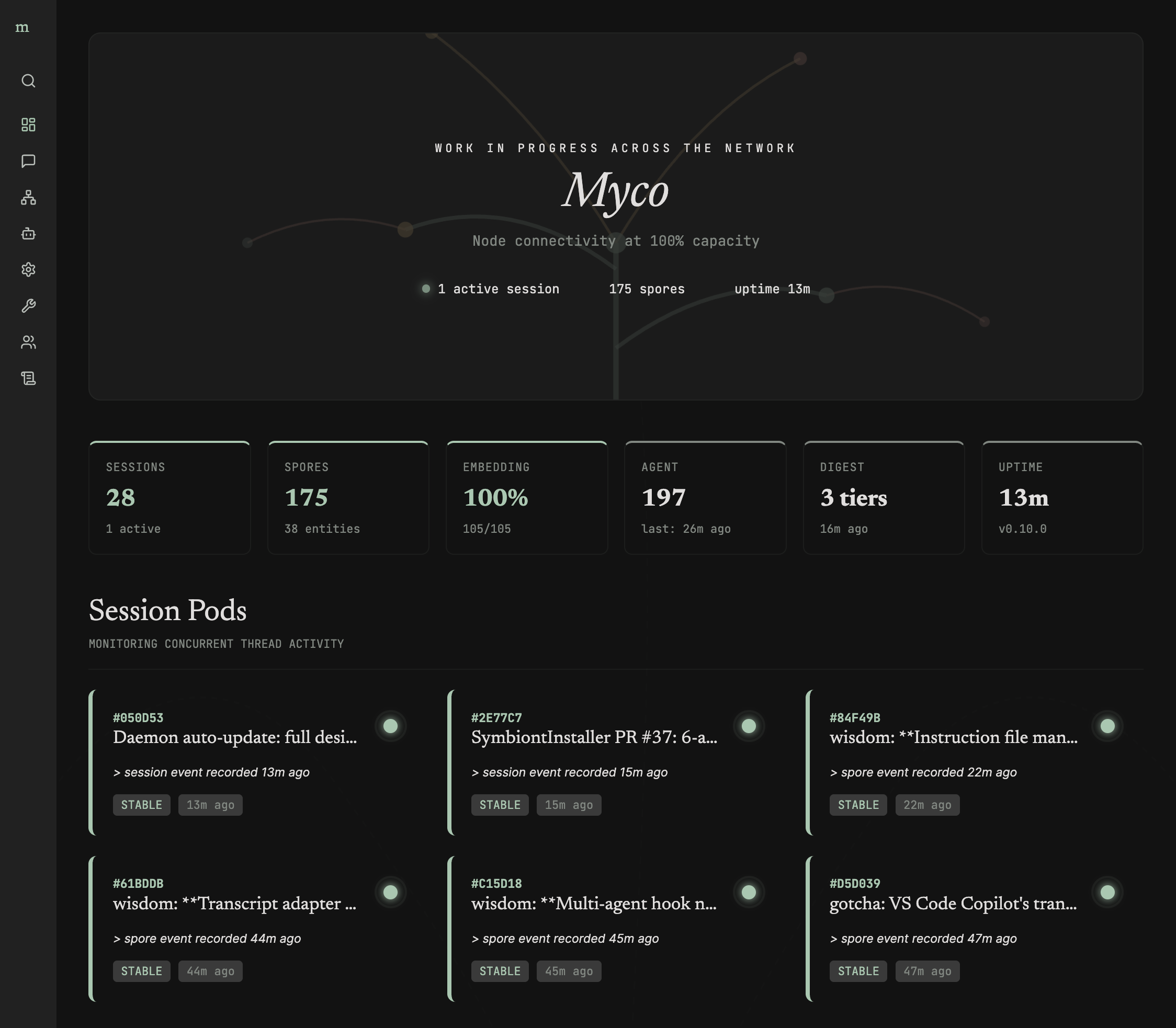
A local web dashboard provides configuration and operations management. Manage intelligence providers and per-task model assignments, trigger agent and digest cycles, monitor daemon health, and view live logs.
Symbionts
Myco integrates with coding agents through symbionts — named for the mycorrhizal symbiotic relationship between fungi and their host trees. myco init detects available agents and lets you choose which to configure. Registration is project-local — hooks, MCP servers, skills, and auto-approve settings are written directly to each agent's config files.
| Agent | Hooks | MCP | Skills | Auto-Approve | Plans |
|---|---|---|---|---|---|
| Claude Code | .claude/settings.json |
.mcp.json |
.claude/skills/ |
permissions.allow |
.claude/plans/ |
| Cursor | — | .cursor/mcp.json |
.cursor/skills/ |
autoApprove |
.cursor/plans/ |
| Codex | .codex/hooks.json |
.codex/config.toml |
.agents/skills/ |
— | — |
| VS Code Copilot | .github/hooks/ |
.vscode/mcp.json |
.agents/skills/ |
autoApprove |
— |
| Gemini CLI | .gemini/settings.json |
.gemini/settings.json |
.agents/skills/ |
coreTools |
.gemini/plans/ |
| Windsurf | .windsurf/hooks.json |
— | .agents/skills/ |
cascadeCommandsAllowList |
~/.windsurf/plans/ |
| OpenCode | .opencode/plugins/myco.ts (plugin) |
opencode.json (mcp key) |
.agents/skills/ |
permission.bash |
.opencode/plans/ |
| Pi | .pi/extensions/myco/index.ts (extension) |
via pi.registerTool() |
.agents/skills/ |
— | .pi/plans/ |
Skills are installed once to .agents/skills/ (the emerging cross-agent standard) and symlinked to each agent's native skills directory. Adding a new agent requires only a YAML manifest and templates — no code changes for JSON-hook agents, and a small manifest extension for plugin-based agents like OpenCode and Pi.
See the Symbiont docs for detailed setup information per agent.
Team sync
Share knowledge across machines and team members. Team sync is enabled per Grove. One team member installs the @goondocks/myco-team package and provisions the infrastructure from any project in that Grove:
npm install -g @goondocks/myco-team
myco-team install    # Provisions Cloudflare D1 + Vectorize + KV + Worker for the current Grove
Share the output URL and Team key with teammates — they connect from the Team page in the dashboard without needing the myco-team package themselves. Once connected, knowledge syncs automatically: new spores, session summaries, plans, and graph edges push to the team store in the background. Search queries fan out to both local and cloud databases, merging results by relevance score.
Local databases remain the source of truth. The cloud store is a queryable mirror — no data is pulled back down. Each record carries a machine identity for attribution.
Runs on the Cloudflare free tier. See the Team Sync docs for the full guide.
Collective
Search across projects and manage shared settings by connecting multiple team workers to one Myco Collective.
Install it only if you want the cross-project admin layer:
npm install -g @goondocks/myco-collective
myco-collective install
The Collective gives you a worker-hosted admin UI for connected projects, shared settings, and cross-project search. See the Collective guide.
Cloud MCP Server
Team sync also deploys a read-only Cloud MCP server on the same Worker — a Streamable HTTP endpoint that exposes your project's intelligence to cloud agents like Anthropic Managed Agents, OpenAI Workflows, and N8N. Connect any tool that speaks MCP and it gets the same project context your local agents already have. See the Cloud MCP docs for the tool reference and setup.
Skills — automated curation, not just memory
Memory is table stakes. Myco goes further: it turns everything your team learns into repeatable workflows that every agent follows. The intelligence pipeline identifies procedural patterns across sessions — debugging the build, adding API routes, configuring providers, resolving common gotchas — and surfaces them as candidates. You approve what becomes canon, and Myco generates validated SKILL.md files under .agents/skills/, symlinked into every agent's native skills directory.
Skills evolve as your code does. When a pattern is abandoned, a new gotcha is discovered, or a workflow shifts, the evolve task rewrites affected skills — preserving what's still accurate, incorporating what's new, and splitting skills that have grown too broad. See the Skills docs for the full lifecycle.
Backup & restore
Local SQL dump backups run automatically during daemon idle periods. Configure a custom backup directory (network share, git repo) from the Operations page. Restore with content-hash deduplication — never overwrites existing records.
Health check
myco doctor
Verifies vault config, database, intelligence provider, embedding provider, symbiont registration, and daemon status. Use --fix to auto-repair fixable issues.
Contributing
Contributions welcome. See the Contributing Guide for development setup, and the Lifecycle docs for architecture details. Please open an issue to discuss before submitting a PR.
License
Yorumlar (0)
Yorum birakmak icin giris yap.
Yorum birakSonuc bulunamadi