Islet
Health Uyari
- License — License: MIT
- Description — Repository has a description
- Active repo — Last push 0 days ago
- Low visibility — Only 5 GitHub stars
Code Basarisiz
- network request — Outbound network request in calendar.js
- os.homedir — User home directory access in claude-bridge.js
- fs module — File system access in claude-bridge.js
- fs module — File system access in downloads.js
- child_process — Shell command execution capability in hooks/hook-auth.js
- os.homedir — User home directory access in hooks/hook-auth.js
- process.env — Environment variable access in hooks/hook-auth.js
- fs module — File system access in hooks/hook-auth.js
- network request — Outbound network request in hooks/islet-hook.js
- child_process — Shell command execution capability in icons.js
- process.env — Environment variable access in icons.js
- fs module — File system access in icons.js
Permissions Gecti
- Permissions — No dangerous permissions requested
Bu listing icin henuz AI raporu yok.
A Dynamic-Island-style notch for Windows 10 and 11: music, Claude Code and Codex, notifications and battery in one black pill.
Islet
A Dynamic-Island-style notch for Windows 10 and 11
Music · Claude Code and Codex · notifications · battery · weather, all in one small black pill at the top of your screen.





 Pill |
 Notification |
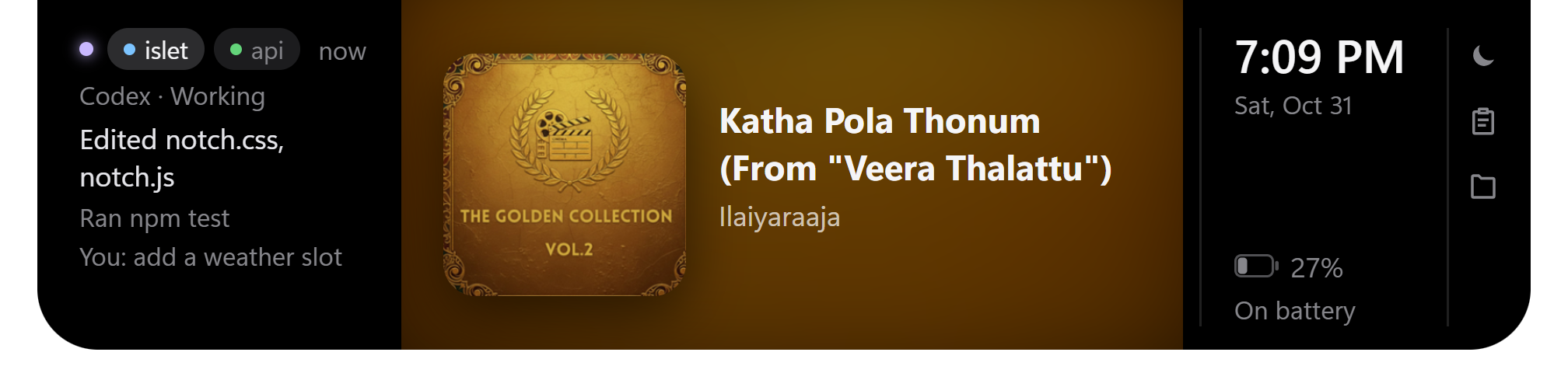 Album view |
Features · Install · Usage · Claude Code & Codex · Settings · How it works · 📘 Full guide (PDF)
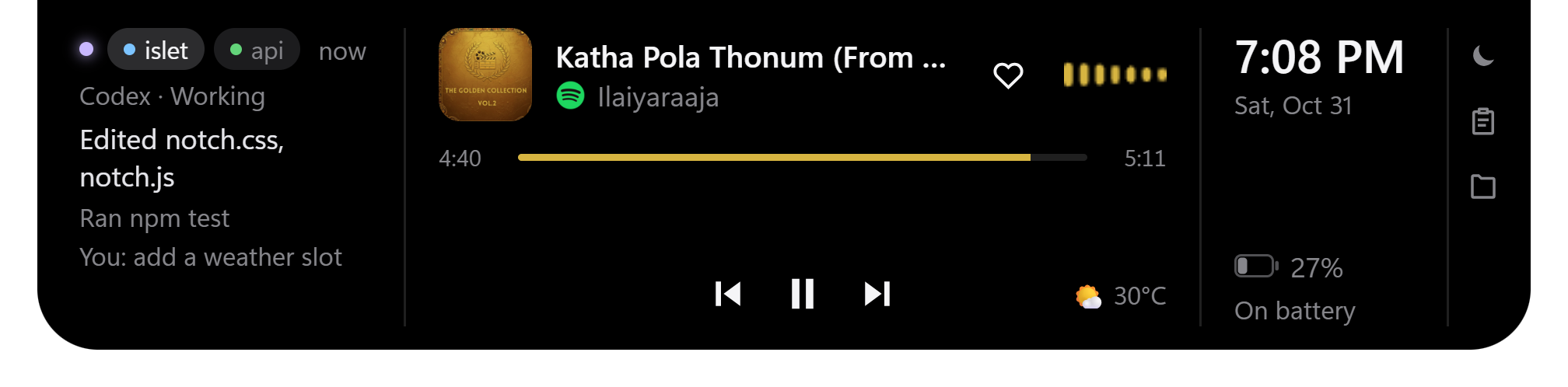
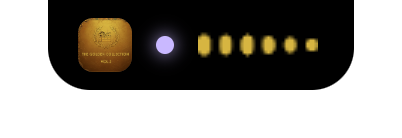
Islet sits at the top centre of your screen. Hover to open it, click anywhere else to close it. When nothing is happening it shrinks to a plain black pill with one dot.
The open notch, left to right: agent sessions → music → time and battery → tools.
✨ What's new
- 👋 Version 2.1: a welcome screen that asks before Islet changes anything, an installer with setup screens, authenticated agent hooks, a wave for the player on show and lighter background work.
- 📦 Version 2.0: 14 reliability fixes, a ready-made installer and redrawn player controls.
- 🌌 Black hole charger animation: an Interstellar-style black hole plays when the charger goes in (CHARGING INITIATED) or out (RUNNING ON BATTERY). You can pick Cinematic or Subtle, or turn it off.
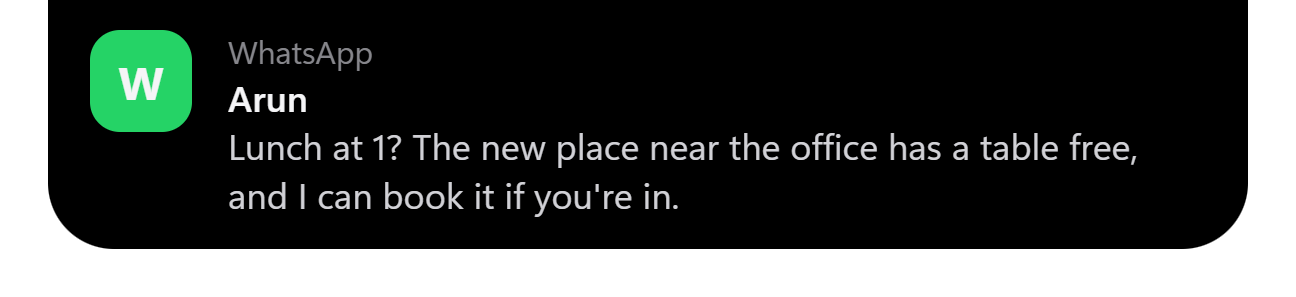
- 💬 Full notification text: pop-ups are wider, grow up to about 7 lines and stay on screen longer for long messages.
- 🔒 Lock screen: Windows' own banners come back while the PC is locked, so you still see messages there.
- 🛡️ Sturdier: Alt+F4 no longer kills the notch, and a broken
config.jsonis never overwritten. This round also fixed calendar exceptions, shelf duplicates, banner recovery, UTF-8 output and more.
🚀 Features
🎵 Music
|
🤖 Claude Code and Codex
|
🔔 Notifications
|
🔋 Battery and system
|
🌤️ Info
|
🧰 Tools
|
📦 Install
You need: Windows 10 1903+ or 11 · Windows PowerShell 5.1 (built into Windows)
Download the installer
Get Islet-Setup-<version>.exe from the latest release and run it. It adds a Start menu entry and installs to %LOCALAPPDATA%\Programs\islet. Islet doesn't update itself, so to update, install the new version.
[!NOTE]
The installer is unsigned. SmartScreen may warn about it, and Smart App Control may block it. If it's blocked, run from source instead.
Run from source
You also need: Node.js 22 or 24 (a supported LTS release) · Git
git clone https://github.com/goprocker/Islet.git
cd Islet
npm install
npm start
Code changes apply on restart. To build your own installer, run npm run dist, then run dist\Islet Setup <version>.exe.
[!TIP]
Runnpm run distfrom PowerShell. It fails under Git Bash.
Only one copy of Islet runs at a time, so quit the npm start copy before installing.
On first run, a welcome screen asks about Start with Windows, notifications and the agent hooks. Islet changes none of them until you click Continue. Right-click the tray icon for the menu.
🖱️ Usage
| Action | How |
|---|---|
| Open / close | Hover the notch / move away or click elsewhere |
| Cycle pill → open → hidden | Ctrl+Alt+N |
| Next monitor | Ctrl+Alt+M, or tray → Show on screen |
| Volume / seek | Scroll over the music side / click the progress bar |
| Album view | Click the album art |
| Like | Heart button, shown for Spotify (sends Spotify's Alt+Shift+B) |
| Clipboard / shelf / DND | Buttons in the tools column |
| Timer / settings | Tray → Timer / Settings… |
| Quit | Tray → Quit (Alt+F4 is ignored on purpose) |
🤖 Claude Code and Codex
The welcome screen offers to install the hooks. Tray → Connect to Claude Code and Codex removes or adds them later. Adding saves a backup next to each file, and only Islet's own handlers are ever removed.
[!IMPORTANT]
The hooks run withnode, so Node.js must be on your PATH, even with the installed app. They also point at the copy of Islet that installed them. If you move that folder or switch between source and the installed app, untick and tick the option again in the copy you're using.
| Hook event | Notch shows |
|---|---|
UserPromptSubmit, PostToolUse |
🟣 Working, plus the latest actions |
PermissionRequest, permission Notification |
🟠 Needs you; Claude Code requests get Allow / Deny |
Stop, any other Notification |
✅ Done |
SessionStart (Codex) |
A new session |
SessionEnd |
The session leaves the list |
- Claude Code: hooks go into
~/.claude/settings.json(backup:settings.json.islet-backup).hooks/islet-hook.jsPOSTs each event to127.0.0.1:47321/claude. - Codex: if
~/.codexexists, hooks are also added to~/.codex/hooks.json(backup:hooks.json.islet-backup). Codex asks you to trust new hooks, so approve Islet's once, through the prompt Codex shows or/hooks. - A Claude Code permission request is held for
permissionWaitSeconds(default 8). If you don't answer in the notch, the terminal asks as usual. Set it to0to never hold. - Codex permission requests show "Needs you", but you answer them in Codex.
- With both agents running, the status line says
Claude ·orCodex ·, and Codex chips have a blue dot. - Without hooks, Islet guesses the status from the newest transcript in
~/.claude/projects.
⚙️ Settings
Stored in %APPDATA%\islet\config.json and edited from the settings window. Hand edits are picked up within 2 s. A file that can't be read is left alone, not overwritten.
| Key | Default | Meaning |
|---|---|---|
size |
normal |
compact, normal or large |
accent |
album |
album (colour from the art) or #rrggbb |
idleHide |
false |
Shrink to a thin line when nothing is happening |
powerAnim |
true |
Black hole animation when the charger goes in or out |
powerAnimStyle |
cinematic |
cinematic or subtle |
hideInFullscreen |
true |
Hide while a fullscreen app is in front |
notifications |
true |
Show Windows notifications in the notch |
hideWindowsBanners |
true |
Turn off Windows' banners while Islet runs (they come back on the lock screen) |
dnd, dndFrom, dndTo |
off | Do Not Disturb, with an optional daily HH:MM window |
permissionWaitSeconds |
8 |
How long to hold a permission request for Allow / Deny (0–24) |
lyrics |
true |
Fetch lyrics from lrclib.net |
weatherCity |
"" |
e.g. Chennai; empty turns weather off |
weatherUnit |
C |
C or F |
calendarIcsUrl |
"" |
Private iCal link |
downloadsFolder |
"" |
Empty means your Downloads folder |
clipboardHistory |
true |
Keep the last 5 copied texts in memory |
displayId |
null |
Screen to show on (set by Ctrl+Alt+M or the tray) |
spotifyClientId |
"" |
Optional Spotify Web API (Premium only) |
🧠 How it works
main.js ── window, tray, hotkeys, powerMonitor, config, IPC
 ├─ helpers.ps1           one PowerShell that runs the three watchers below
 ├─ media.ps1             Windows media session → JSON every second; play/seek/next
 ├─ spotify-audio.ps1/.cs process-loopback capture of Spotify → 24 FFT bands, volume
 ├─ system.ps1            mic / camera / screen use, fullscreen detection
 ├─ notifications.js      reads wpndatabase.db (node:sqlite, read-only); toggles banners
 ├─ icons.js              real app logos (Store manifests, shortcuts, exe icons)
 ├─ claude-bridge.js      HTTP server for Claude Code + Codex hooks; installs/removes them
 ├─ calendar.js  weather.js  lyrics.js  downloads.js  shelf-file.js  spotify-web.js
 └─ preload.js ── renderer/  (index.html, notch.css, notch.js, blackhole.js)
                  settings/  (settings window)
- The window is frameless, transparent and always on top. It ignores the mouse except while the pointer is over the notch.
- Notch states are CSS classes on
#notch:open,toast,hidden,quiet,idle,charging. With reduced motion on, the animations stay still. - The black hole is drawn with Canvas 2D (
renderer/blackhole.js) and driven by ElectronpowerMonitorevents, with no polling. It only animates while playing. - C# runs through
Add-Typeinside PowerShell, so no unsigned exe ships, which keeps it working with Smart App Control on. - Windows has no notification-listener API for unpackaged apps, so Islet reads the notification database read-only.
- To hide Windows' banners, Islet sets
ShowBanner = 0underHKCU\…\Notifications\Settings\<app id>. The previous values are saved in%APPDATA%\islet\banners.jsonand put back on quit or at the lock screen.
🛠️ Develop
npm test     # 27 test files, node --test
node_modules\electron\dist\electron.exe . --remote-debugging-port=9333   # then chrome://inspect
Useful page globals: setOpen(true), render().
🔐 Privacy
Everything runs on your PC. Network calls go only to lrclib.net (title and artist, when lyrics are on), Open-Meteo (the city name), your ICS link, and Spotify if you connect it. Clipboard history never touches disk, and the shelf stores file paths only. The hook server listens on 127.0.0.1 only.
🩺 Troubleshooting
| Problem | Fix |
|---|---|
| Banners still bottom-right | Start Islet normally, not from a sandboxed shell, which can't write the registry. Sign out and in once if needed. |
| Banners stay off after a crash | Start Islet and quit it from the tray, or turn off the setting. |
| Codex column is empty | Approve Islet's hooks in Codex (/hooks). |
| Agent status stops updating | Check that node is on your PATH. If Islet moved, untick and tick Connect to Claude Code and Codex. |
npm run dist fails |
Run it from PowerShell, not Git Bash. |
| Installer blocked | Smart App Control; run from source. |
| Installed app ignores code changes | Rebuild with npm run dist and reinstall. |
| Second launch does nothing | Only one copy runs; the second launch opens the running copy's settings. |
🗑️ Uninstall
- Tray → untick Connect to Claude Code and Codex and Start with Windows.
- Tray → Quit (puts Windows banners back).
- Installed app: Settings → Apps → Islet → Uninstall. From source: delete the folder.
- Delete
%APPDATA%\islet.
🤝 Contributing
Issues and pull requests are welcome. See the contributing guide and Code of Conduct. Report security problems through the security policy, not a public issue.
Islet · Made by Gopinath · Code under MIT · Guide PDF © 2026 Gopinath, all rights reserved
Yorumlar (0)
Yorum birakmak icin giris yap.
Yorum birakSonuc bulunamadi