countersign
Health Uyari
- License — License: GPL-3.0
- Description — Repository has a description
- Active repo — Last push 0 days ago
- Low visibility — Only 5 GitHub stars
Code Gecti
- Code scan — Scanned 12 files during light audit, no dangerous patterns found
Permissions Gecti
- Permissions — No dangerous permissions requested
Bu listing icin henuz AI raporu yok.
Native macOS approval panel for every Claude Code, Codex, Cursor and Antigravity session.

Countersign
Native macOS approval panel for every Claude Code, Codex, Cursor and Antigravity session.
Stop coming back to an agent that has waited an hour for your approval. Countersign shows each
request as soon as you pause; you countersign it once, deliberately, without losing your place.



Install
macOS 14 Sonoma or later. Both install the prebuilt release; no Xcode needed.
With Homebrew:
brew install gord1y/tap/countersign
Or with the install script, which asks whether to add the menu-bar app and whether to open setup
when it's done:
curl -fsSL https://raw.githubusercontent.com/Gord1y/countersign/main/install.sh | sh
Older versions, installs without questions and building from source:
Install options.
Set up
The install script offers to open Countersign for you; after Homebrew, run countersign setup.
Either way, wire the agents you use: the window shows each change before writing it and backs up
every file it changes, and countersign setup --cli does the same in the terminal. Codex asks you
to trust a new hook once: run /hooks in Codex and approve it. What setup changes and how to undo
it: docs/setup.md.
What it is
Run three or four agent chats at once and permission prompts arrive from everywhere. Native dialogs
stack, grab focus while you type, and a stray Return approves a command you never read.
Countersign answers them from one panel instead. Requests from every session and every agent wait
in one queue and appear one at a time, only once you stop typing. While a panel is up your keys go
to it and nowhere else, and when you answer in Claude Code's chat instead, its panel quietly
disappears.
Each prompt starts a short-lived countersign hook that either answers or steps aside, so there is
no service to keep alive, and any error leaves your agent's own prompt in charge. What it reads,
writes and sends: Safety and privacy.
Screenshots
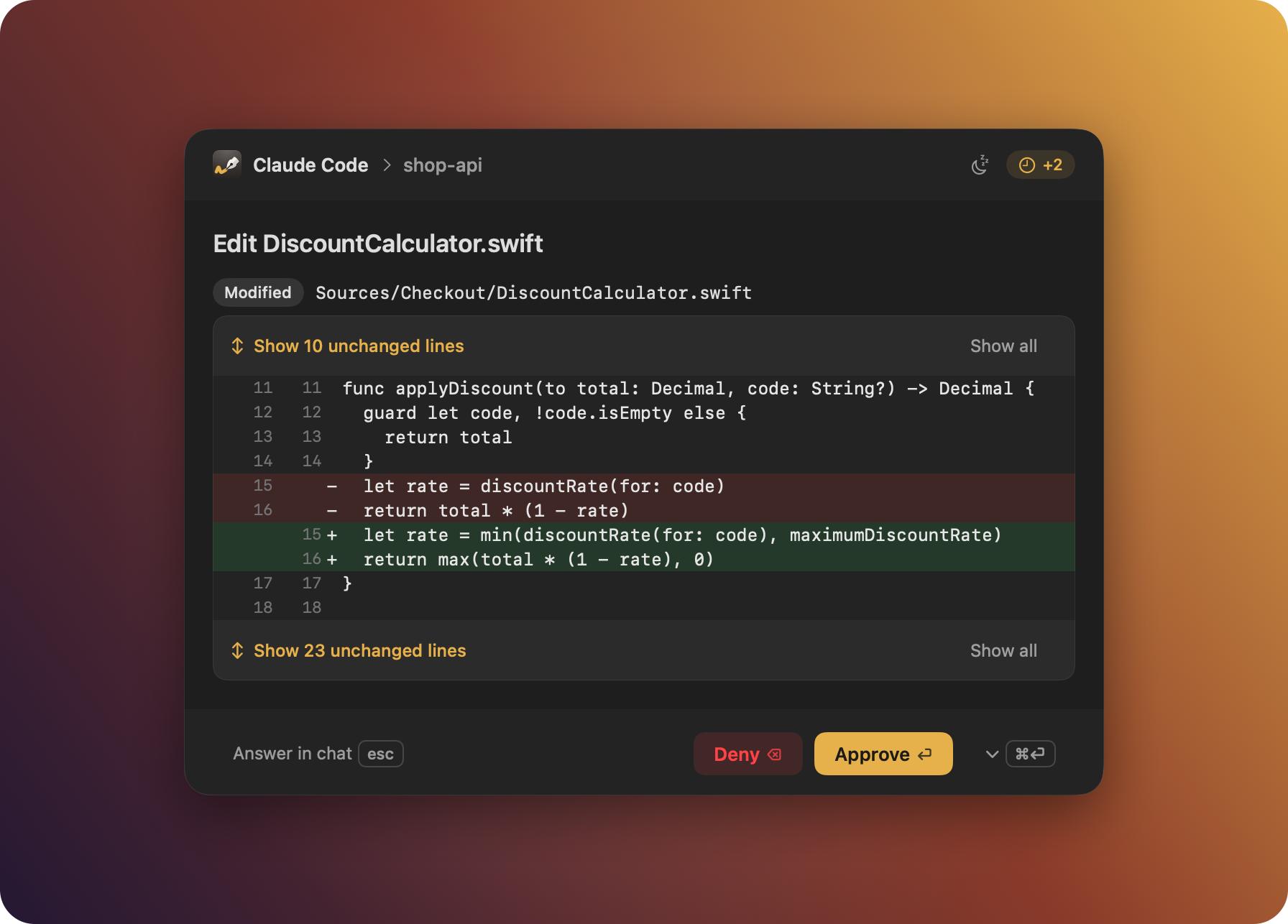
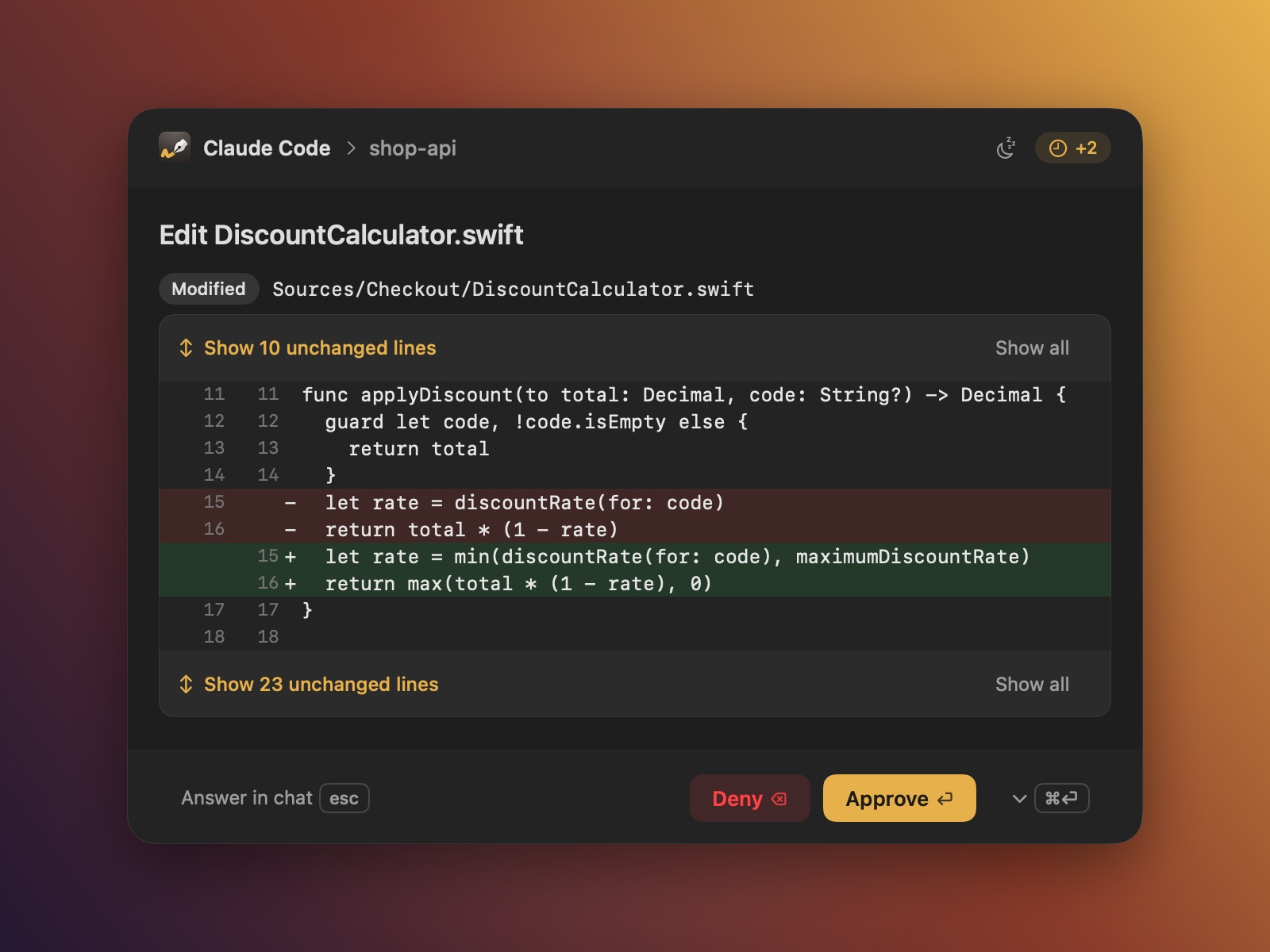 Edits in context. The enclosing block, real line numbers, expandable gaps. |
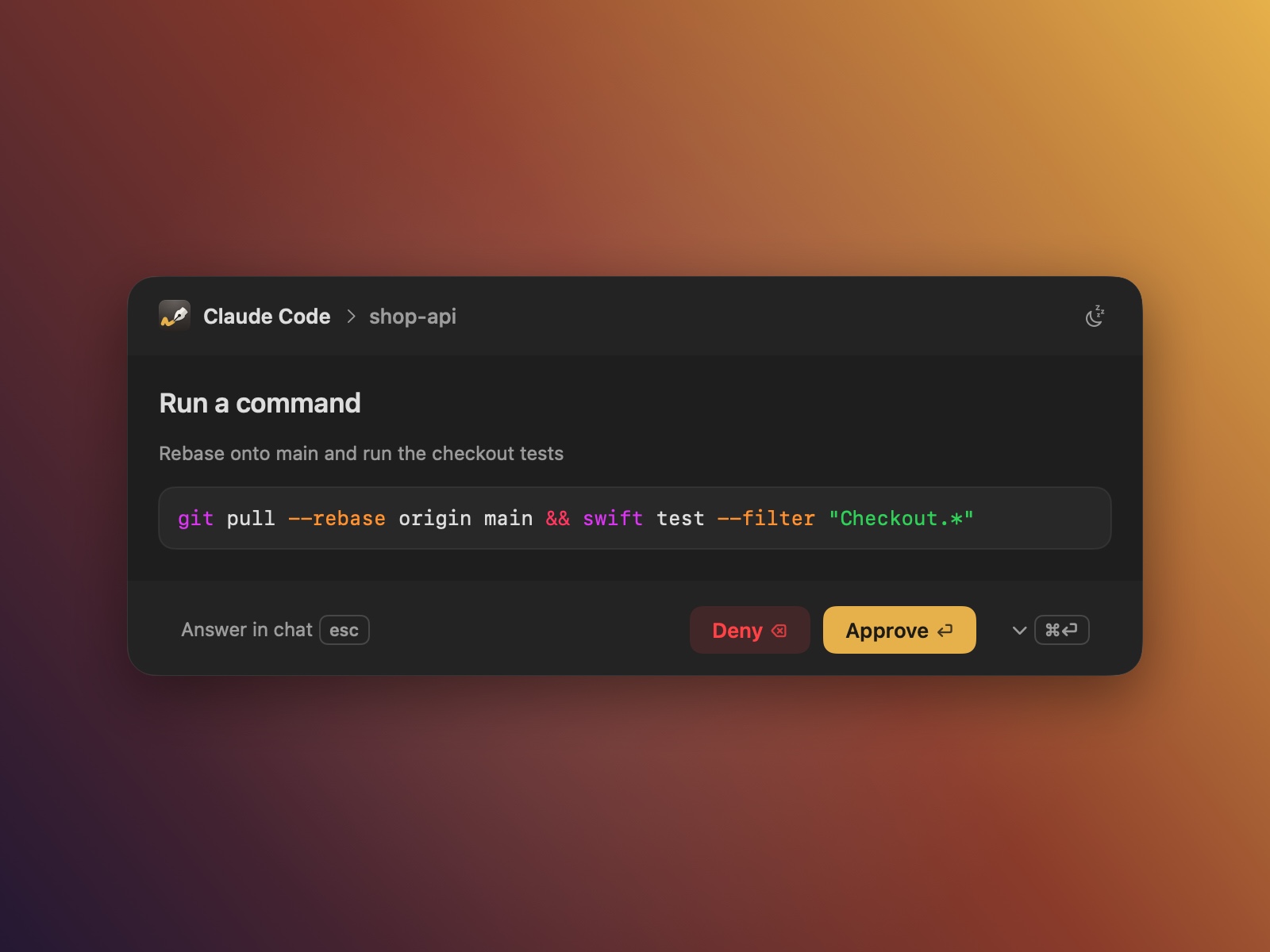 Commands. Highlighted shell, the agent's own description, Approve ▾ rules. |
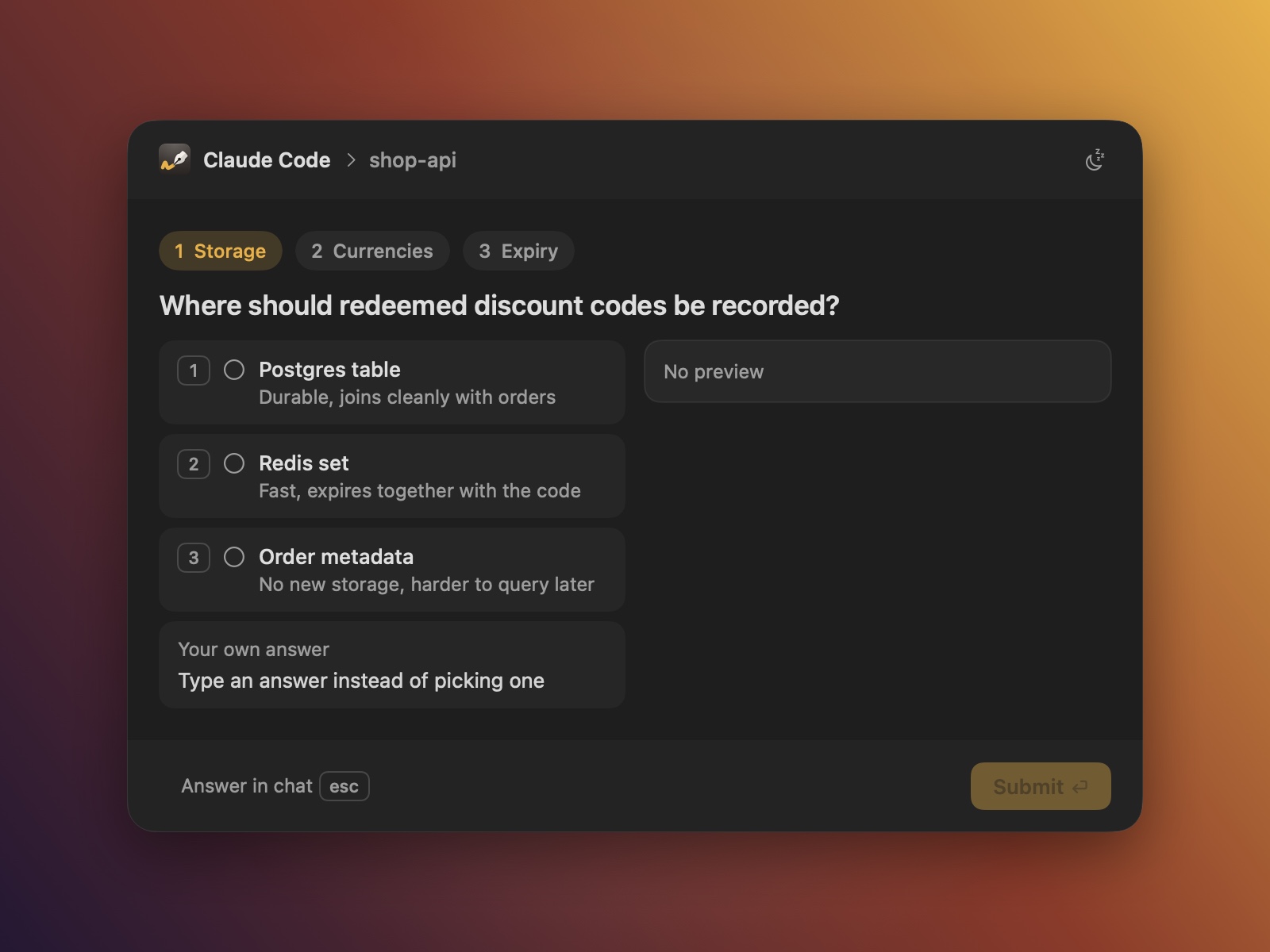 Questions. Tabs, number keys, multi-select, Other and an optional note. |
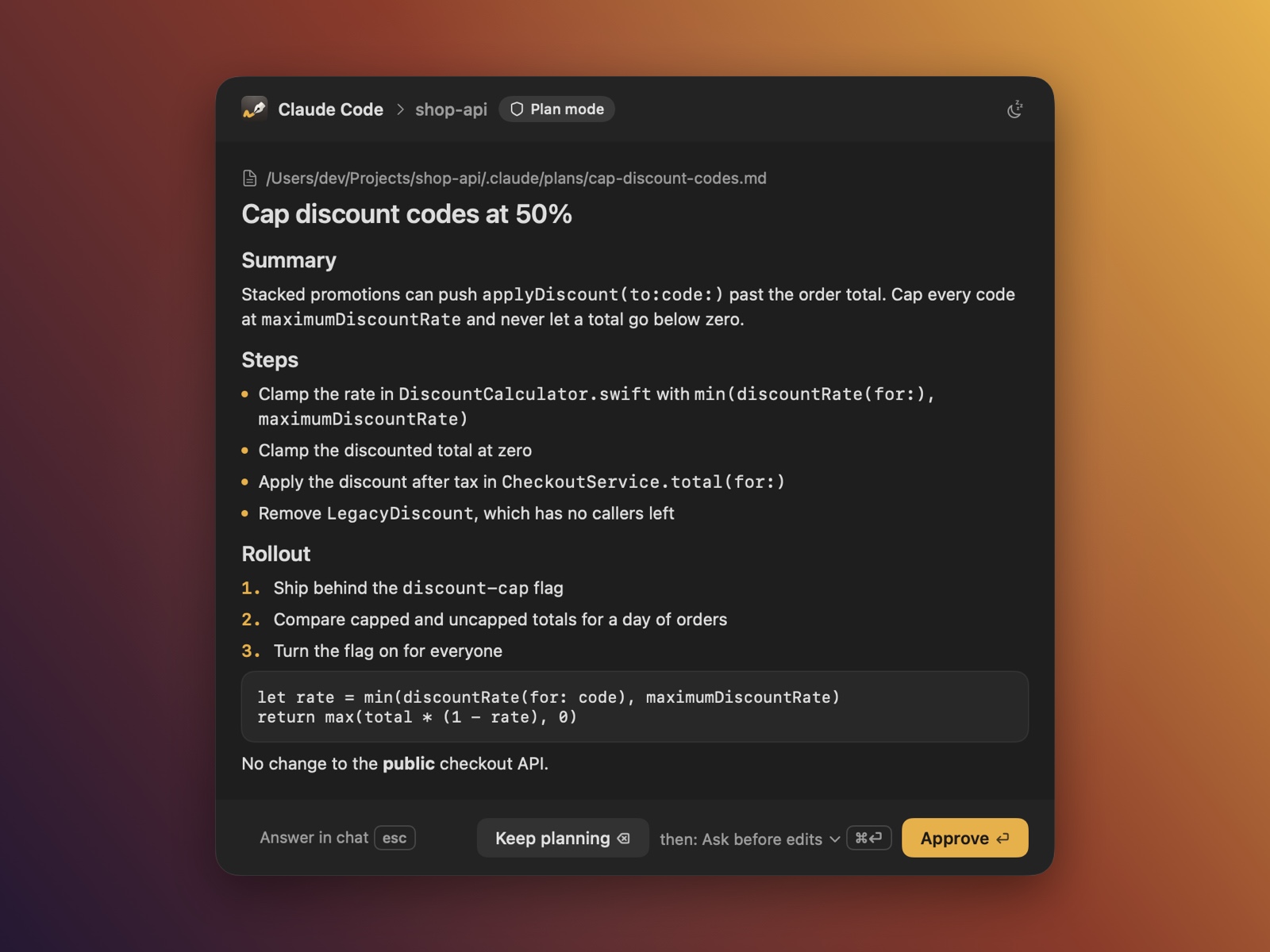 Plans. Markdown, "Keep planning" feedback, the mode to continue in. |
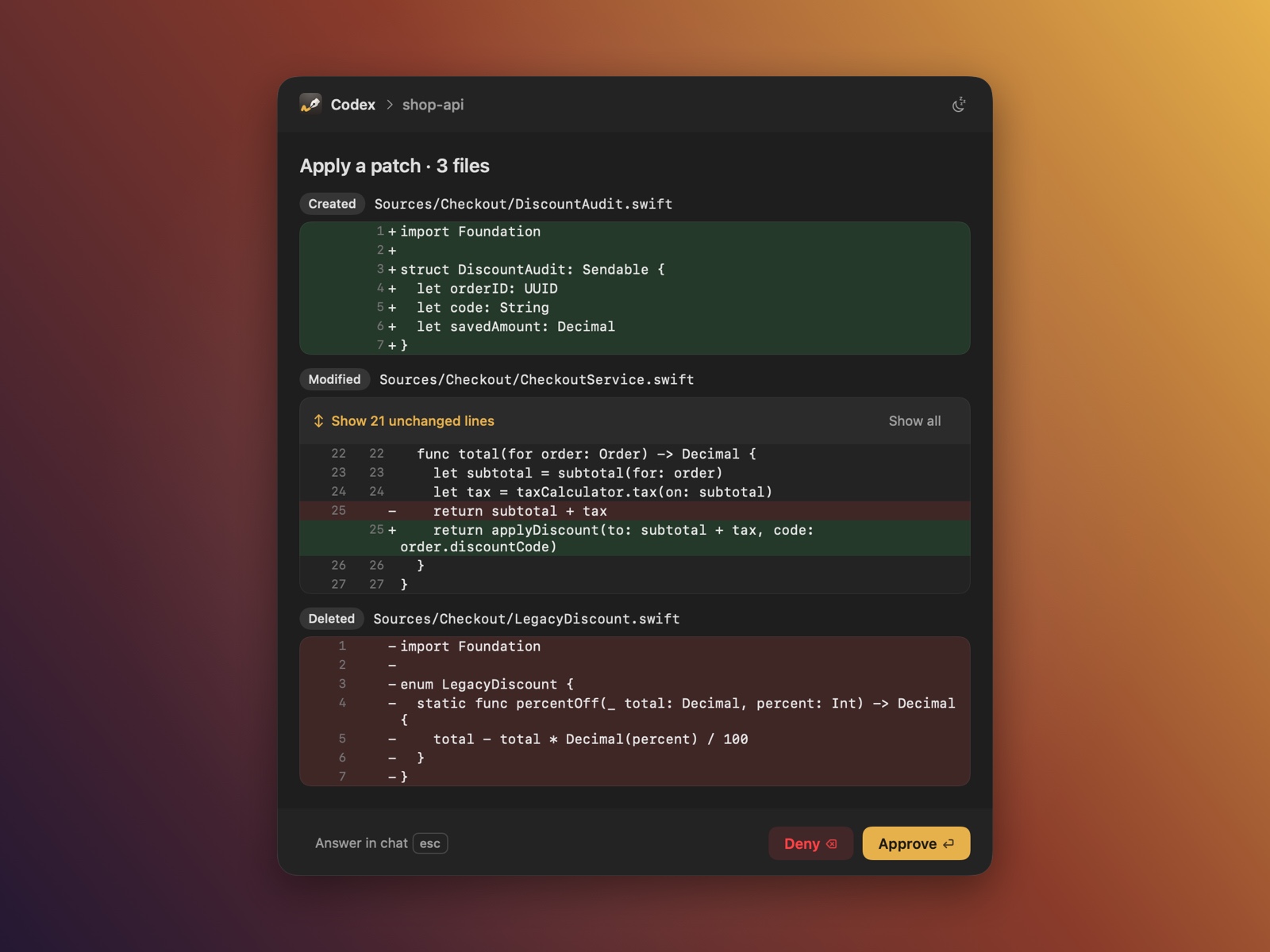 Codex too. Commands and apply_patch edits, with the same real-file context.
|
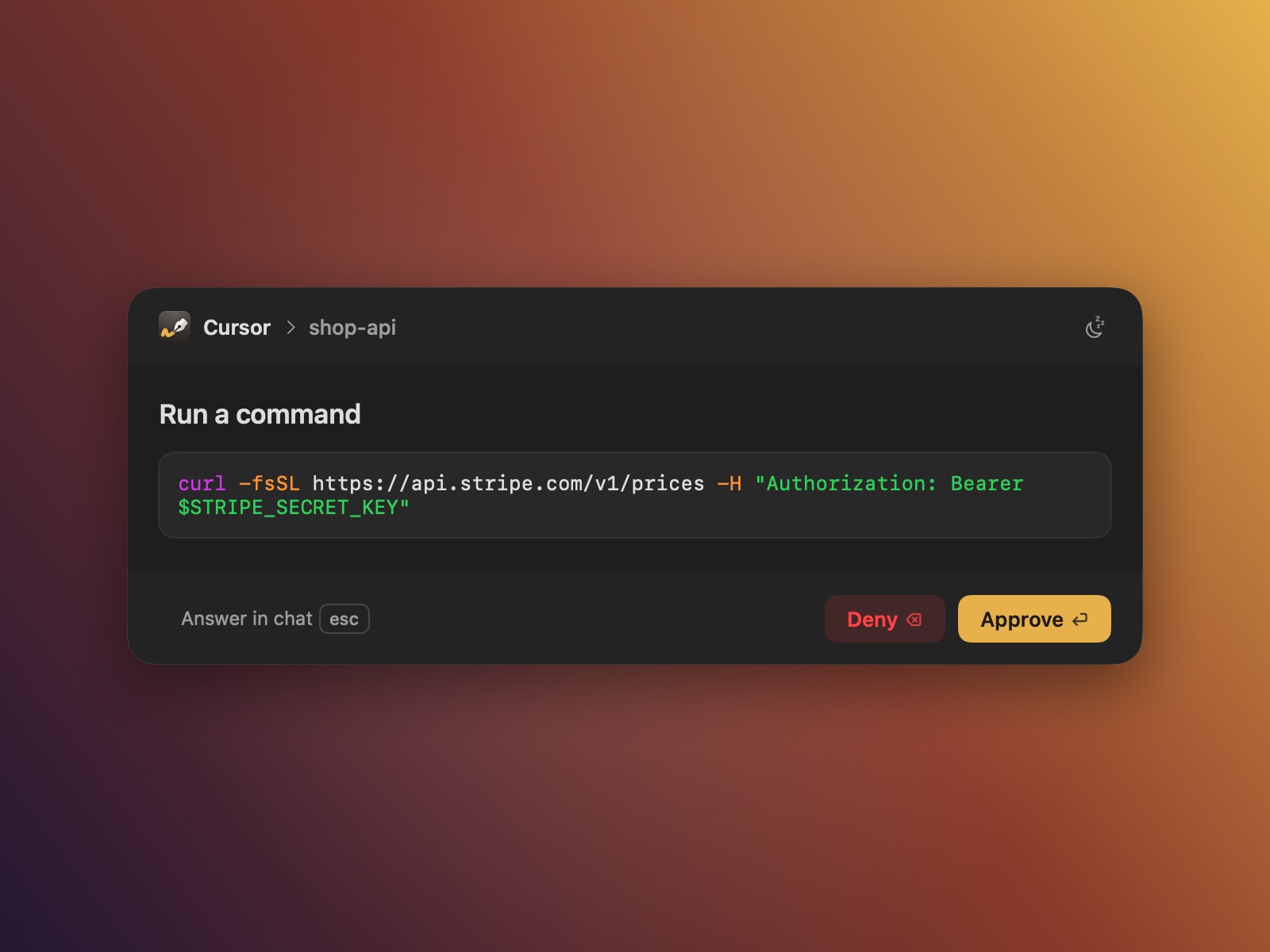 Cursor too. Shell commands outside Cursor's sandbox, and every MCP tool call. |
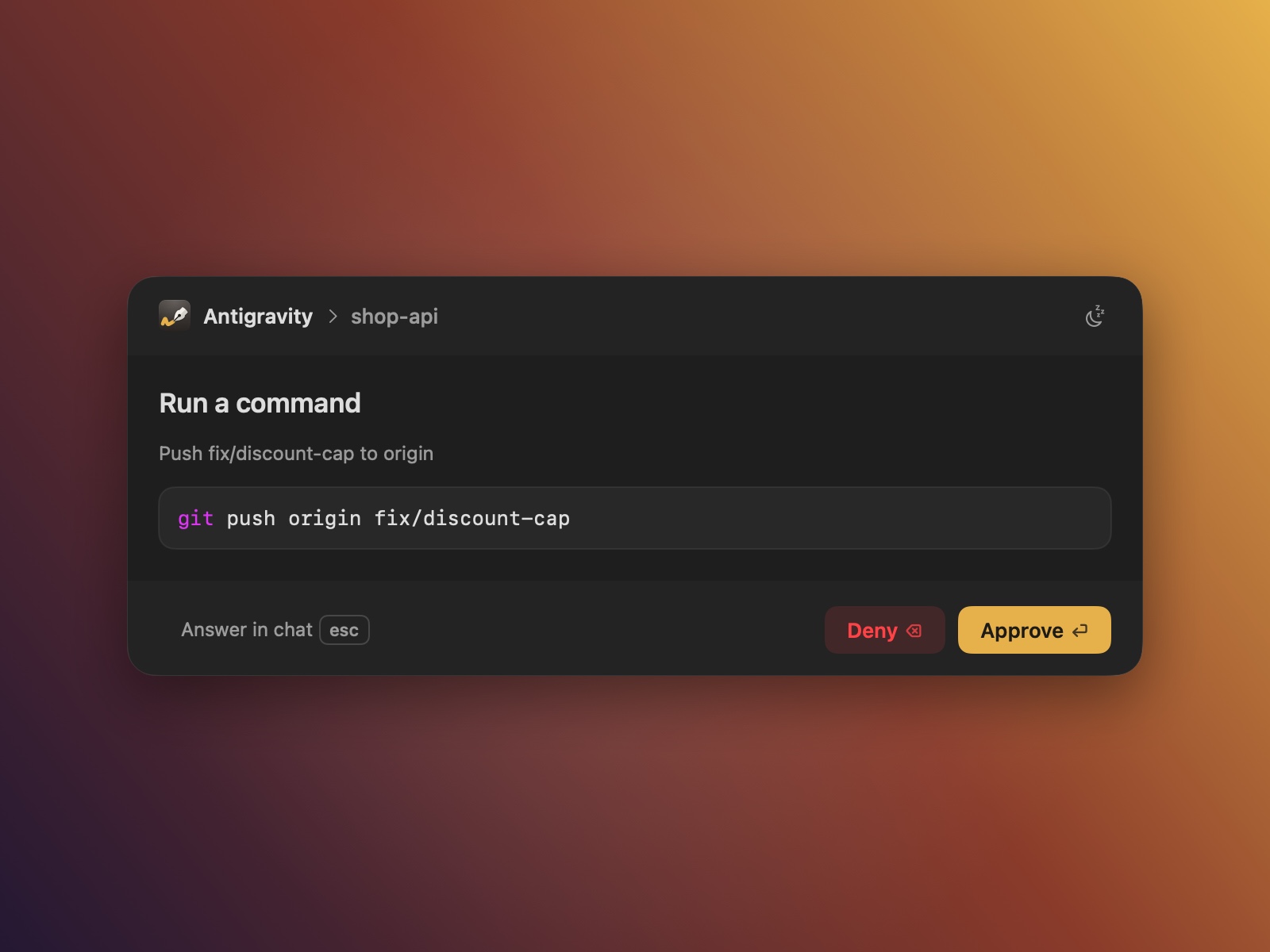 Antigravity too. Commands and MCP tool calls, same panel (see Limitations). |
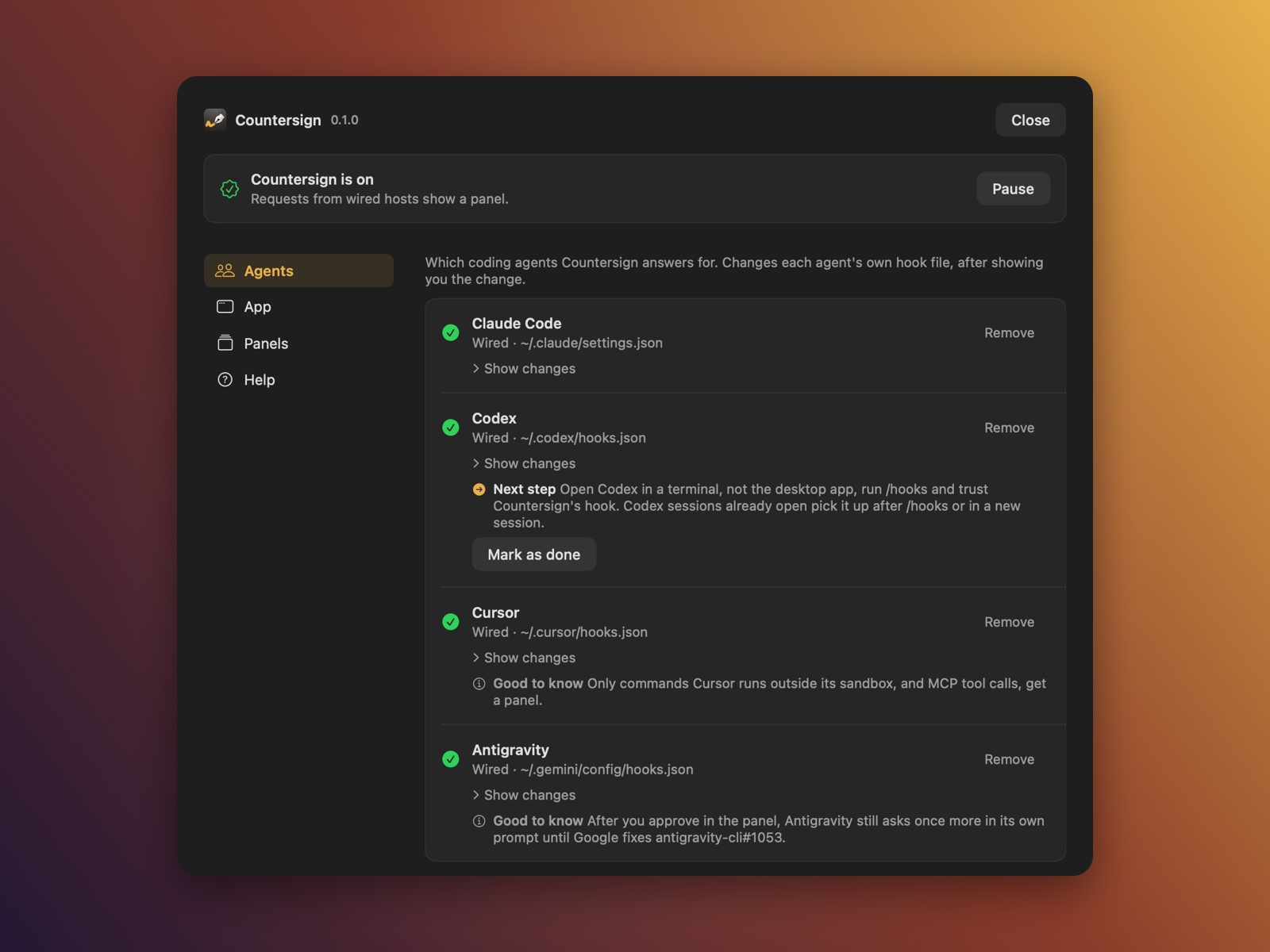 Settings, no terminal needed. Wire, update or remove hooks, tune panels, see the status. |
Features
- Waits for a pause. A panel appears only once you stop typing, clicking or scrolling (5
seconds by default), so it never lands in the middle of a sentence. - Behaves like an alert. Return approves, ⌫ opens the deny step (Keep
planning for a plan), Esc hands the prompt back to the chat, and nothing you type
leaks into the app underneath, even after ⌘Tab. Keys and clicks in its
first 800 ms are ignored. - Leaves your place alone. It takes the keyboard without activating its own app; when it
closes, your editor or chat gets its caret and selection back exactly where they were. - Knows when you already answered. Reply in Claude Code's chat and the panel, or the queued
request, drops out within about a second; reply within the grace period (off by default) and no
panel appears at all. - Real context for edits. The enclosing function or block, real line numbers, and "Show N
unchanged lines" rows that expand up to the whole file. Codex patches get the same treatment. - Approve, or deny with a reason. Approve's ▾ menu holds the "Always allow" rules Claude Code
suggests, each with the exact rule and where it is saved. Deny takes a reason, and for Claude
Code also offers Deny & stop. - Questions and plans. Claude's
AskUserQuestionas tabs with numbered options, multi-select,
an Other field and an optional note (off by default); plans as Markdown, with the mode Claude
continues in. - Snooze. Quiet for a preset duration. Requests answered in their chats meanwhile drop out, the
rest come back one at a time. - Fails safe. Any error, timeout or crash means "no decision": the agent falls back to its own
prompt, and Cursor and Antigravity carry on as they would without Countersign. - Cursor too. Shell commands Cursor runs outside its sandbox, and every MCP tool call, get the
same panel. Commands inside Cursor's sandbox are left to Cursor. - Antigravity too. Every command and MCP tool call from the
agyCLI, the Antigravity app and
the IDE; reading files, edits and its other tools are left to Antigravity. Until Google fixes a
hook bug, it still asks you itself after you approve (Limitations). - A menu-bar app, if you want one. On, paused or quiet at a glance, with Pause, Snooze,
Settings, a test panel to try your settings on, Launch at Login, the update check and Help.
Quitting it asks whether to keep showing panels or pause them until you reopen it. Approvals work
the same without it. - Settings without the terminal. One resizable window shows whether Countersign is on, paused
or quiet, with a sidebar for Agents, App, Panels and Help, plus Advanced behind a button in App: wire,
update or remove each agent's hooks, tune panels and try them on a test panel. Every hook change
shows its diff first, and every other change is saved as soon as you make it; any setting that's
been changed can be reset to its default, alone or as a group. - Checks its own setup.
countersign doctorprints a plain, pasteable report, the same one a
bug report asks for. Doctor and Settings also warn when more than one copy of Countersign is
installed, and Settings walks you through keeping the one you choose.
Using it
While a panel is on screen it owns the keyboard. Switch apps or type a key it has no use for, and
it steps aside, swallowing that one key, until your next pause. ⌘ shortcuts such as ⌘C still work.
| To | Do |
|---|---|
| Approve once | Return, or Approve |
| Approve and remember | Approve ▾ or ⌘Return, then pick a rule |
| Deny | ⌫ or Deny opens a reason field, optionally type a reason, then Return for Deny, or ⌘Return / Deny & stop (Claude Code only) |
| Hand it back to the chat | Esc, Answer in chat, or click anywhere outside the panel |
| Pick an answer | 1–9, ← → between questions, Return for the next question and then Submit |
| Approve a plan | Choose the mode in then: … (⌘Return opens it; it starts on your Mode after a plan setting), then Return |
| Send plan feedback | ⌫ or Keep planning opens a feedback field, type, then Return |
| New line in a text field | ShiftReturn |
| Get some quiet | Snooze ▾ in the header |
| Choose in a ▾ menu | ↑ ↓ and Return, or 1–9; Esc closes just the menu; ⌘Return closes it too |
| Command | What it does |
|---|---|
countersign setup |
Opens the setup window; setup --cli does the same in the terminal |
countersign settings |
Opens the same window |
countersign doctor |
Checks your setup and prints a plain, pasteable report |
countersign status |
Active or paused, queued requests, quiet time, log location |
countersign pause / resume |
Turn the panel off and on. While paused, every prompt goes to its chat |
countersign snooze 15m |
Quiet time for all prompts. Accepts 90s, 15m, 1h or plain minutes |
countersign snooze off |
End quiet time early |
countersign test-panel |
Shows a test panel with your settings; add question or plan for those. Nothing reaches an agent |
countersign --version |
Prints the installed version |
countersign help |
Lists every command, with the help and support links |
What each answer does in each agent: docs/agents.md. preview and snapshot,
for rendering a request without an agent, are covered in CONTRIBUTING.md.
Configuration
Settings live in ~/.config/countersign/config.json (or $XDG_CONFIG_HOME/countersign/config.json),
for example { "idleSeconds": 8, "graceSeconds": 3 }. The file is optional; every setting has a
default, and most can be set per agent. Every key: docs/configuration.md.
Privacy
- No account, and no telemetry: nothing about your requests, commands, file contents, answers or
deny reasons is sent anywhere or written to the log. - The one network request Countersign can make, the update check, is off unless you turn it on or
choose Check for Updates…; it fetches a staticreleases/index.jsonwith no cookies, query
or body, and never installs anything. The hook, setup, doctor and the panel never touch the
network. - Everything else stays on your Mac: the config file, the request queue, the log and the agents'
own hook files it edits (each backed up first). See what it reads and writes:
docs/safety-and-privacy.md. - Any error, crash or timeout means "no decision", never an approval.
The CLI and app are only ad-hoc signed, not notarized: a curl | sh install never passes through a
browser download, so nothing sets Gatekeeper's quarantine flag and there's nothing to work around
(see docs/release.md).
Help
- Something not working? Run
countersign doctorand see
docs/troubleshooting.md; known gaps are in
docs/limitations.md. - Found a bug? Open a bug report
with the output ofcountersign doctor. - Have a question? Ask in
Discussions. - Found a security issue? See SECURITY.md instead of opening a public issue.
- In the terminal?
countersign helplists every command and these links.
Support
Countersign is free and open source. If it saves you time, you can support it on
GitHub Sponsors or
Buy Me a Coffee. Settings ▸ Help, the menu-bar app andcountersign help link there too.
Contributing
See CONTRIBUTING.md for building, the gates a change must pass and the commit
rules; first-time contributors sign the CLA. Every other page, including the design notes
and the roadmap, is indexed in docs/README.md.
License
GPL-3.0-only. See LICENSE.
Yorumlar (0)
Yorum birakmak icin giris yap.
Yorum birakSonuc bulunamadi