mcp-bastion
Health Uyari
- License — License: Apache-2.0
- Description — Repository has a description
- Active repo — Last push 0 days ago
- Low visibility — Only 5 GitHub stars
Code Gecti
- Code scan — Scanned 12 files during light audit, no dangerous patterns found
Permissions Gecti
- Permissions — No dangerous permissions requested
Bu listing icin henuz AI raporu yok.
Reliability + security proxy for the Model Context Protocol (MCP): self-healing connections, runtime tool-security (rug-pull/poisoning detection), and a compliance-mapped audit trail.
🛡️ mcp-bastion
A reliability & security proxy for the Model Context Protocol (MCP).
Self-healing connections, runtime tool-security, and a compliance-mapped audit trail for your MCP servers.







mcp-bastion sits between your MCP client (Claude Code, Cursor, Cline, Windsurf, Zed, Claude
Desktop, or any MCP-compliant agent) and your MCP servers. It is client-agnostic — it works with
any compliant client through configuration alone, with zero client-specific code — and non-invasive:
your servers run unchanged, and removing Bastion is a one-line config revert.
📦 Package: mcp-bastion on npm
📖 Launch story: Medium · dev.to
Contents
- Why
- How it works
- Features
- Quick start
- Demo
- Control tools
- Configuration
- Transports
- Runtime security
- Audit & compliance
- Client setup
- Architecture
- Development
- Roadmap
- Contributing
- Security
- License
Why
When an MCP server disconnects mid-session, the agent only sees a generic "No such tool available"
error — indistinguishable from a tool that never existed — and it cannot reconnect; only a human
can. Long agent sessions silently lose capabilities and fail in confusing ways.
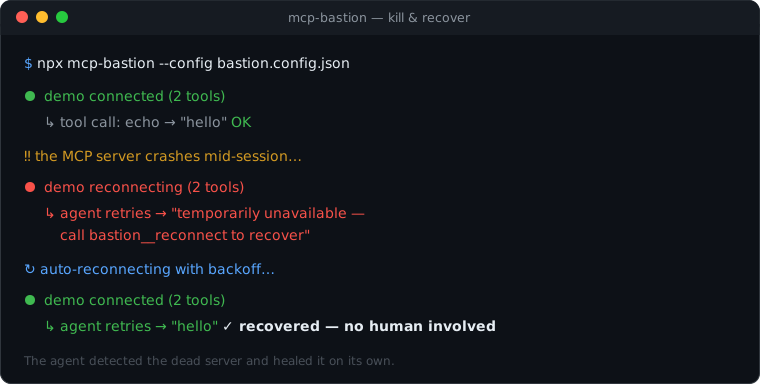
Bastion closes that gap. It health-checks every server, auto-reconnects with backoff, and — crucially —
exposes control tools so the agent itself can inspect connection health and recover a dropped
server without human intervention.
Bastion now spans three layers: reliability (v0.1), runtime security (v0.2 — tool pinning /
rug-pull & poisoning detection), and audit & compliance (v0.3 — pluggable sinks mapped to NIST
AI RMF / OWASP LLM Top 10). See the roadmap.
How it works
Today your client connects directly to each server. With Bastion, your client connects to
Bastion, which connects to those same servers on your behalf — so it sits in the tool-call path
and can add reliability (and, later, security) transparently.
Before:   Client ─▶ server A / server B / server C

After:    Client ─▶ mcp-bastion ─▶ server A
                                  ─▶ server B
                                  ─▶ server C
Bastion is a standard MCP server to your client and a standard MCP client to each upstream.
Because it speaks the protocol faithfully, it works with every compliant client automatically — the
only per-client difference is where you put a few lines of config.
Features
- 🔌 Client-agnostic — one binary, config-only integration; no per-client plugins.
- ♻️ Self-healing — health checks + capped exponential-backoff auto-reconnect for stdio servers.
- 🧭 Agent-recoverable —
bastion__statusandbastion__reconnectlet the agent detect and fix
drops itself, instead of hitting an opaque "no such tool" wall. - 🧩 Transparent aggregation — merges many servers into one, with per-server tool namespacing to
prevent collisions and tool-shadowing. - 💬 Legible failures — a dropped server yields an actionable message, not a crash.
- 🛡️ Runtime security (new in v0.2) — pins each tool's definition and blocks "rug pulls" (a
server changing a tool after approval); heuristically inspects descriptions for poisoning; detects
cross-server shadowing. See Runtime security. - 📝 Audit & compliance (new in v0.3) — structured, tamper-evident audit events to pluggable
sinks (console / file / webhook), mapped to NIST AI RMF & OWASP LLM Top 10. See
Audit & compliance. - 🪶 Non-invasive & reversible — your servers run unchanged; uninstall is a config revert.
- 🧱 Enterprise-grade codebase — strict TypeScript, layered architecture, ESLint + Prettier, and
unit + end-to-end tests.
Quick start
Bastion is published on npm as mcp-bastion — thenpx command below fetches it automatically, so there's nothing to install first.
1. Add Bastion to your client, pointing it at a config file:
// your client's mcpServers config
{
  "mcpServers": {
    "bastion": {
      "command": "npx",
      "args": ["-y", "mcp-bastion", "--config", "bastion.config.json"],
    },
  },
}
2. List your real servers in bastion.config.json (moved verbatim from the client):
{
  "servers": {
    "github": { "command": "npx", "args": ["-y", "@modelcontextprotocol/server-github"] },
    "filesystem": {
      "command": "npx",
      "args": ["-y", "@modelcontextprotocol/server-filesystem", "/path/to/dir"],
    },
  },
  "reconnect": { "auto": true },
  "healthCheck": { "enabled": true },
}
3. Restart your client. Your tools now appear namespaced (e.g. github__create_issue) alongside
Bastion's control tools. See bastion.config.example.json for the
full set of options.
Demo
See the whole thing in action — a server crashing mid-session and healing itself:
npm run demo
It boots Bastion in front of a server that crashes on command, shows the agent getting an actionable
"reconnect" message instead of a cryptic error, and then the connection auto-recovering with no human
involved. To record it as a GIF: asciinema rec demo.cast -c "npm run demo" && agg demo.cast assets/demo.gif.
Control tools
Bastion injects control tools so the agent can manage connections and review security itself, using
only standard MCP calls:
| Tool | Purpose |
|---|---|
bastion__status |
Health of every proxied server: connected / disconnected / reconnecting / failed, tool counts, last error. |
bastion__reconnect |
Reconnect a named server (argument: { "server": "<name>" }) without human intervention. |
bastion__security |
Per-tool security report: pin status (approved vs changed), poisoning findings, and shadowing. |
bastion__approve |
Re-approve a changed tool (arguments: { "server": "...", "tool": "..." }) to clear a rug-pull block. |
bastion__compliance |
Audit summary of recent activity mapped to NIST AI RMF / OWASP LLM Top 10 (requires audit.enabled). |
Configuration
| Key | Type | Default | Description |
|---|---|---|---|
servers |
map | — | Upstream servers to proxy (required, at least one). |
servers.<name>.command |
string | — | Executable to launch (e.g. npx, node). |
servers.<name>.args |
string[] | [] |
Arguments to command. |
servers.<name>.env |
map | — | Env overrides merged over the process env. |
servers.<name>.cwd |
string | — | Working directory for the spawned process. |
reconnect.auto |
boolean | true |
Auto-reconnect after an unexpected disconnect. |
reconnect.maxRetries |
number | 10 |
Max attempts before giving up (-1 = unlimited). |
reconnect.initialBackoffMs |
number | 500 |
Initial backoff, doubled each attempt. |
reconnect.maxBackoffMs |
number | 30000 |
Backoff ceiling. |
healthCheck.enabled |
boolean | true |
Enable periodic liveness probing. |
healthCheck.intervalMs |
number | 30000 |
Interval between probes. |
healthCheck.timeoutMs |
number | 5000 |
Per-probe timeout. |
namespace.strategy |
prefix | passthrough |
prefix |
How upstream tool names are exposed. |
namespace.separator |
string | __ |
Separator used by the prefix strategy. |
security.pinTools |
boolean | true |
Pin tool definitions and detect later changes. |
security.onRugPull |
block | warn |
block |
Action when a pinned tool's definition changed. |
security.inspectDescriptions |
boolean | true |
Run poisoning heuristics on tool descriptions. |
security.onPoisoning |
block | warn |
warn |
Action on a high-severity poisoning finding. |
audit.enabled |
boolean | false |
Record an audit event for every tool call. |
audit.includeArgs |
none|redacted|full |
none |
How tool arguments are recorded. |
audit.tamperEvident |
boolean | false |
Hash-chain events so tampering is detectable. |
audit.sinks |
array | console | Destinations: console, file, webhook, otlp. |
servers.<name>.transport |
stdio | http |
stdio |
Local subprocess or remote endpoint. |
servers.<name>.url |
string | — | Remote MCP URL (required for http). |
servers.<name>.headers |
map | — | Headers for http upstreams (e.g. Authorization). |
listen.mode |
stdio | http |
stdio |
Serve Bastion over stdio or Streamable HTTP. |
listen.host / listen.port |
string / number | 127.0.0.1 / 3000 |
Bind address for http mode. |
Transports
Bastion speaks two transports on both faces:
- stdio (default) — the client spawns Bastion, and Bastion spawns local servers.
- Streamable HTTP — connect to remote MCP servers (
servers.<name>withtransport: "http",
aurl, and optional authheaders), and/or serve Bastion over HTTP to multiple/remote clients
(listen.mode: "http", or--http <port>).
HTTP upstreams configured without an authentication header are flagged (authenticated: false) inbastion__status and warned at connect time.
Runtime security
New in v0.2. Bastion adds a security layer in the tool-call path (an interceptor pipeline), enabled
by default:
- Rug-pull detection (tool pinning). Each tool's definition is pinned on first use. If a server
later changes that definition, the tool is blocked (onRugPull: "block") until you review it and
re-approve withbastion__approve. This catches a server that looks benign at install time and
turns malicious afterward. - Poisoning inspection. Tool names and descriptions are scanned for manipulation heuristics
(instruction override, secret access, data exfiltration, covert instructions, embedded directives,
hidden/zero-width characters). Because heuristics can false-positive, the default iswarn(logged
and reported, not blocked); setonPoisoning: "block"to enforce. - Shadowing. When two servers expose a tool with the same name, it's surfaced in the report.
Review everything with the bastion__security tool. These checks apply to local stdio servers today;
authentication checks for remote servers arrive with HTTP transport support.
Audit & compliance
New in v0.3, opt-in. Enable audit to record a structured, versioned event for every tool call —
including calls blocked by the security layer:
"audit": {
  "enabled": true,
  "includeArgs": "redacted",     // none | redacted | full
  "tamperEvident": true,          // hash-chain events
  "sinks": [
    { "type": "file", "path": "./bastion-audit.jsonl" },
    { "type": "webhook", "url": "https://collector.example/v1/audit" }
  ]
}
- Pluggable sinks.
console(stderr JSONL),file(JSONL append),webhook(batched POST), andotlp(native OpenTelemetry logs export — point it at an OTel Collector to fan out to any SIEM/cloud
backend). The sink interface makes new destinations additive. - Compliance mapping. Each event is mapped to NIST AI RMF functions and OWASP LLM Top 10
categories;bastion__compliancereturns an aggregate report of recent activity. - Tamper-evidence. With
tamperEvident, events are hash-chained; the exportedverifyChainhelper
detects any retroactive edit or deletion. - Redaction. Arguments are omitted by default; set
includeArgstoredactedto keep structure
while masking sensitive keys.
Client setup
The steps are identical for every client — only the config file location differs:
| Client | Where to add the bastion entry |
|---|---|
| Claude Code | project .mcp.json (or claude mcp add) |
| Cursor | ~/.cursor/mcp.json or project .cursor/mcp.json |
| Claude Desktop | claude_desktop_config.json |
| Cline | cline_mcp_settings.json |
| Windsurf | ~/.codeium/windsurf/mcp_config.json |
Gradual adoption: you don't have to route every server through Bastion — put only your flaky or
untrusted servers behind it and leave the rest connected directly.
Architecture
Bastion is organized into clear layers with a one-directional dependency flow, so each concern is
independently testable and easy to evolve:
src/
├── cli.ts              # thin CLI entrypoint (parse → wire → serve)
├── index.ts            # public library API
├── errors.ts           # error hierarchy (BastionError, …)
├── config/             # schema (Zod) + loader
├── core/               # domain: upstream connection lifecycle, aggregation & routing
├── proxy/              # client-facing MCP server + control tools
├── observability/      # logging (audit sinks in v0.3)
└── internal/           # small cross-cutting utilities
Design details — including the client-agnostic rationale, the interceptor pipeline, and the audit-sink
strategy — live in the project's design docs.
Development
npm install
npm run check      # format:check + lint + typecheck + test (the full gate)
npm test           # unit + end-to-end (in-memory transport) tests
npm run build      # bundle to dist/ (CLI + library)
npm run dev -- --config bastion.config.json
| Script | Does |
|---|---|
build |
Bundle CLI + library with tsup. |
dev |
Run the CLI from source with tsx. |
typecheck |
tsc --noEmit (strict). |
lint / lint:fix |
ESLint (flat config). |
format / format:check |
Prettier. |
test / test:watch |
Vitest. |
check |
Everything above, as one gate. |
Roadmap
| Version | Theme | Highlights |
|---|---|---|
| v0.1 ✅ | Reliability | Aggregating proxy, auto-reconnect, bastion__status / __reconnect. |
| v0.2 ✅ | Runtime security | Tool-definition pinning (rug-pull detection), poisoning inspection, shadowing detection. |
| v0.3 ✅ | Audit & compliance | Pluggable audit sinks (console / file / webhook), NIST AI RMF / OWASP LLM Top 10 mapping. |
Both stdio and Streamable HTTP transports are supported (see Transports).
Contributing
Contributions are very welcome — this project is built to be community-owned. Please read
CONTRIBUTING.md for the dev setup, project layout, and PR workflow, and our
Code of Conduct.
In short: open an issue for non-trivial changes, keep PRs focused with tests, and make surenpm run check passes (CI runs it on Node 18/20/22). Good first areas: additional client setup
recipes, more upstream test fixtures, and Streamable HTTP transport support.
Security
mcp-bastion is security-adjacent software, so we hold it to a high bar. Please report
vulnerabilities privately — do not open a public issue. See SECURITY.md for
the disclosure process.
License
Apache-2.0 © mcp-bastion contributors
Yorumlar (0)
Yorum birakmak icin giris yap.
Yorum birakSonuc bulunamadi