peekme
Health Uyari
- License — License: Apache-2.0
- Description — Repository has a description
- Active repo — Last push 0 days ago
- Low visibility — Only 5 GitHub stars
Code Gecti
- Code scan — Scanned 12 files during light audit, no dangerous patterns found
Permissions Gecti
- Permissions — No dangerous permissions requested
Bu listing icin henuz AI raporu yok.
Select text in your agent's terminal and get a short explanation right under it, inside the terminal. Or ask your own question about it.
peekme
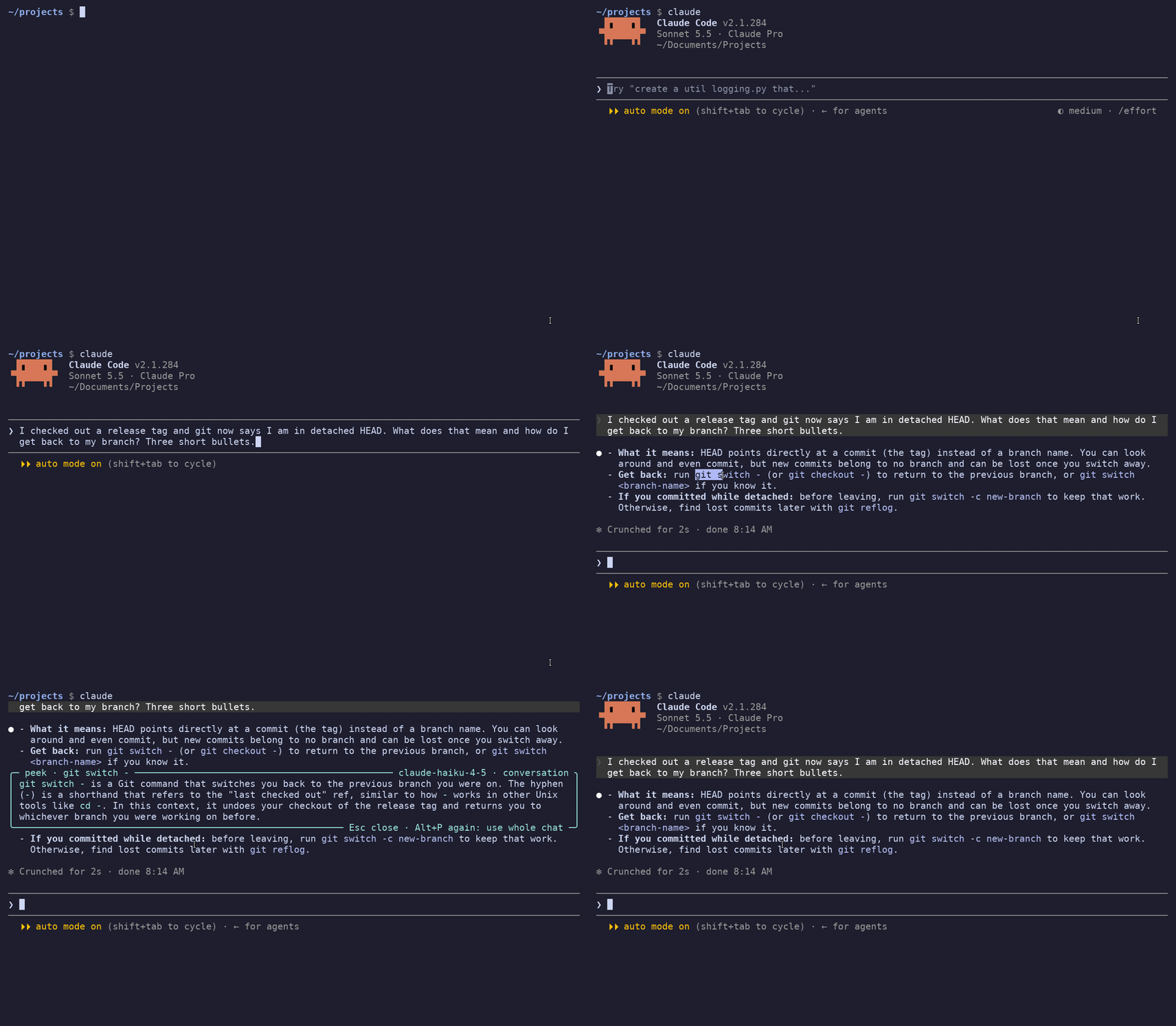
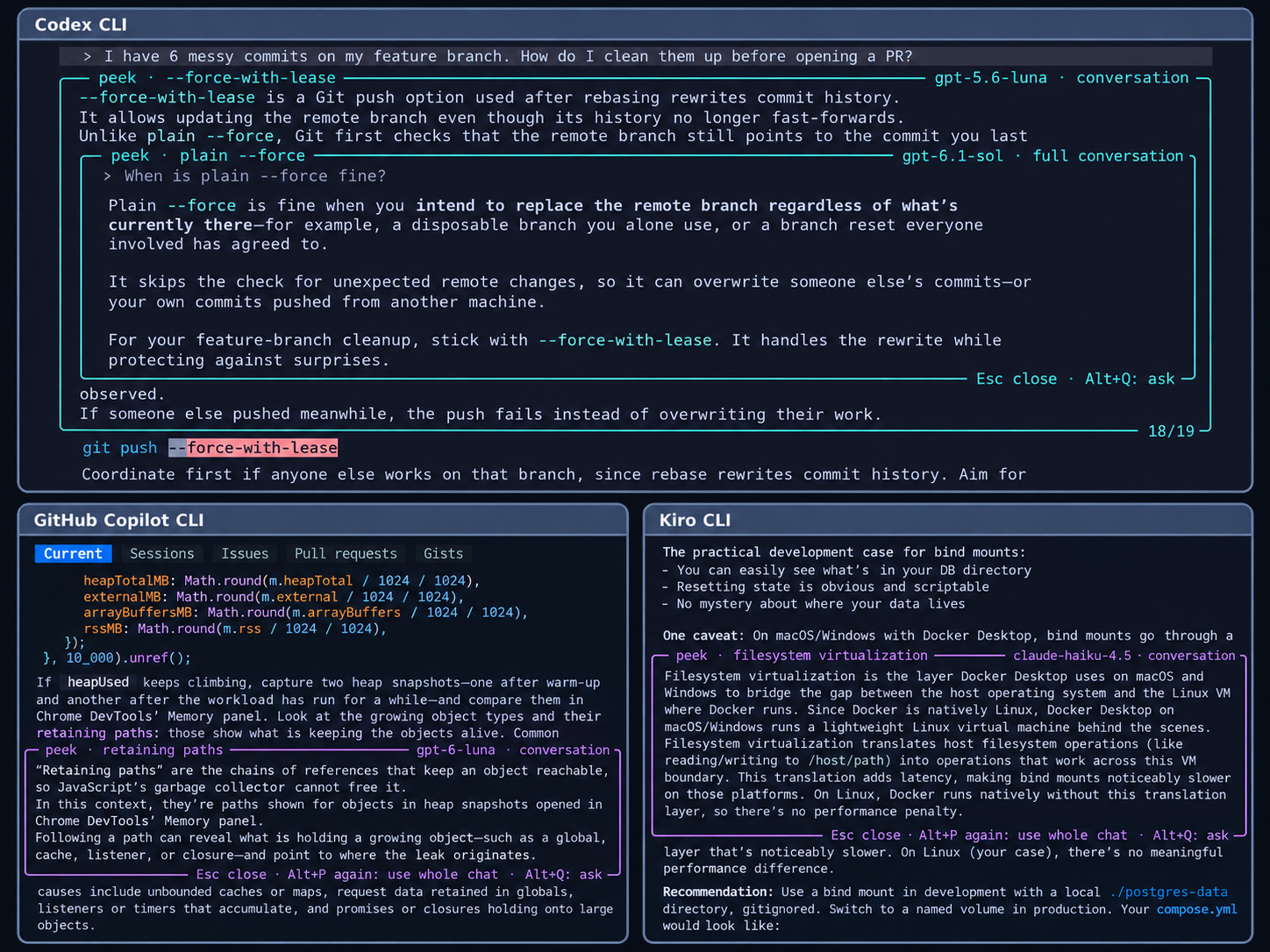
Select text in Claude Code,
Codex CLI,
GitHub Copilot CLI or Kiro CLI
output, press Alt+P, and an explanation opens right under it, inside the terminal.
The other lines move to make room, like Peek in VS Code. Esc closes the box.
On a Mac, use Option+P.
What it does
- Peek. Get a short explanation using your chat's model. It gets context from your chat,
so "its split panes" in an answer about Kitty gets explained as Kitty's split panes. - Ask. Select text and press Alt+Q to type your own question, such as "why not use a
mutex here?". It goes to your chat's model with the whole conversation. - Boxes inside boxes. Select words in an explanation and press Alt+P or Alt+Q again.
A new box opens inside it, under that line. - Saved answers. Explained text gets a dotted underline. Click it to reopen the answer
without another request. Saved answers come back when you reopen the chat later.
Install
You need one of the supported agents installed and logged in. Then run:
npm i -g peekme
peekme install
Open a new terminal. Start claude, codex, copilot or kiro-cli as always.
peekme opens with the agent, including when you resume an existing chat.
You can replace the npm command with one of these, then run peekme install:
- Homebrew:
brew install gregorybolshakov/tap/peekme - Cargo:
cargo install peekme - Shell installer:
curl -LsSf https://github.com/GregoryBolshakov/peekme/releases/latest/download/peekme-installer.sh | sh
Binaries for Linux and macOS, x86_64 and ARM, are on the
releases page.
Use
Select text in your agent's output with the mouse. On a Mac, use Option in place of Alt.
| Key | What it does |
|---|---|
| Alt+P | Explain the selection |
| Alt+Q | Type a question about the selection, then Enter to send |
| Alt+P again | Explain again using the whole conversation |
| Click underlined text | Reopen a saved answer. Click again to close it |
| Mouse wheel or PgUp / PgDn | Scroll the chat with the boxes in it |
| Esc | Close the innermost box, or cancel a question you are typing |
With a box open, select words inside it to open a nested peek or question. You can keep typing
in the agent's input line while an explanation is open. Enter sends your message and closes
the boxes.
In Claude Code, peekme uses Alt+P for peeking. Use /model to open Claude's model picker.
See all keys and gestures.
Models and cost
peekme uses the agent's existing login. There is no separate account or API key.
Each explanation uses a little of your agent's plan or credits.
Peek and Ask use your chat's model by default. Peek sends relevant parts of the conversation.
Ask sends the whole conversation. You can change either model in
settings.
Text goes through your agent's own CLI to its provider. The temporary explanation sessions
are not kept in your agent's chat history. Read what gets sent
and how peekme works.
Help
For Terminal and iTerm2 setup, see the Mac guide.
Over SSH, install peekme on the remote machine where your agent runs. If you use Codex inside
tmux, turn its mouse on with set -g mouse on and restart Codex.
See the tmux and SSH guide.
If something does not work, start with:
peekme doctor
See troubleshooting for selection problems and known
limits. To remove peekme, run peekme uninstall. To run an agent without it once, usecommand claude (or codex, copilot, kiro-cli).
Full documentation: peekme.dev/docs.
License
MIT or Apache-2.0, at your choice.
Yorumlar (0)
Yorum birakmak icin giris yap.
Yorum birakSonuc bulunamadi