grengin
Health Uyari
- License — License: Apache-2.0
- Description — Repository has a description
- Active repo — Last push 0 days ago
- Low visibility — Only 6 GitHub stars
Code Uyari
- network request — Outbound network request in functions/api/[[path]].ts
Permissions Gecti
- Permissions — No dangerous permissions requested
Bu listing icin henuz AI raporu yok.
Web application frontend for Grengin

Grengin
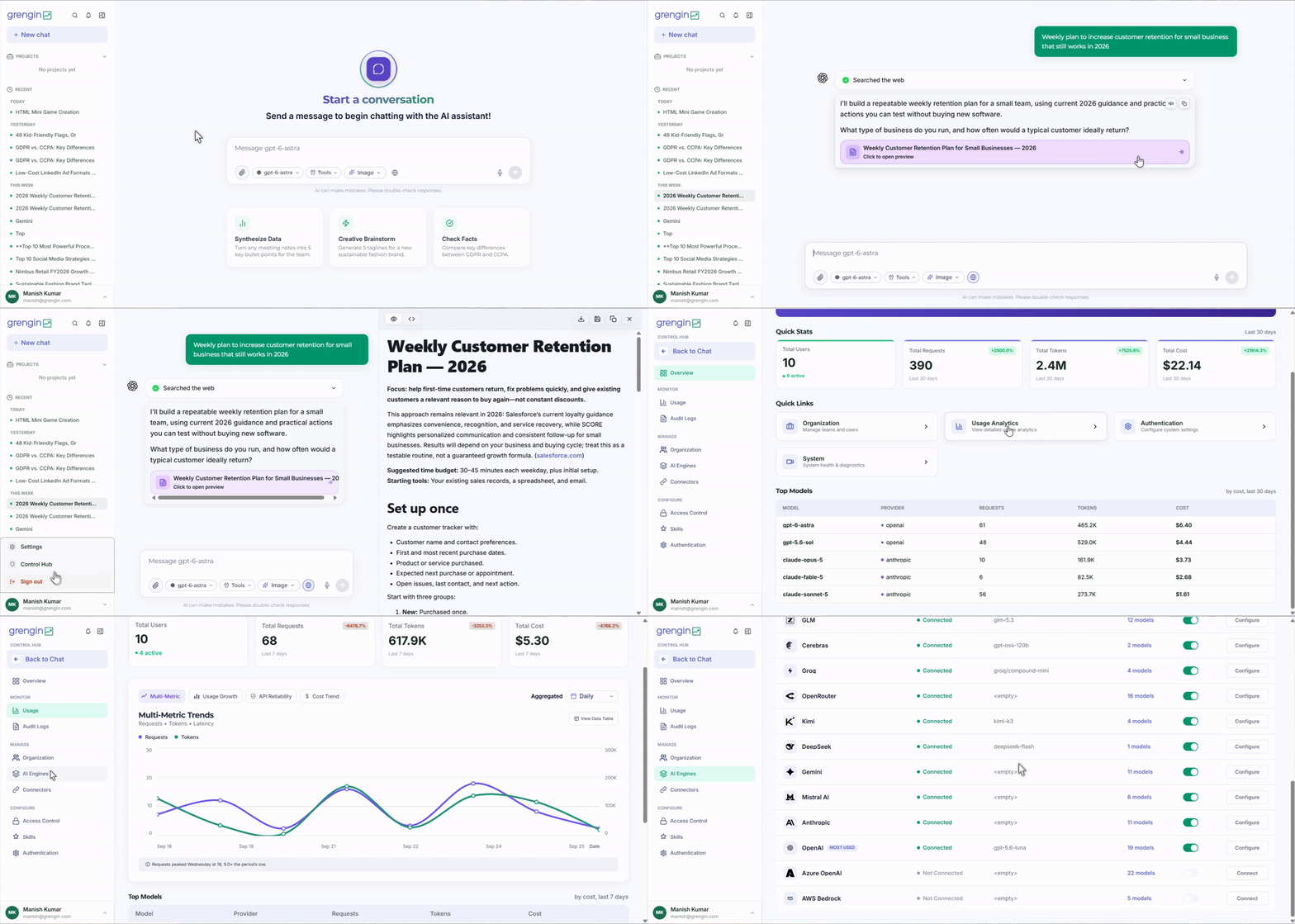
An open-source, self-hosted AI platform for secure multi-provider chat, team governance, MCP tools, projects, analytics, and enterprise SSO.
Website | Documentation | Deploy on AWS | Releases | License




Grengin gives teams governed access to leading AI models without sending their
workspace, policies, and operational data to a third-party AI SaaS. It combines
a responsive chat experience with organization controls, model routing, project
workspaces, semantic search, MCP integrations, budgets, analytics, and audit
logs.
Key Features
- Multi-provider AI: configure OpenAI, Anthropic, Mistral, and Gemini models
- Projects and artifacts: organize conversations, sources, instructions, MCP servers, and generated content
- MCP integrations: connect HTTP and stdio tool servers with per-tool access policies
- Organization governance: manage users, departments, roles, permissions, and delegated access
- Budgets and analytics: control model access and monitor token usage across teams
- RAG and semantic search: search conversation history with configurable embeddings and PostgreSQL pgvector
- Enterprise authentication: Google and Microsoft Entra ID OAuth/OIDC with domain controls
- Security and auditability: encrypted provider credentials, scoped authorization, and administrative audit logs
- Internationalization: English, Arabic, Spanish, French, Japanese, Korean, and Portuguese interfaces
- Self-hosted deployment: run Grengin in your own cloud account and retain control of infrastructure and data
Deploy Grengin
The fastest production path is the Grengin AWS image, which supports both
x86_64 and AWS Graviton instances:
Stable releases are available from the
GitHub Releases page. Every
release records the exact frontend and backend commits used to build it.
Release Assets
Grengin uses one public product version across its release assets:
| Asset | Contents |
|---|---|
grengin-<version>-source.tar.gz |
Frontend source/build and pinned backend source |
grengin-<version>-source.zip |
Same complete source bundle in ZIP format |
grengin-<version>-linux-amd64.tar.gz |
Frontend build plus static amd64 grengin-api and sqlx-mcp binaries |
grengin-<version>-linux-arm64.tar.gz |
Frontend build plus static arm64 grengin-api and sqlx-mcp binaries |
grengin-<version>-SHA256SUMS.txt |
SHA-256 checksums for every custom release asset |
Each archive contains a RELEASE-MANIFEST.json with the exact repositories,
component versions, commit SHAs, platform, and architecture. The backend commit
is pinned in release/backend-commit.txt, so a
release never depends on a moving branch. Source and Linux archives also carry
the applicable Apache 2.0 license and attribution notices.
Architecture
Browser
   |
   v
Grengin web application (Svelte 5)
   |
   | REST + Server-Sent Events
   v
Grengin API (Rust + Axum)
   |
   +-- PostgreSQL + pgvector
   +-- OpenAI / Anthropic / Mistral / Gemini
   +-- MCP tool servers
   +-- Google / Microsoft Entra ID
The frontend in this repository is compiled to static assets. The backend is
maintained in grengin-oss/grengin-api
and is included at a pinned commit in every complete release bundle.
Product Areas
AI Workspace
- Streaming conversations with Markdown and syntax highlighting
- File attachments, web search, and server-driven artifacts
- Personal prompts, project instructions, and reusable organization prompts
- Tool-call timelines for MCP execution visibility
- Conversation projects with members, sources, and dedicated tools
Administration
- AI provider and model configuration
- Organization, user, department, role, and permission management
- Department budgets and allowed-model policies
- Usage analytics and system metrics
- MCP server registration, tool synchronization, OAuth, and access policies
- Audit log filtering and export
- Branding and authentication settings
Security
- Self-hosted infrastructure and database
- Encrypted AI provider credentials
- Role- and department-scoped authorization
- Google and Microsoft Entra ID authentication
- Domain restrictions and controlled user provisioning
- Administrative audit history
Local Development
Frontend
Requirements: Node.js 22 and pnpm 9 or newer.
git clone https://github.com/grengin-oss/grengin.git
cd grengin
pnpm install
pnpm dev
The development server uses /api by default. Set VITE_API_BASE in a local
environment file when connecting to a backend at another origin.
Useful commands:
pnpm check
pnpm test
pnpm build
Backend
The backend is developed separately:
git clone https://github.com/grengin-oss/grengin-api.git
cd grengin-api
cargo build --release --locked --workspace --jobs 2
See the backend repository for
database, environment, and API documentation.
Repository Structure
grengin/
|-- src/
|   |-- lib/admin/          # Administration pages and components
|   |-- lib/api/            # Typed API client
|   |-- lib/components/     # Shared application components
|   |-- lib/features/       # Authentication, chat, and notifications
|   |-- lib/i18n/           # Locale modules
|   `-- lib/routes/         # Application routes
|-- mock/                   # Local mock API
|-- scripts/                # Build and release utilities
|-- release/                # Backend pin and release build definition
`-- .github/workflows/      # CI and release automation
Contributing
Issues and small pull requests are welcome; see
CONTRIBUTING.md. There is no contributor agreement
to sign, since Apache 2.0 Section 5 already covers submissions.
License
Grengin is free and open source software under the
Apache License 2.0.
Use it, modify it, self-host it, embed it, resell it, or run it as a
managed service, commercially or not, at any company size. No usage
caps, no commercial license, nothing to sign. Releases published
before this one remain under the Grengin Sustainable Use License they
shipped with.
The Grengin name and logo are trademarks of Perter Technology
Solutions Private Limited and are not covered by the Apache license.
Forks and third-party distributions need their own name; see
TRADEMARKS.md.
Questions: LICENSE_FAQ.md or [email protected]
Yorumlar (0)
Yorum birakmak icin giris yap.
Yorum birakSonuc bulunamadi