cccodroid
Health Pass
- License — License: Apache-2.0
- Description — Repository has a description
- Active repo — Last push 0 days ago
- Community trust — 15 GitHub stars
Code Fail
- spawnSync — Synchronous process spawning in android/assets/bin/cc-mem.mjs
- process.env — Environment variable access in android/assets/bin/cc-mem.mjs
- exec() — Shell command execution in android/assets/bin/pkg.mjs
- spawnSync — Synchronous process spawning in android/assets/bin/pkg.mjs
- fs.rmSync — Destructive file system operation in android/assets/bin/pkg.mjs
- process.env — Environment variable access in android/assets/bin/pkg.mjs
- exec() — Shell command execution in android/assets/bin/priv.mjs
Permissions Pass
- Permissions — No dangerous permissions requested
No AI report is available for this listing yet.
Run the official Claude Code natively on Android — no root, no proot. Chat GUI, terminal, toolchain and APK builds, all on your phone.
cccodroid
English · 简体中文 · Discussions · Contributing
A development launcher that runs Claude Code on Android phones. No root, no custom ROM, no chroot / proot / VM.




Download the APK · Mirror (cccodroid.net) · Install guide
Android already runs on a Linux kernel. Once the tools run natively on that kernel, a phone can do real AI-assisted development:
write code, compile C/C++, run Python / Node, build APKs and push with git — all on the phone.
cccodroid is a third-party project and is not affiliated with Anthropic. It runs the official, unmodified Claude Code:
downloaded from Anthropic's official channel at install time (or, when that is unreachable, the identical file Anthropic publishes on npm, via a mirror), verified against the official sha256 manifest, never modified.
Why
When you use AI on a phone and the model needs to actually do something (run code, edit files, build a package), the work usually goes to a cloud sandbox, and the phone is just a screen.
cccodroid brings execution back to your own device: the cloud does model inference, while your code, files and toolchain stay local, the environment persists across sessions, and the agent can reach the device itself.
The approach is not tied to one agent — any command-line AI agent that runs on Linux arm64 can be brought to a phone the same way.
See Design philosophy.
Features
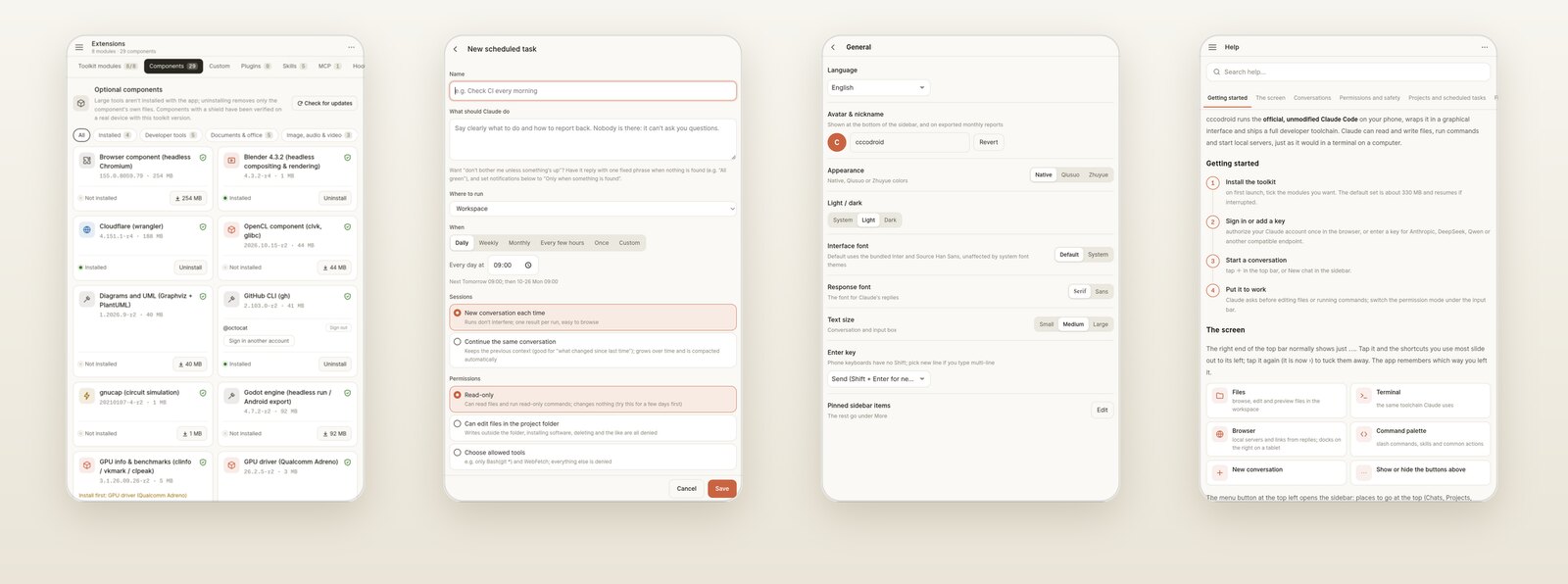
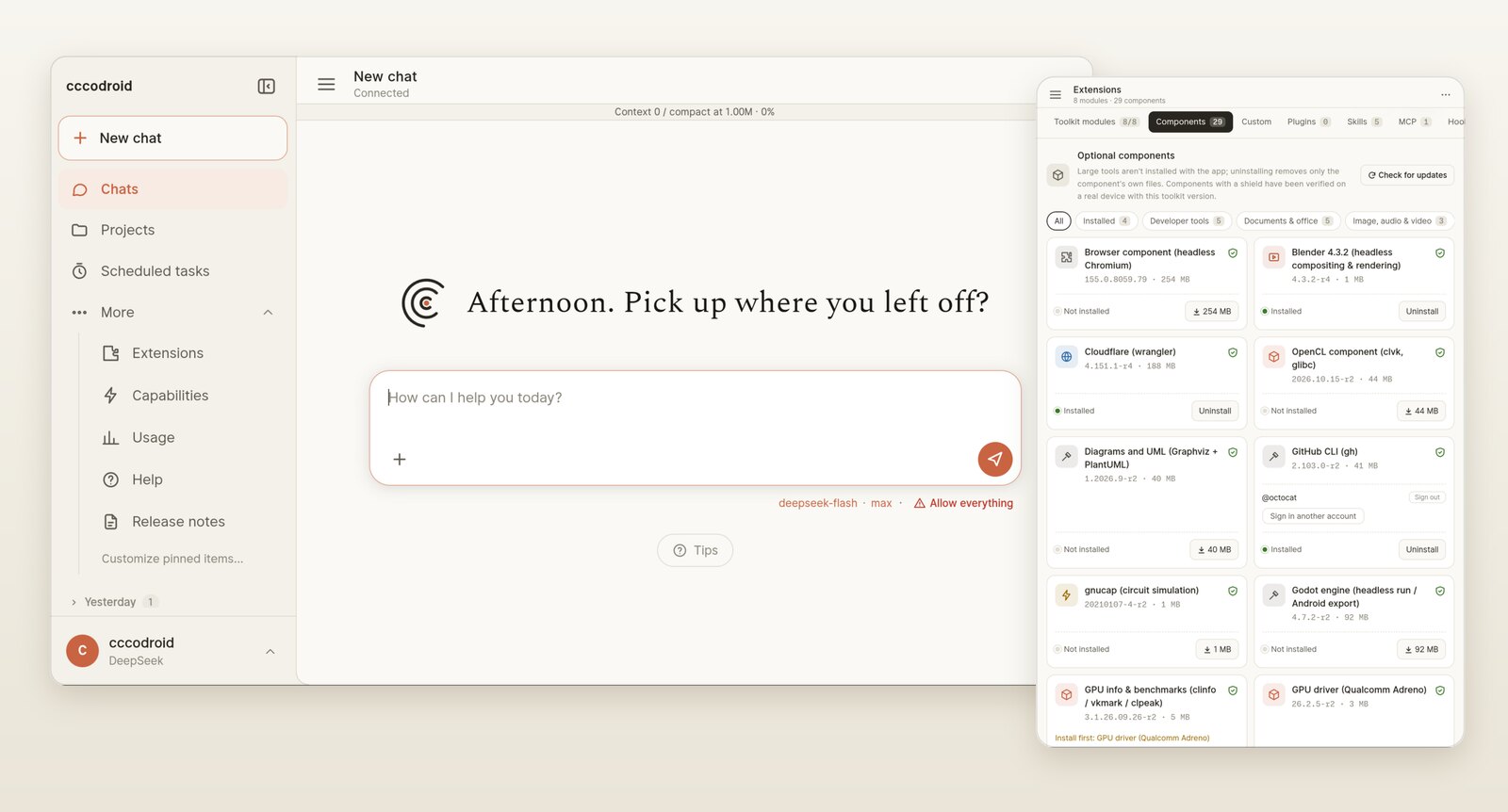
- Official Claude Code with a GUI: chat, streaming output, thinking, tool calls, file browser, session history.
- Messages sent while Claude is working wait at the end of the chat marked Queued; Send now delivers one into the running turn without interrupting it. Stop only stops — queued messages are paused, never sent automatically.
/compact,/contextand other built-in commands show their results immediately.- Each reply shows a live generation timer that settles to the total time when it finishes.
- Light / dark appearance, or follow the system (status bar included); the launch screen, first-run setup screen and in-app browser follow it too. Warm palette, with the CC Mono monospace font in the UI and terminal.
- Your messages sit on the right and replies span the width, as in the desktop app. Tool calls between two pieces of reply text fold into one "N steps" line; tap to see each step. Groups with a pending approval or a failure open by themselves. Under each reply: Copy (the raw Markdown) and Share (system share sheet).
- Built-in help (sidebar → Help): a full user guide and advanced tips, with a table of contents, in Chinese and English.
- Tablets in landscape and unfolded foldables: depending on the window width, the layout becomes two columns (chat plus a workspace on the right) or three (plus a docked sidebar). Files, the viewer, the terminal and the in-app browser open on the right without covering the chat, and you can drag the divider between them. Phones in portrait and narrow split screens look the same as before.
- Work survives the background: you get a system notification when a turn finishes or Claude is waiting for your approval. It shows no heads-up banner. The notification only offers Deny and Open; to allow a command you have to return to the app and read it in full. If the system kills the app, reopening it marks the unfinished turn as Interrupted with a Continue button, and queued messages are still there.
- Session management: deleted sessions go to a recycle bin first (restorable for 30 days). Pick sessions one by one or all at once and export them as a zip — save it anywhere with the system Save to picker, or share it directly — then import the zip on another device and carry on where you left off.
- Terminal (top bar): a real terminal with tabs, running the same bash and toolchain Claude uses — hx (Helix), less, top, git and the rest. A row of extra keys supplies what phone keyboards lack (Esc, Tab, sticky Ctrl / Alt, arrows, Home / End, PgUp / PgDn, paste, font size); a text view lets you long-press to select and copy output. Terminals keep running when you close the panel and replay their output when you come back.
- File viewer / editor (from the file browser): edit text and code and save — if the file changed on disk after you opened it (say Claude edited it), you are asked before anything is overwritten. Markdown renders with an edit toggle; images open fit-to-screen and tap to 1:1; PDFs render with pdf.js (CJK text and password-protected files included), pages drawn only as they scroll into view. docx opens directly; PowerPoint and Excel files are converted to PDF once the LibreOffice component is installed.
.htmlfiles show as live pages — CSS, JS and images next to them load, and the page reloads when the file changes, so a browser game Claude wrote is playable with one tap. The top-right button is Share, which hands the file to the system share sheet. - Switch right under the input box: model, thinking effort and permission mode. On a new chat's start screen you can pick the project and model before you say anything.
- Rewind to here: every message you sent can be rewound — undo only the files Claude changed since, or cut the chat back to that point in a new session and ask again. Any reply can also be forked into a new session, leaving the original alone. When Claude works through a long job, its task list sits above the input box, and each step a subagent takes is folded under that subagent's card.
- Attachments: the top row of the + panel is Attach file, Take photo, Screenshot and Browse files. Take photo opens the system camera; the photo is scaled to 2048 px on the long side and turned upright before it's attached. Screenshots go through Shizuku; long-press Screenshot to take one in 5 seconds, giving you time to switch to the app you want. Sharing to cccodroid from another app attaches the file too.
- A ↓ button appears when you scroll up through a long chat; tap it to jump to the latest message. A dot on it means new output arrived meanwhile.
- Paths in replies are links: tap an absolute path such as
/storage/emulated/0/…/report.pdf(orfile.js:12) and it opens in the viewer; a folder opens in the file browser. Claude is told to write full paths so this always works. Tool cards that read or write a file get a ↗ button too. - In-app browser (globe in the top bar): web links in replies open inside the app — handy for checking a dev server at
http://127.0.0.1:<port>/. On wide screens it opens in the workspace on the right, next to the chat. It uses the system WebView, so it adds no download. Sign-in pages still go to your normal browser. - Besides light and dark there are two more palettes, Qiusuo and Zhuyue.
- UI in 9 languages: 简体中文, 繁體中文, English, Français, Español, Русский, العربية (RTL), 日本語, 한국어.
- Projects and scheduled tasks (from 0.3.13):
- A project is a working directory plus its CLAUDE.md and default provider, model, effort and permissions; sessions are grouped under projects by directory.
- Scheduled tasks have Claude do something on a schedule — daily, weekly, monthly, every few hours, once, or a cron expression — woken on time by a system alarm. You can limit a task to read-only, to this project, or to chosen tools, and cap the cost and duration of a run and the total per day. Nobody is watching while it runs, so anything that needs your approval is refused.
- Usage and limits: the second half of the context line under the top bar shows what is left on the current provider — the 5-hour and weekly limits for a Claude account, the balance for DeepSeek, Kimi and others — and warns you when it runs low. The Usage page records conversations, active days and models used, with a monthly report card to save or share; it counts usage only, never content.
- The toolchain installs by module (Extensions → Toolkit modules, from 0.3.9): it is split into base, command-line tools, C/C++ compilers, Java and Android packaging, graphics libraries, audio/video and other tools. You pick modules on first install and can add or remove them later. Each one lists its purpose, main commands, size, dependencies and which components use it; typing a command from a module you have not installed tells you where to find it. Upgrading from 0.3.8 or earlier installs every module, so nothing goes missing.
- Optional components (Extensions → Optional components): large tools that don't ship with the app; download them only if you need them. Each build matches a specific toolchain release, is checked against its SHA-256 and a per-file manifest before anything is installed, and uninstalls cleanly.
- Browser component (headless Chromium 155), about 254 MB to download and 750 MB installed: lets Claude open pages headlessly — screenshots, PDF export, the rendered DOM, and scripted browsing with puppeteer-core. It comes with a skill that tells Claude how to use it.
- Community components from the cccodroid-components repository. There are currently 28, or 29 with the browser above. Dev: GitHub CLI (gh), Godot (headless runs, APK export), Graphviz / PlantUML diagrams, Hugo, reverse engineering (rizin, binwalk). Media: Blender (headless compositing and rendering, 3D on the GPU), LilyPond (music engraving), a music production toolchain. Office: LibreOffice, Pandoc, a PDF toolbox, OCR (Chinese and English), LaTeX (Tectonic, with Chinese support). AI: llama.cpp. 3D and science: OpenSCAD, GNU Octave, scientific Python (numpy / scipy / matplotlib). EDA: ngspice / gnucap, Icarus Verilog / Yosys. GPU: Snapdragon driver (Vulkan / OpenGL / OpenCL), Mali driver, GPU benchmarks. Net: Cloudflare (wrangler), rclone. See the full list. Indexes are ed25519-signed and rejected if they do not check out; community components are labelled as such, and builds nobody has verified on a real device ask first.
- Custom components: import a Linux arm64 program the market doesn't have (a single binary or a .tar.gz / .zip). It works out whether the program is glibc, Android-native, static or a script, and pulls missing libraries from the Termux glibc repository; once installed it is one command that both Claude and the terminal can use. Where it comes from is your responsibility.
- Several ways to connect:
- Sign in with a Claude account inside the app; after authorizing in the browser you are brought back automatically. The account card shows your 5-hour and weekly usage limits with their reset times (taken from what Claude Code itself reports after each turn — the app never queries anything with your credentials).
- Claude API key.
- The official Anthropic-compatible endpoints of DeepSeek, Zhipu GLM, Qwen and Kimi.
- Any other compatible third-party endpoint you add.
- Per conversation: the provider, model and effort in Settings are defaults; picking something inside a conversation changes only that one. Several conversations can run at once — one on a Claude account, another on DeepSeek — without getting in each other's way.
- A complete development toolchain (about 250 packages, taken from the official Termux repositories):
- C/C++: clang 21 / lld, make / cmake / ninja, gdb / strace.
- Languages: Python 3.14 (pip, venv), Node 26 (npm, npx).
- Android builds: OpenJDK 21, aapt2 / d8 / apksigner — build APKs on the phone.
- VCS and network: git, ssh, curl.
- Audio and video: ffmpeg 9 (x264 / x265 / VP9 / AV1 / Opus…) with hardware encoding on the phone (
h264_mediacodec/hevc_mediacodec), more than 3× faster than software encoding. - CLI tools: rg / fd / bat / jq / sqlite3 / typst / ImageMagick… Tab completion works in interactive bash;
hx-grammarinstalls just the Helix syntax grammars you need; typst finds the system CJK fonts out of the box.
- System privileges (optional): Shizuku integration. In the terminal,
priv '<cmd>'runs pm / am / settings / logcat / screencap… as the shell user.- One-tap install and activation from Settings: downloaded from Shizuku's official release (signing certificate verified), installed with the system installer,
then activated over Wireless debugging — no computer needed. The pairing code is entered in a notification that stays at the top of the screen, so the pairing dialog stays open. - After a reboot, cccodroid turns Wireless debugging back on and re-activates Shizuku by itself (Wi‑Fi required).
- One-tap install and activation from Settings: downloaded from Shizuku's official release (signing certificate verified), installed with the system installer,
- Device tools (off by default): turn them on in Settings → Device tools and Claude can post notifications, read and write the clipboard, share files to other apps, open links or apps, and check battery and network; reading and tapping the screen uses accessibility and is a separate switch. Under the hood this is an MCP server for Claude that calls the system through Priv. Calendar, mail and the like are only pre-filled; you save or send them yourself.
- Automatic updates (on by default; can be turned off or triggered manually in Settings):
- Claude Code: silent updates from the official channel (stable / latest, or pinned to a specific version); running conversations are not affected. If the official channel is unreachable, the same file comes from an npm mirror and is still checked against the official manifest.
- cccodroid itself: downloaded, signature-checked, then offered for install; installed silently when idle if Shizuku is available. There are two APKs, targetSdk 28 and 36; updates follow the one you have installed, and you can switch in Settings (a system that only accepts 36 won't let you switch back to 28).
- Toolchain: pre-downloaded on Wi‑Fi only and swapped in the next time the app opens; anything you installed with pip / npm -g is kept.
- Updates never cut each other off: while the toolchain is downloading or being replaced, the app update waits. The replacement is checked against the release manifest before the old toolchain is touched, and if it is interrupted (app restart, process killed) the next launch finishes it or rolls back.
- Verify / Repair in Settings checks every toolchain file against its recorded hash; Repair reinstalls the same version and keeps your own packages. A quick check also runs at each launch.
- Extensions: install, enable, disable and uninstall Claude Code plugins (search the official directory or add other marketplaces), install skills from a zip, and add or remove MCP servers — all from the Extensions tab. Everything goes through Claude Code’s own
claude plugin/claude mcpcommands; a plugin that needs to run a command to install shows it to you first. - Troubleshooting:
- Safe mode: if a hook, plugin, MCP server or CLAUDE.md breaks things, turn on safe mode and Claude Code starts with its built-in
--safe-mode— no customizations loaded, while sign-in, keys, sessions and model stay as they are. Nothing is moved or edited; turning it off restores everything. - I'm stuck · bundle diagnostics (in Settings, and on the install-failure screen): diagnostics, the app log, the gateway log and the repair ledger, packed into a zip and handed to the system share sheet. Before packing, you see a list of what goes in. Keys, tokens, email addresses and the content of your messages to Claude are scrubbed first, and conversation transcripts are not included.
- Plain-language first-install errors: the app checks free space before downloading and tells you how much it needs. Failures such as being offline, rate limiting or a checksum mismatch are explained in plain words. Retry resumes from what was already downloaded.
- Repair ledger: every toolchain install, verification, repair and startup recovery is recorded (what was found, what was done, the result) and can be read in Settings.
- Known issues: problems not yet fully explained or ruled out, and what we know about each, are listed in docs/known-issues.md.
- Safe mode: if a hook, plugin, MCP server or CLAUDE.md breaks things, turn on safe mode and Claude Code starts with its built-in
- USB debugging of another device: connect it with an OTG cable and run
usb-adb, thenadb devices / install / shellas usual. - Self-test:
cccodroid-selftestexercises 73 tools and usages (including ffmpeg and a hardware-encoding probe); the tool notes are injected into Claude's system prompt so it knows what it has.
Install
- Download
cccodroid.apkfrom Releases and install it. If Android says it isn’t compatible and won’t install it, usecccodroid-36.apkfrom the same release instead (targets SDK 36, same features, available from 0.3.17; see “Updates and repair” in the in-app help for how the two differ). - Open the app. The first launch automatically:
- downloads the toolchain: you pick modules first; the base is required, and the command-line tools and C/C++ compilers are ticked by default, about 330 MB in total (all modules about 700 MB); resumable, sha256-verified, then unpacked;
- downloads Claude Code from Anthropic's official channel (about 275 MB).
- Choose how to connect in Settings: sign in with a Claude account, or enter an API key.
- (Optional) Install and start Shizuku, then grant it in Settings to enable
privand stronger keep-alive.
Requirements: Android 8.0+, arm64, about 4 GB free space.
Tested devices: Lenovo TB320FC (Snapdragon 8+ Gen 1, Android 15) and Red Magic 9 Pro NX769J (Snapdragon 8 Gen 3, Android 14, installed from scratch following this section). Community reports: Redmi K70 Ultra (Dimensity 9300+, Android 16, #14) and vivo V2502A (Dimensity, Android 16). Android 12 / 13 have not been tested on real hardware yet; reports are welcome.
Versions with a suffix (such as v0.2.0-rc1) are pre-releases. In-app updates only offer stable releases; download pre-releases from Releases by hand.
Allow background running on vendor ROMs: some vendors' power savers ignore foreground services and freeze the whole app in the background
(measured on RedMagic: frozen about 90 s after leaving the foreground), stopping any running task. When cccodroid detects a freeze during a running task, Settings tells you exactly where to fix it.
RedMagic / ZTE: App info → App battery usage → Battery optimization → Background running: Allow, Auto-start: Allow.
Offline install: put devkit-cc.codroid.tar.gz in /sdcard/cccodroid/; the first launch uses it instead of downloading.
Versions: v0.3.0 is the first stable release. Later 0.3.x releases build on it; install over the old version and your data and installed tools are kept.
Community and contributing
- Questions, ideas, device reports: GitHub Discussions, in English or Chinese. There is also a Chinese-speaking QQ group, 1062538743.
- Bugs: in the app, tap Settings → Report on GitHub; your device and self-test results are filled in for you.
cccodroid is maintained by one person and badly needs help. Device reports, translation fixes, component recipes, docs and code are all welcome, and you can help without writing code. See the contributing guide.
Architecture
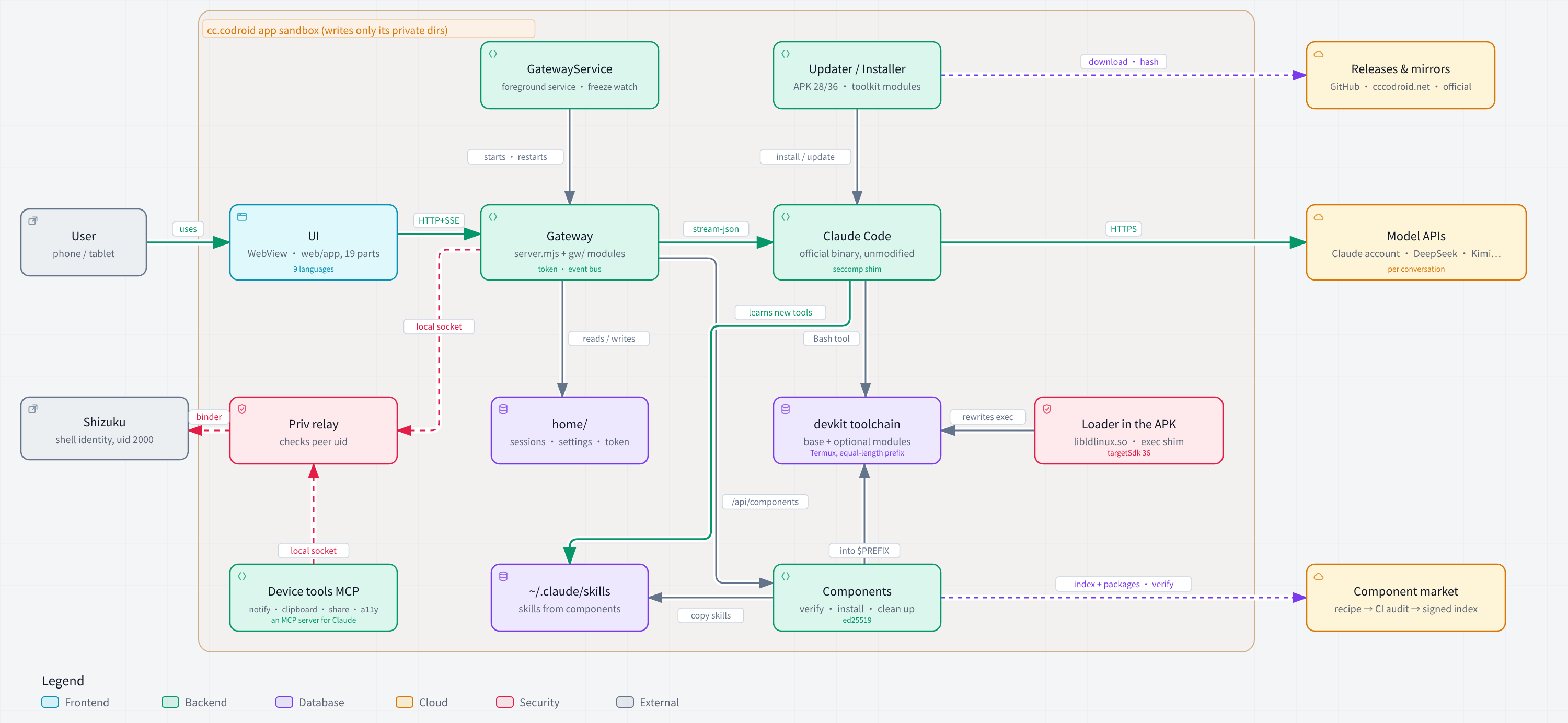
Interactive version (guided views, light/dark, export): download docs/diagrams/cccodroid-architecture.en.html and open it in a browser;
the source is cccodroid-architecture.en.json in the same directory, with every component tied to the source lines it describes. Generated with Archify.
How it works
cccodroid.apk (Java shell: installer + foreground service + WebView)
  ├─ files/usr/      toolchain: official Termux packages, run natively after same-length prefix relocation
  ├─ official Claude Code (linux-arm64 glibc build, unmodified binary)
  │     └─ started by the glibc loader with --preload of a tiny seccomp library
  ├─ lib/arm64-v8a/libldlinux.so   the same glibc loader; the 36 build starts glibc programs through it
  └─ gateway gateway/server.mjs + gw/ (Node): runs claude, event stream, queue, provider config → UI gateway/web/
- Same-length prefix relocation: Termux binaries have
/data/data/com.termux/baked in at build time. The package namecc.codroidhas exactly the same 10 characters ascom.termux, so a byte-for-byte replacement fixes every RUNPATH, shebang and config path — noLD_LIBRARY_PATH, wrapper scripts or binary patching. Entries inside zip / jmod archives are rewritten too. See devkit/README.md. - seccomp: Android installs a syscall allow-list on app processes and kills anything outside it with SIGSYS. Android 14 does not allow
epoll_pwait2, so Claude Code would be killed at startup.seccomp-enosys.cturns such calls into ENOSYS so programs take their own fallback path;enosys-rundoes the same from outside (ptrace) for static binaries. - targetSdk 36: since Android 10, apps targeting SDK 29 or later can't execute files in their own data directory. The regular APK still targets 28. The 36 build puts the glibc loader in the APK's native library directory, which the system does allow, starts bionic programs through
/system/bin/linker64, and an exec shim (exec-shim.c) rewrites every program launch into one of those two forms. Both APKs have the same features; every component has been run on a real device with the 36 build. - Gateway access control: the gateway listens on 127.0.0.1 only, and every
/api/*request must carry a 256-bit token from the app's private directory; Host and Origin are checked as well. Other apps and web pages on the phone cannot drive it. - Credentials: account sign-in is done by Claude Code itself. The gateway hands the authorization URL to the system browser and never reads or stores claude.ai credentials; it does not handle the one-time authorization code either (see Terms and compliance). Third-party API keys live in the app's private directory and reach claude through
apiKeyHelper, never through environment variables.
Terms and compliance
cccodroid aims to follow Anthropic's terms for products that run Claude Code. Below is exactly what the app does, so you can judge for yourself:
- How the binary runs. The Claude Code file is byte-for-byte the official linux-arm64 build: checked against the official sha256 manifest and never patched. Android has no
/lib/ld-linux-aarch64.so.1, so it is started through the glibc loader (the toolchain's copy, or in the 36 build the identical copy inside the APK), with a 61-line preload library (seccomp-enosys.c) that turns system calls Android's seccomp filter forbids into ENOSYS. The library does not read or change Claude Code's code or memory; it only keeps the process from being killed. - Signing in with a Claude subscription. Sign-in is Claude Code's own
claude auth login. You authorize on Anthropic's page in your browser, Claude Code writes the token to its own~/.claude/.credentials.json(the app never reads that file), and while signed in Claude Code talks to api.anthropic.com directly, not through any process of ours. In practice this is the same as SSHing into a Linux machine you own, running Claude Code there and signing in: here the Linux machine is the phone, and the app is the screen and keyboard. Every turn starts with you: either a message you send, or a scheduled task you set up yourself. Scheduled tasks run on your own phone, under your own account, with the same unmodified Claude Code; since nobody is watching, anything that needs approval is refused — the app never clicks "Allow" for you. Anthropic's terms cover this case explicitly: they do not prevent "an end user from signing in to the unmodified Claude Code binary with their own Claude subscription, including where a platform hosts Claude Code". - The one-time authorization code. Normally the browser hands the code back to Claude Code automatically, on this device, without passing through the app. If that fails (for example you authorized on another device), the app opens its built-in terminal and runs
claude auth loginthere; you paste the code into Claude Code's own prompt. The terminal is a generic byte channel, like Termux or SSH; the app has no field that accepts the code and never parses, saves or logs it. - Permission prompts. Like the official CLI, Claude asks before editing files, running commands or going online, and you answer in the chat. The default mode is "Ask each time"; "Allow everything" is available but asks for confirmation first.
- The name. cccodroid stands for "Claude Code CLI On droid", modelled on the long-standing Android C/C++ IDE C4droid. The project does not use the Claude or Anthropic names or logos in its name, icon or package name, and does not claim to be made, endorsed or partnered with by Anthropic. If Anthropic asks, the project will be renamed.
- No resale, no middleman. cccodroid is free and open source, has no server, and does not provide, pay for or resell any Claude usage: you sign in with your own account or bring your own API key, and usage is billed to you directly. The author has a Claude Console account and has accepted Anthropic's Commercial Terms, which the terms above require for products that run Claude Code.
Build
sh scripts/build.sh                 # javac → d8 → aapt2 → sign, produces dist/cccodroid.apk (targetSdk 28)
TARGET_SDK=36 sh scripts/build.sh   # the 36 build; scripts/ship.mjs builds both for a release
node devkit/devkit.mjs build --target cc.codroid   # build the toolchain (CI can do this too)
No setup needed: GitHub Actions builds an APK for every pull request and every push to main; download it from that run's Artifacts (see .github/workflows/apk.yml). Builds from main are signed with the release key and install over the released app. Pull requests from forks are signed with a throwaway test key, so you have to uninstall the released app first; a spare device is best.
To build on your own machine, install JDK 17, Node.js, the Android SDK (build-tools and a platform) and the NDK, then set the environment variables described at the top of build.sh. apk.yml is a working example. The script's default tool paths point at the author's Android tablet.
Release signing certificate SHA-256: B7:03:61:59:5D:D3:D8:D7:04:DD:21:0E:D5:96:FC:57:70:14:CE:22:72:88:4F:B6:98:0B:F6:96:23:33:8F:E0.
The toolchain is built and published by GitHub Actions: push a tag like devkit-YYYY.MM.DD (see .github/workflows/devkit.yml).
Which toolchain version the app downloads is set in devkit-sources.txt. The size and SHA-256 of that version live in devkit-pin.json, which ships inside the APK: the first install (from GitHub, the cccodroid.net mirror, or a local file) and the check on local files both trust it rather than the download source. When you switch versions, edit the former, run node scripts/pin-devkit.mjs "$(head -1 devkit-sources.txt)" devkit-pin.json, and commit both; build.sh checks that they match.
Layout:
| Directory | Contents |
|---|---|
android/ |
Java shell, Manifest, resources, terminal helpers (assets/bin/), native libraries (native/), the original glibc loader shipped in the APK (prebuilt/glibc/) |
gateway/ |
Gateway (server.mjs + feature modules in gw/, Node.js) and UI (web/, plain JS, no build step) |
i18n/ |
UI translations: one txt per language plus the generate and check scripts, see i18n/README.md |
devkit/ |
Toolchain build script and manifests |
docs/design-philosophy.md |
Why the project exists and the principles behind it |
docs/large-screen.md |
Large-screen layout (tablets, foldables) and where its code lives |
docs/known-issues.md |
Known issues and unresolved risks, plus test actions that create fake bugs |
docs/download-sources.md |
Every download chain: sources, trust anchors, server mirrors, how to check and maintain them |
docs/operit2-on-device-build.md |
Case study: building Operit2 (Flutter + Rust) from source into an APK on a phone, with every gap and fix |
docs/diagrams/ |
Architecture diagrams (Archify JSON specs → interactive HTML → light / dark PNG) |
third_party/ |
Shizuku-API 13.1.5 (MIT, unmodified from Maven Central) |
Special thanks
- DeepSeek Harness for Android (woaiys3): running AI agents on a phone without root, elevating through Shizuku, keeping alive with a foreground service — it walked these paths first. cccodroid's early exploration and development happened inside the environment it built; that Claude Code runs on Android the way it does today rests on the foundation laid by it and its author.
- Archify (tt-a1i, MIT): the architecture diagram above was made with it and passed its layout checks; license in ThirdPartyLicenses/Archify.
- Termux: the toolchain is assembled from its official packages.
- Shizuku (RikkaApps): system privileges without root.
- OpenCC / opencc-js: the Traditional Chinese UI strings were converted with it, then reviewed by hand.
Community contributors
- bmbmm-114514: a careful code review that reported ten security and stability problems, each with reproduction steps and code locations; all fixed in 0.3.2.
- IVESHOWARD: reported the skill archive import problems (only one of several skills imported, archives sometimes not recognised); fixed in 0.3.2.
- CCB-Fox: the Dimensity GPU driver component (cccodroid-components#46), which led to Mali support in 0.3.3.
- Cosmosophius: a thorough Dimensity 9300 report (cccodroid-components#47).
- gogoiPhone: a Redmi K70 Ultra device report with their own Vulkan compute test (#14).
Reports, device testing and code review are contributions too, and they're recorded here.
License
cccodroid itself is released under the Apache License 2.0 (see also NOTICE).
Third-party components
- Claude Code: proprietary software by Anthropic, not distributed with this project. Its use is subject to Anthropic's terms.
- Toolchain: taken from the official Termux repositories; each component is distributed under its own license (including GPL). Versions, hashes and build recipes are in the
devkit.lock.json/SBOM.tsvattached to each release. If you need a copy of the source, ask in Issues. - glibc dynamic loader (
lib/arm64-v8a/libldlinux.so, shipped in the APK): from Termux's glibc package, LGPL-2.1-or-later. See android/prebuilt/glibc. - Shizuku-API: MIT, see third_party/shizuku/LICENSE.
- xz-decompress (used at toolchain build time): MIT.
- xterm.js (terminal): MIT, see ThirdPartyLicenses/xterm.js.
- pdf.js (PDF viewer): Apache-2.0; its bundled OpenJPEG / JBIG2 / QCMS decoders carry their own licenses. See ThirdPartyLicenses/pdf.js.
- CC Mono (monospace font for the UI and terminal): a subset of Monaspace Neon by GitHub, SIL OFL 1.1, renamed as the Reserved Font Name clause requires. See ThirdPartyLicenses/ccmono.
android.jaris not shipped (its license forbids redistribution); download it yourself if you want to compile APKs on the phone.
Reviews (0)
Sign in to leave a review.
Leave a reviewNo results found