gridctl
Health Pass
- License — License: Apache-2.0
- Description — Repository has a description
- Active repo — Last push 0 days ago
- Community trust — 14 GitHub stars
Code Pass
- Code scan — Scanned 12 files during light audit, no dangerous patterns found
Permissions Pass
- Permissions — No dangerous permissions requested
No AI report is available for this listing yet.
🧪 Local Stack for testing Agents

One endpoint. Dozens of AI tools. Zero configuration drift.




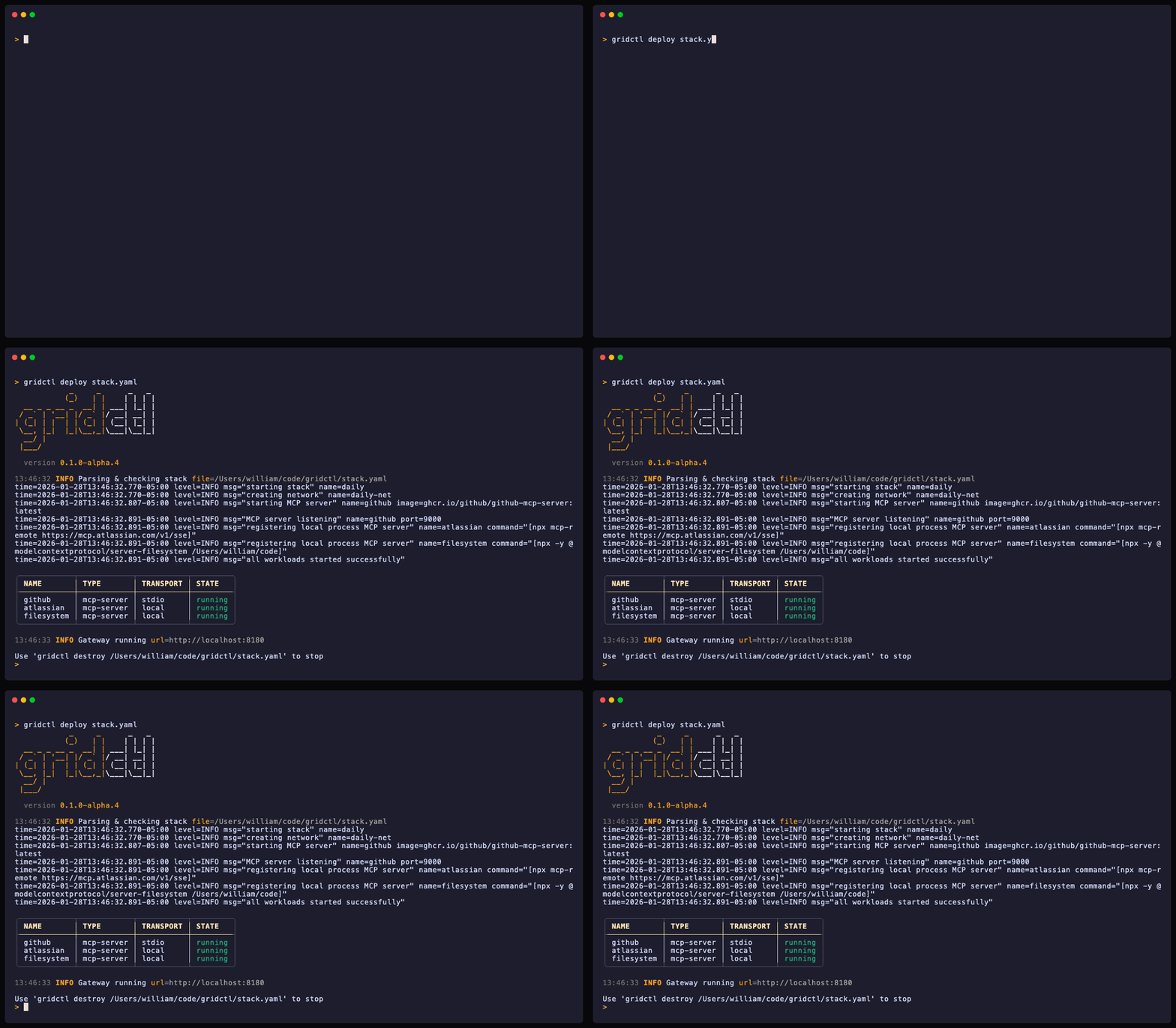
Gridctl aggregates tools from multiple MCP servers into a single gateway. Connect Claude Desktop - or any MCP client - to your grid through one endpoint and start building.
Define your stack in YAML. Apply with one command. Done.
gridctl apply stack.yaml
[!NOTE]
Inspiration - This project was heavily influenced by Containerlab, a project I've used heavily over the years to rapidly prototype repeatable environments for the purpose of validation, learning, and teaching. Just like Containerlab, Gridctl is designed for fast, ephemeral, stateless, and disposable environments.
⚡️ Why Gridctl
MCP servers are everywhere. Running them shouldn't require a PhD in container orchestration. Or, is the MCP server not running in a container? Is a single endpoint exposed behind an existing platform? Is another team hosting and managing an MCP server that is on a different machine on the same network? Different transport types, methods of hosting, and .json files start to accumulate like dust.
I originally built this project to have a way to leverage a single configuration in my application, that I never have to update, while still building various combinations of MCP servers for rapid prototyping and learning.
I would rather be building than juggling ports, tracking environment variables, and hoping everything with my setup is ready for the next demo. My client now connects once and accesses everything over localhost:8180/sse by default.
version: "1"
name: stack

mcp-servers:

  # Build GitHub MCP locally (instantiate in Docker container)
  - name: github
    image: ghcr.io/github/github-mcp-server:latest
    transport: stdio
    tools: ["get_file_contents", "search_code", "list_commits", "get_pull_request"]
    env:
      GITHUB_PERSONAL_ACCESS_TOKEN: "${GITHUB_PERSONAL_ACCESS_TOKEN}"

  # Connects to external SaaS/Cloud Atlassian Rovo MCP Server (breaks out into OAuth to connect)
  - name: atlassian
    command: ["npx", "mcp-remote", "https://mcp.atlassian.com/v1/sse"]

  # Turn any REST API into MCP tools via OpenAPI spec
  - name: my-api
    openapi:
      spec: https://api.example.com/openapi.json
      baseUrl: https://api.example.com
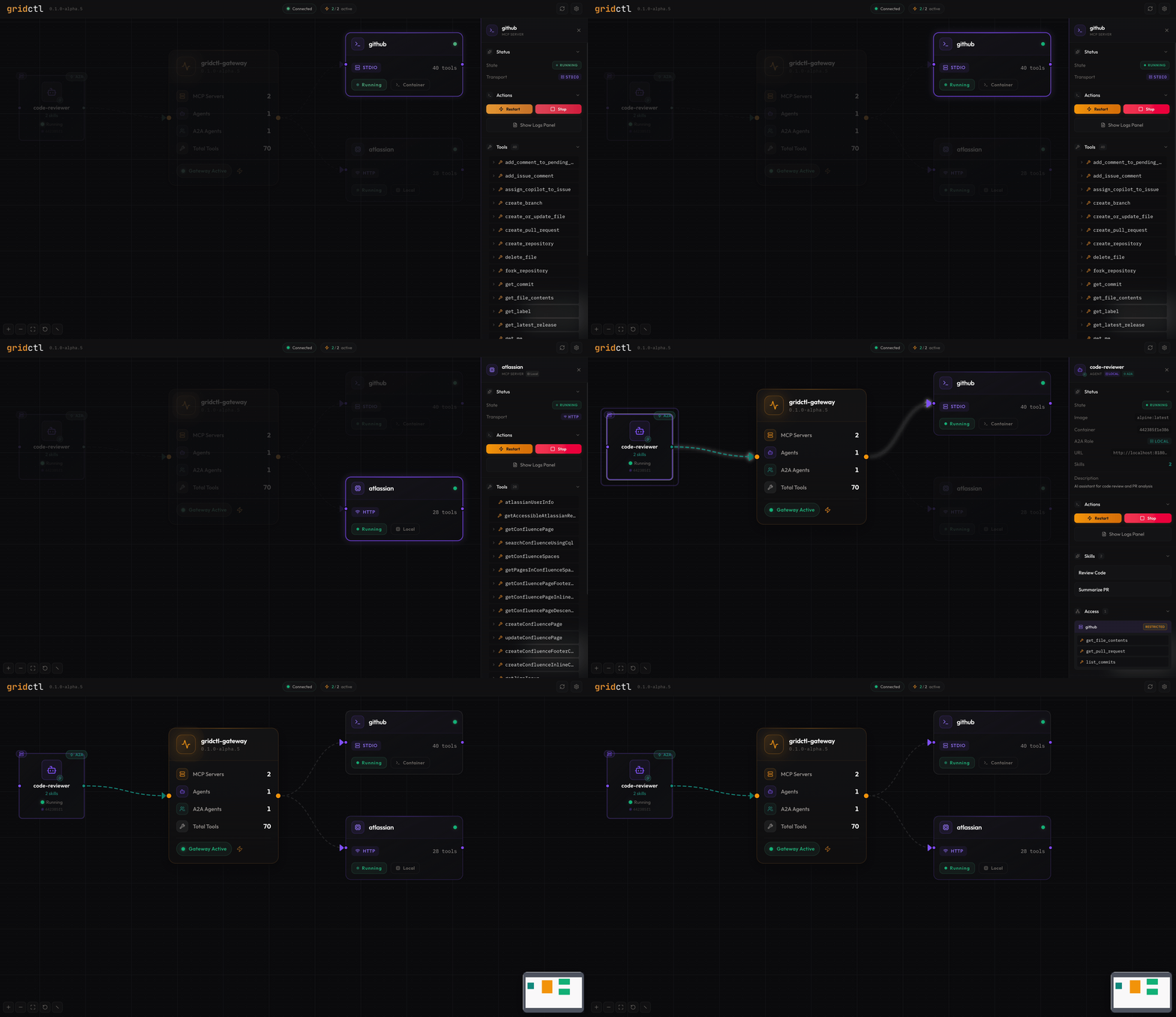
Three servers. Three different transports. One endpoint. Navigate to localhost:8180 to visualize the stack 👉
🪛 Installation
# macOS / Linux
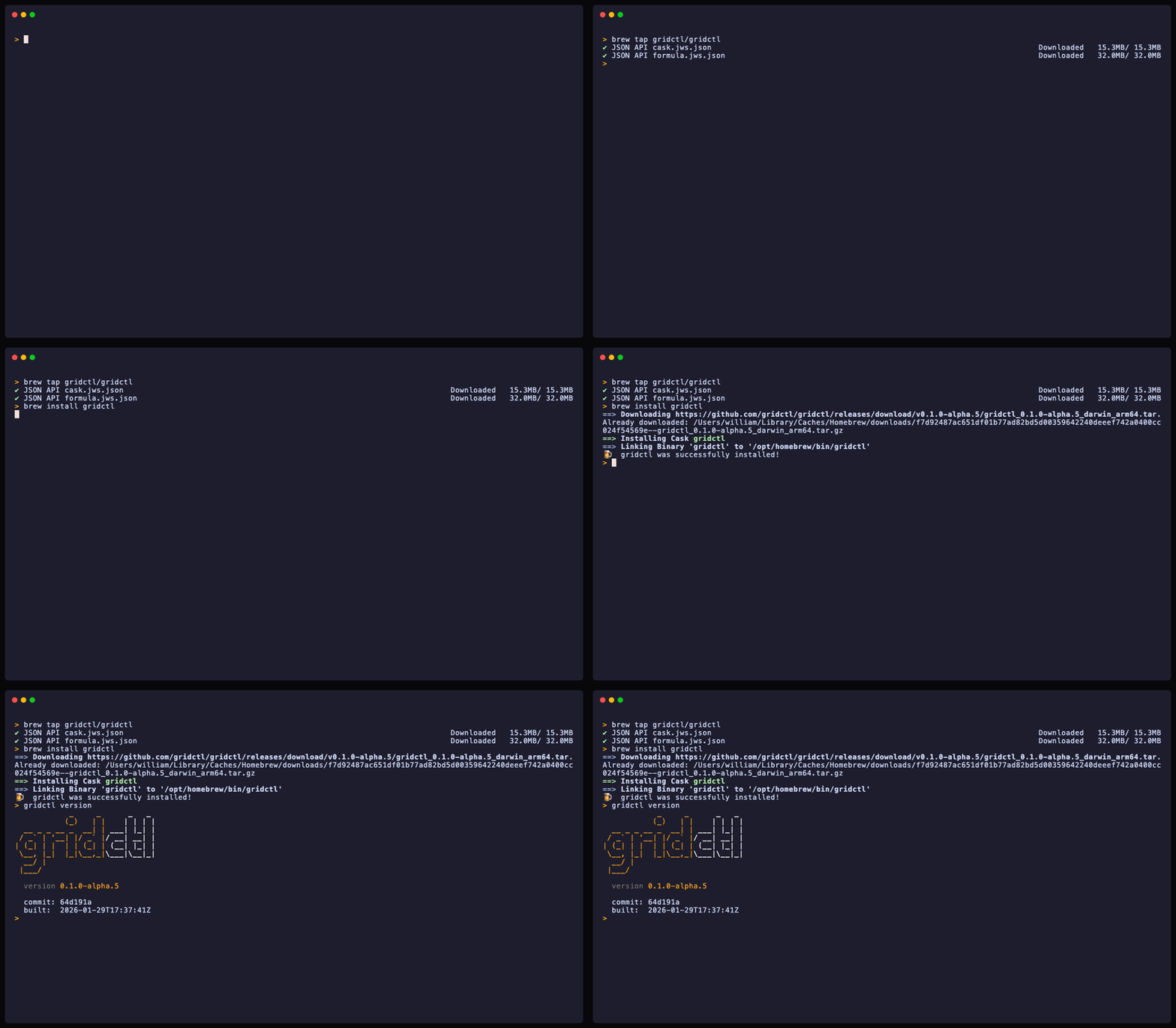
brew install gridctl/tap/gridctl
# From source
git clone https://github.com/gridctl/gridctl
cd gridctl && make build

# Binary releases available at:
# https://github.com/gridctl/gridctl/releases
🐋 Container Runtime
Gridctl requires a container runtime for workloads that run in containers (MCP servers with image and resources). Docker is detected by default; Podman is supported as an experimental alternative.
Runtime Detection
Gridctl auto-detects your runtime by probing sockets in this order:
$DOCKER_HOST(if set)/var/run/docker.sock(Docker)/run/podman/podman.sock(Podman rootful)$XDG_RUNTIME_DIR/podman/podman.sock(Podman rootless)
Override detection with the --runtime flag or GRIDCTL_RUNTIME environment variable:
gridctl apply stack.yaml --runtime podman
# or
GRIDCTL_RUNTIME=podman gridctl apply stack.yaml
Using Podman
# Install Podman (macOS)
brew install podman
podman machine init
podman machine start

# Install Podman (Linux)
sudo apt install podman        # Debian/Ubuntu
sudo dnf install podman        # Fedora/RHEL

# Enable the Podman socket (Linux rootless)
systemctl --user enable --now podman.socket

# Verify gridctl detects Podman
gridctl info
Podman 4.7+ is recommended for full host.containers.internal support. Older versions fall back to the Docker-compatible host.docker.internal alias. SELinux volume labels (:Z) are applied automatically when Podman is running on an SELinux-enforcing system.
[!NOTE]
Podman support is experimental. File issues at github.com/gridctl/gridctl/issues if you encounter problems.
🚦 Quick Start
# Apply the example stack
gridctl apply examples/getting-started/skills-basic.yaml

# Check what's running
gridctl status

# Open the web UI
open http://localhost:8180

# Clean up
gridctl destroy examples/getting-started/skills-basic.yaml
🎬 Features
Stack as Code
Fast, consistent, ephemeral, flexible, and version controlled! Many practitioners use different combinations of MCP servers depending on what they are working on. Being able to instantiate, from a single file, the various combinations needed for the right task, saves time in development and prototyping. The stack.yaml file is where you define this.
Spec-Driven Workflow
The stack.yaml file has always been your source of truth. Now you have the full lifecycle tooling to match — validate before you commit, preview before you apply, and detect the moment your environment drifts from what's in version control:
gridctl validate stack.yaml    # Lint and schema-check the spec (exit 0/1/2)
gridctl plan stack.yaml        # Diff against running state — see exactly what changes
gridctl apply stack.yaml       # Apply the spec
gridctl export                 # Reverse-engineer stack.yaml from a running stack
gridctl test <skill>           # Run acceptance criteria for a skill (exit 0/1/2)
gridctl activate <skill>       # Promote a skill from draft to active
Drift detection runs in the background: the canvas flags servers that are running but absent from your spec, and declarations in your spec that haven't been deployed — so your YAML and your environment stay in sync. Need to build a stack from scratch? The visual spec builder lets you compose stack.yaml through a guided wizard and export the result.
Executable skills (those with a workflow block) must define acceptance_criteria before gridctl activate will promote them — ensuring every deployed skill has a machine-checkable definition of done.
Protocol Bridge
Aggregates tools from HTTP servers, stdio processes, SSH tunnels, and external URLs into a unified gateway. Automatic namespacing (server__tool) prevents collisions.
Transport Flexibility
| Transport | Config | When to Use |
|---|---|---|
| Container HTTP | image + port |
Dockerized MCP servers |
| Container Stdio | image + transport: stdio |
Servers using stdin/stdout |
| Local Process | command |
Host-native MCP servers |
| SSH Tunnel | command + ssh.host |
Remote machine access |
| External URL | url |
Existing infrastructure |
| OpenAPI Spec | openapi.spec |
Any REST API with an OpenAPI spec |
Context Window Optimization (access control)
Are you paying for your own tokens for learning? Even if you aren't, being optimized is critical for not overloading that context window! Reducing the number of tools and scoping things correctly significantly reduces the likelihood of "tool confusion" — where a given LLM selects a similarly named tool from the wrong server.
Use the tools filter in the stack.yaml file to whitelist exactly which tools each server exposes. gridctl filters this list before it reaches the LLM:
mcp-servers:
  - name: github
    image: ghcr.io/github/github-mcp-server:latest
    transport: stdio
    tools: ["get_file_contents", "search_code", "list_commits", "get_issue", "get_pull_request"]
    env:
      GITHUB_PERSONAL_ACCESS_TOKEN: "${GITHUB_PERSONAL_ACCESS_TOKEN}"
This GitHub server only exposes read-only tools. Write operations like create_issue and create_pull_request are hidden from all clients.
Output Format Conversion
Tool call results default to JSON. Set output_format at the gateway or per-server level to convert structured responses into TOON or CSV before they reach the client — reducing token consumption by 25–61% for tabular and key-value data.
gateway:
  output_format: toon      # Default for all servers: json, toon, csv, text

mcp-servers:
  - name: analytics
    image: my-org/analytics:latest
    port: 8080
    output_format: csv      # Override: this server returns CSV
| Format | Best For | Savings |
|---|---|---|
toon |
Key-value pairs, nested objects | ~25–40% |
csv |
Tabular / array-of-objects data | ~40–61% |
text |
Raw passthrough (no conversion) | — |
json |
Default (no conversion) | — |
Non-JSON responses and payloads over 1MB are passed through unchanged. Per-server settings override the gateway default.
Code Mode
When a stack exposes dozens of tools, context window consumption grows fast. Code Mode replaces all individual tool definitions with two meta-tools — search and execute — reducing context overhead by 99%+. LLM agents discover tools via search, then call them through JavaScript executed in a sandboxed goja runtime.
gateway:
  code_mode: "on"
  code_mode_timeout: 30     # Execution timeout in seconds (default: 30)
Or enable via CLI flag:
gridctl apply stack.yaml --code-mode
The sandbox provides mcp.callTool(serverName, toolName, args) for synchronous tool calls and console.log/warn/error for output capture. Modern JavaScript syntax (arrow functions, destructuring, template literals) is supported via esbuild transpilation. See examples/code-mode/ for a working example.
Skills Registry
Store reusable skills as SKILL.md files — markdown documents with YAML frontmatter that get exposed to LLM clients as MCP prompts. Create them via the REST API, Web UI, or by dropping files into ~/.gridctl/registry/skills/.
~/.gridctl/registry/skills/
└── code-review/
    ├── SKILL.md              # Frontmatter + markdown instructions
    └── references/           # Optional supporting files
Skills have three lifecycle states: draft (stored, not exposed), active (discoverable via MCP), and disabled (hidden without deletion). See examples/registry/ for working examples.
Skill Workflows
Add inputs, workflow, and output blocks to a SKILL.md frontmatter to make it executable. Executable skills are exposed as MCP tools and run deterministic multi-step tool orchestration through the gateway.
inputs:
  a: { type: number, required: true }
  b: { type: number, required: true }

workflow:
  - id: add
    tool: math__add
    args: { a: "{{ inputs.a }}", b: "{{ inputs.b }}" }
  - id: echo
    tool: text__echo
    args: { message: "{{ steps.add.result }}" }
    depends_on: add

output:
  format: last
Steps without dependencies run in parallel. Template expressions reference inputs ({{ inputs.x }}) and prior step results ({{ steps.id.result }}). Each step supports retry policies, timeouts, conditional execution, and configurable error handling (fail / skip / continue). The Web UI includes a visual workflow designer with Code, Visual, and Test modes. See examples/registry/ for working examples.
Distributed Tracing
Every tool call through the gateway is captured as an OpenTelemetry trace. Spans record transport type, server name, duration, and error state. The last 1000 traces are kept in a ring buffer and are queryable via CLI or the Web UI.
# List recent traces
gridctl traces

# Inspect a single trace as a span waterfall
gridctl traces <trace-id>

# Stream traces in real time
gridctl traces --follow
The Web UI includes a Traces tab in the bottom panel with an interactive waterfall view, span detail panel, and a pop-out window. Canvas edges light up with latency heat based on recent trace data.
📚 CLI Reference
gridctl validate <stack.yaml>        # Validate stack YAML (exit 0/1/2)
gridctl plan <stack.yaml>            # Preview changes against running state
gridctl apply <stack.yaml>           # Start containers and gateway
gridctl apply <stack.yaml> -f        # Run in foreground (debug mode)
gridctl apply <stack.yaml> -p 9000   # Custom gateway port
gridctl apply <stack.yaml> --watch   # Watch for changes and hot reload
gridctl apply <stack.yaml> --flash   # Apply and auto-link LLM clients
gridctl apply <stack.yaml> --code-mode   # Enable code mode (search + execute)
gridctl apply <stack.yaml> --no-cache    # Force rebuild of source-based images
gridctl apply <stack.yaml> -v        # Print full stack as JSON
gridctl apply <stack.yaml> -q        # Suppress progress output
gridctl apply <stack.yaml> --log-file <path>  # Structured JSON log output with rotation
gridctl export                       # Reverse-engineer stack.yaml from running stack
gridctl serve                        # Start the web UI without managing a stack
gridctl status                       # Show running stacks
gridctl info                         # Show detected container runtime
gridctl link                         # Connect an LLM client to the gateway
gridctl unlink                       # Remove gridctl from an LLM client
gridctl reload                       # Hot reload a running stack
gridctl destroy <stack.yaml>         # Stop and remove containers
gridctl vault set <key> <value>      # Store a secret in the encrypted vault
gridctl vault get <key>              # Retrieve a secret from the vault
gridctl vault list                   # List all vault keys
gridctl vault lock / unlock          # Lock or unlock the vault
gridctl skill list                   # List skills in the registry
gridctl skill add <repo-url>         # Import skills from a remote git repository
gridctl skill update [name]          # Update imported skills (all if no name given)
gridctl skill remove <name>          # Remove an imported skill
gridctl skill pin <name> <ref>       # Pin a skill to a specific git ref
gridctl skill info <name>            # Show skill origin and update status
gridctl skill try <repo-url>         # Temporarily import a skill for evaluation
gridctl test <skill-name>            # Run acceptance criteria for a skill (exit 0/1/2)
gridctl activate <skill-name>        # Promote a skill from draft to active state
gridctl traces                       # Show recent distributed traces (table view)
gridctl traces <trace-id>            # Show span waterfall for a single trace
gridctl traces --follow              # Stream new traces as they arrive
gridctl traces --server <name>       # Filter by MCP server name
gridctl traces --errors              # Show only error traces
gridctl traces --min-duration 100ms  # Filter by minimum duration
gridctl traces --json                # Output as JSON
🖥️ Connect LLM Application
The easiest way to connect is with gridctl link, which auto-detects installed LLM clients and injects the gateway configuration:
gridctl link              # Interactive: detect and select clients
gridctl link claude       # Link a specific client
gridctl link --all        # Link all detected clients at once
Supported clients: Claude Desktop, Claude Code, Cursor, Windsurf, VS Code, Gemini, OpenCode, Continue, Cline, AnythingLLM, Roo, Zed, Goose
Manual configurationMost Applications
{
  "mcpServers": {
    "gridctl": {
      "url": "http://localhost:8180/sse"
    }
  }
}
Claude Desktop
{
  "mcpServers": {
    "gridctl": {
      "command": "npx",
      "args": ["-y", "mcp-remote", "http://localhost:8180/sse", "--allow-http", "--transport", "sse-only"]
    }
  }
}
Restart Claude Desktop after editing. All tools from your stack are now available.
📙 Examples
| Example | What It Shows |
|---|---|
mcp-basic.yaml |
Stack with multiple MCP servers and tool filtering |
tool-filtering.yaml |
Server-level tool access control |
local-mcp.yaml |
Local process transport |
ssh-mcp.yaml |
SSH tunnel transport |
external-mcp.yaml |
External HTTP/SSE servers |
gateway-basic.yaml |
Gateway to an existing MCP server |
gateway-remote.yaml |
Remote access to Gridctl from other machines |
github-mcp.yaml |
GitHub MCP server integration |
atlassian-mcp.yaml |
Atlassian Rovo (Jira, Confluence) integration |
zapier-mcp.yaml |
Zapier automation platform integration |
chrome-devtools-mcp.yaml |
Chrome DevTools browser automation |
context7-mcp.yaml |
Up-to-date library documentation |
openapi-basic.yaml |
Turn a REST API into MCP tools via OpenAPI spec |
openapi-auth.yaml |
OpenAPI with bearer token and API key auth |
code-mode-basic.yaml |
Gateway code mode with search + execute meta-tools |
registry-basic.yaml |
Skills registry with a single server |
registry-advanced.yaml |
Cross-server skills |
workflow-basic |
Executable skill workflow with sequential steps |
workflow-parallel |
Fan-out parallel execution with fan-in merge |
workflow-conditional |
Retry policies and error handling strategies |
📐 Stability
| Feature | Status | Compatibility |
|---|---|---|
| MCP gateway (stdio, SSE, HTTP) | Stable | Backward compatible in 0.x |
| Container orchestration (Docker) | Stable | Backward compatible in 0.x |
| Config schema (servers, resources) | Stable | Backward compatible in 0.x |
| Auth middleware (bearer, API key) | Stable | Backward compatible in 0.x |
| Hot reload | Stable | Backward compatible in 0.x |
| Vault secrets | Stable | Backward compatible in 0.x |
| Web UI | Stable | No API guarantee (internal) |
| Output format conversion | Stable | Backward compatible in 0.x |
| Token usage metrics | Stable | Backward compatible in 0.x |
| Stack validation (validate) | Stable | Backward compatible in 0.x |
| Stack planning (plan) | Stable | Backward compatible in 0.x |
| Code mode | Experimental | May change without notice |
| Podman runtime | Experimental | May change without notice |
| Skills registry workflows | Experimental | May change without notice |
| Skill acceptance criteria (test) | Experimental | May change without notice |
| Stack export (export) | Experimental | May change without notice |
| Spec drift detection | Experimental | May change without notice |
| Visual spec builder | Experimental | May change without notice |
| Skills import (skill add) | Experimental | May change without notice |
| Distributed tracing | Experimental | May change without notice |
⚠️ Known Limitations
- Podman rootless networking requires
slirp4netnsorpastafor inter-container communication - Code mode sandbox has no filesystem access (by design)
- Skills registry is local-only with no remote discovery
- Web UI requires a modern browser (no IE11 support)
📖 Documentation
- Configuration Reference — every field in
stack.yaml - REST API Reference — all gateway endpoints
- Troubleshooting — common issues and resolutions
🤝 Contributing
See CONTRIBUTING.md. We welcome PRs for new transport types, example stacks, and documentation improvements.
🪪 License
Built for engineers who'd rather be building and hate the absence of repeatable environments!
Reviews (0)
Sign in to leave a review.
Leave a reviewNo results found